My main Proxmox server has a 86 TB + 810 TB + 8*10 TB vdevs which make up the main, bullk storage pool.
All of the vdevs are raidz2 vdevs.
I am in the process of replacing the 6 TB SATA HDDs with 12 TB SAS HDDs.
So far, the first two disks have been taking almost 4 days to resilver the pool/vdev each.
Someone of the Proxmox forum wrote:
"Yeah, that's one of the dark sides of zfs, having more than 30% used in a zpool and any non-zfs raid is much faster in scrub/rebuild/resilver than zfs.
I don't expect also - setting the zfs_arc_max that high will give any benefits for resilvering or scrubbing and stay it as before."
Do you think that this would be a good reason to forego ZFS and to move back to HW RAID given how incredibly slow the resilvering process has been?
(I have an Avago/Broadcom/LSI MegaRAID SAS 12 Gbps 9361-8i SAS HW RAID HBA in the system, so I CAN migrate back to using HW RAID if need be.)
I know that @wendell has said numerous times that “HW RAID is dead”, but given the resilvering/rebuild times - I am not so convinced of that.
Any insights would be greatly appreciated.
(I did experiment with stopping all of the VMs and LXCs that were running on the system (stopping all services), upping the zfs_arc_min and zfs_arc_max to 75% of physmem (256 GB) = 192 GB and then also changing the ZFS module parameter zfs_scan_mem_lim_fact from the default 20 to 5 (i.e. instead of it being allowed to take physmem/20 for the sorting algorithm, I increased that to physmem/5). That didn’t really speed things up much at all.)
Hardware specs:
2x Xeon E5-2967A v4
Supermicro X10DRi-T4+
8x 32 GB DDR4-2666 ECC Reg. running at DDR4-2400 speeds (256 GB total)
Supermicro 4U, 36-bay chassis
RTX A2000 6GB
Mellanox ConnectX-4 dual 100 Gbps IB NIC
Avago/Broadcom/LSI MegaRAID SAS 12 Gbps 9361-8i
OS drive: 4x HGST 3 TB SATA 3 Gbps 7200 rpm HDDs in HW RAID6 (hosted by the HW RAID HBA)
VM raidz2 pool: 8x HGST 6 TB SATA 6 Gbps 7200 rpm HDD
Bulk storage: 8x6 TB (raidz2 vdev) + 8x10 TB (raidz2 vdev) + 8x10 TB (raidz2 vdev)
No, bad reason. HW RAID still has the downsides why people should move away from it. But on Linux you have the mdadm tool, which is very good for SW RAID. On modern hardware with (very) high compute power, the RAID6 “write penalty” has much less impact then on earlier systems and LVM offers some benefits as well.
IMO, ZFS has been too much hyped due to the “oh look, shiny GUI” effect for the likes of TrueNAS, UnRAID and Proxmox. But this thread is not for discussing the merits of ZFS
There are a lot of reasons to use hardware raid over ZFS, but slow resilver times isn’t very high up on the list for me.
My biggest issue with ZFS is the unavoidable, permanent fragmentation/aging that happens. It might sound benign but due to ZFS’s COW nature it ends up heavily fragmented with use and in order to resilver and especially scrub, it tends to cause excessive seeking to the point I’d call it thrashing the harddrives; there are real world impacts to reliability because of this behavior. Hardware raid doesn’t need to perform a bunch of seeks to rebuild or scrub an array, it can smoothly and sequentially go through the discs (assuming you’re not taxing it with an independent workload at the time).
Due to the above, hdds on a ZFS array tend to fail more often than hdds in a hardware raid array given the same workload that will fragment the data. With resilvering being especially stressful to the hdds, it can often be necessary to add more parity drives to a ZFS system over a hardware raid system to keep the same real world reliability between “like” systems.
ZFS has a tendency to let it’s space maps become corrupt due to lack of checks and corrections and the seemingly random time they are appended (if ZFS just wouldn’t append them at weird times, unexpected power outages would be less likely to corrupt them). Klennet has some articles about this but the issue isn’t very well documented considering how widespread it is.
ZFS has poor performance compared to hardware raid when it’s data transfer’s can’t be backed by system RAM.
ZFS has a very large bug surface that I am not comfortable with.
These complaints are mostly for systems with spindles; SSDs change my list of gripes.
@twin_savage makes excellen points. But the main reason is still that you use RAIDZ for vdevs.
zvols are blockstorage. They have a fixed blocksize. The blocksize comes with loads of implications. Combined with RAIDZ, this can lead to rw amplification, padding that leads to less usable storage and fragmentation.
zvols is good for VMs and should always be mirrors.
datasets are good for data. Datasets don’t have a fixed size but a max size. Datasets don’t suffer as bad because of that from the RAIDZ problem (unless you have many smaller files).
Lets look at this example and make some assumptions. Correct me if I am wrong on something. You have 8 drives in a RAIDZ2 and use the default 16k for blocksize of proxmox.
With 8 drives, we get a stripe 6 drives wide. Yes, 6 not 8. Why?
This is because we don’t need 10 drives to store 16k.
It also behaves exactly as with 6 drives.
Each stripe has four 4k data blocks and two 4k parity blocks.
For a volblock of 16k, we need one stripe (16k/16k = 1).
That gets us to 24k in total to store 16k.
We expected a storage efficiency of 75%, but got 66.66%.
You wont see this problem in the GUI. But you can easily replicate it. Create a 1TB file and you will notice that a 1TB file uses more than 1TB of storage.
So now that we know that we only get 66.66%, is that really worth the downsides of RAIDZ2 over mirror? Just to get 16% more storage efficiency, we are willing to have the write performance of a single disk instead of four?
(If it is, for example, referring to the RAID5 write hole – I would assume that with RAID6, you’d mostly address that, no?)
Why would you elect to burden the main CPU(s) in the system rather than to offload it to the HW RAID HBA?
Wouldn’t that just tie up CPU cycles when said CPU cycles can be better spent doing other things?
Oh…ABSOLUTELY (it’s been over-hyped).
I started deploying ZFS in I guess it would’ve been around the June-ish 2006 timeframe when ZFS was mainstreamed into mainline Solaris (from the OpenSolaris project) in the Solaris 10 6/06 release.
I literally still have the email thread with the Sun support engineer whom I was working with at the time, because it didn’t take long for me to get ZFS to fail completely.
And for the better part of about a decade-and-a-half, as people were starting to come onboard with ZFS (mostly from the Linux side, but a little bit also from the *BSD side as well), I would always caution people how ZFS is not the great thing that people kept touting (again, because I literally have the email thread to show how it was causing a kernel panic loop in my Solaris system back then, and there was nothing that the Sun engineer whom I was working with, could suggest, that I can do, to rescue my system at the time).
This is precisely why I stayed away from deploying ZFS for about 15-ish years.
There are a LOT of problems with it, and proponents and advocates of and for ZFS pretty much never talk about these problems.
Definitely agree with this one.
I have actually been discussing (read: arguing) with Tom from Lawrence Systems about this where ZFS WILL perpetually fragment your data.
However, I was also educated by him that the fragmentation metric that zpool list reports out, is actually the fragmentation of the free space and NOT the fragmentation of your data on the pool.
(I think of it as almost (1-fragmentation) in a way and apparently, this is because the storage pool allocator (SPA) is looking for the largest contiguous block of free space to write data to.)
It took a little while for me to understand it, but I think that I found either a paper or documentation about how ZFS fragmentation (as a metric) is calculated.
But I was going to try and write the theoretical proof, using just something like twenty 512 byte blocks of data, where the aim of my proof was originally going to be how I can still be at 80% pool usage capacity, and have 100% fragmentation because of the copy-on-write nature of ZFS. Something like that. Haven’t quite gotten around to it yet, but that’s one of the ideas for coming up with the proof for this.
And that the adaptive replacement cache (as outlined in the Megiddo and Modha paper), really only benefits or supplants LRU cache, but as you noted, can’t help for “new”/“fresh” reads.
What is?
Do you have some data that you can share that would demonstrate this, especially for rebuild/resilvering times?
That is patently false.
“Displaying Storage Pool Virtual Device Information
Each storage pool contains one or more virtual devices. A virtual device is an internal representation of the storage pool that describes the layout of physical storage and the storage pool’s fault characteristics. As such, a virtual device represents the disk devices or files that are used to create the storage pool. A pool can have any number of virtual devices at the top of the configuration, known as a top-level vdev.”
Refer to the ZFS Administration Guide in terms of what the syntax of the zpool create command means.
"The following example shows how to create a pool that consists of one top-level virtual device of four disks:
# zpool create mypool raidz2 c1d0 c2d0 c3d0 c4d0
You can add another top-level virtual device to this pool by using the zpool add command. For example:
# zpool add mypool raidz2 c2d1 c3d1 c4d1 c5d1
Disks, disk slices, or files that are used in nonredundant pools function as top-level virtual devices. Storage pools typically contain multiple top-level virtual devices. ZFS dynamically stripes data among all of the top-level virtual devices in a pool.
Virtual devices and the physical devices that are contained in a ZFS storage pool are displayed with the zpool status command. For example:"
(Source: ZFS Administration Guide)
When you swap/replace a drive, the resilvering happens at the pool level (or so it would appear), rather than at the individual top-level vdev level. (If it only did it at the top-level vdev level, it MAY be faster than doing the resilvering at the pool level, but I am not 100% sure about that.)
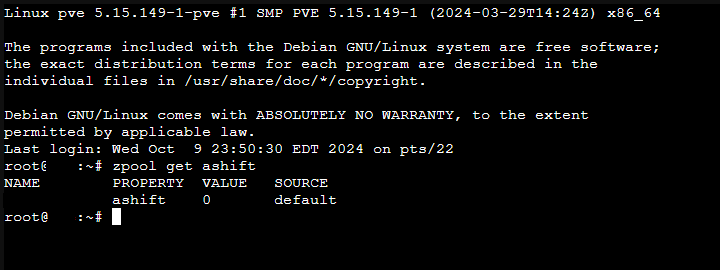
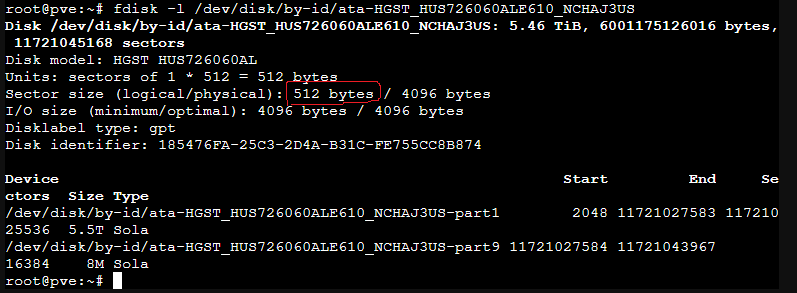
So…for this specific pool, the ashift zfs property was not set when the ZFS pool was created. Therefore; zfs get ashift vm returns 0, which means that it is using auto, which means that it is using the disk logical block size of 512 bytes rather than the disk physical block size of 4096 bytes.
Wait…wut???
Where are you getting “10 drives to store 16k” from when the pool itself only consists of 8 drives???
(It’s not 10 drives total - 2 parity drives worth of space = 8 data drives worth of space left. It’s 8 drives total - 2 parity drives worth of space = 6 data drives worth of space left.)
The calculation for the capacity for raidz2 is exactly the same as the calculation for the capacity for a RAID6 array: (n-2 drives) * min(drive capacity) = usable capacity.
It’s 8 drives.
You’ve included the parity blocks into this calculation, therefore; the basis for this calculation is working against 8 drives, not 6. (See the Matt Ahren’s video on YouTube where he talks about how the parity blocks are interspersed with the data blocks.)
I didn’t use the Proxmox GUI to create the pool, therefore; as such, the recordsize is 128 kiB, which is the default.
You’re working with 8 drives, not 6, therefore; you’re going to have 6 data blocks and 2 parity blocks.
I’m not using zvols, therefore; per the man page, the volblock(size) property is not applicable here. Therefore; your storage efficiency = 6 data blocks / (6 data blocks + 2 parity blocks) = 6/8 = 0.75, as expected.
Show me.
(I’m pretty sure that if you did dd if=/dev/zero of=1TBfile bs=1024k count=1048576, you’re going to get a file that’s precisely 1099511627776 bytes (i.e. 1 TiB). And I am sure that when you type in ls -l 1TBfile, that’s the size that you’re going to get back.)
re: your citation from that guy on Github:
"One stripe has 2 data sectors and 1 parity sector. Each is 4k in size.
So one stripe has 8k data sectors and a 4k parity sector.
To store a 128k file, we need 128k / 4k = 32 data sectors.
To store 32 data sectors, each stripe has 2 data sectors, so we need 16 stripes in total.
Or you could also say, that to store a 128k file, we need 128k / 8k data sectors = 16 stripes.
Each of these stripes consists of two 4k data sectors and a 4k parity sector.
In total, we store 128k data sectors (16 stripes * 8k data sectors) and 64k parity sectors (16 stripes * 4k parity sectors).
Data sectors + parity sectors = total sectors
128k + 64k = 192k.
That means we write 192k to store 128k data.
192k is 48 sectors (192 / 4).
48 sectors is a multiple of 2, so there is no padding needed.
128k / 192k = 66.66% storage efficiency."
No. That’s NOT how the parity math works.
That’s patently false.
His initial premise:
For a 3-disk wide RAIDZ1, the total stripe width is 3.
Is wrong to begin with.
Striping ONLY applies to the data. Parity is NOT included with that.
His mathematical comprehension of how basic RAID5 works does not exist.
No.
The math in your example is incorrect as well.
Please wiki how RAID5 calculations work (in terms of capacity).
(This is how and why, if you want to calculate the available capacity for a RAID5 (e.g. raidz) array, that you’re going to use the formula (n-1)*min(drive capacity) = usable RAID5 capacity.)
"What happens if we wanna save a 4k file?

We calculate the same thing for a 4k file.
We simply store a 4k data sector on one disk and one parity sector on another disk. In total, we wrote a 4k data sector and a 4k parity sector.
We wrote 8k in sectors to store a 4k file.
4k / 8k = 50% storage efficiency.

This is the same storage efficiency we would expect from a mirror!"
That is true IF and ONLY IF you are using a fixed block size.
However, as I have already noted from Matt Ahren’s presentation (the video of which has been uploaded to YouTube), ZFS (at the pool level), does NOT use a fixed block size, but rather, uses variable block size. (cf. https://youtu.be/uJGkyMxdNFE?si=wv40GhNVX1xOt9i_&t=1620)
zvol (which is a block device, that you would create with the zfs command), MAY have the volblock(size) property assigned to it
But again, the applicability of volblock is true IF and ONLY IF you are using zvols. If you’re NOT (as in the case with a ZFS pool), then the zfs property volblock is not applicable, and therefore; is not subject to the limitations of having a fixed block size (which is NOT a ZFS limitation, but a limitation of having a fixed block size, which is true of ANY RAID system that has or uses a fixed block size.)
Furthermore, his example where he wants to write a 4 kiB file and uses a fixed 4 kiB block size, then the combination of one 4 kiB data block + one 4 kiB parity block will be consumed. This is correct.
But that will be true IF and ONLY IF he ever only writes ONE 4 kiB file to the system.
If he has two 4 kiB files, then it will consume two 4 kiB data blocks and it will still only consume one 4 kiB parity block. That doesn’t change. (You can literally use a single drive, and then use par2 to prove out the mathematics. dd if=/dev/zero of=4kiBfile bs=4k count=1 and then run par2 -r 66 4kiBfile.par2 4kiBfile against that and you can see it in action.)
If you want to simulate a 4-block wide (total) RAID5 (3 data block + 1 parity block), again, on a single drive, you can create:
for i in {1..3}
  do dd if=/dev/zero of=4kiBfile$i bs=4k count=1
done;
and then run
par2 -r 25 4kiBfile.par2 4kiBfile* and you can see it in action.
How would you inform ZFS that the pool is consistent though?
(I would imagine that would be slower than the resilvering process no? Since dd would be reading and writing every block (in a block-for-block copy) whereas with the resilvering process, it’s only writing about 2/3rd of that. Something like that.)
(According to htop, it’s reading the pool at upwards of 1.5 GiB/s whereas I am quite certain that with dd, I’d be lucky if I get 1/10th of that.)
If I were using mirror/RAID1, it would be n/2*min(drive capacity) = 8/2 * 6 TB = 4 * 6 TB = 24 TB.
(And the 6 TB drives are currently being replaced with 12 TB drives, which means that the vdev raw capacity will double, as will the usable capacity, which will incrementally add 48 TB to my bulk storage pool, overall.)
So even WITH the loss in capacity due to the two parity drives, I LITERALLY have TWICE the amount of usable capacity by going with raidz2/RAID6 than I do if I were to have gone with using mirrors instead.
Resilver is a very random IO workload. RAIDZ and parity RAID in general is capacity-optimized, not IOPS-optimized.
That’s a known thing and everyone should be aware when deciding on parity-based storage, be it erasure coding, RAID or RAIDZ.
It just is more demanding and a lot slower and that’s just maths and the price you pay. The problem with increasing capacities and stagnating performance on HDDs only make this worse. People were talking about that even with 4TB drives.
There is dRAID in ZFS which offers a sequential resilver option that is vastly faster than traditional RAIDZ (it’s mirror resilver speed zoooom) and is supported for well over 2 years now. It’s specifically geared towards the problem of a pool being in a resilver job all the time on larger pools. So there are options with ZFS.
But you use RAIDZ if you don’t care about performance for the sake of capacity.
If you don’t want to pay the RAIDZ price, pay the capacity price and use mirrors and enjoy next level speed and flexibility. Only 50%? deal with it and everything will be fine after that!
Slowdown process of CoW FS with increasing capacity is a given factor and it only gets amplified with RAIDZ. First TiB is fast…having an aged RAIDZ@70% is not even comparable to initial performance. Suggesting the need for more storage to keep the %age low, effectively reducing storage efficiency you wanted in the first place with RAIDZ.
No, if you want performance with RAIDZ, you pay with storage efficiency or reliability. You can’t outsmart basic storage concepts. Brilliant mathematicians were trying this for 40 years.
ZFS has caching and stuff to mask most of the issues arising from this and it works really great. Fragmented blocks don’t matter if they are stored in cache. Doesn’t mean everything is fine, but ZFS bypasses a lot of technical drawbacks by itself.
Using a non-CoW FS solves this obviously. But so does loading the storage with less data. Depends on if you are fine with less. CoW is just too good…I couldn’t e.g. live without snapshots anymore to only name a single benefit.
Resilver is bad…but try to rsync your pool during resilver instead of replicating a snapshot. Because without CoW you’re back to rsync and fsck. Might as well boot up Win95 in a VM (on HDD-backed storage) to get more 90’s vibes.
Question is why you decided on ZFS in the first place…and these reason aren’t solved with legacy RAID. There are good reasons people moved to modern storage and SDS.
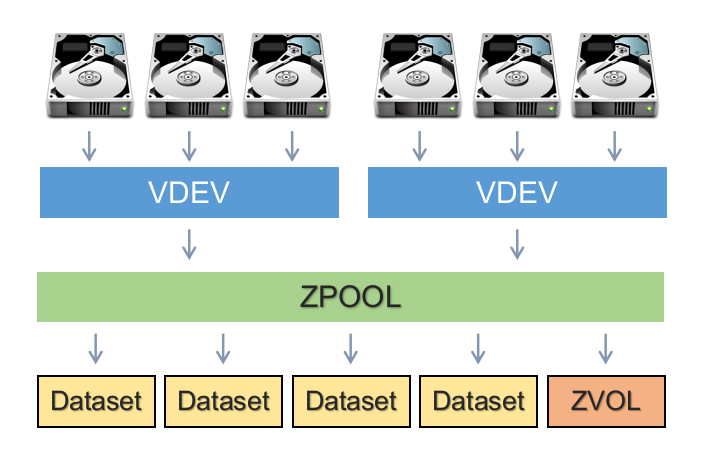
I believe the above use of vdev and dataset is slightly off.
I found the image below online and think it explains the concepts better than I can describe. That said, vdev is how the drives are arranged, whereas dataset is how data can be arranged (or one could use a `zvol’.
Point being- you cannot have a zfs pool without having at least one vdev.
I am not sure whether you can issue “zpool replace” for 8 drives at the same time. If true, you may disregard dd approach.
You can run dd for 8 drives at the same time. That’s how you save the time.
Yeah he got the names wrong. In any case, don’t use RAIDZ with zvols . You might get away with an NVMe pool and RAIDZ, but HDD pool + RAIDZ + block storage is a recipe for disaster on performance. Better get your RAM and tunables on their A-game before doing that.
You should. If you have 8 empty bays. zpool replace only removes the old disk from the pool once the process is completed. So no data is missing from the pool no matter how many disks you issue. Might be sub-optimal performance though, never did that myself.
I assume the thread starter didn’t use replace but rather expand. And that’s a totally different process, but people often do talk about replace while they’re actually using zpool expand.
That is a good rule in general for a new FS. Thank god ZFS is already 18y old
100% disagree. ZFS reads and writes as fast as your disk is, with the caveat that it is a CoW.
If you have sync writes, you can avoid these downsides by using SLOG. That will also help with fragmentation. Not that fragmentation really is a problem for most scenarios, but yeah, if you use HDD for zvols and you fill the pool above 50%, you can experience worse performance. But who uses HDDs for zvols?!
Unlike hardware controllers there are loads of tuning possibilities.
SLOG will help with syn writes, similar to BBU.
ARC will help with metadata reading.
TXG will help with caching writes.
But the biggest of all in my opinion is special vdev.
That is combines the best of two worlds. It can use your SSDs for metadata (you could also add small files) and big HDDs to store the data.
80TB data tank that lists thousands of files without loading times? Easy! SMB will become your new bottleneck and you will switch to NFS
Using RAIDZ for zvols
Sure. Create a ZFS mirror with 20TB HDDs. Write 1GB data to it. Remove one disk. Resilver in seconds. Do the same with your RAID.
Nothing of that contradicts what I wrote. Nothing of that is even related to what I wrote.
You are again mixing stuff together that does not belong together.
volblocksize is 16k.
That is the default since ZFS 2.2.
So since Proxmox implemented ZFS 2.2, 16k is the default for zvols.
Have you changed that default?
If not, then your zvol is 16k!
Ashift is something completely else.
I don’t know why zfs get ashift vm returns 0 for you.
There must be something terribly wrong!
99% of modern drives have 4k sectors and not 512e.
So ZFS will recognize that an use ashift 12.
ashift 12 = 4k
ashift 9 = 512e
So you probably should get ashift 12.
Yeah I know. That is the point. It does not matter if it is 6, 7, 8 or 120 drives. Everything above 6 will stay at 66% storage efficiency because you can not widen the stripe beyond 6 drives (for RAIDZ2 and 16k). Reason is simple. volblocksize is set to 16k, if you have not changed the default.
To store 16k we need 4 data blocks à 4k.
Because we use RAIDZ2, we have two parity blocks also à 4k.
(If we would use RAIDZ1, we would have one parity block)
This is 6 blocks total.
So one stripe is 6 blocks.
Spread out over 6 disks.
It really is that simple.
Here is a good article about it:
Wait. Recordsize is dataset not zvol. Are you not using raw disks? Are you using qcow2 on datasets?
That is an excellent picture, and no it is not off.
Looking at your picture, you can see that there are disks.
You can create a pool with vdevs.
On that pool you can create datasets or zvols.
Datasets have a max value recordsize.
ZVOL have a static blocksize or block size or volblocksize.
That differentiation is extremely important! Because it has huge implications!
That is also basically where most of the criticism of ZFS comes from. It is not idiot proof. You have to understand your workload, your disks, what the difference between recordsize and blocksize is, and you can mess up things really bad if you don’t know what you are doing.
This is also where the general rule that even is documented in the Proxmox manual comes from: Never ever use RAIDZ for VMs! Use mirrors!
That is a lot of text and it is easy to loose track.
If you are really interested in help or want to understand your poor performance, I am still willing to show you. Despite you coming of slightly hostile
But in general I probably will agree with you. Resilver times could be better for ZFS.
Still most of the time better than RAID, since it does not have to copy empty space, but still.
Resilvering is pretty IO intensive.
dRAID solves that. But it comes with a downside. dRAID uses a fixed stripe width. Upside is that resilver is a sequential workload and distributed over all drives and thous way faster.
Let’s start from the beginning. Show us your config.
Exact drive models, pool settings…
I’ll dig into this more later but the resilvering time has improved dramatically since a year or two ago. the resilvering mechanism does a sequential read from block devices now instead of walking the file tree which greatly reduces the chances of non sequential I/o
for me resilvers basically run at the write speed of the device being resilvered at this point. so . something weird here at square one. before the pontification.
My understanding is that just mirrors and dRAID that got the special sequential rebuild feature which isn’t quite equivalent to a “normal” resilver (a discreet scrub needs to be run at the end of the sequential rebuild in order to be equivalent to a resilver).
There’s an open feature request for the sequential rebuild for RAIDZ
EDIT:
theres a chance I’m talking apples vs oranges with your guys because of how ambiguously the term “resilver” is used.
I actually originally went with ZFS because my previous TrueNAS bare metal server, was running ZFS because it offered the ability for me to create a pool across HW RAID HBAs. (Had two 8i LSI SAS controllers and 12 drives, so each HW RAID HBA was responsible for 6 drives and I wanted to be able to pull all of that together into a single pool. Traditional LSI MegaRAID – if I could span a LD across HBAs, it wasn’t something that was immediately obvious how to make that happen in their WebBIOS.
So, when I consolidated my servers from 4 down to 1, I stuck with that as it seemed easier for me to be able to move the data around, pull the drives, pop them into my then new “do-it-all” Proxmox server, create the 8-wide raidz2 vdev and then add that to the bulk storage pool.
(I think that there is a way to do that with the LSI WebBIOS for traditional RAID, but again, the success wasn’t necessarily going to be obvious.)
I assume that based on what you wrote, the RAID rebuild speed for a traditional HW RAID6 array would be just as terrible when the array is 70-80% full (vs. ZFS)?
No, I can’t replace 8 drives simultaneously with zpool replace. With my raidz2 pool, at best, I can only replace two drives simultaneously.
But again, I am not necessarily certain that it would be faster. Maybe if I had 8 more drive bays in my 36-bay chassis so that I would be able to pop the 8 new drives in, and then like you said, just dd them, and then yank them back out. But I would think that even with that, you’d still have to inform ZFS of the changes, which I imagine, would likely cause the resilvering anyways (because my bulk storage pool consists of three 8-wide vdevs, and I am only swapping/replace the drives from one of said 8-wide vdevs). Which means that for the resilvering process, it is still reading the data from the other 2 vdevs and resilvering that onto the new disks. (I see it in watch -n1 zpool iostat -vy main 1 1 where it is reading from all of the drives and writing to the new 12 TB drive that is replacing the old 6 TB drive.)
Uhh…it depends.
I was able to copy sequential data over GbE line speed without any issue.
But when I try to load a game from it as the iSCSI target/device, then it goes down to sub 20 MB/s reads. shrug
For most of the games that I play, when I have time, it’s not that big of a deal for me.
cf. above where this is a part of a three 8-wide vdev pool, and therefore; the observed zpool replace behaviour is that it is reading data from all of the drives in the pool, NOT just isolated to within its own vdev. (IIRC, as Saso Kiselkov describes it – it’s pool wide resilvering.)
No, I am actually using zpool replace as I am switching from using SATA drives to using SAS drives. So the pseudocode/command that I am issuing is zpool replace main /dev/disk/by-id/ata.... /dev/disk/by-id/scsi-3500....
The zpool expand is going to come later, at the end of all of the replacements, so that it will inflate this 3rd vdev capacity from being 8x 6 TB to 8x 12 TB (raidz2).
(Actually, I was reading the ZFS Administration Guide, and I might actually use/try the zpool set autoexpand=on main to expand the pool, and then turning that back off once the expansion/inflation is complete and confirmed.)
That would be true for my ZFS system as well.
If my LSI MegaRAID SAS 12 Gbps 9361-8i takes a dump, ZFS isn’t going to help neither because NONE of the HDDs would be enumerated by the LSI BIOS.
In fact, if my LSI MegaRAID 9361-8i takes a dump, the entire system won’t boot.
USUALLY, generally, and fortunately, LSI HW RAID controllers are quite robust. Out of all of the ones that I’ve had so far, NONE of them has died yet. [knocks on wood]
Conversely, I’ve already had a ZFS pool die on me back in April of 2007, which again, is why I stopped using it for like 17-18 years because NOBODY talks about what happens when ZFS triggers a kernel panic boot loop (and how you get out of it).
(sidebar: if my 9361-8i dies, I can just buy another one, pop it in, import the boot RAID6 array, and off I go. As long as the new/replacement 9361-8i is able to enumerate the remaining HDDs, ZFS (well Proxmox, but ZFS is the thing that’s actually going to be doing the work) will then import the ZFS pools that it finds and I should be back up and running. There are ways to save/export the LSI config, if I remember the MegaRAID WebBIOS user’s manual correctly, but I’ve never done it nor tried to. (Maybe I should look into that. )
For the LSI HW RAID, as long as the new controller imports the config properly, the data should be consistent and there should be very little problems with bringing the array back up online. I am CERTAIN that this is neither a new problem, and that people have found a way to fix this, given that this isn’t a new problem.
The original mainline Solaris implementation, IMO, had “issues” because of the way disks are enumerated in Solaris (cxtydz nomenclature).
It’s about as bad as Linux’s /dev/sdi nomenclature because it can get scrambled.
This is one of the few things that I like about the ZFS on Linux implementation because I can add the physical device to the vdev via the /dev/disk/by-id path, which gives me a LOT more information, especially if/when one of the drive dies.
With the original Solaris nomenclature, trying to find/figure out which is the dead drive (out of 36) with their nomenclature scheme is a nightmare.
Um…are you sure about that?
Because each of my SAS 12 Gbps drives should be capable of around 200-ish MB/s sustained transfer rates. But for random I/O (which scrubbing and resilvering is (again, per Saso Kiselkov), even he states that these processes are more like random I/O in its data access patterns than sequential transfers.
I’ve yet to see my system top out at 24 * 200 MB/s = 4800 MB/s no matter HOW hard I try. Nominal speed is closer to around the 500 MB/s mark.
Even when you consider the fact that I only have 8 PCIe lanes to work with due to the MegaRAID SAS 12 Gbps HW RAID 8i, that’s still 96 Gbps, or should be capable of 12 GB/s at the interface level. (Each drive would be capable of 12 Gbps (1.5 GB/s) (mostly cached I/Os from the cache on each drive), but the physical media is really only good for about 200-ish MB/s sequential transfer rates.)
Yes and no.
Having the secondary ZFS intent log (i.e. SLOG) only makes it so that the sync acknowledgement is sent back to the system has the write having been fully committed to stable storage so that it can move on and issue/execute the next I/O operation. That may or may not necessarily mean that the write has actually been fully committed to stable storage. You’re just “faking” the acknowledgement being sent back. (vs. if you DON’T use a secondary ZFS intent log, then the acknowledgement that comes from a synchronous write means that it has actually been fully committed to stable storage before it moves on to the next I/O operation.
I (still) do.
But it’s on another system.
A secondary ZFS intent log isn’t going to help with the write hole that results due to a loss of power (which is the problem that the battery backup unit is designed to address).
Yes, but I would imagine, less so than you think given that Matt Ahrens, again, from his video, stated that metadata consumes <= 1% of total pool capacity.
So, I am not sure how much of that is cached in the adaptive replacement cache.
Again, per Matt Ahrens, it doesn’t “cache” the writes. It just reduces disk thrashing (a.k.a. atomic I/O operations) by filling a buffer, and the flushing said buffer so that writes can happen as contiguously as possible.
My original question has nothing to do with zvols. Nor raidz (specifically), for that matter.
Actually, come to think of it, on my current main Proxmox system, I don’t have ANY zvols on the system whatsoever.
Therefore; this point is not applicable (relative to my original question).
Why would there be a resilver operation being performed when you remove a disk???
If you have a RAID1 array and you remove a drive, there should be NO operations that are being issued.
This doesn’t make any sense at all.
Quote you:
What I copied-and-pasted explains what a virtual device (vdev) is and it is, most definitely, NOT block storage.
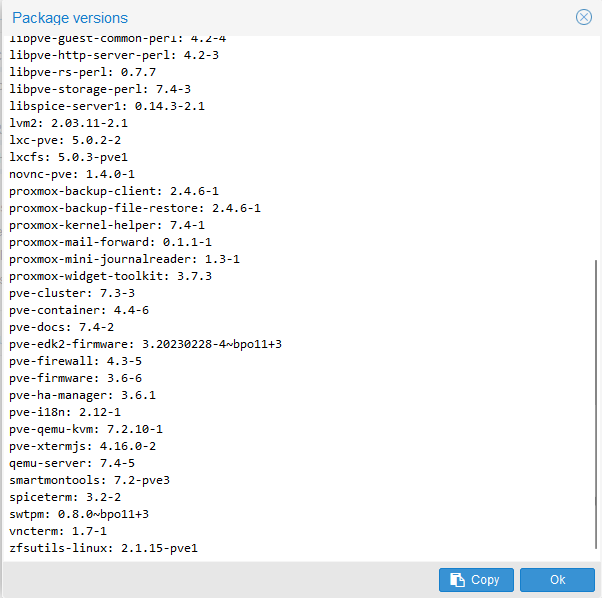
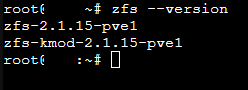
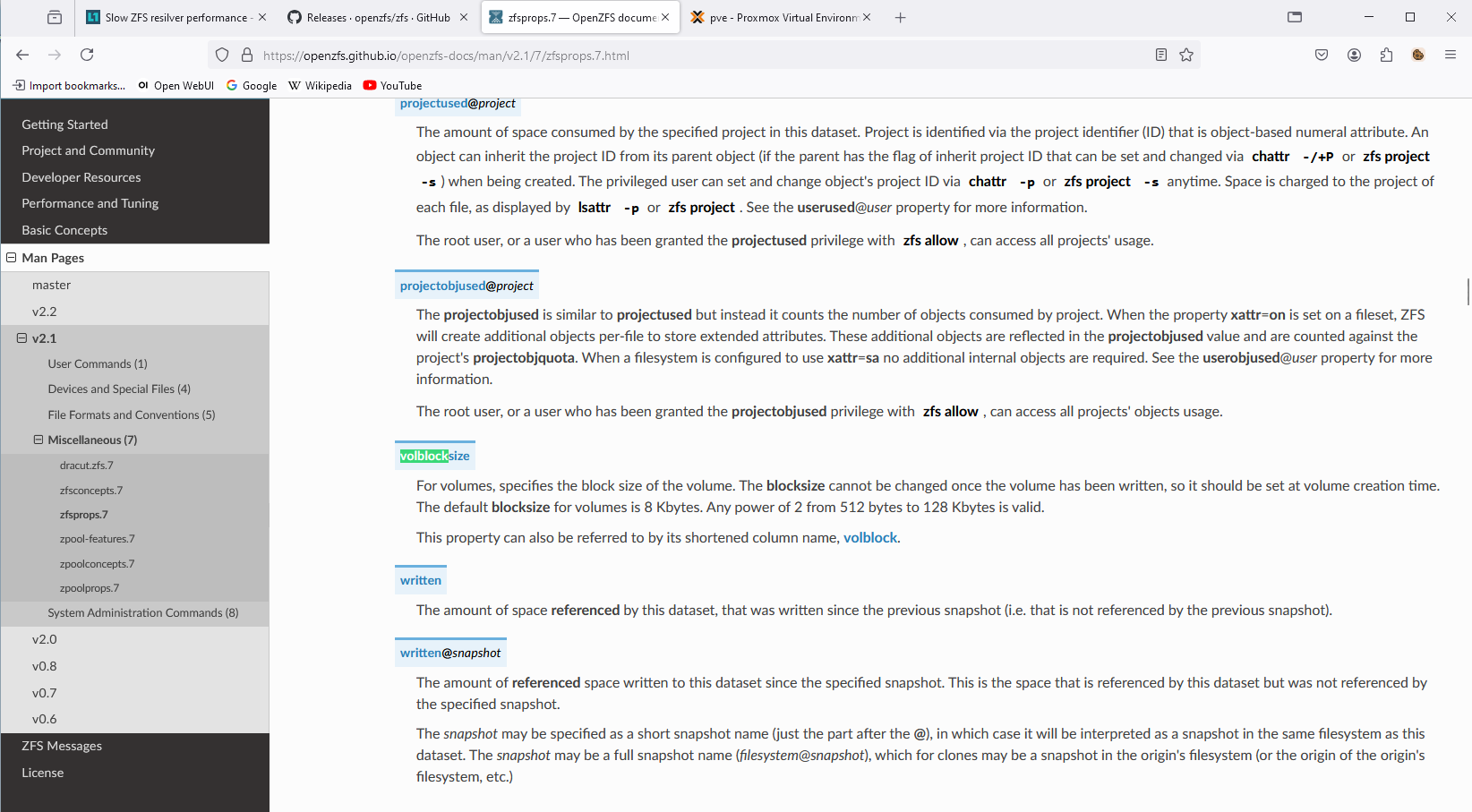
The default volblock(size) for zfs 2.1.15 (which is the zfs --version that I am running), is 8 kiB.
Above and beyond that – I. AM. NOT. USING. zvols.
vdevs. AREN’T. zvols.
What part of that don’t you seem to understand???
It’s not zfs get ashift, it’s zpool get ashift.
From the OpenZFS documentation:
The following properties can be set at creation time and import time, and later changed with the zpool set command:

ashift=ashift
    Pool sector size exponent, to the power of 2 (internally referred to as ashift). Values from 9 to 16, inclusive, are valid; also, the value 0 (the default) means to auto-detect using the kernel's block layer and a ZFS internal exception list.
Again, volblocksize ONLY applies IF and ONLY IF you are using zvols, which I am not.
Again, vdev is NOT the same thing as a zvol.
Please study the variety of sources/references that has been provided to you so that you can learn more about what a vitrual device ACTUALLY is vs. what you think it means.
That’s LITERALLY, NOT how that math works. At all.
If you have 8 disks, according to your math – the total number of 4 kiB blocks that you would have available is EIGHT 4kiB blocks. (Each of the 8 drives contributes one 4 kiB block.)
Do yourself a favour, draw eight square boxes.
[] [] [] []
[] [] [] []
You want to write 16 kiB of data (whether it’s a 16 kiB text file, or a volblock (again, I have no idea why you have such a hard on for volblock, but that’s besides this point), so you will have this:
(where D = data)
[D] [D] [D] [D] [] [] [] []
And then as you said, you have two parity blocks for raidz2 (e.g. RAID6).
Let P = parity.
[D] [D] [D] [D]
[P] [P] [] []
At the end of the 8 blocks, you STILL have two empty 4 kiB blocks that were contributed by drive #7 and drive #8.
You used four 4 kiB blocks for data (for a total of 16 kiB). Two 4 kiB blocks for parity. And you’re left with two more.
(4 (data) + 2 (parity)) / 8 (total number of blocks available) = 6 / 8 = 0.75.
Even if you have FOUR drives (since the minimum number of drives required for RAID6/raidz2 is 4), if the first drive contributes TWO 4 kiB blocks, then ALL of the drives in the array/pool would also, likewise, be contributing TWO 4 kiB blocks each.
Like you said, your volblocksize is 16 kiB. 16 kiB / 4 drives = 4 kiB blocks (one 4 kiB block per drive).
(First row for data)
[] [] [] []
But then you also need parity.
So that will need a second 16 kiB volblock.
[] [] [] []
[] [] [] []
Now you start filling it with data/parity:
[D] [D] [D] [D]
[P] [P] [] []
You still end up with two empty 4 kiB blocks that are unused.
Therefore; even with a four drive RAID6 array/raidz2 pool, you still have eight 4 kiB blocks, and only SIX of them have “stuff” in it (whether it’s data or parity) and TWO are empty.
Again:
(4 (data) + 2 (parity)) / 8 = 6 / 8 = 0.75
(This conforms to your hard on for volblocksize which is a fixed block size, which, for traditional RAID, will also be true as well.)
The Google sheets that the student who is currently pursuing his Master’s in Computer Science (ibug) cites in the article that you cite, actually tells you and pre-calculates for you, what the parity cost is as a function of the number of drives you have, and the number of sectors it takes for your block size.
He also states a few things that are important and noteworthy:
"Accounting
Accounting the storage space for a RAIDZ array is as problematic as it seems: There’s no way to calculate the available space in advance without knowledge on the block size pattern.
ZFS works around this by showing an estimate, assuming all data were stored as 128 KiB blocks[7]"
" Interestingly, neither of the refreservation sizes matches the RAID overhead as calculated in the Delphix spreadsheet[6], as you would expect some 6.0 GiB for the 16k-volblocksized ZVOL and some 8.0 GiB for the 8k-volblocksized one. Let’s just don’t forget that the whole accounting system assumed 128 KiB blocks and scaled by that[8]. So the actual meaning of 4.86G and 6.53G would be “the equivalent space if volblocksize had been 128 KiB”. If we multiply both values by 1.25 (overhead for 128 KiB blocks and 5-wide RAIDZ), we get 6.08 GiB and 8.16 GiB of raw disk spaces respectively, both of which match more closely the expected values. The final minor difference is due to the different amount of metadata required for different number of blocks."
When you issue the zpool create main raidz2 /dev/sd{a..h} command, it creates the raidz2 vdev consisting of drives /dev/sd{a..h} and also creates the dataset and mount the dataset for you, all in one go.
"Unless the -R option is specified, the default mount point is /pool. The mount point must not exist or must be empty, or else the root dataset will not be able to be be mounted. This can be overridden with the -m option."
No. The ZFS pools were created using the command as shown above.
Thank you. I am wrong. I stand corrected.
(That would make sense why when you create the ZFS storage via the GUI, why you can only store VM disks and CT containers and nothing else – because it creates a zvol block device, rather than ZFS dataset. That explains it now.)
(Again, as I have stated earlier, I used the command line, rather than the GUI, to create my ZFS pools.)
I’ve already tested this before.
Granted it was for something else entirely instead, but the point remains that if your pool does NOT have compression enabled (it’s off by default anyways) and you aren’t writing all zeros, then if you issue the command dd if=/dev/urandom of=1Gfile bs=1024k count=1024 and then you type in ls -l when you’re done, you’re going to get exactly and precisely 1073741824 bytes used for that file.





 )
)