As shown in the picture, the zvol lives on top of the ZFS pool, which lives on top of the vdev(s).
Therefore; the pool, which lives on the vdev(s) means that the vdevs aren’t block storage.
Or, saying the same thing, but in a slightly different way – if you create the vdev, you have no means of being able to access the vdev directly without the creation of the ZFS pool. Once you have the ZFS pool, then you can create datasets (which can you use to store files) or zvols (which is a block device that you can use) and both of those live on top of the ZFS pool which lives on top of the vdevs. (And your ZFS pool can span multiple vdevs.)
This is true of traditional HW RAID as well.
That’s not what it says.
What the Proxmox documentation ACTUALLY says is:
“Mirror vdevs (RAID1, RAID10) have favorable behavior for VM workloads. Use them, unless your environment has specific needs and characteristics where RAIDZ performance characteristics are acceptable.” (Source: ZFS on Linux - Proxmox VE)
It doesn’t say to NEVER use raidz.
That statement is just plain wrong.
I already inquired about that, and your response was literally:
It would help if the data that you are providing is accurate and representative.
I didn’t think that RAID rebuild needed to copy empty space?
I was under the impression that the XOR operation isn’t needed for empty (NUL) blocks. (Because if you have (NUL) XOR (NUL), isn’t your result still going to be (NUL)? So…can’t you just skip that?)
Yup. That’s what Saso Kiselkov said in his presentation that the time it might take for the last 5% of the entire resilvering process can be as much as time as the first 95% of said entire resilvering process because now you are processing all of the tiny files, which is very slow (to process) (which I am led to believe that it is down to HDD I/O/s limited).
(SSDs will resilver a LOT faster than HDDs and get a LOT closer to what the drive can do (by itself) whereas HDDs, especially during the last 5% of the entire resilvering proces, where it is now resilvering all of the tiny files, slows down tremendously. SSDs handle the smaller files a LOT better, than HDDs, due in part to its significantly higher random I/O performance.)
You reply with:
It depends, I once drove home drunk without an accident.
But yeah, another time I drove against a tree
Then what do you have? Post some details, post some pictures.
If you don’t have zvols, where are your VM disks? And what format do your VM disks have? RAW? qcow2?
Yes! Of course!
ZVOLS ARE WHAT YOU USE IF YOU SETUP A DEFAULT PROXMOX WITH ZFS!
Jesus christ dude! To not use zvols for your VMs, you would need to actively change some Proxmox defaults!
If you install Proxmox on zfs you get this
local
local-zfs
what are these in Proxmox terms?
local is type directory
local-zfs is type zfs
what are these in TrueNAS terms?
local is a type directory
local-zfs is type zvol
For local, Proxmox uses the ZFS default for directories. That is a recordsize of 128k.
For local-zfs, Proxmox also uses the ZFS default. That is block size of 16k.
(Since April 2024 and Proxmox 8.2)
I hope we can agree on that?!
Now we wanna create a VM.
What options do we have?
We can create a VM with a RAW disk on local-zfs.
We can do something I would not recommend at all. That is to first change the storage settings, so that local even allows us to store VM disks there. Then we can create a qcow2 or vmware image on local.
So either you have RAW images and indeed do use zvols, or even worse you are using qcow2 in a zfs directory. I can’t tell because you shared almost no information about your system.
There is absolutely no point in continuing the discussion before we sorted that out. So I will not engage with the rest of what you wrote.
Ohh and since you use Proxmox 7.4 (which btw is EOL but I don’t wanna open up another pandora’s box) your old ZFS version uses the old zvol 8k default.
I hope for your sake that you either really don’t use zvols or that your HGST drives are 512e…
But that is just wild speculation. Show us your settings and hardware!
OR…alternatively – the real answer might be “your mileage may vary.”
(i.e. sometimes you can still get decent performance with HDD pool + RAIDz + block storage, and other times, (on the exact same target), you might not. It really depends.)
Three things:
You are assuming that my root device where I installed Proxmox onto (my 4x HGST 3 TB SATA 3 Gbps HDDs that is a HW RAID6 array via my LSI 9361-8i) was set to be a root zpool.
That is NOT the case.
In fact, the DEFAULT installer, installs Proxmox using LVM partitioning.
To get Proxmox to install using ZFS root, you have to MANUALLY set that, when you are running the installer (which also further assumes that you are booting off the Proxmox ISO, and that you AREN’T installing Proxmox on top of a Debian 11 or Debian 12 installation, which means that Proxmox wouldn’t have been responsible for setting up LVM partition on your boot drive).
You were already EXPLICITLY told:
for the OS drive, just as you were also, likewise, explicitly told:
raidz2 pools are created using the zpool create command.
zvols, on the other hand, are created AFTER the pool has already been created, using the zfs create -V [size] [pool/zvol_name] command (if you want to use the default zvol block size (which for OpenZFS 2.1, would be 8 kiB).
PATENTLY FALSE.
Again, the DEFAULT installer, uses LVM partition for your root/boot drive.
Again, if you want to use ZFS on root, you will have to MANUALLY select that, when you are booting the Proxmox installer via the Proxmox ISO.
(I don’t recall, if you can actually make the Debian 11 or Debian 12 installer, do the same thing where it will install Debian 11 or Debian 12, onto ZFS root. I don’t recall that being an option in the graphical installer for Debian.)
You state that this is the default, but that would be true IF and ONLY IF you had MANUALLY told Proxmox to install onto a ZFS root/boot drive.
If you DON’T set that, the ACTUAL, DEFAULT Proxmox installer, uses LVM partitioning. (which, post install, you can confirm with the commands pvdisplay and lvdisplay).
You were also EXPLICITLY told here:
where the ZFS pool that I am using for the storage of the VM disks and the OS/boot drive are SEPARATE.
Therefore; that already TOLD YOU, EXPLICITLY, that a) I am NOT using ZFS on root) (because you were EXPLICITLY told that I am using “HW RAID6 (hosted by the HW RAID HBA)” and b) the fact that the OS and VM storage have been SEPARATED, tells you, EXPLICITLY, that that’s NOT the default Proxmox behaviour, post initial Proxmox install.
With two lines, you were already EXPLICITLY told FOUR pieces of information:
I am NOT using ZFS on root (the HW RAID6 is the dead giveaway for that).
I am using the DEFAULT Proxmox installation.
And as such, I am using LVM partitioning, which is the DEFAULT, Proxmox installation behaviour, when you are booting and installing off of the Proxmox installer ISO.
I am NOT using zvol (because you were EXPLICITLY told that I am using a raidz2 pool).
With these two statements that I published from the very beginning, these are the four logical statements that you should have deduced/inferred from said two statements.
Clearly, you didn’t because you assumed how the system was set up (which happens most often when people project their installation set up onto that of others, and therefore; build the rest of their statements/arguments around this assumption of theirs where said such assumptions may have little to no basis in reality of the OP who is asking the question and how their system is set up (which can be completely different than how your system is set up).)
IF you MANUALLY set it to install your Proxmox onto ZFS root, then yes, your statements would be true.
IF you don’t (install Proxmox onto ZFS root), then no, NONE of these things:
would apply (IF you DON’T install on ZFS root).
This is true (and I would agree) IF and ONLY IF you installed Proxmox on to ZFS root.
And IF you did that, then congratulations!!! This would be true.
But from my VERY. FIRST. POST., you were EXPLICITLY told that I did NOT install on ZFS root. (Again, the “HW RAID6 (hosted by the HW RAID HBA)” is the dead giveaway for that.)
YOU are assuming that Proxmox was installed with ZFS root.
You were already EXPLICITLY TOLD, right from the get-go, that’s NOT the case.
Therefore; raising this point (about what happens when you install Proxmox on ZFS root) is LITERALLY pointless.
(Again, everything that you need to know about how my system is set up is pretty much EXPLICITLY given to you, in the very first post. Please read it again more carefully the second and third time around.)
Yes, I am well aware.
Thank you.
(Again, you were EXPLICITLY told about the version of Proxmox that I am running, in the first post (which would’ve told you which version of zfs that I am running).)
Or…rather than assuming that I was running zfs 2.2, you COULD’VE just asked.
This is precisely the reason why the English idiom about people who make assumptions, exists.
OS drives: HDS723030ALA640
VM raidz2 pool drives: 4 of the drives are HDN726060ALE614, 1 is HDN726060ALE610, and the rest are HUS726060ALE610
You know that this is COMPLETELY irrelevant to my OP, right?
Again, you already know and have the settings for the OS drive. It’s in the first post.
VM raidz2 pool was created using the command zpool create tank2 /dev/disk/by-id/... with the disk IDs of the 8 drives in question.
Therefore; your key takeaway (in regards to your question about settings are concerned) – if you have any understanding, even a basic level of understanding of how the zpool create command works, then you will also understand the answer to your question about the settings that were used as a result of issuing the zpool create command.
If you have even a basic understanding of what the zpool create command does, what it is, how it works, etc., then you will know what to expect in terms of output, from zpool get all.
If you don’t have this basic level of understanding of what the zpool create command uses in regards to your question of settings, then I would strongly recommend that you read about it in the OpenZFS documentation, so that you can educate yourself, as it pertains to your question about settings.
(because unless I have EXPLICITLY specified a manual overrride via the flag ‘-o property=value’, then that means that i didn’t override any of the settings, and therefore; you can read up on what the default settings are, since you want to know what the settings are.
Find/figure it out (what the default settings are).
(You can literally get this (information) with three lines, in a bash shell script.)
You were lucky. These are 512e.
Good luck with your project. I am too lazy to further worm information out of you.
For everybody else, fragmentation isn’t a big issue with a sane setup. Reason is that for blockstorage like VMs you would use mirrors and SSDs. SSDs don’t care about free space fragmentation.
For something like Proxmox, just delete all the VMs and restore them from your backup and you are back to 0% fragmentation.
RAIDZ with Proxmox and normal 4k drives is a recipe for disaster.
But even when your drives are 512e, you can still run into issues.
Imagine you have 8 drives in a RAIDZ2.
Your stripe is 8 drives wide.
You have 6 data blocks and 2 parity sectors for each stripe.
Each stripe thous can store 3k.
So for Proxmox to provide 8k (that was the old default) you would need 3 stripes.
The first two stripes have 6 data sectors each, so 12 in total or 6k.
The last stripe has 4 data sectors or 2k.
In total we have 16 data sectors.
First two stripes each have two parity sectors.
The last stripe has also two parity sectors.
In total we have 6 data sectors.
16 data sectors + 6 parity sectors = 22 sectors
22 sectors = 11k
We need 11k to store 8k.
That is 72% efficient instead of the naturally assumed 75% for a 8 drives wide RAID6.
But it gets worse
Total number of sectors needs to be dividable by RAIDZx + 1. In this case we have RAIDZ2.
Our 22 sectors can’t be divided by 3 (RAIDZ2 + 1). So we need to add padding sectors.
24 sectors can be divided by 3. So we need to add two padding sectors.
Now we have 24 sectors or 12k to store 8k.
That is only 66% efficient.
The mean thing about ZFS is, you won’t see that in the GUI! A RAIDZ2 with 8 HDDs a 6TB will still give you a 6*6TB = 36TB poo! But if you write a 10TB VM disk on that zvol, it will take up more space than 10TB.
“That is rather complicated” you now might say.
Congrats, you found out why Proxmox recommends mirrors
“But I could just set the blocksize to 64k” you now might say.
Yes, but that will definitely lead to rw amplification and fragmentation, if your workload is not 64k.
HDDs are cheap. All that headache and performance downgrades just to get 66% instead of 50% isn’t worth it. Is 16% really worth having a 4 times worse write performance? I don’t think so.
Not saying that ZFS is perfect. But it is miles ahead of Hardware RAID. Most of the criticism against ZFS stems from misinformed users like @alpha754293.
Yeah, resilver performance on huge slow HDDs with RAIDZ and millions of small files will be poor.
But that has more to do with his setup beeing poor to begin with and totally unsuitable for the task.
@ThisMightBeAFish You should really fix your many mixups of “vdev” and “zvol” in your first post in this thread. Reading that would be very confusing for someone new to ZFS. I guess you misread “All of the vdevs are raidz2 vdevs” as “All of the zvols are backed by raidz2 vdevs”? Too bad it caused such derailment of an otherwise interesting thread…
Of course that was an error on my part.
I edited it. I only skipped through it, but I think rest of what I wrote still stands.
TLDR:
ZFS is far superior to hardware RAID in many ways:
– Better performance
– cheaper
– less likely to you need to change the PLP on your SLOG than the BBU on your RAID
– your “RAID” is hardware agnostic and can be moved to other systems
You can mess up a lot of things in ZFS. Either know what you are doing or stay with these recommendations:
– For VMs use mirrors
– Never use SMR drives
– Heck don’t even use HDDs for VMs! It is 2024! SSDs are cheap and don’t suffer from a performance downgrade when free space fragmentation occurs
– Use SSDs with a reasonable TBW. That automatically rules out QLC drives.
– You can use RAIDZ if you don’t use it for zvols or very small files
– At first, don’t even bother with L2ARC or SLOG. There is a high chance that performance is so good, you won’t need it
– More RAM == more ARC == better read performance. Don’t sweat because RAM is at 90%! Empty RAM is wasted RAM!
– You can use special vdevs if you need a snappy HDD based RAIDZ
– Don’t use RAIDZ1 but RAIDZ2. This isn’t specific to ZFS but RAID in general. One drive fails, you swap out the wrong disk or another disk goes bad during the restore and your data is toast.
– Don’t put files into blockstorage! Files should not be in a VM disk but on a dataset. So no 40TB iSCSI drive attached to a Windows Server VM. You may laugh, but I have seen this in the Proxmox forums.
The questions that you are asking aren’t even about the right pool.
All of the other information that you are asking for has already been provided to you either implicitly or explicitly.
And yet, again, in Saso Kiselkov’s presentation, he shows that that the improvements that they’ve made to the scrubbing/resilvering DOES matter, even with SSDs, where on a raidz2 pool with six 800 GB SSDs, that’s been filled to about 50% of its capacity, the old scrub/resilvering algorithm took 2 hours 41 minutes whilst the improvements that they made to the scrub/resilvering algorithm reduced that by an hour, down to 1 hour 41 minutes.
So it DOES matter, but the benefits aren’t nearly as dramatic as it is with HDDs, but there clearly are still benefits, even for SSD backed ZFS pools.
I have NO idea why you’re even talking about (free space) fragmentation.
That is irrelevant to my OP.
Once again, your math is wrong.
What’s with your fetish with zvols???
Your own source, that you cited, literally pictorially shows you, that’s NOT how that works.
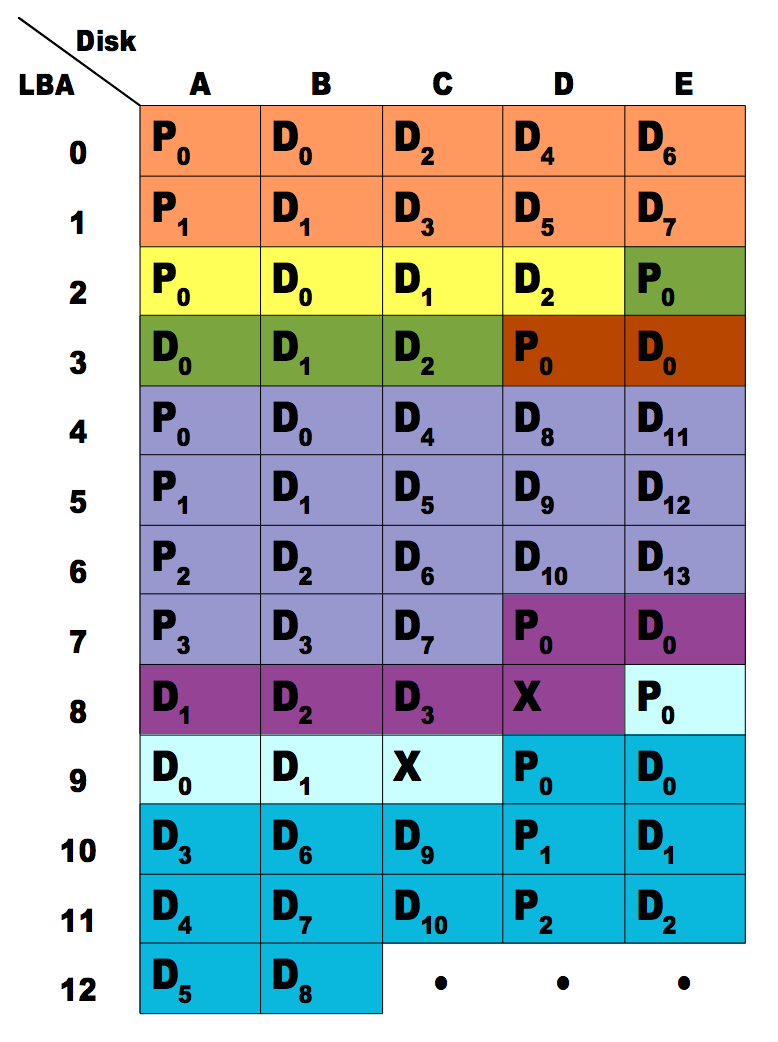
As you can see from the lighter purple colour, it has 4 parity boxes, and 13 data boxes. 4 boxes + 13 boxes = 17 boxes total.
So, once again, even your own sources that you cite, provide the data which demonstrates that your calculations are wrong, but you’ll just continue to ignore that.
It must REALLY suck when even your own sources that you cite TELL you that you’re wrong.
No.
That’s NOT why they recommend mirrors.
Stop propetuating information that is EXPLICITLY and PATENTLY wrong.
Per Proxmox’s own documentation (on ZFS on Linux):
Quote:
"Performance
Each vdev type has different performance behaviors. The two parameters of interest are the IOPS (Input/Output Operations per Second) and the bandwidth with which data can be written or read.
A mirror vdev (RAID1) will approximately behave like a single disk in regard to both parameters when writing data. When reading data the performance will scale linearly with the number of disks in the mirror.
A common situation is to have 4 disks. When setting it up as 2 mirror vdevs (RAID10) the pool will have the write characteristics as two single disks in regard to IOPS and bandwidth. For read operations it will resemble 4 single disks.
…
While a pool made of mirror vdevs will have the best performance characteristics, the usable space will be 50% of the disks available."
Stop propagating your BS.
Per the Proxmox Documentation, the reason why they recommend using mirrored vdevs ISN’T because of space, but because of PERFORMANCE.
Under the section titled “Performance”, the official Proxmox Documentation EXPLICITLY tells you:
“The two parameters of interest are the IOPS (Input/Output Operations per Second) and the bandwidth with which data can be written or read.”
Note that your entire discussion about space (and space efficiency) is NOT a part of that sentence. At all.
Thus, your statement:
It COMPLETE and utter BS.
And you’re not even arguing against me now. You’re arguing against the official Proxmox Documentation itself, which – good luck to you on that one (cuz you’re going to lose that argument every. single. time.)
BWAHAHAHAHA…
As you have repeatedly perpetuated false/wrong information here, based on your fetish for zvols, which has absolutely NO relevance to my OP.
LOLLL…LMAO…
PATENTLY FALSE.
Again, if you watch Saso Kiselkov’s 2016 and 2017 talks during the OpenZFS conference (about scrub/resilvering performance), he actually EXPLICITLY tells you that because it is looking through the largest contiguous “stretches” of data first, that initially, it will actually report back speeds that you would think, shouldn’t be possible to achieve.
(If I check zpool status within the first minute of the resilvering operation, I get 33.7 GB/s and it thinks that it will finish resilvering 155 TB in about an hour and 18 minutes.)
Saso Kiselkov’s talk, at the 2016 OpenZFS conference, then talks about that as it traverses through the final 5% of the pool, where all the small(est) files are, scrubbing/resilvering that last 5% can take as long as it took the pool to scrub/resilver the preceding 95%.
It is quite evident, that given my OP, and given your responses, that you have absolutely no idea what you are talking about.
And the most proof-positive evidence of this is the fact that you aren’t even talking about scrub/resilver performance for all of the words that you have used, in your replies here.
So, rather than not saying anything at all (about something that you CLEARLY have ZERO understanding about), and since you can’t just not say anything at all, this is why you end up going on this wildly off topic rant about your fetish for zvols, rather than ACTUALLY addressing my OP.
Like if you’re going to be going on the wildly off topic rant about your fetish, that’s fine, but at least answer the damn OP first before going on your rant about your fetish.
But that’s not what you did here.
In fact, if you do a CTRL+F for “resilver” and then filter by your screenname, you only reference or use the term “resilver” a grand total of FOUR times in this ENTIRE thread, three of which are here, and NONE of these three mentions of “resilver” answers my OP.
(The fourth method of the term “resilver” is here.)
That’s it.
Out of all of the words that you’ve typed, in a discussion about resilvering performance, you’ve only typed “resilver” (either by itself or as a part of one of its conjugate forms) – total count = 4.
That’s it.
And the REASON why you only mention it four times is because of your lack of knowledge about it.
And again, since not saying anything isn’t an option, that’s why you ran off on your wildly offtopic tangent about your fetish for zvols – where NONE of that has ANYTHING to do with my OP to begin with.
And you’ve spent how much time, arguing with me about this???
Even a new (i.e. not refurbished) WD/HGST Ultrastar DC HC520 12 TB SAS 12 Gbps 7200 rpm HDD is $337.99 on Newegg.
12 x $337.99 = $4055.88
But I don’t NEED 12 of the 12 TB drives to hit the 96 TB raw capacity – I only need 8 of them.
Therefore;
8 x $337.99 = $2703.92.
Therefore; pursuant to your “recommendation” of:
If you want 96 TB of raw capacity for VM storage, you’re staring down the barrel of a bill of $7427.88 (before taxes and S&H).
Whereas with HDDs, you can achieve the same raw capacity for $2703.92, or 63.6% lower cost.
And the last time that I ran the scrub on my VM raidz2 pool, it took 1 day 11 hours 2 minutes and 25 seconds.
It ran in such a way that I don’t even notice that the scrub was running in the background.
If and/or when I would need to expand the pool - that’s when it will probably suck because the resilvering time will be slow, but if I were to achieve the same raw capacity using a pool of mirror vdevs, I would need double the number of drives, to achieve the same capacity.
16 x $337.99 = $5407.84
Would still be cheaper to use HDDs than it would be to use SSDs.
But then I would have to also migrate out of my 36-bay 4U enclosure to at least a 45-bay top loader enclosure, which also assumes that the rest of my system will be able to go with it, which may or may not always necessarily be true.
So it’s very easy to make a recommendation, especially when you don’t take ANYTHING ELSE (cost, space, power, heat, cooling, raw capacity) into consideration.
But once you actually look at everything as a total system, you will then realise that the “recommendation” might only be valid in a SIGNIFICANTLY fewer number of cases than a “recommendation” might apply.
For everybody else that doesn’t have $7-almost 8 grand (by the time you add taxes and S&H) burning a hole in your pocket – I bought my drives for < $60 each, used, and I am doing the replacements (with two cold spares), for < $600 total.
You can see how quickly that “recommendation” falls apart once you apply cost and technical requirements/constraints to it.
The above calculations were performed using consumer grade SSDs.
If I repeat the exercise with enterprise grade SSDs (e.g. Intel DC P4510 8 TB which is going for $1344.55 on Newegg)
12 x $1344.55 = $16134.60
Such an impractical “recommendation”.
(They make 12.8 TB drives (Micron 7450 MAX), but those are $2856.99 each on Newegg and they’re also out of stock at the moment.)
8 x $2856.99 = $22855.92
^^^I don’t use zvols. At all. (cf. the entire discussion above)
(Funny how you were bitching about the setup and then in your “recommendation” – that is LITERALLY exactly what I’ve deployed. LOL…LMAO…)
(because the system ran out of RAM because ARC wasn’t releasing the RAM back to the system fast enough for the VMs to use said RAM – it was LITERALLY causing kernel panic errors, in my VM(s))
(there’s a reason why the ZFS module parameter zfs_arc_max exists, in ZFS on Linux, because ZFS runs in user space rather than at the kernel level (which is how *BSD and Solaris runs ZFS), and why the default is 5/8 of physmem. (cf. here and here))
^^^again, cf. the entire discussion above.
(Again, funny how you were bitching about the setup and then in your “recommendation” – that is LITERALLY exactly what I’ve deployed. LOL…LMAO…)
You say this:
And yet, per your OWN recommendations:
and
is EXACTLY what I’ve deployed, per your own recommendations.
You’re so full of crap.
Your own inherent contradictions, as highlighted above, provides the evidence that you’re full of crap.
Again, you’ve LITERALLY only mentioned “resilver” four times in this ENTIRE thread: thrice here and once here.
Everything else that you’ve written about your fetish, has nothing to do with my OP.
If you had more to say about resilvering performance, you would’ve said it by now and there’d be more instances of you using and/or referencing the term. But quite literally, a simple CTRL+F for “resilver” only turns up just FOUR instances where you even broached the OP. Four. In total. In this entire thread.
You accused @ThisMightBeAFish of not knowing basic math and yet failed at computing 6 * 6 TB = 36 TB (in the first equation you changed 6TB to 8TB.
I believe his argument was based on you using suboptimal layout for RAIDZ2 - you should always aim for (2^k)+n drives for RAIDZn. 6 != 2^k.
Before having that meltdown answer how your Proxmox stores VM images.
Besides he clearly states why he’s interested in zvols - it’s defacto the standard way to store VM images. And you’re having a meltdown for no apparent reason.
So… zvols?
IIRC on HDDs you don’t distinguish between a space that contains 0 and an unused space. So you can’t just “skip” an area that contains 0s - you have to read it to know it’s null, read the other areas to know they are null as well, compute parity and write it. On SSDs you can tell if a block is allocated or not before reading it.
This is 100% relevant because if you recall, the degraded raidz resilver performance likely stems from fragmentation.
Re: heat/power, last time I checked SSDs were leagues beyond HDDs on power efficiency due to insane idle power cost of spinning HDDs.
Yet you still didn’t answer the simple question of “how do you store vm images in the first place”.
That picture shows a RAIDZ1 with 5 drives.
And it show different sized stripes.
Yellow is 3 data sectors.
Purple is 4 data sectors.
For zvol, you don’t have different sized stripes.
You define a volblocksize. That size is fixed.
It isn’t in the manual but often said by proxmox employees in their forum.
I fail to imagine any situation where I have the need to store 96TB blockstorage VM data, and at the same time care about 5k.
Yes I ignore this, since it never happened to me nor do I see this as a problem in the proxmox forums.
No. You are just unable to see that the world isn’t black and white. RAIDZ for datasets, for not very small files is perfectly fine. That does not mean that is is perfectly fine for VM storage. Two things can be true at the same time.
You still don’t seem to understand how these two things are linked together, don’t you?
Of course your resilver performance is poor! Your performance is poor to begin with. It probably can’t even keep up with normal operations, let alone a resilver at the same time.
It’s currently 8x 6 TB drives (raw capacity); (8-2) x 6 TB drives = 36 TB usable.
I stand corrected.
[citation needed]
That’s already answered here:
and here:
You could’ve literally CTRL+F to find the answer to this question from the information that has already been provided.
Why do you need someone else to do your homework for you?
No.
There’s actually no “defacto” way, to store your VM images/disks.
That’s the thing about Linux. You can do pretty much whatever you want, however you want to do it.
IF you use the Proxmox GUI to create your ZFS storage, then yes, you WILL be limited to what said Proxmox GUI gives you.
But that’s NOT the ONLY way nor the “defacto” way to do things.
You are EXPLICITLY told that "raidz2 pools are created using the zpool create command.
If you read the information that has already been provided to you carefully, what you should’ve gotten from that was that I did not use the Promox GUI to create the ZFS storage (because with the zpool create command, I can do a LOT more with Proxmox/Debian than the limited options that Proxmox provides to you, via their GUI.
C’mon guys.
This is not that hard.
No.
There wasn’t a secondary dataset that’s created.
Again, this isn’t TrueNAS (Core nor Scale).
TrueNAS makes you create a dataset on top of the pool (which, when you create the pool itself, it also mounts the pool as a dataset. Read the OpenZFS documentation for the default mount location.
When you create the raidz2 pool command using the zpool create command, it will also, create and mount the ZFS dataset for you, with one zpool create command.
Therefore; a separate command to create a secondary dataset is not required.
Therefore; you can start creating your VMs, directly onto the zpool/mount point that said zpool create command provides to you.
Sounds to me like y’all need to experiment more with how the zpool create command works, given the questions that you guys are asking about it.
I would agree with this if you were using dd.
It is my understanding, based on Saso Kiselkov’s presentation, that with the metadata, it knows where there is data (and where there isn’t), because otherwise, if that were true, an empty scrub on a 48 TB raw/36 TB raidz2 zpool would take equally as long when it is filled vs. when it is empty.
And we know that’s not true, so the evidence and the data that we have tells or at minimum, suggests to us, that it’s smarter than to XOR [NUL] blocks.
See Saso Kiselkov’s presentation/video on YouTube.
(i.e. if it is about to find the largest contiguous blocks and resilver those first, then free space fragmentation is about the absence of large, contiguous blocks of free space, and NOT necessarily a representation of data fragementation.
Per the free space fragementation algorithm as explained in Chris’s wiki, you can have a really large file, an empty block, and then another really large file, an empty block, a really large file, etc. - and that will show up as being highly fragmented because the fragmentation percentage measures free space fragmentation.
Therefore; for resilvering performance, having the large, contiguous files, separated by empty blocks, will not have an adverse effect of resilvering performance.
Please read Chris’ wiki/blog on how ZFS fragementation percent is calculated.
ThisMightBeAFish EXPLICITLY stated, in his “recommendations”:
By ruling out QLC drives, that eliminates probably like 90-ish% of the consumer grade drives, which pushes his recommendation into the enterprise SSD category, which is how you end up with drives like the Solidigm P4510 which can consume 16 W on average, during their FIO workload.
Thus, last I checked, 16 W > 10.1 W for the WD/HGST UltraStar DC HC520 12 TB SAS 12 Gbps 7200 rpm HDD.
Which I’ve already told you, is true IF and ONLY if you’re using zvol.
If you’re NOT using a zvol, which I have told you repeatedly, the fixed “volblocksize” does. not. apply.
(And the variable block size applies, which again, if you’ve watched Matt Ahren’s presentation on YouTube – he already tells you that.)
Again, with your fetish with zvols.
(It’s like in your mind – VMs can’t be stored outside of zvols. It is astounding to me, why this is such a difficult concept for you grasp, (where you can store your VMs using ANY method you want.)
(That, by the way, isn’t even the pool I’m resilvering.)
You’d think if that were true, someone would’ve update their documentation by now.
And yet, they didn’t/haven’t.
The limitations of your imagination is not my problem.
Of COURSE you would.
If it doesn’t conform to your pre-determined world view/mental model, then it doesn’t exist.
This is why you’d still talking about your fetish.
And you can’t accept the fact that your LITERAL, first response, to my problem statement, as outlined in my OP, is that quote:
That’s LITERALLY what started with.
And you LITERALLY conclude, with this, as being one of your recommendations:
Quite literally, you STARTED by arguing that “All of the vdevs are raidz2 vdevs” as “There is your problem” and you LITERALLY conclude, with “Don’t use RAIDZ1 but RAIDZ2.”
That is LITERALLY your first statement and your second-to-last statement (from your concluding recommendations), juxtaposed next to each other.
You state that it’s the problem, and the conclude by recommending raidz2 to people.
LOLLLL…
You know that you can use full allocation (in lieu of just allocating the metadata, and then using basically thin provisioning for the rest of the data) to try and help mitigate some of that right?
It won’t be able to mitigate ALL of its effects, but it can mitigate as least SOME of it, because then you can write/allocate the VM disk as a large, contiguous allocation, such that in theory, any of the small files that are used by the VM’s OS, will be confined to the initially full allocation, which basically caps how far ZFS will have to go, to find all of the data for said VM OS.
If you use full allocation, rather than just allocating the metadata only (which is the Proxmox default), the starting block of the VM’s OS disk will be bound by one (fixed) allocation/address and will end its allocation at a finite (contiguous), (fixed) allocation/address.
That way, you keep all of the relevant data, as physically close, on the ZFS pool, as you might possibly be able to.
Again, it isn’t a perfect solution, but it will help to mitigate the default behaviour where it only pre-allocates only the metadata, which means that the rest of the data would be permitted to be shotgunned all over your ZFS pool, which would be a significant contributor to poor VM’s OS performance.
Full preallocation limits the amount of “shotgunning” that can occur. Might not limit all of it, but it can limit quite a lot of it.
IF you have been reading carefully this whole time (which I know you haven’t, but if you had (been reading carefully this whole time)), you would know that the pool in question (about the poor resilvering performance) isn’t even the pool that’s used for my VM’s OS storage.
The pool that I am actually talking about, is given to you, quite literally, in the first sentence of my OP.
(Which I am almost certain, you completely glossed over and ignored critical details about the original problem statement.)
BWAHAHAHA…
You aren’t even talking about the correct pool in question, throughout this entire discussion.
It actually isn’t my fault that arc_evict can’t keep up.
Of course, given that you aren’t even talking about the right thing (vdev vs. zvol) nor the right pool (your fetish for zvol led you to focus in on the VM’s OS vdev rather than the bulk storage pool, as you were explicitly told, in my OP), nothing that you’ve said applies to the question/discussion at hand.
Your talking about my VM’s OS zvol rather than my bulk storage vdevs is me talking about apples and you’re talking about oranges, where you’re talking about how you can make oranges better, but that LITERALLY has nothing to do with my bulk storage vdevs.
Again, I can LITERALLY take your first statement that you wrote, and the juxtapose it with your second-to-last concluding recommendation, and then snip EVERYTHING ELSE OUT because it’s all just useless BS in between your first statement and your second-to-last concluding recommendation – neither of which, even gets remotely close to touching the very first sentence in my OP.
Lemme ask you something – why are you (still) asking about that when it has NOTHING to do with the very first sentence of my OP:
?
In my OP, you are EXPLICITLY told that the VM’s OS vdev is separate from my question about my bulk storage vdevs, as given here, from my OP:
So, why, then, since the very first sentence, EXPLICITLY tells you that I am asking about my bulk storage pool – why then, are you asking about my VM’s OS disk storage pool, which has nothing to do with my bulk storage pool?
What relevance does my VM’s OS’ disk storage pool have to do with my bulk storage pool when you were EXPLICITLY told, from the very beginning, that they are separate?
Given that the question is about my bulk storage pool, then why do you care where or how I have stored my VM’s OS disks?
That’s irrelevant.
The VM’s OS disk storage pool/raidz2 vdev ISN’T the vdev that’s getting the disks swapped out.
It’s the 8x 6 TB raidz2 vdev from my bulk storage pool that’s getting their disks swapped out (6 TB → 12 TB).
So when, why do you care what or how the VM’s OS’ disks are stored?
You’re not even talking about the correct pool.
What relevance does it have, talking about where or how my VM’s OS disks are stored, when it’s not even on the pool in question???
Don’t you see how poorly you structured your post?
Even the first sentence is poorly formatted, because you ignore how discourse uses * to format text
that should look like this
My main Proxmox server has a 8* 6 TB + 8* 10 TB + 8* 10 TB vdevs which make up the main, bullk storage pool.
And then you can’t even say, yeah the bulk storage is a dataset with 128k recordsize.
Or what data is stored on that bulk storage pool.
Anyway, since you aren’t gonna change your opinion anyway and probably were never interested in a solution to begin with and only came here to vent about ZFS, I would be surprised if you are interested in a meaningful discussion.
I don’t know about the exact block allocations of ZFS or the most efficient way of storing VM images (myself I just use raw image files in a dataset backed by NVMe), but I do know that this description is incorrect. ZFS is COW so full allocation/pre-allocation does not work, it only makes things worse.
All modified blocks are written to a new location and then the old block is released (unless it’s part of a snapshot). So when you allocate the entire image beforehand you just reduce available free space. It does not help against file fragmentation, or confine the VM image data to a certain area of the pool.
I corrected you, numerous times, throughout this post.
Your resistance to being corrected is not my problem.
Additionally, your error was so egregious in nature that even two other people tried to correct you, during the discussion, and a third person corrected you again, towards the end of this discussion.
That’s on you.
Why did it take four people, in total, before you finally realised your mistake?
It shouldn’t have taken four people to point out your “mistake”, especially given that it is a significant portion of this discussion - where the discussion about your error:
a) isn’t even talking about the right pool
b) is you taking about something that is not applicable with respect to the relevant pool
This has nothing to do with how the OP was structured and/or formatted.
And yet, you still, clearly, had no difficulties deciphering that.
In fact, within the same OP, I wrote it out again where I DON’T use asterisks to denote multiplication per here:
Either you read the first sentence and not the other, or you read the other and not the first sentence.
In either case, BOTH were given to you, within the same OP, which, again, you clearly had no problems deciphering.
In fact, nothing that you wrote, had anything to this formatting issue, so your claim that you make the mistake due to said formatting issue is pure utter BS (once again).
(If it was a formatting issue, you could’ve asked a simple question for clarification, but nowhere, in anything that you wrote, did you ever ask the clarifying question about the formatting issue, which means that your claims about it being a formatting issue, is pure utter BS.)
(Busted. Again.)
If you know how the zpool create command works, I don’t need to.
You would only need me to EXPLICITLY spell this out for you if you have absolutely no clue how the zpool create, in ZFS, works.
(An answer, BTW, that you can LITERALLY find out the answer to, as I stated, using three lines, in a bash shell script.)
You’re trying to tell me that you can’t find out the answer to your own question with three lines in a bash shell script?
Really???
And then you say/claim, quote:
and yet, you don’t know how the zpool create command works???
(or more to your specific question – what’s the (suggested) recordsize that’s the default, when you use said zpool create command?)
You claim that others are misinformed, and yet, you can’t even answer this very simple, basic, fundamentals of operation question, given that you are told that the zpool create command was used.
If you are so well informed (about said ZFS fundamentals of operation), then this shouldn’t even be a question that you’re asking because you’d already know the answer.
Furthermore, per the OpenZFS documentation, the ZFS property, recordsize is:
" recordsize=size
Specifies a suggested block size for files in the file system. This property is designed solely for use with database workloads that access files in fixed-size records."
Once again, you are focusing on a question, where:
a) you can obtain the answer to your own question with three lines in a bash shell script
b) given your focus of talking about ZFS storage for VM’s OS disks, would make you bringing up recordsize irrelevant, per the OpenZFS documentation, as quote:
“This property is designed solely for use with database workloads that access files in fixed-size records.”
Don’t you have confidentiality/intellectual property training at your work???
Or do you not work yet?
(You need to learn how to be able to answer questions without breaching confidentiality. Your confidentiality/intellectual property training at work should’ve trained you on how to do that, if you haven’t learned it by now.)
If you actually were on-topic, it would’ve been a worthwhile discussion to have.
But that didn’t happen.
That’s on you.
Other people actually stayed on topic, pursuant to my OP.
(And I addressed and responded to that respectively, e.g. if I were to dd the drives over, (one, two, or all eight at once), I have no idea how I would bring that into the ZFS pool without ZFS “freaking out” such that it would think or need/want to resilver anyways.
If I do it on the PROD system, I’d have to somehow, jerryrig 8 additional drive bays, so that the dd can be executed. Otherwise, I can’t imagine taking 8 drives out of the vdev (out of three vdevs in total) would be particularly “great” for the ZFS pool at large).
Never tried ripping an entire vdev out of a three-vdev pool before. I can’t imagine that going particularly well as I’d imagine that will, more than likely, take down the entire pool, which would be bad. Very, very bad.
I’ve been using ZFS since Solaris 10 6/06, when it was mainlined from the OpenSolaris project.
I’ve been working with the ZFS engineers, then at Sun Microsystems, since April 9th, 2007 via their premium customer support line.
If you read the silent data corruption bug with OpenZFS 2.2.0 over on Github, I was involved with trying to see if I could replicate the issue with Solaris 10 1/13, but the hammer script that was written for ZFS on Linux, doesn’t run in Solaris 10, because coreutils isn’t a software package that is used by Solaris and the hammer script uses it quite a bit actually.
I’ve been having meaningful discussions with other people who have offered their ideas/suggestions/solutions.
Let’s assume, for a moment, that your statement is true, that full allocation + CoW = “only makes things worse”.
Per the operating principle of CoW, the theory would suggests that if I had a VM’s OS disk that’s a 1 TiB file and I pre-allocate the entire file (whether it’s raw or qcow2 format), then the ZFS fundamental theory of operation for copy-on-write is that if I change a file inside the OS.raw or OS.qcow2, it would have to copy (the entire file)-on-write.
But that’s not what it actually does. (Because if that was the case, my VM OS pool would be constantly getting thrashed with CoW commands with every little tiny change that’s happening within the VM.)
I don’t have the know-how nor the skillset required to be able to tell whether it is only JUST copying the blocks that it needs to modify, therefore; the VM OS disk won’t be contiguous anymore, OR, if it is able to copy the blocks that it needs to modify WITHIN the confines of the allocation address for that file.
(That, would probably be a Matt Ahrens question, or one of the contributors to the ZFS code that came after Matt Ahrens.)
The observed behaviour appears to be that it only copies the blocks that it needs, within the confines of the space allocated (because I don’t see the disk activity jumping all over the place), but again, that’s just subjective observation with me standing in front of the rack, in front of my server, and watching the HDD lights go (which is admittedly, a terrible way to try and gauge what the system is doing, but I am going to defer to people who know how the inner workings of the ZFS operates way better than I do, to be able to answer this question).
Again, subjectively, if this statement and the ZFS fundamental theory of operation was true, this would have been, very, very, very slow, to move multiple 1TB VM OS disks around, every single time it needs to change a block.
If that were the case, I’d probably would have observed this behaviour very early on in its deployment.
Again, I am not 100% certain of that.
I understand that’s the ZFS fundamental theory of operation, but I am not 100% that it would actually need to find a free block that’s outside the allocation address range (based on said full, pre-allocation), for the VM’s OS drive file.
Suppose that your entire disk allocation goes from 0x0000000 to 0xFFFFFFFF.
If your full allocation of OS.raw (or OS.qcow2) goes from allocation address 0x00000000 to 0x10000000, and let’s also assume that after you’ve installed your OS, it consumed blocks 0x00000000 to 0x0000FFFF (which means that the “free” block is at allocation address 0x00010000), why would it ever need to go outside the 0x10000000 to find a free block when there are free blocks that are available inside the 0x00000000-0x10000000 allocation address???
Now let’s suppose that the block that you want to modify is at allocation address 0x00010000 and you need to write a new block, so you find a new, free block at allocation address 0x00010001, as far as your OS.raw or OS.qcow2’s total allocation address space is concerned, it’s still bounded by 0x00000000 to 0x10000000.
That hasn’t changed.
My theory with the pre-allocation is that you are “pre-allocating” the free space within which, you will be able to find and copy-on-write the blocks that need to be modified, all within the same pre-allocated address space.
I don’t see how or why you would need to venture outside of 0x10000000 to find a free block when you have free blocks within the pre-allocated allocation address space range.
I would agree with you that if you are trying to find new free blocks to write stuff, after you have completely filled your OS drive too 100% of its capacity, then sure – that can probably be problematic.
But my understanding of the pre-allocation is that the allocation address space/range is already pre-determined.
I am trying to think through your statement of “what would it take for your statement: “you just reduce available free space.” be true?”
If I pre-allocate a 100 GB raw or qcow2 OS disk file, and only use half of it - then the other half would be free space that the CoW mechanism can use, no?
(I’m trying to think of scenarios when it won’t be able to use the pre-allocated free space.)
As I gave in the example above, where the pre-allocated address range goes from 0x00000000 to 0x10000000 and I consumed half of that for the OS installation such that allocation address range 0x00000000 to 0x0000FFFF is now used. 0x00010000 is a free block.
I write data to that block and the need to modify it, allocation address range 0x00010001 is a free block, so it would be able to copy and modify the contents from block 0x00010000 to 0x00010001, and then release 0x00010000 back as a free block.
But that all happens inside, internal the OS.raw or OS.qcow2 allocation address space range.
I dunno about that.
I have four 1 L bottles and I say that VM1 can take the first 1 L bottle for its OS.
It only fills it up (with liquid) half-way, post OS installation. You still have 500 mL of space where you can put more liquid in it.
You do that three more times, such that all four 1 L bottles are “assigned” as the OS disk for 4 VMs, and if the OS only takes up half of its allocated capacity, you still have 4x 500 mL of space where you can still put more liquid in.
The total volume, of the bottles, without liquid, is still the same.
There’s no reduction in the free space as a result of the full, pre-allocation.
For file fragmentation, it should.
(cf. the very simple example of the allocation address space above, because the modification of allocation block 0x00010000 to 0x00010001 all happens inside the OS.raw/OS.qcow2 file.)
I’m trying to think of why, if a VM’s OS disk has been fully pre-allocated, why it would find it necessary to have an excursion outside of the pre-allocated address space, to be able to find a free block when there are free/unused blocks inside of the fully pre-allocated space?
Like I can see that happening IF and ONLY IF you have filled your VM OS’s disk to 100% of its capacity, then sure, it might try to go outside the full pre-allocated space to find a free block.
But if you’ve already pre-allocated free blocks with said full allocation, then why would it need to have an excursion, outside of the fully pre-allocated space, to be able to find a free block?
(My understanding is that the full, pre-allocation, uses zeroinit, which, (since PVE isn’t open source, or at least a Google search for that doesn’t point me to Github), would suggest that a full pre-allocation just writes zeros to the full allocation address space. But that should also mean that a block that has a zero in it = free, I would think (as the name suggests/implies).)
That way, before the OS installation begins, you have a large, contiguous run of zeros, that is destined to be used as your VM’s OS disk.
Again – I am trying to think of “when would there ever be a need, for the VM’s OS disk, to have an excursion outside of the pre-allocated address space?” or “under what scenario, would there be a pre-allocated address space excursion?”
I can’t think of any reason why/when/how it would need to go out of the pre-allocated address space (upper) bound.
It’s like taking a beach, and caring it up into distinct plots of sandboxes.
Inside the sandbox, you can dig, move the sand around, build sandcastles, destroy sandcastles, move sandcastles, all you want.
But I don’t think that the full pre-allocation would ever allow you to go outside the bounds of your own sandbox.
My understanding of the full, pre-allocation is where it is drawing and telling you “this is your sandbox that you’re allowed to play in”.
And again, I’ve been using it this way, for almost 2 years now, to help mitigate the potential effect of having only the metadata being pre-allocated, but not the rest of the VM’s OS disk. (because my thought was that if I didn’t pre-allocate the VM’s OS disk, then it would be a disaster, as it will have to hunt around for all of the blocks that actually belong to the VM vs. the full pre-allocation (e.g. zeroinit) that purposely puts all of the VM’s OS disk’s blocks, in as large of a contiguous chunk as possible.
As for the free space question, by NOT using some kind of thin provisioning, I also avoid the issue where I inadvertently oversubscribe the VM’s OS disk storage. (cf. Storage - Proxmox VE)
(Of course, on the other hand, as my current VM OS storage has ~36 TB of raidz2 capacity, the “lack” of free space, really isn’t much of a concern for me. Nominally, I’m only at around like 33-34% used. Somewhere around there.
As a sidenote: I am currently running a snapshot test, where I am purposely testing how space is being allocated. (That’s a super high level summary of that experiment. It goes further beyond that.)
On ZFS - yes. The point was that a “raw” RAID array does not have this metadata and as such would need to sync full drive.
I only mentioned idle power consumption, but w/e.
OK, now for the most annoying part
THE WAY YOU CREATE THE POOL HAS NOTHING TO DO WITH HOW THE IMAGES ARE STORED. AT THIS POINT WE DON’T CARE IF YOU HAVE A STIPED ARRAY, STRIPED ARRAY OF MIRRORS OR A RAIDZ, DRAID OR ANY COMBINATION OF THE ABOVE!
IT’S ALL ABOUT THE HIGHER LAYER I.E.:
DO YOU STORE VM IMAGES AS QCOWS ON A DATASET
DO YOU STORE VM IMAGES AS RAWS ON A DATASET
DO YOU STORE VM IMAGES IN ZVOLS.
Each of those options has different performance characteristics and THAT’S why we need to establish it first. And you never provided this crucial piece of information, because you keep having meltdowns about how you created the pool, i.e. the lower layer.
Maybe, just maybe, you should take into account that more than one person is asking the same thing, and maybe the answer you think you provided is not really an answer to that question.
Since then you started saying that this isn’t the pool where you store the VMs. I can’t infer that from your previous posts, especially since you mentioned in the OP that:
Which - to me - suggests that stopping VMs was meant to have direct impact on usage of said pool. And I assume that @ThisMightBeAFish and others might have made similar assumptions. Also this:
at least to me does not suggest there is any other, vm-specific storage pool.
Had you said very early “I do not store VM images on this pool”, the overall reaction might have been different.
Couple less relevant replies:
Maybe if you read that post without the emotional prejudice you’d realise that his recommendation was towards the general public and not you specifically.
The problem is not as much with allocation, but with COW nature of the OS, where changing a small portion of a block has significant write amplification, because now the full block needs to be copied and written somewhere else.
Have you ever implied that this is a work-related pool? Answers might have been different, less or more questions asked, etc. Many will assume homelab use if you’re going for used HDDs instead of enterprise-grade SSDs.
No, not the entire file, just the block.
This might differ between pre-allocating with truncate and dd if=/dev/zero and other methods. Besides there’s the whole SEEK_HOLE debacle that was n.b. causing the silent corruption recently.
If you want we can make some simple tests and see how it shapes out. Remember you don’t need a full pool to do this, you can make a toy one using local files and examine it using hexdump/xxd.



 (in the first equation you changed 6TB to 8TB.