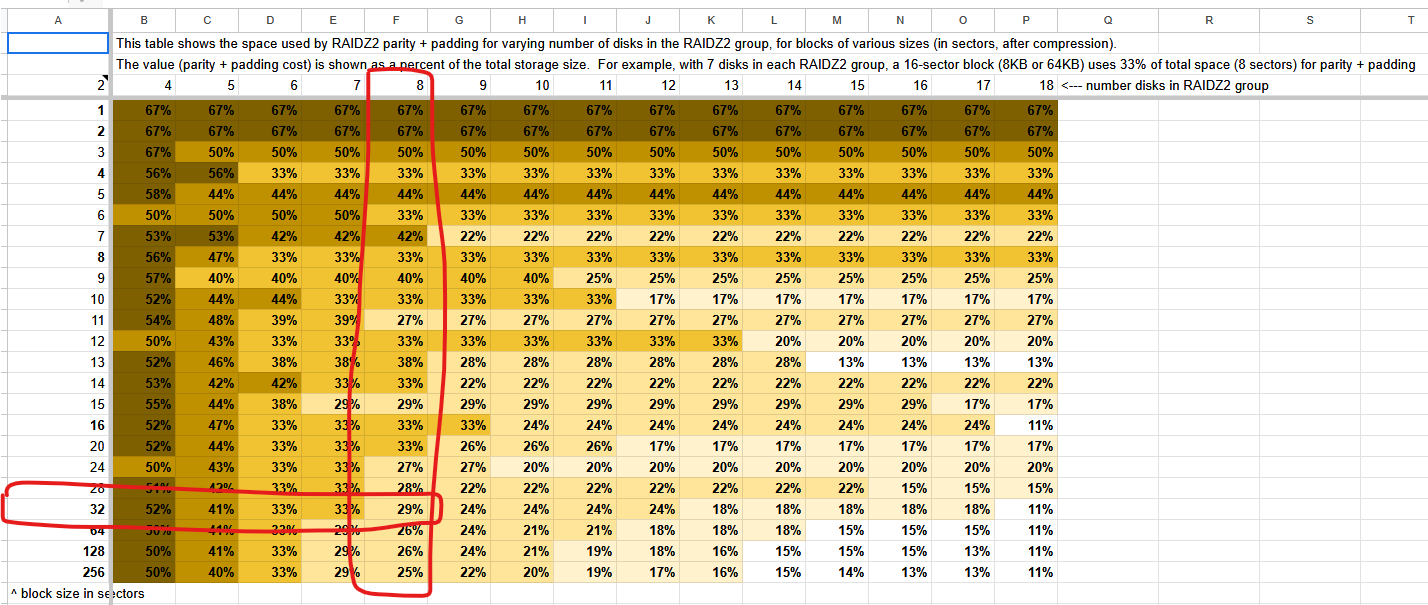
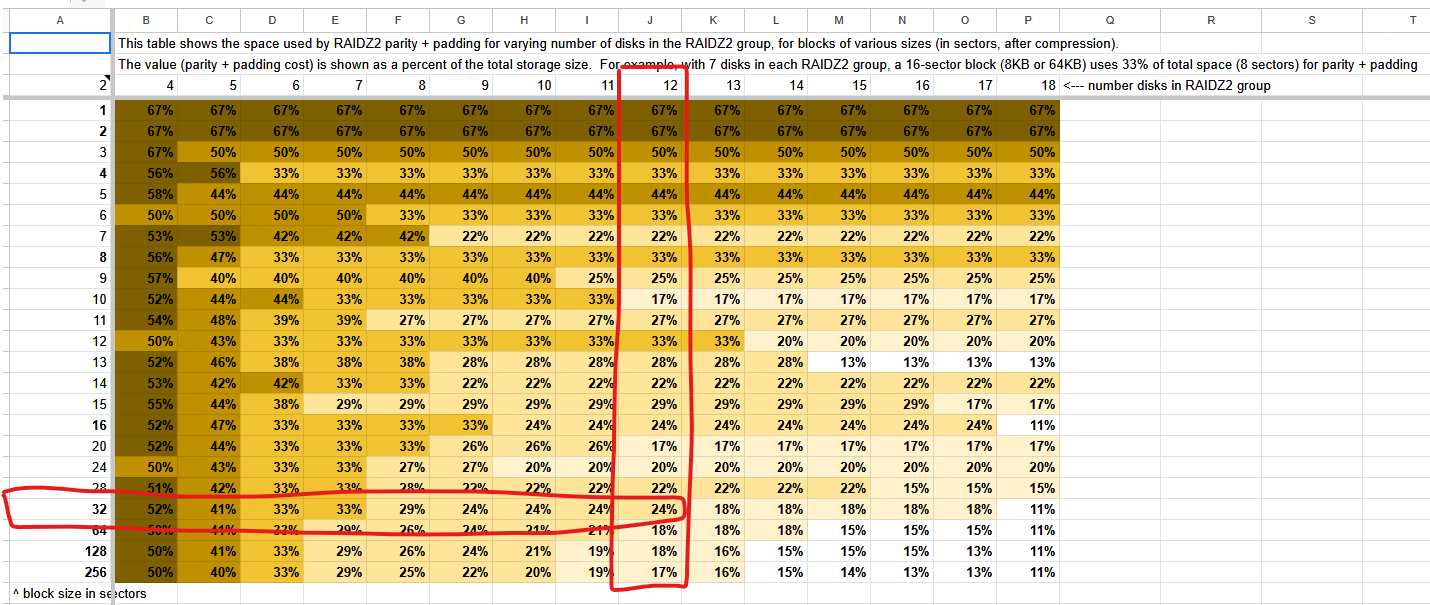
I need some sanity check from you guys. Maybe I took one wrong turn after another, because I have a misconception or misunderstanding. Not sure if I missed something.
I think ZFS stripes can’t be wider than the total number of disks in the vdev.
I base my opinion on this:
stripe width in RAIDZ is dynamic, and starts with at least one data block part, or up to disks count minus parity number parts of data block
You still end up with two empty 4 kiB blocks that are unused.
Therefore, even with a four-drive RAID6 array/raidz2 pool, you still have eight 4 kiB blocks, and only SIX of them have “stuff” in it (whether it’s data or parity) and TWO are empty.
Again:
(4 (data) + 2 (parity)) / 8 = 6 / 8 = 0.75
I think that this is not true, because it ignores that a stripe can’t be larger than the total number of disks. That is why I think it looks like this instead:
[D] [D] [P] [P]
[D] [D] [P] [P]
which is why you only get 50% storage efficiency, just like a mirror.
We were also discussing 8 drives RAIDZ2.
He thinks that you get 75% storage efficiency. And that the data is stored like this:
[D] [D] [D] [D]
[P] [P] [ ] [ ]
I don’t even disagree on that one. I also think it is stored like this.
I would append that the next 16k write is then stored like this:
But even then, his math seems off. We stored for each stripe 16k of data. And for each stripe, if we include the parity data, we used 24k to store these 16k.
But I do. If you have 6 data chunks and ashift=12, you have to write 4k to 4 drives each and fill the rest with zeros (2 drives). Storage efficiency is decisively <75%, in this case it’s 50% (4x4k out of 8 drives). This is why RAIDZ is so bad at wasting space on smaller record/block-sizes.
You can e.g get a 1TB zvol using 2TB of space that way. So your pool has 67% storage efficiency, but if the stuff use double the space cause of this, that’s down to 33% now if all you store is 16k files on a 8+2 RAIDZ.
If you ever heard about super wide RAIDZ vdevs being bad, it’s because of this fact (wasted space) and you more and more turn nice 128k files into horribly small 4-8k chunks (bad), making nice 128k file read into random IO hell (worse performance), especially for HDDs.
Don’t use RAIDZ on low record/block-size. Chances are that going mirrors can have better storage efficiency if most your stuff is <=16k
In terms of space efficiency, and you’re using raidz2, you’re going to have 2 data blocks, k, and 2 parity blocks, m, for what would be analogous to an erasure coded setup.
Or put in another way, if you have (k + m) disks, (4 in this case) and the formula for calculating how much usable space for RAID6/raidz2 is ((k + m, i.e. total number of disks))-m) = 4-2 =2 disks worth of space. That’s nothing new nor earth shattering about that.
Therefore; I stand corrected.
It will be, indeed:
[D] [D] [P] [P]
[D] [D] [P] [P]
(see the spacemap from Matt Ahrens presentation about space allocation from the video here:
(i.e. no partial stripe writes. It is not permitted in ZFS, by design)
However, for the second, 8-drive scenario, we’re both wrong.
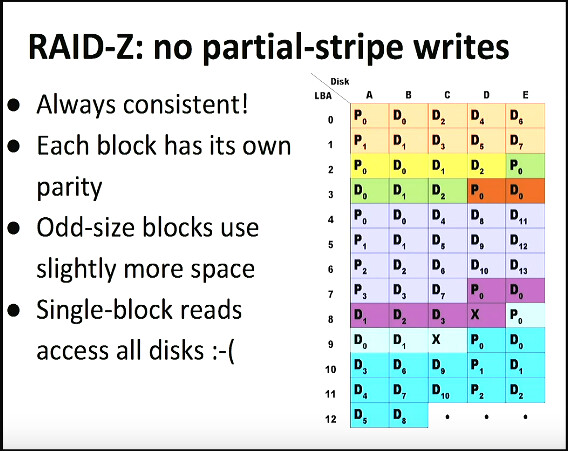
ZFS, by design, does not allow for no partial-stripe writes as the title of slide states (again, from Matt Ahrens).
What we both failed to account for, is the fact that ZFS uses variable block sizes.
Therefore; in the second case, with 8 drives, this is what you would get:
X1 (where X is either P or D) is the first logical block, which will be six blocks wide, and the second logical block, X2 (where X is either P or D), will also only be six blocks wide and the pattern here will continue.
Per Matt Ahrens, partial stripe writes aren’t permitted with ZFS.
this would be a partial stripe write, and thus, isn’t permitted. If you disagree, you are free to argue with Matt Ahrens about it.
Again, I encourage you to watch Matt Ahrens’ video about ZFS space allocation (which again, I surmise that you probably haven’t yet, hence your questions about it).
You can also fast forward, in the video, to the part where Matt Ahrens talks about future work (for ZFS on Linux), which includes:
"vdev spacemap log
performance of large/fragmented pools"
You can also watch this video, also presented by Matt Ahrens, for more details about ZFS space allocation, that was presented at BSDCan 2016, as well as this video where Matt Ahrens dives even further into the read and write code paths.
Again, if you disagree with what I have parroted from Matt Ahrens here, I encourage you to engage with Matt Ahrens in regards to your disagreements.
Assuming that he has the time to be able to answer questions from the general public, he should be able to address any questions/disagreements that you may have about the stuff that I have parroted (from him) here.
I have no reason to because I have nothing to prove or dispute. If he says otherwise, I disagree and so do people like Jim Salter and Alan Jude. But the more likely case is that you (again) got it wrong.
Waste of space in RAIDZ is just a fact, easily demonstrated but also noted in the official docs:
Seems like your own citation of the OpenZFS documentation just provided the data and the evidence that disputes your own statement/claim.
Go figures, eh?
"Another example for ashift=12 and recordsize=128K for raidz1 of 3 disks:
total stripe width is 3

one stripe can have up to 2 data parts of 4K size because of 1 parity blocks

we will have 128K/8k = 16 stripes with 8K of data and 4K of parity each

16 stripes each with 12k, means we write 192k to store 128k
so usable space ratio in this case will be 66%."
(k+m-m) / (k+m) = (2+1-1)/(2+1) = 2/3
(I don’t know why they would use an example where you can easily calculate the space efficiency using that formula, or the simpler version of the same formula where it’s (number of drives - parity (drives/level))/(total number of drive) = (3-1)/3 = 2/3.)
But either way, they use that as the example.
You will also note that the spreadsheet that they have included, includes padding, but in their write up, they literally make no mention of why padding exists and/or why the spreadsheet includes said padding.
Should have been more precise, I agree with the drawing, not the math.
Not sure if I can follow. So if we have 6 data chunks you mean a 24k write?
Alpha is right, what I totally forgot is that a single file can’t have different record sizes.
So for that 24k write on a 128k record size (or any other record size bigger than 16k), it would to two 16k records. But since the second record empty space can be compressed to basically nothing, this would result still in the end as a 16k + 8k write.
I think this is the reason why in generally everybody tells you to leave lz4 enabled. It costs basically nothing but helps in these situations. It is enabled by default on proxmox too.
So you are agreeing with me that a 4 drive RAIDZ2 gets you 50% and not 75%?
Like I already wrote But thank you for acknowledging it, by repeating it.
Remember how many times you asked me, why I have “such a hard on for volblocksize”?
I believe that, yes, datasets have a variable record size, because recorddsize is not static value but a max value. While volblocksize is a static value (16k).
So here comes the big shocker:
What do you think happens, when you set the max value volblocksize of your VM disks to 16k?
Right, you don’t get writes that are bigger than 16k.
And then, the behavior compared to datasets drastically changes.
Not because datasets behave and differently when it comes to pool geometry!
No, not that!
But while for (most, average, normal) datasets you have many big files (+64k) and not that many smaller files (16k). So the pool geometry problem does not apply to many files.
For volblocksize on the other hand ALL your writes are now 16k.
ALL. Not some, all. So the pool problem applies to ALL your writes.
(Side note, like already said, the same would be true if you have a 128k dataset and only write 16k txt files to it.)
(Second side note, I used 64k as example for big files, because the pool geometry problem gets drastically reduced at that size! With RAIDZ2 and 6 drives, you even get a perfect match.)
Yes and no. Or maybe I am misunderstanding you.
There can be different stripe widths. Like in the picture you posted, green has not the same stripe width as blue.
I think you are misunderstanding what partial stripe write is.
So yes, while I agree with Matt Ahrens that ZFS does not do partial stripe writes, this isn’t a partial stripe write. It is just two stripes with different widths.
Like Matt said “the parity is actually part of the data we do for each logical block”.
He then makes a RAIDZ1 4 drives example:
"If the block is only two sectors
(that is two sectors including the parity, or in other words, a sector that is one 4k data and one 4k parity) we have one sector of parity for every sector of data instead of one sector of parity for ever three sectors of data."
In other words he said:
You expected 75% storage efficiency like in a traditional RAID but only get 50%.
ZFS doesn’t deal with files under the hood. It only knows blocks (or records). And you can divide a larger block into many smaller blocks. But blocks can’t be below volblocksize or ashift. So how do you divide 16k by 6 if you can’t go below 4k (ashift=12)? You don’t. You write 4k blocks until you get your 16k and fill up the rest with zeroes. 6 data chunks written, 4x4k, 2xzeros.
This is really only a thing with wide RAIDZ or very low records/blocks. But best practice is to not use RAIDZ on mainly low record-/blocksize pools. Caching in ZFS usually solves a lot, so isn’t that critical on a homeserver, ARC got you covered. And who cares about 500G wasted space for your 1TB worth of zvols for your VMs (which is a lot of VMs) on a 100T pool? not that important really. Percentage-wise, it’s trivial all things considered.
recordsize is the maximum a record can be, but 4k will always be 4k, unless we’re talking about volblocksize which is always 128k then. This is a critical distinction between them. And why 128k default recordsize is basically fine all the time, but 128k volblocksize certainly wouldn’t be (default is 16k afair)
No, I was referring to your 16k example. Technically you write 6x4k + parity. But 2x4k are just zeroes for padding. I’m talking about a 6+2 RAIDZ
I don’t know how this applies to this padding situation, but compressing zeros is triple digit compressratio afair. But lz4 is really a no-brainer for a lot of reasons. And why it’s the default setting. I prefer zstd for my ZFS stuff, but the way compression works and performs in ZFS and compressed ARC…it’s a crime to not use at least lz4 (even on a Pi). Free performance, free RAM, free everything for very little CPU cycles.
TLDR;
Use compression, don’t use RAIDZ on 4-16k records/blocks, you don’t get all of what your RAIDZ layout would suggest.
Aside from generally more smaller stuff instead of larger stuff, mirrors just don’t cut down 128k files into 8k pieces that are harder to work with.
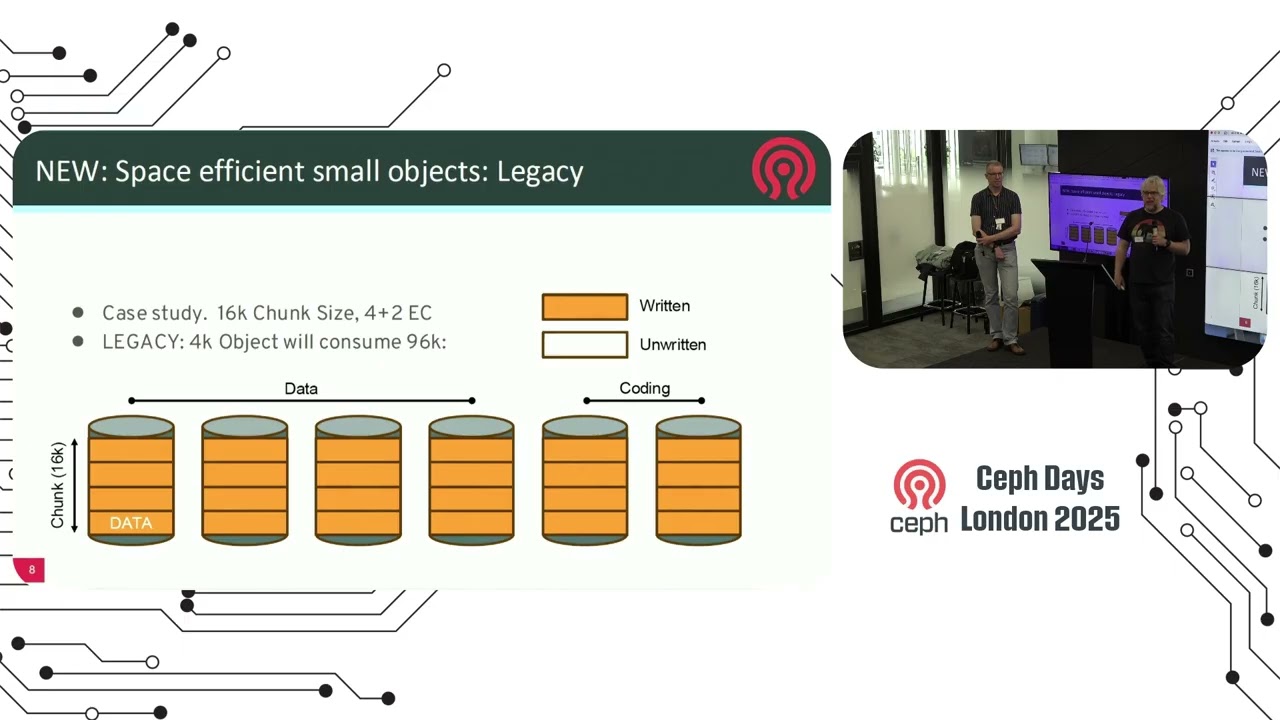
P.S.: Ceph “suffers” from the same problem. With the upcoming release, they improve erasure coding and also mitigate the wasted space and improving performance in the same pass. Mainly to make parity raid or erasure coding much more viable for block storage (RBD in Ceph), which is usually your 4k-16k VM stuff. So this isn’t strictly a ZFS thing, but a problem in all/most parity schemes in storage.
This is kind of obvious, isn’t it? If a stripe was wider than the total number of disks you would no longer have the stated redundancy. In the 4-drive raidz2 example:
[D] [D] [D] [D]
[P] [P] ...
Lose drive 1 or 2 plus any other drive and the block is no longer recoverable.
This seems to contradict what is written in the ZFS documentation:
(I assume here that when they mention recordsize they mean the effective recordsize for the particular record being written rather than the setting as such.)
So for example, it seems that if you have ashift=12, volblocksize=16k on a 4-drive raidz1 pool, the first block written would be [D][D][D][P] and the second one [D][P], for a total storage efficiency of 67 % rather than the expected 75 %?
Or, in your example with ashift=12, 16k of data on an 8-drive raidz2 pool: [D][D][D][D][P][P] would be written, again giving a total storage efficiency of 67 % rather than the expected 75 %. But not due to any zeros written.
The conclusion seems to be that storage efficiency is never worse on a wider vdev: with 16k volblocksize and ashift=12, you get the same storage efficiency using, say, 6 data (non-parity) drives that you would get using 4 data drives. So both d/(d+p) and (max_sectors_in_block/(max_sectors_in_block+p)) set ceilings for storage efficiency.
However, there’s also this interesting tidbit in the linked blog post:
Which means there sometimes will be some wasted pad sectors. But not in the examples above.
But Matt tells us that there are no partial writes?
Which one do we trust?
Well, I think both are right but are using the word differently.
Matt is talking about "we don’t do partial writes, because power loss and RAID5 write whole, and parity is in the block and with CoW we get consistency without expensive hardware.
While Jason is talking about: “Unlike traditional RAID, we are not bound to one size and can make use of different stripe sizes, so we use partial stripe writes while RAID can’t.”
This part I don’t understand. Why would I need to divide 16k by 6?
Again not sure if I understand why volblocksize supposedly is always 128k, but yes, the default for record size is 128k and the default for volblocksize is 16k. Which already is a compromise. Used to be 8k until very recently. Lifting it up from 8k to 16k made the pool geometry problem way less intense. But there is of course rw ampflification for every write smaller than 16k. Which hopefully your VMs don’t have too much. IMHO it is the perfect middle ground. 64k is too big, and 8k is too small.
Are you sure about that? Either you or I are totally off on that one.
AFAIK padding and compressing zeros has nothing to do with each other. Here is how I understand it.
Compression:
Compressing zeros is very valuable, since if you have 68k write or block (before compression, and also assuming that) you would need two stripes. A 64k stripe and a 4k stripe combined is not possible. You can have a 64k strpe and a 4k stripe in the same dataset, but for one single block or write or file, you need the same record size. So in that case, it would use a 128k record. Since you can basically compress the zeros to, well zero, you could compress it into one stripe that is 68k data. For a 8 wide RAIDZ2 that would be
P P D D D D D D
P P D D D D D D
P P D D D D D D
P P D
This leaves us with a 63% storage efficiency, while on traditional RAID this would be 75%.
Without compression we would need 128k, which would be 53%. So compression helps a lot, but does not solve everything.
Padding:
This is something totally different.
Because we can divide 27 (number of blocks) with 3 ( 1 + parity number RAIDZ2).
But lets make another example, where it does not work. The width does not even matter.
We make a 8 sector write (2 parity, 6 data)
P1 P1 D1 D1 D1 D1 D1 D1
Now we delete the second 5 sector write
P1 P1 D1 D1 D1 D1 D1 D1
( ) ( ) ( ) ( ) ( ) P3 P3 D3
D3 D3 D3 D3 D3
Now we make a 3 sector write ( 2 parity, 1 data)
P1 P1 D1 D1 D1 D1 D1 D1
P4 P4 D4 ( ) ( ) P3 P3 D3
D3 D3 D3 D3 D3
The problem is now clear if you look at the empty sectors. It is only two sectors or 8k. But since that is what we need even for our parity, this space is just lost. We have a 2-sector gap that we can’t do anything with. That space can’t be recovered without totally rewriting every other sector on the disk after it. We would simply have to pray to the IT gods for good luck. Instead ZFS uses padding. I use X for padding sectors.
For RAIDZ2 that means that every write has to be dividable by 3.
We make a 8 sector write (2 parity, 6 data)
P1 P1 D1 D1 D1 D1 D1 D1
You cant divide 8 / 3. So we add one padding. 9 you can divide by 3.
P1 P1 D1 D1 D1 D1 D1 D1
X1
(You don’t explicit denote where the [ ] are empty blocks or padding blocks in my citation of you above, where empty blocks can be Parity, Data, or X (Padding) blocks. You don’t specify which in your example.)
…that only applies for zvols. Therefore; if you’re not using zvols, the volblocksize is irrelevant for datasets.
Yes, because the entire time, you had a hard on for zvols and completely ignored the case when it’s not a zvol.
That’s the whole point of me repeatedly asking you why you have such a hard on for volblocksize, because you, for some reason (still) have such a hard on for zvols, whilst, again, completely ignoring the case of what happens if it isn’t a zvol.
That is precisely why I kept asking you about it.
…and once again, you are making yourassumption that VM disks reside on a zvol when there is absolutely nothing that stipulates nor requires you to do so.
This is an assumption on your part, to make your argument work out for you. But that’s not necessarily how it is implemented, in actual practice.
If that’s how you have implemented it, good for you. No one cares how you have done things. What people care about how they have done things, regardless of whether it conforms to your opinion or not. (And of the people who have deployed it without ever having the pleasure [/s] of knowing you, therefore; they probably deployed it as they saw fit, and don’t care what your view as to how it should('ve) been deployed.
And no, people aren’t going to spend $5200 on SSDs to bring it in line with your opinion. LOL…LMAO…
Sure. If you ignore the Proxmox/qemu storage pre-allocation parameter.
(Again, there was some debate as to whether the full pre-allocation actually writes all zeros to fill the VM disk, during said pre-allocation or whether it only does so in metadata. (Given the time that it takes on a HDD for the full pre-allocation to complete, and also looking at iostat data during said pre-allocation, I would imagine that it is actually writing zeros for the entire size of the VM disk, rather than just metadata only (because that’s the one of other pre-allocation option that’s available to you, in Proxmox, when you set up the storage).)
Therefore; if you have fully pre-allocated all zeros, and then inside said VM disk, you have a bunch of atomic writes that are to be committed to stable storage, I honestly have no idea whether ZFS has any insight into what’s going on inside said VM disk or whether it still sees and treats it as one gigantic file.
You’d have to profile the system and the ZFS subsystem to be able to ascertain that.
I have no idea/no clue how to do that.
Two things:
This statement can be interpreted as you are only writing 16k text file(s) to it – i.e. if you are only writing one 16k text file, then sure.
But given that you said “files” (plural), therefore; in 128k, you can write eight 16k text files to it to fill up said 128k, and therefore; from the space efficiency perspective, if ZFS is flushing the TXG which consists of eight 16k text files to a singular 128k block, then it would’ve filled said 128k block with said eight 16k text files.
So…it depends on what’s your histogram looks like for the filesize distribution.
I don’t know why you keep citing the flawed jameskimmel source, but here we go again.
Per the OpenZFS documentation that you had previously cited, again, it very clearly states:
“The more disks RAIDZ has, the wider the stripe, the greater the space efficiency.”
Therefore; why you would go with a 6-wide raidz2 is entirely your choice, but even per basic arithmetic of k/(k+m), you’re still only going to get 4/(4+2) = 4/6 = 66.66667% of your raw capacity (or 33.3333% loss compared to the raw capacity).
(which you can achieve with a block size of 4 sectors, when using a 6-wide raidz2 array/pool). (Source: ibid.)
Matt Ahrens actually explains what a partial stripe write is, in his video. From you remarks, based on what you heard/watched, there’s insufficient evidence to be able to prove whether you understood what Matt Ahrens is talking about or not.
Given this statement, have you ever bothered to ask yourself why padding blocks would be needed, when you have variable stripe widths?
Think about it.
If you can vary the size of the stripe width, then why would padding be even needed?
Think about that for a moment.
(Hint: You should be able to vary the size of the stripe width such that it perfectly aligns with what you need, therefore; eliminating the need for padding blocks. So why do padding blocks exists, when you have variable stripe widths?)
(BTW, here is the transcript from the video (that’s probably AI generated), so there are errors in there, but I am going to copy-and-paste it here, “as-is” without editing/correcting for those errors):
37:11
is that um oddsiz blocks could use more than expected amount of parody so like
37:18
if you have a RAID Z1 that tolerates one failure and you have four discs in it um
37:24
you might expect like if you did RAID Z if you did RAID four or RAID five with this you know one disc would be used as
37:30
par and the other three would be used for data um if you have uh large blocks
37:37
then that will be the same for RA Z but if you have a smaller block then we
37:42
might um have a block where like if the block if the block is only two sectors then then we're going to have to
37:48
allocate one sector of par just for those two sectors of data rather than one sector of par for every three
37:54
sectors of data so you can see that illustrated here the most kind of degenerate case um is like uh so here
38:00
like each color is a different logical block um so like this is the most degenerate case where the data is just
38:07
one single sector and then there's one sector of par so this is like the same space utilization as mirroring right you
You know that he’s talking about degenerate/odd size blocks in ZFS, right? (from the spacemap, look at LBA3, disks D and E, where LBA3, disk D is a parity block, and LBA3, disk E is a data block.
That’s in his ZFS spacemap.
You can see the respective timestamps, from the video, via the copy-and-paste of the video transcript above.
If you end up with odd size/degenerate blocksize, then sure, but if you don’t have odd size/degenerate blocksizes, then no (also as shown in his spacemap).
Doesn’t this assume fixed recordsize? And doesn’t this also assume that you don’t have any parity as well (e.g. a stripped pool). I’m trying to think of the scenarios where what you wrote would be true. “2xzeros” implies that there’s no parity data being written for the four blocks of 4k of data written.
Also, as I understand it, if you’re going to be doing this, you can also set your ashift=9, which can help alleviate (some) of this.
Additionally, this also ignore the fact that ZFS will buffer the reads/writes into TXGs until said TXG is flushed to stable storage.
So how much of this actually happens, in reality/in practice vs. the singular transaction theory?
Adaptive replacement cache works for reads, but not for writes.
well…depends on your ashift and the physical/logical geometry of you drive.
Yes, newer drives use 4kn, but there are still many older drives in the wild, that don’t have/use 4kn.
If I understood and followed you correctly, you’ve just demonstrated the free space fragmentation that happens with ZFS.
You mentioned that you have a 2 sector gap that you can’t do anything with. Why is that? I’m guessing that it’s because the 2-sector wide gap isn’t wide enough for a 3-sector write (2 parity, 1 data)?
(I think that you might have been able to diagram-out what I was thinking my head, when I wrote in the Lawrence Systems forums here where I had postulated that you can execute this repeatedly, stay within the 80% capacity/usage “rule-of-thumb” and still end up with a really high (free space) fragmentation percentage.)
Was this delete because of a copy-on-write operation or was this truly a delete operation?
I find it’s way easier to address the question in the thread title.
A stripe in RAID, zfs or not is the number of disk or that in vdev. So by definition, a stripe cannot be wider than the number of disk in a vdev.
–
Btw, does any one know why odd-size blocks need to be padded to an even number in ZFS ? E.g. as the illustration in slide “RAID-Z: no partial-stripe writes” where some blocks are padded with “X”
The slide title is also misleading if taken out of context. The “no partial-stripe writes” only refers to a stripe in traditional RAID. Nothing more nothing less. In a traditional RAID, a stripe is always filled. Fill with padding if not enough data. Hence, the “partial-stripe”. raidz avoids partial-stripe by not limiting itself to a "physical: stripe.
Yes, it’s been mentioned several times in this thread already; check at the end of my previous post, for example. (And it’s not about odd-sized blocks.)
If you watch Ahren’s talk it’s pretty clear that this refers specifically to re-writing part of an already written stripe, as might be done in a hardware raid stripe. I.e. a read-modify-write operation. ZFS doesn’t do this, hence “no partial-stripe writes”.
Oh, thanks for the hint “multiple of (p+1)”. I think I figured out, and AI agrees with my thought.
In a nutshell, this is so called “p+1” rule in ZFS. p+1 sectors are the minimum allocation unit in ZFS. In an allocation with multiple of p+1, ZFS ensures that when the block is free’ed, the free space will be fully re-usable in the worst case scenarios of new allocations within this free space.
I think the explanation in my previous post is better, concise and precise.
Yes. Exactly. Which is exactly what Proxmox VM disks are.
BTW datasets we use the word record size.
100% agree. I assume that we use the proxmox default. Otherwise I would have stated otherwise.
Sure. And it is not wrong. But it has limitations. I mean look at the Excel sheet. What do you get for a one sector write for one drive? Exactly, 50%. And for two? Also 50%. And for three? Also 50%.
So no, it is not a universally true statement and more a rule of thumb.
Because it does not solve the problem that is could be that there are two sectors empty but I am using RAIDZ2 and thous can’t do anything with these sectors?
If all stripes were the same size, why you would even need padding to begin with? Than all are the same size and if I delete one I can put another same size one in. There would be no need for padding. That is precisely how traditional RAID works and why traditional RAID does not have padding.
Ohh god, please don’t, unless you found some overpriced 512n drive.
No. Free space fragmentation is something else.
Exactly!
True delete.
I think explained that in my padding section from my previous comment.
Cheers, that is where the confusion comes from. Thank you. Alpha misunderstood that part by thinking “all writes have to be the same stripe size”.
Even easier to understand:
If you use RAIDZ1, the smallest write you can make is P + D.
So two.
That is why you need at least two free sectors.
You can’t do anything with one free sector.
If you can device the total sectors by 2, you have two free sectors.
If you use RAIDZ2 the smallest write you can make is P + D + D.
So tree.
That is why you need at least three free sectors.
You can’t do anything with one or two free sectors.
If you can device the total sectors by 3, you have 3 free sectors.
And since my math matches up with the math in the Excel sheet below that source, I think there is nothing left to discuss. Alpha was wrong, and the github numbers match up. Or does anybody have another input?
Not only are there different width stripes, even the same file or write can have different stripes with a different width.
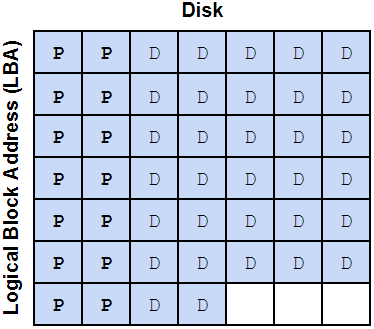
Our stripe width is 7 disks, so we can figure out how many stripes this 128KiB write will take. Remember, we need 2 parity sectors per stripe, so we divide the 32 sectors by 5 because that’s the number of data sectors per stripe:
32 / (7-2) = 6.4
We can visualize how this might look on the disks (P represents a parity sectors, D represents a data sectors):
As mentioned above, that partial 0.4 stripe also gets 2 parity sectors, so we have 7 stripes of parity data at 2 parity sectors per stripe, or 14 total parity sectors. We now have 32 data sectors, 14 parity sectors, adding those, we get 46 total sectors for this data block. 46 is not an even multiple of our minimum sector count (3), so we need to add 2 padding sectors. This brings our total sector count to 48: 32 data sectors, 14 parity sectors, and 2 padding sectors.
Depending on how it is set up. It can be, but it doesn’t have to be.
Yes, I know. I covered in 2022, Oct 2024, and in Nov 2024, on this very forum, as well.
Thanks.
Of course you would assume that because once again, you didn’t bother to read what I had told you already, where you’ve been explicitly told how I have set my system up.
Again, you ignore information that has already been given to you, whether it’s out of laziness, or whether it’s because you don’t like the information that has already been given to you, because it doesn’t conform to your pre-determined worldview/mental model of how things work and/or how you think things should or ought to work - where you completely ignore/neglect what people are actually doing (vs. what you would do instead).
Whyyyy are you using raidz for one drive?
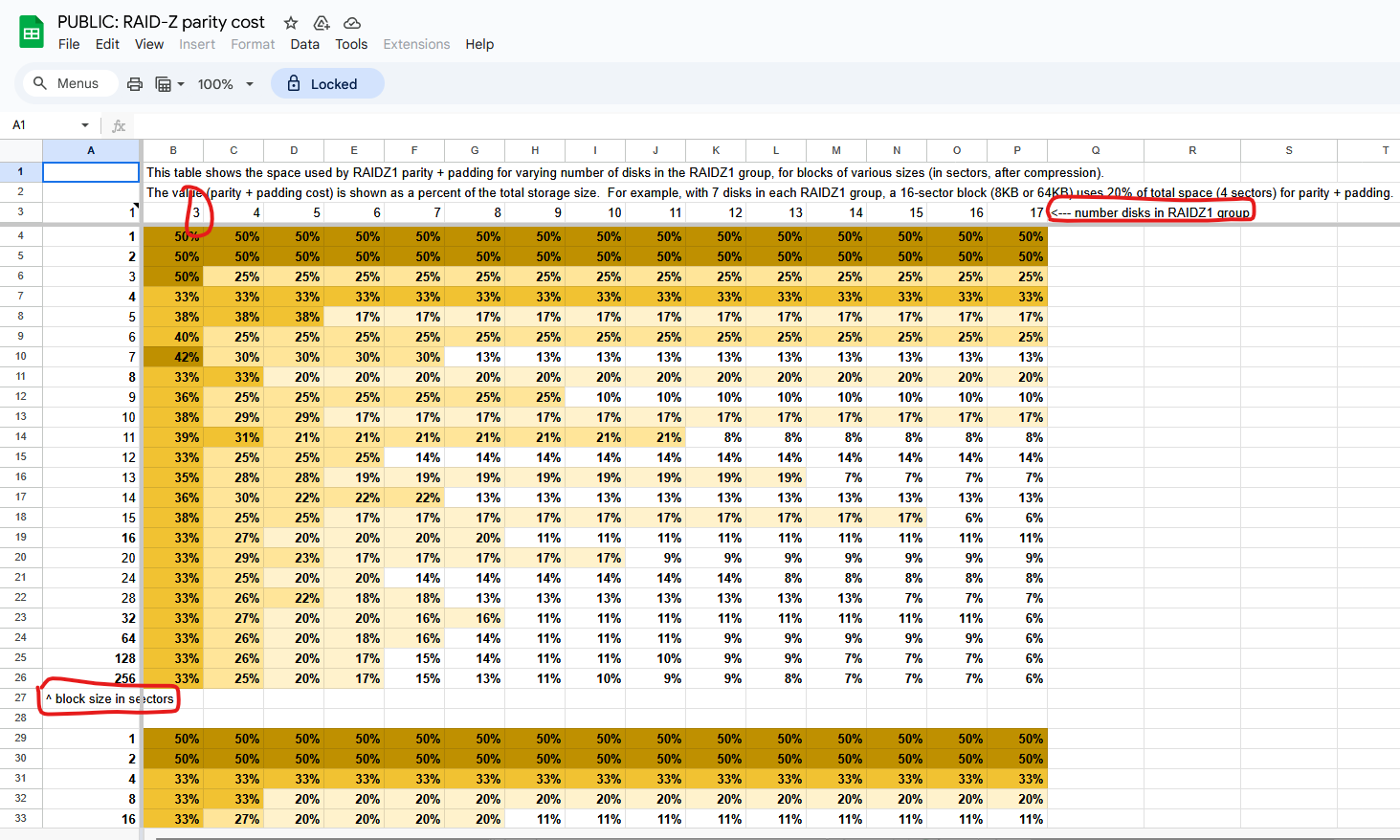
That’s NOT what the spreadsheet actually states.
Whyyy do you consistently and repeatedly employ the strawman logical fallacy, just to make your argument work for you?
It literally tells you that the top row is the number of disks in the raidz(1) “group”
You will note that the FIRST entry, in that table, is a minimum of three disks in said raidz(1) “group”.
When would you ever write only one sector?
“What do you get for a one sector write for one drive?”
That’s also not what first column says neither.
It literally tells you that the first column is “block size in sectors”.
That’s not the same thing as writing only one sector. That’s you writing one block, where each block is one sector wide.
Since you went from 1 → 2 → 3, I can only surmise that you were reading down the column rather than across (to increase the number of drives), and therefore; what you’re writing about is where you changed the block size from being one drive sector, to two drive sectors, to three drive sectors, etc.
If your recordsize is 128k and your phy/logical sector size is 4k, then automatically, you’re already looking at row 23 for where the “block size” (which I am interpreting to mean recordsize (expressed as a function of number of sectors), is 32 physical/logical sectors per record.
To get your raidz pool to use 1, 2, or 3 physical/logical sectors per record, you’d have to set the recordsize to be 4k, 8k, and 12k respectively, to make that happen, which, I don’t know of anybody who is actively doing that. (Why would they?)
Again, you just stated that you are assuming the Proxmox defaults, and with that, if you create the ZFS pool/array via the Proxmox GUI, it defaults to an ashift=12 (4 kiB logical sector size, the physical sector size will depend on your drive itself), and a recordsize of 128 kiB.
So why would you declare that you’re talking about the “Proxmox defaults” when the only way to set the recordsize to equal 1 physical/logical sector size of 4 kiB would be to interfere with said defaults???
You’re proving my point for me, about how you would make comments that only suit your purposes of the argument, whilst even contradicting yourself.
If you’re using the Proxmox (GUI) defaults, then you can’t have a recordsize of 4k, 8k, nor 12k, respectively. So which is it? Are you using the Proxmox (GUI) defaults, or are you doing something else that’s entirely different from said Proxmox (GUI) defaults?
(BTW, even if you created your ZFS pool via the CLI zpool create ..., that too, also defaults to a recordsize of 128k as well. So even if you did it via the CLI, to get a recordsize = 4k, 8k, or 12k respectively, you’d have to explicitly specify that in your zpool create command and/or you’d have to immediately issue the zfs set command right after you create the pool to change the recordsize from the 128k default to either 4k, 8k, or 12k in your example here.)
If your recordsize is 128 kiB and your drive’s physical/logical sector size is 512 B, and you’ve aligned your ashift=9, then 128*1024/512 = 256 sectors per “block” (i.e. record).
Therefore; if that is the case, because of the drives that you’re using, from the same spreadsheet, you’re automatically looking at the results for row 26 where you have 256 sectors per block.
Thus, when you go from 3 drives in a raidz(1) pool (33%) to 4 drives (25%), to 5 drives (20%), you are being more space efficient as you increase the number of drives in said raidz1 pool.
The same holds true for row 23, which would have been what you would’ve gotten, if you left the recordsize at the 128k default, and you’re using 4k physical/logical drives (or you’re using 512 physical/logical drives, but you’re using ashift=12), going from 3 drives in the raidz(1) pool (33%), to 4 drives (27%), to 5 drive (20%) still hold that statement as being true.
But again – you say that you assume the Proxmox defaults, and then talk about conditions that are anything but.
In your example, you added the padding.
If you didn’t add the padding, then the resulting picture at the end of your example, would be very different than if you added said padding.
Try it.
I understand how traditional RAID works, as I have already previously cited (to you, which again, you don’t read, so what else is new?).
In Matt Ahrens’ presentation, he talks about sub-size/degenerate records, therefore; they’re allowed to exist, even if they’re not liked/preferred, but you can have them present in the ZFS spacemap.
Therefore; given that, in your first case where you had 3 drive raidz, and where you state:
If you allow this to be a sub-size/degenerate record, then you don’t need to add the padding.
What the heck is a “512n” drive? According to the OpenZFS documentation:
“The sector size on all storage devices was 512-bytes prior to the creation of flash-based solid state drives.”
So, no, they’re not terribly expensive, but they’re also not the most cost efficient anymore neither. (They had better cost efficiency back in like 2018 when I originally built my NAS back then.)
(The last time that I ran the price/capacity cost efficiency optimisation study was just shy of a year ago, and back then, the 12 TB came out as the most cost efficient solution. The cost efficiency changes semi-regularly.)
You just proved it with the two free blocks that you can’t do anything with, as you mentioned.
Therefore; pursuant to the calculation of free space fragmentation, the 2-free-block-wide would be used to calculate said free space fragmentation.
It would appear that spelling isn’t your forte neither.
*divide
But again, this ignores what Matt Ahrens presented in the case of sub-size/degenerate records, because once again, it is vastly easier for you to just outright ignore the things that doesn’t conform to your pre-determined worldview/mental model.
(because if you allow sub-size/degenerate records, per Matt Ahrens’ explanation, then what @ThisMightBeAFish wrote won’t hold true 100% of the time anymore)
That is, quite literally, the only thing that you care about.
LOL…LMAO…
(even though, you’ve been proven wrong yourself, on numerous occasions, but according to you “nevermind that. We don’t talk about that.”)
LOL…LMAO…
(*This only works if you ignore the things that make you wrong as well, like sub-size/degenerate records that was already covered by Matt Ahrens in his presentation/video.)
LOL…LMAO…
You got me. ONCE.
Meanwhile, you couldn’t even read, comprehend, interpret, and regurgitate the very same spreadsheet that you, yourself, cite.
LOL…LMAO…
But yes, let’s focus on the one thing that I am wrong about (vs. your errors that I have been calling out since October 2024 at minimum).
(If you’re going to focus on the one thing that I am wrong about, the least that you can do, is to make sure that you are reading, comprehending, interpreting, and regurgitating the very spreadsheet that you cite, back, properly, and making sure that you aren’t making any mistakes when you regurgitate that. But even as simple as just reading and interpreting a spreadsheet, you couldn’t even do that without making mistakes. Plural. But yes, let’s focus on the one thing that I got wrong.)
I would have to imagine that both scenarios are true and possible, depending on whether you’re writing to an empty block (“fresh and free” block) vs. writing modified data either in-place (which would be more like for traditional RAID) or using the copy-on-write model that ZFS and Btrfs uses (and in the case of Proxmox, if you’re using the qcow2 file format for VM disks).
And I would also have to imagine that the “mode” that you’re in (whether the former or the latter) would depend on the age of the system and how much data has been written to the pool/array as a function of time and nominal usage.
The thing that I don’t fully understand from Matt Ahrens’ presentation though, is that he talks about how sub-size/degenerate “blocks” (records) can happen, and therefore; why then, if sub-size/degenerate blocks/record can happen, why wouldn’t they permit it to happen more often rather than to use padding?
(i.e. when ZFS choose to pad vs. when would ZFS permit sub-size/degenerate blocks/records, given that the “block” size (recordsize) is supposed to be variable? I haven’t really found a good explainer as to when ZFS would use one vs the other.)
Would you please not hijack this read and stay on the topic?
Otherwise you are just as bad as I am
Ups, my mistake.
Of course I meant 3 to 99999 drives.
The point was, that it does not really matters how many drives, it is always 50%. But you are of course also right that a RAIDZ1 needs at least 3 drives.
A drive that is actually a 512b drive not not just emulating it. That would be a 512e drive.
You are right, not a native speaker. How good is your Spanish?
Actually yes. You were wrong (or misunderstanding me, or engaging in bad faith or whatever) in such confident way, that you were actually able to gaslight me into thinking that maybe my storage efficiency assumptions are wrong.
You already agreed to some, but not all of my storage efficiency statements.
RAIDZ2 with 4 drives, offers 50% RAIDZ2 with 8 drives, ashift=12, 16k volblocksize, RAW VM disk, offers 66% storage efficiency RAIDZ2 with 12 drives, ashift=12, 16k volblocksize, RAW VM disk, offers 66% storage efficiency
If you actually read the citation, then you would’ve known that it’s very muchon topic.
But again, since you don’t read, so of course you’re going to say that, once again, providing further data/evidence that proves my point for me.
(You should really get a parrot tattooed on your arm since you love to do that so much. It’s like having an original thought of your own isn’t something that happens very often (given that you parrot jameskimmel and now you’re parroting me).)
I’d like to see a raidz array/pool, that per you, is a 99999-drive wide raidz pool/array because I am certain that if someone actually deployed this, at your behest, you’d find a way to complain about that as well.
ONLY if your block size (i.e. recordsize is one drive sector (whether that’s 512b or 4k(n)), which again, you have to explicitly and manually interfere with the defaults to achieve this.
Then sure, if you’re going to set your recordsize to be the same as one sector (whether that’s a logical or a physical sector of your drive), then sure, it’ll always be 50%.
But again, per you, that’s not using the Proxmox defaults anymore at that point.
Or put in another way, I would love for you to find me an example of a drive where it actually says “512n” on it.
Good luck with that.
(vs. you can find drives that say either 4k and/or 4kn on it, just as you can find drives that will say “512e” on it. But I would love for you to find me an example of a drive that says “512n” on it.)
Non-existent.
I never claimed to know, read, write, spell, nor know Spanish grammar.
It’s not gaslighting you.
You literally couldn’t read and interpret the spreadsheet that you cited, correctly.
I don’t need to gaslight you when you can’t even read a spreadsheet.
That’s on you.
Why would you be using 16k volblocksize???
If you’re using a HDD where the physical and logical sector size of the drive is 512b, then having an ashift=12 would mean that you’re have 8 drive sectors per block. If you have a volblocksize=16k, then that means that you will have 16384 bytes (16k volblocksize) / 512 bytes (physical drive sector size) = 32 drive sectors per 16k volblocksize.
Therefore; referring to the sheet that you cited, you’d end up here:
The intersection of the column with the row is 29%. (or 71% storage efficiency).
Again, that depends. If your hard drive, again, uses 512b physical/logical sector sizes, then once again, 16384 bytes (volblocksize) / 512 bytes (physical drive sector size) = 32 drive sectors per 16k volblocksize.
Therefore; for 12 drives, raidz2, you’d end up here:
(i.e. per Matt Ahrens’ suggestion, why wouldn’t you be creating your zvol with a volblocksize=64k at the time when said zvol was created, if you’re going to be using it for VMs?)
There is nothing that says that you can’t increase your volblocksize to something greater than 16k, if you’re going to use it for VMs.
(“It makes sense to me that most zvols should use volblocksize=16K or more…(e.g. volblocksize=64K…)”. cf. ibid.)
if you want to maintain the same space efficiency that you get with 512b phyiscal/logical drive sectors of (some) HDDs, you could increase your volblocksize to 128k and that will make it so that if your drive is a 4kn drive (4k physical/loglcal drive sector size), and you want it to be 32 drive sectors per block size, then the block size would need to be:




 RAIDZ2 with 4 drives, offers 50%
 RAIDZ2 with 8 drives, ashift=12, 16k volblocksize, RAW VM disk, offers 66% storage efficiency