Varies.
Depending on how it is set up. It can be, but it doesn’t have to be.
Yes, I know. I covered in 2022, Oct 2024, and in Nov 2024, on this very forum, as well.
Thanks.
Of course you would assume that because once again, you didn’t bother to read what I had told you already, where you’ve been explicitly told how I have set my system up.
Again, you ignore information that has already been given to you, whether it’s out of laziness, or whether it’s because you don’t like the information that has already been given to you, because it doesn’t conform to your pre-determined worldview/mental model of how things work and/or how you think things should or ought to work - where you completely ignore/neglect what people are actually doing (vs. what you would do instead).
-
Whyyyy are you using raidz for one drive?
-
That’s NOT what the spreadsheet actually states.
Whyyy do you consistently and repeatedly employ the strawman logical fallacy, just to make your argument work for you?
This is what the spreadsheet actually shows:
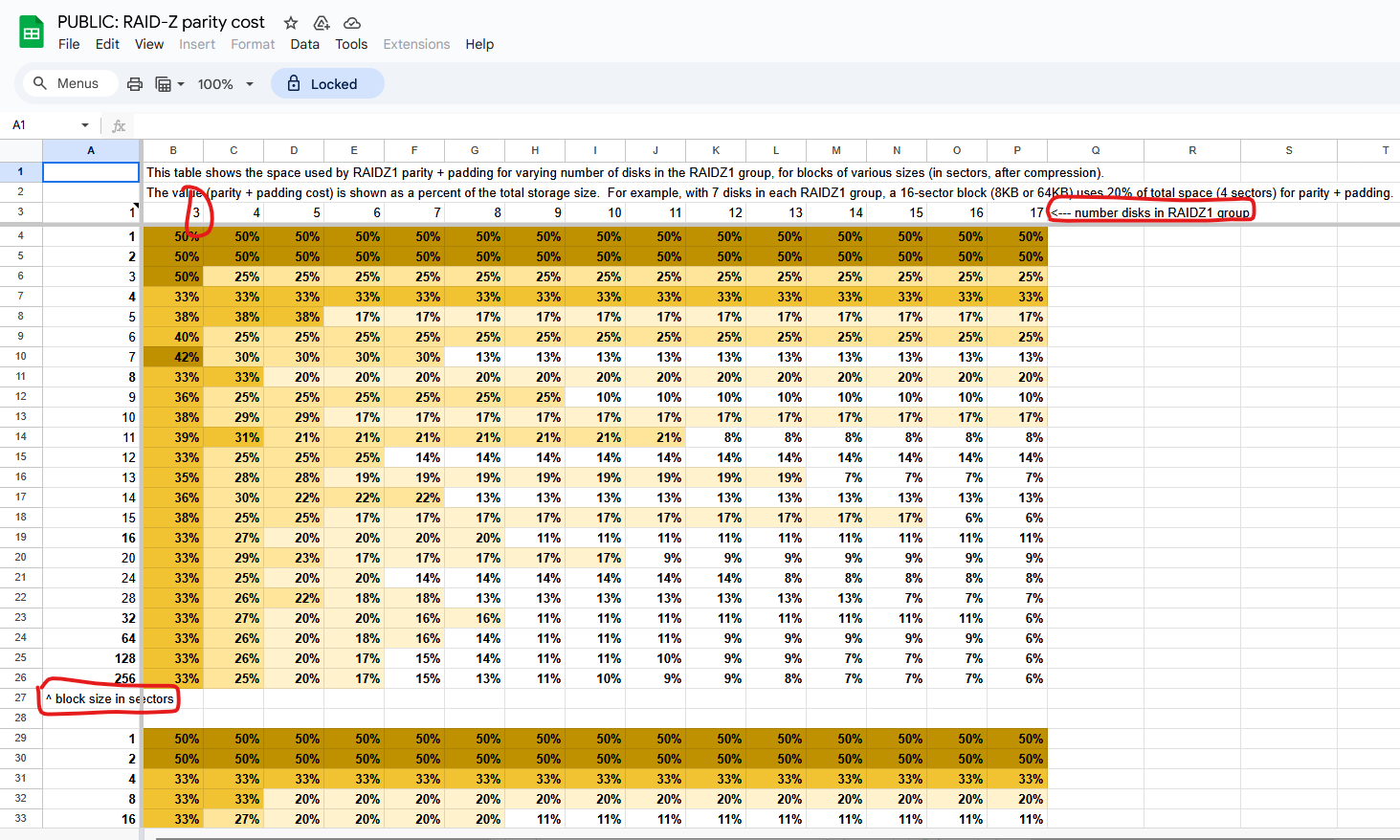
It literally tells you that the top row is the number of disks in the raidz(1) “group”
You will note that the FIRST entry, in that table, is a minimum of three disks in said raidz(1) “group”.
-
When would you ever write only one sector?
-
“What do you get for a one sector write for one drive?”
That’s also not what first column says neither.
It literally tells you that the first column is “block size in sectors”.
That’s not the same thing as writing only one sector. That’s you writing one block, where each block is one sector wide.
Since you went from 1 → 2 → 3, I can only surmise that you were reading down the column rather than across (to increase the number of drives), and therefore; what you’re writing about is where you changed the block size from being one drive sector, to two drive sectors, to three drive sectors, etc.
If your recordsize is 128k and your phy/logical sector size is 4k, then automatically, you’re already looking at row 23 for where the “block size” (which I am interpreting to mean recordsize (expressed as a function of number of sectors), is 32 physical/logical sectors per record.
To get your raidz pool to use 1, 2, or 3 physical/logical sectors per record, you’d have to set the recordsize to be 4k, 8k, and 12k respectively, to make that happen, which, I don’t know of anybody who is actively doing that. (Why would they?)
Again, you just stated that you are assuming the Proxmox defaults, and with that, if you create the ZFS pool/array via the Proxmox GUI, it defaults to an ashift=12 (4 kiB logical sector size, the physical sector size will depend on your drive itself), and a recordsize of 128 kiB.
So why would you declare that you’re talking about the “Proxmox defaults” when the only way to set the recordsize to equal 1 physical/logical sector size of 4 kiB would be to interfere with said defaults???
You’re proving my point for me, about how you would make comments that only suit your purposes of the argument, whilst even contradicting yourself.
If you’re using the Proxmox (GUI) defaults, then you can’t have a recordsize of 4k, 8k, nor 12k, respectively. So which is it? Are you using the Proxmox (GUI) defaults, or are you doing something else that’s entirely different from said Proxmox (GUI) defaults?
(BTW, even if you created your ZFS pool via the CLI zpool create ..., that too, also defaults to a recordsize of 128k as well. So even if you did it via the CLI, to get a recordsize = 4k, 8k, or 12k respectively, you’d have to explicitly specify that in your zpool create command and/or you’d have to immediately issue the zfs set command right after you create the pool to change the recordsize from the 128k default to either 4k, 8k, or 12k in your example here.)
If your recordsize is 128 kiB and your drive’s physical/logical sector size is 512 B, and you’ve aligned your ashift=9, then 128*1024/512 = 256 sectors per “block” (i.e. record).
Therefore; if that is the case, because of the drives that you’re using, from the same spreadsheet, you’re automatically looking at the results for row 26 where you have 256 sectors per block.
Thus, when you go from 3 drives in a raidz(1) pool (33%) to 4 drives (25%), to 5 drives (20%), you are being more space efficient as you increase the number of drives in said raidz1 pool.
The same holds true for row 23, which would have been what you would’ve gotten, if you left the recordsize at the 128k default, and you’re using 4k physical/logical drives (or you’re using 512 physical/logical drives, but you’re using ashift=12), going from 3 drives in the raidz(1) pool (33%), to 4 drives (27%), to 5 drive (20%) still hold that statement as being true.
But again – you say that you assume the Proxmox defaults, and then talk about conditions that are anything but.
In your example, you added the padding.
If you didn’t add the padding, then the resulting picture at the end of your example, would be very different than if you added said padding.
Try it.
I understand how traditional RAID works, as I have already previously cited (to you, which again, you don’t read, so what else is new?).
In Matt Ahrens’ presentation, he talks about sub-size/degenerate records, therefore; they’re allowed to exist, even if they’re not liked/preferred, but you can have them present in the ZFS spacemap.
Therefore; given that, in your first case where you had 3 drive raidz, and where you state:
If you allow this to be a sub-size/degenerate record, then you don’t need to add the padding.
What the heck is a “512n” drive? According to the OpenZFS documentation:
“The sector size on all storage devices was 512-bytes prior to the creation of flash-based solid state drives.”
(Source: Workload Tuning — OpenZFS documentation)
LOL(?)…
“overpriced”
Even you noted that the drives that I am using are:
“You were lucky. These are 512e.”
You can buy HDN726060ALE614 for as little as $70 a pop.
You can pick up a HDN726060ALE610 for $60.
And you can pick up HUS726060ALE610 also for $70 a pop.
So, no, they’re not terribly expensive, but they’re also not the most cost efficient anymore neither. (They had better cost efficiency back in like 2018 when I originally built my NAS back then.)
(The last time that I ran the price/capacity cost efficiency optimisation study was just shy of a year ago, and back then, the 12 TB came out as the most cost efficient solution. The cost efficiency changes semi-regularly.)
You just proved it with the two free blocks that you can’t do anything with, as you mentioned.
Therefore; pursuant to the calculation of free space fragmentation, the 2-free-block-wide would be used to calculate said free space fragmentation.
You need to do a better job at reading (from Oct 2024). (given that it is clearly evident that you don’t read)
It would appear that spelling isn’t your forte neither.
*divide
But again, this ignores what Matt Ahrens presented in the case of sub-size/degenerate records, because once again, it is vastly easier for you to just outright ignore the things that doesn’t conform to your pre-determined worldview/mental model.
(because if you allow sub-size/degenerate records, per Matt Ahrens’ explanation, then what @ThisMightBeAFish wrote won’t hold true 100% of the time anymore)
That is, quite literally, the only thing that you care about.
LOL…LMAO…
(even though, you’ve been proven wrong yourself, on numerous occasions, but according to you “nevermind that. We don’t talk about that.”)
LOL…LMAO…
(*This only works if you ignore the things that make you wrong as well, like sub-size/degenerate records that was already covered by Matt Ahrens in his presentation/video.)
LOL…LMAO…
You got me. ONCE.
Meanwhile, you couldn’t even read, comprehend, interpret, and regurgitate the very same spreadsheet that you, yourself, cite.
LOL…LMAO…
But yes, let’s focus on the one thing that I am wrong about (vs. your errors that I have been calling out since October 2024 at minimum).
(If you’re going to focus on the one thing that I am wrong about, the least that you can do, is to make sure that you are reading, comprehending, interpreting, and regurgitating the very spreadsheet that you cite, back, properly, and making sure that you aren’t making any mistakes when you regurgitate that. But even as simple as just reading and interpreting a spreadsheet, you couldn’t even do that without making mistakes. Plural. But yes, let’s focus on the one thing that I got wrong.)
LOLLLL
What a joke.