Dmesg looks ok I guess. I see no smoking gun
boot:
dmesg |grep -i -e xe -e iommu
[    0.000000] Command line: BOOT_IMAGE=/root/boot/vmlinuz-6.17.3-gentoo-dist root=UUID=bcebfd65-8733-4001-84eb-a49b68353f23 ro rootflags=subvol=root rootflags=compress=zstd console=ttyS0,115200 console=tty1 quiet iommu=pt intel_iommu=on
[    0.000000] NX (Execute Disable) protection: active
[    0.000555] MTRR map: 5 entries (3 fixed + 2 variable; max 23), built from 10 variable MTRRs
[    0.218946] Kernel command line: BOOT_IMAGE=/root/boot/vmlinuz-6.17.3-gentoo-dist root=UUID=bcebfd65-8733-4001-84eb-a49b68353f23 ro rootflags=subvol=root rootflags=compress=zstd console=ttyS0,115200 console=tty1 quiet iommu=pt intel_iommu=on
[    0.219001] DMAR: IOMMU enabled
[    0.486127] DMAR-IR: IOAPIC id 2 under DRHD base  0xfed91000 IOMMU 0
[    0.495289] ... fixed-purpose events:   4
[    0.009692] ... fixed-purpose events:   3
[    0.760545] pci 0000:00:1f.4: BAR 4 [io  0xefa0-0xefbf]
[    0.781985] iommu: Default domain type: Passthrough (set via kernel command line)
[    0.835116] pci 0000:00:00.0: Adding to iommu group 0
[    0.835130] pci 0000:00:01.0: Adding to iommu group 1
[    0.835140] pci 0000:00:06.0: Adding to iommu group 2
[    0.835149] pci 0000:00:0a.0: Adding to iommu group 3
[    0.835159] pci 0000:00:0e.0: Adding to iommu group 4
[    0.835175] pci 0000:00:14.0: Adding to iommu group 5
[    0.835183] pci 0000:00:14.2: Adding to iommu group 5
[    0.835203] pci 0000:00:15.0: Adding to iommu group 6
[    0.835212] pci 0000:00:15.1: Adding to iommu group 6
[    0.835220] pci 0000:00:15.2: Adding to iommu group 6
[    0.835232] pci 0000:00:16.0: Adding to iommu group 7
[    0.835240] pci 0000:00:17.0: Adding to iommu group 8
[    0.835257] pci 0000:00:1a.0: Adding to iommu group 9
[    0.835279] pci 0000:00:1b.0: Adding to iommu group 10
[    0.835289] pci 0000:00:1b.4: Adding to iommu group 11
[    0.835311] pci 0000:00:1c.0: Adding to iommu group 12
[    0.835321] pci 0000:00:1c.1: Adding to iommu group 13
[    0.835339] pci 0000:00:1c.2: Adding to iommu group 14
[    0.835354] pci 0000:00:1d.0: Adding to iommu group 15
[    0.835370] pci 0000:00:1d.4: Adding to iommu group 16
[    0.835395] pci 0000:00:1f.0: Adding to iommu group 17
[    0.835404] pci 0000:00:1f.3: Adding to iommu group 17
[    0.835414] pci 0000:00:1f.4: Adding to iommu group 17
[    0.835424] pci 0000:00:1f.5: Adding to iommu group 17
[    0.835435] pci 0000:01:00.0: Adding to iommu group 18
[    0.835447] pci 0000:02:01.0: Adding to iommu group 19
[    0.835458] pci 0000:02:02.0: Adding to iommu group 20
[    0.835656] pci 0000:03:00.0: Adding to iommu group 21
[    0.835667] pci 0000:04:00.0: Adding to iommu group 22
[    0.835677] pci 0000:05:00.0: Adding to iommu group 23
[    0.835694] pci 0000:06:00.0: Adding to iommu group 24
[    0.835731] pci 0000:08:00.0: Adding to iommu group 25
[    0.835759] pci 0000:08:00.1: Adding to iommu group 26
[    0.835769] pci 0000:0a:00.0: Adding to iommu group 27
[    0.835787] pci 0000:0b:00.0: Adding to iommu group 28
[    0.835798] pci 0000:0d:00.0: Adding to iommu group 29
[    1.084349] evm: security.SMACK64EXEC (disabled)
[   22.351788] RAPL PMU: API unit is 2^-32 Joules, 2 fixed counters, 655360 ms ovfl timer
[   22.616288] xe 0000:03:00.0: vgaarb: deactivate vga console
[   22.616488] xe 0000:03:00.0: [drm] Running in SR-IOV PF mode
[   22.616554] xe 0000:03:00.0: [drm] Found battlemage (device ID e212) discrete display version 14.01 stepping B0
[   22.618290] xe 0000:03:00.0: [drm] VISIBLE VRAM: 0x0000004000000000, 0x0000000400000000
[   22.618314] xe 0000:03:00.0: [drm] VRAM[0, 0]: Actual physical size 0x0000000400000000, usable size exclude stolen 0x00000003fb000000, CPU accessible size 0x00000003fb000000
[   22.618315] xe 0000:03:00.0: [drm] VRAM[0, 0]: DPA range: [0x0000000000000000-400000000], io range: [0x0000004000000000-43fb000000]
[   22.618317] xe 0000:03:00.0: [drm] Total VRAM: 0x0000004000000000, 0x0000000400000000
[   22.618319] xe 0000:03:00.0: [drm] Available VRAM: 0x0000004000000000, 0x00000003fb000000
[   22.649996] xe 0000:03:00.0: vgaarb: VGA decodes changed: olddecodes=io+mem,decodes=none:owns=none
[   22.651667] Loading firmware: xe/bmg_guc_70.bin
[   22.653487] xe 0000:03:00.0: [drm] GT0: Using GuC firmware from xe/bmg_guc_70.bin version 70.49.4
[   22.663595] xe 0000:03:00.0: [drm] Finished loading DMC firmware i915/bmg_dmc.bin (v2.6)
[   22.753188] xe 0000:03:00.0: [drm] GT0: ccs1 fused off
[   22.753191] xe 0000:03:00.0: [drm] GT0: ccs2 fused off
[   22.753192] xe 0000:03:00.0: [drm] GT0: ccs3 fused off
[   22.773001] Loading firmware: xe/bmg_guc_70.bin
[   22.773274] xe 0000:03:00.0: [drm] GT1: Using GuC firmware from xe/bmg_guc_70.bin version 70.49.4
[   22.774574] Loading firmware: xe/bmg_huc.bin
[   22.783196] xe 0000:03:00.0: [drm] GT1: Using HuC firmware from xe/bmg_huc.bin version 8.2.10
[   22.794083] xe 0000:03:00.0: [drm] GT1: vcs1 fused off
[   22.794084] xe 0000:03:00.0: [drm] GT1: vcs3 fused off
[   22.794084] xe 0000:03:00.0: [drm] GT1: vcs4 fused off
[   22.794085] xe 0000:03:00.0: [drm] GT1: vcs5 fused off
[   22.794085] xe 0000:03:00.0: [drm] GT1: vcs6 fused off
[   22.794086] xe 0000:03:00.0: [drm] GT1: vcs7 fused off
[   22.794087] xe 0000:03:00.0: [drm] GT1: vecs2 fused off
[   22.794087] xe 0000:03:00.0: [drm] GT1: vecs3 fused off
[   22.830815] xe 0000:03:00.0: [drm] Registered 4 planes with drm panic
[   22.830817] [drm] Initialized xe 1.1.0 for 0000:03:00.0 on minor 0
[   22.909706] xe 0000:03:00.0: [drm] Cannot find any crtc or sizes
[   22.931152] xe 0000:03:00.0: [drm] Using mailbox commands for power limits
[   22.931580] xe 0000:03:00.0: [drm] PL2 is supported on channel 0
[   22.948269] Creating 4 MTD partitions on "xe.nvm.768":
[   22.948288] 0x000000000000-0x000000001000 : "xe.nvm.768.DESCRIPTOR"
[   22.949358] 0x000000001000-0x00000054e000 : "xe.nvm.768.GSC"
[   22.950417] 0x00000054e000-0x00000074e000 : "xe.nvm.768.OptionROM"
[   22.952163] 0x00000074e000-0x00000075e000 : "xe.nvm.768.DAM"
[   23.069783] xe 0000:03:00.0: [drm] Cannot find any crtc or sizes
[   23.069796] snd_hda_intel 0000:04:00.0: bound 0000:03:00.0 (ops lmtt_ml_ops [xe])
[   23.149837] xe 0000:03:00.0: [drm] Cannot find any crtc or sizes
Enabling SR-IOV
[  199.129212] xe 0000:03:00.0: [drm] GT0: PF: VF1..VF2 provisioned with 2090348544 (1.95 GiB) GGTT
[  199.129952] xe 0000:03:00.0: [drm] GT0: PF: VF1..VF2 provisioned with 8468299776 (7.89 GiB) LMEM
[  199.130115] xe 0000:03:00.0: [drm] GT0: PF: VF1..VF2 provisioned with 32639 GuC context IDs
[  199.130245] xe 0000:03:00.0: [drm] GT0: PF: VF1..VF2 provisioned with 128 GuC doorbell IDs
[  199.130479] xe 0000:03:00.0: [drm] GT1: PF: VF1..VF2 provisioned with 32639 GuC context IDs
[  199.130604] xe 0000:03:00.0: [drm] GT1: PF: VF1..VF2 provisioned with 128 GuC doorbell IDs
[  199.232681] pci 0000:03:00.1: [8086:e212] type 00 class 0x030000 PCIe Endpoint
[  199.233181] pci 0000:03:00.1: Adding to iommu group 30
[  199.233203] pci 0000:03:00.1: vgaarb: no bridge control possible
[  199.233207] pci 0000:03:00.1: vgaarb: VGA device added: decodes=io+mem,owns=none,locks=none
[  199.233213] xe 0000:03:00.0: vgaarb: VGA decodes changed: olddecodes=none,decodes=none:owns=io
[  199.233457] xe 0000:03:00.1: enabling device (0000 -> 0002)
[  199.234809] xe 0000:03:00.1: [drm] Running in SR-IOV VF mode
[  199.236592] xe 0000:03:00.1: [drm] VF: migration not supported by this module version
[  199.239088] xe 0000:03:00.1: [drm] VISIBLE VRAM: 0x0000004400000000, 0x0000000200000000
[  199.239119] xe 0000:03:00.1: [drm] VRAM[0, 0]: Actual physical size 0x00000001f8c00000, usable size exclude stolen 0x00000001f8c00000, CPU accessible size 0x00000001f8c00000
[  199.239131] xe 0000:03:00.1: [drm] VRAM[0, 0]: DPA range: [0x0000000000000000-1f8c00000], io range: [0x0000004400000000-45f8c00000]
[  199.239143] xe 0000:03:00.1: [drm] Total VRAM: 0x0000004400000000, 0x00000001f8c00000
[  199.239150] xe 0000:03:00.1: [drm] Available VRAM: 0x0000004400000000, 0x00000001f8c00000
[  199.293150] xe 0000:03:00.1: [drm] GT0: ccs1 fused off
[  199.293153] xe 0000:03:00.1: [drm] GT0: ccs2 fused off
[  199.293154] xe 0000:03:00.1: [drm] GT0: ccs3 fused off
[  199.303425] xe 0000:03:00.1: [drm] GT1: vcs1 fused off
[  199.303432] xe 0000:03:00.1: [drm] GT1: vcs3 fused off
[  199.303435] xe 0000:03:00.1: [drm] GT1: vcs4 fused off
[  199.303438] xe 0000:03:00.1: [drm] GT1: vcs5 fused off
[  199.303441] xe 0000:03:00.1: [drm] GT1: vcs6 fused off
[  199.303444] xe 0000:03:00.1: [drm] GT1: vcs7 fused off
[  199.303448] xe 0000:03:00.1: [drm] GT1: vecs2 fused off
[  199.303451] xe 0000:03:00.1: [drm] GT1: vecs3 fused off
[  199.310435] [drm] Initialized xe 1.1.0 for 0000:03:00.1 on minor 1
[  199.310541] pci 0000:03:00.2: [8086:e212] type 00 class 0x030000 PCIe Endpoint
[  199.310649] pci 0000:03:00.2: Adding to iommu group 31
[  199.310655] pci 0000:03:00.2: vgaarb: no bridge control possible
[  199.310655] pci 0000:03:00.2: vgaarb: VGA device added: decodes=io+mem,owns=none,locks=none
[  199.310657] xe 0000:03:00.0: vgaarb: VGA decodes changed: olddecodes=none,decodes=none:owns=io
[  199.310686] xe 0000:03:00.2: enabling device (0000 -> 0002)
[  199.311407] xe 0000:03:00.2: [drm] Running in SR-IOV VF mode
[  199.311854] xe 0000:03:00.2: [drm] VF: migration not supported by this module version
[  199.313024] xe 0000:03:00.2: [drm] VISIBLE VRAM: 0x0000004600000000, 0x0000000200000000
[  199.313027] xe 0000:03:00.2: [drm] VRAM[0, 0]: Actual physical size 0x00000001f8c00000, usable size exclude stolen 0x00000001f8c00000, CPU accessible size 0x00000001f8c00000
[  199.313028] xe 0000:03:00.2: [drm] VRAM[0, 0]: DPA range: [0x0000000000000000-1f8c00000], io range: [0x0000004600000000-47f8c00000]
[  199.313030] xe 0000:03:00.2: [drm] Total VRAM: 0x0000004600000000, 0x00000001f8c00000
[  199.313031] xe 0000:03:00.2: [drm] Available VRAM: 0x0000004600000000, 0x00000001f8c00000
[  199.360690] xe 0000:03:00.2: [drm] GT0: ccs1 fused off
[  199.360692] xe 0000:03:00.2: [drm] GT0: ccs2 fused off
[  199.360693] xe 0000:03:00.2: [drm] GT0: ccs3 fused off
[  199.365371] xe 0000:03:00.2: [drm] GT1: vcs1 fused off
[  199.365373] xe 0000:03:00.2: [drm] GT1: vcs3 fused off
[  199.365373] xe 0000:03:00.2: [drm] GT1: vcs4 fused off
[  199.365374] xe 0000:03:00.2: [drm] GT1: vcs5 fused off
[  199.365374] xe 0000:03:00.2: [drm] GT1: vcs6 fused off
[  199.365375] xe 0000:03:00.2: [drm] GT1: vcs7 fused off
[  199.365375] xe 0000:03:00.2: [drm] GT1: vecs2 fused off
[  199.365376] xe 0000:03:00.2: [drm] GT1: vecs3 fused off
[  199.369348] [drm] Initialized xe 1.1.0 for 0000:03:00.2 on minor 2
[  199.369463] xe 0000:03:00.0: [drm] PF: Enabled 2 of 12 VFs
Launching VM with gpu VF (split locks appear only during boot and are probably harmless)
[  275.004488] VFIO - User Level meta-driver version: 0.3
[  275.427739] vfio-pci 0000:03:00.1: vgaarb: VGA decodes changed: olddecodes=io+mem,decodes=io+mem:owns=none
[  275.476285] tun: Universal TUN/TAP device driver, 1.6
[  275.477430] brvl5: port 2(vnet0) entered blocking state
[  275.477439] brvl5: port 2(vnet0) entered disabled state
[  275.477451] vnet0: entered allmulticast mode
[  275.477551] vnet0: entered promiscuous mode
[  275.477729] brvl5: port 2(vnet0) entered blocking state
[  275.477733] brvl5: port 2(vnet0) entered forwarding state
[  275.534685] /proc/cgroups lists only v1 controllers, use cgroup.controllers of root cgroup for v2 info
[  277.008666] vfio-pci 0000:03:00.1: enabling device (0000 -> 0002)
[  277.008674] vfio-pci 0000:03:00.1: resetting
[  277.009012] xe 0000:03:00.0: [drm] GT0: PF: VF1 FLR
[  277.009051] xe 0000:03:00.0: [drm] GT1: PF: VF1 FLR
[  277.112155] vfio-pci 0000:03:00.1: reset done
[  277.118904] vfio-pci 0000:03:00.1: resetting
[  277.119019] xe 0000:03:00.0: [drm] GT0: PF: VF1 FLR
[  277.119113] xe 0000:03:00.0: [drm] GT1: PF: VF1 FLR
[  277.225621] vfio-pci 0000:03:00.1: reset done
[  285.058483] x86/split lock detection: #AC: CPU 0/KVM/12879 took a split_lock trap at address: 0x758c86cf
[  285.068735] x86/split lock detection: #AC: CPU 1/KVM/12880 took a split_lock trap at address: 0x758c86cf
[  285.140418] x86/split lock detection: #AC: CPU 3/KVM/12882 took a split_lock trap at address: 0x758c86cf
[  285.525710] x86/split lock detection: #AC: CPU 2/KVM/12881 took a split_lock trap at address: 0x758c6379
and that’s it for dmesg.
This time I’ve launched single VM with 8GB of vram
I’ve managed to launch System shock remake, played for few minutes. Lag happened in game and the game crashed (windows and other programs were fine). There were no dmesg messages or errors.
Machine:
CPU: intel i5 13500
Mobo: asus prime z790-p ddr5
RAM: CMK192GX5M4B5200C38 (4x48GB @ 3600MT/s) 192GB
Corsair rm550x 550W PSU
OS: gentoo
Kernel: 6.17.3-gentoo-dist
Qemu: 9.2.3-r3 ( I’ve also tested 10.0.5 )
Libvirt: 11.1.0
I have been using it as a hypervisor for about a year and it has been rock solid ( on 3600 MT/s ram settings). Right now it’s just a test system.
Maybe next month I’ll have some spare hardware and time to test B50 on actual proxmox. But I’m skeptical since basic building blocks are mostly the same.
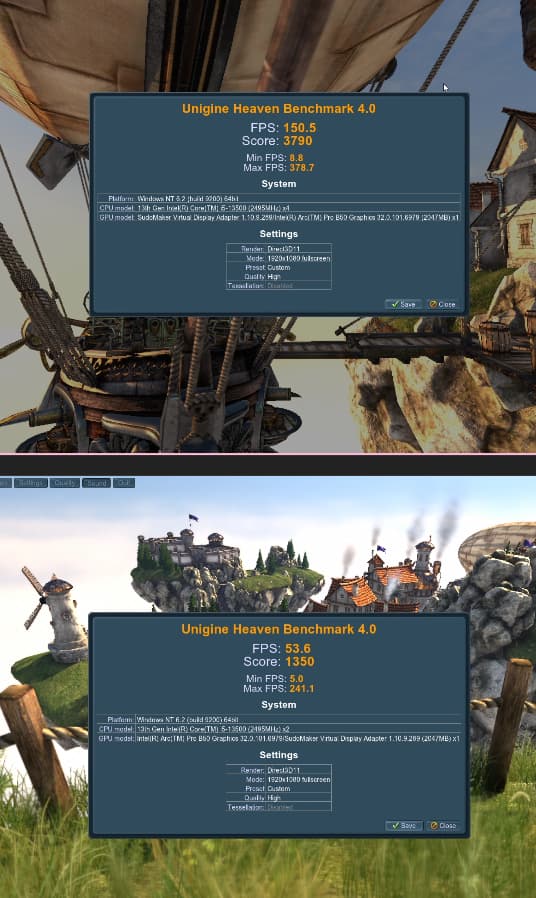
I’ve tested also older heaven benchmark you used.
It’s more stable, I had only one crash. 2nd VM has 1/3 of the FPS without using window moving trick you showed.
I’ll run heaven or valley bencmark overnight on non-SR-IOV B50 VM to test how stable it is in more normal scenario.