Perhaps I misunderstand you, but this is exactly what I am seeing with SR-IOV. I can floor the GPU compute on any VM, and if multiple want to use resources at the same time it gets divided up between them. For a test I ran the media encoder in two vms while running heaven bench in a third and minus some hitching on the framerate in heaven, it successfully shared the GPU resources.
I got it to work after realizing how vital the firmware is. Seriously, run it in a Windows VM exclusively, or install it on a Windows PC’s Bare Metal, and make sure to install the latest Intel Drivers. You will see an Updating Firmware message.e It will not work without this step.
However. I have an issue where, no matter how many slices I divide the Pro B50 into ( echo 4 or any number in sriov_numvfs), they always result in 2GB chunks. When I check lspci I see:
Kernel driver in use: xe
Kernel modules: xe
I am pretty sure it should be “Kernel driver in use: vfio-pci”. Otherwise, I don’t know what I am doing wrong here. Is there a Grub Parameter or something else I need? I feel I am missing just one step, and I will be good as gold!!!
This card is installed in a Lenovo P620 3995WX / 512GB ECC 8 Channels. PCIE slot 5, SR-IOV, AMD Secure Virtualization Stuff, and IOMMU are all on and working. Latest i915-sriov-dkms (3 Days old) installed and confirmed working. I can use the card with SR-IOV, but it is limited to 2GB. GRUB is set to defaults, and IOMMU is enabled in GRUB with the two usual switches.
Thanks in advance for the assistance.
2 Likes
try rmmod xe then echo 0 > numvfs then echo 4 > numvfs ?
Just got it working too on my Epyc 7452/ASRockRack RomeD8-2T, although a bit stuttery in Heaven as mentioned. Min at 7 fps, max at 199, avg 33.
Mine also had a 2GB chunk of vmem. Will try rmmod now.
Edit:
rmmod: ERROR: Module xe is in use
xe driver isn’t blacklisted btw
Edit 2:
I’m running Proxmox 9 with 6.17 kernel
vfio-pci doesn’t bind to a device until you actually launch a vm with that device attached (and after killing the vm it should generally unbind as well). i suppose vfio-pci.ids can also bind the driver before you try to run a vm, but its usually not needed.
i also always see 2GB of vram on the virtual fns. i did find some documentation about flex cards being able to choose different profiles, but i don’t see anything matching that for these cards yet.
You can try manually unbinding the VF from the driver and binding it to vfio-pci. First, use lspci -nn to get the PCI Address, VendorID and DeviceID (The last two numbers in brackets that -nn adds, like [8086:4680]) of the VF. Then unbind, and bind it to vfio-pci. This is how it looks on my Alder Lake with SR-IOV for the IGP, should also be applicable to this:
echo 0000:00:02.1 > /sys/bus/pci/devices/0000:00:02.1/driver/unbind
echo 8086 4680 > /sys/bus/pci/drivers/vfio-pci/new_id
is it your primary gpu? that’ll be problematic if so
No, I use the BMC if trouble arises. Rest is through SSH or Proxmox web ui.
Anyone else getting Error 43 in Windows 11 25H2? According to Tyan ReBar support is enabled by default on this mobo.
B50 is using the vfio-pci driver. I tried a clean install and pulled the intel driver/firmware package before I even attached the gpu and installed in a air gap to no avail(So windows update doesn’t cause any issues).
The only thing I haven’t tried is updating the firmware from a bare metal windows instance since I don’t have a machine to do it on but I’m going to building another computer this weekend in a last ditch effort to get this working.
System specs:
EPYC 7302P
Tyan S8030
Proxmox 9 with 6.17 kernel
I’m not missing anything in Proxmox 8.4.x currently, so I am probably going to let this one mellow for a bit.
That said, I am running it for server purposes, not for client or anything that requires a GPU. I’ve played around with GPU forwarding in KVM before, and while it is a cool concept, I’ve generally found it to be more trouble than it is worth. I’d rather just run any system that requires a GPU as a standalone box.
I’m of the opinion that when stability and security are a consideration, I’d rather be on the most tested version that is still supported, so I’ll likely ride 8.4 into the sunset, let everyone else run into the problems first, let them be fixed, and then upgrade in August 2026 when 8.4 goes EOL.
This is what I have done for every previous version, and it is what I do for all of my guest OS:es as well. Oldest still supported variant is always what I run, unless I absolutely need one of the features from the newer variant.
It’s good to hear that at least the compute sounds like it’s not divided up but most of the comments here also talk about hard divisions in VRAM which would also be inconvenient for switching between VMs running high VRAM usage applications.
It’s great to see these updates! Let’s hope development stabilizes and more official releases are released. In our use case, we have something we’re not seeing in many examples: the use of Intel Arc outside of Windows. We want to use them primarily for inferences with Ollama on Ubuntu Server virtualized with Proxmox 9.0. Do you have any experience or have you achieved something similar? It’s a combination of Linux and Ollama with little support for Intel…
Official proxmox kernel 6.17 is now available as opt in option: Opt-in Linux 6.17 Kernel for Proxmox VE 9 available on test & no-subscription | Proxmox Support Forum
4 Likes
Seems to be working well, The windows update requirement for the firmware had me tripped up for a minute. I did have one Windows VM today that just crashed out hard, Proxmox showed a internal VM error, along with the following in the log. Reset the VM and so far so good.
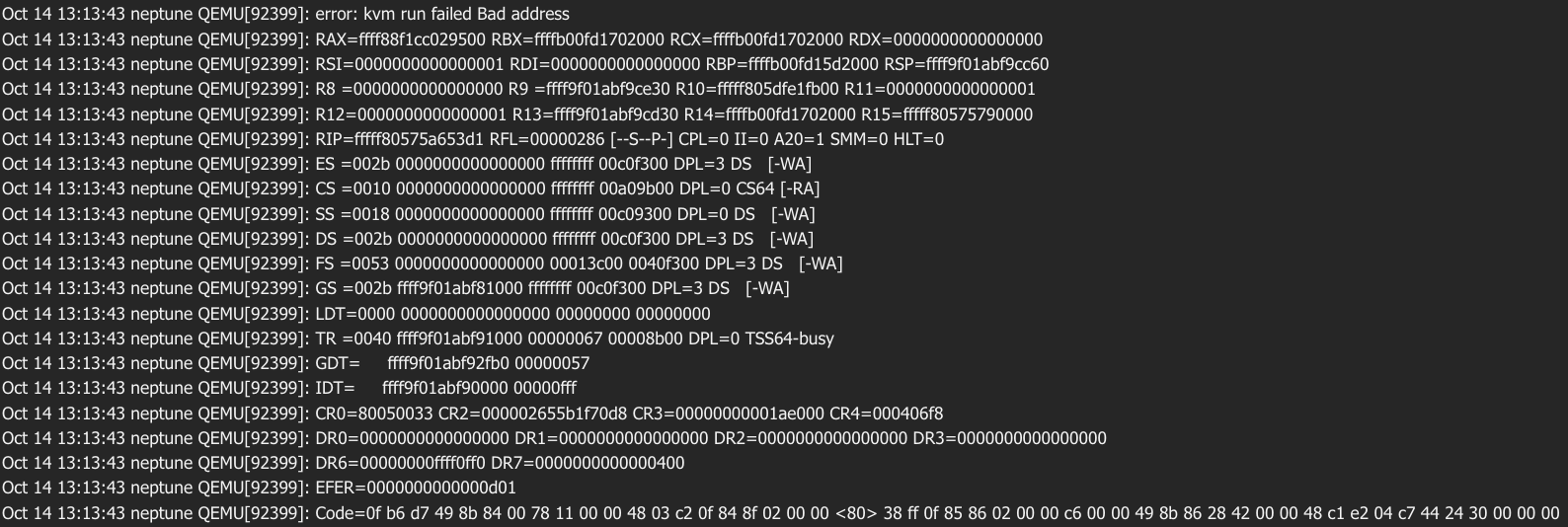
So i am currently having issue with. Everything works like it should until the start of the VM. Then vf’s are being just removed on VM start.
VM Log:
Use of uninitialized value $name in concatenation (.) or string at /usr/share/perl5/PVE/SysFSTools.pm line 324.
Use of uninitialized value $name in concatenation (.) or string at /usr/share/perl5/PVE/SysFSTools.pm line 324.
failed to reset PCI device '0000:03:00.1', but trying to continue as not all devices need a reset
kvm: -device vfio-pci,host=0000:03:00.1,id=hostpci1,bus=ich9-pcie-port-2,addr=0x0: vfio /sys/bus/pci/devices/0000:03:00.1: no such host device: No such file or directory
PCI device mapping invalid (hardware probably changed): pci device '0000:03:00.1' not found

TASK ERROR: start failed: QEMU exited with code 1
System Log:
[44498.041252] vfio-pci 0000:81:00.0: resetting
[44498.403397] vfio-pci 0000:81:00.0: reset done
[44498.779284] xe 0000:03:00.0: vgaarb: VGA decodes changed: olddecodes=none,decodes=none:owns=io
[44498.779660] xe 0000:03:00.0: vgaarb: VGA decodes changed: olddecodes=none,decodes=none:owns=io
[44500.771691] xe 0000:03:00.0: [drm] PF: Disabled 2 VFs
[44500.772546] Deleting MTD partitions on "xe.nvm.768":
[44500.772550] Deleting xe.nvm.768.DESCRIPTOR MTD partition
[44500.772912] Deleting xe.nvm.768.GSC MTD partition
[44500.773098] Deleting xe.nvm.768.OptionROM MTD partition
[44500.773296] Deleting xe.nvm.768.DAM MTD partition
[44500.915210] xe 0000:03:00.0: [drm] *ERROR* GT1: TLB invalidation request failed (-ENODEV)
[44500.915269] xe 0000:03:00.0: [drm] PF: LMTT0 invalidation failed (-ENODEV)
[44500.915283] xe 0000:03:00.0: [drm] *ERROR* GT1: TLB invalidation request failed (-ENODEV)
[44500.915330] xe 0000:03:00.0: [drm] PF: LMTT0 invalidation failed (-ENODEV)
[44500.915343] xe 0000:03:00.0: [drm] *ERROR* GT1: TLB invalidation request failed (-ENODEV)
[44500.915399] xe 0000:03:00.0: [drm] PF: LMTT0 invalidation failed (-ENODEV)
[44500.915412] xe 0000:03:00.0: [drm] *ERROR* GT1: TLB invalidation request failed (-ENODEV)
[44500.915448] xe 0000:03:00.0: [drm] PF: LMTT0 invalidation failed (-ENODEV)
[44500.915461] xe 0000:03:00.0: [drm] *ERROR* GT1: TLB invalidation request failed (-ENODEV)
[44500.915497] xe 0000:03:00.0: [drm] PF: LMTT0 invalidation failed (-ENODEV)
[44500.915510] xe 0000:03:00.0: [drm] *ERROR* GT1: TLB invalidation request failed (-ENODEV)
[44500.915546] xe 0000:03:00.0: [drm] PF: LMTT0 invalidation failed (-ENODEV)
[44500.915559] xe 0000:03:00.0: [drm] *ERROR* GT1: TLB invalidation request failed (-ENODEV)
[44500.915597] xe 0000:03:00.0: [drm] PF: LMTT0 invalidation failed (-ENODEV)
[44500.915610] xe 0000:03:00.0: [drm] *ERROR* GT1: TLB invalidation request failed (-ENODEV)
[44500.915647] xe 0000:03:00.0: [drm] PF: LMTT0 invalidation failed (-ENODEV)
[44500.915659] xe 0000:03:00.0: [drm] *ERROR* GT1: TLB invalidation request failed (-ENODEV)
[44500.915700] xe 0000:03:00.0: [drm] PF: LMTT0 invalidation failed (-ENODEV)
[44500.915712] xe 0000:03:00.0: [drm] *ERROR* GT1: TLB invalidation request failed (-ENODEV)
[44500.915753] xe 0000:03:00.0: [drm] PF: LMTT0 invalidation failed (-ENODEV)
[44500.915766] xe 0000:03:00.0: [drm] *ERROR* GT1: TLB invalidation request failed (-ENODEV)
[44500.915804] xe 0000:03:00.0: [drm] PF: LMTT0 invalidation failed (-ENODEV)
[44500.915817] xe 0000:03:00.0: [drm] *ERROR* GT1: TLB invalidation request failed (-ENODEV)
[44500.915856] xe 0000:03:00.0: [drm] PF: LMTT0 invalidation failed (-ENODEV)
[44501.033809] vfio-pci 0000:03:00.0: vgaarb: VGA decodes changed: olddecodes=none,decodes=io+mem:owns=io
I have been trying to figure it out since yesterday but i had no luck. I am running latest proxmox with opt in kernel 6.17.
Are you trying to pass “All Functions” through to the VM? If you accidentally specify that in the PCIE device settings for the guest, it will do exactly this.
iam saving up money for an b60 atm, could some one please test an VM i dont care much which Linux or Windows and can some one please pass an IGPU or another GPU Intel or AMD dont care, trough that VM with one b50/60 VF ? and use the IGPU HDMI or DP port for display out and use the VF as 3d “accelerator” ?  that would be nice to know if that works ^^ it should just work, right? right? or if some has another of those USB to display out dongles like this WAVLINK USB 3.0 zu HDMI Adapter Slim Externe Video Karte Display Monitor unterstützt 2048 × 1152 Auflösung mit Audio Port für Windows 10/8/7/XP – Schwarz: Amazon.de: Computer & Zubehör
Thank you for this note, +1, Windows/a firmware update was needed to enable SR-IOV.
If you’re fighting the card when it should just work, ensure you’ve updated your firmware regardless of what other’s state about their cards working out of the box.
03:00.0 VGA compatible controller: Intel Corporation Battlemage G21 [Intel Graphics] (prog-if 00 [VGA controller])
        Subsystem: Intel Corporation Device 1114
        Flags: bus master, fast devsel, latency 0, IRQ 289, IOMMU group 18
        Memory at 2810000000 (64-bit, prefetchable) [size=16M]
        Memory at 2800000000 (64-bit, prefetchable) [size=256M]
        Expansion ROM at 52000000 [disabled] [size=2M]
        Capabilities: [40] Vendor Specific Information: Len=0c <?>
        Capabilities: [70] Express Endpoint, IntMsgNum 0
        Capabilities: [ac] MSI: Enable+ Count=1/1 Maskable+ 64bit+
        Capabilities: [d0] Power Management version 3
        Capabilities: [100] Alternative Routing-ID Interpretation (ARI)
        Capabilities: [110] Null
        Capabilities: [200] Address Translation Service (ATS)
        Capabilities: [420] Physical Resizable BAR
        Capabilities: [220] Virtual Resizable BAR
        Capabilities: [320] Single Root I/O Virtualization (SR-IOV)
        Capabilities: [400] Latency Tolerance Reporting
        Kernel driver in use: xe
        Kernel modules: xe
Nope, it’s not selected.
Question for people testing their cards on non-proxmox linux systems. What firmware blobs are required for it to work?
I’ve looked into that proxmox kernel repo and it seems to be just normal 6.17 kernel but for proxmox.
sr-iov should work on vanilla kernel, right?
I’ve installed b50 into my test hypervisor box running gentoo.
I’ve tested 6.17.3-gentoo-dist and more vanilla 6.17.3-dist-hardened kernel
I’ve installed also latest linux firmware from main git repo
dmesg shows that gpu is loading these firmware blobs
dmesg | grep -e xe | grep firmware
[   36.006566] xe 0000:03:00.0: [drm] GT0: Using GuC firmware from xe/bmg_guc_70.bin version 70.49.4
[   36.019221] xe 0000:03:00.0: [drm] Finished loading DMC firmware i915/bmg_dmc.bin (v2.6)
[   36.152144] xe 0000:03:00.0: [drm] GT1: Using GuC firmware from xe/bmg_guc_70.bin version 70.49.4
[   36.161491] xe 0000:03:00.0: [drm] GT1: Using HuC firmware from xe/bmg_huc.bin version 8.2.10
all xe related dmesg messages
dmesg | grep -e xe
[    0.000000] NX (Execute Disable) protection: active
[    0.000498] MTRR map: 5 entries (3 fixed + 2 variable; max 23), built from 10 variable MTRRs
[   13.810633] ... fixed-purpose events:   4
[    0.009558] ... fixed-purpose events:   3
[   14.089900] pci 0000:00:1f.4: BAR 4 [io  0xefa0-0xefbf]
[   35.597028] RAPL PMU: API unit is 2^-32 Joules, 2 fixed counters, 655360 ms ovfl timer
[   35.970080] xe 0000:03:00.0: [drm] Found battlemage (device ID e212) discrete display version 14.01 stepping B0
[   35.971335] xe 0000:03:00.0: [drm] VISIBLE VRAM: 0x0000006000000000, 0x0000000400000000
[   35.971401] xe 0000:03:00.0: [drm] VRAM[0, 0]: Actual physical size 0x0000000400000000, usable size exclude stolen 0x00000003fb000000, CPU accessible size 0x00000003fb000000
[   35.971404] xe 0000:03:00.0: [drm] VRAM[0, 0]: DPA range: [0x0000000000000000-400000000], io range: [0x0000006000000000-63fb000000]
[   35.971405] xe 0000:03:00.0: [drm] Total VRAM: 0x0000006000000000, 0x0000000400000000
[   35.971406] xe 0000:03:00.0: [drm] Available VRAM: 0x0000006000000000, 0x00000003fb000000
[   36.006566] xe 0000:03:00.0: [drm] GT0: Using GuC firmware from xe/bmg_guc_70.bin version 70.49.4
[   36.019221] xe 0000:03:00.0: [drm] Finished loading DMC firmware i915/bmg_dmc.bin (v2.6)
[   36.134625] xe 0000:03:00.0: [drm] GT0: ccs1 fused off
[   36.134627] xe 0000:03:00.0: [drm] GT0: ccs2 fused off
[   36.134628] xe 0000:03:00.0: [drm] GT0: ccs3 fused off
[   36.152144] xe 0000:03:00.0: [drm] GT1: Using GuC firmware from xe/bmg_guc_70.bin version 70.49.4
[   36.161491] xe 0000:03:00.0: [drm] GT1: Using HuC firmware from xe/bmg_huc.bin version 8.2.10
[   36.173124] xe 0000:03:00.0: [drm] GT1: vcs1 fused off
[   36.173129] xe 0000:03:00.0: [drm] GT1: vcs3 fused off
[   36.173131] xe 0000:03:00.0: [drm] GT1: vcs4 fused off
[   36.173133] xe 0000:03:00.0: [drm] GT1: vcs5 fused off
[   36.173134] xe 0000:03:00.0: [drm] GT1: vcs6 fused off
[   36.173135] xe 0000:03:00.0: [drm] GT1: vcs7 fused off
[   36.173136] xe 0000:03:00.0: [drm] GT1: vecs2 fused off
[   36.173138] xe 0000:03:00.0: [drm] GT1: vecs3 fused off
[   36.205498] xe 0000:03:00.0: [drm] Registered 4 planes with drm panic
[   36.205506] [drm] Initialized xe 1.1.0 for 0000:03:00.0 on minor 1
[   36.283117] xe 0000:03:00.0: [drm] Cannot find any crtc or sizes
[   36.283925] xe 0000:03:00.0: [drm] Using mailbox commands for power limits
[   36.284313] xe 0000:03:00.0: [drm] PL2 is supported on channel 0
[   36.300797] Creating 4 MTD partitions on "xe.nvm.768":
[   36.300807] 0x000000000000-0x000000001000 : "xe.nvm.768.DESCRIPTOR"
[   36.303558] 0x000000001000-0x00000054e000 : "xe.nvm.768.GSC"
[   36.306367] 0x00000054e000-0x00000074e000 : "xe.nvm.768.OptionROM"
[   36.309264] 0x00000074e000-0x00000075e000 : "xe.nvm.768.DAM"
[   36.442919] xe 0000:03:00.0: [drm] Cannot find any crtc or sizes
[   36.522912] xe 0000:03:00.0: [drm] Cannot find any crtc or sizes
[   36.522919] snd_hda_intel 0000:04:00.0: bound 0000:03:00.0 (ops lmtt_ml_ops [xe])
lspci showsno sr-iov capabilities
lspci -s 03:00.0 -v
03:00.0 VGA compatible controller: Intel Corporation Battlemage G21 [Intel Graphics] (prog-if 00 [VGA controller])
	Subsystem: Intel Corporation Device 1114
	Flags: bus master, fast devsel, latency 0, IRQ 208, IOMMU group 22
	Memory at 84000000 (64-bit, non-prefetchable) [size=16M]
	Memory at 6000000000 (64-bit, prefetchable) [size=16G]
	Expansion ROM at 85000000 [disabled] [size=2M]
	Capabilities: [40] Vendor Specific Information: Intel Capabilities v1
		CapA: Peg60Dis- Peg12Dis- Peg11Dis- Peg10Dis- PeLWUDis- DmiWidth=x4
		     EccDis- ForceEccEn- VTdDis- DmiG2Dis- PegG2Dis- DDRMaxSize=Unlimited
		     1NDis- CDDis- DDPCDis- X2APICEn- PDCDis- IGDis- CDID=0 CRID=0
		     DDROCCAP- OCEn- DDRWrtVrefEn+ DDR3LEn+
		CapB: ImguDis- OCbySSKUCap- OCbySSKUEn- SMTCap- CacheSzCap 0x0
		     SoftBinCap- DDR3MaxFreqWithRef100=Disabled PegG3Dis-
		     PkgTyp- AddGfxEn- AddGfxCap- PegX16Dis- DmiG3Dis- GmmDis-
		     DDR3MaxFreq=2932MHz LPDDR3En-
	Capabilities: [70] Express Endpoint, IntMsgNum 0
	Capabilities: [ac] MSI: Enable+ Count=1/1 Maskable+ 64bit+
	Capabilities: [d0] Power Management version 3
	Capabilities: [100] Alternative Routing-ID Interpretation (ARI)
	Capabilities: [110] Null
	Capabilities: [200] Address Translation Service (ATS)
	Capabilities: [420] Physical Resizable BAR
	Capabilities: [400] Latency Tolerance Reporting
	Kernel driver in use: xe
	Kernel modules: xe
I’ve found GPU’s pcie dir in /sys but it doesn’t contain sriov_numvfs file.
I’ve checked, my bios has enabled resize bar and sr-iov.
I have B50 connected to 16x to cpu slot on asus prime z790-p ddr5 with i5 13500 CPU.
Is there something else I’m missing?