I mean the spec sheet from what I’ve looked at promises nothing in regards to SR-IOV capabilities so it’s unsurprising that Intel can pull off things with not much room for complaints.
So currently I’m having no luck with the 3 MS-01s and my B50s. They all seem to stall even prior to POST. I’ll see if I can update the firmware on the cards in hopes of actually getting the nodes up and running. After that its all about the PVE config.
fwiw these cards do this on some am5 boards pre bios update too. fix is usually board side. ot card side. and it’s also true Intel fw can make a previously posting system not post but due to bugs in the host system not Intel
I had raised that issue with Intel and gave them specific examples to test
double check your bios has resize bar and above 4g decoding enabled
I’m not done yet, and willing to accept this is the early adaptors tax. 
For some additional context, I’m currently running BIOS v1.27, PVE 9 with kernel 6.14.11. I’ve opened a support ticket with Minisforum, as I expect these cards to see increased adoption now that the N3rdware coolers are publicly available.
I’ve already gone through the usual PCIe-related parameters:
- PCIe Link Speed → Forced to Gen3
- ASPM → Disabled as far as possible. I have to boot with a Sparkle Arc A310 (which works flawlessly) to configure this, since the system provides no feedback when the B50 is installed and the option is otherwise completely unavailable in BIOS.
- Above 4G Decoding → Toggled
- SR-IOV → Toggled
- ReBAR → Toggled
All of the above have been tested in multiple enabled/disabled combinations with no change in behavior. The system still hangs before the splash screen appears.
At this point, attention shifts to card firmware, especially given reports from December describing similar behavior on the Intel forums. A BIOS update may ultimately be required, assuming Minisforum is willing to provide one. 
You will want to update your kernel if you plan to use SR-IOV. That probably does not have any relevance to your current issue though. No post is rough.
This is from the official changelogs inside firmware update distributed via LVFS: LVFS: Arc Battlemage B50
You can download the latest firmware .cab file, unpack it and check metadata.xml files.
3 Likes
If it helps at all, I can confirm that I have the b50 card working with a 13th gen MS-01 both plugged directly into the PCIE slot (with no case on) and via oculink using the DEG1.
The tests in my previous post were from an MS-A1 , but just recently got a second card for the MS-01.
The card has the firmware 32.0.101.6979 .
What I can say is that it didnt work for the longest time on the MS-01. In fact I cant really say exactly what worked but at one point I did remove the CMOS battery to reset the BIOS.
If I recall correctly things did start to work after i manually specified GEN3 speed, but i then went back to auto and it still worked after that?
I did explicitly set integrated graphics instead of auto as well.
I know this isnt terribly helpful other than to say it CAN work. I’m on the middle of tests and don’t really want to risk a reboot ATM but I will send you screenshots of my bios when i get a chance.
And to clarify “work” vs “didnt work”. My main problem with it not working was the devices wasnt showing up via lspci nor dmesg from what i could tell. I didnt ever experience freezes or whatnot
I am posting my computer trauma in case it may aid someone still suffering.
In short you should never just trust Intel’s Windows Installer!
I spend three days pulling my hair out and screaming at the computer screen trying to get the B50 to recognize the SR-IOV capability. I had read all the instructions multiple times, watch countless videos on the B50 and SR-IOV. However, nothing I did worked, it was as if it was just ignoring me when it should just work.
I created a windows machine, installed the 6979 drivers, confirmed the drivers with GPU-Z, built and rebuild proxmox many times however nothing worked. What was even more infuriating was the internal motherboard gpu was showing SR-IOV capabilities. When I reach the point that I was screaming at the monitor I tried something different.
I rebuild the Windows machine, downloaded and installed the latest driver 8306. It still said I wanted a further update, so I updated the drivers again. Finally I booted Linux Mint 22.3 from a USB drive. I did not install it, I just ran it from the USB drive.
I immediately opened a terminal and type “sudo lspci -vv” and found that the B50 card finally recognized the SR-IOV capability.
It is true that the VF is limited to 2, however it was working.
Later, I reinstalled the 6979 drivers and the VF went back to 12.
In short, I had to update the drivers to the latest and then downgrade, instead of installing the desire drivers directly.
I hope this helps someone in need.
2 Likes
Nice! I just discovered that my Repo was posted on here. If you checkout my GitHub repo (In the first post), You will see that I have Kernel 6.18 and 6.19 available. I wonder if the newer kernels will help? I only have AMD APU, and Vega 64. So I can’t help with testing.
2 Likes
I’ve successfully enabled 2 VFs with my B50 in Proxmox on a Dell R730XD (does not support reBAR) using the 6.17.4-2-pve kernel. However, I get an error of “not enough MMIO resources for SR-IOV” with the 6.17.9-1-pve kernel. Is anyone else experiencing this?
Two files attached with dmesg output for the B50 PCI address as well as lspci for the B50, one for each of the kernels.
dmesg_6.17.9-1.txt (10.8 KB)
dmesg_6.17.4-2.txt (12.7 KB)
One maybe-a-data-point is the BAR resize errors are different between the two kernel versions, ENOENT vs ENOSPC…
[ 9.791439] xe 0000:85:00.0: [drm] Failed to resize BAR2 to 16384M (-ENOENT). Consider enabling 'Resizable BAR' support in your BIOS
[ 9.781156] xe 0000:85:00.0: [drm] Failed to resize BAR2 to 16384M (-ENOSPC). Consider enabling 'Resizable BAR' support in your BIOS
Directions I followed:
(originally posted this comment in a different thread but I think it belongs in this one)
Uh…I fixed it, apparently! Add this to your kernel command line:
xe.vram_bar_size=-1
It will not attempt to resize the BAR for the GPU, and creation of VFs works again! This may be a fix for all that do not have reBAR support on their platform! If you’re blocked by lack of reBAR support, please try this option and report back.
3 Likes
I will second this.
I didnt catch it until I got my second card . Trying to go directly to 6979 wouldnt work . I tried 3 times and the SRIOV capabilities wouldnt show. I had to install a newer driver (that only included 2 VFs) then drop back to 6979 to get the 12
More SR-IOV functionality coming to Linux in version 7.0
The Intel Xe driver has contiuned enabling more functionality around SR-IOV as well as Shared Virtual Memory (SVM) as part of their Project Battlematrix initiatives and preparing for next-gen Crescent Island AI accelerator hardware. Among the SR-IOV work is SR-IOV PF MERT support, SR-IOV V migration, and other functionality. On the SVM side is multi-device SVM.
3 Likes
SR-IOV V Migration
Is this what I think it is? Live migration support for SR-IOV? Gonna have to do some reading…
This is interesting. I was just doing testing in the area this week. The goal was to see how migration and cloning worked. Here are some findings.
-
Cloning of VM Templates that have a resource mapping for the virtual functions will work assuming you have multiple nodes with the b50 and you’ve added the virtual functions from both nodes to the same resource mapping
-
Similarly migration of powered off VMs will work in the same way
-
When defining the resource mapping you can try enabling “Live Migration Capable (Experimental)” but it won’t even let you power on the VM. It reports that its not capable of V migration. So, live migration isnt possible.


3 Likes
https://www.intel.com/content/www/us/en/download/741626/intel-arc-pro-graphics-windows.html
2025.Q4.R2 (8314) driver is out - I’m away from computer now, unclear from skim of release notes if there is new firmware b50/b60 is in this release?
1 Like
@long.barn4823 There is definitely new B60 firmware which introduces the enablement of SR-IOV - B60 SR-IOV support emerges in latest Arc Pro drivers (7 VFs)
Has card specific firmwares:
~/bmg$ find .
.
./golden-fwcode
./golden-fwcode/bmg_g21_fwupdate_golden.bin
./golden-fwdata
./golden-fwdata/bmg_onix_arkn_intel_arc_pro_b60-b60_config-data_golden.bin
./golden-fwdata/bmg_shangke_ms_intel_arc_pro_b60_dual_48g_gpu1-b60_config-data_golden.bin
./golden-fwdata/bmg_sparkle_dual_b60_passive-b60_config-data_golden.bin
./golden-fwdata/bmg_shangke_ms_intel_arc_pro_b60_dual_48g_gpu2-b60_config-data_golden.bin
./golden-fwdata/bmg_shangke_maxsun_intel_arc_pro_b60_milestone_24g-b60_config-data_golden.bin
./golden-fwdata/bmg_ibc-dws-b93_e212_config-data_golden.bin
./golden-fwdata/bmg_asrock_passive-b60_config-data_golden.bin
./golden-fwdata/bmg_sparkle_b60_blower-b60_config-data_golden.bin
./golden-fwdata/bmg_asrock_creator-b60_config-data_golden.bin
./golden-fwdata/bmg_sparkle_b60__passive-b60_config-data_golden.bin
./opromcode
./opromcode/bmg_OpromCode.bin
./fwcode
./fwcode/bmg_g21_fwupdate.bin
./golden-opromcode
./golden-opromcode/bmg_OpromCode_golden.bin
./golden-opromdata
./golden-opromdata/bmg_e212_1114_config23_golden.bin
./fwdata
./fwdata/bmg_onix_arkn_intel_arc_pro_b60-b60_config-data.bin
./fwdata/bmg_sparkle_b60_blower-b60_config-data.bin
./fwdata/bmg_ibc-dws-b93_e212_config-data.bin
./fwdata/bmg_asrock_creator-b60_config-data.bin
./fwdata/bmg_shangke_maxsun_intel_arc_pro_b60_milestone_24g-b60_config-data.bin
./fwdata/bmg_shangke_ms_intel_arc_pro_b60_dual_48g_gpu1-b60_config-data.bin
./fwdata/bmg_shangke_ms_intel_arc_pro_b60_dual_48g_gpu2-b60_config-data.bin
./fwdata/bmg_asrock_passive-b60_config-data.bin
./fwdata/bmg_sparkle_b60__passive-b60_config-data.bin
./fwdata/bmg_sparkle_dual_b60_passive-b60_config-data.bin
./opromdata
./opromdata/bmg_e212_1114_config23.bin
2 Likes
B50 Pro firmware is upgraded too. Not sure what the difference is but in any case I still have 2 VFs. Maybe stuff for future SRIOV migration?
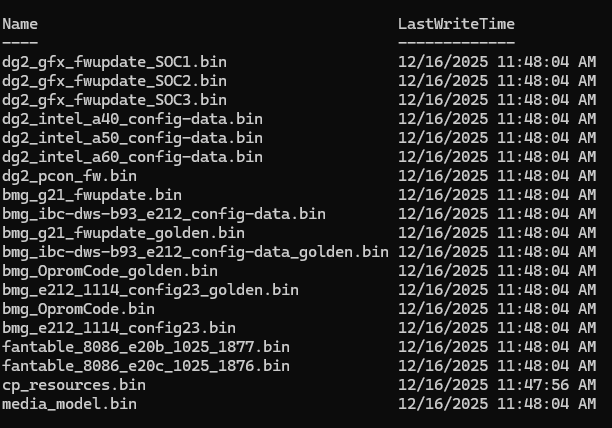

I wouldn’t get excited. The fact that Intel has created custom firmware for the B60, which allows you to have up to 7 VFs, is good for Intel. I would advise caution when purchasing this card for SRIOV workloads until at least two firmware upgrades. The reason I advise caution is that Itel could decide to limit the VFs to two, as they did to the B50.