i already have two of the cards. they previously had no sr-iov at all, so i think being excited is perfectly warranted.
I wish you luck. How is the firmware? I assume it is very buggy; that is usually the case with brand-new firmware from Intel.
I used the same process, can confirm.
I’m definitely excited, but slightly apprehensive. Limiting the VFs to only two on the Arc Pro B50 is pretty rough. Glad I didn’t buy one to test with. I’d like to snag a B60, but I’m afraid Intel might limit that card to three. I don’t want to drop $700-$800 on a card that can only accelerate three VMs, although I guess right now since I have zero VMs accelerated, that’s still a deal.
1 Like
Yea, I was bummed about the 2 VF limit, but the 12 VF was honestly too high for a 16GB card… it would have left barely any VRAM for each, it’d only be useful for VDI. With the B60 starting at 7, I feel confident it won’t change (famous last words…)
So I nabbed 3x B60’s a while ago, with the recent addition of SR-IOV on the latest firmware I’m struggling to get VFs added.
root@testgpu:~# echo 1 > /sys/devices/pci0000:00/0000:00:03.1/0000:07:00.0/0000:08:01.0/0000:09:00.0/sriov_numvfs
-bash: echo: write error: No such file or directoryroot@testgpu:/sys/devices/pci0000:00/0000:00:03.1/0000:07:00.0/0000:08:01.0/0000:09:00.0# cat sriov_totalvfs
7
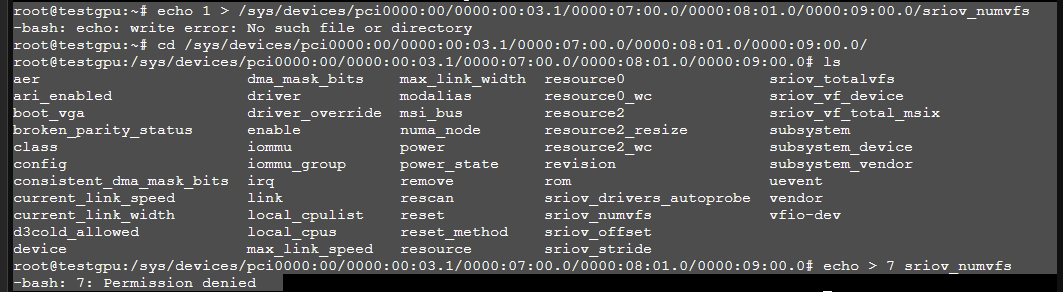
I fear I’m doing something incredibly stupid or missing something obvious here.
09:00.0 VGA compatible controller: Intel Corporation Battlemage G21 [Intel Graphics] (prog-if 00 [VGA controller])
Subsystem: ASRock Incorporation Device 6023
Control: I/O- Mem+ BusMaster+ SpecCycle- MemWINV- VGASnoop- ParErr- Stepping- SERR- FastB2B- DisINTx-
Status: Cap+ 66MHz- UDF- FastB2B- ParErr- DEVSEL=fast >TAbort- <TAbort- SERR- <PERR- INTx-
Latency: 0, Cache Line Size: 64 bytes
IOMMU group: 19
Region 0: Memory at 7e07000000 (64-bit, prefetchable) [size=16M]
Region 2: Memory at 6800000000 (64-bit, prefetchable) [size=32G]
Expansion ROM at fc600000 [disabled] [size=2M]
Capabilities: [40] Vendor Specific Information: Len=0c <?>
Capabilities: [70] Express (v2) Endpoint, IntMsgNum 0
DevCap: MaxPayload 256 bytes, PhantFunc 0, Latency L0s unlimited, L1 unlimited
ExtTag+ AttnBtn- AttnInd- PwrInd- RBE+ FLReset+ SlotPowerLimit 0W TEE-IO-
DevCtl: CorrErr- NonFatalErr- FatalErr- UnsupReq-
RlxdOrd+ ExtTag+ PhantFunc- AuxPwr- NoSnoop+ FLReset-
MaxPayload 256 bytes, MaxReadReq 512 bytes
DevSta: CorrErr- NonFatalErr- FatalErr- UnsupReq- AuxPwr- TransPend-
LnkCap: Port #0, Speed 2.5GT/s, Width x1, ASPM L0s L1, Exit Latency L0s <64ns, L1 <1us
ClockPM- Surprise- LLActRep- BwNot- ASPMOptComp+
LnkCtl: ASPM L1 Enabled; RCB 64 bytes, LnkDisable- CommClk-
ExtSynch- ClockPM- AutWidDis- BWInt- AutBWInt-
LnkSta: Speed 2.5GT/s, Width x1
TrErr- Train- SlotClk- DLActive- BWMgmt- ABWMgmt-
DevCap2: Completion Timeout: Range B, TimeoutDis+ NROPrPrP- LTR+
10BitTagComp+ 10BitTagReq+ OBFF Not Supported, ExtFmt+ EETLPPrefix-
EmergencyPowerReduction Not Supported, EmergencyPowerReductionInit-
FRS- TPHComp- ExtTPHComp-
AtomicOpsCap: 32bit- 64bit- 128bitCAS-
DevCtl2: Completion Timeout: 50us to 50ms, TimeoutDis-
AtomicOpsCtl: ReqEn-
IDOReq- IDOCompl- LTR+ EmergencyPowerReductionReq-
10BitTagReq- OBFF Disabled, EETLPPrefixBlk-
LnkCap2: Supported Link Speeds: 2.5GT/s, Crosslink- Retimer- 2Retimers- DRS-
LnkCtl2: Target Link Speed: 2.5GT/s, EnterCompliance- SpeedDis-
Transmit Margin: Normal Operating Range, EnterModifiedCompliance- ComplianceSOS-
Compliance Preset/De-emphasis: -6dB de-emphasis, 0dB preshoot
LnkSta2: Current De-emphasis Level: -6dB, EqualizationComplete- EqualizationPhase1-
EqualizationPhase2- EqualizationPhase3- LinkEqualizationRequest-
Retimer- 2Retimers- CrosslinkRes: unsupported
Capabilities: [ac] MSI: Enable- Count=1/1 Maskable+ 64bit+
Address: 0000000000000000 Data: 0000
Masking: 00000000 Pending: 00000000
Capabilities: [d0] Power Management version 3
Flags: PMEClk- DSI- D1- D2- AuxCurrent=0mA PME(D0+,D1-,D2-,D3hot+,D3cold-)
Status: D3 NoSoftRst+ PME-Enable+ DSel=0 DScale=0 PME-
Capabilities: [100 v1] Alternative Routing-ID Interpretation (ARI)
ARICap: MFVC- ACS-, Next Function: 0
ARICtl: MFVC- ACS-, Function Group: 0
Capabilities: [110 v1] Null
Capabilities: [200 v1] Address Translation Service (ATS)
ATSCap: Invalidate Queue Depth: 00
ATSCtl: Enable+, Smallest Translation Unit: 00
Capabilities: [420 v1] Physical Resizable BAR
BAR 2: current size: 32GB, supported: 256MB 512MB 1GB 2GB 4GB 8GB 16GB 32GB
Capabilities: [220 v1] Virtual Resizable BAR
BAR 2: current size: 8GB, supported: 256MB 512MB 1GB 2GB 4GB 8GB 16GB 32GB
Capabilities: [320 v1] Single Root I/O Virtualization (SR-IOV)
IOVCap: Migration- 10BitTagReq+ IntMsgNum 0
IOVCtl: Enable- Migration- Interrupt- MSE- ARIHierarchy+ 10BitTagReq-
IOVSta: Migration-
Initial VFs: 7, Total VFs: 7, Number of VFs: 0, Function Dependency Link: 00
VF offset: 1, stride: 1, Device ID: e211
Supported Page Size: 00000553, System Page Size: 00000001
Region 0: Memory at 0000007e00000000 (64-bit, prefetchable)
Region 2: Memory at 0000007000000000 (64-bit, prefetchable)
VF Migration: offset: 00000000, BIR: 0
Capabilities: [400 v1] Latency Tolerance Reporting
Max snoop latency: 1048576ns
Max no snoop latency: 1048576ns
Kernel driver in use: vfio-pci
Kernel modules: xe
Anyone got some ideas?
No, don’t think about it this way. I created 4x VF and each one had 4gb. This is The Way on the old firmware.
I hope they aren’t locking it to two-- 4x4gb VFs should be fine on this card. The original plan was “4 or more” at 2025 computex, for the B50.
5 Likes
I agree completely. I could live with just 4 VFs probably personally, 8 would be plenty usable if stable, and 12 only for high density office work but there is plenty of market for that too.
Only 2 VFs though is a bit light, and not at all why I was willing to buy 4 of these cards.
I wonder if the 12VFs originally was a typo. 
1 Like
This is exactly how I’m using the B50’s in my hosts… 4x 4GB instances, and they work great for small LLM’s and basic GPU-accelerated processes.
Sorry, I should have clarified: I understand you don’t have to use whatever the total possible VFs are. I was just saying that 12 was probably high for a 16GB card, and most people would have used less… but I do disagree with artificially limiting things.
I’m willing to bet the 7 VF possible with the B60 will stick. It would be weird, even for Intel, to make the same very visible mistake twice.
1 Like
Looks like your kernel driver in use is vfio-pci. It should be xe. What kernel are you running, did you blacklist xe?
Ye Sorry, I fixed it almost immediately after posting this but my account was locked down so I couldn’t edit etc.
I had blacklisted the driver to prevent the card from being used by proxmox as it’s my only display adapter and I was passing it through.
On a fresh proxmox install this problem won’t exist, if you’re moving from an existing setup with single, full-card passthrough, probably best to remove it from the blacklists & vfio-pci conf
As soon as I did that, I could correctly echo to the number of VFs I wanted.
I haven’t had much time to test, but existing fedora 43 vm couldn’t get past systemd logs on boot.
Gdm seems to be crashing… I installed intel-gpu-tools, ran intel_gpu_top and got this error message: No device filter specified and no discrete/integrated i915 devices found. I see Battlemage G21 in lspci output and card0 and renderD128 under /dev/dri/ in guest… Was anyone able to make this work in Linux guest and Proxmox host? I have stock 6.17.4-2-pve kernel. I tried with Arch Linux and Fedora 43 with 6.18.10-200.fc43.x86_64 kernel. I currently have 2 VFs enabled.
Some good news from the Intel forums, in that they did not just confirm a 2-VF limit. Support techs are trying to replicate the issue. Maybe some of the findings we have here can help them.
I can’t link it, google " Why did the latest Intel Arc ProB50 firmware nerf SR-IOV VFs from 12 to 2?".
I highly doubt that it’s an issue they are trying to “replicate” due to anything but the support teams ignorance or an apparent masterclass in playing broken telephone considering the LVFS firmware changelog said quite explicitly
Feature: SRIOV support with maximum 2VFs and 8GB Bar Size.
so the question is more why and if there’s any plan to change the number in the future rather than whether or not it was an accident (my guess is pure product segmentation and no).
FWIW I’m not sure where on LVFS I can find the changelog version that contained that but it’s what appeared during the fwupdmgr process.
6 Likes
That is indeed compelling evidence.
The primary reason I want to go with the Arc Pro B50 is that it can run off PCIe slot power, unlike the B60. Also because I’m okay spending $349.99 to play around with this, but a little less okay spending $700-800 for the B60.
6 Likes
With the new firmware you can only make 2vf. How do i configure that?
Hi,After I input echo 4 > sriov_numvfs .they will be in the same iommu group at resource mappings. If start vm then crashed
I do not think it is currently possible to get SR-IOV to work on a Linux VM using Proxmox. The Linux version Intel Arc Pro B50 drivers lack the “Display Engine” section.
I hope in a later version of the drivers resolves this.