I just picked up an ASRock B60, updated the firmware through LVFS, and it’s showing support for 24 VFs?
I can create them, but haven’t tried using them yet.
root@:~# lspci -vvv -s 05:00.0
05:00.0 VGA compatible controller: Intel Corporation Battlemage G21 [Arc Pro B60] (prog-if 00 [VGA controller])
	Subsystem: ASRock Incorporation Device 6023
	Control: I/O- Mem+ BusMaster+ SpecCycle- MemWINV- VGASnoop- ParErr- Stepping- SERR- FastB2B- DisINTx-
	Status: Cap+ 66MHz- UDF- FastB2B- ParErr- DEVSEL=fast >TAbort- <TAbort- <MAbort- >SERR- <PERR- INTx-
	Latency: 0, Cache Line Size: 64 bytes
	Interrupt: pin ? routed to IRQ 189
	IOMMU group: 19
	Region 0: Memory at ec18000000 (64-bit, prefetchable) [size=16M]
	Region 2: Memory at d800000000 (64-bit, prefetchable) [size=32G]
	Expansion ROM at df200000 [disabled] [size=2M]
	Capabilities: [40] Vendor Specific Information: Intel Capabilities v1
		CapA: Peg60Dis- Peg12Dis- Peg11Dis- Peg10Dis- PeLWUDis- DmiWidth=x4
		      EccDis- ForceEccEn- VTdDis- DmiG2Dis- PegG2Dis- DDRMaxSize=Unlimited
		      1NDis- CDDis- DDPCDis- X2APICEn- PDCDis- IGDis- CDID=0 CRID=0
		      DDROCCAP+ OCEn- DDRWrtVrefEn+ DDR3LEn+
		CapB: ImguDis- OCbySSKUCap- OCbySSKUEn- SMTCap- CacheSzCap 0x0
		      SoftBinCap- DDR3MaxFreqWithRef100=Disabled PegG3Dis-
		      PkgTyp- AddGfxEn- AddGfxCap- PegX16Dis- DmiG3Dis- GmmDis-
		      DDR3MaxFreq=2932MHz LPDDR3En-
	Capabilities: [70] Express (v2) Endpoint, IntMsgNum 0
		DevCap:	MaxPayload 256 bytes, PhantFunc 0, Latency L0s unlimited, L1 unlimited
			ExtTag+ AttnBtn- AttnInd- PwrInd- RBE+ FLReset+ SlotPowerLimit 0W TEE-IO-
		DevCtl:	CorrErr- NonFatalErr- FatalErr- UnsupReq-
			RlxdOrd+ ExtTag+ PhantFunc- AuxPwr- NoSnoop+ FLReset-
			MaxPayload 256 bytes, MaxReadReq 512 bytes
		DevSta:	CorrErr- NonFatalErr- FatalErr- UnsupReq- AuxPwr- TransPend-
		LnkCap:	Port #0, Speed 2.5GT/s, Width x1, ASPM L0s L1, Exit Latency L0s <64ns, L1 <1us
			ClockPM- Surprise- LLActRep- BwNot- ASPMOptComp+
		LnkCtl:	ASPM L1 Enabled; RCB 64 bytes, LnkDisable- CommClk-
			ExtSynch- ClockPM- AutWidDis- BWInt- AutBWInt- FltModeDis-
		LnkSta:	Speed 2.5GT/s, Width x1
			TrErr- Train- SlotClk- DLActive- BWMgmt- ABWMgmt-
		DevCap2: Completion Timeout: Range B, TimeoutDis+ NROPrPrP- LTR+
			 10BitTagComp+ 10BitTagReq+ OBFF Not Supported, ExtFmt+ EETLPPrefix-
			 EmergencyPowerReduction Not Supported, EmergencyPowerReductionInit-
			 FRS- TPHComp- ExtTPHComp-
			 AtomicOpsCap: 32bit- 64bit- 128bitCAS-
		DevCtl2: Completion Timeout: 50us to 50ms, TimeoutDis-
			 AtomicOpsCtl: ReqEn-
			 IDOReq- IDOCompl- LTR+ EmergencyPowerReductionReq-
			 10BitTagReq- OBFF Disabled, EETLPPrefixBlk-
		LnkCap2: Supported Link Speeds: 2.5GT/s, Crosslink- Retimer- 2Retimers- DRS-
		LnkCtl2: Target Link Speed: 2.5GT/s, EnterCompliance- SpeedDis-
			 Transmit Margin: Normal Operating Range, EnterModifiedCompliance- ComplianceSOS-
			 Compliance Preset/De-emphasis: -6dB de-emphasis, 0dB preshoot
		LnkSta2: Current De-emphasis Level: -6dB, EqualizationComplete- EqualizationPhase1-
			 EqualizationPhase2- EqualizationPhase3- LinkEqualizationRequest-
			 Retimer- 2Retimers- CrosslinkRes: unsupported, FltMode-
	Capabilities: [ac] MSI: Enable+ Count=1/1 Maskable+ 64bit+
		Address: 00000000fee00000  Data: 0000
		Masking: 00000000  Pending: 00000000
	Capabilities: [d0] Power Management version 3
		Flags: PMEClk- DSI- D1- D2- AuxCurrent=0mA PME(D0+,D1-,D2-,D3hot+,D3cold-)
		Status: D3 NoSoftRst+ PME-Enable- DSel=0 DScale=0 PME-
	Capabilities: [100 v1] Alternative Routing-ID Interpretation (ARI)
		ARICap:	MFVC- ACS-, Next Function: 0
		ARICtl:	MFVC- ACS-, Function Group: 0
	Capabilities: [110 v1] Null
	Capabilities: [200 v1] Address Translation Service (ATS)
		ATSCap:	Invalidate Queue Depth: 00
		ATSCtl:	Enable+, Smallest Translation Unit: 00
	Capabilities: [420 v1] Physical Resizable BAR
		BAR 2: current size: 32GB, supported: 256MB 512MB 1GB 2GB 4GB 8GB 16GB 32GB
	Capabilities: [220 v1] Virtual Resizable BAR
		BAR 2: current size: 2GB, supported: 256MB 512MB 1GB 2GB 4GB 8GB 16GB 32GB
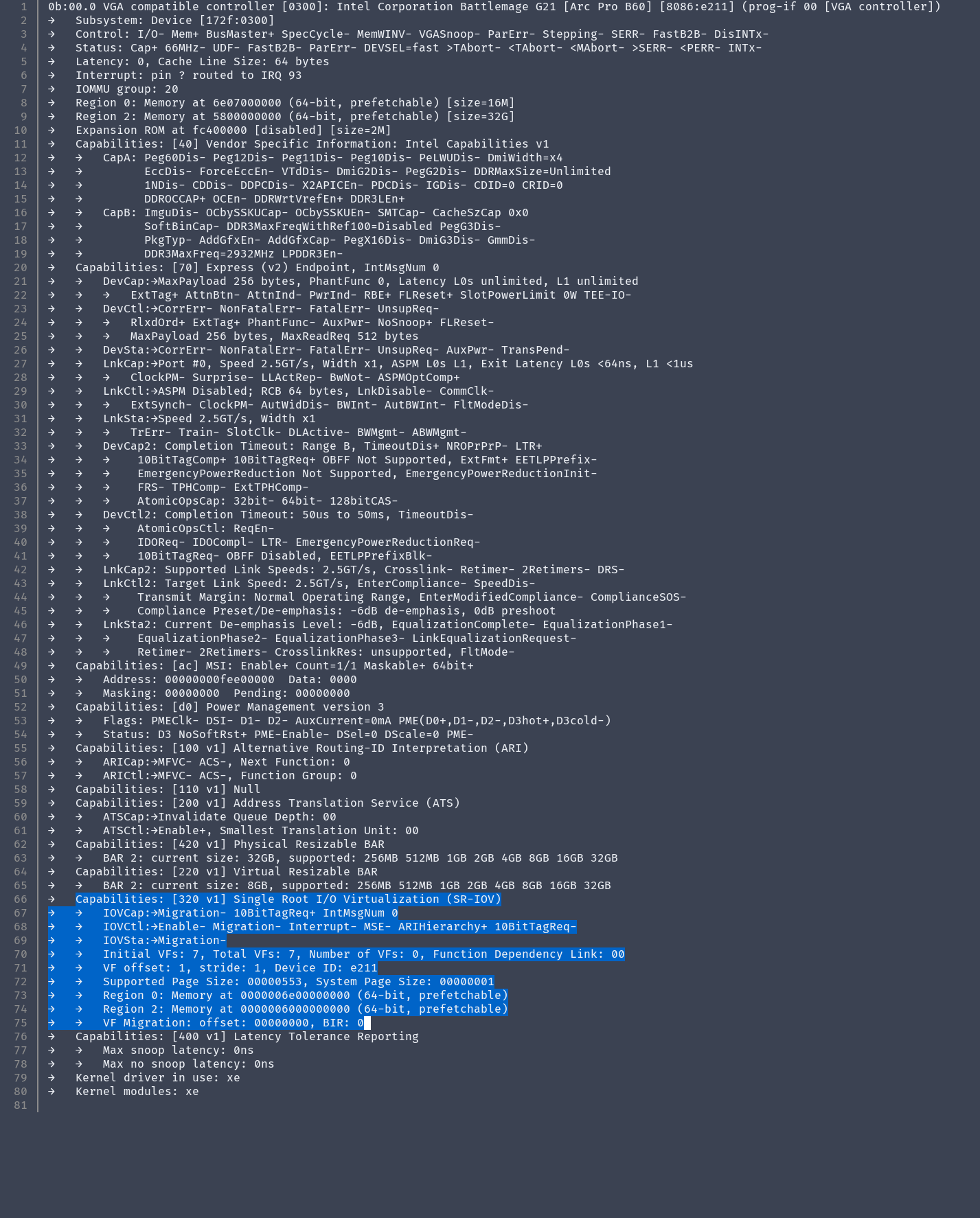
	Capabilities: [320 v1] Single Root I/O Virtualization (SR-IOV)
		IOVCap:	Migration- 10BitTagReq+ IntMsgNum 0
		IOVCtl:	Enable- Migration- Interrupt- MSE- ARIHierarchy+ 10BitTagReq-
		IOVSta:	Migration-
		Initial VFs: 24, Total VFs: 24, Number of VFs: 0, Function Dependency Link: 00
		VF offset: 1, stride: 1, Device ID: e211
		Supported Page Size: 00000553, System Page Size: 00000001
		Region 0: Memory at 000000ec00000000 (64-bit, prefetchable)
		Region 2: Memory at 000000e000000000 (64-bit, prefetchable)
		VF Migration: offset: 00000000, BIR: 0
	Capabilities: [400 v1] Latency Tolerance Reporting
		Max snoop latency: 1048576ns
		Max no snoop latency: 1048576ns
	Kernel driver in use: xe
	Kernel modules: xe

root@:~# echo 24 > /sys/bus/pci/devices/0000\:05\:00.0/sriov_numvfs
root@:~# lspci -s 05:
05:00.0 VGA compatible controller: Intel Corporation Battlemage G21 [Arc Pro B60]
05:00.1 VGA compatible controller: Intel Corporation Battlemage G21 [Arc Pro B60]
05:00.2 VGA compatible controller: Intel Corporation Battlemage G21 [Arc Pro B60]
05:00.3 VGA compatible controller: Intel Corporation Battlemage G21 [Arc Pro B60]
05:00.4 VGA compatible controller: Intel Corporation Battlemage G21 [Arc Pro B60]
05:00.5 VGA compatible controller: Intel Corporation Battlemage G21 [Arc Pro B60]
05:00.6 VGA compatible controller: Intel Corporation Battlemage G21 [Arc Pro B60]
05:00.7 VGA compatible controller: Intel Corporation Battlemage G21 [Arc Pro B60]
05:01.0 VGA compatible controller: Intel Corporation Battlemage G21 [Arc Pro B60]
05:01.1 VGA compatible controller: Intel Corporation Battlemage G21 [Arc Pro B60]
05:01.2 VGA compatible controller: Intel Corporation Battlemage G21 [Arc Pro B60]
05:01.3 VGA compatible controller: Intel Corporation Battlemage G21 [Arc Pro B60]
05:01.4 VGA compatible controller: Intel Corporation Battlemage G21 [Arc Pro B60]
05:01.5 VGA compatible controller: Intel Corporation Battlemage G21 [Arc Pro B60]
05:01.6 VGA compatible controller: Intel Corporation Battlemage G21 [Arc Pro B60]
05:01.7 VGA compatible controller: Intel Corporation Battlemage G21 [Arc Pro B60]
05:02.0 VGA compatible controller: Intel Corporation Battlemage G21 [Arc Pro B60]
05:02.1 VGA compatible controller: Intel Corporation Battlemage G21 [Arc Pro B60]
05:02.2 VGA compatible controller: Intel Corporation Battlemage G21 [Arc Pro B60]
05:02.3 VGA compatible controller: Intel Corporation Battlemage G21 [Arc Pro B60]
05:02.4 VGA compatible controller: Intel Corporation Battlemage G21 [Arc Pro B60]
05:02.5 VGA compatible controller: Intel Corporation Battlemage G21 [Arc Pro B60]
05:02.6 VGA compatible controller: Intel Corporation Battlemage G21 [Arc Pro B60]
05:02.7 VGA compatible controller: Intel Corporation Battlemage G21 [Arc Pro B60]
05:03.0 VGA compatible controller: Intel Corporation Battlemage G21 [Arc Pro B60]
root@:~# journalctl -k | grep xe | grep VF
Feb 18 13:21:11 bazzite kernel: pci 0000:05:00.0: VF BAR 0 [mem 0xec00000000-0xec00ffffff 64bit pref]
Feb 18 13:21:11 bazzite kernel: pci 0000:05:00.0: VF BAR 0 [mem 0xec00000000-0xec17ffffff 64bit pref]: contains BAR 0 for 24 VFs
Feb 18 13:21:11 bazzite kernel: pci 0000:05:00.0: VF BAR 2 [mem 0xe000000000-0xe07fffffff 64bit pref]
Feb 18 13:21:11 bazzite kernel: pci 0000:05:00.0: VF BAR 2 [mem 0xe000000000-0xebffffffff 64bit pref]: contains BAR 2 for 24 VFs
Feb 18 18:22:49 wetbox kernel: xe 0000:05:00.0: [drm] GT0: PF: VF1..VF24 provisioned with 174198784 (166 MiB) GGTT
Feb 18 18:22:49 wetbox kernel: xe 0000:05:00.0: [drm] GT0: PF: VF1..VF24 provisioned with 1061158912 (1012 MiB) LMEM
Feb 18 18:22:49 wetbox kernel: xe 0000:05:00.0: [drm] GT0: PF: VF1..VF24 provisioned with 2719 GuC context IDs
Feb 18 18:22:49 wetbox kernel: xe 0000:05:00.0: [drm] GT0: PF: VF1..VF24 provisioned with 10 GuC doorbell IDs
Feb 18 18:22:49 wetbox kernel: xe 0000:05:00.0: [drm] GT1: PF: VF1..VF24 provisioned with 2719 GuC context IDs
Feb 18 18:22:49 wetbox kernel: xe 0000:05:00.0: [drm] GT1: PF: VF1..VF24 provisioned with 10 GuC doorbell IDs
Feb 18 18:22:49 wetbox kernel: xe 0000:05:00.1: [drm] Running in SR-IOV VF mode
Feb 18 18:22:49 wetbox kernel: xe 0000:05:00.1: [drm] VF: migration not supported by this module version
Feb 18 18:22:49 wetbox kernel: xe 0000:05:00.2: [drm] Running in SR-IOV VF mode
Feb 18 18:22:49 wetbox kernel: xe 0000:05:00.2: [drm] VF: migration not supported by this module version
Feb 18 18:22:49 wetbox kernel: xe 0000:05:00.3: [drm] Running in SR-IOV VF mode
Feb 18 18:22:49 wetbox kernel: xe 0000:05:00.3: [drm] VF: migration not supported by this module version
Feb 18 18:22:49 wetbox kernel: xe 0000:05:00.4: [drm] Running in SR-IOV VF mode
Feb 18 18:22:49 wetbox kernel: xe 0000:05:00.4: [drm] VF: migration not supported by this module version
Feb 18 18:22:49 wetbox kernel: xe 0000:05:00.5: [drm] Running in SR-IOV VF mode
Feb 18 18:22:49 wetbox kernel: xe 0000:05:00.5: [drm] VF: migration not supported by this module version
Feb 18 18:22:50 wetbox kernel: xe 0000:05:00.6: [drm] Running in SR-IOV VF mode
Feb 18 18:22:50 wetbox kernel: xe 0000:05:00.6: [drm] VF: migration not supported by this module version
Feb 18 18:22:50 wetbox kernel: xe 0000:05:00.7: [drm] Running in SR-IOV VF mode
Feb 18 18:22:50 wetbox kernel: xe 0000:05:00.7: [drm] VF: migration not supported by this module version
Feb 18 18:22:50 wetbox kernel: xe 0000:05:01.0: [drm] Running in SR-IOV VF mode
Feb 18 18:22:50 wetbox kernel: xe 0000:05:01.0: [drm] VF: migration not supported by this module version
Feb 18 18:22:50 wetbox kernel: xe 0000:05:01.1: [drm] Running in SR-IOV VF mode
Feb 18 18:22:50 wetbox kernel: xe 0000:05:01.1: [drm] VF: migration not supported by this module version
Feb 18 18:22:50 wetbox kernel: xe 0000:05:01.2: [drm] Running in SR-IOV VF mode
Feb 18 18:22:50 wetbox kernel: xe 0000:05:01.2: [drm] VF: migration not supported by this module version
Feb 18 18:22:50 wetbox kernel: xe 0000:05:01.3: [drm] Running in SR-IOV VF mode
Feb 18 18:22:50 wetbox kernel: xe 0000:05:01.3: [drm] VF: migration not supported by this module version
Feb 18 18:22:50 wetbox kernel: xe 0000:05:01.4: [drm] Running in SR-IOV VF mode
Feb 18 18:22:50 wetbox kernel: xe 0000:05:01.4: [drm] VF: migration not supported by this module version
Feb 18 18:22:50 wetbox kernel: xe 0000:05:01.5: [drm] Running in SR-IOV VF mode
Feb 18 18:22:50 wetbox kernel: xe 0000:05:01.5: [drm] VF: migration not supported by this module version
Feb 18 18:22:50 wetbox kernel: xe 0000:05:01.6: [drm] Running in SR-IOV VF mode
Feb 18 18:22:50 wetbox kernel: xe 0000:05:01.6: [drm] VF: migration not supported by this module version
Feb 18 18:22:50 wetbox kernel: xe 0000:05:01.7: [drm] Running in SR-IOV VF mode
Feb 18 18:22:50 wetbox kernel: xe 0000:05:01.7: [drm] VF: migration not supported by this module version
Feb 18 18:22:50 wetbox kernel: xe 0000:05:02.0: [drm] Running in SR-IOV VF mode
Feb 18 18:22:50 wetbox kernel: xe 0000:05:02.0: [drm] VF: migration not supported by this module version
Feb 18 18:22:50 wetbox kernel: xe 0000:05:02.1: [drm] Running in SR-IOV VF mode
Feb 18 18:22:50 wetbox kernel: xe 0000:05:02.1: [drm] VF: migration not supported by this module version
Feb 18 18:22:50 wetbox kernel: xe 0000:05:02.2: [drm] Running in SR-IOV VF mode
Feb 18 18:22:50 wetbox kernel: xe 0000:05:02.2: [drm] VF: migration not supported by this module version
Feb 18 18:22:50 wetbox kernel: xe 0000:05:02.3: [drm] Running in SR-IOV VF mode
Feb 18 18:22:50 wetbox kernel: xe 0000:05:02.3: [drm] VF: migration not supported by this module version
Feb 18 18:22:50 wetbox kernel: xe 0000:05:02.4: [drm] Running in SR-IOV VF mode
Feb 18 18:22:50 wetbox kernel: xe 0000:05:02.4: [drm] VF: migration not supported by this module version
Feb 18 18:22:50 wetbox kernel: xe 0000:05:02.5: [drm] Running in SR-IOV VF mode
Feb 18 18:22:50 wetbox kernel: xe 0000:05:02.5: [drm] VF: migration not supported by this module version
Feb 18 18:22:50 wetbox kernel: xe 0000:05:02.6: [drm] Running in SR-IOV VF mode
Feb 18 18:22:50 wetbox kernel: xe 0000:05:02.6: [drm] VF: migration not supported by this module version
Feb 18 18:22:50 wetbox kernel: xe 0000:05:02.7: [drm] Running in SR-IOV VF mode
Feb 18 18:22:50 wetbox kernel: xe 0000:05:02.7: [drm] VF: migration not supported by this module version
Feb 18 18:22:50 wetbox kernel: xe 0000:05:03.0: [drm] Running in SR-IOV VF mode
Feb 18 18:22:50 wetbox kernel: xe 0000:05:03.0: [drm] VF: migration not supported by this module version
Feb 18 18:22:50 wetbox kernel: xe 0000:05:00.0: [drm] PF: Enabled 24 of 24 VFs
What fwupdmgr reports.
root@:~# fwupdmgr get-history
ASUS System Product Name
│
├─Arc Pro B60:
│ │   Device ID:          a1d3f119b7f41e1f6fb1cc96e27da2d329911cbd
│ │   Previous version:   21.1162
│ │   Install Duration:   2 minutes
│ │   Update State:       Success
│ │   Last modified:      2026-02-18 22:28:00
│ │   GUID:               14ef02a7-931e-5168-a3dd-4a03d32c9203
│ │   Device Flags:       • Internal device
│ │                       • Updatable
│ │                       • System requires external power source
│ │                       • Supported on remote server
│ │                       • Needs shutdown after installation
│ │                       • Signed Payload
│ │                       • Can tag for emulation
│ │
│ └─Arc Battlemage B60 GPU Update:
│       New version:      21.1177
│       Remote ID:        lvfs
│       Release ID:       136488
│       Summary:          FWCODE firmware for Arc Battlemage discrete GPUs.
│       License:          Proprietary
│       Size:             2.1 MB
│       Created:          2025-12-09 00:00:00
│       Urgency:          High
│         Tested:         2026-02-13 00:00:00
│         Distribution:   fedora 42
│         Old version:    203.12
│         Version[fwupd]: 2.0.19
│       Vendor:           Intel
│       Release Flags:    • Trusted payload
│                         • Trusted metadata
│       Description:
│       This stable release provides the following:
│
│       • General improvements to robustness.
│       Checksum:         7a8e4ef34796b3c1f06408b0411529ff929e2abeb2c9100d2c0c6fec7582a8f3
│
└─Arc Pro B60 (OptionROM Code):
  │   Device ID:          90d386d061b85ddcc5599983c739c0694f739552
  │   Previous version:   23.1061.0.0
  │   Install Duration:   22 seconds
  │   Update State:       Success
  │   Last modified:      2026-02-18 22:30:14
  │   GUID:               e70fe1ae-5789-56d8-b859-46be927c7c59
  │   Device Flags:       • Internal device
  │                       • Updatable
  │                       • System requires external power source
  │                       • Supported on remote server
  │                       • Needs a reboot after installation
  │                       • Signed Payload
  │
  └─Arc Battlemage B60 GPU Update:
        New version:      23.1065.0.0
        Remote ID:        lvfs
        Release ID:       136502
        Summary:          OPROMCODE firmware for Arc Battlemage discrete GPUs.
        License:          Proprietary
        Size:             983.0 kB
        Created:          2025-11-05 00:00:00
        Urgency:          High
          Tested:         2026-02-13 00:00:00
          Distribution:   fedora 42
          Old version:    203.12
          Version[fwupd]: 2.0.19
        Vendor:           Intel
        Release Flags:    • Trusted payload
                          • Trusted metadata
        Description:
        This stable release provides the following:

        • General VBIOS improvements for various display configurations.
        Checksum:         7a8e4ef34796b3c1f06408b0411529ff929e2abeb2c9100d2c0c6fec7582a8f3
EDIT: The VFs pass through to VMs just fine.