Pc case and PSU recommendation for multi GPU LLM setup

Hi. Currently my setup is as follows:

ProcessorAMD Ryzen 9 5900XT

Motherboard: Gigabyte B550M AORUS PRO (Micro ATX form factor)

Memory: 128GB DDR4 (maxed-out capacity for this board)

Graphics (USED)

Primary: NVIDIA RTX 3090

Secondary: NVIDIA RTX 3060 external

Storage: 4TB Samsung 990 Pro NVMe SSD

Case: Tecware Timber Atx. 5x14mm artic pro case fans

Power Supply: Super Flower Leadex III Gold

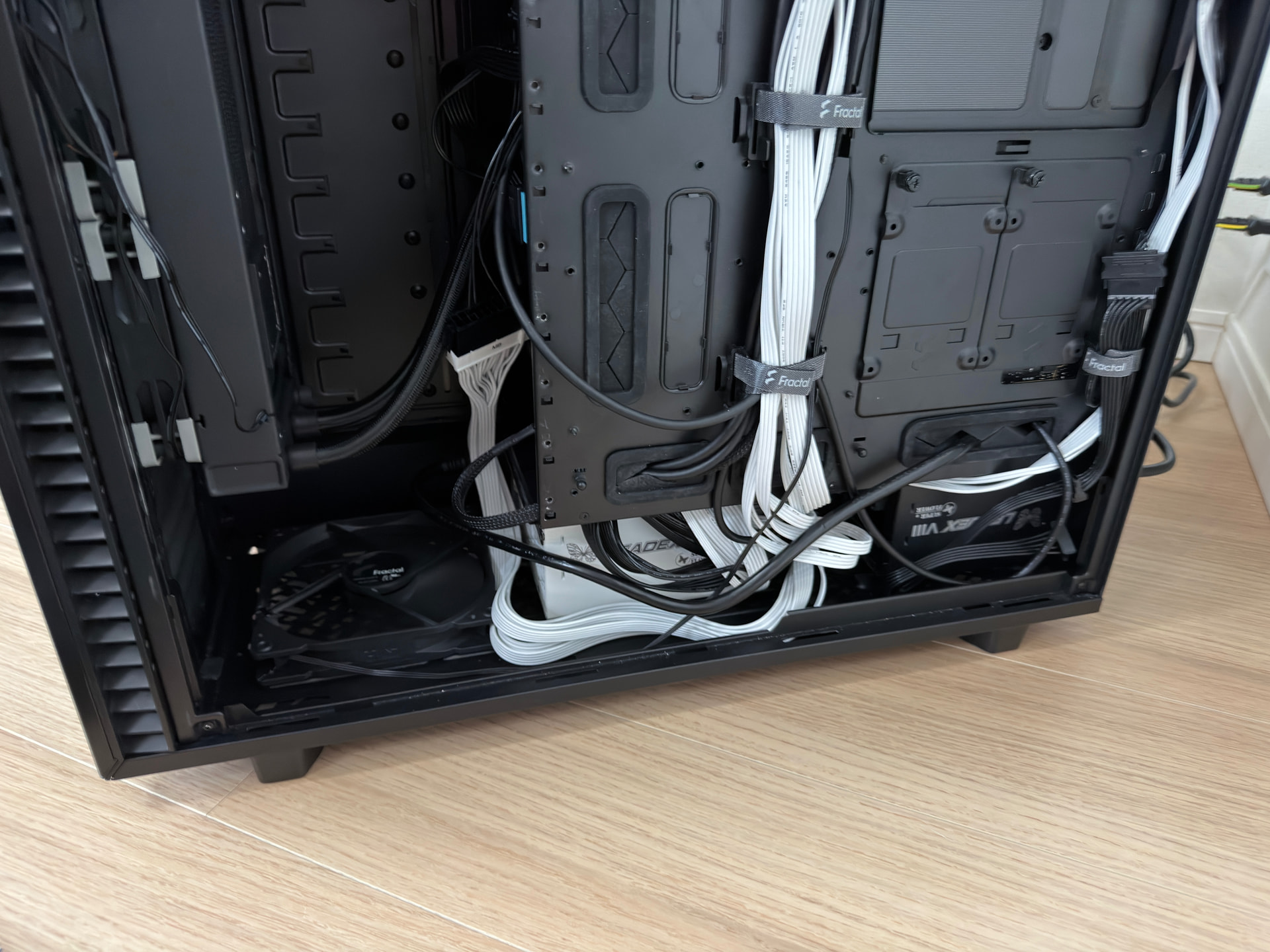
Currently, my office pc is at the side of the wall. The glass side is facing the wall and my work table on the opposite side of the case. Sandwiching the case. The RTX 3060 is mounted on a 3d printed stand outside of the case via m2 to pci extension cables. Psu cables routed outside too. Thermals and power are fine as both cards have been undervolted. Also limit the cards using MSI afterburner. Running LM Studio and python scripts to archive pdfs. Warm, but manageable. Max 73C on the RTX 3090.

I noticed that this the best I can get with this setup. The next upgrades I have in mind are the case and PSU (which can support multi gpus with high VRAM, but low watt (but used RTX cards, as they are cheap). Any ideas what case and PSU can support 3xRTX3090? I don’t think I’ll be buying any RTX higher than this, unless new cards which have less power draw and lots of ram and cheaper than a used RTX3090.

I’m targeting the case and PSU first as these prices are relatively stable. Also, the current setup has one card and cables all outside of the case. Not ideal. Want to enclose it in one big case. It seems that mounting all cards via PCIE extender cables is the way to go for the next build. Prefer a tall case as I can just place it next to the wall. The current case, even though ATX, doesn’t allow a second card, unless I want to limit airflow to the primary card. Hence I had to use the second M2 slot to PCIE adapter and extender just to have the second card further away. The 2nd PCIE slot is blocked by the case PSU separator.

Two used RTX 3060 12G is cheaper than one used RTX3090. Technically they are using the same amount of external PSU cables, but will have higher footprint.
Probably the most common solutions to ATX being a seven PCIe slot form factor are blower dGPUs and waterblocking. For the latter if you figure 100 W a fan mount that’s pretty much Corsair 9000D or external rads. For a two GPU DIY air cooled solution adaptable to three, see JayVenturi’s build.

Using PEG and risering two of the dGPUs would be a bit simpler and thus preferable. Unfortunately I know of exactly zero cases capable to mount two risered dGPUs and, as of eight months ago, neither did anybody else around here (the 9000D is the successor to the 1000D). Or underutilize a mining case like TP1846 or a four or six GPU mining rack.

Since 3x3090 is ~1200 W and the rest of a build’s easily another 300 that’s a 2000 W supply entry level, unless you like redlining. Dual PSU would be my default, 2xHX1500i’s probably overkill but the cost riser’s not much from 2xHX1200i. Hela 2050R or 2500Rz are good single supply starting points.

The guy above’s response is pretty much the gist of it, but there are a few 8 slot cases.

Off the dome, you got the ASUS ProArt PA602,

and the Fractal Pop XL Silent.

Those two aren’t as RIDICULOUSLY sized as the 9000D, but still, they’re a lot. That extra slot opens up everything, four* two-slot GPUs or whatever. If you get an eight-slot case and a beefy power supply, your mATX motherboard would be the limiting factor for your GPUs. When it comes to AM4 - most modern consumer ATX motherboards with lots of PCIe slots at that - they tend to not only position the top SSD where the first slot would be on a case, they also have this sort of…

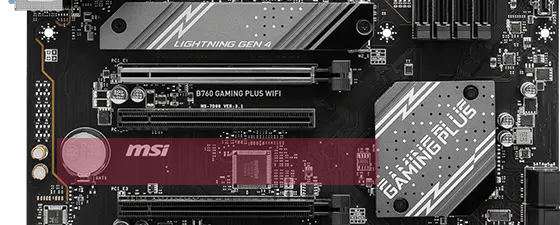
…Gap… Between the 2nd and 3rd slot that they’d either reserve for an SSD slot, the CMOS battery, or sometimes just nothing at all. If you’re going through the effort to get a case and PSU to account for three 3090s (recommend getting one of those blower-style ones like stated above, they ship them modded from China with <$100 premiums) I think a motherboard swap is in order to save you the headache of bending over backwards to get everything to fit.

There is a power comnponent that as above should be addressed. May I suggest a superflower 2800w power supply (quality). Also any US based PASU is usually capped at 1600w due to to 110/120v. To do it right, it would have to be plugged into 220/240v or 1600w will remain the cap.

Sorry to be the barrier of (some) bad news…

That B550 motherboard only supports 1 x 16x PCIe 4.0 slot - one of my kids has the same mobo but the full ATX version. The other 16x slot is only 4x, and connected through the chipset. Basically only the high-end X570 chipset mobos support splitting the PCIe 4.0 x16 slot into x8 x x8 dual PCIe 4.0.

This will seriously degrade the speed (tokens/second or t/s or ts or tps) if you try to use load a model across both GPUs.**

If you are not replacing the mobo, then limit your planning to one big GPU with big VRAM so you can load advance models. Like the R9700 w/32GB or Intel B70 w/32GB.

The Nvidia tax is only warranted if you want to generate images and videos faster. Otherwise, if you want to load LLMs, go for the cheapest 24GB or 32GB you can get. With the current advancements and tunings, 24GB of VRAM is the current sweetspot for most of the highly advanced LLM models - and it only seems to be getting better from here.


**Those other PCIe slots if u are stuck with that mobo? Use them on risers to additional GPUs… that will run other models.

See, limited PCIe bandwidth effects two things:

  • Prompt Processing (pp), or how fast data gets sent (think PDFs, codebases, zip files) into your LLM to open and analyze for a large context window. Only minimal, but it does effect it and the slower you go (PCIe 3.0 x8, x4, etc) the greater the delay. Also, going through the chipset will kill bandwidth as well. Usually only x1 or x2 PCIe 3.0.
  • GPU <> GPU communications.
  • CPU offloading (though, with only PCIe 4.0, there really isn’t point - it’s too slow. Heck, PCIe 5.0 x16 is still waaay too slow for CPU offloading, unless u want 5t/s).

However, all is not lost. You can still add GPUs, but only to run additional models that can fit into those GPUs only.

For example, run a large coding or general model on the 24GB main GPU. Like Unsloth Qwen3.6 35B A4B Q5 or Q6 and enjoy insane speeds and performance with around 130-180k context fitting.

And then on the 3060 or Vega64 (like me for 2nd GPUs), run an image/video generation model. Or a fast Chat model (no thinking), like for chat or intellisense.

However, the point is, with that mobo you will have a terrible and frustrating time if you try to run them parallel with the same model. Don’t. Plan on using each GPU separately.

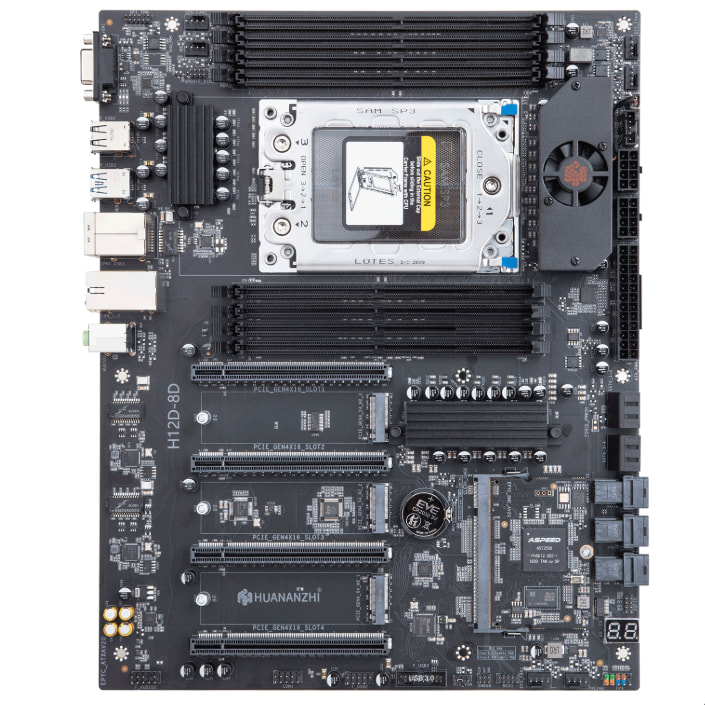
IF you’re looking to run multiple large GPUs [3x 3090s]… Look into appropriate [HEDT] platforms
Even using older platforms [ex. SP3], will still have multiple full x16 lanes

1 Like

Also the HVAC, yeah.

The Leadex Titanium 2800 ATX 3.1’s mostly a pretty good supply but, with only 8 PCIe, you’re forced into the crappy 12V-2x6s early. The builds discussed here’d wouldn’t need to pull more than 150 W per 12V-2x6, so it’s probably fine, but cost on the unused capacity’s kinda steep.

Fractal North XL has been good to me (had to buy two to get both side fan mounts.) I guess there is a high airflow case that they make also. Have a 1600 w noctua PSU, but that’s about the best I can do in the US without 220v.

Recently I have built a dual PSU system using the recent Super-Flower LEADEX VIII Platinum Pro 1200W PSUs. They are only 125mm deep, so I was able to fit two of them easily into a Define 7 XL chassis even though that case is only designed to take a single PSU. It also has a pretty flexible cable arrangement as the SATA, PCI, and CPU cables all use the same connector on the PSU, so you can utilize the PSU primarily for motherboard and GPUs and not lose connectors to peripherals like SATA.

I have been very happy with these PSUs because the shallow depth and good connectivity give you a lot more options with a large system build where you want two PSUs.

Here is a pic of two of them stuffed into the PSU area of the Define 7 XL:

1 Like

Yes this pretty much.

It would basically be better to go with a HEDT platform that has ample lanes for it.
It might work on main stream with like RTX3060´s and a proper x870e motherboard.
But it´s likely going to be less than ideal.

I may have a suggestion in regards to a case, and it’s one I’ve (almost) settled upon for myself: The SilverStone ALTA D1

Full story: For the past three months or so I’ve been searching for a case with similar requirements; initially, the plan was to build into a console-style HTPC chassis, but the selection of those which can accept a 4-slot GPU was pretty limited and ultimately that went out the window thanks to 12v-2x6 connector shenanigans (MSI cards are apparently among those most at risk of meltdown, and attaching a WireView Pro II for some protection leaves me with a 359mm [L] x ~180mm [W] x ~5 slot [H] behemoth to accommodate). Since the case I end up picking will have to be massive regardless, I figure it may as well be one that can fit multiple GPUs if I eventually repurpose this into an AI system, and here the Alta caught my attention because it fits the bill, seems very sturdy, and has optional wheels (actually really handy for my use-case). The only issue is, the last unit in Australia sold while I was still making up my mind- and when I reached out to Silverstone they indicated they had no plans to bring more in through local distributors. They did however offer to mail me one for $915 USD (most of which is the shipping cost, specifically Fedex International Economy = $465) which is ~1.4x what it cost locally, but I think I’m still gonna pull the trigger because the closest alternative is the Asus ProArt PA602 which is purported to be a cheap plasticky piece of crap.

I use an ALTA D1 with 4x RTX PRO 6000 Max-Q cards and wrote a bit about it here: WIP: Blackwell RTX 6000 Pro / Max-Q Quickie Setup Guide on Ubuntu 24.04 LTS / 25.04 - #320 by brandon.c

TLDR: The case is tall, and makes it easy to space out 4 air-cooled GPUs so they have room to breathe and run at ideal temperatures. However, there is not much affordance for cable management if you have a large (e.g. SSI-EEB) motherboard and using large/long power supplies on one side of the case (i.e. rear) can block your usage of the modular bay on the opposite side (i.e. front). Also, buy the wheels if you buy the case!

New here, this is probably necro-ing a dead thread, but I’m just beginning my LLM learning journey and the Silverstone Alta T1 has me drooling. Anybody out there have hands-on with it?

I’m apparently too new to include links but it’s there on silverstonetek .com

better off getting an open frame style setup. no point trying to jam GPUs into a case since you WILL at some point want more capacity. Regarding massive power supplies, again not needed as you are better served just setting the cards to consume less power (trade offs here but typically better to just do that). I set all my cards to use about 300W max.

1 Like