Not that I ever found. Even random one-offs that make their way to ebay tend to go for hefty prices for current-generation LTO and the last ~3 previous.
Tape would make the most sense for backing up my NAS but I’m not going to buy a LTO drive that costs $3K+ where the tape drive itself will almost certainly break before it paid for itself. It’s far cheaper to just buy large capacity HDDs and stick them on a shelf.
At some point it might be worth just finding a really old 8+ bay NAS to repurpose as a backup drive cabinet. Some of the really old Synology boxes are getting extremely cheap. Who cares if the NAS OS is no longer updated, it’s just going to be a direct plug & backup box that gets shutdown after for cold storage.
Yup, there is no easy or sensible entrypoint for tape storage. Only spelunking at enterprise ewaste sites. Not surprising for enterprise only tech and mainly larger scale enterprise.
There are some USB and thunderbolt specialty models aimed at pro photograpers et. al, but pricing is pretty much a same 4-5k USD per unit.
Colleague got entire LTO5 tape library (entire automated rack solution, robot arms, tapes and drives) for less than 50 USD, just as long as arranged clearing and transport. Since he is backup engineer and avid homelabber, it made sense.
I’ve had my LTO-8 tape drive since I think about 2018 and so far, I haven’t had any problems with it.
If you are worried about hardware failure – yes, technically ANY piece of hardware can fail at any moment in time, but that’s true for tape drives as it is with hard drives. Neither are special in the sense that they are immune to hardware failures. (cough cough, I’m looking at you, Seagate).
With that being said, it will also depend on how much data you are looking to backup.
I ran the cost optimisation once before and I think that I plotted it where the break even point between using ONLY HDDs vs. using LTO-8 tapes was around the 150 TB mark.
If you need to store > 150 TB, then it will make more sense to do so with LTO-8 tape. (Sub in the generation, along with the max, native capacity for your LTO generation of interest and you can re-run this cost optimisation calcs yourself.)
Less than that, it made more sense to stick with HDDs.
My main server has about 216 TB of raw storage capacity (it’s actually gone from that by now and I haven’t re-run my hardware inventory check in a while, so I’ll stick with my old data for now).
Therefore; from the cost optimisation analysis, it is cheaper for me to store my data with tape, than with HDDs.
(Remember that one LTO-8 tape can store ~12 TB natively and the last time that I bought the tapes, there were something like $75 each. Maybe less than that. So, until 12 TB HDDs come down to that price point, tape is cheaper, even including the initial capex cost of the drive itself.)
The more data you (want to) store, the cheaper tape becomes for you.
For HDDs, you can have a system that you will only turn on, when you’re running a backup (cold HDD storage), but then, unlike tape, you’re not necessarily going to deploy a grandfather-father-son type of topology for data backup with HDDs as you would be with tape. (because if you did that with HDDs, then the cost of your HDD-based system SIGNIFICANTLY increases, again, depending on how much data you’re looking to store).
Thunderbolt works well if you think you’re going to be using something like YoYotta via a Mac for your backups.
It’s paid software, and along with it, comes with some nice “ease of life” features/benefits (like databasing where your data is stored so that it can help you find (and restore) your data faster/easier).
If you are looking to do it as inexpensively as possible (like myself), then you can download the IBM Spectrum LTFS Single Drive Edition for free, and compile LTFS yourself, and then you will be responsible for building and maintain the database of where all of your files are stored, and so when you want to find a file, you will have to search through your database to find out which tape your file is on, load that tape in (manually), mount the tape using LTFS, and then pulling the data that you want from said tape.
And it’s certainly doable, as I, a self-proclaimed idiot, have already deployed.
(I just build a file index as a text file, and I back that up to tape as well as keep a copy of said index text file on my NAS, so that when I want to look for a file, I just search through the index text file of each tape. Doesn’t take too long to run through it, because it’s only a text file.)
For me, I choose LTO-8 rather than LTO-7 because I can 12 TB per tape (natively) vs. 6 TB per tape. And if it were up to me, I wouldn’t go with LTO-9 (unless the drives and the tapes were exactly the same price as LTO-8) because LTO-9 only stores 50% more than LTO-8 (18 TB vs. 12 TB).
But to make sure that you understand the answer to your OP – the cost of the initial drive isn’t going to be cheap.
The cheap ones that you can find on eBay are for older LTO generations, and whilst they might appear to be cheap, but you will pay for it in the number of tapes that you will need, to hit the same capacity target that you’re looking to backup, so you end up not really spacing much money, and if you need four times as many tapes for the same storage capacity, then you’re going to increase your chances of a drive failing (because you need more load/unload cycles from the drive because of the smaller capacity tapes) vs. if you had just paid more for the newer drive anyways.
However you want to slice-and-dice the data, is up to you.
But from my experience, having a LTO-8 tape drive at home, for me, that increased risk wasn’t worth it.
Again, the cost optimisation calculation is very simple:
For n-amount of storage (in TB), the formula for the cost optimisation is this:
capex of tape drive + k/n (number of tapes) * cost per tape.
Where k is the total amount of storage you want to backup.
And you can compute this as a variable.
And then you can repeat the same calculation for HDDs (find out how much data you want store, divided by the cost of the HDD (which is a cost optimisation in and of itself as well, because different drive brands/capacities, have different $/TB ratios) and the intersection point between these two lines will be your break even point.
Like I said – I ran the cost optimisation once before, and for me, the break even point was at around the 150 TB mark. Less than that, it’s cheaper to just stick to HDDs.
More than that, then it’s cheaper to use LTO-8 tape.
And I was at 216 TB (now it’s gone up slightly), so for me, it was cheaper to go with tape than HDDs for backup, especially if you employ any variant of grandfather-father-son type backup scheme.
LTO-9 tapes cost about the same as LTO-8 per TB uncompressed, so it’s a toss.
ALso:
Costwise it’s not apples ↔ apples comparison.
HDDs can be easier and faster to work with as one can simply have extra RAID for example, that is normally off.
Data backup or search on such backup can be fast,
OTOH, it’s really easy to corrupt such backup.
LTO OTOH by default doesn’t present one with filesystem.
Natural path to backup is making incremental archive file and sending it to a drive ( tar + xz + cpio +dd ) which demand preparation and deliberate step.
It’s harder to screw it up to overwrite something. ALso cartridge can be normally on the shelf.
Question:
IS there some convenient SW or library so one can have parity file to repair the archive in the case of file corruption ? Does drive have some decent ECC ?
I’ve checked open-sauce ltfs and it doesn’t appear to support cheapest LTO-9 option yet (Quantum) or just on half-height option.
What’s the deal with LTO-9 drive height ?
Again, that depends on how you want to implement your specifc backup workflow/process, so there are a lot of variables in there that are under your specific control.
Just because I prep my files (compress and then run par2 twice on it to generate double parity data against in addition to any checksums that the tape already generates), doesn’t mean that you *have to * do it this way.
I do it this way, to have stave off (silent) data corruption. And in the event that the data does end up being corrupted (because I had a bad memory controller with my 12900K), and was archiving files and then writing those files to tape, at least two occasions, I ended up writing bad .tpxz files along with its bad par2 and .par2.par2 files (parity and double parity) files, all to tape. So for me, the only way that I was able to salvage the data was by pulling the data from the other duplicate copy of the tape, which for some reason, had good, uncorrupted copies of the same data.
I have no idea what nor how it happened, but that it happened, and the second, duplicate copy, was able to save my butt.
So, how you want to implement the solution, is entirely up to you.
In terms of ease of use and/or speed – again, there are LOTS of factors that come into play.
If you ONLY have one more copy of the data, such that you have the live copy and your backup copy, then you will only have two copies of the data.
But if you want to be able to BACKUP your data, and then DELETE IT from your live storage, you can do that, but again, you will ONLY end up with a SINGLE backup copy of the data.
So if that backup goes kaput – so too, does your BACKUP of the data that you have deleted off your live/hot storage.
(Unlike with tape, I can do a grandfather-father-son style topology and/or even just a father-son topology such that I have TWO copies, as BACKUP.)
But again, that’s entirely up to you how you want to implement the backup solution.
If I wanted to have a father-son backup system (like I do with my tapes), then backing up 216 TB becomes 216 TB of live data PLUS 432 TB of BACKUP data. 432 TB divided by 12 TB drives (which was the latest, most cost efficient in terms of $/TB price point), would need 36 drives.
And then if I have one GIANT 36-wide raidz2 vdev (which is highly NOT recommended), that would mean that I would need 38 drives minimum.
If I want to break that 36-drive into four 9-drive-wide vdevs, then I would need to add 8 more drives (4 * 2 “parity” drives), which would then push my total drive count up to 47 drives.
So, call that 48 drives, and then split that between two 2U, 24-bay LFF servers that I would need to fire up BOTH of the servers, whenever I want to or need to run a backup and/or refresh said backups.
Again, the key to this whole question as to whether tape is worth it for you or not is highly dependent on “how much data are you looking to backup?”
As your total data volume increases, the price/TB using tape becomes SIGNIFICANTLY more advantageous over using HDDs.
For example, as you mentioned, on a price/TB basis, the difference between LTO-9 and LTO-8 is neglible. (works out to be just shy of $4.99416667/TB.)
Depending on what hard drive you chose, even a used WD DC HC520 12TB Helium drive is selling, on eBay, right now for about $108.88 USD. That works out to be $9.07333 USD/TB.
That means that on a $/TB basis, the HDD option is 81.6786% more expensive than the tape option.
It IS an apples to apples comparison because you have the initial capex of the tape drive (and for this analysis, I am assuming that the host system will be the same, but it doesn’t have to be neither. For my tape drive system, I am using my old 3930K system, because the Atto ExpressSAS H680 is a PCIe 2.0 x8 SAS HBA as recommended by Backupworks.com when I bought the whole system from them. And I specifically asked them about using a LSI SAS HBA rather than the Atto ExpressSAS HBA, and they recommended the Atto ExpressSAS HBA because there has been problems (sometimes) getting the external LTO-8 tape drive to work with the LSI SAS HBA. And at the time, I would defer to their expertise as it was my first foray into using LTO tape drive backup systems whereas they sell it, so they should know more about it than myself, when I was a beginner back then. (And I’m still VERY much a beginner, as I don’t know most of the ins and outs of it. I just learned enough to get it to work, and so long as it works, I didn’t learn more about it beyond that.))
If you want to include the price of the host system into your calculations, again that’s up to you, how you want to slice and dice the data.
(e.g. I can, just as easily, add in the cost of the TWO 24-bay, 2U, LFF server into the capex calculation for the HDD side because that’s what I would need to be able to backup 216 TB of data, TWICE, in the father-son topology, in order to mirror what I am currently doing with my LTO-8 tapes.)
But if you want to keep it simple, you can just look at the cost of the HDDs vs. the initial capex cost of the tape drive + cost of tapes.
And given that the initial capex for the tape drive is fixed, and you only have to pay for incremental storage, therefore; the greater the total volume of data you want to and/or need to backup, the cheaper it will be, to perform this backup.
This is what this calc is supposed to show you.
Again, you can run the math/numbers.
(And as it is with the tape drives, there are different brands/capacities of HDDs as well, and therefore; the $/TB calculation changes based on these differences as well, much like how it changes depending on what tape drive you pick (SAS? FC? Thunderbolt?) and any other “add-ons” like commercial backup software like YoYotta or something else.)
It depends.
Some servers can take 10 minutes for the entire cold start process/procedure to complete because the HBA needs to ennumerate all of the drives, etc.
For my 3930K system, it takes about 2 minutes-ish for it to boot, and 30 seconds of that, is just for it to sit at the grub boot menu because I was using CAELinux 2018 (which is built on top of Xubuntu 16.04 LTS), for it to boot. I could change /etc/default/grub so that it will only sit on the grub boot menu for a second or whatever, but I don’t really care.
I will usually power on the tape drive and the tape drive host system, at the same time, and let both the drive and the system fully boot up.
And then I would load the tape in, and then mount the tape with ltfs and that process takes like 15-20 seconds or so. So in less than 3 minutes, the system is up.
If I need to format the tape and then mount it, so that it is ready to write data (start the backup process), then the formatting takes a little while (maybe a minute or two). I’ve never bothered timing it because who cares? The backup process is going to take longer anyways and I just leave it run overnight.
How fast your system boots up, if it is a HDD based system, will depend a little bit on what kind of a system it is.
Some systems runs the ZFS import at boot a little bit faster than others.
But again, if you’re cold starting your backup server(s), it can EASILY be 10 minutes from the moment you press the power button (or issue the POWER ON command over IPMI) to the moment that it is in a state where it is ready to accept new data.
(And oh BTW, if I want to add incremental capacity to my tape backup system, it’s a LOT easier for me to do so with tape than it is with ZFS. Even with the latest ZFS on Linux version where you can add an additional drive to a vdev(/pool(?)) at a time, if you have it as a single 38-wide vdev, you’d only be able to add a single drive to the entire vdev/pool at a time. If you split it up, such that you’re using 4 vdevs, then you might be able to add four drives simultaneously, but that DEPENDS on whether you have open drive bays available, for this add.
If you are using the two 24-bay LFF 2U servers like I just mentioned, now to add a drive, you will have to spill over into a 4U JBOD disk shelf, and THEN, you will have to make sure that your SATA/SAS HBA has both INTERNAL AND EXTERNAL ports, AND if you have a SATA HBA, you will need to switch over to a SAS HBA so that you will be able to use the SAS expanders.
My point is that depending on what and how you size your system, adding incremental capacity with HDDs can be a LOT more complicated than just buying ONE (or two) more tape cartridge(s), and then cold starting your tape backup host system, formatting the tapes, and then writing data to it.
(If you can’t tell, I’ve already ran the analysis already.)
So if you have relatively low total volume of data to be backed up requirements, then yes, it can be faster and easier. But’s not necessarily a guarantee, if you have a (lot) more data that you’re trying to backup.
Like I said – this is my point – what you decide to go with depends significantly on how much data you’re looking to backup.
From my prior (and relatively simple) analysis, if you’re < 150 TB, HDDs is an easier option for you. But once you cross the ~150 TB mark, then tape starts to make way more sense.
The things that you want to include or exclude from the cost optimisation calculation is entirely up to you, but the basic idea remains the same: “At what point does it make sense to go with HDD vs. tape?”
That’s what the cost optimisation between the two platforms is designed to answer.
Depends.
Searching through my text file index, on tape is very fast, yes.
But if I am trying to find a file ACROSS tapes, where if I didn’t keep a copy of the text index file on my NAS, then the act of needing to load/unload tapes (to swap them) and then search the tape index text file, ends up taking more time.
Whereas, right now, I have a python script that the codestral:22b LLM wrote for me, that will search through ALL of my tape index files simultaneously, when I am looking for a specific file. So, that, for me, works better, than trying to look for a file, one tape at a time.
Yes and no.
Being that tape is a magnetic medium, if you keep it close to a speaker, then yes, like any other magnetic medium, it can and will be prone to data corruption on account of something like that.
But if I just keep the boxes of tapes on my bookshelf, away from anything magnetic (or generally electronic), then no.
Correct.
But that’s why you can treat it as a block device (I’ll have to dig up the thread elsewhere on here that talks a little bit more about that), but the problem is that if I want to pull ONE specific file, being a block device, it doesn’t really “understand” files, so I will have to download the entire tape for ONE specific file.
Whereas, if I format it using LTFS, then that is a FILEsystem, and therefore; I can do normal “file” commands like ls, etc., and once I know which file I want, from the tape, I can cd to that location, and then run simple rsync to pull the file down.
So for me, that’s easier, more apparent, and intuitive.
For more advanced and experienced users of tape, you might be able to do it with it still being a block device, but when I asked about that in the past, I didn’t come away from that discussion with a clear and precise answer of how I would go about pulling down a single file, from said tape-as-a-block-device.
Uh…depends.
I use pixz instead of xz for compression because it allows for parallel decompression, which, again, depending on what and how many files you’re compressing/decompressing (and how big the total archive ends up being), can become quite useful.
(My external aerodynamic CFD results for a North American cargo-carrying 18-wheeler (which I think would be like a 40 tonne lorry in British English) – the total volume of data that that CFD simulation generated was 5.1 TB as a pixz compressed file. So, LOTS of transient data just from one run of that CFD simulation.)
There’s also been other times, that when I am backing up pictures that wife has taken of the kids – since there are a lot more files, but they are smaller files) that I would also pack them into a .tpxz archive, and send the whole thing to tape, because it’s way faster to do that then to send the several-hundred-thousand smaller picture files, one at a time, to tape, even with rsync which is sending them one after another. But it can be super slow doing it as an individual picture file at a time vs. one bigger archive.
Correct.
It is my understanding that you don’t really “delete” files from the tape.
But also to be honest, I haven’t really tried neither.
Usually, when I need to refresh or update a tape, I will pull the entire tape down, update that, reformat the tape, and then write all the updated data back up to the tape.
I might not need to do that, but that is what I do, so that I can be more explicitly sure that the data being written to tape is exactly what I wanted it to be, vs. experimenting with it, and then finding out that it didn’t work as I thought it did.
Unlike a bigger business, time is a luxury (for reading/writing data to/from tape) that I have. So, I am not really worried about the speed (or lack thereof) as a result of this process. If speed was more of a concern, then I probably would switch over, get myself a Mac, switch to a Thunderbolt tape backup drive, and then use YoYotta to deal with it.
But I wanted a cost-effective solution, so I went this other route instead.
Correct. I keep my 8 boxes of 5 tapes each, on my bookshelf.
I use par2(cmdline) to manually force the generation/computation of explicit parity data.
There is, supposed to be checksum (I think per block?) on the tape itself, but I don’t trust that it is enough to be able to REPAIR corrupted data.
And for EXTRA measure, I will run par2 a second time, where the first time, it will produce the .par2 files for the original .tpxz archive itself, and then the second time, I will generate the explicit parity for both the original .tpxz archive PLUS the .par2 files as well.
That way, if the FIRST parity files, for whatever reason, gets corrupted as well, I have double parity and can use the second parity to repair both the parity and the original archive itself.
And then I write ALL of that in a father-son topology.
(With wife’s pictures of the kids, e.g. from when they were born, I don’t mess around with that. Those are pictures that if the data dies, we will never be able to get back. So having MULTIPLE layers of protection against data loss and data corruption is paramount for stuff like that. Everything else, it would suck. But nothing would suck more than losing the pictures from when my kids were born.)
I don’t think that LTFS cares.
As long as your system supports the SAS HBA (assuming you’re going to be using SAS instead of FC or Thunderbolt), and your SAS HBA supports the drive – I don’t think that LTFS cares what drive you use.
This is the MagStor LTO-9 half-height external drive (as an example) from backupworks.com, which supports LTFS: here.
And this is the cheapest Quantum LTO-9 half-height internal SAS drive. Even though the page doesn’t explicitly say that it supports LTFS like the MagStor drive does, but I don’t see why it wouldn’t support LTFS. I don’t think that LTFS cares, but you can always send backupworks.com an email and ask them to confirm compatibility with LTFS.
I’m not sure what you mean by this question.
There are half-height drives with LTO-9 just as there are half-height (and full-height) drives with LTO-8.
The MagStor LTO-9 half-height external drive is the LTO-9 version of the LTO-8 drive that I have running in the basement of my house right now.
I haven’t had ANY issues with it.
It’s been going strong for me.
I think that if I were to go by the number of times that I’ve had to use the cleaning cartridge (which is about 20 out of 50 available uses of the cleaning cartridge), so I’ve used it enough where I’ve had to use said cleaning cartridge 20 times (out of an available 50 uses of said cleaning cartridge), which is designed to show that I still use it quite a bit.
Not as much as others, perhaps, but then again, for just “home” use, it might be more than others as well, given the total volume of data that I am backing up.
Going back to this statement – again, that can REALLY depend.
If you’re in my situation where I would need to run TWO MORE 24-bay LFF 2U servers to be able to backup 432 TB (216 *2, for the father-son topology like it is with my tapes), then as far as speed is concerned, there can potentially be a problem with speed where my current live storage server, won’t be able to read and send the data over to the backup servers, fast enough.
The first option would be to have BOTH servers pulling the data from the live server simultaneously at which point, the read speeds of the live server will DEFINITELY become the bottleneck, and I can see my system slowing down to the sub-70 MB/s, as it is reading and pulling the data and sending it to BOTH backup servers, simultaneously.
The second option would be for me to send a bit of data to the first backup server, and then use THAT to send the second copy to the second backup server. Here, the bottleneck will lie with the first backup server as it is trying to write new data that it is receiving from the live server, whilst it is simultaneously trying to send the incremental data over to the second backup server. So the hard drives in the first backup server will be reading and writing at the same time, which, as we well know, does wonders for the read and write speeds of the HDDs. [/s]
(It’ll be very slow there too.)
The third option would be for me to send a copy of the data to the first backup server, WAIT for that to finish, and THEN send the data to the second backup server.
There, the drives might perform better in terms of reads from the live server and writes from the first backup server, but overall time, can end up being just as long as running it in parallel, because running it sequentially like this, will still take “twice” as long as only running ONE backup copy of the data from the live server.
So…overall, the speed might end up NOT necessarily really being that much faster than tape.
The FASTEST that I’ve ever gotten the tape to write the data was around ~300 MB/s (~2.4 Gbps).
So, that also depends on your network speed as well, of course. If you have 2.5 GbE or anything faster than that, then you might be able to write the data to tape quickly. If you’re only using GbE, then not so much.
At home, I am also running 100 Gbps Infiniband, so my tape backup system is a 100 Gbps connection back to my live server (MASSIVE overkill), but I already had my 100 Gbps Infiniband system for HPC/CAE work, so I am just re-using what I already have, so that was a “no extra cost” to me, when I deployed my tape backup system.
But to the point about the speed and ease of use – again, it really depends on your setup, what you do, how you want to do it, etc.
(P.S. Sending the data from a live server to a HDD-based backup server, over the network, will also have the similar network constraints where if you’re backing up your data over GbE, it will be slow(er). If you have faster networking already, then it can be advantageous, but HDDs are unlikely going to really be able to fully utilise even 10 GbE.)
The half height LTO drives are inferior in every way to the full height drives, they can’t transfer data as fast, they wear out significantly faster, they are less gentle and more likely to break a tape due to a bad control loop between the two spindles that caused the tape more strain.
This is the thread in question, where other members talked about treating the LTO tape drive, more as a block device and less of a “filesystem” (via mbuffer).
I ran a brief experiment with it, and had to reduce the buffer size down from 1m to 512k with my drive, for some reason, and if I recall correctly, because I was using my crippled 3930K system to run the compression-on-the-fly (the 3930K is supposed to be a 6-core/12-thread system, but because I had overclocked that CPU, back in the day, HARD (I was pumping 1.45 Vcore to it, to keep it running at 4.5 GHz 24/7/365 running HPC/CAE/FEA/CFD workloads, so at least one of the cores got cooked and died, so now, via the BIOS, I have to turn off two of cores to keep the system running). It still runs, but it’s crippled.
But as a result of that, running the on-the-fly-compression ended up being very slow, and therefore; yielded no speed improvements over backing up my stuff via LTFS.
And I never bothered moving the tape backup drive/system over to a faster system, to see if a better (not crippled) processor, would be able to handle it better.
If it works, I’m not going to break it/mess with it.
Theory suggests that using a better/faster processor (e.g. one of my 5950X nodes and/or my 7950X nodes would probably be better), but again, I like the fact that with LTFS, I can “see” all the files that’s on the tape whereas if it was treated as a block device, I wouldn’t necessarily be able to do that.
I like being able to explicitly see what the tape (drive) is doing.
I get the “warm, fuzzy” feeling when I can see everything vs. making assumptions about things that I can’t see (which would be the case, if the tape was treated as a block device).
As a home user though, would you really care about that???
Like, for a business, (and probably medium-to-large business at that), I can see where these metrics might become more important.
But if you’re only backing up your home data, would you really care about that???
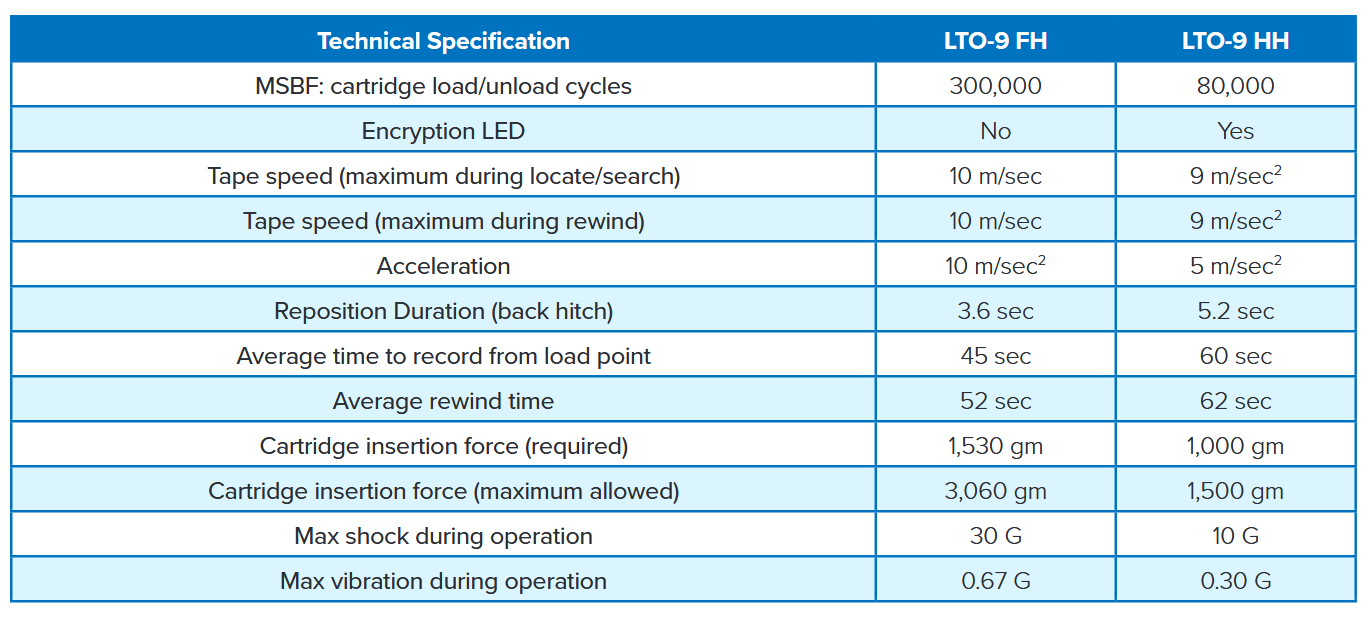
(The specs that you cite says that the MSBF is 80 THOUSAND load/unload cycles.)
If it takes you a day to write ~18 TB* (* assumes that you write the tape to its full, formatted capacity, which “they” (LTO experts, generally do not recommend), but to simplify the calculations, let’s assume that you’ll write to its full native capacity), to hit the 80 THOUSAND load/unload cycles – you’d have to be swapping a tape, DAILY, for the next 219 years.
So…would that really be that much of an issue/concern?
(I should back up: I am ASSUMING that the OP is referring to a home use case, but that is my assumption.)
Suppose that you think that the HH drive will fail in 5 years. That means that 80 THOUSAND load/unload cycles / 5 years = 16 THOUSAND load/unload cycles/year.
Divide that by 365 days/year = 43.85 load/unload cycles per day.
That works out to a little over 1.8 load/unload operations per hour or a load/unload operation every 32.85 minutes.
I suppose that if you were CONSTANTLY refreshing your data, you might be able to hit those load/unload number of cycles.
But home use and/or even for small-to-medium enterprises, you might not necessarily even hit that mark.
(Again, my bad for assuming that the OP’s use case is a home use case. The OP doesn’t actually explicitly state what’s their use case for a LTO-9 tape backup system. My bad.)
I would imagine that a home user might be quite likely to use the drive in an unusual or less optimal way. That load/unload metric is probably a proxy for all kinds of failures, averaged into what a normal enterprise backup load+unload cycle is like, and home use may be the equivalent of several enterprise load+unload cycles even thought the tape is not technically being removed from the mechanism multiple times.
I have no experience with LTO, but knowing how raw NAND reacts poorly to use as if it were HDD storage, I imagine there are certain ways of using archival tape (which seems to be the main audience of LTO) that can be similarly damaging.
Like I said, assuming that you can even WRITE 18 TB to a LTO-9 tape per day (hint: in theory, you can, but in practice, the probability of you actually being able to do so, is very, very slim), you’d have to be loading/unloading a tape DAILY, for the next TWO HUNDRED and NINETEEN YEARS.
So, I ask again, why would you care about the MSBF of 80,000 load/unload cycles given that you’re not even going be alive in 219 years?
You say that you would care, but given this arithmetic, you haven’t been able to logically reason out why you would care.
That’s not what the definition of the mean swaps between failure (MSBF) metric means.
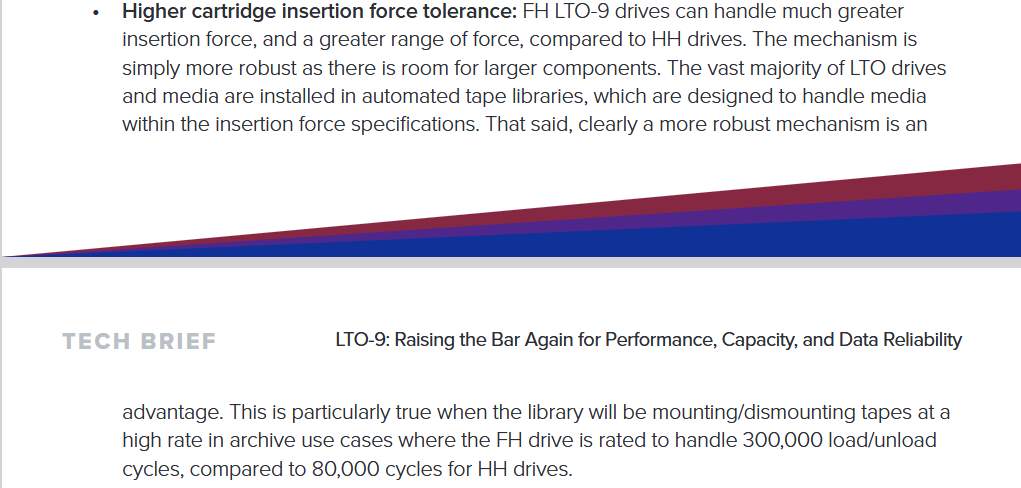
That has nothing to do with any of the other factors that you mentioned, but rather, as it states in the technical brief, that it has moreso to do with the drives being in an automated tape library system, where the removal and insertion of tapes are automated (vs. the more manual process in a home lab or small-to-medium enterprise setting).
Let me put it to you this way: if people here are balking at the price of a full height drive, they’re HIGHLY UNLIKELY going to be getting an automated tape library system where the cost of said automated tape library system would be significantly more than the single full height drive.
Therefore; it doesn’t make sense to be worried about this metric, given the relatively and significantly low(er) probability of someone using a LTO-8 or LTO-9 automated tape library, as the cost of those systems is several times more than the cost of a single full height drive.
And then you have to think/ask yourself: “What’s Quantum trying to do?” Sell you tape drives.
So if you were a company selling a product, would you try to steer people towards your more expensive product or your less expensive product? The more expensive product, right? After all, if you were trying to make money, why would you steer your clients towards a product where you would be making less money than your own product line where you would making more money?
You have to think about what is the purpose and point of the technical brief.
And then additionally, if the half-height drives were such a problem, then why would they sell them, if it ruins their customers tapes, and data???
Think about it.
If it is really as big of a problem as you might think or make it out to be, then why would people buy and use it?
If it is as big of a problem as you make it out to be, don’t you think that there’d be news articles about it all over the place (a la the whole 13th and 14th gen Intel CPU fiasco that costed Pat Gelsinger his job?)
There’s a lot of speculation here about the failure rates and/or the failures/issues that it causes, but there’s not a lot of actual data that’s being presented to support any of the claims that have been made here.
Three things:
As you stated, you don’t have any experience with it, which is in direct contrast to the LTO-8 tape system that I have been running since around the 2018 mark (so for like 6, going on 7 years).
And whilst I recognise that my use case may not be representative of the OP’s (potential) use case (again, the OP hasn’t stated what nor how they plan on using a system like this yet, so I can only assume (I know, my bad for assuming, but I am explicitly declaring my assumption now), or extrapolate (which is also my bad for extrapolating) my use case as the OP’s use case – but in either way, given the price sensitivity, I can only surmise that they’re working on a limited budget, and therefore; it’s a use case where it isn’t a business that’s paying for the tape drive system (again, I am assuming).
(If it was a business that was paying for it, then there might be a little bit more liberty with the budget, and if that was the case, then this might be just pre-purchase due diliegence/research so that the OP understands what he’s getting himself into before buying everything that he’ll need to bring the system up and online.)
NAND, HDDs, and LTO tapes work VERY differently.
The finite write endurance limit of a NAND flash chip/module has very little to do with how HDDs are used which is very different than how LTO tapes are used.
NAND flash chip/modules are usually rated (well, as a commericalised SSD) is usually represented in terms of TBW or DWPD. And whilst HDDs technically has a write endurance limit as well, the reality is that HDDs are far more tolerants to writes and have a far longer total write endurance limit than SSDs.
(Sidebar: if you use SSDs as swap space you can burn through said write endurance limit WITHOUT coming anywhere CLOSE to the TBW/DWPD write endurance limits. Seven dead SSDs later (two NVMe, five SATA, all used as swap drives, is what tells me this.)
If you tried to use HDDs for highly random workloads where SSDs really shine, then you will be sorely disappointed. Again, you can’t cross compare the utilisation patterns across the different technologies because it would be silly and non-sensical to do that.
(Using HDDs as swap can reduce the read/write speeds down to sub-5 MB/s async speeds.)
If you try to use LTO tapes as swap space, it would be even slower still.
(Random reads/writes to a LTO tape will probably put the most mechanical stress/strain on the motors/drive mechanisms etc. as it would be constantly trying to seek the tape. And whilst you technically can use LTO tapes for this, clearly, it would be silly and very senseless to try and do so. It’ll probably be so slow that in practical effect, you’d try it once, for a little while, that you are unlikely going to do it ever again.)
And whilst you CAN use a HDD like you do with LTO tapes, but the reality is that HDDs CAN write the data linearly, like LINEAR tape open, but the linear write behaviour is not necessarily guaranteed.
Same thing with SSDs - it’s actually quite difficult to ensure that the data is written linearly, to said SSD.
The read/write/access patterns cannot be compared across the different technologies in order to try and predict the reliability of the medium.
Crazy, I wasn’t even aware there were differences in HH and FH drives let alone such pronounced ones in reliability. Thank you for that info and the detailed reply. Makes me glad I didn’t pull the trigger on a half-height model I found on the edge of what I considered a good price two years ago. Definitely think I will just stick with HDDs for cold backup purposes myself.
(I doubt that it’s even a twinkle in the eye, in the grand scheme of things.)
Even with my LTO-8 drive which can only write 12 TB of data per tape (again, I don’t write it to the full, formatted capacity, but to make the math easier, let’s assume that I do) – 216 TB * 2 = 432 TB. 432 TB / 12 TB/tape = 36 tapes
At 80,000 load/unload cycles, divided by 36 tapes – it means that I can write and re-write ALL of the data (216 TB), twice (432 TB) two THOUSAND two hundred and twenty-two times before I would even come REMOTELY CLOSE to hitting that 80,000 MSBF rating.
Again, my point is that if you’re using it for home use and you’ve ran the cost optimisation analysis/calculations such that you’ve determined that it is worth it for you to have a LTO tape system instead of a HDD-based system, you’re going to be WELL under the rated MSBF number of load/unload cycles, especially if you’re manually changing your tapes, one at a time.
Again, assuming that I could even write 36 tapes per month (I can’t, but let’s again, assume that I actually could), 2222.222 months / 12 months/year = 185.185 years.
It would take me 185 years to hit that MSBF rating of 80,000 load/unload cycles.
Again, in practice, you’re going to be WELL under the MSBF rating, so it’s such a non-issue, if you’re going to be using it for a homelab setting and/or even a small-to-medium enterprise setting.
If your company grows large enough where it becomes and issue for you, then hopefully, your company would’ve grown large enough where it is consuming the load/unload cycles at a higher rate, where your overall IT budget would grow, proportional to the growth of your business.
So again, as your company grows, so too, should its IT budget so that you would be able to things more “properly”, and therefore; if/when the half-height drive fails, and if your company has grown big enough that the reason why it failed was because you were consuming the load/unload cycles at a higher rate, then you might be in a much better position, with a bigger IT budget to be able to replace it not only with a full height drive, but quite possibly with an actual automatic tape library system where that MSBF rating would be more important/significant.
By then, you could’ve moved on to bigger and better IT systems, such that this MSBF rating for a single, half-height LTO-8/9 tape drive, would be a distant memory in the history of your company.
Once again – it doesn’t matter and it is highly unlikely to matter, in your ENTIRE lifetime, let alone the lifetime of the tapes, the tape drive, and the system that it’s attached to itself.
Note that it stipulates that the HDD has a write endurance of 550 TBW.
Note also that it’s not TBW per day. It’s FLAT, “TBW”.
Therefore; 550 TBW / 12 TB = 45.83333.
Therefore; if you write 550 TBW, according to wherever the source is for this write endurance value, you write that much data to the drive, the HDD ought to be kaput.
But clearly, that’s not the case here.
And you can pretty much repeat the same exercise for whatever drive you’re using, as the drive in question.
Some manufacturers may publish this data somewhere, whilst others might not give it a rating at all.
Again, this is for HDDs, not SSDs.
And yet, CLEARLY, people are using the WD DC HC520 12 TB drives, and writing more than 550 TB to it without issue.
The AFR for this model, per the manufacturer’s spec sheet is supposed to be 0.35%, but per the 2024 year-end data from Backblaze, the lifetime AFR for the same WD DC HC520 12 TB model is 1.36%.
“As you can see, there are two 12TB drive models driving the high AFR for the HGST drives. The HUH721212ALN604 model began showing signs of an increased quarterly AFR in Q1 2023 and the HUH721212ALE604 model followed suit in Q3 2024. Without these drive models, the 2024 AFR for HGST drive would be 0.55%.”
(Source: ibid.)
My point is that when you are looking at the statistics of reliability data, as noted by Backblaze (for HDDs), either you’re going to get a bunch of duds right at the very beginning of service (which, lots of times, if it falls within the warranty period, you can send it back and get it replaced under warranty), whilst in the 3-5 year mark, it will be the lowest failure rate, and then as the drives age, the failure rates will start to increase again, in what they call “the bathtub curve”. Whilst there isn’t publicly published reliability data like how Backblaze publishes their drive reliability stats, there is little evidence to suggest that tape drives, half-height or otherwise, would fundamentally behaving really any different than said “bathtub curve.”
This isn’t to say that drives don’t nor can’t fail, but that the probability of them doing so is very, very low.
The same will be true for half-height drives (vs. full-height drives).
Again, if the half-height drives were really as big of a problem as people think it might be here, then we’d never hear the end of it (again, a la the whole Intel fiasco with their 13th and 14th gen CPUs).
But that clearly isn’t the case here. Per probability theory, you’re actually vastly more likely to end up with a half-height drive that is going to be fine vs. getting one that would be a part of the fractional percentage that would fail.
Between the low initial probability of failure and then what it would take for you to actually get it to fail (how many cycles, etc.) - again – the statistical story remains the same – don’t really worry about it unless you have to send it back for a RMA within the warranty period.
This is true for pretty much any piece of technology that you buy.
if the difference between 300,000 load/unload cycles vs. 80,000 load/unload cycles is really THAT big of a deal for you, then it raises the question as to why are you only looking at spending the money for just ONE tape drive then?
(I, for one, would LOVE to watch the person who’s concerned about it, load and unload a tape, 300,000 times, manually.)
If the more robust physical mechanism was the only benefit to FH over HH, then I wouldn’t be as interested.
It’s all the benefits of of FH together that make it more compelling, the faster transfer and seek rates mixed with the improved spindle positional and torque control that enable not only faster speeds, but less strain on the tapes improving their lives that make it compelling.
Tape life is a pretty big deal with the new LTO formats, LTO-10 is slated to only allow for ~71 full reads or writes to the tape before the expected tape durability has been exceeded.
All that said, I don’t know if the large price increase for FH justifies all this.
The endurance rating for HDDs is per year of warrantee as opposed to the total expected of the drive.
The manufactures claim the way the number is derived is the amount of workload the hdd can see before there is any statistical increase in failure rate within a year.
ALL cost optimisation analyses – you’re optimising between cost, performance (speed), performance (reliability), and/or whatever else that matters to you (e.g. performance/Watt or any other metric).
This is true with any and ALL cost optimisation studies.
That would like you saying that you can choose to buy/drive a vehicle with a powersplit hybrid architecture vs. a Jeep.
You can choose to drive like a maniac and drive 140 km/h (87 mph) everywhere, but your fuel economy is going to suck as a result of it (where you’ve optimised it for speed) or you can drive the hybrid at 110 km/h (69 mph) and just relax and cruise, because you know that you are going slower, but more efficiently and you pay for the difference in the cost to fill up your tank and the frequency of needing to do so.
Similarly, along the lines of the cost optimisation problem – you CAN replace your entire mass storage system with SSDs, but again, you’re trading performance (faster speed) with reliability and cost.
The difference between the FH and HH tape drives is no different than that.
You pay more for the FH drive, but it runs slightly faster than the HH drive.
But like a long road trip, if it’s going to take you 12 hours for you to get to your destination, does it REALLY matter if you shave 20 minutes off said 12 hour drive?
The theoretical speeds of the FH vs. HH drive, especially for LTO-9 is supposed to be a peak of upto 400 MB/s.
I am not sure how much physical/practical experience you have with LTO-8 (and newer tape drives), but I can tell you, based on my actual experience with my actual LTO-8 HH tape drive, that the theoretical peak speeds is precisely that – a theoretical peak speed.
In practice, I am ususally SIGNIFICANTLY slower than that.
If I am writing the pictures my wife takes of the kids – each picture is only a few MB. Even if we were to assume that a picture is 20 MB, if you’re writing a picture per second, (again, I am using rsync to write it, not mbuffer), you’re still, at max, writing at 20 MB/s, in actual, practical reality.
This is why, in all of the speed calculations, I specifically caveat the calculation with two assumptions:
The full capacity (vs. the 80% of the tape’s native capacity is the more general, “rule-of-thumb” recommendation (don’t write it completely)) and
That you are able to write that native capacity, in a day, where in many cases, you can’t for a variety of reasons (source storage system may be fragmented (as it is with ZFS), so your HDDs have to hunt around a little bit for the data.
(e.g. my main storage pool right now, as reported by zpool list shows a size of 231 TiB, at 78% capacity, and 40% free space fragmentation)
Therefore; given that, there is a decent chance that I won’t be able to sustain even the 300 MB/s that the LTO-8 HH drives are supposed to be capable of.
I’ve RARELY ever seen it hit that. MOST of the time, it’s sitting closer between the 70-80 MB/s mark.
Therefore; who cares if the FH drives can do the stuff faster.
The actual, practical matter of reading and writing data from/to the tape can’t go any faster anyways, for the rest of the reasons, in the entire chain of (potential) bottlenecks.
Yes, the other things MAY benefit, but you’re not necessarily guaranteed to be able to reap the rewards of the differences between FH and HH drives, especially in a single, manually loaded drive configuration.
I tend to fill my drives up to 10.5 TiB. (87.5% capacity, which I know, is higher than the “rule-of-thumb” recommendation)
If I am able to write at an average of about 80 MiB/s, then it would take 137625.6 seconds for me to write to that capacity level or approximately 1.6 days.
Therefore; spending 47% more ($7198/$4894 per backupworks.com pricing) for something that may yield upto 33% benefit (no guarantee that you’ll actually reap the full 33% reward/benefit), works out to be a 1.1% price increase per 1% increase in potential performance (speed) increase.
Again, this cost optimisation isn’t unique to FH vs. HH drives.
You can replace your entire bulk storage with SSDs.
But I am going to bet that you probably didn’t/haven’t.
This cost optimisation is no different than that.
^Agreed.
I tried googling this and couldn’t come up with any sources that state nor stipulate this.
So, if you have a reference that you are able to pass along so that I can read it, that would be greatly appreciated.
(I would be surprised if this was the case, but until I read the reference, I can’t speak to it, one way or another. But a quick google for this came up completely empty handed.)
[citation needed]
[also citation needed]
I’ll summarise this discussion this way – out of the people who has responded, it would be interesting to know how many have a LTO-8 tape drive system that they have, at their house.
(Again, this is the use case that I am assuming as the OP doesn’t say what use case he is looking to get one for.)
If the people who have one, are speaking from their actual experiences of using one, then to me, at least, that would carry more “weight” than people who might be speaking about this topic mostly (or purely) from the theoretical perspective.
There are a LOT of things that people can talk about, based on theory.
And I can personally attest that when it comes to the actual, practical deployment – theory can often times, have little bearing nor relationship to reality.
Remember that the calculations for the peak transfer rates of the FH vs. HH drives are under “ideal”, lab conditions (so that their tests can be conducted in a reliable and repeatable manner). But out in the actual, real world deployments, it’s not a lab setting, and therefore; all of the things that were used to create the “perfect” lab condition, goes out the window when it’s deployed in the basement of my home.
There are no shortage of ways/things that can end up taking you far, far, far away from the ideal/theoretical maximum transfer rates.
And it really doesn’t take much, with LTO, to end up slowing it down.
(Like ideally, I should be backing up my data to another server and then have that server be the source of the data that’s going up on tape. But being “cost-efficiency minded”, I don’t have a second server, with a grand total of 231 TiB + 43.7 TiB + 12 TiB = 286.7 TiB of storage to be able to ingest/backup my data onto before sending said data over to tape. Hard drives alone, (12 TB drives at $108.88 off of eBay) would run me $2613.12. And that’s BEFORE I buy another 36-bay 4U server, where one of the servers that I am watching on eBay, is going for $1396.04. That will bring the combined total for the new server up to $4009.16.)
And again, as I mentioned, that’s just if I want to store the data that I have right now.
That doesn’t include the data that have already offloaded onto tape.
If you’re only planning on backing up 12 TB of data, then it would be silly and senseless to get a LTO-8/9 tape drive system.
But like I said, when I did the original optimisation calculations, my “breakeven point” was about 150 TB.
That’s where it made more sense to go tape than more HDDs (hot or cold storage).
Like I said, you can build a very simple Excel spreadsheet to run the cost optimisation for yourself to see what works best for you, as a function of how much data you want to or need to backup and you can decide from there, which option works better for you.
I’m not here to dictate nor sell you on going with one option or the other.
I’m just conveying my experiences and how I ran the cost optimisation calculations for myself, and then using that analysis, made the decision for what works best for me.
And what works best for me, may not work for you, and that’s 100% ok as well.
But I am also of the opinion that it is much better to speak from experience, rather than theory, because there are a lot of things that take me away from the theoretical peak/sustained data transfer rates.
If you have more questions, please feel free to ask.
I’ve been in recovery situations where a client swears up and down they have regular tape backups (and do), but the tape is degraded due to environmental deterioration, untested hardware / recoveries, etc.
LTO is dead, buy HDD’s and switch your prod to SSD’s.