I always love it when people write this as it provides the data that shows what they do and don’t know about tape backups and the industry as a whole.
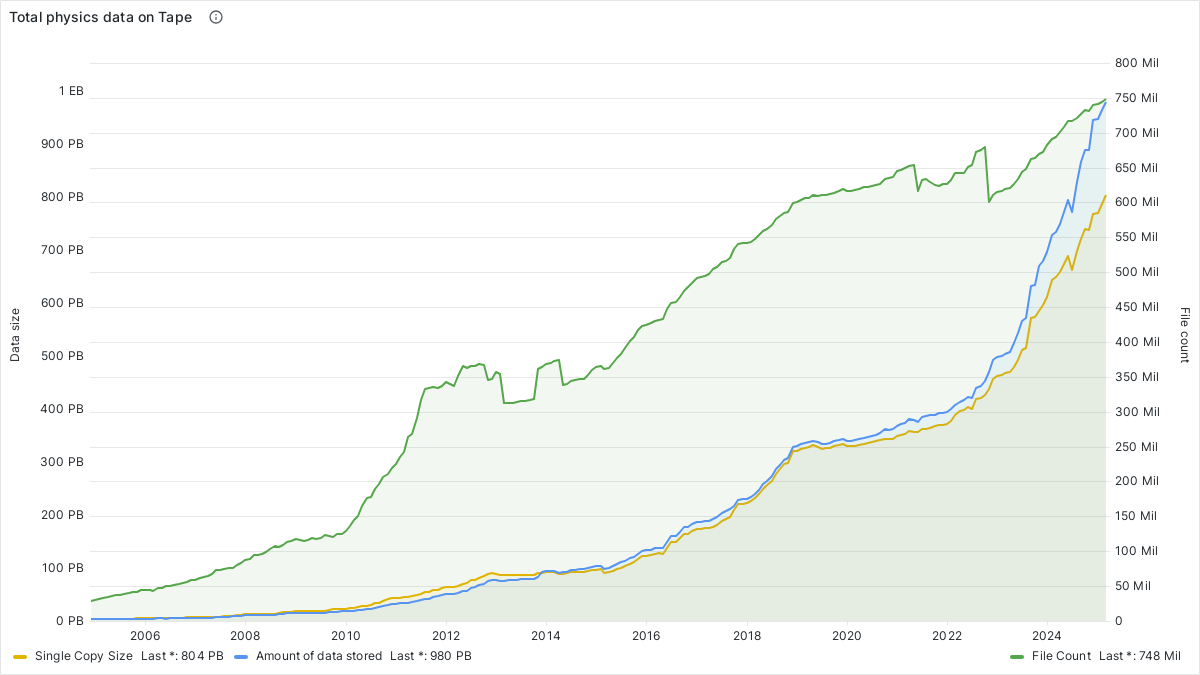
(Source: CERN)
Note that the amount of data stored, on tape, is going UP, not down.
Strange that.
I always love it when people write this as it provides the data that shows what they do and don’t know about tape backups and the industry as a whole.
Note that the amount of data stored, on tape, is going UP, not down.
Strange that.
That is fine, now from your expert wisdom show me your sales figures regarding LTO tape vs HDD vs SSD per deployment use case in enterprise.
I nerd for a living, and out of several thousand clients encountered: 1 had regular LTO tape backups that we learned about because they were also running a hardware RAID (with ZFS on top) NAS [how we met] which resulted in several hundred terabytes of data being lost.
We have encountered a number of LTO machines humming along producing trash (when attempting to recover during disaster recovery simulations).
We do not and will not recommend deprecated technology for clients.
If you’re really being pedantic then reference the Library of Congress recommendations…
actually, I’ll do that for you:
LTO is only to be used to transport .tar images to be transcoded to more stable media.
As for your quoted reference,
" CERN Advanced STORage manager (CASTOR) is a hierarchical storage (i.e. has disk and tape) management system"
" CASTOR is the successor of SHIFT, the Scalable Heterogeneous Integrated FaciliTy for HEP computing, which was developed and operated in the 1990s. As of June 29th 2020, CTA, the CERN Tape Archive, started to be operated as the successor of CASTOR and gradually replaced it. The evolution of total data on tape at CERN since 2001 is displayed on the right, including statistics gathered from CASTOR 1 (1998-2007), CASTOR 2 (2005-2022), and CTA (2020-onwards)."
You are quoting a legacy system that is only in operation due to inertia and unlimited funding from the federal government. You @alpha754293 took that chart out of context and attempted to pass it off as market adoption.
The current maintainers of that system do not know their initialization date, curious for a system that is supposed to indefinitely maintain records, much less the data in those records…
Meanwhile, every homelab enthusiast running TrueNAS unknowingly keeps logs of every transaction.
Wait…so this CLIENT of yours, had SEVERAL HUNDRED terabytes of data LOST, and only had ONE regular LTO tape backups (i.e. NOT a tape library, for SEVERAL HUNDRED TBs of data lost), which as, you said was ZFS built on top of HW RAID.
Two curious questions:
Why were they running ZFS on top of HW RAID?
Who’s the idiot that sold them on that idea???
(Cuz clearly, they didn’t know what the eff they were doing, given this type of a set up.)
If you have a poorly and mismanaged set up and data loss occurs, (I surmise that they weren’t regularly validating and verifying the data that was backed up on to said tape neither, like they’re supposed to), that’s NOT the fault of the underlying technology – that’s PEBKAC.
Do stupid stuff with IT, win stupid IT-related prizes like data loss.
CLEARLY your client didn’t know any better, and neither did the person who set up their system, in the first place.
BWAHAHAHA…
And yet, 10th generation LTO is supposed to be launching “soon”.
If it is “deprecated” technology, then why are the sales of tapes INCREASING whilst sales of HDDs are DECREASING?
(Source: ibid.)
(It’s LITERALLY the second image in a google search for “LTO tape sales”. LOL…LMAO…)
Note further, by the way, that Seagate is the ONLY manufacturer that I am aware of, that has dual actuator HDDs. EVERYBODY ELSE, doesn’t, which means that the sustained sequential transfer rate for HDDs has remained pretty much the same for about the last decade or so, meanwhile, LTO tape, as an industry is moving toward 400 MB/s.
But, it’s “deprecated technology” according to you, but it’s FASTER than HDDs.
In fact, you need multiple HDDs to be able to feed the tape enough data, consistently, so that the tape can reach its fullest transfer rate potential, writing to a single tape drive.
From your source:
“E. Delivery method • Direct File Submission: These submissions would require
grouping in a submission package such as BagIt, Tape
Archive (tar), or AXF object.
• Mass storage device: All of the
requested information may be included
as distinct files or may be grouped
together using a method such as BagIt,
Tape Archive (tar), or AXF object:
• Hard drive with USB (universal
serial bus) interface
• CD-ROM disc
• Flash drive with USB interface
• DVD disc”
So…wait, what you are trying to tell me is that tape is a “deprecated technology”, but according to the source that you cite, CD-ROM disc isn’t a “deprecated technology”??? (because it’s on the LOC Recommended Formats Statement list???) (Source: LOC Recommended Formats Statement 2022-2023, p. 40).
Really???
That’s the source you want to cite?
Again, from your own source:
“Direct File Submission: These submissions would require
grouping in a submission package such as BagIt, Tape
Archive (tar), or AXF object.” (emphasis mine, Source: ibid.)
There is NO reference, from your source that supports your claim, quote “LTO is only to be used to transport .tar images to be transcoded to more stable media.”
If you do a CTRL+F inside the LOC Formats Statement PDF, and try and look for “transcod”, there are zero instances of that found in the entire document that you cited.
PATENTLY FALSE.
How the eff is CERN Tape Archive (CTA), which was brought online in 2020, quote “a legacy system”. It was brought online in 2020. In what universe is “2020” a “legacy” system???
LOL…LMAO…
Furthermore, I did NOT state that it is MARKET adoption.
YOUR statement was:
“LTO is dead, buy HDD’s and switch your prod to SSD’s.”
I provided the data which showed that the amount of data being stored, on tape, is INCREASING, which is a direct counterargument against your claim that quote “LTO is dead, buy HDD’s and switch your prod to SSD’s.”.
Pursuant to your claim, if that were true, then the data would’ve reflected that.
But as the plot from CERN shows, that is clearly NOT the case.
SHOW ME where I made the claim that the graph represents “market adoption”.
Go ahead. Show me.
Quote/cite me back to me. You can’t, can you?
LOL…LMAO…
Nice try.
You made a claim: “LTO is dead, buy HDD’s and switch your prod to SSD’s.”
I disproved your claim.
And you haven’t been able to supply ANY data that counters the plot from CERN that the amount of data being backed up to tape is INCREASING, therefore; tape is VERY much alive and well, and NOT dead, contrary to your claim.
Again, LITERALLY, the second image from a google image search for “lto tape sales” refers to an article from Tom’s Hardware, the title of which reads: " Tape Storage Soars While HDD Sales Crash"
AGAIN, I have been able to provide the data and the evidence that disproves your claim, in your statement: “LTO is dead, buy HDD’s and switch your prod to SSD’s.”
IF your claim was true, and that LTO is dead, then WHY would “Tape Storage Soars While HDD Sales Crash”???
Once again, the data doesn’t support your claim that you made and since you can’t actually compile a cogent, well formed, well researched rebuttal, you instead, make stuff up (a la “attempted to pass it off as market adoption.”) whereas you can’t cite a single statement that I have made, where I actually did this and you can’t provide ANY data to support this claim that I quote “attempted to pass it off as market adoption.”.
So this just goes to show that you’re as uninformed as the person who set up the system in the first place.
IF you are cycling through the tapes REGULARLY, like you’re supposed to, this can mean that unless that you have a specific LEGAL requirement for record retention, and/or data that you need to keep for archival reasons, it is entirely possible that you can be wiping/overwriting old data with new data, to the same tape.
Therefore; I have NO idea where you get the idea or notion that records are being kept indefinitely.
The tapes themselves, typically, have between a 25-30 year lifespan on them anyways.
Again, play stupid IT games, win stupid IT prizes (like data loss).
A poorly and improperly implemented and managed system (doesn’t sound like that you really know much about it given the statements that you’re making about it), isn’t the fault of the underlying technology, but the person who sold, and implemented the solution, in the first place, along with future sysadmins who, if they’re one of your clients, might mean you, and if you don’t know how to properly use the technology, that’s not the fault of the technology, but rather, PEBKAC.
As far as I can tell (via a simple google search), the ZFS intent log isn’t and does not, contiuously retain the operations indefinitely.
Or put in another way, I couldn’t find any specific references/sources/documentation/citation that says that the ZFS intent log: a) grows continuously, and b) as a result of (a), grows, indefinitely.
In Matt Ahren’s presentation here, he talks about spacemaps and transaction groups and the slide talks about clearing/cleaning (basically) the constituent components of the ZFS intent log so that it will start batching up the next set of operations into the next transaction group, that is waiting for the sync/commit operation (see the zfs_txg_history and zfs_txg_timeout module parameters for more info).
So no, “every homelab enthusiast running TrueNAS unknowingly keeps logs of every transaction.”
It doesn’t actually, technically keep a log of EVERY transaction.
At best, the operations are queued up in the ZFS intent log and then sync’d/commited to disk (if sync is enabled). If sync is disabled (or async is enabled), then per the Oracle documentation, the ZFS intent log was created to satisfy the POSIX requirement for data to be committed to stable storage where the ZFS intent log will “lie” to the OS and say that the data has been committed to stable storage, but in reality, it has only been committed to the ZFS intent log before the acknowledgement of the commit is sent back to the OS. (Source: Creating a ZFS Storage Pool With Log Devices)
The ZFS intent log only keeps a tiny fraction of the operations queued up in the ZFS intent log, until it is sync’d/committed to disk (if sync is enabled). It doesn’t keep a record of EVERY transaction, unlike your claim/statement that you’re making here, once again.
Please refer to the ZFS Administration Guide for more details/information as well as this presentation from OpenZFS.
(Sidebar:
As do I, but in very difficult capacities.
I’ll put it to you this way – I’ve been using ZFS since it was released in Solaris 10 6/06 (“U2”) release.
My first experience in working with the ZFS developers, at Sun Microsystems was back in April 9th, 2007, when I encountered my first major issue with it where I was in a Solaris 10 kernel panic loop because of ZFS.
And I would be willing to bet that your first foray into ZFS, most likely, WASN’T with Solaris 10 6/06.
So, I’ve basically been using it for the past, well, just shy of 19 years actually.
After I graduated from university, there were people whom I was working with at the time, that were pursuing their SCSA certification, and I would chat with them about it, and they would literally ask me if a) I was going to for my SCSA certification/exam as well (I wasn’t) and then b) given (a), the next question that they’d ask me is “okay, if you’re not going for your SCSA, then how do you know all this stuff (about Solaris)?” to which, my reply was “I use it, daily, at home.” (I used to have a Pentium MMX 166 MHz system that was my Solaris server.)
I think that by the time ZFS was released, I was using an AMD Duron 1800 system, with ZFS, and it mostly worked, well enough, at the time.
You say that you nerd for a living. But do you have 100 Gbps Infiniband running in the basement of your house???
(I skipped 2.5 G, 5 G, 10 G, 25 G, 40 G, 50 G, and went straight to 100 Gbps Infiniband instead.)
I work at a Fortune 20 company. There are people in my IT department, that when I talk to them, their jaws drop because of the kind of stuff that I am running in the basement of my home.
(e.g. I was asking my HPC group which manages some 330k CPU cores, what are some things they do to tune our 200 Gbps IB network. And they asked me why I’m asking, and I told them because I’m running the 100 Gbps IB in the basement of my house and that’s not something that you hear, every day.)
I’m still working on trying to “package” HPC apps into LXCs so that I am able to share said 100 Gbps IB connection between LXCs. Unfortunately, the opensm that ships with Debian, doesn’t support virtualisation, so no SRIOV for me, for now.
(Trying to figure out a workaround for that, as well as trying to get Proxmox (Debian 12) and Rocky Linux 9 (RHEL 9) to play nicely together with NFSoRDMA (Rocky Linux can do it, Proxmox/Debian can’t.)
You might nerd for a living.
I do it for fun.
As a result, if I mess up, I don’t have someone else breathing down my neck to get it fixed.
I just answer to myself/be my own boss of sorts.
At work, I have to ASK them to deploy specific LLMs that I want to use.
At home, I can deploy any LLM I want.
I do indeed:
“The report reveals a record 152.9 Exabytes (EB) of total tape capacity (compressed) shipped in 2023,”
sauce: LTO Tape Capacity Shipments Achieve Significant Growth Amid Explosive Data Generation
total Seagate sales in 2023: 340+ Exabytes of HDD storage
source: Seagate HDD capacity shipped worldwide 2025 | Statista
That is just Seagate, not including Western Digital who is the other major player in high capacity HDD’s.
End users purchased an off the shelf solution that was in that configuration.
$150,000 NAS used a reskinned legacy FreeNAS installation on top of a pair of LSI cards that was not communicating disk errors.
By the time they knew a drive had died, several were dead from the array and it was too late.
Which is around 400 MB/s.
Correct, as archive media a CD-ROM is more stable than LTO. I do not recommend that either, but it is on their list for a reason.
Let’s look at the actual use case here:
You compared multiple drives in an array versus an LTO tape.
Every production workflow relies on redundant disk media.
Every modern file system implements metadata validation and on the fly error correction.
Writing out data to a tape is a single point of failure followed by in best case a mechanical machine that then automatically removes, stores, and replaces the tape. Each write operation is a separate operation at your quoted 400 MB/s.
A small snapshot backup of 2TB is 5000 seconds at best, and multiply that twice for a single redundant tape backup.
10000 seconds or 3 hours to backup 2TB to 2 tapes
A 3 wide array of HDD’s is going to complete the same task in 3333 seconds, less than an hour, and make 2 copies of all the data simultaneously.
When an enterprise is implementing proper encryption at rest, a raw encrypted backup is necessary. This mean the entire volume has to be rewritten for each backup. Considering that the backup solution should not have unencrypted access to the production data, the only solution is faster write times.
2TB is a small backup for a small enterprise.
Most of ours are substantially larger and we rely on nightly images as a single lost day of work exceeds the cost of the backup solution.
LTO is not feasible in the modern age of large data.
Methinks it is really meant for long term archival storage for end-of-the-world scenarios.
But it can’t get past the problem that high initial cost of the unit doesn’t get amortized over many tapes.
It’s hard to see scenario where one unit could serve more than 20 tapes or so - which usually means around 50% of the unit price.
GREAT. Couple questions about Infiniband:
I’ve skipped out on everything after 6 because that was when the generational improvements went from 100% to 50%.
However LTO-10 has me interested because it’s finally getting good capacity scaling again. Tape is very convenient for backup because of how easy it is to move around compared to heavier, bulkier and more delicate hdds.
Whoops, I got that wrong, LTO-9 is the one that will wear tapes out after ~71 full tape reads or writes, I’d expect LTO-10 to be even less.
The way I came up with that endurance number is that LTO-9 has a total of 8960 tracks, which would mean that it would take 280 (8960/32 tracks per wrap) end to end passes to fill up a tape, and LTO tape can do 20,000 end to end passes before running out of “life” according to most spec sheets. This 20,000 number can wildly vary depending on a bunch of factors (the quality of the drive is a big one which is what makes me consider the FH drives so strongly).
I slightly misunderstood, I thought that Half-Height and Full-Height were also changes in cartridge size or tape width; too many years of only thinking about HDDs and SSDs I guess, where “drive” is almost synonymous with “storage medium”.
If the drive size (FH vs HH) really has no effects on tape wear, literally only the load unload mechanism jamming, than I retract my prior concerns; a slightly slower theoretical read speed would probably be better for the tape anyway.
That is exactly the kind of enterprise-use assumption I would be concerned about. I have definitely heard this kind of statistic before; I forget exactly where, sorry @alpha754293, but I remember it being somewhat credible at the time, though I would certainly hope it is not true.
If it is, then would not each test or validation-read of your backups significantly eat into the lifespan? That would be really concerning.
Then one must ask, is the wear rate even worse for random file reads rather than full tape?
While enterprise users have tapes as a tier of an automated storage system (I imagine Amazon Glacier is like this), backups of pre-organised datasets or databases, purely archival for legal reasons (look into WORM cartridges if curious), etc. — a home user would probably be backing up BluRays, documents, music, photos, old OS or application ISOs, and will be more likely to need a single file or a collection of a few files every so often.
An enterprise will likely never be looking through an actual tape file system, instead probably loading the entire contents of a tape or multiple tapes into a RAID/ZFS pool, treating an entire array of HDD as no more than a caching layer for tape access.
I would bet experience with systems like that is why @alpha754293 is referring to the ideal as having a “second server” between the user and actual tape access.
A home user though, even a “poweruser”, will be using backups more like how Apple envisioned with its Time Machine:
plucking out individual files or folders that were accidentally deleted or that were only on that one old machine, having never being needed anywhere else until it broke.
Like someone responding to a friendly datahoarder request on /r/DHExchange, I cannot imagine any personal data retrieval of my own being as straightforward as, “restore our database backup DB20110401 from tape CART20110401C” which is how I imagine it works for any business not large enough to have an automated tape library.
Once I reach the break-even point @alpha754293 describes, where buying a tape drive is practical, I would want to move as much data as possible to tape to cut down on cyclical HDD backup costs and be able to have some amount of “forget about it” in my backups.
As described above, I imagine my use of LTO would probably involve some amount of on-tape seeking or random access especially when accessing older data that I may organised differently than at present. Maybe a rare full text or binary search of multiple TiB of data if I am trying to find something I may have misplaced. Maybe even hunting for a file matching a particular checksum. Sure it would not be fast, but I would hope that doing such searches is not the equivalent of feeding tapes to the shredder (like how @alpha754293 described using NAND for swap) in terms of longevity.
That shelf life is the key; I very ardently yearn for storage that I can store long term without needing to, for example, bring it online several times per year, worry about integrated drive motors seizing up, or burned-optical-dye bit rot (except M-disc), or missing an email about policy changes or payment card expiry and finding later that my internet backups were deleted.
Yes, I know testing backups on a regular basis is recommended, but if I forget, I want hardware that can tolerate being left alone for years at a time so long as it is in a reasonable indoor climate.
Maybe I am just addicted to a fantasy, but being able to retreat to that metaphorical cabin in the woods without electricity, then return decades later, restore all my data onto new hardware with only a box of tapes and an encryption key to pick up where I left off… that kind of peace of mind is utterly priceless.
Regardless of whether I plan to actually escape to the woods, I would do almost anything to get us incrementally closer to making that a possibility, even if it means buying an underperforming product to keep the technology alive.
There is a difference in tape wear between the two types of drives. While the FH drives are faster, they are also more gentle to the tape at the same time, prolonging it’s life.
The reason is that the the FH drives have much better spindles/reel servos on them that can control their position and torque they put on the tape better compared to the HH drives.
The FH height drives can only run the tape about 10% faster than the HH drives, but can accelerate twice as fast due to the better encoder resolution and bandwidth; so it’s not necessarily that the FH drives have more powerful motors, it’s that they are more precise and damage the tape less by keeping the slack between the two reels controlled better (less tape stretch).
That 20,000 end to end passes “limit” is probably alittle conservative. In a clean environment, with a FH drive, I’d expect that number to be significantly higher.
Reads would eat into the lifespan of the tapes, but you wouldn’t need to read the tapes to verify the data was written correctly itself because the ECC on the tapes is super robust; You’d want to read the tapes to verify that the entire backup strategy works though, but once you know your backup strategy works you should be good.
That is a surprising amount of trust to place in just the medium — especially jarring compared to HDD/SSD where best practice is to:
It feels bizarre to just trust the cartridge.
Especially with that limited tape wear; imagine buying a physical safe that is only guaranteed to open 100 times before destroying its contents.
Is there some kind of counter to keep track of wear?
Being linear, the first part of the tape is guaranteed to see more reads if not writes; is it more reinforced than the rest?
I cannot imagine how any reasonable wear-leveling in LTFS could change that; being unreasonable, you could write the file index in several different places and pick one to read randomly on tape insertion, but then when you need a full read or files from the start of the tape, backtracking is almost always required, and you need to do a bunch of duplicate scattered writes when adding files.
I wouldn’t think about so much in terms of the number of tapes, unless you want to “translate” the volume of data that you want to backup and divided that volumetric data measurement by the capacity of each tape to convert TB of data to number of tapes.
I mean, I guess that you can do that. Sure.
And I guess that you can change the denominator of the division as a function of the LTO generation that you are evaluating, but it doesn’t really change the numerator part of this division problem, which is really, at the heart of the problem.
As I mentioned, I have 8 boxes of tapes, with each box having 5 tapes, so a total of 40 boxes.
My single tape drive has no issues serving 40 tapes. (I’m not sure why you think it would be an issue, so I would be curious to find out what your thinking is, behind this statement.)
Again, there are many factors that come into play here:
How much total volume of data are we talking about here?
What’s your use case? Home(lab)? Small business? Medium business?
How often is the data changing?
What is the volume of data that is changing?
What kind of a backup schedule do you want?
What’s your data retention policy?
etc.
Those questions will help to compute what the backup requirements which will drive the technical statement of requirements, from which, you’d be able to compile a solution that address all of the points from said technical statement of requirements.
Furthermore, also like I mentioned, the process of adding incremental storage with a tape backup system has SIGNIFICANTLY fewer caveats than with a HDD system.
A HDD-based backup system will ONLY be able to backup whatever data it is that you have running on your live system.
If you want to backup your data from your live system, and then delete it off the live system, so that you can put more data on it, there will come a point where and when even the backup HDD-based system will run out of available free space for all of the new data that’s been added to your live/primary system/server.
What I mean is that suppose that I have two identical servers, both with thirty-six 12 TB HDDs.
Initially, there is no data on neither server.
I add 12 TB of new data to the primary server per week. And that is then backed up by the secondary/backup server.
After the data has been backed up, the data is then deleted off the primary server to make room for new data.
After 36 weeks, I will have filled the backup server.
At week 37, when I add my 433rd TB to 444th TB of data, I will not be able to back up this new data to the backup server because the backup server would’ve completely run out of space.
And being that both servers are in a 36-bay 4U rackmount server, the ONLY way that you would be able to expand your backup server is by adding JBOD disk shelves. If your HBA that you bought doesn’t have external ports, then you’d have to replace that HBA. If the HBA that you bought was a SATA HBA and not a SAS HBA, then you’d have to replace the HBA.
If you’re not running the latest version of ZFS on Linux, then you won’t be able to add a single HDD to an existing vdev, which means to expand a vdev, you’d have to add as many drives as there are in a vdev.
So, if you have a 36-wide vdev, then you’d have to add an entire 36-drive JBOD’s worth of HDDs, to be able to expand the pool.
If you have separate it out, for example, as four 9-wide vdevs, then you can add it to just a single vdev, which will require a minimum of 9-drives (if you’re not running the latest version of ZFS on Linux).
If you’ve configured your vdev such that they’re raidz vdevs, then when you add a single drive, and one of your other drives dies, you’d have to replace the dead drive, and it can’t/won’t resilver itself until the single drive ZFS expansion is complete.
If another drive dies during the expansion, then that vdev is toast, and so is the entire pool.
These are just a few of the considerations that need to be taken, if you’re going to go with an all-HDD backup system.
Whereas with tape, if I want to add another tape, I just add another tape.
NONE of the aforementioned considerations are necessary with tape.
If I want to add another tape after that, I can just add another tape after that.
There is no JBOD disk shelf. No RAID/ZFS expansion. No resilvering. None of that. All of that goes away with tape.
And if you’re not using ZFS dRAID, then resilvering is notoriously slow.
With tape, I don’t have to worry about ANY of that.
But again, it all starts with “how much data are you looking to backup?” and “what’s your use case?”.
No, IB is not needed for storage systems of any kind, with the only exception that I can think of nowadays as Ceph (or Lustre/Gluster/GPFS) running on some kind of SSD. (The faster the SSD, the greater your IB utilisation will be.)
Is IB needed? No.
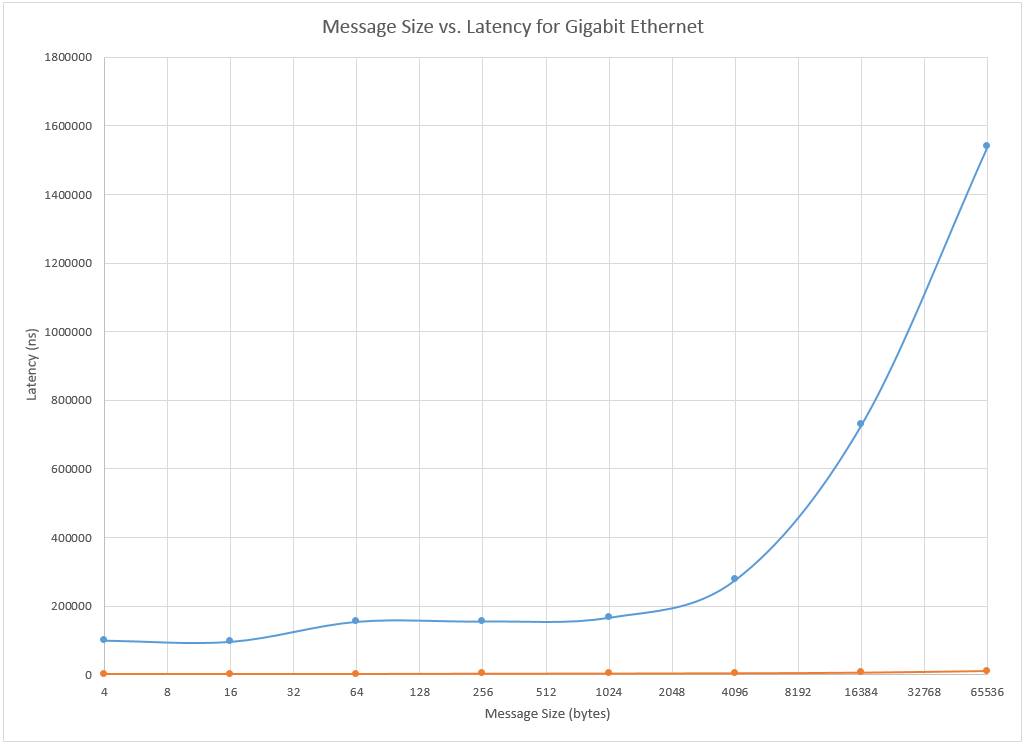
Latency on ethernet sucks.
This is a plot that I made on December 21, 2018 which compares the latency, in nanoseconds, between ethernet and IB, as a function of the message size (in bytes).
Ethernet, as far as latency is concerned, sucks.
But for storage needs, the drives are so slow (relatively speaking) that it’s like “who cares?”.
Well…it’s not the only use case, but it is still one of the most predominant use cases for IB.
But with AI nowadays and U.2 NVMe SSDs which plug directly into a CPU (no storage controller in between the drive and the CPU anymore), high speed system interconnects like 800 Gbps IB has become a thing to feed the massive volume of data that is used to train, then run, AI models.
The explosion of AI, at the data center level, is quickly outpacing the rate of growth for the more “traditional” HPC systems (cf. Top500).
My guess is that probably within the next 5 years, AI HPC clusters will overtake the more “traditional” HPC clusters that were designed for CAE workloads of all kinds.
Varies.
I’m using 100 Gbps Mellanox ConnectX-4 (MCX456A-ECAT) (dual port). Yes, it uses a PCIe 3.0 x16 connector interface. I don’t know about it “wasting” lanes on the host, because it really depends on what you’re using for the host system.
My crippled 3930K that runs my LTO-8 tape drive, runs headlessly, so it has all 16 PCIe 3.0 lanes dedicated to the IB card, of which, it maxes out at 2.4 Gbps utilisation out of 100 Gbps when I am sending/writing data to said tape.
I use it because I already have it.
I didn’t buy the 100 Gbps IB system for storage.
I bought it for HPC/CAE/CFD/FEA workloads.
re: “or slower CX5/CX4”
For the most part – the “slower” part of this sentence fragment is irrelevant.
Your drives are going to be your most limiting bottleneck in the entire chain.
Again, unless you’re going to be sending data to/from PCIe 5.0 x4 NVMe SSDs (U.2 or E1 EDSFF/E3 EDSFF) to another PCIe 5.0 x4 NVMe SSD - chances are, the “slower” only 100 Gbps system interconnect, isn’t going to be your problem.
You’re more likely going to run into a bottleneck elsewhere before said 100 Gbps network bubbles up to the top of your bottleneck list.
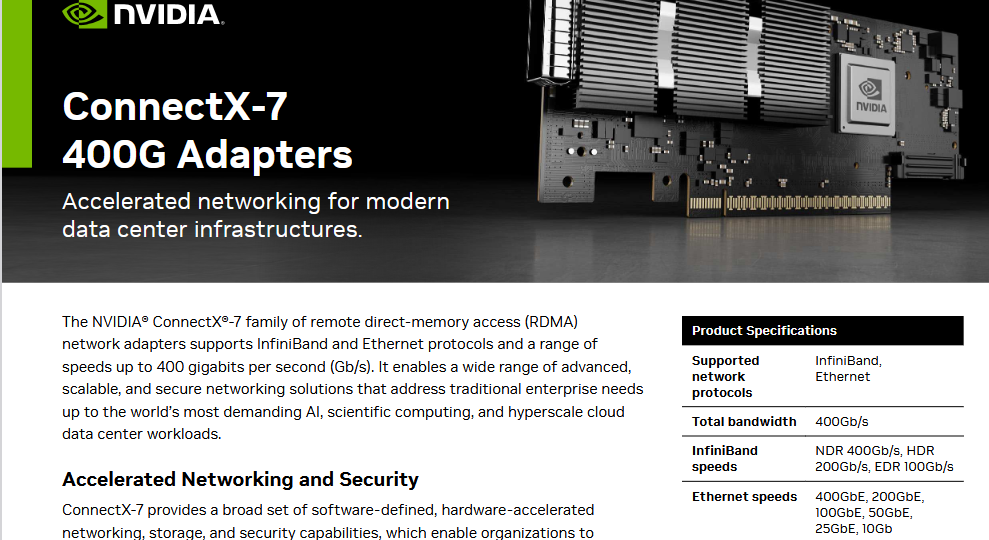
Not really sure why you would say this given what’s stated in the CX7 data sheet:
Note that it supports 100 Gbps EDR IB operation.
(Source: https://www.nvidia.com/content/dam/en-zz/Solutions/networking/infiniband/connectx-7-datasheet.pdf)
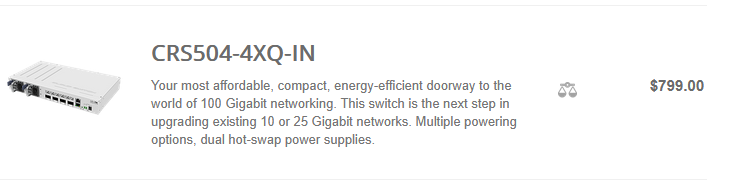
(Source: MikroTik Routers and Wireless - Products: CRS504-4XQ-IN)
I don’t know why you would assume that I am using a switch that doesn’t have loud vents and doesn’t churn power like it’s free.
It’s an interesting caveat to add to your question of “what switch are you using?” (the answer to which is the Mellanox MSB-7890, where per the spec sheet, the typical power consumption, with passive cables is 122 W. (Source: https://network.nvidia.com/files/doc-2020/pb-sb7890.pdf) But keep in mind that this is a 7.2 Tbps switching capacity switch, which means that it does 59.016393442 Gbps/W in terms of switching capacity efficiency.) As far as I’ve seen, there aren’t really very many switches that has this kind of switching capacity efficiency.
The aforementioned Mikrotik 4-port 100 GbE switch has a max power consumption of 41 W, which means that at 800 Gbps total, full duplex, switching capacity, that works out to be only about 19.5122 Gbps/W, in terms of switching capacity efficiency.
Yes, I have - NFSoRDMA.
Works on RHEL and RHEL-derivatives with “inbox” drivers that ship (or that you can run yum install/dnf install to install) with the OS.
Doesn’t work with Debian nor Debian-derivatives (at least not with the “inbox” drivers that you can install via apt install).
But in both cases, you might/should be able to install the MLNX_OFED drivers to give the NFSoRDMA capability to Debian and Debian-derivative Linux distros.
But as I’ve also already mentioned, the opensm that ships with Debian and Debian-derivatives (or installed via apt install) doesn’t support virtualisation.
I confirmed this with the opensm/rdma-core developers. (Joined their mailing list briefly, to ask this question and got confirmation that virtualisation does not work with the Debian version of opensm and there are no plans to port it from RHEL to Debian. SRIOV works with the opensm that ships with RHEL and RHEL-derivatives.
RDMA is awesome.
I don’t think that Samba support SMB Direct as a server. As a client, maybe. (See this paper about SMB Direct client in LInux.
And as of January 2022, it’s still on the Samba roadmap, but listed as “prototype”. (but again, I can’t tell if that’s server side nor client side)
Agreed*!
(*My tape drives is an external tape drive. The only “internal” component that I have is the Atto Express H680 SAS card. So, if I want to move the tape drive around, I can pull the card, the drive is already an external drive, and then I would only need to bring card, cable, drive, tapes, and also a USB stick with the LTFS SDE already download so that I can re-compile it on whatever system I am going to end up plugging the drive into, and then that should be able to bring the tape drive back up and running. If I weren’t so “cost-efficiency-minded”, I would’ve bought the Thunderbolt version instead, and then I can have YoYotta running on a MacBook, and then it would REALLY be a way for me to make the whole tape drive portable. But portability wasn’t a criteria/technical requirement for me, when I bought it, so mehhhh…)
But yes, it’s definitely way easier to move tape than HDDs, especially if said HDDs are a part of a pool/array.
I’m trying to find a source for this.
The closest that I’ve gotten is this:
The durability doesn’t seem to make a distinction between FH and HH drives, nor differences in generation – at least not according to the Dell/EMC source.
I haven’t been able to find any spec sheet that explicitly states the number of end-to-end passes for LTO-9, let alone LTO-10.
But this assumes that the number of end-to-end passes (20,000 for upto LTO-8, 16,000 for LTO-7) remains constant with each successive LTO generation.
I haven’t been able to find a source that positively confirms this assumption though.
An alternative assumption is that the number of end-to-end passes increased by 25% from LTO-7 to LTO-8. Therefore; if we were to apply this for LTO-8 to LTO-9, that would work out to 25,000 end-to-end passes / 280 = 89.285714 passes.
89.285714 passes * 18 TB = 1607.142857 TB of data written before it hit its rated life.
times the number of tapes you have, to store/backup your data.
(For my LTO-8 tapes, 20,000/(6656/32) = 20000 / 208 = 96.15384615 full tape read(/writes?) before it hit its rated life. 96.15384615 * 12 TB = 1153.846153846 TB. TIMES the 40 tapes that I have = 46153.841653846 TB.)
Somehow, I don’t think that this is going to be an issue for me.
That PDF that you reference from Seagate is a great source that spells out that the workload rating is in TB/year. Thank you for that.
I know about Mikrotik’s affordable small 25GbE and 100GbE switches. I was talking about Ethernet switches.
Using 1GbE data is irrelevant for fast Ethernet that can do PFC and an use RoCE.
No worries. It’s all good. 
So I just computed what that means in terms of (an assumed) TBW metric. (I assume that the full tape read(/write?) – I assumed that it meant writes, but I suppose that technically, it can be for reads as well.
IF it is writes, then even 71 full tape passes * 18 TB per tape pass = 1278 TB of either read or writes.
But again, how often are you really going to be reading and writing an entire tape, at any given point in time?
And then to do it 71 times?
But suppose that I just run with this thought experiment for a moment –
Even I have 40 tapes, at home. (albeit they’re LTO-8 tapes, so it’s 6656 tracks, with 32 tracks being read/written simultaneously, so that means that it’s 20,000 / (6656/32) = 20,000/208 = 96.153846 full tape passes. Times 12 TB/tape = 1153.84615 TB.
TIMES the 40 tapes I have at home ~= 46 PB. And my storage server, all said, is 286.7 TB.
In other words, with the tapes that I have, I can back up my ENTIRE server, 160.983 times before I would exhaust the rated life of the tapes.
This also assumes that my 286.7 TB server is completely full, each time I run the full server backup, which is highly unlikely. (There are significant problems with having a system let it get that full.)
For an enterprise use case, you’re going to have a LOT more drives, and usually/generally, a LOT more tapes.
Therefore; the overall probability of this being a problem, is quite low.
Remember, again, that this is for archival data storage. It isn’t really meant to be read from/written to, on a frequent basis (unlike HDDs).
This is more like, send it to tape (once) and pretty much forget about it, unless/until the tapes either need to get refreshed, or you actually need to pull data from backup.
Well…you’re archiving data, so it really depends on how many times you really think you’re going to be wiping a 12 TB or an 18 TB tape and starting over from scratch (with that tape).
The thought might be that 71 full tape reads/writes might not be a lot, but remember, that if you’re only doing it, say, like once a month, round up to 72 and divide by 2, that means that the rated life is still good for just under 36 months or 3 years. And that’s IF you are ONLY using that ONE tape, for said 36 months of monthly backups, without cycling through ANY other tapes.
For me, because I have 40 tapes, if I cycle them in succession, that means that for that ONE tape, I would hit it with a full tape write/read (maybe read twice?), once every 40 months (or once every 3 years 4 months) and then I won’t touch that tape (as a part of the cycling) for another 3 years 4 months.
etc.
x36 = 120 years.
In other words, what this relatively simplified arithmetic is designed to show that if you’re cycling your tapes, this rated life (in terms of full tape read/writes) will ONLY be an issue if you have a large volume of data that you’re writing/backing up/reading/restoring from, and only a very limited number of tapes that’s taking the load.
But if you only HAVE a few tapes, the total volume of data that you’d be able to back up with be limited by said few number of tapes, in the first place.
Like if I only had FOUR LTO-8 tapes, then I can only backup a maximum of 48 TB of data.
So, unless I am constantly refreshing ONLY 48 TB of data, across just those four tapes, then yes, this can be an issue.
But being that even I, as a home user, bought 40 tapes (because I needed more archival capacity), then that means that I can cycle through said 40 tapes such that each tape only get “hit” once every 3 years 4 months, across all 40 tapes. And I can “hit” each tape up, for say 36 times (if it is a full write and a full read). If it is a full read (download), full write (upload), and another full read (verify), then I can hit up each tape 24 times before I will hit the rated life. But I still won’t hit any given tape, out of my 40 tapes, any more frequently than every 3 years 4 months, which means that the total life of any one tape would be 80 years.
It’s a function of your desired capacity, which will then drive the number of tapes you want/need, and then cycling through them, on a regular basis.
TL;DR:
Arithmetically speaking, it’s a non-issue.
Agreed.
Depends.
At work, I’ve had my IT department pull specific files/batches of files before, due to accidental delete/the storage system died and took out our entire department’s files down along with it.
So I have had them restore ONE specific file before. They were able to recover the file for me.
Yes and no.
I proposed this method because then you have a backup on the backup server, but then your primary server can still serve the data without the tape backup system, pulling/reading data from it, whilst it is still trying to serve the data, simultaneously.
It frees up the primary server from having to pull double duty. (But my current system - is set up where as the ONLY server that exists (I don’t have a second, backup HDD server), so it pulls double duty whenever I am doing anything with my tape drive system.
It’s “fine”, for the most part.
The system gets busier and the disks definitely get busier, but it takes it in stride.
And unlike an enterprise where they’d be pressed for time, and time is money – I have time on my side where I don’t really care if a backup or restore job takes a few days. It is wayyyy more important to me that the backup job finishes successfully than pure speed.
This is how I treat my tape drive system now.
That’s how I have set up my manual tape backup system.
Like I said, I create/write an index file of all of the files that are being written to that specific tape, and then I write a copy of that index file to the tape itself, and also make a copy of that text file to my NAS.
That way, when I want to look for a specific file (because I’m lazy, and I haven’t converted/imported the text files into an actual database, even if it is a crappy database like MS Access), I have a Python script that my locally deployed LLM wrote for me, that will search through the indices of all of the tapes that has data on it, simultaneously, looking for that ONE file that I am trying to find.
It’s a dumb, “cost efficient” method. It’s very manual (because I’m lazy to automate it with my locally deployed/hosted LLM).
But it works well enough for me, for now.
So…mehhhh…
100% agreed.
In fact, what’s been quite interesting as someone who has deployed LTO-8 tape at home, is that I find myself needing HDDs less and less.
Why?
Because I can just dump/rotate the data to tape.
There’s a LOT of data that we probably have, readily at our disposal, whenever we need it, but let’s be real here – 99.9999% of the data that you are probably storing, the BULK majority of that, you rarely ever touch/access.
Yes, there are a bunch of files that are regularly accessed.
For everything else that you are hot storing, seriously - if you were to run something like Xinorbis against your server, how many files do you have, sitting on it, whose “Date Accessed” date/time is older than 6 months?
BUT, it’s just sitting there, on hot storage, waiting for you to access it, on a whim or a moment’s notice.
Yup 100% agree.
Like I said, this is exactly what and how I am using my tape backup system.
My tapes and drive is 7 years old and still going strong. So…I don’t see nor expect that to change, anytime soon.
Varies.
My dad used to have a really OLD, OLD, OLD tape drive system, back in the 90s when I think we could only store like maybe 20 MB on tape or something like that.
It was a piece of technology that he picked up (along with Zip Drives and some other random stuff as well), that him and I got to play and experiment with and learn from.
But it was VASTLY more difficult to bring online back then than it is now.
I still can’t believe that I was able to compile LTFS SDE with just the instructions and it worked (the first time I tried).
Well…again, I stave against this by explicitly computing and writing parity and double parity data (where the double parity isn’t just re-hashing the archive file itself, but the archive file PLUS the first level of parity data along with it to produce the double parity data).
That way, if the first parity has issues, then I can use the second parity to fix the first parity and the archive itself.
Some might call it paranoia.
But I’d rather expend a little bit more tape capacity, and paranoia then to lose the pictures of my when kids were born.
Being paranoid about losing those pictures is better than actually losing those pictures (cuz losing those pictures would succckkkkkkk. It’d be a terrible day for me, personally.)
I am not sure if this is necessarily true.
I never really quite fully understood it, but with LTFS, when I format the tape, it is supposed to write/sync the index every 5 minutes. I am not sure where/which track it is writing the index to because also when I format the tape, I can actually create like a separate partition (partition a) where I can like have it store smaller files that I would want faster to access (e.g. my index text file) vs. the rest of the data.
So, I don’t know if the beginning of tape is really read that much more than end of tape.
I think that it would depend on whether you’re loading it and then unloading the tape right away vs. loading the tape, trying to find (and restore) something specific (which would be positioned elsewhere on the tape), and then when you eject the tape, it will rewind the entire tape fully.
Dunno about that.
I never fully grasped how the index and syncing worked with LTFS. I read about it and came out of it with even LESS understanding about how it worked than before I read about it, from the LTFS docs.
 no idea.
Again – I dunno about that neither.
Let’s suppose, for a moment, that the folders are written in alphabetical order. Therefore; if you know that you need to pull data from a folder that starts with “D”, “K”, and “M”. then you can issue the command to pull the data down, in alphabetical order, which will help the tape go find the data faster for you so it doesn’t have to track forward nor backtrack, to seek the data.
There are things that you can do, to help minimise/prevent that, so backtracking isn’t necessarily always a guarantee.
Again, not really entirely sure how that works.
But this is complicated by three potential scenarios:
If you’ve filled your tape (to 100% of its native capacity), then you won’t be able to add anymore data to the tape to it anyways (or at least not really. You might be able to jam really tiny text files still. But it’s probably generally not a particularly great idea to pack it so tightly.)
But if you’ve only filled it, say, < 50%, then you can add data to it, and I would surmise that it would just append the data to the last file that it wrote, wherever it wrote it, and keep going from there. I don’t think that there’s much in the way of scattered writes.
If you’re worried about that, then what you could do is download the entire tape. Add your data to that location. And completely wipe and re-format the tape (the wipe operation probably only wipes the index or just sets the dirty flag bit), and then send the data back up to tape. All of it. Again.
Then you have fewer “scattered” writes.
In my actual use of my tape drives, I don’t really see/notice scattered writes really happening all that often, to be honest.
Two things:
So, that’s why I cited the Mikrotik 4-port 100 GbE switch as a low(er) cost option for you.
(With the Mellanox ConnectX-4 100 Gbps IB NICs, you have the option, IIRC, via mstconfig to set the port LINK_TYPE. So you can change it from IB to ETH, if you want to.)
You asked about a small, cheap-ish low power switch – that’s an option for you.
Just set your LINK_TYPE from 1 (IB) to 2 (ETH), reboot, and you’re good to go.
I assumed as much, despite the preface to your question.
I think that with higher speed ethernet, there are a LOT more variables that can come into play. (NIC chip/chipset, driver, driver version, OS, distro, distro version, driver version, and all of that on the switch-side side as well and to some extents, the type (and length) of cable you’re using as well.)
With IB, it’s pretty much only Nvidia/Mellanox (or if there are other players, they’re really not all that well known whereas Mellanox has been doing this pretty much forever by this point).
Compare and contrast that with 100 GbE, there are a few OEMs that make NIC chips for 100 GbE. Not many, but still more than there are when you compare the number of OEMs that are making 100 Gbps IB NIC chips.
Therefore; measuring latency can vary depending on which chip you’re using, etc.
Some applications or like “helper” applications (like MPI) can take advantage of the RDMA capabilities of IB, which is useful for a lot of HPC applications.
Conversely, on the 100 GbE side of the coin, the results aren’t always as straightforward.
I actually gave Proxmox one of the ports from my dual-port 100 Gbps IB NIC, and gave it a Linux Network Bridge (with the intent on being able to share the 100 GbE connection).
NOPE.
VM ↔ VM - I was only getting 23 Gbps.
And since the 100 Gbps EDR IB consists of four 25 Gbps links that’s tied together, so the LInux Network Bridge that I created in Proxmox, probably doesn’t know nor understand that the interface itself, is actually a 4 lane EDR configuration.
It probably only saw the one lane, and sent all the traffic from the Linux Network Bridge, down that lane, because if that was the case, then 23 Gbps out of 25 Gbps would mean only about a 8% overhead, which isn’t super terrible.
(It’s about what you can expect out of a 25 GbE interface.)
And apparently, you can’t create a Linux Network Bridge, for IB interfaces.
Didn’t know it at the time, but found out when I tried. (Which is why I changed one of the LINK_TYPES on one of the two ports from IB to ETH.)
Proxmox host to Proxmox host though, using iperf and 8 parallel streams, I was able to hit like 80-90 Gbps. I forget. But it’s a LOT higher and closer to what ib_send_bw can do.
But if I didn’t run ETH and ran the port back as IB, there are definitely some advantages that IB had over ETH.
(Nominally, ETH is about 1-3% slower than IB (on the same card, in the same system. When I tested this, I just need to change the LINK_TYPE.))
But I also ran an experiment where I had NVMe SSDs (consumer grade, two Intel 670ps and a Silicon Power US70 1 TB) tied together using Ceph and then I would store the VM/LXC disk on the Ceph RBD erasure coded pool.
Migrating the VMs/LXCx between three nodes (two 5950Xs and a 7950X), I can, at times, thanks to compression, hit 133 Gbps out of the 100 Gbps that’s possible with the IB link itself.
That was really interesting to see.
So, there are some rare cases where I was actually able to utilise my 100 Gbps IB outside of a HPC application, but it’s super rare to be able find such use cases.
Most of the time, it doesn’t/can’t utilise the 100 Gbps bandwidth that’s available to it.
(I don’t have any 2.5 G, 5 G, 10 G, 25 G, 40 G, 50 G, nor 56 G networking gear. I skipped ALL of these intermediary steps and went from GbE straight to 100 Gbps IB. On an absolute basis, it was expensive. But on a $/Gbps basis, it’s more cost effective than 10 GbE. Plus I also knew that my HPC apps worked better with IB than with ETH as the system interconnect.)
You’re dead right about those retail prices being jacked up with old markup. Datacenters buying in bulk pay 30-50% less than those $3k drive and $80-90 cartridge prices. Best bets: grab OEM/bare drives instead of retail boxed stuff, hit up enterprise resellers and liquidators rather than consumer electronics stores, buy media in bulk from tape guys, and look at white label cartridges or older LTO-8 gear. Government surplus, end-of-lease datacenter stuff, and specialized broadcast/archive dealers will get you real pricing instead of the inflated consumer nonsense.
This topic was automatically closed 273 days after the last reply. New replies are no longer allowed.