


[Learning & Testing] Example w/Info (Stemma QT, AT, TRRS, I2C Cables)
Intro
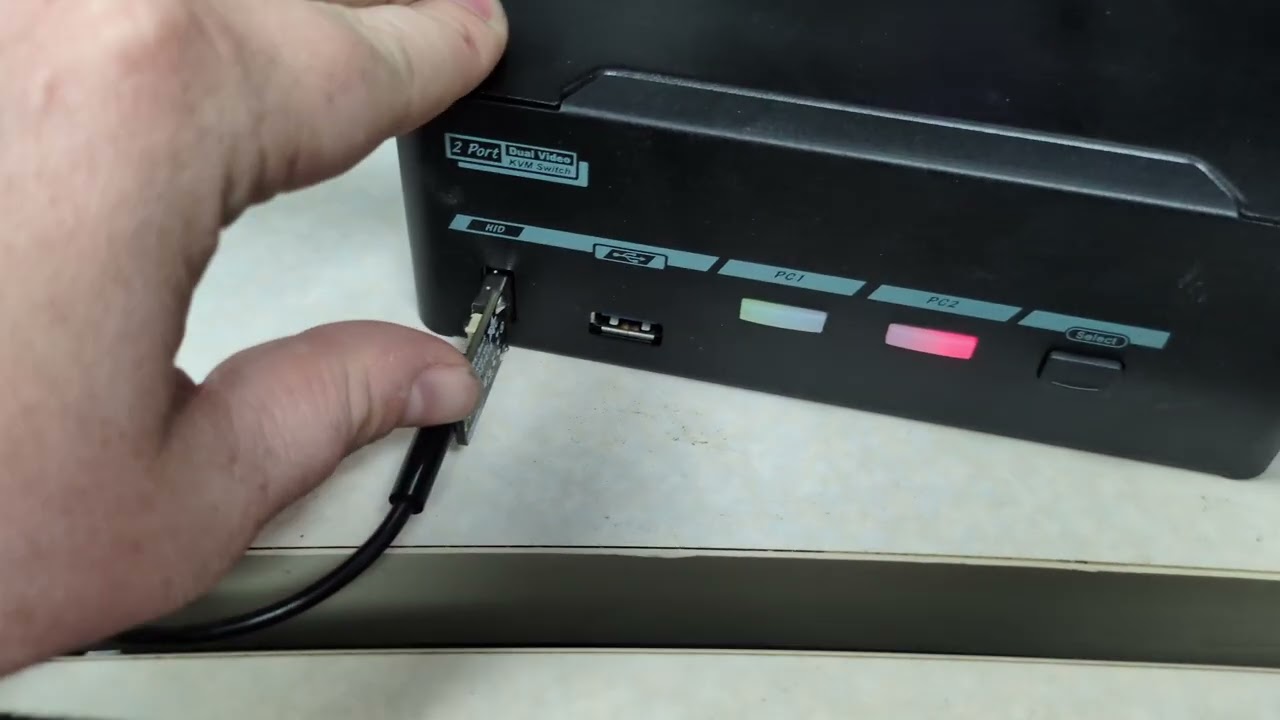
This guide is for using hotkey controls with the KVM when pushing the physical select button, and/or using keyboard hotkey control sequences is not an option. Thank you to Nick for reaching out to us!
I am also working to explore this same technology (Adafruit Trinkey) for a 4-key MX macropad to enable hotkey controls when your daily driver keyboard is not HID compatible. See the next section once I figure that out (hopefully soon!)
Anyway! Instead of reinventing the wheel, we have a great resource from Adafruit by way of Stemma QT technology. In fact, they have a large repertoire of interactive and innovative ways to control various IOT devices.
The goal is to create a HID input/keyboard so that KVM hotkeys can be used with a TRRS 3.5mm AT device via HID. In this case, I will be using a thumbstick from Adafruit in which movement will trigger the hotkey. Instead of “Left_Ctrl Left Ctrl 1” on your keyboard, we should be able to move the thumbstick. As noted in their article(s) this can be adapted for other use cases and needs.
By using an Adafruit TRRS Trinkey running custom firmware, we can turn it into a USB keyboard with exactly one USB interface. No serial port, no extra composite interfaces, It enumerates purely as a HID keyboard, which is what allows it to work through the L1Techs KVM’s USB-HID port.
For more technical information about the specific parts and how they work, please see the attached articles under Resources.
Parts List
Adafruit TRRS Trinkey
RCA Cable
Thumb Joystick with Select Button
(or whatever you would like to use to control. Keep in mind this WILL require different programming). This is just an example device.
Assembly

credit: Adafruit Learning System


The TRRS Trinkey exposes four GPIO-connected contacts through its 3.5mm jack. There is no dedicated power or ground, so any power/ground attached peripheral needs has to be driven by two of those four GPIOs.
| TRRS contact | Connected to | Role in this build |
|---|---|---|
| Tip | Thumbstick Xout | Analog input, X axis |
| Ring 1 | Thumbstick Yout | Analog input, Y axis |
| Ring 2 | Thumbstick GND | GPIO driven LOW as virtual ground |
| Sleeve | Thumbstick VCC | GPIO driven HIGH as virtual 3.3V supply |
This wiring follows Adafruit’s official Adaptive Joysticks guide for the TRRS Trinkey. Because all four contacts are committed to X, Y, GND, and VCC, there is no fifth conductor available for the thumbstick’s separate SEL (click) button in this configuration.
Prerequisites Setting up the Adafruit TRRS Trinkey
Download:
- Adafruit SAMD Boards
- Adafruit TinyUSB Library
- NeoPixel is just for status readout
Board: Adafruit TRRS Trinkey
Tools menu: Board → Adafruit SAMD Boards → Adafruit TRRS Trinkey M0 (Board Manager)
USB Stack → TinyUSB
Library: Adafruit TinyUSB Library + Adafruit NeoPixel (Library Manager)
Sketch Notes
The L1Techs KVM’s USB-HID is Strict
Some KVM switches, especially ones used in secure, compliance-sensitive environments, implement an intentionally narrow USB HID filter. They are designed to accept simple keyboards and mice and to reject anything that looks like it could be used to exfiltrate data or inject unexpected traffic. A common way they do this is by refusing composite USB devices outright. If a device presents more than one interface (HID + CDC) the KVM’s USB firewall drops the whole device rather than trying to figure out which interface is “safe.”
This matters because most Arduino boards using TinyUSB (including the stock TRRS Trinkey firmware) establishes the Trinkey as a composite devices by default. The Arduino core automatically adds a CDC interface alongside HID so that Serial.print() worls. That is convenient for development, but unfortunately is also the kind of multi-interface that a strict KVM’s USB filter is built to reject. Without careful planning, a USB device would show up fine on a normal PC, but be invisible or malfunctioning on the KVM’s USB-HID port.
^^ this is very common when people ask us "why doesn’t my device work?’
Why TinyUSB specifically, instead of Arduino USB
The SAMD21 chip on the Trinkey doesn’t have hardware USB HID support baked in. That is well, a problem. It is a better option than the “Arduino USB” stack, though. HID only is impossible. This is because it hard-codes a composite CDC+HID layout with very little control available via the sketch code too. You can’t just say “don’t add the CDC interface.”
Adafruit TinyUSB library is a different USB stack that exposes device configuration as first-class, public API calls: setID(), clearConfiguration(), and the ability to control which interfaces get added and in what order.
| Default Arduino USB stack | Adafduit TinyUSB | |
|---|---|---|
| Interfaces added by default | CDC + HID (composite) | Only what the sketch explicitly adds |
| Can drop the CDC interface? | No public API to do this | Yes, clearConfiguration() before adding HID |
| USB IDs / strings | Fixed by board package | Fully settable at runtime (setID, string descriptors) |
How to Setup Single-Interface HID
-
- Set a fixed identity: setID(), setManufacturerDescriptor(), setProductDescriptor(), and setSerialDescriptor() are called first, so the device reports the same VID/PID and strings every time it boots, on every host. This avoids Windows treating it as a “new” device on each reconnect.
-
- Wipe the default configuration: TinyUSBDevice.clearConfiguration() removes the CDC interface that the Arduino/TinyUSB init would otherwise add automatically.
-
- Add only HID: usb_hid.begin() adds a single HID interface, configured as a boot-protocol keyboard via a minimal TUD_HID_REPORT_DESC_KEYBOARD() report descriptor.
-
- Force clean: detach() / delay(500) / attach() makes the host re-read the descriptors from scratch, so it sees the final single-interface configuration rather than a partially-updated one.
The result is a device descriptor reporting one interface: bInterfaceClass 0x03 (HID), bInterfaceSubClass 0x01 (Boot Interface), bInterfaceProtocol 0x01 (Keyboard
Setting up advanced macro sequences
i.e., needing to cycle through active ports (PC 1 → PC 2 → PC 3 → PC 4) with 1 hotkey.
const uint8_t macro_sequence[] = {
  TAP_MOD_LCTRL, TAP_MOD_LCTRL, HID_KEY_F2,
  TAP_DELAY_1S,
  HID_KEY_ARROW_DOWN,
  TAP_MOD_LCTRL, TAP_MOD_LCTRL, HID_KEY_F2
};

So the full sequence is:
Left Control + Left Control + F2 + Down Arrow + Left Control + Left Control + F2.
^^ We will use this with the macroboard.
Explainer:
-
Left Control + Left Control + F2
This tells the KVM “I want to manually change ports. Wait for my input” -
1 Second Delay
I added a 1-second delay just to make sure there’s sufficient time for the KVM to go into “wait” mode. -
Down Arrow
This tells the KVM I want to switch down to the next active (green light) PC.
If it is already on the last active PC, it will wrap around to select the 1st available active PC. Like in my video, it was switching from PC 1 to PC 2.
If it were a 4-port KVM and only PC 2 and PC 4 were active, it would alternate between them. -
Left Control + Left Control + F2
Doing this for a 2nd time takes the KVM out of the manual switching inputs/waiting mode and puts it into regular use mode.
I referenced my hotkeys post to find the desired sequence in this example:
Sketch
//Necessary libraries
#include "Adafruit_TinyUSB.h"
#include <Adafruit_NeoPixel.h>

// USB identity from Adafruit
// The VID/PID/strings are hard-coded rather than left at Adafruit's stock
#define MY_USB_VID 0x239A // Adafruit VID
#define MY_USB_PID 0x8115 // TRRS Trinkey PID
#define MY_USB_MANUFACTURER "Custom"
#define MY_USB_PRODUCT "TRRS Trinkey Keyboard"
#define MY_USB_SERIAL "TRRSHID0001"

// HID setup
uint8_t const desc_hid_report[] = {
  TUD_HID_REPORT_DESC_KEYBOARD()
};

Adafruit_USBD_HID usb_hid;

// Thumbstick defining
#define PIN_X PIN_TIP // analog
#define PIN_Y PIN_RING1 // analog
#define PIN_GND PIN_RING2 // driven LOW as virtual ground
#define PIN_VCC PIN_SLEEVE // driven HIGH as virtual power

// Macro played on movement
#define TAP_MOD_LCTRL 0xFF  // sentinel, not a real HID keycode
const uint8_t macro_sequence[] = { TAP_MOD_LCTRL, TAP_MOD_LCTRL, HID_KEY_1 };
#define MACRO_LEN (sizeof(macro_sequence) / sizeof(macro_sequence[0]))

#define TAP_HOLD_MS 30  // how long each key is held down
#define TAP_GAP_MS  30  // gap between taps

// Movement logic
// analogReadResolution(12) below -> readings are 0-4095.

// Deadzone
#define ADC_BITS      12
#define DEADZONE      300
#define DEBOUNCE_MS   20

int centerX = 0, centerY = 0;

// NeoPixel for status feedback (since we have no Serial)
Adafruit_NeoPixel pixel(1, PIN_NEOPIXEL, NEO_GRB + NEO_KHZ800);

void setup() {
  pixel.begin();
  pixel.setBrightness(20);
  pixel.setPixelColor(0, pixel.Color(20, 0, 0)); // red = booting
  pixel.show();

  // PINOUT
  pinMode(PIN_GND, OUTPUT);
  digitalWrite(PIN_GND, LOW);
  pinMode(PIN_VCC, OUTPUT);
  digitalWrite(PIN_VCC, HIGH);

  analogReadResolution(ADC_BITS);
  delay(50); // let the pot rails settle after power-up

  // Calibrate thumbstick
  // On boot, the firmware assumes the thumbstick is at rest/centered. If the stick is nudged during power-up, calibration will be off. Power-cycling with the stick released fixes this.
  long sumX = 0, sumY = 0;
  const int SAMPLES = 16;
  for (int i = 0; i < SAMPLES; i++) {
    sumX += analogRead(PIN_X);
    sumY += analogRead(PIN_Y);
    delay(2);
  }
  centerX = sumX / SAMPLES;
  centerY = sumY / SAMPLES;

// Fixed identity
TinyUSBDevice.setID(MY_USB_VID, MY_USB_PID);
  TinyUSBDevice.setManufacturerDescriptor(MY_USB_MANUFACTURER);
  TinyUSBDevice.setProductDescriptor(MY_USB_PRODUCT);
  TinyUSBDevice.setSerialDescriptor(MY_USB_SERIAL);

  // Important: strip the auto-added CDC interface
  TinyUSBDevice.clearConfiguration();

  // Add ONLY the HID interface
  usb_hid.setPollInterval(2);
  usb_hid.setBootProtocol(HID_ITF_PROTOCOL_KEYBOARD);
  usb_hid.setReportDescriptor(desc_hid_report, sizeof(desc_hid_report));
  usb_hid.setStringDescriptor(MY_USB_PRODUCT);
  usb_hid.begin();

  // Force clean for HID
  TinyUSBDevice.detach();
  delay(500);
  TinyUSBDevice.attach();

  pixel.setPixelColor(0, pixel.Color(0, 20, 0)); // green = ready
  pixel.show();
}

bool last_stable_state = false; // false = not moved
bool last_raw_state = false;
uint32_t last_change_ms = 0;

// Sends one keystroke: press, hold briefly, release, then
// pause before the next tap. If keycode == TAP_MOD_LCTRL, taps the
// Left Ctrl modifier instead of a regular key.
0void sendTap(uint8_t keycode) {
  uint8_t keys[6] = { 0 };
  uint8_t modifier = 0;

  if (keycode == TAP_MOD_LCTRL) {
    modifier = KEYBOARD_MODIFIER_LEFTCTRL;
  } else {
    keys[0] = keycode;
  }

  usb_hid.keyboardReport(0, modifier, keys);
  delay(TAP_HOLD_MS);

  uint8_t empty[6] = { 0 };
  usb_hid.keyboardReport(0, 0, empty);
  delay(TAP_GAP_MS);
}

void playMacro() {
  for (uint8_t i = 0; i < MACRO_LEN; i++) {
    sendTap(macro_sequence[i]);
  }
}

void loop() {
// Each loop iteration compares the current X/Y
#ifdef TINYUSB_NEED_POLLING_TASK
  TinyUSBDevice.task();
#endif

  delay(2);
  if (!usb_hid.ready()) return;

  int x = analogRead(PIN_X);
  int y = analogRead(PIN_Y);

  bool raw_moved = (abs(x - centerX) > DEADZONE) ||
                    (abs(y - centerY) > DEADZONE);

  // Debounce
  if (raw_moved != last_raw_state) {
    last_raw_state = raw_moved;
    last_change_ms = millis();
  }

  if ((millis() - last_change_ms) >= DEBOUNCE_MS &&
      raw_moved != last_stable_state) {
    last_stable_state = raw_moved;

    if (last_stable_state) {
      // Just moved off-center: fire the macro once
      pixel.setPixelColor(0, pixel.Color(0, 0, 20)); // blue = macro firing
      pixel.show();
      playMacro();
    } else {
      // Back to center: ready to fire again next time it moves
      pixel.setPixelColor(0, pixel.Color(0, 20, 0)); // green = idle/ready
      pixel.show();
    }
  }
}
Compiling
Sketch uses 43956 bytes (16%) of program storage space. Maximum is 262144 bytes.
Device       : ATSAMD21x18
Version      : v1.1 [Arduino:XYZ] Apr 17 2024 12:09:58
Address      : 0x0
Pages        : 4096
Page Size    : 64 bytes
Total Size   : 256KB
Planes       : 1
Lock Regions : 16
Locked       : none
Security     : false
BOD          : true
BOR          : true
Write 44404 bytes to flash (694 pages)

[                              ] 0% (0/694 pages)
[==                            ] 9% (64/694 pages)
[=====                         ] 18% (128/694 pages)
[========                      ] 27% (192/694 pages)
[===========                   ] 36% (256/694 pages)
[=============                 ] 46% (320/694 pages)
[================              ] 55% (384/694 pages)
[===================           ] 64% (448/694 pages)
[======================        ] 73% (512/694 pages)
[========================      ] 82% (576/694 pages)
[===========================   ] 92% (640/694 pages)
[==============================] 100% (694/694 pages)
Done in 7.715 seconds
Verify 44404 bytes of flash

[==============================] 100% (694/694 pages)
Verify successful
Done in 0.497 seconds
Reprogramming Info
Since CDC is intentionally never started, Arduino IDE’s automatic “touch at 1200 baud” reset trick doesn’t work. To upload new firmware:
- Double-tap the RESET button on the Trinkey to force it into bootloader mode.
- The board should appear as a small USB mass-storage drive and be detected by the Arduino IDE’s port list while in bootloader mode.
- Upload as normal from the Arduino IDE with Board = Adafruit TRRS Trinkey M0 (SAMD 21) and USB Stack = TinyUSB.
HID USBTreeView
    =========================== USB Port2 ===========================

Connection Status        : 0x01 (Device is connected)
Port Chain               : 2-5-1-2
Properties               : 0x00
 IsUserConnectable       : no
 PortIsDebugCapable      : no
 PortHasMultiCompanions  : no
 PortConnectorIsTypeC    : no
ConnectionIndex          : 0x02 (Port 2)

      ========================== Summary =========================
Vendor ID                : 0x239A (Adafruit Industries LLC)
Product ID               : 0x8157
Manufacturer String      : "Adafruit"
Product String           : "TRRS Trinkey M0"
Serial                   : "5C35BDC5503055314E2E3120FF0E2A01"
USB Version              : 2.0 (but 12 Mbit/s FullSpeed only)
Port maximum Speed       : Full-Speed
Device maximum Speed     : Full-Speed
Device Connection Speed  : Full-Speed
Self powered             : no
Demanded Current         : 100 mA
Used Endpoints           : 2

      ======================== USB Device ========================

        +++++++++++++++++ Device Information ++++++++++++++++++
Device Description       : USB Input Device
BusReported Device Desc  : TRRS Trinkey M0
Device Path              : \\?\USB#VID_239A&PID_8157#5C35BDC5503055314E2E3120FF0E2A01#{a5dcbf10-6530-11d2-901f-00c04fb951ed} (GUID_DEVINTERFACE_USB_DEVICE)
Kernel Name              : \Device\USBPDO-12
Device ID                : USB\VID_239A&PID_8157\5C35BDC5503055314E2E3120FF0E2A01
Hardware IDs             : USB\VID_239A&PID_8157&REV_0100 USB\VID_239A&PID_8157
Driver KeyName           : {745a17a0-74d3-11d0-b6fe-00a0c90f57da}\0016 (GUID_DEVCLASS_HIDCLASS)
Driver                   : \SystemRoot\System32\drivers\hidusb.sys (Version: 10.0.26100.8521  Date: 2026-06-30  Company: Microsoft Corporation)
Driver Inf               : C:\WINDOWS\inf\input.inf
Legacy BusType           : PNPBus
Class                    : HIDClass
Class GUID               : {745a17a0-74d3-11d0-b6fe-00a0c90f57da} (GUID_DEVCLASS_HIDCLASS)
Service                  : HidUsb
Enumerator               : USB
Location Info            : Port_#0002.Hub_#0008
Address                  : 2
Location IDs             : PCIROOT(0)#PCI(0102)#PCI(0000)#PCI(0800)#PCI(0003)#USBROOT(0)#USB(5)#USB(1)#USB(2), ACPI(_SB_)#ACPI(PCI0)#ACPI(BXBR)#ACPI(BYUP)#ACPI(BYD8)#ACPI(XHC0)#ACPI(RHUB)#ACPI(PRT5)#USB(1)#USB(2)
Container ID             : {50aac64b-11ff-5b38-9e21-614ef20a1217}
Manufacturer Info        : (Standard system devices)
Capabilities             : 0x94 (Removable, UniqueID, SurpriseRemovalOK)
Status                   : 0x0180400A (DN_DRIVER_LOADED, DN_STARTED, DN_REMOVABLE, DN_NT_ENUMERATOR, DN_NT_DRIVER)
First Install Date       : 2026-07-02 18:56:57
Last Arrival Date        : 2026-07-02 19:31:00
SelectiveSuspendEnabled  : 0
EnhancedPowerMgmtEnabled : 1
Power State              : D0 (supported: D0, D1, D2, D3, wake from D0, wake from D1, wake from D2)

        +++++++++++++++++ Registry USB Flags +++++++++++++++++
HKEY_LOCAL_MACHINE\SYSTEM\CurrentControlSet\Control\usbflags\239A81570100
 osvc                    : REG_BINARY 00 00

        ---------------- Connection Information ---------------
Connection Index         : 0x02 (Port 2)
Connection Status        : 0x01 (DeviceConnected)
Current Config Value     : 0x01 (Configuration 1)
Device Address           : 0x06 (6)
Is Hub                   : 0x00 (no)
Device Bus Speed         : 0x01 (Full-Speed)
Number of open Pipes     : 0x01 (1 pipe to data endpoints)
Pipe[0]                  : EndpointID=1  Direction=IN   ScheduleOffset=0  Type=Interrupt  wMaxPacketSize=0x40    bInterval=2   -> 718 Bits/ms = 89750 Bytes/s

        --------------- Connection Information V2 -------------
Connection Index         : 0x02 (2)
Length                   : 0x10 (16 bytes)
SupportedUsbProtocols    : 0x01
 Usb110                  : 1 (yes, port supports USB 1.1)
 Usb200                  : 0 (no, port not supports USB 2.0)
 Usb300                  : 0 (no, port not supports USB 3.0)
 ReservedMBZ             : 0x00
Flags                    : 0x00
 DevIsOpAtSsOrHigher     : 0 (Device is not operating at SuperSpeed or higher)
 DevIsSsCapOrHigher      : 0 (Device is not SuperSpeed capable or higher)
 DevIsOpAtSsPlusOrHigher : 0 (Device is not operating at SuperSpeedPlus or higher)
 DevIsSsPlusCapOrHigher  : 0 (Device is not SuperSpeedPlus capable or higher)
 ReservedMBZ             : 0x00

    ---------------------- Device Descriptor ----------------------
bLength                  : 0x12 (18 bytes)
bDescriptorType          : 0x01 (Device Descriptor)
bcdUSB                   : 0x200 (USB Version 2.0) -> but device is Full-Speed only
bDeviceClass             : 0x00 (defined by the interface descriptors)
bDeviceSubClass          : 0x00
bDeviceProtocol          : 0x00
bMaxPacketSize0          : 0x40 (64 bytes)
idVendor                 : 0x239A (Adafruit Industries LLC)
idProduct                : 0x8157
bcdDevice                : 0x0100
iManufacturer            : 0x01 (String Descriptor 1)
 Language 0x0409         : "Adafruit"
iProduct                 : 0x02 (String Descriptor 2)
 Language 0x0409         : "TRRS Trinkey M0"
iSerialNumber            : 0x03 (String Descriptor 3)
 Language 0x0409         : "5C35BDC5503055314E2E3120FF0E2A01"
bNumConfigurations       : 0x01 (1 Configuration)

    ------------------ Configuration Descriptor -------------------
bLength                  : 0x09 (9 bytes)
bDescriptorType          : 0x02 (Configuration Descriptor)
wTotalLength             : 0x0022 (34 bytes)
bNumInterfaces           : 0x01 (1 Interface)
bConfigurationValue      : 0x01 (Configuration 1)
iConfiguration           : 0x00 (No String Descriptor)
bmAttributes             : 0xA0
 D7: Reserved, set 1     : 0x01
 D6: Self Powered        : 0x00 (no)
 D5: Remote Wakeup       : 0x01 (yes)
 D4..0: Reserved, set 0  : 0x00
MaxPower                 : 0x32 (100 mA)

        ---------------- Interface Descriptor -----------------
bLength                  : 0x09 (9 bytes)
bDescriptorType          : 0x04 (Interface Descriptor)
bInterfaceNumber         : 0x00 (Interface 0)
bAlternateSetting        : 0x00
bNumEndpoints            : 0x01 (1 Endpoint)
bInterfaceClass          : 0x03 (HID - Human Interface Device)
bInterfaceSubClass       : 0x01 (Boot Interface)
bInterfaceProtocol       : 0x01 (Keyboard)
iInterface               : 0x04 (String Descriptor 4)
 Language 0x0409         : "TRRS Trinkey M0"

        ------------------- HID Descriptor --------------------
bLength                  : 0x09 (9 bytes)
bDescriptorType          : 0x21 (HID Descriptor)
bcdHID                   : 0x0111 (HID Version 1.11)
bCountryCode             : 0x00 (00 = not localized)
bNumDescriptors          : 0x01
Descriptor 1:
bDescriptorType          : 0x22 (Class=Report)
wDescriptorLength        : 0x0041 (65 bytes)
Error reading descriptor : ERROR_INVALID_PARAMETER (due to a obscure limitation of the Win32 USB API, see F1 Help)

        ----------------- Endpoint Descriptor -----------------
bLength                  : 0x07 (7 bytes)
bDescriptorType          : 0x05 (Endpoint Descriptor)
bEndpointAddress         : 0x81 (Direction=IN EndpointID=1)
bmAttributes             : 0x03 (TransferType=Interrupt)
wMaxPacketSize           : 0x0040 (64 bytes)
bInterval                : 0x02 (2 ms)

    ----------------- Device Qualifier Descriptor -----------------
Error                    : request skipped because low-speed device

      ---------- Binary Object Store (BOS) Descriptor -----------
bLength                  : 0x05 (5 bytes)
bDescriptorType          : 0x0F (Binary Object Store)
wTotalLength             : 0x0039 (57 bytes)
bNumDeviceCaps           : 0x02

        ----------- Platform Capabilities Descriptor -----------
bLength                  : 0x18 (24 bytes)
bDescriptorType          : 0x10 (Device Capability Descriptor)
bDevCapabilityType       : 0x05 (Platform Capabilities)
bReserved                : 0x00
PlatformCapabilityUUID   : 3408B638-09A9-47A0-8BFD-A0768815B665
CapabililityData         : 0

        ----------- Platform Capabilities Descriptor -----------
bLength                  : 0x1C (28 bytes)
bDescriptorType          : 0x10 (Device Capability Descriptor)
bDevCapabilityType       : 0x05 (Platform Capabilities)
bReserved                : 0x00
PlatformCapabilityUUID   : D8DD60DF-4589-4CC7-9CD2-659D9E648A9F (GUID_USB_MSOS20_PLATFORM_CAPABILITY_ID)
dwWindowsVersion         : 0x06030000 (Windows V6.3 and higher)
wMSOSDescSetTotalLength  : 0x00B2 (178 Bytes)
bMS_VendorCode           : 0x02 (2)
bAltEnumCode             : 0x00 (0)

      -------------------- String Descriptors -------------------
             ------ String Descriptor 0 ------
bLength                  : 0x04 (4 bytes)
bDescriptorType          : 0x03 (String Descriptor)
Language ID[0]           : 0x0409 (English - United States)
             ------ String Descriptor 1 ------
bLength                  : 0x12 (18 bytes)
bDescriptorType          : 0x03 (String Descriptor)
Language 0x0409          : "Adafruit"
             ------ String Descriptor 2 ------
bLength                  : 0x20 (32 bytes)
bDescriptorType          : 0x03 (String Descriptor)
Language 0x0409          : "TRRS Trinkey M0"
             ------ String Descriptor 3 ------
bLength                  : 0x42 (66 bytes)
bDescriptorType          : 0x03 (String Descriptor)
Language 0x0409          : "5C35BDC5503055314E2E3120FF0E2A01"
             ------ String Descriptor 4 ------
bLength                  : 0x20 (32 bytes)
bDescriptorType          : 0x03 (String Descriptor)
Language 0x0409          : "TRRS Trinkey M0"
Working!!
Additional Notes
- Status LED (NeoPixel)
- Red = booting / calibrating
- Green = Idle, centered, ready
- Blue = Macro firing (stick moved off-center)
- Only movement, not the thumbstick’s click is wired up. All four TRRS contacts are already committed to X, Y, GND, and VCC.
- No serial debugging is available by design. NeoPixel is the only diagnostic tool.
- Calibration is a one-time, boot-time snapshot of the thumb stick’s location. It does not adapt if the stick’s centered position drifts afterward. Power-cycle to recalibrate.
- The macro is fixed at three taps (Left Ctrl, Left Ctrl, “1”). anything more elaborate would need to be re-flashed.
[DIY GUIDE] Hotswap Mechanical HID Macroboard for KVM Hotkeys!
Thanks to the knowledge gained in this endeavour, I now have enough information to make a functioning plug-and-play DIY macroboard with NO soldering.
The goal is to have the most common hotkeys ready and consistent to fire. I want to make sure to add in nice features like LED indicators when hotkeys fire (NeoPixel) and the ability to enable/disable standby LEDs if you do not want them.
Parts List
1x Adafruit TRRS Trinkey
1x NeoKey 1x4 QT I2C
1x Stemma QT JST SH I2C Cable
Mechanical Key Switches (Any Cherry Compatible)
I used the Adafruit Kailh Thick Click Jade Box
Keycaps (Any Cherry Compatible)
I used the Relegendable Plastic Keycaps. I like these because they have a white base with a protective clear top. You can get creative with a design or icon and have it protected.
Assembly – Very easy!
Just snap it all together.
The I2C cable is plugged into the right side, where the ON LED is in the top right corner.


Be sure to avoid bending the mechanical key pins when plugging into the NeoKey.


option 1

option 2
NeoKey Housing 3D Print

neokey housing final OBJ.zip (342.7 KB)
Note: to see the LEDs well a translucent filament would be best to use.
Added support to lock the neokey into place.
*Based on: https://www.thingiverse.com/thing:4948558
Default Mappings
#define COLOR_OFF         neokey.pixels.Color(0,   0,   0)   // standby color
#define COLOR_RED         neokey.pixels.Color(255, 0,   0)   // key1 L1
#define COLOR_ORANGE      neokey.pixels.Color(255, 70,  0)   // key1 L2
#define COLOR_GREEN       neokey.pixels.Color(0,   255, 0)   // key2 L1
#define COLOR_LIME        neokey.pixels.Color(150, 255, 150)   // key2 L2
#define COLOR_BLUE        neokey.pixels.Color(0,   0,   255) // key3 L1
#define COLOR_LIGHT_BLUE  neokey.pixels.Color(150,  217, 255) // key3 L2
#define COLOR_PURPLE      neokey.pixels.Color(150, 0,   220) // key4 waiting
#define COLOR_BOOT        neokey.pixels.Color(255, 255, 255) // boot flash
LAYER 1
Key 1 - Select next active port

-
LED Color:
Red -
Mapped Hotkey:
Left Control + Left Control + F2 + Arrow Down + Left Control + Left Control + F2 -
Code:
const uint8_t macro_sequence[] = { TAP_MOD_LCTRL, TAP_MOD_LCTRL, HID_KEY_F2, HID_KEY_ARROW_DOWN, TAP_MOD_LCTRL, TAP_MOD_LCTRL, HID_KEY_F2 };
Key 2 - Force audio to the current active port (Single beep = success, double beep = hotkey is disabled). Enable with layer 2 command.

Will not fire unless you use the hotkey that enables this feature. (Key 4 active + Key 2).
-
LED Color:
Green -
Mapped Hotkey:
Left Control + Left Control + A -
Code:
const uint8_t macro_key2_L1[] = { TAP_MOD_LCTRL, TAP_MOD_LCTRL, HID_KEY_A };
Key 3 - Force USBs to the current active port (Single beep = success, double beep = hotkey is disabled). Enable with layer 2 command.

Will not successfully fire unless you use the hotkey that enables this feature. (Key 4 active + Key 3).
-
LED Color:
Blue -
Mapped Hotkey:
Left Control + Left Control + U -
Code:
const uint8_t macro_key2_L1[] = { TAP_MOD_LCTRL, TAP_MOD_LCTRL, HID_KEY_U };
Key 4 - Enable modifier (change hotkey layer)

-
LED Color:
Purple -
Function:
Once you press key 4, it will light up purple and wait for you to then press key 1, 2, or 3.
Key 1, 2, or 3 will start its layer 2 hotkey.
LAYER 2
Key 4 active + Key 1 - Enable (single beep) or disable (double beep) KVM beeping sounds

-
LED Color:
Orange -
Mapped Hotkey:
Left Control + Left Control + Left Alt (hold) + G + Left Alt (release) -
Code:
sendTap(TAP_MOD_LCTRL);
sendTap(TAP_MOD_LCTRL);
sendComboTap(KEYBOARD_MODIFIER_LEFTALT, HID_KEY_G);
Key 4 active + Key 2 - Enable (single beep) or disable (double beep) force Audio routing

-
LED Color:
Light Green -
Mapped Hotkey:
Left Control + Left Control + F5 -
Code:
const uint8_t macro_key2_L1[] = { TAP_MOD_LCTRL, TAP_MOD_LCTRL, HID_KEY_F5 };
Key 4 active + Key 3 - Enable (single beep) or disable (double beep) force USB routing

-
LED Color:
Light Blue -
KVM Hotkey:
Left Control + Left Control + F7 -
Code:
const uint8_t macro_key2_L1[] = { TAP_MOD_LCTRL, TAP_MOD_LCTRL, HID_KEY_F7 };
Key 4 active + Key 4 - Cancel layer 2 modifier.
- LED Color:
Purple
If key 4 is currently waiting for an input (LED is purple), pressing it again will cancel.
Additional Feature
- Pressing and holding Key 4 for 1 second will allow the standby LEDs to be OFF, DIM, or BRIGHT
Sketch
#include "Adafruit_TinyUSB.h"
#include <Adafruit_NeoPixel.h>
#include <Wire.h>
#include <Adafruit_NeoKey_1x4.h>

#define MY_USB_VID          0x239A   // Adafruit VID
#define MY_USB_PID          0x8115   // TRRS Trinkey PID
#define MY_USB_MANUFACTURER "Custom"
#define MY_USB_PRODUCT      "TRRS Trinkey Keyboard"
#define MY_USB_SERIAL       "TRRSHID0002"

uint8_t const desc_hid_report[] = {
  TUD_HID_REPORT_DESC_KEYBOARD()
};

Adafruit_USBD_HID usb_hid;

#define NEOKEY_ADDR 0x30
Adafruit_NeoKey_1x4 neokey;

const uint8_t KEY_INDEX[4] = { 0, 1, 2, 3 };
#define KEY1 KEY_INDEX[0]
#define KEY2 KEY_INDEX[1]
#define KEY3 KEY_INDEX[2]
#define KEY4 KEY_INDEX[3]

#define TAP_MOD_LCTRL 0xFF  // sentinel, not a real HID keycode
#define TAP_DELAY_1S  0xFE  // sentinel, not a real HID keycode

#define TAP_HOLD_MS 30
#define TAP_GAP_MS  30

const uint8_t macro_key1_L1[] = {
  TAP_MOD_LCTRL, TAP_MOD_LCTRL, HID_KEY_F2,
  HID_KEY_ARROW_DOWN,
  TAP_MOD_LCTRL, TAP_MOD_LCTRL, HID_KEY_F2
};
const uint8_t macro_key2_L1[] = { TAP_MOD_LCTRL, TAP_MOD_LCTRL, HID_KEY_A };
const uint8_t macro_key3_L1[] = { TAP_MOD_LCTRL, TAP_MOD_LCTRL, HID_KEY_U };
const uint8_t macro_key2_L2[] = { TAP_MOD_LCTRL, TAP_MOD_LCTRL, HID_KEY_F5 };
const uint8_t macro_key3_L2[] = { TAP_MOD_LCTRL, TAP_MOD_LCTRL, HID_KEY_F7 };

#define MACRO_LEN(arr) (sizeof(arr) / sizeof(arr[0]))

const uint8_t STANDBY_LEVELS[3] = { 0, 50, 255 };  // off, dim, bright
uint8_t standbyLevelIndex = 0;
uint8_t standbyLevel = STANDBY_LEVELS[0];

// Macro-fire colors are always full brightness, independent of the standby
// stage -- only the idle/off pixel color (COLOR_OFF, white-only) follows
// standbyLevel.
#define COLOR_RED         neokey.pixels.Color(255, 0,   0)   // key1 L1
#define COLOR_ORANGE      neokey.pixels.Color(255, 70,  0)   // key1 L2
#define COLOR_GREEN       neokey.pixels.Color(0,   255, 0)   // key2 L1
#define COLOR_LIME        neokey.pixels.Color(140, 255, 0)   // key2 L2
#define COLOR_BLUE        neokey.pixels.Color(0,   0,   255) // key3 L1
#define COLOR_LIGHT_BLUE  neokey.pixels.Color(60,  170, 255) // key3 L2
#define COLOR_PURPLE      neokey.pixels.Color(150, 0,   220) // key4 waiting
#define COLOR_BOOT        neokey.pixels.Color(255, 255, 255) // boot flash

#define COLOR_OFF (neokey.pixels.Color(standbyLevel, standbyLevel, standbyLevel))

bool waitingForLayer2 = false;
uint32_t waitStartMs = 0;
#define LAYER2_TIMEOUT_MS 5000

bool key4Down = false;
uint32_t key4PressStart = 0;
bool key4HoldFired = false;
#define HOLD_MS 1000

bool last_raw_state[4]    = { false, false, false, false };
bool last_stable_state[4] = { false, false, false, false };
uint32_t last_change_ms[4] = { 0, 0, 0, 0 };
#define DEBOUNCE_MS 25

void setup() {
  Wire.begin();

  if (!neokey.begin(NEOKEY_ADDR)) {
    while (1) {
      delay(500);
    }
  }

  for (uint8_t i = 0; i < 4; i++) {
    neokey.pixels.setPixelColor(i, COLOR_BOOT);
  }
  neokey.pixels.show();
  delay(300);
  refreshIdlePixels();

  TinyUSBDevice.setID(MY_USB_VID, MY_USB_PID);
  TinyUSBDevice.setManufacturerDescriptor(MY_USB_MANUFACTURER);
  TinyUSBDevice.setProductDescriptor(MY_USB_PRODUCT);
  TinyUSBDevice.setSerialDescriptor(MY_USB_SERIAL);

  TinyUSBDevice.clearConfiguration();

  usb_hid.setPollInterval(2);
  usb_hid.setBootProtocol(HID_ITF_PROTOCOL_KEYBOARD);
  usb_hid.setReportDescriptor(desc_hid_report, sizeof(desc_hid_report));
  usb_hid.setStringDescriptor(MY_USB_PRODUCT);
  usb_hid.begin();

  TinyUSBDevice.detach();
  delay(500);
  TinyUSBDevice.attach();
}

void sendTap(uint8_t keycode) {
  uint8_t keys[6] = { 0 };
  uint8_t modifier = 0;

  if (keycode == TAP_MOD_LCTRL) {
    modifier = KEYBOARD_MODIFIER_LEFTCTRL;
  } else {
    keys[0] = keycode;
  }

  usb_hid.keyboardReport(0, modifier, keys);
  delay(TAP_HOLD_MS);

  uint8_t empty[6] = { 0 };
  usb_hid.keyboardReport(0, 0, empty);
  delay(TAP_GAP_MS);
}

void sendComboTap(uint8_t modifier, uint8_t keycode) {
  uint8_t keys[6] = { 0 };
  keys[0] = keycode;

  usb_hid.keyboardReport(0, modifier, keys);
  delay(TAP_HOLD_MS);

  uint8_t empty[6] = { 0 };
  usb_hid.keyboardReport(0, 0, empty);
  delay(TAP_GAP_MS);
}

void playMacro(const uint8_t* seq, uint8_t len) {
  for (uint8_t i = 0; i < len; i++) {
    if (seq[i] == TAP_DELAY_1S) {
      delay(1000);
    } else {
      sendTap(seq[i]);
    }
  }
}

void refreshIdlePixels() {
  for (uint8_t i = 0; i < 4; i++) {
    if (i == KEY4 && waitingForLayer2) continue;
    neokey.pixels.setPixelColor(i, COLOR_OFF);
  }
  neokey.pixels.show();
}

void setStandbyLevel(uint8_t level) {
  standbyLevel = level;
  refreshIdlePixels();
}

void advanceStandbyLevel() {
  standbyLevelIndex = (standbyLevelIndex + 1) % 3;
  setStandbyLevel(STANDBY_LEVELS[standbyLevelIndex]);
}

void enterWaiting() {
  waitingForLayer2 = true;
  waitStartMs = millis();
  neokey.pixels.setPixelColor(KEY4, COLOR_PURPLE);
  neokey.pixels.show();
}

void cancelWaiting() {
  waitingForLayer2 = false;
  neokey.pixels.setPixelColor(KEY4, COLOR_OFF);
  neokey.pixels.show();
}

void clearLayer2State() {
  waitingForLayer2 = false;
}

void fireMacroWithColor(uint8_t keyIdx, uint32_t color,
                         const uint8_t* seq, uint8_t len,
                         bool clearKey4 = false) {
  if (clearKey4) {
    neokey.pixels.setPixelColor(KEY4, COLOR_OFF);
  }
  neokey.pixels.setPixelColor(keyIdx, color);
  neokey.pixels.show();
  playMacro(seq, len);
  neokey.pixels.setPixelColor(keyIdx, COLOR_OFF);
  neokey.pixels.show();
}

void fireKey1Layer2() {
  neokey.pixels.setPixelColor(KEY4, COLOR_OFF);
  neokey.pixels.setPixelColor(KEY1, COLOR_ORANGE);
  neokey.pixels.show();

  sendTap(TAP_MOD_LCTRL);
  sendTap(TAP_MOD_LCTRL);
  sendComboTap(KEYBOARD_MODIFIER_LEFTALT, HID_KEY_G);

  neokey.pixels.setPixelColor(KEY1, COLOR_OFF);
  neokey.pixels.show();
}

void handlePress(uint8_t idx) {
  bool useLayer2 = waitingForLayer2;
  if (waitingForLayer2) {
    clearLayer2State();
  }

  if (useLayer2) {
    if (idx == KEY1) {
      fireKey1Layer2();
    } else if (idx == KEY2) {
      fireMacroWithColor(KEY2, COLOR_LIME, macro_key2_L2, MACRO_LEN(macro_key2_L2), true);
    } else if (idx == KEY3) {
      fireMacroWithColor(KEY3, COLOR_LIGHT_BLUE, macro_key3_L2, MACRO_LEN(macro_key3_L2), true);
    }
  } else {
    if (idx == KEY1) {
      fireMacroWithColor(KEY1, COLOR_RED, macro_key1_L1, MACRO_LEN(macro_key1_L1));
    } else if (idx == KEY2) {
      fireMacroWithColor(KEY2, COLOR_GREEN, macro_key2_L1, MACRO_LEN(macro_key2_L1));
    } else if (idx == KEY3) {
      fireMacroWithColor(KEY3, COLOR_BLUE, macro_key3_L1, MACRO_LEN(macro_key3_L1));
    }
  }
}

void handleKey4Press() {
  key4Down = true;
  key4HoldFired = false;
  key4PressStart = millis();
}

void handleKey4Release() {
  key4Down = false;

  if (key4HoldFired) {
    key4HoldFired = false;
    return;
  }

  if (waitingForLayer2) {
    cancelWaiting();
  } else {
    enterWaiting();
  }
}

void checkKey4Hold() {
  if (!key4Down || key4HoldFired) return;

  if (millis() - key4PressStart >= HOLD_MS) {
    key4HoldFired = true;
    advanceStandbyLevel();
  }
}

void loop() {
#ifdef TINYUSB_NEED_POLLING_TASK
  TinyUSBDevice.task();
#endif

  delay(2);
  if (!usb_hid.ready()) return;

  uint8_t buttons = neokey.read();

  for (uint8_t i = 0; i < 4; i++) {
    bool raw_pressed = (buttons & (1 << i)) != 0;

    if (raw_pressed != last_raw_state[i]) {
      last_raw_state[i] = raw_pressed;
      last_change_ms[i] = millis();
    }

    if ((millis() - last_change_ms[i]) >= DEBOUNCE_MS &&
        raw_pressed != last_stable_state[i]) {
      last_stable_state[i] = raw_pressed;

      if (i == KEY4) {
        if (last_stable_state[i]) {
          handleKey4Press();
        } else {
          handleKey4Release();
        }
      } else if (last_stable_state[i]) {
        // Rising edge: key1/2/3 just pressed
        handlePress(i);
      }
    }
  }

  checkKey4Hold();

  if (waitingForLayer2 && (millis() - waitStartMs) >= LAYER2_TIMEOUT_MS) {
    cancelWaiting();
  }
}
That’s cool and all, but can you give me the tldr “get it up and running”?
- Purchase the items in the [DIY GUIDE] “Parts List” that includes the NeoKey (no thumbstick, that was just for testing).
- Assemble – snap into place, no soldering.
- Install Arduino IDE
- Setup Arduino to work with the Trinkey (install any necessary libraries + allow dependants) and make a new project:
- (Board Manager) AMD SAMD Boards
- (Library Manager) Adafruit seesaw
- (Library Manager) Adafruit TinyUSB Library
- (Library Manager) Adafruit NeoPixel
- Set Tools → USB Stack → TinyUSB
- Sst Tools → Board → Adafruit TRRS Trinkey M0 (SAMD21)
- Copy & paste the sketch above.
- Plug the trinkey into one of the blue ports on the KVM (or straight into your PC).
- Press the physical button on the trinkey twice to put it in programming mode.
- Compile in Arduino IDE.
- Unplug the Trinkey from the port it’s in, and plug it into a HID port on the KVM.
Done!
Resources
- Introduction | Using the TRRS Trinkey as an Assistive Technology Device | Adafruit Learning System
- Adaptive Joysticks | Adafruit TRRS Trinkey | Adafruit Learning System
- Pinouts | Adafruit TRRS Trinkey | Adafruit Learning System
- Overview | Adafruit NeoKey 1x4 QT I2C Breakout | Adafruit Learning System