Putting the tweet text here so it shows up in forum search: GSkill f5-6000j3644d64gx4 -- first ddr5 6000 kit plug and play on this motherboard from MSI! video soon.
I noticed from another thread there’s 3 variants of that kit:
I registered here just to report the same finding. I bought 2 sets of the same kit you did from v-color, and while a single pair boots up right away with DDR5-5600, nothing I did – including setting the UEFI to the exact same settings as auto – would allow the system to POST. I’ve waited for up to 1h for it; I didn’t have a speaker plugged in then when I was testing it on a separate test rig and always needed a CMOS reset afterward to get it back to the UEFI.
what agesa version? a lot of mobos are dropping bioses the last few days/weeks with 1.2.0.3f and thats a good starting point… its absolutely bonkers how big of a difference it makes.
and the board to board variation is huge.
About 2 mins to POST with 256gb though! which is crazy awesome!
However older ddr5 kits may be more trouble than before/longer post time.
Ack, I keep trying to find an edit action and I can’t – this is a Asus Proart x670E, Ryzen 9950X, two kits of v-color TE564G64D852K (64gb x2, 6400MT, ECC UDIMM)
mentest86 is not a heavy load. It is not enough to stress test memory. You want something like ycruncher with VT3 to stress test. Also, single CCD Zen 5 cannot saturate memory bus because of the limitation of the single inifinity fabric.
Right now, I am still on AGESA 1.2.0.3e. Admittedly, it is not the best bios for 2DPC in the history. I went through my archive. I found the best results I got was from AGESA 1.1.0.1. It happened to be the first bios that supports 256GB.
1.2.0.3e was a huge regression for me, leaving me unable to boot with anything higher than 5000, and sending training times through the roof. Fortunately the patch notes stating that downgrading was impossible were false.
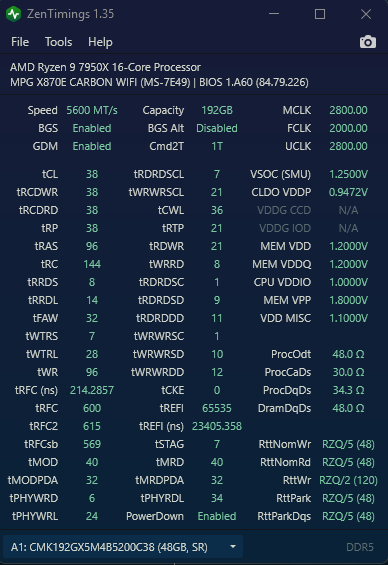
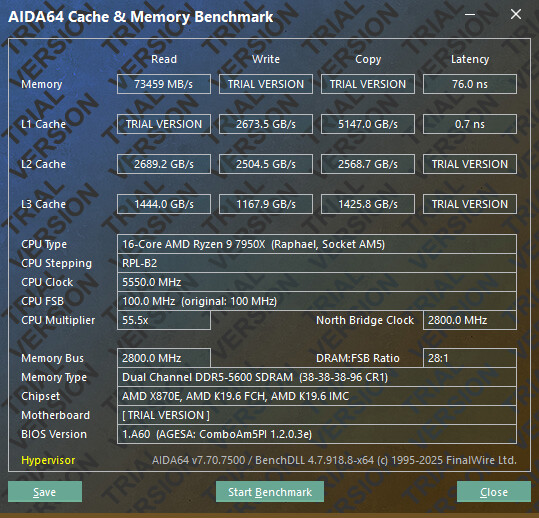
After that post I decided to give the new agesa a try. Looks like I finally managed to reach 5600MHz stable with my 4x64GB setup!
I’ve also toyed a little bit with TRFC and TREFI values and achieved 60GB/s memory bandwith with mlc. Currently running some extra tests to guarantee that things are stable, but so far everything is looking good!
9950x on a x670 ProArt with BIOS 3205, using 4x of Kingston’s KVR64A52BD8-64.
I’ve set the refresh interval do 32000 and TRFC1 to 1228 (copy pasted those values from another place here). Also left FCLK as 2000MHz, “Power Down Enable” disabled, “UCLK DIV1 MODE” as “UCLK=MEMCLK”.
mlc results:
Intel(R) Memory Latency Checker - v3.11b
*** Unable to modify prefetchers (try executing 'modprobe msr')
*** So, enabling random access for latency measurements
Measuring idle latencies for random access (in ns)...
                Numa node
Numa node            0
       0          85.7

Measuring Peak Injection Memory Bandwidths for the system
Bandwidths are in MB/sec (1 MB/sec = 1,000,000 Bytes/sec)
Using all the threads from each core if Hyper-threading is enabled
Using traffic with the following read-write ratios
ALL Reads        :      62219.8
3:1 Reads-Writes :      59474.9
2:1 Reads-Writes :      60049.0
1:1 Reads-Writes :      61289.9
Stream-triad like:      59533.5

Measuring Memory Bandwidths between nodes within system
Bandwidths are in MB/sec (1 MB/sec = 1,000,000 Bytes/sec)
Using all the threads from each core if Hyper-threading is enabled
Using Read-only traffic type
                Numa node
Numa node            0
       0        62269.8

Measuring Loaded Latencies for the system
Using all the threads from each core if Hyper-threading is enabled
Using Read-only traffic type
Inject  Latency Bandwidth
Delay   (ns)    MB/sec
==========================
 00000  196.22    62060.0
 00002  196.45    62080.3
 00008  185.82    61491.2
 00015  174.93    61057.4
 00050  199.50    61816.5
 00100  197.10    61857.1
 00200  194.89    61727.7
 00300  197.73    61789.0
 00400  201.65    61925.4
 00500  195.77    61777.6
 00700  117.37    51857.8
 01000  103.91    37797.1
 01300   99.10    29851.4
 01700   96.36    23324.6
 02500   90.57    16364.5
 03500   89.27    12009.1
 05000   88.34     8686.8
 09000   87.37     5188.5
 20000   86.65     2754.3

Measuring cache-to-cache transfer latency (in ns)...
Local Socket L2->L2 HIT  latency        15.4
Local Socket L2->L2 HITM latency        15.4
I am on the AGESA 1.2.0.3f now. I don’t see any improvement. Maybe the improvement is not meant for x670e Carbon. Maybe my double 2x32GB Kingston kits have already got patched before that.
I actually don’t mind being stuck at 5600 at all. There is a optimized fclk for 5600. That is 2100 fclk. It runs pyprime under 9 seconds with Ryzen 9950x, with CL30 @5600 1.25v. Very efficient.
Plus 7950x undervolted to negative 27 on all cores. These settings all together are rock solid. I tried many overnight Y cruncher sessions, gaming, editing, EU5 editor with demanding sample scenes and also let the PC to idle on desktop for long periods of time. Works perfectly.
Thanks to help of people in this thread, as I have very little idea what I’m doing. I think the RAM OC could be pushed even more in my case, but I just lack the knowledge and patience. This is good enough for me.
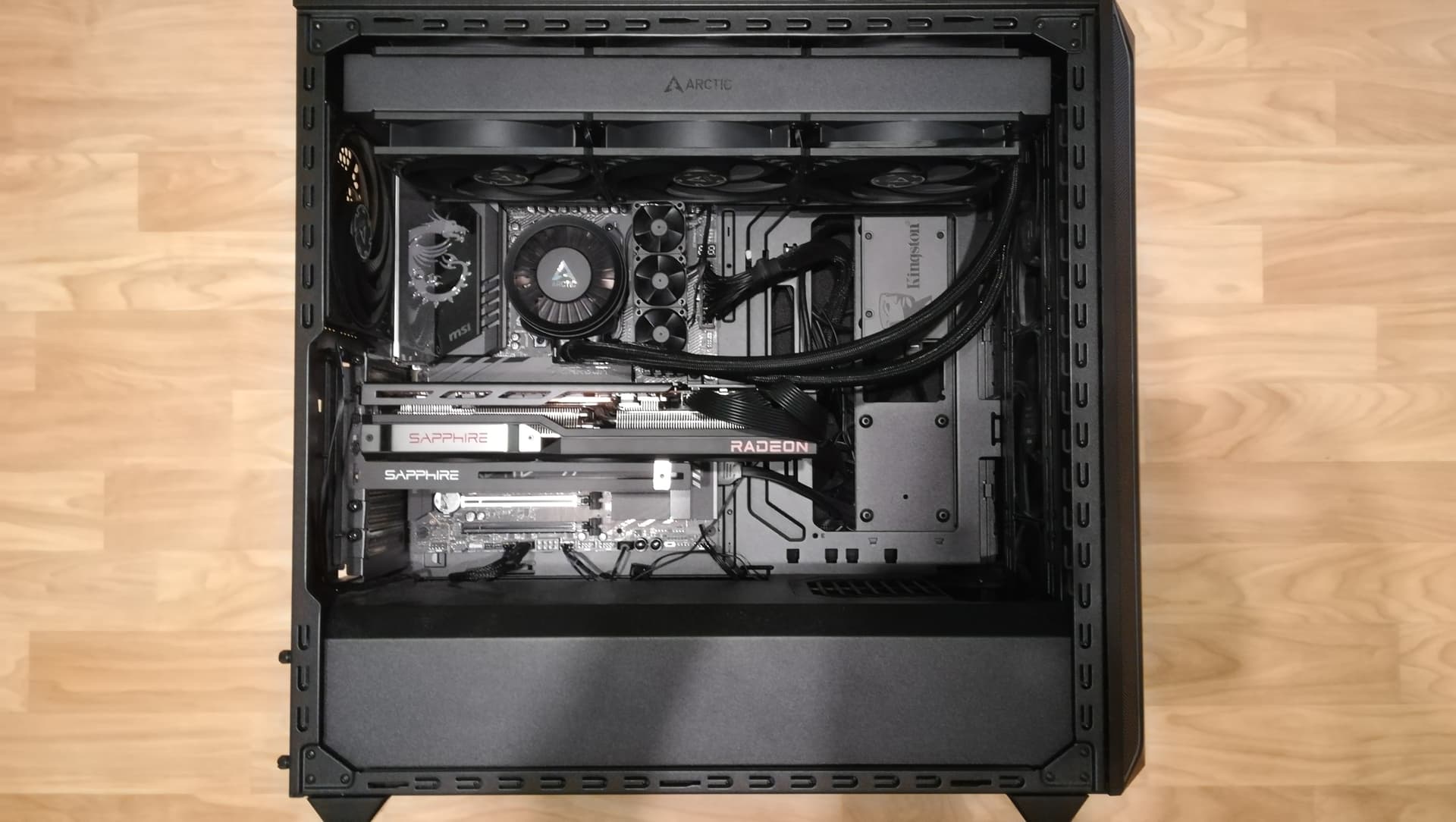
Behold my push pull 420 AIO and RAM cooling solution (3x 6k fans, capped at reasonably quiet 3k). Both AIO and RAM coolers had to be attached by questionable DIY methods, but hey. It works. Besides 3x140 fans in the front, There are also 2x140 hidden fans in the bottom compartment, close to the front ones. There’s way too many fans inside this case. And I like it.
GPU is 7900 XTX, PSU is EVGA 750 GQ, UPS Green Cell 2000VA 1400W
I had my best results with the first or second BIOS that added 48GB DIMM support.
The BIOS that stated “Significantly enhanced memory compatibility, with a focus on configurations utilizing all four DIMM slots” was the worst for me.
currently undecided, whether to get a 4x64gb kit from g.skill. which is 170$ cheaper than my other option that are a couple of vcolor 2x64gb kits with sk hynix m die and 400mhz faster.
pros for g.skill: i get a full kit of paired tested ram, and its cheaper.
cons for g.skill: samsung m die. not as good a sk.hynix.
pros for vcolor: 6400mhz, Sk.hynix chips. best of all from what ive read.
cons for vcolor: would have to buy 2 separate 128gb kits. and more expensive.