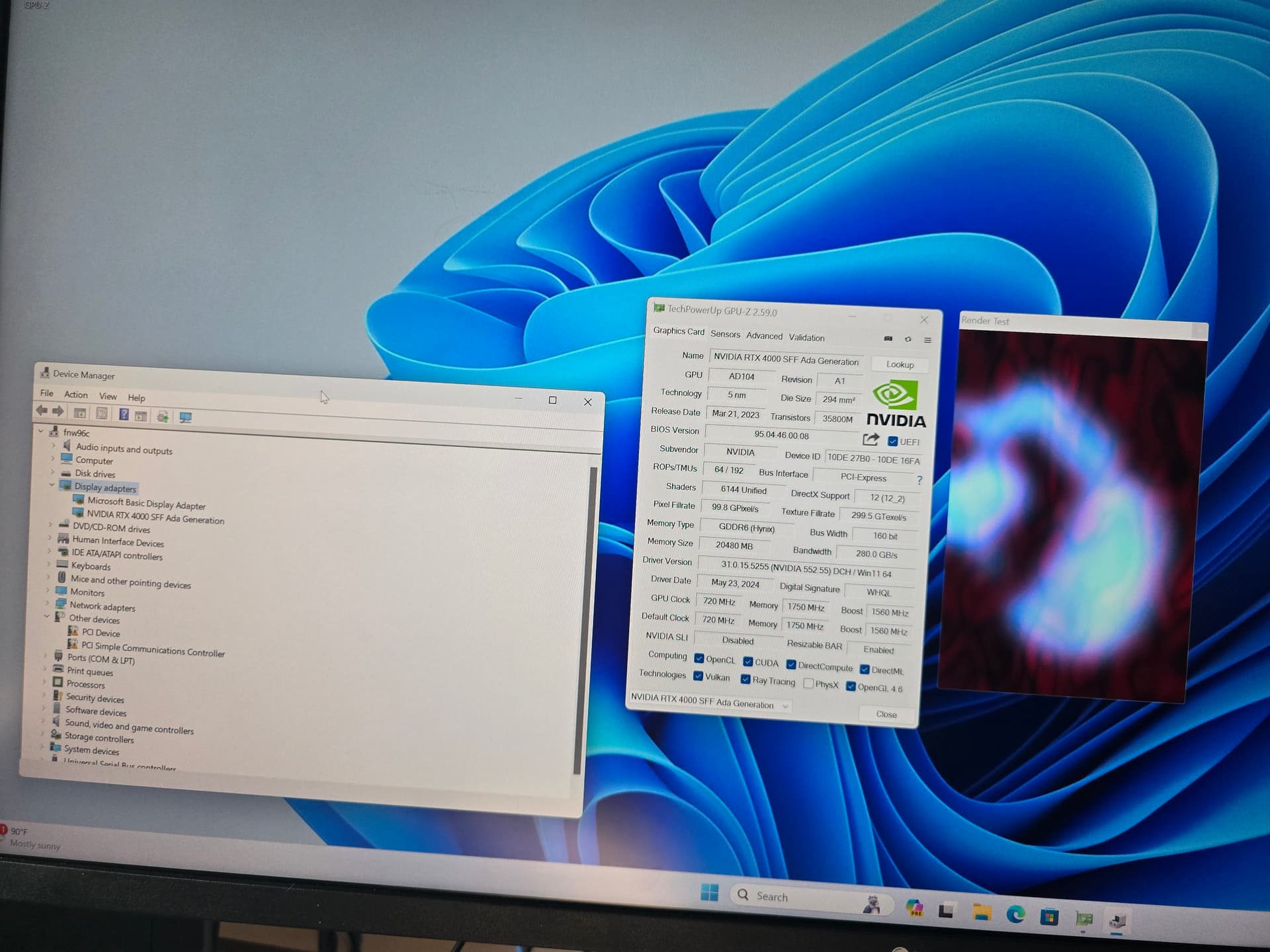
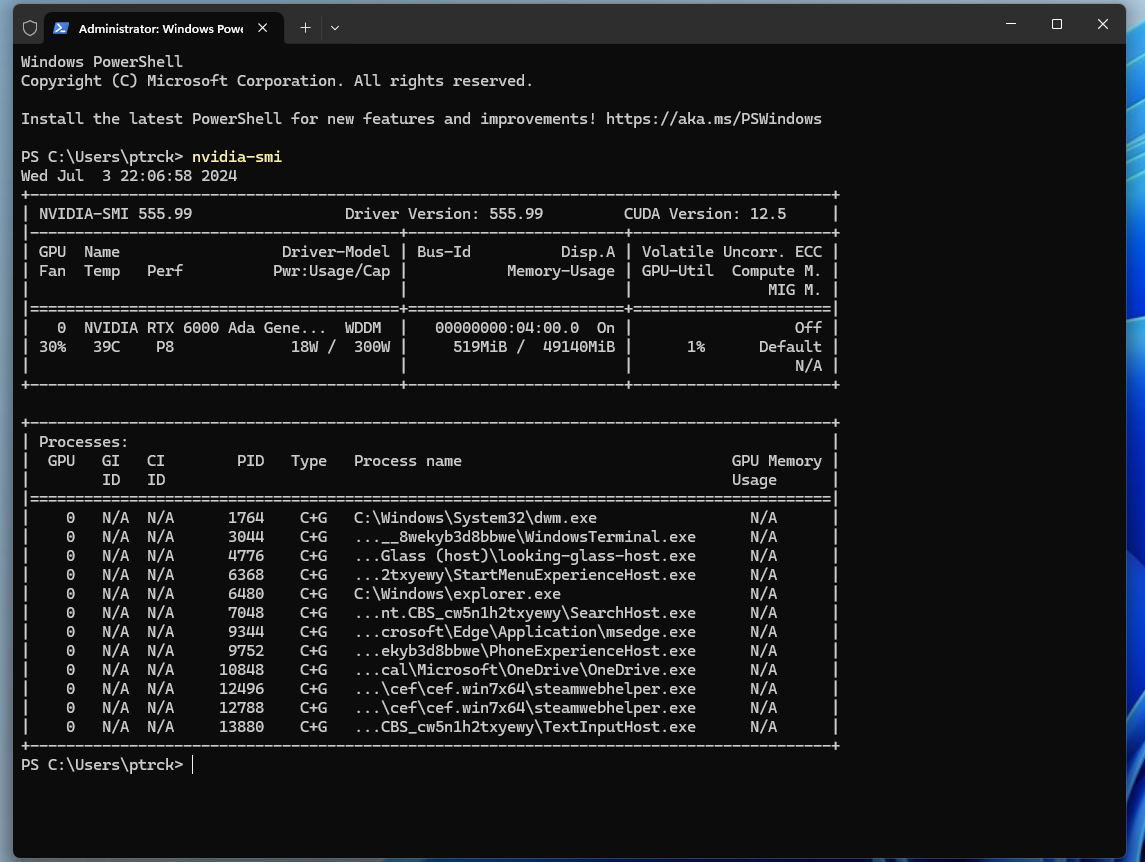
Tried mucking with enabling resizable bar
		BAR 0: current size: 16MB, supported: 16MB
		BAR 1: current size: 64MB, supported: 64MB 128MB 256MB 512MB 1GB 2GB 4GB 8GB 16GB 32GB 64GB
		BAR 3: current size: 32MB, supported: 32MB
		BAR 0: current size: 16MB, supported: 16MB
		BAR 1: current size: 256MB, supported: 64MB 128MB 256MB 512MB 1GB 2GB 4GB 8GB 16GB 32GB 64GB
		BAR 3: current size: 32MB, supported: 32MB
		BAR 0: current size: 16MB, supported: 16MB
		BAR 1: current size: 64GB, supported: 64MB 128MB 256MB 512MB 1GB 2GB 4GB 8GB 16GB 32GB 64GB
		BAR 3: current size: 32MB, supported: 32MB
No change in behavior unfortunately
well, good news bad news.
I got it to work, first try, which is both good and bad news.
Here is what I did on a fresh install step-by-step on Ubuntu 24.04.
I didn’t have to virsh edit, hide the hypervisor or do any tweaking at all. I did literally everything through virt-manager.
[wrx90 testing a6000]
[20240629_115301]
I am sure that this is probably going to need more tweaking for best performance but uh… no code 43?
So I am going to keep digging with you to get to the bottom of it
Any deviations from what you did that you spot in what I did?
3 Likes
Gaming and Visualization Technologies
General Topics and Other SDKs
GPU - Hardware
I also got this: NVRM: GPU 0000:01:00.0: RmInitAdapter failed! (0x11:0x45:2525] NVRM: GPU 0000:01:00.0: rm_init_adapter failed, device minor number 0 while trying to pass a whole NVIDIA RTX 6000 Ada to an Ubuntu 20.04 VM under Proxmox. But...
Reading time: 1 mins 🕑
Likes: 2 ❤
From what I found elsewhere this issue seems to be specific to the ada cards where this seems to work from on the A?000 series cards. Otherwise going through the videos my bios settings are the same.
Also tried windows 10 but no love there either. Guess I should try to find a copy of this displaymodeselector tool, doesn’t look like I can get it straight from nvidia since it requires a “nvidia contact”
wait, do you see this in your dmesg output??
NVRM: GPU 0000:01:00.0: RmInitAdapter failed! (0x11:0x45:2525]
NVRM: GPU 0000:01:00.0: rm_init_adapter failed, device minor number 0
?
Nope, only thing I see in dmesg from NVRM is
[   28.445361] NVRM: This can occur when a driver such as:
               NVRM: nouveau, rivafb, nvidiafb or rivatv
               NVRM: was loaded and obtained ownership of the NVIDIA device(s).
[   28.445362] NVRM: Try unloading the conflicting kernel module (and/or
               NVRM: reconfigure your kernel without the conflicting
               NVRM: driver(s)), then try loading the NVIDIA kernel module
               NVRM: again.
[   28.445365] NVRM: loading NVIDIA UNIX x86_64 Kernel Module  535.183.01  Sun May 12 19:39:15 UTC 2024
ok, I’ll rework my setup to swap in the sff ada4000 and try to pass that through. I don’t have any other ada gpus atm, but an ada gpu I borrowed in november worked without me having to use displaymodeselect. I suppose it might have come in the right mode because it was a loaner.
wendell:
sff ada4000
I’m currently passing through an RTX 4000 ADA (but not the SFF one). Pretty much works out of the box for me. I’ve got the card bound to VFIO on the host for exclusive use in one of the guests.
The RTX 6000 ADA is a different beast though and it’s the one I shelved after coming across the forum post about requiring a vGPU license last year.
Afaik the vgpu license is only if you split the gpu as opposed go pass whole thing
Hmm… actually now that I think about it, the working RTX 4000 Ada pass-through is on a different system than the one I tested the RTX 6000 Ada pass-through on. Maybe that’s also my problem.
Yeah ive got an a100 in passthrough also but its on 22.04 and it really is for compute buuutttt it passes through fine too. Its just the one though and its doing stuff i cant stop rn
So I did the thing, instead of passing through the 6000 and using the 4000 as my host gpu, I passed through the 4000 and used the 6000 as my host gpu.
And it works. That confirms to me at least, this is a problem specific to the 6000 ada.
3 Likes
Worked for me too!
I wonder if theres a vbios update for the a6000 ada card. It should not do this.
Ill dig around and see if i can borrow one.
3 Likes
wendell:
Worked for me too!
That shaved me some work swapping GPUs between hosts. Molto grazie!
1 Like
And just to confirm it wasn’t one of the random tweaks I did, I backed out most everything and did a fresh vm and installation of windows 11. The 4000 SFF worked straight out of the box, no tweaks other then assigning the PCI id’s to vfio so the nvidia driver didn’t try to grab it.
1 Like
I am on the hunt for alternative sources of the utils. You might be able to spin up an amazon nv gpu instsnce rhen download the tarball from the instsnce lol
But i bet i can dig up another link
2 Likes
(non-affiliate link, no money made here)
If anyone comes across this in the future, I also got one of these instead of having another monitor hooked up and using looking glass to connect to it. Current xml looks like this…
<domain type="kvm">
  <name>win11</name>
  <uuid>55e8cf86-c58d-4eab-9d28-847a480cc594</uuid>
  <metadata>
    <libosinfo:libosinfo xmlns:libosinfo="http://libosinfo.org/xmlns/libvirt/domain/1.0">
      <libosinfo:os id="http://microsoft.com/win/11"/>
    </libosinfo:libosinfo>
  </metadata>
  <memory unit="KiB">67108864</memory>
  <currentMemory unit="KiB">67108864</currentMemory>
  <vcpu placement="static">32</vcpu>
  <os firmware="efi">
    <type arch="x86_64" machine="pc-q35-8.2">hvm</type>
    <firmware>
      <feature enabled="yes" name="enrolled-keys"/>
      <feature enabled="yes" name="secure-boot"/>
    </firmware>
    <loader readonly="yes" secure="yes" type="pflash">/usr/share/OVMF/OVMF_CODE_4M.ms.fd</loader>
    <nvram template="/usr/share/OVMF/OVMF_VARS_4M.ms.fd">/var/lib/libvirt/qemu/nvram/win11_VARS.fd</nvram>
    <smbios mode="host"/>
  </os>
  <features>
    <acpi/>
    <apic/>
    <hyperv mode="custom">
      <relaxed state="on"/>
      <vapic state="on"/>
      <spinlocks state="on" retries="8191"/>
    </hyperv>
    <vmport state="off"/>
    <smm state="on"/>
  </features>
  <cpu mode="host-passthrough" check="none" migratable="on">
    <topology sockets="1" dies="1" cores="16" threads="2"/>
    <feature policy="require" name="topoext"/>
  </cpu>
  <clock offset="localtime">
    <timer name="rtc" tickpolicy="catchup"/>
    <timer name="pit" tickpolicy="delay"/>
    <timer name="hpet" present="no"/>
    <timer name="hypervclock" present="yes"/>
  </clock>
  <on_poweroff>destroy</on_poweroff>
  <on_reboot>restart</on_reboot>
  <on_crash>destroy</on_crash>
  <pm>
    <suspend-to-mem enabled="no"/>
    <suspend-to-disk enabled="no"/>
  </pm>
  <devices>
    <emulator>/usr/bin/qemu-system-x86_64</emulator>
    <disk type="block" device="disk">
      <driver name="qemu" type="raw" cache="none" io="native" discard="unmap"/>
      <source dev="/dev/nvme1n1p1"/>
      <target dev="sda" bus="sata"/>
      <boot order="2"/>
      <address type="drive" controller="0" bus="0" target="0" unit="0"/>
    </disk>
    <disk type="file" device="cdrom">
      <driver name="qemu" type="raw"/>
      <source file="/home/ptrck/Downloads/en-us_windows_11_business_editions_version_23h2_updated_may_2024_x64_dvd_97f0b7e9.iso"/>
      <target dev="sdb" bus="sata"/>
      <readonly/>
      <boot order="1"/>
      <address type="drive" controller="0" bus="0" target="0" unit="1"/>
    </disk>
    <controller type="usb" index="0" model="qemu-xhci" ports="15">
      <address type="pci" domain="0x0000" bus="0x02" slot="0x00" function="0x0"/>
    </controller>
    <controller type="pci" index="0" model="pcie-root"/>
    <controller type="pci" index="1" model="pcie-root-port">
      <model name="pcie-root-port"/>
      <target chassis="1" port="0x10"/>
      <address type="pci" domain="0x0000" bus="0x00" slot="0x02" function="0x0" multifunction="on"/>
    </controller>
    <controller type="pci" index="2" model="pcie-root-port">
      <model name="pcie-root-port"/>
      <target chassis="2" port="0x11"/>
      <address type="pci" domain="0x0000" bus="0x00" slot="0x02" function="0x1"/>
    </controller>
    <controller type="pci" index="3" model="pcie-root-port">
      <model name="pcie-root-port"/>
      <target chassis="3" port="0x12"/>
      <address type="pci" domain="0x0000" bus="0x00" slot="0x02" function="0x2"/>
    </controller>
    <controller type="pci" index="4" model="pcie-root-port">
      <model name="pcie-root-port"/>
      <target chassis="4" port="0x13"/>
      <address type="pci" domain="0x0000" bus="0x00" slot="0x02" function="0x3"/>
    </controller>
    <controller type="pci" index="5" model="pcie-root-port">
      <model name="pcie-root-port"/>
      <target chassis="5" port="0x14"/>
      <address type="pci" domain="0x0000" bus="0x00" slot="0x02" function="0x4"/>
    </controller>
    <controller type="pci" index="6" model="pcie-root-port">
      <model name="pcie-root-port"/>
      <target chassis="6" port="0x15"/>
      <address type="pci" domain="0x0000" bus="0x00" slot="0x02" function="0x5"/>
    </controller>
    <controller type="pci" index="7" model="pcie-root-port">
      <model name="pcie-root-port"/>
      <target chassis="7" port="0x16"/>
      <address type="pci" domain="0x0000" bus="0x00" slot="0x02" function="0x6"/>
    </controller>
    <controller type="pci" index="8" model="pcie-root-port">
      <model name="pcie-root-port"/>
      <target chassis="8" port="0x17"/>
      <address type="pci" domain="0x0000" bus="0x00" slot="0x02" function="0x7"/>
    </controller>
    <controller type="pci" index="9" model="pcie-root-port">
      <model name="pcie-root-port"/>
      <target chassis="9" port="0x18"/>
      <address type="pci" domain="0x0000" bus="0x00" slot="0x03" function="0x0" multifunction="on"/>
    </controller>
    <controller type="pci" index="10" model="pcie-root-port">
      <model name="pcie-root-port"/>
      <target chassis="10" port="0x19"/>
      <address type="pci" domain="0x0000" bus="0x00" slot="0x03" function="0x1"/>
    </controller>
    <controller type="pci" index="11" model="pcie-root-port">
      <model name="pcie-root-port"/>
      <target chassis="11" port="0x1a"/>
      <address type="pci" domain="0x0000" bus="0x00" slot="0x03" function="0x2"/>
    </controller>
    <controller type="pci" index="12" model="pcie-root-port">
      <model name="pcie-root-port"/>
      <target chassis="12" port="0x1b"/>
      <address type="pci" domain="0x0000" bus="0x00" slot="0x03" function="0x3"/>
    </controller>
    <controller type="pci" index="13" model="pcie-root-port">
      <model name="pcie-root-port"/>
      <target chassis="13" port="0x1c"/>
      <address type="pci" domain="0x0000" bus="0x00" slot="0x03" function="0x4"/>
    </controller>
    <controller type="pci" index="14" model="pcie-root-port">
      <model name="pcie-root-port"/>
      <target chassis="14" port="0x1d"/>
      <address type="pci" domain="0x0000" bus="0x00" slot="0x03" function="0x5"/>
    </controller>
    <controller type="pci" index="15" model="pcie-root-port">
      <model name="pcie-root-port"/>
      <target chassis="15" port="0x1e"/>
      <address type="pci" domain="0x0000" bus="0x00" slot="0x03" function="0x6"/>
    </controller>
    <controller type="pci" index="16" model="pcie-to-pci-bridge">
      <model name="pcie-pci-bridge"/>
      <address type="pci" domain="0x0000" bus="0x07" slot="0x00" function="0x0"/>
    </controller>
    <controller type="sata" index="0">
      <address type="pci" domain="0x0000" bus="0x00" slot="0x1f" function="0x2"/>
    </controller>
    <controller type="virtio-serial" index="0">
      <address type="pci" domain="0x0000" bus="0x03" slot="0x00" function="0x0"/>
    </controller>
    <interface type="network">
      <mac address="52:54:00:6f:08:63"/>
      <source network="default"/>
      <model type="e1000e"/>
      <address type="pci" domain="0x0000" bus="0x01" slot="0x00" function="0x0"/>
    </interface>
    <channel type="spicevmc">
      <target type="virtio" name="com.redhat.spice.0"/>
      <address type="virtio-serial" controller="0" bus="0" port="1"/>
    </channel>
    <input type="tablet" bus="usb">
      <address type="usb" bus="0" port="1"/>
    </input>
    <input type="mouse" bus="ps2"/>
    <input type="keyboard" bus="ps2"/>
    <tpm model="tpm-crb">
      <backend type="emulator" version="2.0"/>
    </tpm>
    <graphics type="spice" autoport="yes">
      <listen type="address"/>
      <image compression="off"/>
    </graphics>
    <sound model="ich9">
      <address type="pci" domain="0x0000" bus="0x00" slot="0x1b" function="0x0"/>
    </sound>
    <audio id="1" type="spice"/>
    <video>
      <model type="none"/>
    </video>
    <hostdev mode="subsystem" type="pci" managed="yes">
      <source>
        <address domain="0x0000" bus="0xe1" slot="0x00" function="0x0"/>
      </source>
      <address type="pci" domain="0x0000" bus="0x04" slot="0x00" function="0x0"/>
    </hostdev>
    <hostdev mode="subsystem" type="pci" managed="yes">
      <source>
        <address domain="0x0000" bus="0xe1" slot="0x00" function="0x1"/>
      </source>
      <address type="pci" domain="0x0000" bus="0x05" slot="0x00" function="0x0"/>
    </hostdev>
    <redirdev bus="usb" type="spicevmc">
      <address type="usb" bus="0" port="2"/>
    </redirdev>
    <redirdev bus="usb" type="spicevmc">
      <address type="usb" bus="0" port="3"/>
    </redirdev>
    <watchdog model="itco" action="reset"/>
    <memballoon model="none"/>
    <shmem name="looking-glass">
      <model type="ivshmem-plain"/>
      <size unit="M">256</size>
      <address type="pci" domain="0x0000" bus="0x10" slot="0x01" function="0x0"/>
    </shmem>
  </devices>
</domain>
Still don’t have the 6000 ada working as a passthrough. Going to try farming an amazon nvidia gpu instance in a bit to try the mode selector tool
1 Like
<name>win11</name>
<uuid>55e8cf86-c58d-4eab-9d28-847a480cc594</uuid>
<metadata>
<libosinfo:libosinfo xmlns:libosinfo="http://libosinfo.org/xmlns/libvirt/domain/1.0">
<libosinfo:os id="http://microsoft.com/win/11"/>
</libosinfo:libosinfo>
</metadata>
<memory unit="KiB">67108864</memory>
<currentMemory unit="KiB">67108864</currentMemory>
<vcpu placement="static">32</vcpu>
<iothreads>1</iothreads>
<os firmware="efi">
<type arch="x86_64" machine="pc-q35-8.2">hvm</type>
<firmware>
<feature enabled="yes" name="enrolled-keys"/>
<feature enabled="yes" name="secure-boot"/>
</firmware>
<loader readonly="yes" secure="yes" type="pflash">/usr/share/OVMF/OVMF_CODE_4M.ms.fd</loader>
<nvram template="/usr/share/OVMF/OVMF_VARS_4M.ms.fd">/var/lib/libvirt/qemu/nvram/win11_VARS.fd</nvram>
<boot dev="hd"/>
<smbios mode="host"/>
</os>
<features>
<acpi/>
<apic/>
<hyperv mode="custom">
<relaxed state="on"/>
<vapic state="on"/>
<spinlocks state="on" retries="8191"/>
</hyperv>
<vmport state="off"/>
<smm state="on"/>
</features>
<cpu mode="host-passthrough" check="none" migratable="on">
<topology sockets="1" dies="1" cores="16" threads="2"/>
<feature policy="require" name="topoext"/>
</cpu>
<clock offset="localtime">
<timer name="rtc" tickpolicy="catchup"/>
<timer name="pit" tickpolicy="delay"/>
<timer name="hpet" present="no"/>
<timer name="hypervclock" present="yes"/>
</clock>
<on_poweroff>destroy</on_poweroff>
<on_reboot>restart</on_reboot>
<on_crash>destroy</on_crash>
<pm>
<suspend-to-mem enabled="no"/>
<suspend-to-disk enabled="no"/>
</pm>
<devices>
<emulator>/usr/bin/qemu-system-x86_64</emulator>
<disk type="block" device="disk">
<driver name="qemu" type="raw" cache="none" io="threads" discard="unmap"/>
<source dev="/dev/nvme1n1p1"/>
<target dev="sda" bus="scsi"/>
<address type="drive" controller="0" bus="0" target="0" unit="1"/>
</disk>
<controller type="usb" index="0" model="qemu-xhci" ports="15">
<address type="pci" domain="0x0000" bus="0x02" slot="0x00" function="0x0"/>
</controller>
<controller type="pci" index="0" model="pcie-root"/>
<controller type="pci" index="1" model="pcie-root-port">
<model name="pcie-root-port"/>
<target chassis="1" port="0x10"/>
<address type="pci" domain="0x0000" bus="0x00" slot="0x02" function="0x0" multifunction="on"/>
</controller>
<controller type="pci" index="2" model="pcie-root-port">
<model name="pcie-root-port"/>
<target chassis="2" port="0x11"/>
<address type="pci" domain="0x0000" bus="0x00" slot="0x02" function="0x1"/>
</controller>
<controller type="pci" index="3" model="pcie-root-port">
<model name="pcie-root-port"/>
<target chassis="3" port="0x12"/>
<address type="pci" domain="0x0000" bus="0x00" slot="0x02" function="0x2"/>
</controller>
<controller type="pci" index="4" model="pcie-root-port">
<model name="pcie-root-port"/>
<target chassis="4" port="0x13"/>
<address type="pci" domain="0x0000" bus="0x00" slot="0x02" function="0x3"/>
</controller>
<controller type="pci" index="5" model="pcie-root-port">
<model name="pcie-root-port"/>
<target chassis="5" port="0x14"/>
<address type="pci" domain="0x0000" bus="0x00" slot="0x02" function="0x4"/>
</controller>
<controller type="pci" index="6" model="pcie-root-port">
<model name="pcie-root-port"/>
<target chassis="6" port="0x15"/>
<address type="pci" domain="0x0000" bus="0x00" slot="0x02" function="0x5"/>
</controller>
<controller type="pci" index="7" model="pcie-root-port">
<model name="pcie-root-port"/>
<target chassis="7" port="0x16"/>
<address type="pci" domain="0x0000" bus="0x00" slot="0x02" function="0x6"/>
</controller>
<controller type="pci" index="8" model="pcie-root-port">
<model name="pcie-root-port"/>
<target chassis="8" port="0x17"/>
<address type="pci" domain="0x0000" bus="0x00" slot="0x02" function="0x7"/>
</controller>
<controller type="pci" index="9" model="pcie-root-port">
<model name="pcie-root-port"/>
<target chassis="9" port="0x18"/>
<address type="pci" domain="0x0000" bus="0x00" slot="0x03" function="0x0" multifunction="on"/>
</controller>
<controller type="pci" index="10" model="pcie-root-port">
<model name="pcie-root-port"/>
<target chassis="10" port="0x19"/>
<address type="pci" domain="0x0000" bus="0x00" slot="0x03" function="0x1"/>
</controller>
<controller type="pci" index="11" model="pcie-root-port">
<model name="pcie-root-port"/>
<target chassis="11" port="0x1a"/>
<address type="pci" domain="0x0000" bus="0x00" slot="0x03" function="0x2"/>
</controller>
<controller type="pci" index="12" model="pcie-root-port">
<model name="pcie-root-port"/>
<target chassis="12" port="0x1b"/>
<address type="pci" domain="0x0000" bus="0x00" slot="0x03" function="0x3"/>
</controller>
<controller type="pci" index="13" model="pcie-root-port">
<model name="pcie-root-port"/>
<target chassis="13" port="0x1c"/>
<address type="pci" domain="0x0000" bus="0x00" slot="0x03" function="0x4"/>
</controller>
<controller type="pci" index="14" model="pcie-root-port">
<model name="pcie-root-port"/>
<target chassis="14" port="0x1d"/>
<address type="pci" domain="0x0000" bus="0x00" slot="0x03" function="0x5"/>
</controller>
<controller type="pci" index="15" model="pcie-root-port">
<model name="pcie-root-port"/>
<target chassis="15" port="0x1e"/>
<address type="pci" domain="0x0000" bus="0x00" slot="0x03" function="0x6"/>
</controller>
<controller type="pci" index="16" model="pcie-to-pci-bridge">
<model name="pcie-pci-bridge"/>
<address type="pci" domain="0x0000" bus="0x07" slot="0x00" function="0x0"/>
</controller>
<controller type="sata" index="0">
<address type="pci" domain="0x0000" bus="0x00" slot="0x1f" function="0x2"/>
</controller>
<controller type="virtio-serial" index="0">
<address type="pci" domain="0x0000" bus="0x03" slot="0x00" function="0x0"/>
</controller>
<controller type="scsi" index="0" model="virtio-scsi">
<driver queues="8" iothread="1"/>
<address type="pci" domain="0x0000" bus="0x09" slot="0x00" function="0x0"/>
</controller>
<interface type="network">
<mac address="52:54:00:de:90:51"/>
<source network="default"/>
<model type="virtio"/>
<driver queues="8"/>
<address type="pci" domain="0x0000" bus="0x01" slot="0x00" function="0x0"/>
</interface>
<channel type="spicevmc">
<target type="virtio" name="com.redhat.spice.0"/>
<address type="virtio-serial" controller="0" bus="0" port="1"/>
</channel>
<input type="mouse" bus="virtio">
<address type="pci" domain="0x0000" bus="0x08" slot="0x00" function="0x0"/>
</input>
<input type="keyboard" bus="ps2"/>
<input type="keyboard" bus="virtio">
<address type="pci" domain="0x0000" bus="0x06" slot="0x00" function="0x0"/>
</input>
<input type="mouse" bus="ps2"/>
<tpm model="tpm-crb">
<backend type="emulator" version="2.0"/>
</tpm>
<graphics type="spice" autoport="yes">
<listen type="address"/>
<image compression="off"/>
</graphics>
<sound model="ich9">
<address type="pci" domain="0x0000" bus="0x00" slot="0x1b" function="0x0"/>
</sound>
<audio id="1" type="spice"/>
<video>
<model type="none"/>
</video>
<hostdev mode="subsystem" type="pci" managed="yes">
<source>
<address domain="0x0000" bus="0xe1" slot="0x00" function="0x0"/>
</source>
<address type="pci" domain="0x0000" bus="0x04" slot="0x00" function="0x0"/>
</hostdev>
<hostdev mode="subsystem" type="pci" managed="yes">
<source>
<address domain="0x0000" bus="0xe1" slot="0x00" function="0x1"/>
</source>
<address type="pci" domain="0x0000" bus="0x05" slot="0x00" function="0x0"/>
</hostdev>
<redirdev bus="usb" type="spicevmc">
<address type="usb" bus="0" port="2"/>
</redirdev>
<redirdev bus="usb" type="spicevmc">
<address type="usb" bus="0" port="3"/>
</redirdev>
<watchdog model="itco" action="reset"/>
<memballoon model="none"/>
</devices>
<qemu:commandline>
<qemu:arg value="-device"/>
<qemu:arg value="{"driver":"ivshmem-plain","id":"shmem0","memdev":"looking-glass"}"/>
<qemu:arg value="-object"/>
<qemu:arg value="{"qom-type":"memory-backend-file","id":"looking-glass","mem-path":"/dev/kvmfr0","size":268435456,"share":true}"/>
</qemu:commandline>
</domain>
Current xml (July 1st 24)
Changelog entry 1
Changelog entry 2
1 Like
good news, rtx 5880 otw, and maybe another ada6000 to test.
3 Likes
Current as of July 2 24
For the looking glass client I am launching it like
looking-glass-client -f /dev/kvmfr0 win:size=2560x1080 egl:noSwapDamage=yes
The point of these non-standard options is to eliminate the artifacts (boxs/tearing/etc) that I was seeing using the default options.
Change log 1
1 Like
So after much sleuthing, crawling through the trenches of every community I could think of I came across this gem.
Setting the value of the regkey MSISupported to 0 after installing the driver.

This registry key is located at below path.
HKEY_LOCAL_MACHINE\SYSTEM\CurrentControlSet\Enum\PCI\<Device-Instance-Path>\Device Parameters\Interrupt Management\MessageSignaledInterruptProperties\MSISupported
This is supposed to get fixed according to the source on discord in a future driver update. For now this has enabled me to pass through the 6000 ada
3 Likes