Zen 4 B650 Memory Tuning

I’m having a hard time getting to 5200 MT/s on my lab server:

  • Asus B650E-F ROG STRIX Gaming Wifi
  • AMD Ryzen 9 7900X
  • 4x G.Skill Flare X5 F5-5200J3636D32G DIMMs (128GB)

I know Zen 4 “struggles” with 4 DIMMs but I was expecting to get better than 4800 MT/s

I’m running BIOS v3222 currently. I noticed that ASUS released v3265 recently but before I blindly upgrade (the release notes are sparse) I thought I would see if anyone on the L1 Forums has had a similar experience or suggestions - even if that’s “you have cheap memory, buy XXX instead”

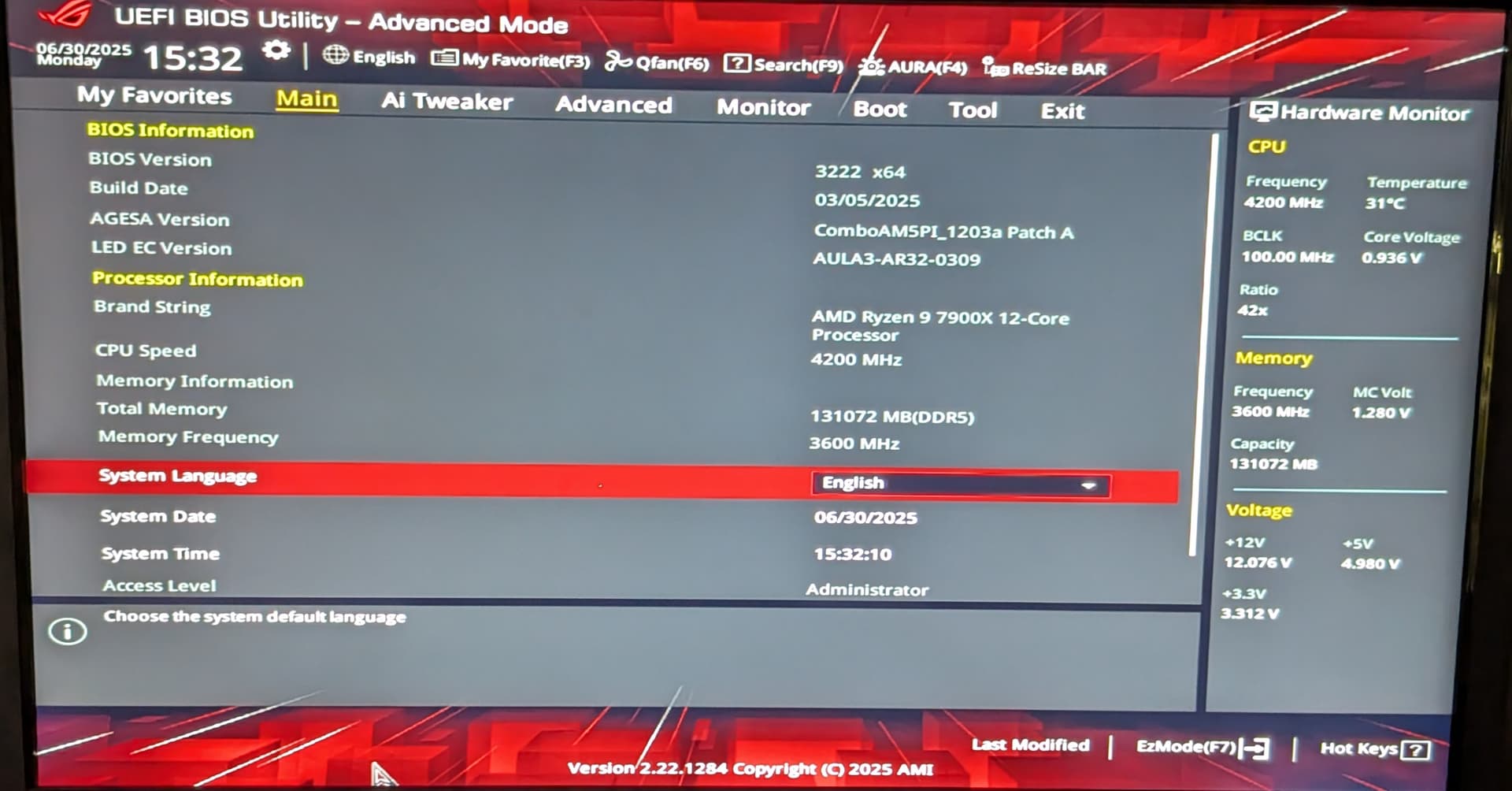
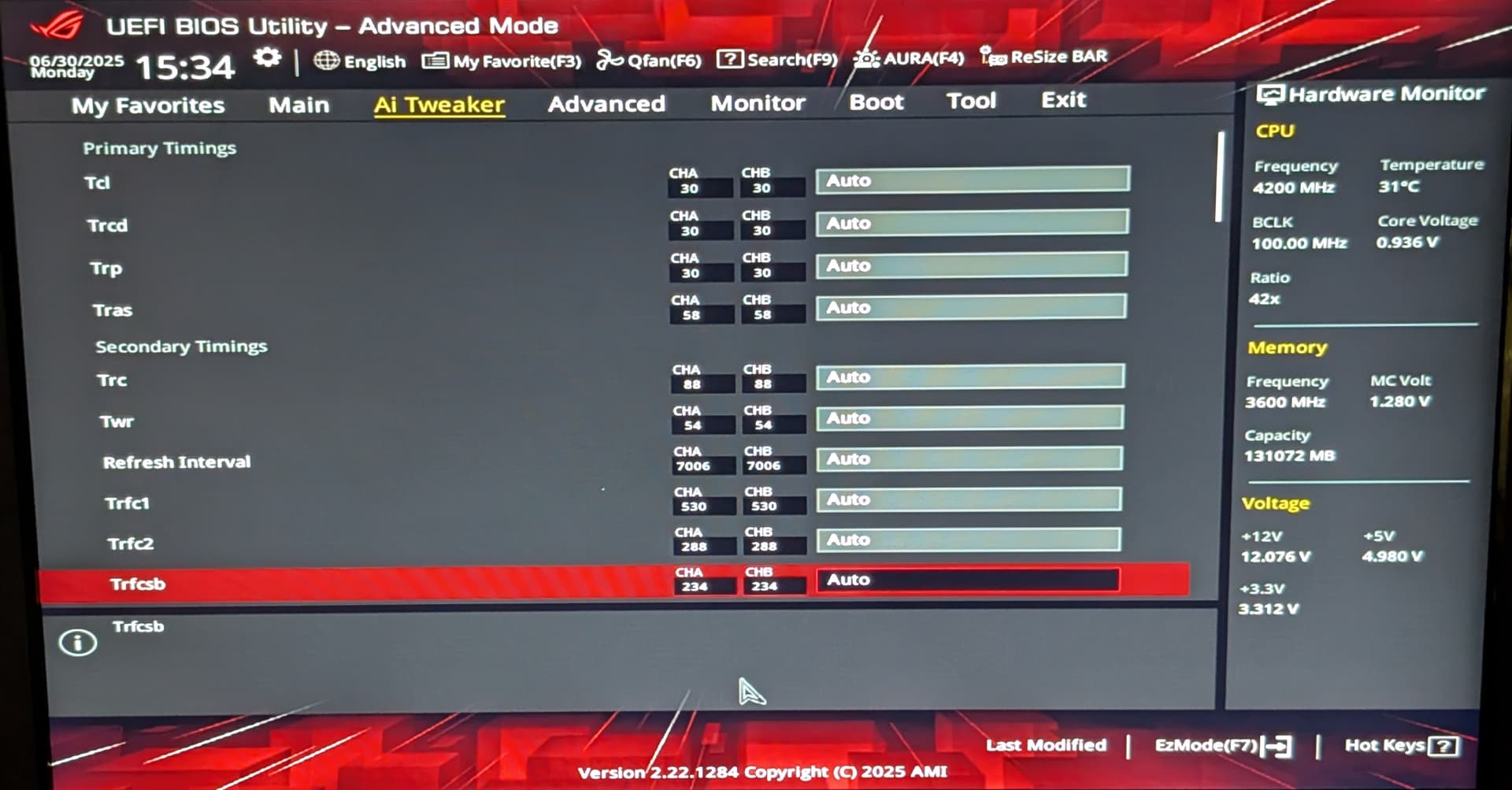
When I first stood up the server, I spent nearly a week trying to get anything other than “Auto” for all of the memory settings to work with no luck.

Screenshots below of the fairly uninteresting BIOS settings (apologies for the quality - I’ll try to find my video capture device if I keep posting screenshots)


What the kernel reports:

# dmidecode -t 17
# dmidecode 3.6
Getting SMBIOS data from sysfs.
SMBIOS 3.6.0 present.

Handle 0x0014, DMI type 17, 92 bytes
Memory Device
	Array Handle: 0x0011
	Error Information Handle: 0x0013
	Total Width: 64 bits
	Data Width: 64 bits
	Size: 32 GB
	Form Factor: DIMM
	Set: None
	Locator: DIMM 0
	Bank Locator: P0 CHANNEL A
	Type: DDR5
	Type Detail: Synchronous Unbuffered (Unregistered)
	Speed: 4800 MT/s
	Manufacturer: G Skill Intl
	Serial Number: 3450CBF6
	Asset Tag: Not Specified
	Part Number: F5-5200J3636D32G
	Rank: 2
	Configured Memory Speed: 3600 MT/s
	Minimum Voltage: 1.1 V
	Maximum Voltage: 1.1 V
	Configured Voltage: 1.1 V
	Memory Technology: DRAM
	Memory Operating Mode Capability: Volatile memory
	Firmware Version: Unknown
	Module Manufacturer ID: Bank 5, Hex 0xCD
	Module Product ID: Unknown
	Memory Subsystem Controller Manufacturer ID: Unknown
	Memory Subsystem Controller Product ID: Unknown
	Non-Volatile Size: None
	Volatile Size: 32 GB
	Cache Size: None
	Logical Size: None

Handle 0x0017, DMI type 17, 92 bytes
Memory Device
	Array Handle: 0x0011
	Error Information Handle: 0x0016
	Total Width: 64 bits
	Data Width: 64 bits
	Size: 32 GB
	Form Factor: DIMM
	Set: None
	Locator: DIMM 1
	Bank Locator: P0 CHANNEL A
	Type: DDR5
	Type Detail: Synchronous Unbuffered (Unregistered)
	Speed: 4800 MT/s
	Manufacturer: G Skill Intl
	Serial Number: 215E19F7
	Asset Tag: Not Specified
	Part Number: F5-5200J3636D32G
	Rank: 2
	Configured Memory Speed: 3600 MT/s
	Minimum Voltage: 1.1 V
	Maximum Voltage: 1.1 V
	Configured Voltage: 1.1 V
	Memory Technology: DRAM
	Memory Operating Mode Capability: Volatile memory
	Firmware Version: Unknown
	Module Manufacturer ID: Bank 5, Hex 0xCD
	Module Product ID: Unknown
	Memory Subsystem Controller Manufacturer ID: Unknown
	Memory Subsystem Controller Product ID: Unknown
	Non-Volatile Size: None
	Volatile Size: 32 GB
	Cache Size: None
	Logical Size: None

Handle 0x001A, DMI type 17, 92 bytes
Memory Device
	Array Handle: 0x0011
	Error Information Handle: 0x0019
	Total Width: 64 bits
	Data Width: 64 bits
	Size: 32 GB
	Form Factor: DIMM
	Set: None
	Locator: DIMM 0
	Bank Locator: P0 CHANNEL B
	Type: DDR5
	Type Detail: Synchronous Unbuffered (Unregistered)
	Speed: 4800 MT/s
	Manufacturer: G Skill Intl
	Serial Number: AC514BF1
	Asset Tag: Not Specified
	Part Number: F5-5200J3636D32G
	Rank: 2
	Configured Memory Speed: 3600 MT/s
	Minimum Voltage: 1.1 V
	Maximum Voltage: 1.1 V
	Configured Voltage: 1.1 V
	Memory Technology: DRAM
	Memory Operating Mode Capability: Volatile memory
	Firmware Version: Unknown
	Module Manufacturer ID: Bank 5, Hex 0xCD
	Module Product ID: Unknown
	Memory Subsystem Controller Manufacturer ID: Unknown
	Memory Subsystem Controller Product ID: Unknown
	Non-Volatile Size: None
	Volatile Size: 32 GB
	Cache Size: None
	Logical Size: None

Handle 0x001D, DMI type 17, 92 bytes
Memory Device
	Array Handle: 0x0011
	Error Information Handle: 0x001C
	Total Width: 64 bits
	Data Width: 64 bits
	Size: 32 GB
	Form Factor: DIMM
	Set: None
	Locator: DIMM 1
	Bank Locator: P0 CHANNEL B
	Type: DDR5
	Type Detail: Synchronous Unbuffered (Unregistered)
	Speed: 4800 MT/s
	Manufacturer: G Skill Intl
	Serial Number: 535108F2
	Asset Tag: Not Specified
	Part Number: F5-5200J3636D32G
	Rank: 2
	Configured Memory Speed: 3600 MT/s
	Minimum Voltage: 1.1 V
	Maximum Voltage: 1.1 V
	Configured Voltage: 1.1 V
	Memory Technology: DRAM
	Memory Operating Mode Capability: Volatile memory
	Firmware Version: Unknown
	Module Manufacturer ID: Bank 5, Hex 0xCD
	Module Product ID: Unknown
	Memory Subsystem Controller Manufacturer ID: Unknown
	Memory Subsystem Controller Product ID: Unknown
	Non-Volatile Size: None
	Volatile Size: 32 GB
	Cache Size: None
	Logical Size: None

Interstingly enough the kernel is reporting 1.1v while the BIOS is clearly set to 1.25v (over-volting to get a clean memtest run)

Any thoughts or suggestions are greatly appreciated!

Lots of info here…

https://forum.level1techs.com/t/ddr5-4-dimms-on-am5-whats-working-whats-not/

Thank you :pray: - reading through the thread now!

Insert a USB stick and press F12. :slight_smile:

It’s my vague understanding that dmidecode reports what’s in the SPDs, not the current settings. (Same with ECC info, i.e. you can use dmidecode to check what the DIMMs are capable of, but not if it’s actually in use and functioning.)

1 Like

:pray:

I wondered that - and it makes complete sense.

I’m still reading through the link posted above mining for nuggets and I hope to carve out some downtime for the box later this week / over the weekend to try and get closer to the published specs for the G.Skill RAM kits :smiley:

Configured Memory Speed is the speed the sticks are currently running at.
But the voltages are indeed the SPD ones.

2 Likes

The unreliability of dmidecode-reported data seems to reflect the general state of “correctness” of typical UEFIs. From the dmidecode homepage:

So I guess it’s not even “sensible” enough to reliably report what’s in the SPD. :frowning:

I ran Intel’s Memory Latency Checker so I have a frame of reference when I start tweaking (and a more “reliable” measure for change/improvements)

I guess it’s not surprising that consumer grade motherboards are prone to providing unreliable data. I would think server grade equipment would do a better job but we all know where assumptions get us.

After some quick Googling I found CPU-X that might provide more reliable info. I’ll see if I can get it running on the system and report back.

The CPU-X continuous release AppImage runs on the system with no issues but it appears that it’s getting it’s memory info the same way dmidecode does:

  >>>>>>>>>> Memory <<<<<<<<<<

	***** Stick 0 *****
    Manufacturer: G Skill Intl
     Part Number: F5-5200J3636D32G              
            Type: DIMM DDR5
     Type Detail: Synchronous Unbuffered (Unregistered)
  Device Locator: DIMM 0
    Bank Locator: P0 CHANNEL A
            Rank: 2
            Size: 32 GB
           Speed: 3600 MT/s (configured) / 4800 MT/s (max)
         Voltage: 1.1 V (min) / 1.1 V (configured) / 1.1 V (max)

	***** Stick 1 *****
    Manufacturer: G Skill Intl
     Part Number: F5-5200J3636D32G              
            Type: DIMM DDR5
     Type Detail: Synchronous Unbuffered (Unregistered)
  Device Locator: DIMM 1
    Bank Locator: P0 CHANNEL A
            Rank: 2
            Size: 32 GB
           Speed: 3600 MT/s (configured) / 4800 MT/s (max)
         Voltage: 1.1 V (min) / 1.1 V (configured) / 1.1 V (max)

	***** Stick 2 *****
    Manufacturer: G Skill Intl
     Part Number: F5-5200J3636D32G              
            Type: DIMM DDR5
     Type Detail: Synchronous Unbuffered (Unregistered)
  Device Locator: DIMM 0
    Bank Locator: P0 CHANNEL B
            Rank: 2
            Size: 32 GB
           Speed: 3600 MT/s (configured) / 4800 MT/s (max)
         Voltage: 1.1 V (min) / 1.1 V (configured) / 1.1 V (max)

	***** Stick 3 *****
    Manufacturer: G Skill Intl
     Part Number: F5-5200J3636D32G              
            Type: DIMM DDR5
     Type Detail: Synchronous Unbuffered (Unregistered)
  Device Locator: DIMM 1
    Bank Locator: P0 CHANNEL B
            Rank: 2
            Size: 32 GB
           Speed: 3600 MT/s (configured) / 4800 MT/s (max)
         Voltage: 1.1 V (min) / 1.1 V (configured) / 1.1 V (max)

Oh well - worth a shot, and nice to have a CPU-Z like tool that works from the CLI.

1 Like

I have updated the BIOS to v3265, tinkered with the VSOC voltage (currently at 1.25v) as well as even briefly played around with manual bus termination impedance values. Every time I attempted a change there the system would freeze.

None of the available EXPO settings are clean with all 4 DIMMs and trying to push the speed up to 5200 with everything else set to AUTO except memory voltage (1.25) and VSOC (1.25)

Along with BIOS settings, I played musical chairs with the DIMMs and it wasn’t hard to get them into a sequence that resulted in the inability to POST - interestingly enough the system would go back and forth between reporting a CPU error (solid red) and GPU error (solid white)

I’m starting to think I may just be stuck at 4800 MT/s using the current hardware config. I’m running memtest86+ right now to ensure that the the system is stable with the current settings:

  • 4800 MT/s
  • 1.25v VSOC
  • 1.25v DRAM

As of this post the system is a little over 50% of the way through the 1st memtest pass without any failures. Will post back once it’s dones.

I’m going to keep reading through the thread listed above to see what other things l’m likely missing - if I see something particularly compelling I may bring the server down again to try tweaking again.

So after tweaking and testing over the long weekend I seem to have mad up some ground.

After re-reading through my thread - I realized that I was running at 3600 MT/s (configured) and that DMI data was reporting the kit as 4800 MT/s (not the 5200 MT/s the kit is advertised as). This further reinforces what @homeserver78 pointed out earlier in the thread around “correctness” of data reported by typical UEFIs.

After the BIOS update to v3265 (updating to AGESA 1.2.0.3e) does seem to be a slight improvement over BIOS 3222 (AGESA 1.2.0.3a I believe)

This coincides with the 1.2.0.3e notes:

AGESA 1.2.0.3e also adds support for a new processor, likely the upcoming Ryzen 7 9700F, and improves memory support, allowing for up to 256GB of DDR5 RAM using 4 x 64GB DIMMs.
This update also includes optimizations for DDR5 memory overclocking, enhancing stability and performance with various DRAM manufacturers.

I may have just lost the silicon lotto (either on the CPU, RAM, Mobo or combo of all of the above). when it comes to getting all four banks running anywhere near rated/advertised speeds.

The two G.Skill kits I have are rock stable when run individually (only populating 2 DIMMs) but just don’t want to work anywhere near advertised speeds when running 4 DIMMs.

Given that the new AGESA supports up to 256GB of RAM w/ 64GB DIMMs - I am curious what that looks like. Maybe better kits are much more stable.

To be fair, I only experimented with manually setting bus termination once and when it resulted in a hard lock in the BIOS I backed off tweaking the settings (very well could have been a coincidence)

I ended up at 4200 MT/s (configured):

DMI data:

# dmidecode -t 17
# dmidecode 3.6
Getting SMBIOS data from sysfs.
SMBIOS 3.6.0 present.

Handle 0x0016, DMI type 17, 92 bytes
Memory Device
	Array Handle: 0x0013
	Error Information Handle: 0x0015
	Total Width: 64 bits
	Data Width: 64 bits
	Size: 32 GB
	Form Factor: DIMM
	Set: None
	Locator: DIMM 0
	Bank Locator: P0 CHANNEL A
	Type: DDR5
	Type Detail: Synchronous Unbuffered (Unregistered)
	Speed: 4800 MT/s
	Manufacturer: G Skill Intl
	Serial Number: 3450CBF6
	Asset Tag: Not Specified
	Part Number: F5-5200J3636D32G
	Rank: 2
	Configured Memory Speed: 4200 MT/s
	Minimum Voltage: 1.1 V
	Maximum Voltage: 1.1 V
	Configured Voltage: 1.1 V
	Memory Technology: DRAM
	Memory Operating Mode Capability: Volatile memory
	Firmware Version: Unknown
	Module Manufacturer ID: Bank 5, Hex 0xCD
	Module Product ID: Unknown
	Memory Subsystem Controller Manufacturer ID: Unknown
	Memory Subsystem Controller Product ID: Unknown
	Non-Volatile Size: None
	Volatile Size: 32 GB
	Cache Size: None
	Logical Size: None

Handle 0x0019, DMI type 17, 92 bytes
Memory Device
	Array Handle: 0x0013
	Error Information Handle: 0x0018
	Total Width: 64 bits
	Data Width: 64 bits
	Size: 32 GB
	Form Factor: DIMM
	Set: None
	Locator: DIMM 1
	Bank Locator: P0 CHANNEL A
	Type: DDR5
	Type Detail: Synchronous Unbuffered (Unregistered)
	Speed: 4800 MT/s
	Manufacturer: G Skill Intl
	Serial Number: 215E19F7
	Asset Tag: Not Specified
	Part Number: F5-5200J3636D32G
	Rank: 2
	Configured Memory Speed: 4200 MT/s
	Minimum Voltage: 1.1 V
	Maximum Voltage: 1.1 V
	Configured Voltage: 1.1 V
	Memory Technology: DRAM
	Memory Operating Mode Capability: Volatile memory
	Firmware Version: Unknown
	Module Manufacturer ID: Bank 5, Hex 0xCD
	Module Product ID: Unknown
	Memory Subsystem Controller Manufacturer ID: Unknown
	Memory Subsystem Controller Product ID: Unknown
	Non-Volatile Size: None
	Volatile Size: 32 GB
	Cache Size: None
	Logical Size: None

Handle 0x001C, DMI type 17, 92 bytes
Memory Device
	Array Handle: 0x0013
	Error Information Handle: 0x001B
	Total Width: 64 bits
	Data Width: 64 bits
	Size: 32 GB
	Form Factor: DIMM
	Set: None
	Locator: DIMM 0
	Bank Locator: P0 CHANNEL B
	Type: DDR5
	Type Detail: Synchronous Unbuffered (Unregistered)
	Speed: 4800 MT/s
	Manufacturer: G Skill Intl
	Serial Number: AC514BF1
	Asset Tag: Not Specified
	Part Number: F5-5200J3636D32G
	Rank: 2
	Configured Memory Speed: 4200 MT/s
	Minimum Voltage: 1.1 V
	Maximum Voltage: 1.1 V
	Configured Voltage: 1.1 V
	Memory Technology: DRAM
	Memory Operating Mode Capability: Volatile memory
	Firmware Version: Unknown
	Module Manufacturer ID: Bank 5, Hex 0xCD
	Module Product ID: Unknown
	Memory Subsystem Controller Manufacturer ID: Unknown
	Memory Subsystem Controller Product ID: Unknown
	Non-Volatile Size: None
	Volatile Size: 32 GB
	Cache Size: None
	Logical Size: None

Handle 0x001F, DMI type 17, 92 bytes
Memory Device
	Array Handle: 0x0013
	Error Information Handle: 0x001E
	Total Width: 64 bits
	Data Width: 64 bits
	Size: 32 GB
	Form Factor: DIMM
	Set: None
	Locator: DIMM 1
	Bank Locator: P0 CHANNEL B
	Type: DDR5
	Type Detail: Synchronous Unbuffered (Unregistered)
	Speed: 4800 MT/s
	Manufacturer: G Skill Intl
	Serial Number: 535108F2
	Asset Tag: Not Specified
	Part Number: F5-5200J3636D32G
	Rank: 2
	Configured Memory Speed: 4200 MT/s
	Minimum Voltage: 1.1 V
	Maximum Voltage: 1.1 V
	Configured Voltage: 1.1 V
	Memory Technology: DRAM
	Memory Operating Mode Capability: Volatile memory
	Firmware Version: Unknown
	Module Manufacturer ID: Bank 5, Hex 0xCD
	Module Product ID: Unknown
	Memory Subsystem Controller Manufacturer ID: Unknown
	Memory Subsystem Controller Product ID: Unknown
	Non-Volatile Size: None
	Volatile Size: 32 GB
	Cache Size: None
	Logical Size: None

Intel MLC output after tuning (running at 4200 MT/s vs 3600 MT/s):

# ./mlc
Intel(R) Memory Latency Checker - v3.11b
Measuring idle latencies for random access (in ns)...
		Numa node
Numa node	     0	
       0	 108.5	

Measuring Peak Injection Memory Bandwidths for the system
Bandwidths are in MB/sec (1 MB/sec = 1,000,000 Bytes/sec)
Using all the threads from each core if Hyper-threading is enabled
Using traffic with the following read-write ratios
ALL Reads        :	46206.2	
3:1 Reads-Writes :	45526.8	
2:1 Reads-Writes :	46451.1	
1:1 Reads-Writes :	48035.8	
Stream-triad like:	46572.5	

Measuring Memory Bandwidths between nodes within system
Bandwidths are in MB/sec (1 MB/sec = 1,000,000 Bytes/sec)
Using all the threads from each core if Hyper-threading is enabled
Using Read-only traffic type
		Numa node
Numa node	     0	
       0	46309.3	

Measuring Loaded Latencies for the system
Using all the threads from each core if Hyper-threading is enabled
Using Read-only traffic type
Inject	Latency	Bandwidth
Delay	(ns)	MB/sec
==========================
 00000	1133.61	  46184.7
 00002	1106.46	  46206.0
 00008	1102.14	  46281.5
 00015	1077.33	  46231.4
 00050	1018.93	  46264.0
 00100	1085.88	  46216.4
 00200	1085.44	  46072.4
 00300	240.64	  46084.5
 00400	133.15	  35198.9
 00500	128.37	  28634.8
 00700	115.98	  20726.6
 01000	111.43	  14805.3
 01300	110.86	  11588.5
 01700	111.52	   8989.9
 02500	113.37	   6319.4
 03500	106.82	   4714.0
 05000	107.93	   3475.7
 09000	109.18	   2191.6
 20000	110.42	   1303.1

Measuring cache-to-cache transfer latency (in ns)...
Local Socket L2->L2 HIT  latency	17.5
Local Socket L2->L2 HITM latency	17.8

When compared to throughout and latency tests when running at 3600 MT/s there is a noticeable improvement.

3600 MT/s Intel Memory Latency Test results:

# ./mlc
Intel(R) Memory Latency Checker - v3.11b
Measuring idle latencies for random access (in ns)...
		Numa node
Numa node	     0	
       0	 103.7	

Measuring Peak Injection Memory Bandwidths for the system
Bandwidths are in MB/sec (1 MB/sec = 1,000,000 Bytes/sec)
Using all the threads from each core if Hyper-threading is enabled
Using traffic with the following read-write ratios
ALL Reads        :	42872.8	
3:1 Reads-Writes :	41867.3	
2:1 Reads-Writes :	42074.6	
1:1 Reads-Writes :	42932.0	
Stream-triad like:	42360.5	

Measuring Memory Bandwidths between nodes within system
Bandwidths are in MB/sec (1 MB/sec = 1,000,000 Bytes/sec)
Using all the threads from each core if Hyper-threading is enabled
Using Read-only traffic type
		Numa node
Numa node	     0	
       0	42680.7	

Measuring Loaded Latencies for the system
Using all the threads from each core if Hyper-threading is enabled
Using Read-only traffic type
Inject	Latency	Bandwidth
Delay	(ns)	MB/sec
==========================
 00000	1149.53	  42934.6
 00002	1172.06	  43058.4
 00008	1115.94	  42950.3
 00015	1149.45	  43067.7
 00050	1074.16	  42986.4
 00100	1088.75	  43054.2
 00200	973.89	  43096.9
 00300	161.39	  38315.0
 00400	121.79	  28544.3
 00500	127.40	  23146.6
 00700	112.78	  16828.3
 01000	110.06	  12065.0
 01300	107.06	   9440.9
 01700	110.75	   7352.4
 02500	106.42	   5234.4
 03500	107.82	   3901.4
 05000	112.10	   2893.7
 09000	109.44	   1878.1
 20000	107.90	   1176.1

Measuring cache-to-cache transfer latency (in ns)...
Local Socket L2->L2 HIT  latency	22.3
Local Socket L2->L2 HITM latency	22.3

How I arrived at the current settings

Following Wendell’s initial post in the thread linked above I let the system train and POST with everything set to Auto. From there I loaded the 2nd EXPO setting for my RAM (this included a more comprehensive set of timings) and then started backing off the speed until I got a clean memtest86+ run at 4200 MT/s. I did set my VSOC to 1.18v. I played with a settings as high as 1.25 on the VSOC. I also bumped RAM voltage up to 1.3v for a few test iterations but that caused the memory temps to go higher than I was comfortable with.

I think there are probably still gains to be had by setting bus terminations manually but I’m not sure if “the juice is worth the squeeze” - plus I can’t have any additional downtime with this server right now :laughing:

If things go well with my current project, this box will likely be rolled into a workstation running a single 64GB kit and replaced with a newer setup running 9k series or possibly even an Opteron processor.

For a fun comparison, I ran mlc on an older Zen 2 web server and the difference in bandwidth and latency between that DDR4 platform (running at 2933 MT/s) vs the Zen 4 DDR5 platform are not as stark as I expected:

Intel MLC output on a Ryzen 7 2700X with smp disabled (due to vulnerabilities):

# ./mlc
Intel(R) Memory Latency Checker - v3.11b
Measuring idle latencies for random access (in ns)...
		Numa node
Numa node	     0	
       0	  79.8	

Measuring Peak Injection Memory Bandwidths for the system
Bandwidths are in MB/sec (1 MB/sec = 1,000,000 Bytes/sec)
Using all the threads from each core if Hyper-threading is enabled
Using traffic with the following read-write ratios
ALL Reads        :	41121.9	
3:1 Reads-Writes :	36082.3	
2:1 Reads-Writes :	35725.0	
1:1 Reads-Writes :	34337.9	
Stream-triad like:	37109.4	

Measuring Memory Bandwidths between nodes within system
Bandwidths are in MB/sec (1 MB/sec = 1,000,000 Bytes/sec)
Using all the threads from each core if Hyper-threading is enabled
Using Read-only traffic type
		Numa node
Numa node	     0	
       0	40411.3	

Measuring Loaded Latencies for the system
Using all the threads from each core if Hyper-threading is enabled
Using Read-only traffic type
Inject	Latency	Bandwidth
Delay	(ns)	MB/sec
==========================
 00000	220.94	  40871.2
 00002	241.31	  40023.0
 00008	211.01	  40557.7
 00015	211.16	  39798.7
 00050	155.05	  39971.9
 00100	132.72	  36303.1
 00200	107.82	  25620.0
 00300	104.20	  18492.8
 00400	 96.51	  15312.9
 00500	 97.53	  12402.6
 00700	 93.56	   9634.4
 01000	 94.24	   6943.8
 01300	 90.57	   5737.3
 01700	100.10	   4466.4
 02500	 86.53	   3340.4
 03500	 87.00	   2637.3
 05000	 88.32	   1995.4
 09000	 86.81	   1480.5
 20000	 91.47	   1024.2

Measuring cache-to-cache transfer latency (in ns)...
Local Socket L2->L2 HIT  latency	18.3
Local Socket L2->L2 HITM latency	18.5

DMI info:

# dmidecode -t 17
# dmidecode 3.6
Getting SMBIOS data from sysfs.
SMBIOS 3.3.0 present.

Handle 0x0017, DMI type 17, 92 bytes
Memory Device
	Array Handle: 0x0010
	Error Information Handle: 0x0016
	Total Width: 64 bits
	Data Width: 64 bits
	Size: 32 GB
	Form Factor: DIMM
	Set: None
	Locator: DIMM 0
	Bank Locator: P0 CHANNEL A
	Type: DDR4
	Type Detail: Synchronous Unbuffered (Unregistered)
	Speed: 2933 MT/s
	Manufacturer: Micron Technology
	Serial Number: EA1D18D4
	Asset Tag: Not Specified
	Part Number: CP32G4DFRA32A.M16FF
	Rank: 2
	Configured Memory Speed: 2933 MT/s
	Minimum Voltage: 1.2 V
	Maximum Voltage: 1.2 V
	Configured Voltage: 1.2 V
	Memory Technology: <OUT OF SPEC>
	Memory Operating Mode Capability: None
	Firmware Version: Unknown
	Module Manufacturer ID: Unknown
	Module Product ID: Unknown
	Memory Subsystem Controller Manufacturer ID: Unknown
	Memory Subsystem Controller Product ID: Unknown
	Non-Volatile Size: None
	Volatile Size: None
	Cache Size: None
	Logical Size: None

Handle 0x001A, DMI type 17, 92 bytes
Memory Device
	Array Handle: 0x0010
	Error Information Handle: 0x0019
	Total Width: 64 bits
	Data Width: 64 bits
	Size: 32 GB
	Form Factor: DIMM
	Set: None
	Locator: DIMM 1
	Bank Locator: P0 CHANNEL A
	Type: DDR4
	Type Detail: Synchronous Unbuffered (Unregistered)
	Speed: 2933 MT/s
	Manufacturer: Micron Technology
	Serial Number: EA1D18D0
	Asset Tag: Not Specified
	Part Number: CP32G4DFRA32A.M16FF
	Rank: 2
	Configured Memory Speed: 2933 MT/s
	Minimum Voltage: 1.2 V
	Maximum Voltage: 1.2 V
	Configured Voltage: 1.2 V
	Memory Technology: <OUT OF SPEC>
	Memory Operating Mode Capability: None
	Firmware Version: Unknown
	Module Manufacturer ID: Unknown
	Module Product ID: Unknown
	Memory Subsystem Controller Manufacturer ID: Unknown
	Memory Subsystem Controller Product ID: Unknown
	Non-Volatile Size: None
	Volatile Size: None
	Cache Size: None
	Logical Size: None

Handle 0x001D, DMI type 17, 92 bytes
Memory Device
	Array Handle: 0x0010
	Error Information Handle: 0x001C
	Total Width: 64 bits
	Data Width: 64 bits
	Size: 32 GB
	Form Factor: DIMM
	Set: None
	Locator: DIMM 0
	Bank Locator: P0 CHANNEL B
	Type: DDR4
	Type Detail: Synchronous Unbuffered (Unregistered)
	Speed: 2933 MT/s
	Manufacturer: Micron Technology
	Serial Number: EA1D16E2
	Asset Tag: Not Specified
	Part Number: CP32G4DFRA32A.M16FF
	Rank: 2
	Configured Memory Speed: 2933 MT/s
	Minimum Voltage: 1.2 V
	Maximum Voltage: 1.2 V
	Configured Voltage: 1.2 V
	Memory Technology: <OUT OF SPEC>
	Memory Operating Mode Capability: None
	Firmware Version: Unknown
	Module Manufacturer ID: Unknown
	Module Product ID: Unknown
	Memory Subsystem Controller Manufacturer ID: Unknown
	Memory Subsystem Controller Product ID: Unknown
	Non-Volatile Size: None
	Volatile Size: None
	Cache Size: None
	Logical Size: None

Handle 0x0020, DMI type 17, 92 bytes
Memory Device
	Array Handle: 0x0010
	Error Information Handle: 0x001F
	Total Width: 64 bits
	Data Width: 64 bits
	Size: 32 GB
	Form Factor: DIMM
	Set: None
	Locator: DIMM 1
	Bank Locator: P0 CHANNEL B
	Type: DDR4
	Type Detail: Synchronous Unbuffered (Unregistered)
	Speed: 2933 MT/s
	Manufacturer: Micron Technology
	Serial Number: EA1D0D0E
	Asset Tag: Not Specified
	Part Number: CP32G4DFRA32A.M16FF
	Rank: 2
	Configured Memory Speed: 2933 MT/s
	Minimum Voltage: 1.2 V
	Maximum Voltage: 1.2 V
	Configured Voltage: 1.2 V
	Memory Technology: <OUT OF SPEC>
	Memory Operating Mode Capability: None
	Firmware Version: Unknown
	Module Manufacturer ID: Unknown
	Module Product ID: Unknown
	Memory Subsystem Controller Manufacturer ID: Unknown
	Memory Subsystem Controller Product ID: Unknown
	Non-Volatile Size: None
	Volatile Size: None
	Cache Size: None
	Logical Size: None

That system is running 4 DIMMs for a total of 128GB as well.

Since F5-5200J3636D32G is a 2x32 kit the 5200 MT/s rating applies only to 1DPC configs. There’s quad DIMM kits claiming up to 6400 but that doesn’t change Raphael + Granite Ridge IO die 2DPC support being DDR5-3600. ¯\_(ツ)_/¯

FWIW, the AM5 2DPC 2R overlocks I’ve been able to get stable so far are 2x DDR5-4000, 1x DDR5-4400, and 1x DDR5-4800. A couple of those’ll boot 400 MT/s faster but quickly error out. I’ve spent a bunch of time probing voltages and terminations and, while the degree of instability can change in response, have yet to hit a combination where the difference is enough to render an unstable config stable.

I’d also question any claimed stable result posted but not backed by 12+ hours of y-cruncher testing, including hot configs and enough restarts and cold boots to have good coverage of memory training stability during post. I’ve had y-cruncher FFT blow up stuff that’s passed many of hours of testing in other tools and also had reboot blow up a config that’d passed 20 hours in y-cruncher, Prime95, OCCT, and other tests.

Mobos don’t have any silicon on the DDR bus, though what you get for impedance, crosstalk, and sockets will influence optimal terminations and achievable clock speeds. I’m not aware of any evidence suggesting that’s of much importance around 4200ish, though some minor effect (e.g. ±200 MT/s) strikes me as plausible in edge cases.

It’s not. Bricking post and having to flashback is pretty normal. I’ve done it just by upping clock or tightening timings a little.

Haven’t seen anything to suggest they are (I’ve been working with multiple kits, including M-die rated up to 6600). Looking across everything I’ve seen posted around this topic in the past couple years there are maybe some hints emerging Micron B-die has somewhat better 2DPC 2R odds. But it could also just be small n fluctuation or who’s happening to post about it.

There’s also maybe some hints 7950X[3D] and 9950X[3D] get nicer IO die bins and thus have better 2DPC 2R odds than 7900X[3D] and 9900X[3D]. But that might not be statistically significant either.

Well, I did manage 5200MHz on 4x64GB recently, and did many hours of both y-cruncher, memtest and stressapptest, with at least 20h on each of those.

Currently on 17 days of uptime (and had already rebooted the system some times before as well for updates and messing some internal wiring), with no issues either.

I had previously managed 4800MHz rock solid as well.

That makes sense as to why the system was previously cruising along at 3600 MT/s. I didn’t realize the Raphael/Granite Ridge I/O die had such discrepant supported settings for 1DPC and 2DPC.

I ran out of time before needing to go back into service with the server, but I am now wondering if I should go ahead and pull it back down to 3600 MT/s to be safe(r) - at least until I can burn-in with y-cruncher.

That’s what I was thinking in reference to the lotto comment, but it sounds like this hasn’t had a significant impact in your experience to date.

That sounds VERRY promising - @igormp is that an ECC or non-ECC kit - for that matter what and where did you find a 4x64 (or is it 2x 2x64?)

Are you on AGESA 1.2.0.3e?

4x independent CUDIMM 6400MHz sticks from kingston, non-ECC.

I left more information on the previous-linked thread:

As well as in this other thread:

Yup

sudo agesafetch
:: Searching Reserved region #1 (5123 KiB)...
-> Found AGESA version: ComboAm5PI 1.2.0.3e

BIOS 3112 Beta on my x670e Pro Art

1 Like

I went ahead and rebooted the server in order to pull memory settings back down to 3600 MT/s based on the feedback from @lemma. I’m running y-cruncher right now. I went with multi-threaded (no smt) so “half” the threads will be available for non y-cruncher work and I could only fit 44.7 GiB test into available RAM. Not sure how long I can leave it running but if I can get an overnight run out of it clean I think my confidence level will be significantly higher.

y-cruncher v0.8.6 Build 9545-gcc

Detecting Environment...

Hardware Features:
(*) Indicates it is used explicitly by y-cruncher.

CPU Vendor:
    AMD         = Yes
    Intel       = No

OS Features:
  * 64-bit      = Yes
  * OS AVX      = Yes
  * OS AVX512   = Yes

Hardware Features:
    MMX         = Yes
  * x64         = Yes
  * ABM         = Yes
    RDRAND      = Yes
    RDSEED      = Yes
  * BMI1        = Yes
  * BMI2        = Yes
  * ADX         = Yes
    PREFETCHW   = Yes
    PREFETCHWT1 = No
    RDPID       = Yes
    SERIALIZE   = No
    CLDEMOTE    = No

SIMD: 128-bit
  * SSE         = Yes
  * SSE2        = Yes
  * SSE3        = Yes
  * SSSE3       = Yes
    SSE4a       = Yes
  * SSE4.1      = Yes
  * SSE4.2      = Yes
    PCLMULQDQ   = Yes
    AES         = Yes
    SHA         = Yes
    GFNI        = Yes
    SM3         = No

SIMD: 256-bit
  * AVX             = Yes
    FMA4            = No
    XOP             = No
  * FMA3            = Yes
  * AVX2            = Yes
    VAES            = Yes
    VPCLMULQDQ      = Yes
  * AVX-GFNI        = Yes
    AVX-VNNI        = No
    AVX-VNNI_INT8   = No
    AVX-IFMA        = No
    AVX-NE-CONVERT  = No
    AVX-VNNI_INT16  = No
    SHA512          = No
    SM4             = No

SIMD: 512-bit
  * AVX512-F                = Yes
    AVX512-CD               = Yes
    AVX512-PF               = No
    AVX512-ER               = No
  * AVX512-VL               = Yes
  * AVX512-BW               = Yes
  * AVX512-DQ               = Yes
    AVX512-VPOPCNTDQ        = Yes
    AVX512-4VNNIW           = No
    AVX512-4FMAPS           = No
  * AVX512-IFMA             = Yes
  * AVX512-VBMI             = Yes
    AVX512-VNNI             = Yes
  * AVX512-VBMI2            = Yes
    AVX512-BITALG           = Yes
    AVX512-VPCLMULQDQ       = Yes
    AVX512-VAES             = Yes
  * AVX512-GFNI             = Yes
    AVX512-BF16             = Yes
    AVX512-VP2INTERSECT     = No
    AVX512-FP16             = No

APX + AVX10:
    APX-F           = No
    AVX10           = No
    AVX10/128       = No
    AVX10/256       = No
    AVX10/512       = No

AMX:
    AMX-TILE        = No
    AMX-INT8        = No
    AMX-BF16        = No
    AMX-FP16        = No
    AMX-COMPLEX     = No


Auto-Selecting: 22-ZN4 ~ Kizuna

/home/aenright/y-cruncher/y-cruncher-v0.8.6.9545-static/Binaries/22-ZN4 ~ Kizuna


Launching y-cruncher...
================================================================

Running from console...


Checking processor/OS features...

Required Features:
    x64, ABM, BMI1, BMI2, ADX,
    SSE, SSE2, SSE3, SSSE3, SSE4.1, SSE4.2,
    AVX, FMA3, AVX2,
    AVX512-(F/CD/VL/BW/DQ/IFMA/VBMI/VBMI2/GFNI)


Reading Hardware Topology...

Logical Cores:
    0-23

Physical Cores:
    0-5 8-13

NUMA Node 0:
    0-23

Scheduling Group 0:
    0-23

{
    DataCache : 0
    LogicalCores : ["0-23"]
    PhysicalCores : ["0-5" "8-13"]
    Children : [
        {
            DataCache : 33554432
            LogicalCores : ["0-5" "12-17"]
            PhysicalCores : ["0-5"]
            Children : [
                {
                    DataCache : 1048576
                    LogicalCores : [0 12]
                    PhysicalCores : [0]
                    Children : [
                        {
                            DataCache : 32768
                            LogicalCores : [0 12]
                            PhysicalCores : [0]
                        }
                    ]
                }
                {
                    DataCache : 1048576
                    LogicalCores : [1 13]
                    PhysicalCores : [1]
                    Children : [
                        {
                            DataCache : 32768
                            LogicalCores : [1 13]
                            PhysicalCores : [1]
                        }
                    ]
                }
                {
                    DataCache : 1048576
                    LogicalCores : [2 14]
                    PhysicalCores : [2]
                    Children : [
                        {
                            DataCache : 32768
                            LogicalCores : [2 14]
                            PhysicalCores : [2]
                        }
                    ]
                }
                {
                    DataCache : 1048576
                    LogicalCores : [3 15]
                    PhysicalCores : [3]
                    Children : [
                        {
                            DataCache : 32768
                            LogicalCores : [3 15]
                            PhysicalCores : [3]
                        }
                    ]
                }
                {
                    DataCache : 1048576
                    LogicalCores : [4 16]
                    PhysicalCores : [4]
                    Children : [
                        {
                            DataCache : 32768
                            LogicalCores : [4 16]
                            PhysicalCores : [4]
                        }
                    ]
                }
                {
                    DataCache : 1048576
                    LogicalCores : [5 17]
                    PhysicalCores : [5]
                    Children : [
                        {
                            DataCache : 32768
                            LogicalCores : [5 17]
                            PhysicalCores : [5]
                        }
                    ]
                }
            ]
        }
        {
            DataCache : 33554432
            LogicalCores : ["6-11" "18-23"]
            PhysicalCores : ["8-13"]
            Children : [
                {
                    DataCache : 1048576
                    LogicalCores : [6 18]
                    PhysicalCores : [8]
                    Children : [
                        {
                            DataCache : 32768
                            LogicalCores : [6 18]
                            PhysicalCores : [8]
                        }
                    ]
                }
                {
                    DataCache : 1048576
                    LogicalCores : [7 19]
                    PhysicalCores : [9]
                    Children : [
                        {
                            DataCache : 32768
                            LogicalCores : [7 19]
                            PhysicalCores : [9]
                        }
                    ]
                }
                {
                    DataCache : 1048576
                    LogicalCores : [8 20]
                    PhysicalCores : [10]
                    Children : [
                        {
                            DataCache : 32768
                            LogicalCores : [8 20]
                            PhysicalCores : [10]
                        }
                    ]
                }
                {
                    DataCache : 1048576
                    LogicalCores : [9 21]
                    PhysicalCores : [11]
                    Children : [
                        {
                            DataCache : 32768
                            LogicalCores : [9 21]
                            PhysicalCores : [11]
                        }
                    ]
                }
                {
                    DataCache : 1048576
                    LogicalCores : [10 22]
                    PhysicalCores : [12]
                    Children : [
                        {
                            DataCache : 32768
                            LogicalCores : [10 22]
                            PhysicalCores : [12]
                        }
                    ]
                }
                {
                    DataCache : 1048576
                    LogicalCores : [11 23]
                    PhysicalCores : [13]
                    Children : [
                        {
                            DataCache : 32768
                            LogicalCores : [11 23]
                            PhysicalCores : [13]
                        }
                    ]
                }
            ]
        }
    ]
}


y-cruncher v0.8.6 Build 9545-icx            ( www.numberworld.org )
Copyright 2008-2024 Alexander J. Yee      ( [email protected] )

Distribute Freely - Please report any bugs.

Binary:  Linux/22-ZN4 ~ Kizuna  -  Zen 4 Raphael (x64 AVX512-GFNI)

  0         Benchmark Pi      (standard, memory-intensive)
  1         Benchmark Pi BBP  (digit extraction, CPU only)

  2         Component Stress Tester
  3         Run I/O Performance Analysis

  4         Custom Compute a Constant
                -   Compute other constants (e, Golden Ratio, etc...)
                -   Choose your own settings (use disk for large computations)

  5         BBP Digit Extractor for Pi (Customizer)
  6         Digit Viewer

  7/8       Advanced Options / About
  9         Tuning Profile:  Kizuna
Enter your choice:
option: 0

Benchmark Pi:

Select a Benchmark Type:

  0     Single-Threaded
  1     Multi-Threaded (all cores)
  2     Multi-Threaded (no SMT)

option: 2


Available Memory:   90.9 GiB

Option      Decimal Digits          Approx. Memory Needed

  1             25,000,000                 142 MiB
  2             50,000,000                 252 MiB
  3            100,000,000                 472 MiB
  4            250,000,000                1.11 GiB
  5            500,000,000                2.29 GiB
  6          1,000,000,000                4.38 GiB
  7          2,500,000,000                11.3 GiB
  8          5,000,000,000                22.3 GiB
  9         10,000,000,000                44.7 GiB
 10         25,000,000,000                 111 GiB
 11         50,000,000,000                 222 GiB
 12        100,000,000,000                 445 GiB
 13        250,000,000,000                1.09 TiB
 14        500,000,000,000                2.18 TiB
 15      1,000,000,000,000                4.48 TiB
 16      2,500,000,000,000                11.2 TiB

  0     I prefer SuperPi sizes... (1M, 2M, 4M...)

option: 9

Constant:   Pi
Algorithm:  Chudnovsky (1988)

Decimal Digits:       10,000,000,000
Hexadecimal Digits:   8,304,820,238 (Disabled)

Computation Mode:     Ram Only
Multi-Threading:      Push Pool  ->  12 / ? / 12  (suppress SMT)

Start Time: Mon Jul  7 16:29:15 2025

Working Memory...  44.6 GiB  (locked, spread: ?)
Twiddle Tables...  11.2 MiB  (locked, spread: ?)

Begin Computation:

Series CommonP2B3...  705,136,706 terms  (Expansion Factor = 2.911)
Summing: 22% ( 4 ) E  -> ( 2,286,969,578 )

That took less time to complete than I had initially thought - I think I need to free up more of the server’s memory for a more thourough test as well as figure out how to run y-cruncher in a stress-test mode:

Constant:   Pi
Algorithm:  Chudnovsky (1988)

Decimal Digits:       10,000,000,000
Hexadecimal Digits:   8,304,820,238 (Disabled)

Computation Mode:     Ram Only
Multi-Threading:      Push Pool  ->  12 / ? / 12  (suppress SMT)

Start Time: Mon Jul  7 16:29:15 2025

Working Memory...  44.6 GiB  (locked, spread: ?)
Twiddle Tables...  11.2 MiB  (locked, spread: ?)

Begin Computation:

Series CommonP2B3...  705,136,706 terms  (Expansion Factor = 2.911)
Time:    273.224 seconds  ( 4.554 minutes )
Large Division...
Time:    12.067 seconds  ( 0.201 minutes )
InvSqrt(10005)...
Time:    8.264 seconds  ( 0.138 minutes )
Large Multiply...
Time:    5.391 seconds  ( 0.090 minutes )

Pi:  298.945 seconds  ( 4.982 minutes )

Processing Hexadecimal Digits:
Time:    0.113 seconds  ( 0.002 minutes )
Base Converting:
Time:    22.223 seconds  ( 0.370 minutes )
Writing Decimal Digits:
Time:    2.875 seconds  ( 0.048 minutes )

Start Time: Mon Jul  7 16:29:15 2025
End Time:   Mon Jul  7 16:34:45 2025

Total Computation Time:     321.168 seconds  ( 5.353 minutes )
Start-to-End Wall Time:     330.483 seconds  ( 5.508 minutes )

CPU Utilization:         1079.30 %  +    0.68 % kernel overhead
Multi-core Efficiency:     44.97 %  +    0.03 % kernel overhead

Last Decimal Digits:  Pi
9763261541 1423749758 2083180752 2573977719 9605119144  :  9,999,999,950
9403994581 8580686529 2375008092 3106244131 4758821220  :  10,000,000,000

Spot Check: Good through 10,000,000,000

Program:              y-cruncher v0.8.6 Build 9545-icx
Tuning Profile:       Linux/22-ZN4 ~ Kizuna => Kizuna
Processor(s):         AMD Ryzen 9 7900X 12-Core Processor
Topology:             24 threads / 12 cores / 1 socket / 1 NUMA node
Usable Memory:        134,169,198,592 ( 125 GiB)
Est. CPU Frequency:   5,485,787,390 Hz

Validation File: Pi - 20250707-163446.txt

I turned down all the VMs on the server and ran all cores for test 10 - 111GiB and it passed. I know it’s not an exhaustive burn-in test, but I’m going to call it a win and move on for now :grin:

# ./y-cruncher
y-cruncher v0.8.6 Build 9545-gcc

Detecting Environment...

Hardware Features:
(*) Indicates it is used explicitly by y-cruncher.

CPU Vendor:
    AMD         = Yes
    Intel       = No

OS Features:
  * 64-bit      = Yes
  * OS AVX      = Yes
  * OS AVX512   = Yes

Hardware Features:
    MMX         = Yes
  * x64         = Yes
  * ABM         = Yes
    RDRAND      = Yes
    RDSEED      = Yes
  * BMI1        = Yes
  * BMI2        = Yes
  * ADX         = Yes
    PREFETCHW   = Yes
    PREFETCHWT1 = No
    RDPID       = Yes
    SERIALIZE   = No
    CLDEMOTE    = No

SIMD: 128-bit
  * SSE         = Yes
  * SSE2        = Yes
  * SSE3        = Yes
  * SSSE3       = Yes
    SSE4a       = Yes
  * SSE4.1      = Yes
  * SSE4.2      = Yes
    PCLMULQDQ   = Yes
    AES         = Yes
    SHA         = Yes
    GFNI        = Yes
    SM3         = No

SIMD: 256-bit
  * AVX             = Yes
    FMA4            = No
    XOP             = No
  * FMA3            = Yes
  * AVX2            = Yes
    VAES            = Yes
    VPCLMULQDQ      = Yes
  * AVX-GFNI        = Yes
    AVX-VNNI        = No
    AVX-VNNI_INT8   = No
    AVX-IFMA        = No
    AVX-NE-CONVERT  = No
    AVX-VNNI_INT16  = No
    SHA512          = No
    SM4             = No

SIMD: 512-bit
  * AVX512-F                = Yes
    AVX512-CD               = Yes
    AVX512-PF               = No
    AVX512-ER               = No
  * AVX512-VL               = Yes
  * AVX512-BW               = Yes
  * AVX512-DQ               = Yes
    AVX512-VPOPCNTDQ        = Yes
    AVX512-4VNNIW           = No
    AVX512-4FMAPS           = No
  * AVX512-IFMA             = Yes
  * AVX512-VBMI             = Yes
    AVX512-VNNI             = Yes
  * AVX512-VBMI2            = Yes
    AVX512-BITALG           = Yes
    AVX512-VPCLMULQDQ       = Yes
    AVX512-VAES             = Yes
  * AVX512-GFNI             = Yes
    AVX512-BF16             = Yes
    AVX512-VP2INTERSECT     = No
    AVX512-FP16             = No

APX + AVX10:
    APX-F           = No
    AVX10           = No
    AVX10/128       = No
    AVX10/256       = No
    AVX10/512       = No

AMX:
    AMX-TILE        = No
    AMX-INT8        = No
    AMX-BF16        = No
    AMX-FP16        = No
    AMX-COMPLEX     = No


Auto-Selecting: 22-ZN4 ~ Kizuna

/var/lib/libvirt/images/y-cruncher/y-cruncher-v0.8.6.9545-static/Binaries/22-ZN4 ~ Kizuna


Launching y-cruncher...
================================================================

Running from console...


Checking processor/OS features...

Required Features:
    x64, ABM, BMI1, BMI2, ADX,
    SSE, SSE2, SSE3, SSSE3, SSE4.1, SSE4.2,
    AVX, FMA3, AVX2,
    AVX512-(F/CD/VL/BW/DQ/IFMA/VBMI/VBMI2/GFNI)


Reading Hardware Topology...

Logical Cores:
    0-23

Physical Cores:
    0-5 8-13

NUMA Node 0:
    0-23

Scheduling Group 0:
    0-23

{
    DataCache : 0
    LogicalCores : ["0-23"]
    PhysicalCores : ["0-5" "8-13"]
    Children : [
        {
            DataCache : 33554432
            LogicalCores : ["0-5" "12-17"]
            PhysicalCores : ["0-5"]
            Children : [
                {
                    DataCache : 1048576
                    LogicalCores : [0 12]
                    PhysicalCores : [0]
                    Children : [
                        {
                            DataCache : 32768
                            LogicalCores : [0 12]
                            PhysicalCores : [0]
                        }
                    ]
                }
                {
                    DataCache : 1048576
                    LogicalCores : [1 13]
                    PhysicalCores : [1]
                    Children : [
                        {
                            DataCache : 32768
                            LogicalCores : [1 13]
                            PhysicalCores : [1]
                        }
                    ]
                }
                {
                    DataCache : 1048576
                    LogicalCores : [2 14]
                    PhysicalCores : [2]
                    Children : [
                        {
                            DataCache : 32768
                            LogicalCores : [2 14]
                            PhysicalCores : [2]
                        }
                    ]
                }
                {
                    DataCache : 1048576
                    LogicalCores : [3 15]
                    PhysicalCores : [3]
                    Children : [
                        {
                            DataCache : 32768
                            LogicalCores : [3 15]
                            PhysicalCores : [3]
                        }
                    ]
                }
                {
                    DataCache : 1048576
                    LogicalCores : [4 16]
                    PhysicalCores : [4]
                    Children : [
                        {
                            DataCache : 32768
                            LogicalCores : [4 16]
                            PhysicalCores : [4]
                        }
                    ]
                }
                {
                    DataCache : 1048576
                    LogicalCores : [5 17]
                    PhysicalCores : [5]
                    Children : [
                        {
                            DataCache : 32768
                            LogicalCores : [5 17]
                            PhysicalCores : [5]
                        }
                    ]
                }
            ]
        }
        {
            DataCache : 33554432
            LogicalCores : ["6-11" "18-23"]
            PhysicalCores : ["8-13"]
            Children : [
                {
                    DataCache : 1048576
                    LogicalCores : [6 18]
                    PhysicalCores : [8]
                    Children : [
                        {
                            DataCache : 32768
                            LogicalCores : [6 18]
                            PhysicalCores : [8]
                        }
                    ]
                }
                {
                    DataCache : 1048576
                    LogicalCores : [7 19]
                    PhysicalCores : [9]
                    Children : [
                        {
                            DataCache : 32768
                            LogicalCores : [7 19]
                            PhysicalCores : [9]
                        }
                    ]
                }
                {
                    DataCache : 1048576
                    LogicalCores : [8 20]
                    PhysicalCores : [10]
                    Children : [
                        {
                            DataCache : 32768
                            LogicalCores : [8 20]
                            PhysicalCores : [10]
                        }
                    ]
                }
                {
                    DataCache : 1048576
                    LogicalCores : [9 21]
                    PhysicalCores : [11]
                    Children : [
                        {
                            DataCache : 32768
                            LogicalCores : [9 21]
                            PhysicalCores : [11]
                        }
                    ]
                }
                {
                    DataCache : 1048576
                    LogicalCores : [10 22]
                    PhysicalCores : [12]
                    Children : [
                        {
                            DataCache : 32768
                            LogicalCores : [10 22]
                            PhysicalCores : [12]
                        }
                    ]
                }
                {
                    DataCache : 1048576
                    LogicalCores : [11 23]
                    PhysicalCores : [13]
                    Children : [
                        {
                            DataCache : 32768
                            LogicalCores : [11 23]
                            PhysicalCores : [13]
                        }
                    ]
                }
            ]
        }
    ]
}


y-cruncher v0.8.6 Build 9545-icx            ( www.numberworld.org )
Copyright 2008-2024 Alexander J. Yee      ( [email protected] )

Distribute Freely - Please report any bugs.

Binary:  Linux/22-ZN4 ~ Kizuna  -  Zen 4 Raphael (x64 AVX512-GFNI)

  0         Benchmark Pi      (standard, memory-intensive)
  1         Benchmark Pi BBP  (digit extraction, CPU only)

  2         Component Stress Tester
  3         Run I/O Performance Analysis

  4         Custom Compute a Constant
                -   Compute other constants (e, Golden Ratio, etc...)
                -   Choose your own settings (use disk for large computations)

  5         BBP Digit Extractor for Pi (Customizer)
  6         Digit Viewer

  7/8       Advanced Options / About
  9         Tuning Profile:  Kizuna
Enter your choice:
option: 0

Benchmark Pi:

Select a Benchmark Type:

  0     Single-Threaded
  1     Multi-Threaded (all cores)
  2     Multi-Threaded (no SMT)

option: 1


Available Memory:    123 GiB

Option      Decimal Digits          Approx. Memory Needed

  1             25,000,000                 183 MiB
  2             50,000,000                 273 MiB
  3            100,000,000                 493 MiB
  4            250,000,000                1.13 GiB
  5            500,000,000                2.31 GiB
  6          1,000,000,000                4.41 GiB
  7          2,500,000,000                11.4 GiB
  8          5,000,000,000                22.3 GiB
  9         10,000,000,000                44.7 GiB
 10         25,000,000,000                 111 GiB
 11         50,000,000,000                 222 GiB
 12        100,000,000,000                 445 GiB
 13        250,000,000,000                1.09 TiB
 14        500,000,000,000                2.18 TiB
 15      1,000,000,000,000                4.48 TiB
 16      2,500,000,000,000                11.2 TiB

  0     I prefer SuperPi sizes... (1M, 2M, 4M...)

option: 10

Constant:   Pi
Algorithm:  Chudnovsky (1988)

Decimal Digits:       25,000,000,000
Hexadecimal Digits:   20,762,050,594 (Disabled)

Computation Mode:     Ram Only
Multi-Threading:      Push Pool  ->  24 / ? / 24  (all cores)

Start Time: Mon Jul  7 17:35:53 2025

Working Memory...   111 GiB  (locked, spread: ?)
Twiddle Tables...  11.2 MiB  (locked, spread: ?)

Begin Computation:

Series CommonP2B3...  1,762,841,746 terms  (Expansion Factor = 2.995)
Time:    720.930 seconds  ( 12.015 minutes )
Large Division...
Time:    28.742 seconds  ( 0.479 minutes )
InvSqrt(10005)...
Time:    18.975 seconds  ( 0.316 minutes )
Large Multiply...
Time:    12.930 seconds  ( 0.216 minutes )

Pi:  781.578 seconds  ( 13.026 minutes )

Processing Hexadecimal Digits:
Time:    0.246 seconds  ( 0.004 minutes )
Base Converting:
Time:    57.489 seconds  ( 0.958 minutes )
Writing Decimal Digits:
Time:    7.176 seconds  ( 0.120 minutes )

Start Time: Mon Jul  7 17:35:53 2025
End Time:   Mon Jul  7 17:50:15 2025

Total Computation Time:     839.067 seconds  ( 13.984 minutes )
Start-to-End Wall Time:     861.905 seconds  ( 14.365 minutes )

CPU Utilization:         2148.48 %  +    1.98 % kernel overhead
Multi-core Efficiency:     89.52 %  +    0.08 % kernel overhead

Last Decimal Digits:  Pi
2448547079 5329693979 7145627081 9204187454 9483487803  :  24,999,999,950
1309759846 5364560010 7388984278 8403481193 9913806533  :  25,000,000,000

Spot Check: Good through 25,000,000,000

Program:              y-cruncher v0.8.6 Build 9545-icx
Tuning Profile:       Linux/22-ZN4 ~ Kizuna => Kizuna
Processor(s):         AMD Ryzen 9 7900X 12-Core Processor
Topology:             24 threads / 12 cores / 1 socket / 1 NUMA node
Usable Memory:        134,169,198,592 ( 125 GiB)
Est. CPU Frequency:   5,616,055,930 Hz

Validation File: Pi - 20250707-175015.txt

It’s a limitation of 2DPC topology. Vermeer’s DDR4-3200 1DPC and DDR4-2667 2DPC, for example. Intel’s mostly more restrictive than AMD (what Intel calls 1DPC everybody else calls 1SPC).

You can find my y-cruncher default here. I’ve also had OCCT pick up errors pretty quick but y-cruncher’s had consistently faster time to detection with DDR5 2DPC 2R. So far Prime95 blend or long hasn’t picked up anything that’s gotten through y-cruncher and OCCT for me.

Depending on HVAC it can take several hours to run DIMMs up to peak temperature. So a full temperature sweep can take a while.

I’ve tested on AGESA 1.1.0.0 to 1.2.0.3e. It’s made exactly zero difference.

1 Like