Question to help a friend of mine, this is what he wrote:
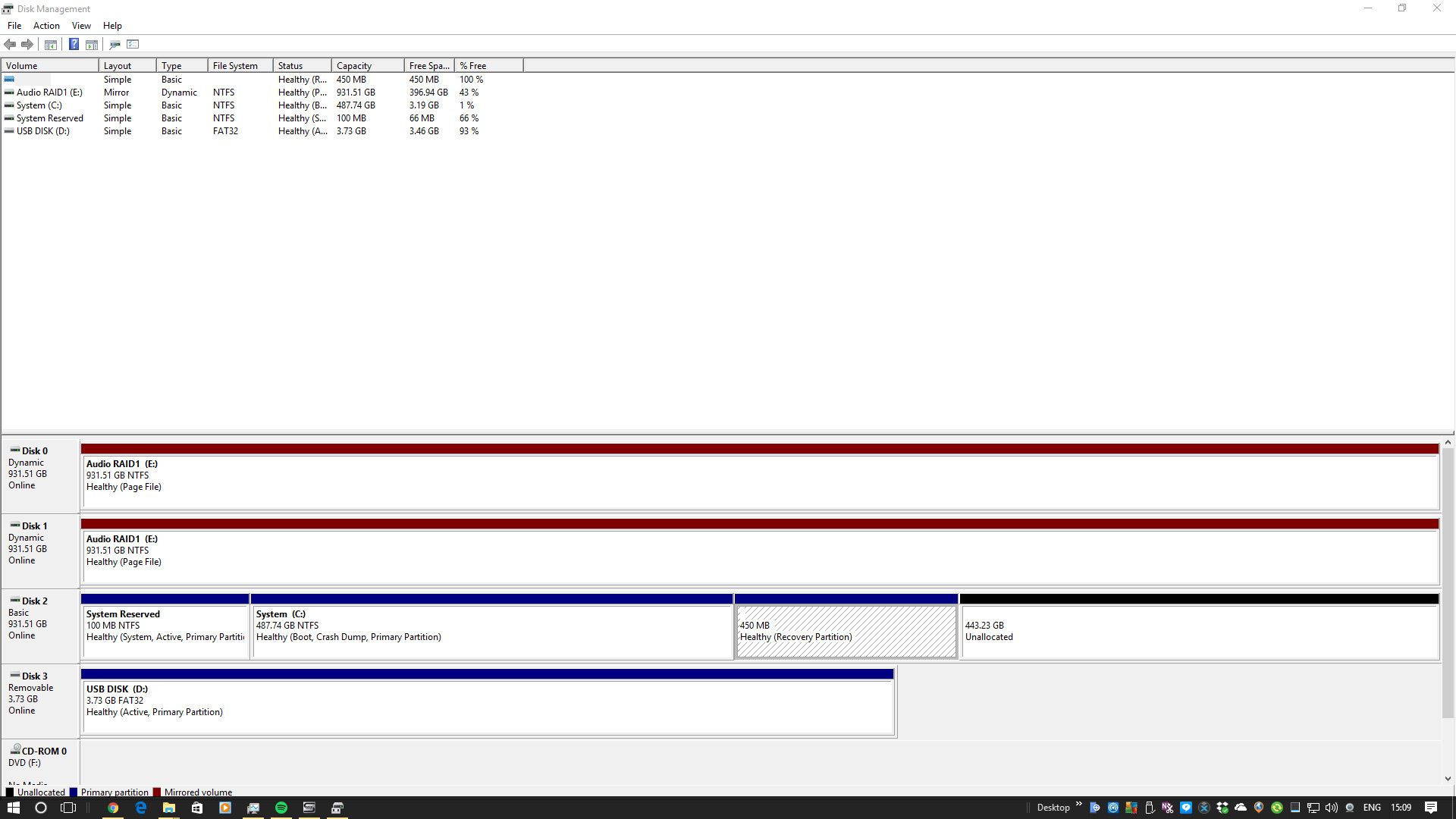
I have a 1tb SSD that my is my system drive I upgraded from Win 7 to Win 10 and over the last couple of years it has filled the partition where my system is running and I'm really becoming short of headroom. I'd like to expand the partition but of course win 10 won't let me.
It is partitioned into 487GB NTFS Basic with a 100MB reserved to the left of it. The rest of the drive is a 450MB Healthy recovery partition to the right and a 443GB unallocated drive to the right See image When I use Win 10's device manager we can't expand the c drive What can I do people? Should I use a Linux partition manager to mess with he size of my partition or use something else?
Gparted live should do what you're looking to do. Though I've never tried to make an NTFS Partition larger with it I have used it to make one smaller so it should work just as well.
"It" has filled the partition? I kinda doubt Win10 is able to take almost 500GB all by itself. Why won't he just create a second partition and move all the shit he downloaded there?
Believe I had the same problem once. Little hard to explain, but try to "move" the unallocated space to the left by expanding the recovery partition, and after completion shrinking it to the right side. So the unallocated space ends up next to the C drive.
#!/usr/bin/GOALKEEPERthoughts
----------

"

Did we not have a thread similar to this a few days ago?

Something about re-allocating space from C drive to D drive.  Or vice versa?

Would it not be the same process?  Or similar?

I have forgotten the days of Windows.

 :frowning:

"
yeah its a bit strange to explain, but its all about getting the unallocated space directly next to the C partition. No worries, let us know if it did or didn't work
mini tool partition wizard should handle this quite easy, else gparted, albeit gparted is not really that happy about ntfs, not that it ruins it or anything just takes longer then needed. mini tool is sortta the same just for windows and its free. it also supports moving your partitions to a different spot on unpartitioned space, o if you need to drag the 450mb space to the end of disc, you can do that.
Do you have proper backups of your data? I wouldn't even consider messing with partitions if the only copy of something important was on the drive. It might not be a bad idea to use Clonezilla or similar to make a reserve copy of your OS and bootloader in case any errors occur so you can always go back to the way your system was before you start changing things.
Of course we all have backups of all our data anyway, right? I wouldn't trust backups only on a separate partition in case the drive itself were to fail.