It’s not that difficult to enable it in the kernel on ubuntu/debian derivatives
Please let me know which SSDs have this no-op wear-leveling algorithm so I can avoid them 
If that were true then I’d imagine the filesystem journal would wear a hole in the NAND chips faster than over-writing a set of files, since the journal is used for every metadata update.
Makes me wonder how ZFS and CoW filesystems in general are better for SSD health than journaling filesystems.
2 Likes
ZFS is certainly better for drive endurance because of the TXG mechanics and only writing sequentially and larger stuff every couple of seconds. From an endurance perspective, ZFS is vastly superior. Doesn’t apply to BTRFS or CoW in general as this isn’t a CoW thing.
1 Like
So…I changed the vm.swappiness=5 down to vm.swappiness=1 in /etc/sysctl.conf last night/yesterday as I was responding to some of the replies and then also issued sysctl --system and swapoff -a; swapon -a to turn swap off and back on again.
Since then, I’m already back up to 4.4 GB out of 8 GB of swap being used again (so, not, it’s not some lingering swap as each time I change the vm.swappiness setting, reload via sysctl --system, and then turn swap off and back on again, whatever’s in swap gets “refreshed” with each cycle.
So…again, from my experience with the system (and which is why I created this thread in the first place, despite the fact that I’ve been taking screenshots about this since at least March of this year), generally, more swapping = lower performance for my system.
Again, I only started this thread because it was swapping so badly such that it was pushing the load averages up towards 150 on a system where the nominal load average is closer to 38-40something, which the swap was pushing the I/Owait well into the 60% mark as a result/consequence of said swapping.
So no, I don’t think that increasing swapping would be a positive thing (for performance), for my system.
Thank you. It’s all good.
(Sidebar: I just set my vm.swappiness=0 on the system and am in the current process of turning swap off, and then back on again, as I am writing this.)
And yes, from my past experience with setting vm.swappiness=0 = (generally) bad, but there may be a case to be made here, that, because I have 768 GB of RAM installed, and that so far, in practice, I’m not coming remotely close to anywhere that RAM amount used by the entire system (my poor dual Xeons E5-2697A v4 (16-core/32-thread) CPUs are working hard to keep up now because I can just dump so much more stuff onto the single system), so there may be a case where vm.swappiness=0 may work with.
Again, the remarks about it being particularly hosed (i.e. too late to start swapping) is something that I would be abide by if and/or when the system gets close to running out of RAM.
But so far, that hasn’t been the case here, at all.
And even with just having turned off swap and turned swap back on again, it is already sitting at 8.56 MiB (out of 8 GB) of swap space being consumed already (and in the time it took for me to type this sentence out, it has grown to 9.06 MiB).
This is with vm.swappiness=0, as confirmed via:
pve:~# cat /proc/sys/vm/swappiness
0
And growing. (Now at 10.3 MiB.)
So we’ll see what happens over time.
i would imagine that it would be the opposite because of the nature of copy-on-write where it either copies just the blocks to be modified (part of the file then gets split/fragmented) or it copies and re-writes the entire file, elsewhere in the ZFS pool (so that the file remains as contiguous as possible).
I think that tech YouTuber ElectronicsWizardry has done some write amplification testing with ZFS, and as I vaguely recall, ZFS is worse for write amplification than ext4.
I think the default commit time for ZFS from the ZFS intent log is 300 seconds (5 minutes) or the number of intended operations exceed a certain threshold (I don’t think that I’ve ever come across some kind of documentation from Matt Ahrens et. al., that talks about how many operations the ZFS intent log will accumulate before issuing either a sync and/or a commit operations/command/call to commit said changes to stable storage.
But the idea is basically the same – you hold operations in a buffer until it’s time to flush.
Similar thing with ZFS except that with ZFS, when it imports the zpool at boot, it replays the ZIL to (try) to ensure FS consistency.
If you only have a single OS drive, when you install Proxmox and you’re not using a ZFS rpool, then it will automatically create an 8 GB swap partition for you.
If you’re already running Proxmox and you have nested virtualisation enabled on your platform, you should be able to test this behaviour out very quickly where you can set up like a 64 GB VM/OS disk for a Proxmox VM, and install Proxmox onto that.
(It works a little bit better if the Proxmox VM OS disk is closer to like 100 GB or something like that because I think that when it is less than 32 GB, it can’t really apportion the VM OS disk between lvm-thin (local-lvm) and local properly. Something like that. I can’t remember what the threshold for that was again.)
And then in the Proxmox installer, when you select you drive, don’t make any changes to it, and just click “Next” your way through the installer/installation process.
"Advanced LVM Configuration Options
The installer creates a Volume Group (VG) called pve, and additional Logical Volumes (LVs) called root, data, and swap, if ext4 or xfs is used. To control the size of these volumes use:
…
swapsize
Defines the size of the swap volume. The default is the size of the installed memory, minimum 4 GB and maximum 8 GB. The resulting value cannot be greater than hdsize/8.
Note 	If set to 0, no swap volume will be created."
(Source: Installation - Proxmox VE)
If you don’t want the installer to create a swap partition during installation, you have to manually configure that, when you are running said installer (or if you’ve got like a scripted Proxmox installation/deployment script).
No worries. It’s all good. 
…or when the TXG is full and it has to flush it before the timer runs out.
(cf. Matt Ahrens – I can’t remember which video it was where he talks about this (either this one or this one), but in one of those videos, he talks about TXGs and how the ZIL works.)
Again, tech YouTuber ElectronicsWizardy has done a little bit of testing with ZFS write amplification, so said write amplification will consume more of the finite program/erase cycles from the NAND flash cells/modules of most modern SSDs faster/sooner than from filesystems that have a lower write amplification overall.
(I still tend to use XFS as I have found that to be a tad faster than ext4, despite the fact that SGI came up with XFS like 31 years again on IRIX 5.3.)
(cf. https://www.youtube.com/watch?v=V7V3kmJDHTA)
(Sidebar: in the time that it took for me to write this reply, I’m already at 517 MiB out of 8 GiB of swap used, even when vm.swappiness is set to 0. And in the time it took to write this sentence, it has since gone up even further to 567 MiB and continues to grow.)
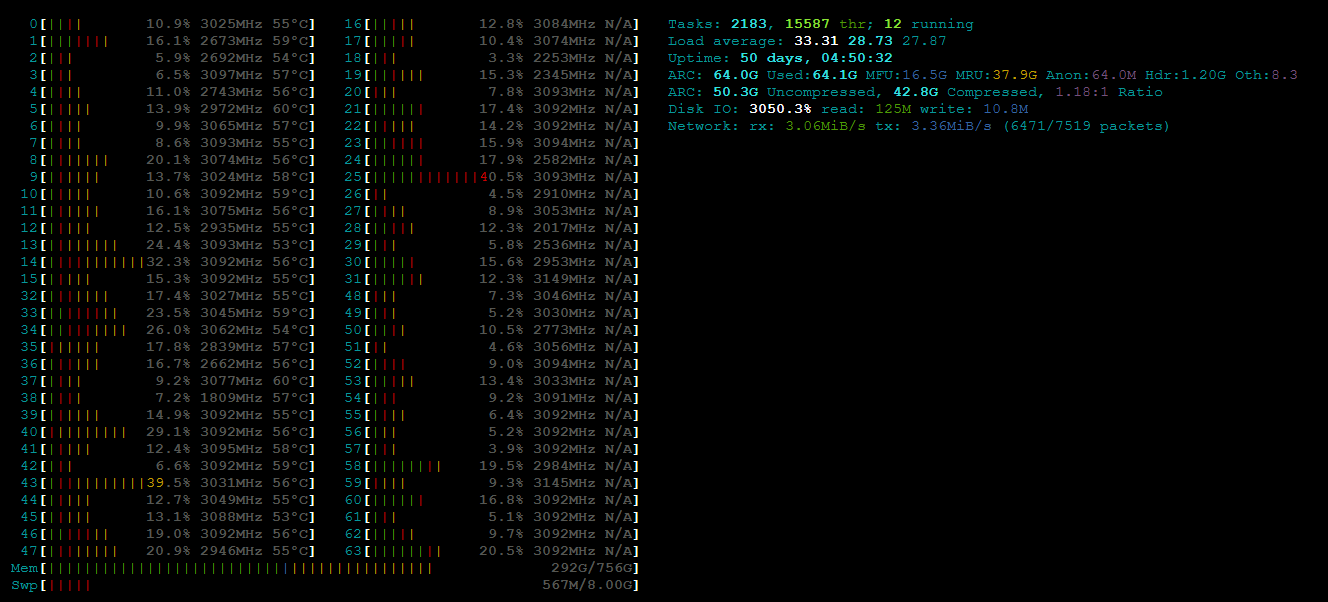
2 Likes
You are confusing write-amplification and wear leveling. The mechanism of a log/spool file destroying an ssd is the same sector being rewritten thousands of times until that specific sector fails. Wear-leveling done by the ssd controller should mitigate that but more primitive storage like (older?) usb sticks, sd cards and the like don’t do this. If an actual sata/nvme ssd does this it has faulty firmware.
CoW in itself shouldn’t lead to write amplification (unless you defragment continuously; which is a non-default option on btrfs, not sure about zfs). If the filesystem block size is 4k and the physical block size is 4k, a CoW filesystem would just update that block and write it elsewhere, whereas a ‘normal’ filesystem would update it in place. But on a proper ssd controller it would decide on the device level to write to a different block any way if it deems it necessary for write leveling. So in both cases 4k get written.
I found the video you mentioned and it does show write amplification on zfs depending on the settings used, but not for btrfs. So the write amplification is rather other zfs features than CoW itself.

The detail above of Fedora using swap on zram has me thinking, it captures some of the advantage of swap (freeing up RAM) without the downside - disk IO.
The default of zram started with Fedora 33, though they had some prior experience in the project - Anaconda and Fedora IoT have been using swap-on-zram by default for years as mentioned in their document on the change..
The Ubuntu derivative Pop OS has since switched to zram too, claiming performance improvements, they bump the swappiness up by default.
I think I’ll start using swap on zram instead of no swap , it’s not the Debian default but the Fedora project aren’t fools, and Debian tends to be slow to adopt.
This still doesn’t answer your opening question as to what was happening, but rather introduces another option. (There’s also zswap, as yet another option…)
1 Like
Gotcha.
re: wear levelling
Again, that depends.
I don’t know how much wear levelling happens with random I/O on NAND flash devices given that the theory of operation for random writes is that (you can) end up writing small amounts of data, over and over again, as it traverses the entire physical map of the NAND flash cells/modules repeatedly.
For sequential writes or where the writes either for an entire file or a part of a file happening over and over again, it is quite entirely possible that even with 4 kiB random writes at the max I/Os/s, that you can exhaust the finite number of NAND flash cell/module’s program/erase cycle endurance limits before said NAND flash cell/modules start to fail, with going over the sequential transfer rate’s write endurance limits which is how most drives are rated, for warranty.
It’s bad when you kill drives annually. It’s great that it happens annually such that you can file a RMA and at least for the first one, MOST companies will eventually replace it, once you have provided sufficient data that you were well within the TBW and/or DWPD spec as advertised on their website/product spec sheets.
Depends on how you end up “copying” on write. (i.e. are you ONLY copying the modified block or are you copying the entire file again, only to modify said modified block?
If it is the latter, then you WILL get write amplification because it is re-copying and re-writing unmodified blocks to free blocks, in addition to copying the modified block to the free block.
But if it is the former, then the total amount of data written for modifying a block, would only be the size of the modified block.
So it really depends on how CoW is implemented, at the block level.
ZFS fragementation is free space fragmentation.
(cf. the thread here)
(And yes, it is super annoying that ZFS decided to talk about fragmentation in terms of free space fragmentation rather than file and/or data fragmentation. I still hold the hypothesis/theory that you can actually have 5 blocks per vblock in ZFS, write to 4 of them, in groups of 5 blocks, such that you can still never exceed the 80% utilisation rule-of-thumb, and still achieve 100% fragmentation in ZFS.)
But again, if you are having to re-copy/re-write the entire file, just to modify a single block, then write amplification will occur, as a function of CoW (vs. if you were only copying just the block to be modified, whilst leaving the rest intact, but that will lead to file fragmentation, which for SSDs is less of an issue, but it would kill HDDs (in terms of performance), if you do that sufficiently (because you’ll end up where you’ll have lots of interspersed files, especially with/for smaller files).
if logical and physical block size is the same, yes.
But even if you were to talk about 512b blocks (for both logical and physical blocks), you can end up with:
[unmod][unmod][unmod][unmod][mod][used][used][used][used][used][free][free][free][free][free] ==>

[unmod][unmod][unmod][unmod][mod][used][used][used][used][used][new][new][new][new][new] ==>

[free][free][free][free][free][used][used][used][used][used][new][new][new][new][new]
(this is the scenario where you copied and wrote the entire file for the ONE block that has changed.)
vs.
[unmod][unmod][unmod][unmod][mod][used][used][used][used][used][free][free][free][free][free] ==>

[unmod][unmod][unmod][unmod][free][used][used][used][used][used][new][free][free][free][free] ==>
(where you ONLY copied and wrote the block that changed, leaving the rest of the file intact, but increases file fragmentation such that the unmodified block occupy the first 4 blocks, but you would need to skip 6 blocks (in this example) to read the 5th block of the file, which was the block that was copied and modified on write.)
So it really depends on how CoW is implemented.
For btrfs, again, it really depends on how it is deployed.
I haven’t done much with btrfs since it was available as an option I think either in SLES 12 SP4 or like SLES15.
(There are other disadvantages with btrfs (vs. ZFS) that btrfs is still working hard to catch up to (e.g. support for RAID5/6/7) whereas ZFS already has those features in place, working, and most of the time, enabled.)
(cf. Btrfs vs Ext4, Btrfs vs. EXT4: A Comprehensive Comparison of File Systems in Linux (2025) | DiskInternals, Comparing Btrfs and ZFS: Features, Pros, and Cons - CorpIT)
I don’t really spend any time with btrfs on account of lack of stable RAID5/6 support.
(cf. When will there be btrfs raid6 support? - #4 by mbod - Kernel, boot, graphics & hardware - EndeavourOS, https://serverfault.com/a/1168921, BTRFS Raid Confusion - #20 by twin_savage)
Yes. And? Like I said,
If your VMs use 100GB, you have 384GB for ARC. 284 are empty. 284GB empty RAM, **that is ridiculous.
So yes, the Linux default is IMHO ridiculous. TrueNAS Core did not use this ridiculous default but used total RAM - 1GB. So in your case 767GB. That is why more sensible.
Fast enough so it never matters.
Than you have other problems. Because see above. But hey, you don’t need ARC, it is just a performance boost. Set it to 16GB max (new Proxmox default that is even more ridicilous) and you are good.
Not showing it above. Not showing it as “in use”. Only showing it as a single line that purposfully is using white as backround just like free RAM does? Yeah, that is what I mean by hiding.
What I mean is if you use ZFS and RAW VM disks or something weird like ZFS with QCOW2 VM disk in datasets?
So, it is located on your ext4 boot disk?
BTW, why are you making this so unnessesary hard if you want help? Why not simply post your config? This should be the very first thing anyone should do coming into this forum!
SWAP on a RAID6? You can’t be serious?
I am not getting into the rest of what you wrote, simply because it is IMHO a waste of time.
KISS. Keep it simpel stupid. The success to Proxmox, TrueNAS and ZFS is pretty simple.
Use SSD mirrors for blockstorage. Don’t put files on blockstorage. Put files on datasets.
Datasets can be RAIDZ2. If you need even better sync write performance, add a server PLP SSD as SLOG. Don’t use any RAID controllers. That is all that there is to it.
1 Like
That’s only ridiculous if you have never actually experienced a busy system where it wasn’t able to evict/reclaim the ARC fast enough.
If you’re talking about ARC, then that’s a ZFS on Linux thing because the ZFS implementation in the original Solaris and in *BSD (which is basis for TrueNAS Core) – ZFS runs at the kernel level rather than in user space.
See the GNU Octave script to load up a dense matrix.
(You can have codestral:22b spit out another MATLAB m script that you can run in GNU Octave to load up a sparse matrix.)
Two things about this:
- You are assuming based on how you have set up your system, where everything (presumably) runs from ZFS pools (include a ZFS rpool). But again, that’s not the case here.
Therefore; ZFS ARC will ONLY help with loading data from a ZFS pool, which for me, will only be VM/LXC OS disks and bulk data, and it makes little sense to cache bulk data into the adaptive replacement cache. (It isn’t like you are reusing the bulk data over and over again.)
As I have stated already, I’ve already set the zfs_arc_min to 8 GiB and zfs_arc_max to 32 GiB.
Depends on how you want to account for it.
If you add up the numbers that are shown, it may or may not add up to the amount of RAM that has either been installed and/or provisioned for your system/VM.
(I’ve had it happen both where it was more than the installed/provisioned amount of RAM and also when it has been less than the installed/provisioned amount of RAM.  No idea how M$ implemented Enron’s accounting math principles.)
Honestly, I don’t pay any particular attention to the format that it uses. In practice, with only 9 VMs and 27 LXCs running (out of a configured 40 VMs, 21 of which aren’t running and 40 LXC configured, but 13 aren’t running), some use raw and some use qcow2 – whatever it did by default either when the VM/LXC was created and/or moved around.
There’s enough of them running that broadly speaking, the combined total system performance delta between raw vs. qcow2 is lost with 36 LXC/VMs running that there is enough “cross traffic” from everything that’s running, that it doesn’t make much of a difference what format is used, on account of said cross traffic.
(When you have 36 “things” trying to read data from an 8x HGST 6 TB SATA 6 Gbps 7200 raidz2 pool, if each VM/LXC issued 1 I/O request per LXC/VM, you’d already get 36 I/O requests, which divided by 8, would be 4.5 I/Os per physical disk. It doesn’t take much such that each drive ends up with a queue depth > 1, and therefore; whether it’s qcow2 or raw, across 8 HDDs, any bandwidth deltas is washed out by just the number of I/O requests coming in from the VMs/LXCs.
If you only had a handful of VMs/LXCs and/or the I/O requests were spread across more spindles, then maybe the difference between qcow2 and raw would be more appreciable. But with I/O request per VM/LXC from 36 VMs/LXCs, hitting 8 spindles, which results in an instant queue depth of 4.5, the format makes less of an impact.
Yes.
Because the config of the storage Isn’t the question here.
vm.swappiness has NOTHING to do with the storage configuration.
Furthermore, if you searched on the forum here, you will find other threads posted elsewhere, on this forum, where I have spelled out my hinv.
Even with the vm.swappiness set to 0, as we speak, I am at 4.13 GiB of swap (out of 8 GiB).
That has nothing to do with the storage configuration.
Again, use the search feature of this forum if you want to pull the hinv.
The question isn’t about the storage configuration.
The question is about why does Linux still swap when I have 768 GB of RAM, and at least 50% of it is still free?
Changing the storage config isn’t going to change the fact that even with vm.swappiness=0, that it’s still using 4.13 GiB of swap, on a system that has 768 GB of RAM installed, where at least 50% of it is free.
Default install. Who cares? (You’re missing the point of the OP.)
Translation:
You’re lazy (to read) and thus you’re just going to ignore what people say/tell you and you’re only going to go down the path that you know whilst you complete ignore any of the technical statement of requirements that doesn’t confirm to your pre-determined world view/mental model of how you do things, technical SOR be damned.
That’s what you’re really saying with a declaration like this.
You complain about what people don’t tell you, and then you ignore the critical, technical SOR from what people actually tell you, because it doesn’t conform to your pre-determined world view/mental model.
Again.
(This isn’t the first time that you’ve done this neither.)
I’ve already killed 7 SSDs before. I’m not going to kill 8 more. This recommendation is just idiotic and completely ignores the fact that I’ve already a priori, killed 7 SSDs.
Furthermore, SSDs are the brake pads of the computer world: the faster they go, the more you are likely going to use them, and therefore; you’re going to wear them out faster – just like brake pads on a car. It’s a wear item. Which also means that it’s a disposable item.
Again, as ElectronicsWizardary has already provided the data for, ZFS on SSDs results in write amplification, which will cause the SSDs to fail sooner than if you just used ext4 (and/or btrfs, but again, as I have noted, btrfs still doesn’t support RAID5/6 in any stable fashion, and therefore; can’t be deploy for this kind of a use case) which means that either you’re left with HW RAID6 and format that LV/VD group using ext4, or if you’re going to be using ZFS, using ZFS with SSDs, as ElectronicsWizardary has provided the data and the evidence which shows ZFS write amplification on SSDs, will kill your SSDs sooner than if you didn’t use ZFS with SSDs.
Also fails the cost/space efficiency test.
The server chassis itself has 36 3.5" LFF bays. Assume that I have eight 3.5" to 2.5" LFF to SFF adapters, the remaining 28 bays are already occupied.
At 8x HGST 6 TB SATA 6 Gbps 7200 rpm HDDs, I have 48 TB raw capacity, 36 TB usable capacity.
To get the same amount of usable capacity using SSD mirrors, I’d need 72 TB of raw capacity. 72 TB / 8 = 9 TB drives.
The CHEAPEST 8 TB SATA SSD is $649.99 USD via Newegg.com. * 8 = $650 * 8 = $5200.
I bought the server for $1150 USD.
Your suggestion/recommendation adds $5200 USD to a system that costs about 1/5th of that, for its initial capex.
And that’s just the 8 TB version. (There are no 9 TB SSDs.)
You state the KISS principle, and yet, even when you just run these “simple” arithmetics, it already fails the “simple” principle at the expense of spending approxmiately FIVE TIMES the initial server capex just on the blockstorage mirror SSDs per your recommendation.
“Simple”, but stupid, and woefully cost inefficient.
NONE of this has anything to do with my OP.
Yes, that is why I wrote “the Linux default is IMHO ridiculous” 
It does not matter if container or VM, both should use RAW when on top of ZFS. Because yes, using QCOW with 64k as default can lead to write amplification and kill your SSD.
That is a good point, what is the question?
Why Linux uses SWAP? That question was already answered by other people.
But you are right, what I am doing is not engaging with the question but trying to help with errors I see coming up. To correct misinformation like this:
Like ElectronicWizard said, yes ZFS creates a write amplification, but only for sync writes.
If you disable sync writes or add SLOG you should have no amplification.
If you still have, you misconfigured something.
He does that in his testings and than gets no write amplification, like expected.
So yeah, like he said, ZFS does not kill your disks, because it only creates write amplification for sync writes, which is the minority of your writes.
If you managed to kill SSDs, this is on you and not ZFS.
No, not really. And you are pretty close to understanding why.
Mirrros don’t suffer from wrong pool geometry, so you only get more capacity if you really know what you are doing with RAIDZ and know about sector sizes and how stripes work.
Github that explains it.
The 80% rule is trash, because it is too nice and to mean at the same time and does not apply to SSDs. For VMs, it is too nice. Performance will suffer even after 50% full ZFS fragmentation issues | TrueNAS Community . So yeah that is another point why HDDs don’t offer a real storage advantage for VM storage.
Yeah, I totally agree that 36TB high performance VM storage is expensive. That is why recommend you to offload files to datasets, out of VMs.
Like you said, you only have 40VMs. If you offload data, you can fit 40VMs easy into a 2TB mirror. And the data you put into RAIDZ2.
Funny thing is that this is even cheaper than your setup, performs better and is way simpler because stuff like volblocksize is now all of a sudden way less important.
You have a very fast random 4k rw storage mirror SSD pool1 and a perfectly fine sequential rw performance storage RAIDZ2 HDD pool2. If you wan’t good metadata performance on pool2 simply add special vdev.
You on the other hand seem to have (I write seem, because I don’t know your config):
-
8x 6TB drives in RAIDZ2, with ashift 12
-
that offers poor VM storage performance
-
put all your data on the VM themselves
-
the VMs use RAW disks on ZFS
-
you use 16k volblocksize default (that is a static value)
-
because you don’t use datasets with 1MB recordsize (that is not a static but a max value) , the performance is bad, you need lots of metadata, compression chances are low
-
but the worst part is, you don’t match you pool geometry with 16k.
Explanation is in the link above, but I will try to explain it based on your config.
It is pretty simple, with 16k and RAIDZ you need 4 data blocks (4k * 4 = 16k) plus two blocks for redundancy. But that is only 6 blocks total. As you can see, your stripes are only 6 disks wide and not 8. You will not be able to get a better storage efficiency than 66%. The mean part is, ZFS will show you 36TB usable. Because you have 36TB usable. What it won’t show you, is that your 1TB drive does not only need 1TB.
And then you come into the Proxmox forum and ask “I only have a single 30TB VM disk in my pool, why is ZFS showing me that my 36TB pool is full?”
-
Your 80% vs 50% storage efficiency is now only 66.66% vs 50% but with many negative consequenzes.
-
The only way to combat that problem above is to set volblocksize to 64k, which in return will lead to rw amplification and fragmentation
-
Fragmentation on HDDs will lead to horrible performance
You see now why it is way more KISS, if you simply detach VM storage from files, don’t care about fragmentation, rw amplification, pool geometry?
This is IMHO where almost all the misinformation about ZFS comes from.
People don’t understand the difference between zvols and datasets.
But the implications are pretty huge!
2 Likes
As others have said, you could just disable swap. Or, you might try Optane as a dedicated swap device which should have very nice longevity for you and stop worrying about this.
Linux is not optimized for this use case. The kernel has very conflicting requirements, and most systems are small resource constrained VMs on a SAN and low end computers where these defaults make sense.
Systems with cavernous resources usually have competent admins that have the controls they need to tune the systems for their use cases - like disabling swap or setting up a suitable device for it. So again, if you are going to a single default behavior, this is probably the right one.
1 Like
For the record, this is the current state of the system where it has consumed all 8 GiB out of 8 GiB of swap now:
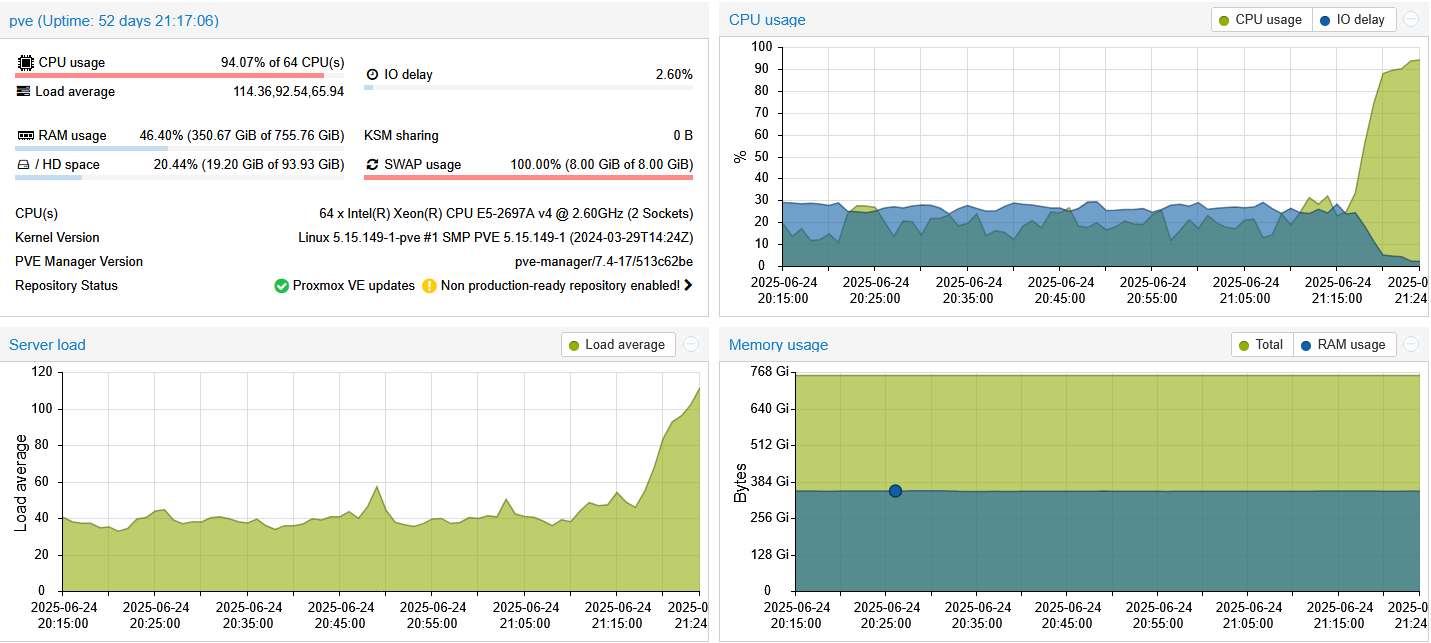
(I’m not 100% sure when it started, but it has certainly gotten there now.)
I’m not sure if you got the memo where I’m not using ANY SSDs in this system, at all.
You’ll have to reach out to ElectronicsWizardry to see how he set up his system/VM(s)/LXC(s).
See the OP.
Again, swap doesn’t use raw nor qcow2 formats, and therefore; renders your point irrelevant at best, and ignorant at worst (as in you literally ignore data that you’ve already been told because it doesn’t suit your purpose).
Read above^.
(If you’re going to choose to skim/skip reading, then skim/skip such that you don’t miss important details like this.)
If you’ve actually read what I wrote, which again, you clearly didn’t, you wouldn’t even be talking about this given how irrelevant this point is.
Some people just like to talk (about things that are irrelevant) merely/purely for the sake of talking. Less talking, more reading.
LOL…I would LOVE for you to provide the arithmetic on that one. LOL…
You’re still hanging on to that crap even though I’ve already proved that jameskimmel’s “opinion about tech” is full of crap???
STILL???
LOL…LMAO…
(And I literally disproved you hanging on to this crap again here like eight months ago and you’re still hanging on to this crap??? At this point, I can’t tell if you’re just looking for an echo chamber/bubble or if you might have difficulties learning.)
(More data/evidence which disproves your claims (still) here.)
Some people either don’t or can’t learn.
Two things:
- The thread that you cite fails to acknowledge the fact that in ZFS, “fragmentation” refers to free space fragmentation, NOT file/data fragmentation.
This is EXTENSIVELY covered/discussed in my thread here over at forums.lawrencesystems.com.
jgreco et. al. from the TrueNAS forum – nobody over even recognised nor acknowledges the fact that when you run zpool list, the FRAG column that’s reported out is free space fragmentation.
So, take what they write with a little grain of salt, given their apparent failure (or at least they don’t explicit seem to indicate that they understand what they’re looking at) when they zpool list, and/or how it affects performance.
- From my thread from forums.lawrencesystems.com, I also postulated the thesis that you can put ZFS in a position such that you can meet the D.N.E. 80% capacity mark and still have
zpool listreport outFRAG= 100 for the pool.
I was going to have codestral:22b write the bash shell script to write the blocks of data, but ran into a snaggle with that because ZFS uses variable block sizes (per Matt Ahrens). I can do it with dRAID because it uses fixed block sizes, so it makes this behaviour more programmatically predictable, but the theory of it still stands (where you can put ZFS into that condition, even with variable block sizes. It’s just that the number of blocks that will be filled will always be 1 less than the block size.)
If you ignore cost, and/or cost efficiency ($/TB), then sure. Once again, since we know that you like to ignore data that doesn’t conform to your pre-determined worldview/mental model.
Who said anything about high performance VM storage?
Quote from you, from eight months ago:
snip…ZFS…blah…blah…blah
(i’ve stopped responding to your irrelevant points as I have already disproved your claims eight months ago. Even homeserver78 contributed to disproving your claims from said thread from eight months ago. Like I said, some people don’t or can’t learn.)
Your soapbox rant about ZFS has nothing to do with my OP about swap.
I’ve already disproved what you wrote here, literally eight months ago.
Stop threadjacking.
So, in the interim, I’ve actually create a tmpfs swap partition for the system to use via the instructions provided here.
As shown above, the system is at 8 GiB out of 8 GiB swap usage, but being that it’s swapping to a tmpfs partition, the system doesn’t appear to hate it, and I’ve been running it for like a day-ish by now. (Was too hot yesterday here for me to even bother to look at what the system was doing.)
So far so good, I guess?
System doesn’t have a NVMe slot on the motherboard (Supermicro X10DRi-T4+).
I don’t think that I have any more free PCIe 3.0 x16 slots anymore as one is occupied by the RTX A2000 6 GB SFF GPU and the other PCIe 3.0 x16 slot is occupied by the Mellanox ConnectX-4 dual port 100 Gbps Infiniband NIC.
(I think that I have at least one, possible two other PCIe 3.0 x8 slots open, so I could, in theory, drop in a PCie 3.0 x8 to dual NVMe 3.0 x4 card in there, but being that I am now “swapping to RAM” (via said tmpfs partition), the need for that is negated by this, in the interim. And the system doesn’t seem to be absolutely hating the fact that it is swapping to RAM, but I don’t think that it has realised that it is swapping to RAM yet, because the system hasn’t locked up yet, as a result of my setting it up this way.)
So I did log into my work’s HPC system where we have nodes with 4 TB of RAM installed to see what they did, and my setup isn’t far off.
I haven’t quite figured out how to make the script that I am currently using to create the tmpfs partition more permanent (i.e. such that it can be called from /etc/fstab, but at least for now, since the system doesn’t reboot very often, I can always run the script manually, after rebooting the system, if/when that happens).
But from looking at how my work’s HPC nodes are set up, it is evident that I’m not the only one who’s stumbled upon this problem, based on what I found out in terms of how they have configured/set up the system.
1 Like
Ohh shit, I did not realize it is you again 
So first of all, thanks for taking the time and linking it again. I read through it once more and I think you are right that:
A: I mixed up vdev and you have corrected me and because of that think you have disproven everything I wrote
B: he/she has a misconception about that stripes are limited to the total number of drives. That changes the math for some. Will look into it and open up an issue.
You are right, this is threadjacking. But these things are connected.
Don’t you recognize a pattern?
Why is it only you that suffer from SWAP killing his SSD?
Why is it only you suffering from slow resilvers?
Are the IT gods against you? Or could it be something else?
Maybe a car analogy can help you:
Proxmox created a race track.
Proxmox:
Don’t go faster than 100km/h (or whatever freedom units) in that turn. That turn is dangerous. We did it before, trust us.
Alpha:
Nahh, I am a great alpha driver. I know better. I don’t care about what you say. Also this car is not important I don’t care if I crash. Fuck around and find out!
*SpongeBob a few moments later meme*
Alpha crashed. But instead of saying:
Well, I really overdid it in that turn. Maybe Proxmox was right. There is a reason why I am the only one crashing on track day
you say:
How on earth could that happen to me? Maybe I need better tires? Or maybe this racetrack sucks
But to get back to your initial question, there is nothing more to discuss.
You asked why your system uses SWAP, you became an answer you don’t like.
Since you know better, I am sure they are very happy to implement your code. /s
Then you also got asked, why you would not simply disable SWAP. Which you answered with, it will crash your system.
So the only question left open, and the only interesting question, and what also should have been the title of this thread is:
“Why is my system crashing when I disable SWAP?”
Which I would answer with:
Before you go down that rabbit hole, I would start with a fresh and sane setup (if I use ZFS for VMs I also use it for boot, which leaves me with no SWAP by default) and see if the problem is still there.
Good luck and may the IT gods be with you 
3 Likes
No, not because of it.
The correction isn’t because you mixed up vdev.
The correct is because of the arithmetic (as shown in the previous thread, authored approximately 8 months ago, where I went over the arithmetic with you, which again, you clearly didn’t read that neither), and you have yet to either:
a) disprove the arithmetic by pointing out where the error in my arithmetic is or
b) provide new arithmetic that actually abides by either the theory of operation (i.e. logic) or the practical implementation therefore; backed up by data/evidence which proves your claims (and that of jameskimmel’s).
So far, you haven’t done neither (a) nor (b).
In fact, if anything, there’s little data/evidence to show that you’ve even done the arithmetic yourself, at all.
This is why your claims (and your regurgitation of jameskimmel’s claims) have been debunked because you can literally run the arithmetic yourself. Like the arithmetic really isn’t that hard.
No, it’s not.
That you have absolutely no clue what you’re talking about, that you don’t read, and apparently you don’t do basic arithmetic neither – why yes, I do recognise this pattern of yours, as cited above.
Quote:
"
On Digitalocean I came up with this message when I want to add swap:
Although swap is generally recommended for systems utilizing traditional spinning hard drives, using swap with SSDs can cause issues with hardware degradation over time. Due to this consideration, we do not recommend enabling swap on DigitalOcean or any other provider that utilizes SSD storage. Doing so can impact the reliability of the underlying hardware for you and your neighbors. This guide is provided as reference for users who may have spinning disk systems elsewhere. If you need to improve the performance of your server on DigitalOcean, we recommend upgrading your Droplet. This will lead to better results in general and will decrease the likelihood of contributing to hardware issues that can affect your service.
Why is that? I thought it was necessary for creating a stable server (not running into memory issues)"
(Source: https://stackoverflow.com/questions/38872941/why-is-swap-not-good-when-using-a-ssd)
The original post for that was authored in 2016, and yet, you seem to think that somehow, I’m the only one with this problem.
I guess that all of DigitalOcean’s customers doesn’t count then, eh?
LOL…
It’s also covered here, here (for the 1% who can actually make this happen), here, and here.)
And yet, somehow, you seem to think that I’m the only one who has unlocked this achievement.
LOL…LMAO…
Sure. If you ignore quite literally, an ENTIRE presentation titled “Scrub/Resilver Performance by Saso Kiselkov” and this video, and this video, titled “Improving Resilver: operational results by Saso Kiselkov”, but sure, according to you, I’m the only one who suffers from slow resilvers (vs. EVERYBODY who uses ZFS such that the ZFS on Linux devs knows about it, and has literally given talks/presentations, on this very topic.) Yeah, I’m the only one with the problem here. [/s]
LOL…LMAO…
Given that I have been able to cite other people’s a priori questions (quite literally, some of the citations date back to 2015, or approximately A DECADE ago), I’m gonna go with the latter – it’s something else (more specifically, at minimum, you don’t google.)
re: your car analogy
LOL…LMAO…
It’s neither a relevant (much like the rest of what you’ve written here so far, again) and since you don’t actually have anything of value to contribute to this discussion, and not saying anything isn’t an option for you, therefore; you, instead, do what you know best next, which is to employ the strawman logical fallacy, because that’s all you’ve got left, in the absence of anything meaningful/substantial to contribute to any discussion.
So, to your question, yes, this is the pattern that I have observed about you here, yes.
(Sidebar: following your dumb car analogy, according to said dumb car analogy, you’d use the same argument as your rationale for keeping speed limits in the US to 12 mph in cities, and 15 mph on rural roads because that’s what they were in 1905 (cf. https://blog.americansafetycouncil.com/the-history-of-speed-limits-in-america/). That’s what your analogy is like. Instead of raising the speed limits to keep up with the pace of progress and technology advancements, you instead, via your analogy, is making the argument for the US to go back to 12 mph speed limits in cities, rather than asking yourself the question “why are we still setting the speed limits based on what cars could do, in 1905?”. That is what your analogy is really an argument for.)
Precisely. So whyyyy are you still talking then???
You have to be an idiot to think that swapping when you have 768 GB of RAM, of which, more than half of it is free, is a good thing.
You still can’t explain why this is the case.
(I’ve already LITERALLY set vm.swappiness to 0 and it’s STILL swapping.)
Why do you need the dumbest person here, to:
a) notice/pickup on that this is an issue (even though it’s been an issue probably ever since AMD EPYC launched, and maybe even before that with some of the Xeons that could support > 512 GB of RAM) and
b) fix the code by someone who doesn’t even code/program?
If you have to rely on the dumbest person here (moi) to fix it, then you’re already in a lot of trouble.
(You shouldn’t have to rely on the dumbest person here, to a) notice, and b) fix this. This is why I use codestral:22b. A LOT.)
Translation:
You don’t give a crap what OPs actually write. You will just do your thing, instead, whatever the OP wrote be damned.
Once again, you are proving my point that you will literally take any topic/question and instead of actually answering said question, you will, instead, turn it into it being about you and what you would do, whilst completely ignoring the OP and their technical statement of requirements.
I love how you just being yourself, proves my points about you, without me even trying.
LOL…LMAO…
LOL…LMAO…
No. The title of this topic really should’ve been “Why does swap still use assumptions from (at least) 2018?”
That is the real question here.
تكنولوجيا المعلومات الله أكبر
Any particular reason for not using Zramswap instead? Or, indeed, turning swap off?
Not really. Just haven’t gotten there yet.
So, if by “turning swap off” = setting vm.swappiness=0, then the reason for is covered here, and here.
If you’re taking about either deleting or commenting out the swap line from /etc/fstab, the result is similar when I have tested it previously, but again, albeit on an entirely different system (the same system that I used previously to test vm.swappiness=0 and where the system/application would routinely crash).
(I ran a whole bunch of experiments with my four half-width, dual socket compute nodes before, because my FEA models were sucking back something like 400 GB of RAM, distributed between the four nodes, and so, I was experimenting with the settings to see what would give me the fewest number of problems/crashes (either system and/or application crashes). This was about the same time that, with the help of SuSE support engineers, we found that there’s a memory leak issue with X11 with the mgag200 kernel module, that the author of said mgag200 driver wasn’t going to fix, because it was deemed to be too old to bother. As a result, I ended up ditching SLES for CentOS and that seemed to work better/was more stable.)
Have a couple of clusters that have been swapping to SSD for multiple years, each host has 1/2 TB of memory and run production workload for the business.
Ding ding!
Somebody read and comprehended the article.
A machine will swap, by design, without memory contention.
Repeat
A machine will swap, by design, without memory contention.
Why? Read and re-read the article until you understand.
2 Likes