Why does Linux still swap when I have 768 GB of RAM, and at least 50% of it is still free?
I have already set vm.swappiness=5 in /etc/sysctl.conf and reloaded that with sysctl --system and it’s still doing this.
Your help is greatly appreciated.
pve# free -m
               total        used        free      shared  buff/cache   available
Mem:          773901      333813      169116       36066      270971      399579
Swap:           8191         335        7856
^This is after running swapoff -a; swapon -a where I flushed the swap back to RAM, and then re-enabled swap again, and it’s already starting to consume swap space again, despite the fact that I have almost 170 GB of RAM free (excluding RAM that’s used for buffer/cache).
A great article about swap from someone who has actually worked on the kernel code:
In particular:
(I’m not sure what “other optimisations” means; it’s a shame he didn’t expand on that.)
Also: vm.swappiness does not control how likely the kernel is to use swap – rather it controls if the kernel prioritises anonymous memory or file pages:
Interesting article for sure. It argues that swapping “it’s about making memory reclamation egalitarian and efficient.” That assumes inherent memory contention - or at least the need for memory reclamation.
The article is a few years old (as indicated by the frequent references to kernel v4+) and I would argue that the need to design computer systems with the absolute minimum RAM for cost reasons has somewhat declined. That in turn allows having computer systems with limited memory contention and possibly as a result a diminished need for most efficient memory reclamation.
Modern linux distros use compressed memory as swap target (zram).
On OPs system there is no obvious memory contention.
So, I think the question is still valid and not answered by this article.
We’re talking about 300MB of swap here…I don’t understand the problem. Yes, it is more than 0. But what’s so bad about 300MB? Are there performance regressions associated with it or is it just an unpleasant sight that makes you feel uncomfortable?
And why only use 8G of swap? In case you need swap on amachine with 768G of memory, 8GB won’t help you at all…I usually have 1:1 memory/swap ratio. storage is cheap.
The article posted above has more than enough information to resolve your riddle.
You can set vm.swappiness = 0 to achieve what you want.
I did that few years ago after adding plentiful of RAM to my small system. It works. But I never truly understand why until I read the article just now.
0 disables swap completely
1 avoids swapping unless it is needed to avoid going OOM
vm.swappiness = 1 is probably the go
Looks like a production machine. Historically (since ~2001) I have run tightly-scoped servers, so have been able to just disable swap completely and utterly. Plenty of RAM and tight user-space controls worked — servers never hit the ceiling and the OS never needed to play roulette with processes. Not knowing how tightly scoped or controlled the OP’s server is, however, I would hesitate turning off swap completely.
To be clear: Swap is an additional layer that simply is not required in a well-resourced and well-scoped system. There are no advantages that amount to a hill of beans, compared with how much more predictable your system memory becomes when you turn swap off. “One less thing to go wrong.”
PS: If your system is under-resourced and/or loosely-/poorly-/not-scoped, and exhausts ≥80% of your memory on a regular basis, it is better to leave swap on. In such wild-west conditions, it does help… as a stop-gap measure until you can get more resources and/or better control over your system.
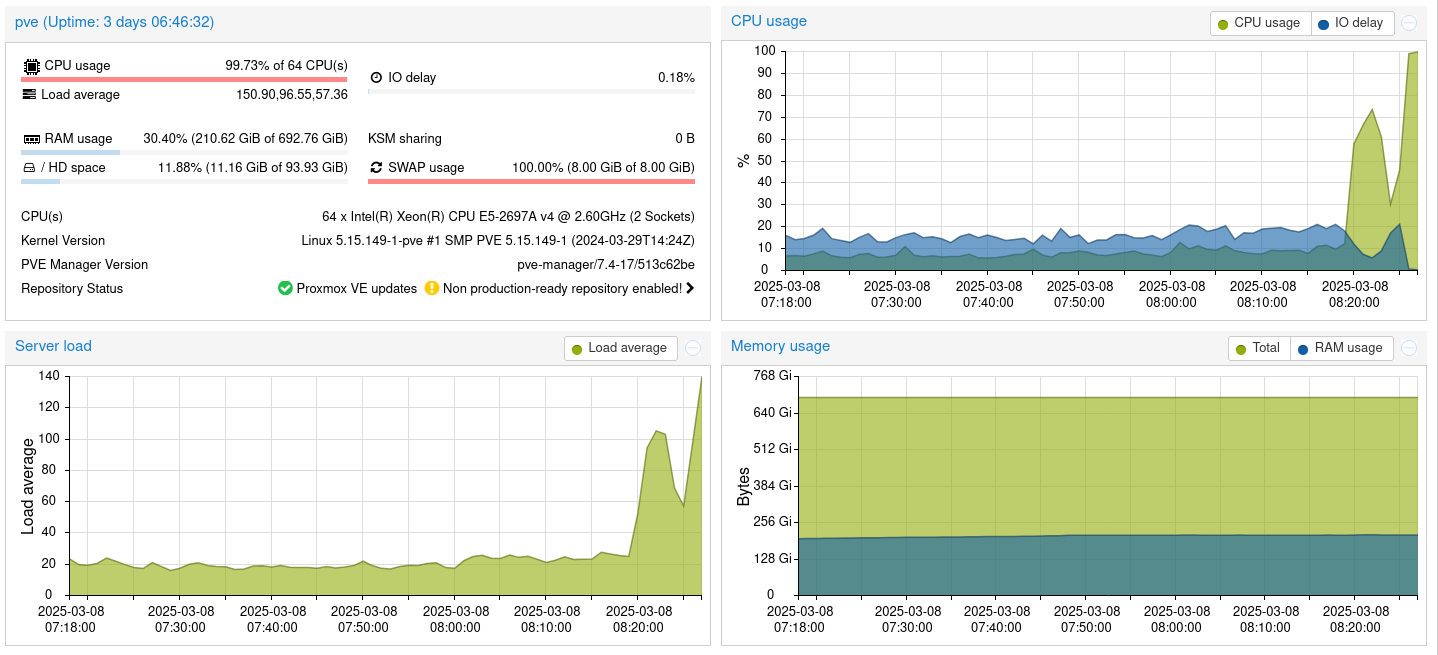
where it shows all 8 GiB of 8 GiB (100%) of swap space is used despite the fact that I still have some ~450 GiB of RAM free (or about 69.60% free).
Therefore; with that much RAM that’s still free, it makes no sense to swap, GIVEN how much RAM is still free/available/unused.
If I was pressed for RAM, I would understand the need to swap. But that is clearlynot the case here.
Because swapping to HDD is ridiculously slow.
And swapping to SSDs is what killed my 7th NVMe SSD. (After killing 6 others before that, that were also being used as swap.)
edit
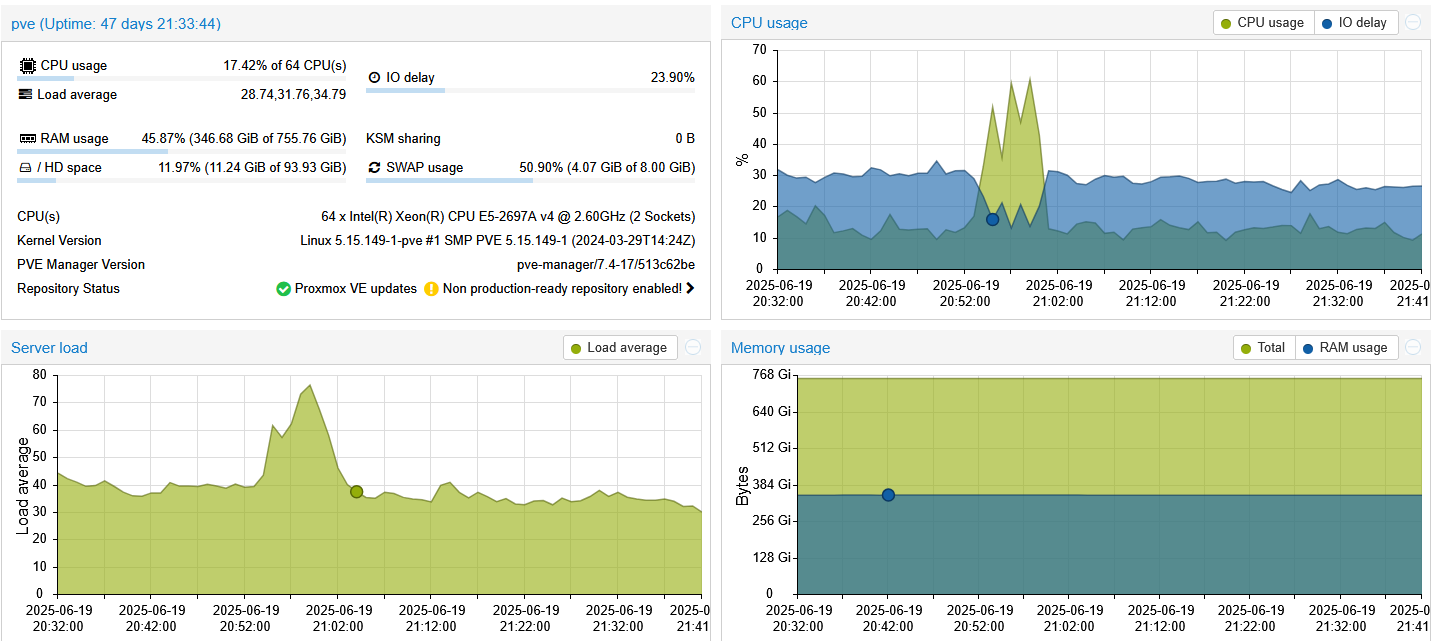
By the way, since I posted this question, in the time that that has since elapsed, the system is now sitting at around 4 GiB (out of 8 GiB) of swap used (or about 50% already).
That’s the default if you just clicked “next” through the Proxmox installer.
Depends on your installed RAM capacity. If you’re < 128 GB, probably less of a deal. < 64 GB installed RAM, even less of a deal.
But when you’re getting into 512 GB, 768 GB (as the case here), or even 1 TB of installed RAM capacity, and depending on what your RAM utilisation looks like, it CAN be quite easy to burn up even SSDs on a regular basis, when you’re using them as swap.
My old 3930K workstation had 64 GB of RAM installed and like I said, I managed to burn through SEVEN SSDs when I was running it. Initially, Intel customer service thought that I was blowing through the write endurance limit daily (so that they can deny the warranty claim), but when I sent the S.M.A.R.T. report from the drive, it only averaged out to 2.29 GB writes/day, which is WELL below the published/advertised write endurance limit (which is moreso for sequential writes than the random write nature of using said SSD as swap).
I’ve tried using tmpfs for swap (basically splitting the RAM) and it worked ok, but made it such that I couldn’t run as big of models as I was able to run when I didn’t split the RAM.
(Also tried using GlusterFS v3.7, created four tmpfs partitions, one for each of my four compute nodes in my cluster, and strung them together as a distributed stripped gvol and exported the whole thing to NFSoRDMA on my 100 Gbps IB system interconnect/network, so that I can use the RAM as like one giant, distributed, swap drive. Didn’t really work as well as I thought, but the function was deprecated in gluster v5 and completely removed in gluster v6. And now the whole project is waning, as a whole.)
I’ve tried it before, albeit on an entire different system, under entirely different circumstances/operating conditions, and setting vm.swappiness=0 ended up being tragically deathly for the app (that I was running at the time) and the host system itself.
(But that was on an Intel Xeon E5-2690 (v1) dual socket system, if that gives you a little bit of a hint as to the generation of hardware I’m referring to here.)
The proper way to disable swap is removing/commenting out the partition’s entry in /etc/fstab. Just setting vm.swappiness=0 always caused system crashes on my machines.
From the URL of the article, it looks like that it was published in 2018. As others have noted, things (installed capacity of RAM) has grown over the last ~7 years.
Also as @jode and others have noted, the age of the article, and therefore; its perspective about the question of swap in Linux, the article makes a BUNCH of assumptions throughout said article about what swap is and how it’s used (e.g. reclamation (e.g. that you need reclamation (which for systems with a large amount of installed RAM, may not always necessarily be true that you need to reclaim said RAM), and/or that you are at, close to, or may get close to running out of RAM, hence why reclamation is needed in the first place.
But again, if say, you have systems with like 512 GB of installed RAM (or even more than that, like it is in my current case (as I am currently running the cost feasibility studies to move to a dual EPYC set up with 1 TB of installed RAM), and I’m only currently using about 50% (give or take a few percent) of said installed capacity of 768 GB of RAM (haven’t remotely come close to running out yet because on my current “do-it-all” Proxmox server, the host itself only has dual Intel Xeon E5-2697A v4 (16-core/32-threads), which means that now, I end up running out of compute power before running out of RAM, but that’s an entirely separate problem (hence why I’m feasing-out the dual EPYC, 1 TB system).) – the need for RAM reclamation is significantly/substantially less.
Per Chris Down’s article, it also explains that setting the vm.swappiness is only shifting the weight/balance of reclaiming anon_prio vs file_prio, but never really truly “turns it off” per se.
(cf.:
" First, it’s important to understand what vm.swappiness does. vm.swappiness is a sysctl that biases memory reclaim either towards reclamation of anonymous pages, or towards file pages. It does this using two different attributes: file_prio (our willingness to reclaim file pages) and anon_prio (our willingness to reclaim anonymous pages). vm.swappiness plays into this, as it becomes the default value for anon_prio, and it also is subtracted from the default value of 200 for file_prio, which means for a value of vm.swappiness = 50, the outcome is that anon_prio is 50, and file_prio is 150 (the exact numbers don’t matter as much as their relative weight compared to the other).
…
Essentially, the patch makes it so that we are extremely biased against scanning (and thus reclaiming) any anonymous pages at all with vm.swappiness = 0, unless we are already encountering severe memory contention."
Again, I would challenge the assumptions he makes in this article such that I can understand the applicability of said assumptions for 2018, but perhaps less so in 2025, where my homelab server has 768 GB of RAM installed.
modern platforms swap inactive pages out proactively, so that IF a flood of memory requests come in, it can instantly discard the non-changed pages from memory. i.e., it is preparing to respond much quicker. otherwise if it had to page to disc WHEN the request came in, the system would be less responsive. a quick “drop” for something already on disc is much faster than paging out at the time of the inbound memory request rather than in advance.
i.e., things can be “in memory” and “in swap” at the same time. believe that’s what part of buffer/cache is consisting of.
swap is good.
worry about how small your buffer/cache memory size is. if that is tiny AND you have little free RAM then you’re low on RAM.
basically, you’re looking for, and finding problems that don’t exist.
If you don’t want the machine to swap - turn swap off. If you want to be able to swap, turn swap on and leave it to do what it thinks is best - it (the kernel) has a lot more visibility into the system’s behaviour than you do just looking at things with TOP.
When swap is disabled, it’s very likely running into out-of-memory. People need to understand your own system resources, applications and memory usage before applying vm.swappiness = 0.
I was providing a hammer (and sharing my joy of why the hammer works after reading the article). It’s up to monkeys to make good use of it.
I think @Exard3k provided very much underrated advice above. Most people should probably just be happy with it.
Yeah, I’ve done that before as well and made the system crash hard as a result of vm.swappiness=0, so I tend not to do that anymore.
As for removing or commenting out the swap entry in /etc/fstab – I’m not necessarily sure that I want to do that neither.
I like that swap is there, if it is needed.
But what I also want is for the swap to behave/perform, based on the theory of operation (especially for systems with a large amount of installed RAM capacity) vs. how it is actually operating (where the code may have been written with at least implicit assumptions that you don’t have 768 GB of RAM installed, and therefore; it’s swapping out, even when it really doesn’t need to (because there’s still free RAM available, and therefore; there shouldn’t be a need to swap out at all, when you have nearly still 170 GB of RAM free and available.)
To swap out when you still have that much RAM available, just doesn’t make any sense to me.
Yep. Swap, printer spools, and log files can drill holes in flash memory. Been there, seen that.
I prefer to opt out of swap at the OS-install stage. No dedicated drive. No swap partition. No swap file. No traces of swap anywhere, ever. Can’t say I’ve personally ever come across any application/process that has complained about the absence of swap.
Swap is supposed to happen below the application layer anyway, so its existence and functioning should be invisible to applications — they should neither know nor care about swap. Yes, it is possible to write applications to be swap-status-aware, but… why??? Unless it’s a system utility I can’t think of a valid reason to do it.
Anyway, for a system that already has swap, swapoff -a, then delete the swap file if it exists, or edit fstab and delete the partition if that exists. If you are sure you want it off permanently, of course.
Again, it doesn’t explain why it needs to swap out, at all, when I have 169 GB of RAM free (as shown in free -m above).
Swap can be good.
But swapping when you have 170 GB of RAM free, isn’t one of them.
As shown in my OP, there’s just shy of 271 GB that’s buffered/cached in RAM.
And then there’s 169 GB of RAM that’s actually free.
271 GB (buffer/cache) + 169 GB (free) = 440 GB between the two.
I don’t think that I’m at any risk of running low on RAM when there’s 440 GB between these two.
And yet, you can’t explain why my system is swapping when it has 169 GB of RAM available.
I’m not using top to monitor this. free gives much more insight. htop (if you enable the other display meters/metrics), can also give quite a lot of information about what’s going on with the entire memory subsystem.
And no, the system sucks at doing what it thinks should be best, because the system (well, the code that runs underneath said system) were written by humans, and they wrote it with certain assumptions in mind (cf. Chris Down’s blog post about it) (e.g. that it needs to reclaim and/or that you’re close to or may hit an out-of-memory error/mark, neither of which would be true when you have 440 GB between buff/cache and free RAM.).
Again, on the surface, it’s a very simple question: when I have ~50% of RAM that’s still free, why is Linux even swapping at all?
(Swapping to HDD is SIGNIFICANTLY slower than not swapping at all.)
I shouldn’t have to turn off swap to make swap work properly for systems with a large amount of installed RAM.
The memory is idle. It can be kept in RAM but also paged to disc during system idle time so that IF it needs to be evacuated urgently, it is simply dropped rather than swapped AT THAT TIME and then dropped, which takes longer.
i.e., your “swap” usage includes things that are currently STILL IN RAM
If your machine is suddenly flat out on CPU (and possibly storage) and then urgently needs RAM, it will be delayed in getting that request to swap stuff out, which could have been done earlier when the system was NOT busy.
I’ll have to google to see if there is a way for me to make my system re-read /etc/fstab without rebooting.
But again, it doesn’t really explain why, when I have something like 380-ish GB of RAM free (or thereabouts), why Linux is swapping at all, in the first place.
Again, I can understand why it wants to swap out either:
when it thinks the RAM is about get hit hard (unlikely when you have 440 GB between buff/cache and free) or
when you’re actually CLOSE to running out of memory (which again, I’m only at ~50% RAM utilisation right and even WITH 271 GB used by buff/cache, I still have 169 GB that’s completely free.
Given that my system is in a state where neither of these things are remotely close to happening, then it shouldn’t be swapping out at all, in the first place, according to the theory of operation for how swap is supposed to work.