What Epyc/Threadripper CPU is good for gaming?

I’m trying to centralize all the gaming PCs (6) at home to a single rackmount server, but I’m noticing some issues. The more cores you add, the slower the clock speed.

Core Count

With 6 PCs, this is what I’m looking at provided everyone has the same number of cores:

Cores Total
8 48
12 72
16 96

AMD Epyc

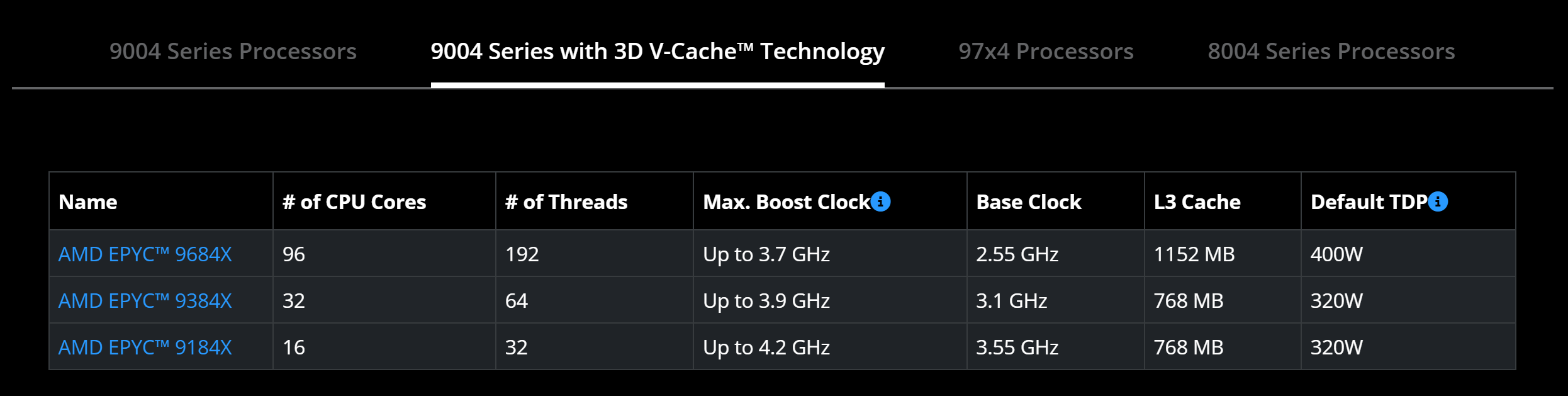
The only processor available that has the cores I need is the Epyc 9684X. I’ll worry about the $8K price later.

Epyc 9004 with 3D V-Cache (equivalent to Ryzen 7000 series; I think):

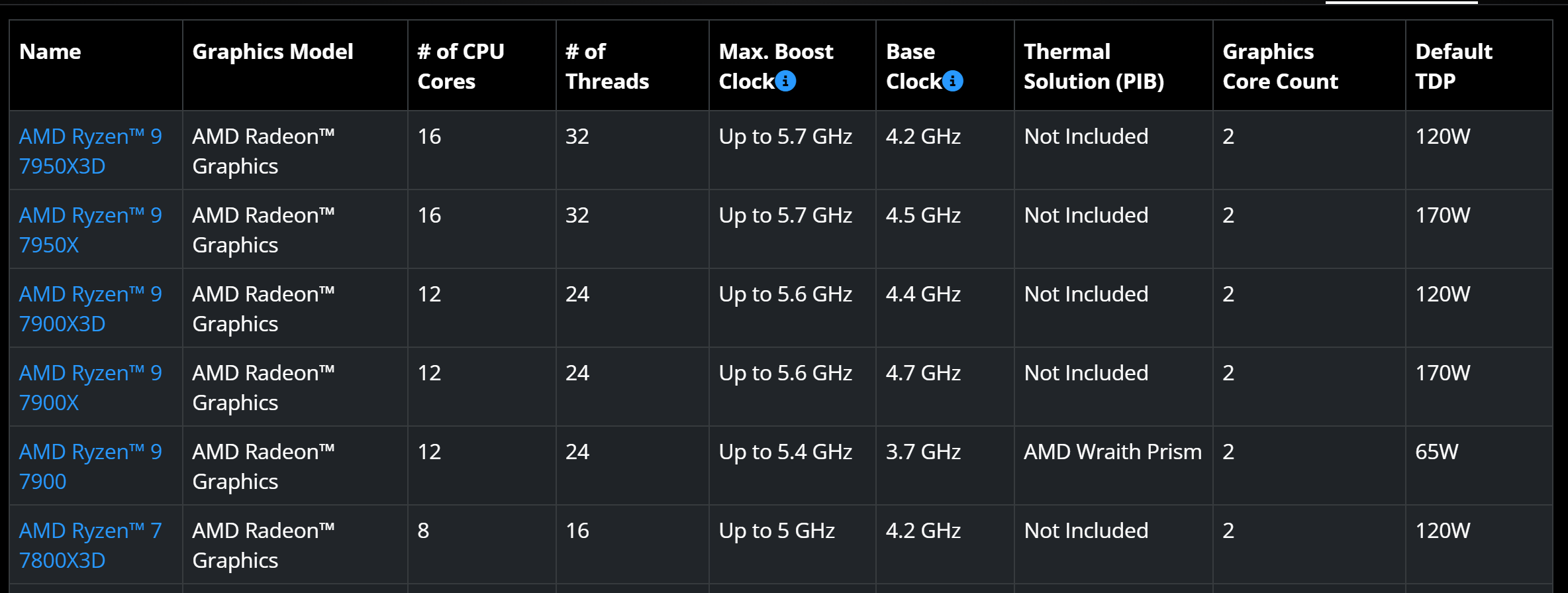
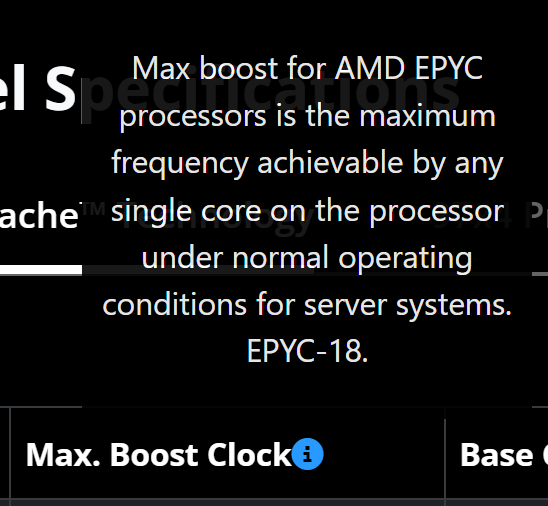
The max core clock is only 3.7GHz. That’s nothing compared to the Ryzen 5950X and Ryzen 5800X3D in my two main gaming PCs today.

Max Core Clock

I figure if you’re using less cores, you can turbo higher. Anyone know for sure?

In 95% of use cases, it’s just me on the TV PC. If these can boost up to 5.7GHz like today’s Ryzen processors with a single set of cores, we’re good to go!

AMD Ryzen 7000 series processors:

AMD Threadripper

Another idea is buying a Threadripper instead of Epyc, but not one Threadripper has 3D V-Cache support.

Multiple CPUs

Another idea is having multiple Epyc CPUs.

While horrible for power draw, I can divvy them up easier since I’m already virtualizing. That’d result in higher core clocks, and all of them are still in a single rackmount enclosure.

Do I have to buy these in pairs or can I mix 'n match and upgrade separately over time?

Intel???

I have no clue what options there are for Intel, but it doesn’t seem like any of Intel’s offerings are for me.

What’s Bronze, Silver, etc? Why pay a monthly fee for features already on the hardware? Yeah… Confusing and not consumer-friendly. My initial impression is these aren’t for me.

Conclusion

What do you think? Are my options looking good?

Don’t worry about pricing. I value simplicity over cost right now.

1 Like

Not sure about mixing and matching but I do know you can populate a system with 1 cpu (and memory) and add more to the mobo later.
Just do not get a dual socket mobo and a “P” designated cpu. The P means performance = Single cpu only. These do come higher clocked but also remember Epyc generally clocks lower than the equivalent Threadripper.

What you did not cover are the number of gamers, what types of games, frame rate/resolution etc…
What I would do is focus on multiple GPU for the gaming use and save the cores for your VMs/LXCs… Games are almost always bottlenecked at the GPU before the CPU.

Also, since you sound like you are relying upon the central system for speed, plan to have a strong LAN in place. 2.5Gb nic clients and 10Gb or dual 10Gb server links to the core switch.

1 Like

I have some first hand knowledge of at least SOME of the areas you are delving into… I have used several generations of Threadripper in addition to current gen Sapphire Rapids (Intel Xeon w7-2495X) for gaming. I also happen to have a 24 Core EPYC with 3d vcache which I could also fire up and do some gaming performance testing on.

Having said this, I havent done any gaming within a VM… Additionally, I have always ran Windows on bare metal and used Hyper-V or VMWare on top of Windows for virtualization needs… Again, I always ran the game on the bare metal Windows install so not really applicable to your use case but thought I would respond and offer whatever assistance I can.

A couple things to keep in mind is that AMD Threadripper and EPYC have CCD’s (up to 8 cores on each) and different CPU SKUs have different amount of memory controllers… Ideally you’ll get the best performance if you keep the compute to one CCD while that CCD also has its own dedicated memory controller. The Intel equivalent is vastly different in that its not “really” a chiplet design… The 2495x I have is a monolithic 24 core 48 thread and the 56 core 112 thread variant is actually two 28 core 48 thread monolithic die’s tied together on one CPU package. If you need more than 8 CPU cores in a single VM, the Intel route “may” be preferable… For GPU’s I have mostly Nvidia (4090, 3090), but have a couple last gen AMD 5700xt series cards too.

So, in summary I can attest to bare metal performance at the very least…

They cannot. The frequency listed in that table is the maximum single core speed; it will never clock higher. With multiple or many cores active, the realized speed will be lower than that number relative to what power, heat, and product segmentation allows.

Both CPUs in a dual socket configuration, no matter the manufacturer, must be identical model and stepping.

1 Like

Any Threadripper 7000 or Threadripper Pro 7000 chip is good for gaming. They’re Threadrippers, so they have high clocks.

Also 5.7ghz is the single core boost frequency, but Threadripper overclocks so well that you can get something close to that on all cores with a custom loop. They’re insane.

1 Like

Server Boards

Processors

Sadly, both processors I have lying around are P models. I thought those were able to run solo, so that’s why I bought them. I didn’t realize the non-P models can also run in a single-processor configuration.

If I buy new processors, the 96-core version or two lower-core-count processors, I will be buying a new board and will keep that in consideration.

From what I’m seeing, the current Epyc and Threadripper processors have similar clock speeds, but Epyc ones have 3D V-Cache whereas Threadripper processors do not.

Max clock speed

@rrubberr There’s an asterisk on the Epyc page about max clock speed. It said in normal use. I would expect that means when most cores are in use. Does that actually mean “best-case”?

Threadripper clocks

@AgentAnon Are you saying you can overclock Threadrippers or that they self-overclock? I haven’t overclocked a CPU in about 10 years, and the last time I did, the motherboard provided me with a few options.

Dual-socket boards

@rrubberr Do I actually need 2 processors or can I get by with one and get another later? I will buy them both at the same time, just asking for future knowledge depending on how I move things around.

CCDs

@IM3CPO Great note on the CCDs. I know they exist, but I thought newer Epycs had 16-core CCDs. So ideally, I’d keep gaming systems down to 8 cores if I want the best performance. That seems to align with most games as well. They rarely utilize more than 2; let alone 8.

Also great note on using Intel. Unless they’re significantly better at the gaming workload I’d rather stick with AMD. Intel also doesn’t have as many PCIe lanes; and I’d probably need them. Also, I’m not in the Intel ecosystem, so it’d take a lot more work to study up on how they handle naming, cores, that stupid “feature rental” on new chips, etc.

My GPUs are currently 1080 Ti and 3090. I have others, but they’re not worth talking about. I plan to upgrade to this generation’s flagship GPU if it’s worth it, and I hope to only buy one, not two this time.

Networking

The server boards I have are dual-10Gb, and I also have extra Mellanox ConnectX-6 cards with two 25Gb SFP28 ports.

Performance expectations

My expectation is to be able to do 4K@120Hz with max or close to max settings. I understand that pretty much nothing can do ray-tracing well today. I expect to have VRR enabled, but I’d still like a steady framerate, and not one of the games I own supports frame-gen nor am I excited for a extra lag and what is essentially my TV’s motion smoothing.

The other PCs used to be 3440x1440@60Hz, but my oldest son knocked one of those over. They’re currently 2560x1080@75Hz which is a lot easier to drive, but I will probably upgrade them in the future. I expect my wife to complain when she gets time to play BG3 with me again now that the kids are older.

Number of users

@slidermike I plan to have 6 users at any given time, but for the most part, it will be 1-3 depending.

My kids are fairly young, and only 2 of them can use the PC at the moment, and with Aster, they’re currently able to, but it has issues with X-Input controllers messing with both workplaces. VMs would be better.

If for some reason I’m working on a project and my kids are playing too, that’s 3.

In terms of my wife and me, that’s 2 of us. My kids aren’t skilled enough to play LAN games just yet.

If I’m playing on the TV, we’re all together, so that’s only 1.

I expect this server to get a lot more use as my kids get older.

Finding a rackmount case

I can’t find a rackmount case that allows you to add a bunch of GPUs with PCIe extenders.

I’m wondering how to address that. It’s the crux of this whole operation.

Peformance Testing

@IM3CPO If you can do those benchmarks, you’d be my hero! The games I’d be playing right now that absolutely kill my system are:

  1. No Rest of the Wicked
  2. Baldur’s Gate 3
  3. Sackboy (with ray-tracing)
  4. Hitman 3 (with ray-tracing)

No other games seem to stress the system. As you can tell, I don’t play many AAA games. I stick to AA and indie titles, but AA games tend to be the worst-optimized of the bunch.

The last big game I played that could’ve caused problems was Elden Ring (back in 2022), but that’s because of shader compilation stutter, and I didn’t touch ray-tracing. Plus, it’s limited to only 60fps.
I’m still trying to wrap my head around your proposed use case. If I wanted to consolidate a bunch of systems to one rack I’d probably just eat up more rack space and build 6 independent AM5 systems in 3U chassis’ instead of trying to build one system and chop it up. By trying to virtualize one system I feel like you will be always compromising performance. But, different strokes for different folks, so:

EK solutions is what you seek. 6 liquid cooled 30 or 4090s and whatever flavor of CPU you want. Configure it as you see fit

I think I have to echo that it makes more sense to split up the machines. The main advantage of having one big CPU and virtualizing is power consumption, but if it’s mostly going to be a single person using it, it’s just wasted power having all that memory and all those extra cores and GPUs powered on and idling.
If you can figure out what your gaming workloads look like, you can spec out a system for the likely use cases, and then use a 40Gbe jbod and some enterprise NICs to handle all your storage needs.
Say, a 16c32t Ryzen dual-gpu desktop with a dynamic 8c16t VM that can spin up when you have a second player, and then for the remaining 4 machines could be delegated to a lower grade TR VM setup that can be spun up for family game time and spun down after.

There has to be some way to handle booting from a shared network device with multiple login credentials and permissions, right? I know linux can do that just fine, to the point it’s a complete non-issue, but I’m not sure how it works on Windows, or how to delegate that information conveniently when dealing with VMs and images, but it’s so obvious that it should exist that someone has probably figured it out

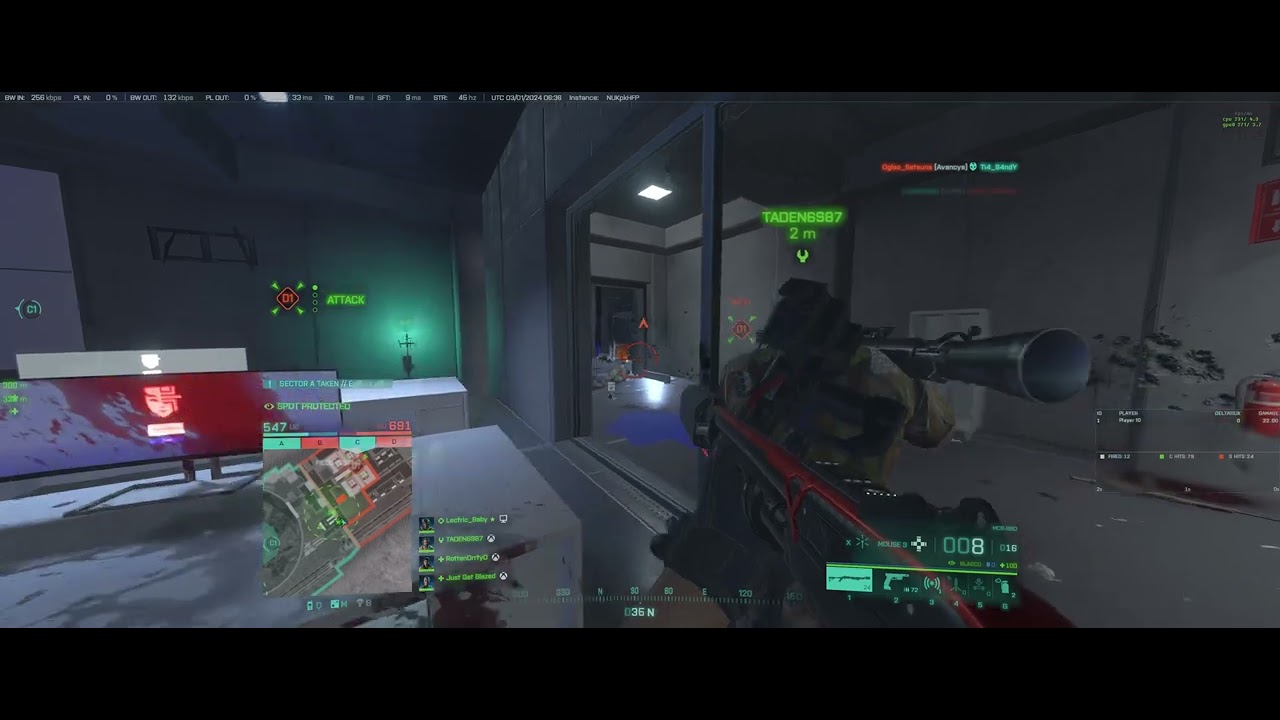
Hmm… I may have Hitman 3 around here somewhere, but not sure I have any of those other games. Having said this, I do have some footage of me playing The Finals and Battlefield 2042 you can take a look at. These videos were all recorded on the Intel 2495x at 3440 x 1440 resolution with TeamSpeak or Discord running as well as screen recording (all on the same system). I can easily do the same for the Threadripper 7000 system I have and the EPYC 7473x3d systems so you have an accurate comparison. I have FPS counters going on both (Upper left on the Finals and upper right on BF2042):

EDIT : Forgot to mention to make sure you up the quality on the video playback on youtube.

Finals:

Battlefield 2042

3 Likes

Just wanted to say thank you so much for posting actual W790 gameplay. Finding game-relevant benchmark results for this platform is a struggle, and actual gameplay is practically unobtanium. Do you have the full specs of your systems listed somewhere?

1 Like

Is there a place to post system specs??!? (I’ll take a look in the profile area)

But while I am here:

Motherboard: ASUS Pro WS W790E-SAGE SE
CPU : Intel 2495X Overclocked to 5.0GHz all core
Cooler : EK Waterblock (Cant find the model # on their site for some reason)
RAM : Gskill Zeta R5 F5-6400R3239G16GQ4-ZR5K (64 GB Kit)
Video Card : 4090 air cooled with 600W BIOS
Monitor: CORSAIR XENEON FLEX 45WQHD240 45-Inch Bendable Gaming Monitor
Storage : 1.6TB Optane 5800x & 7.6TB Kioxia CD8-V
OS: Windows 11 Workstation

I also have a Mellanox ConnectX-5 Dual Port 100GB NIC installed (I have the onboard Intel 10GB NIC’s disabled most of the time via device manager as I disable whatever I am not using for best latency & performance).

Let me know if there is anything else performance wise you’d like to know. I have a crap ton of systems and hardware at my disposal and would be more than happy to help in any way I can.

FWIW : Its really a great system for gaming! Its really nice having the extra PCIE lanes and not having to hassle with stupid e-cores. Games that use scale (like Battlefield 2042) really scream and those that dont still run very close to if not better than what an overclocked 14900K can do.

Guess I should also say that in addition to this system, the EPYC systems, Threadripper 7000 and 3000 systems, I also have a 14900K, 13900K, and 12900K so I can tell you from LITERAL hands on experience… :slight_smile:

5 Likes

You are just noticing the more cores the slower the clock speed in server and workstation CPUs? The all core turbo speed is also a lot slower.

1 Like

my2cents on this:

How much CPU usage do you usualy have in Games? 20%? 30%? :slight_smile:

so you can overprovision your CPU Cores by alot.

i would Aim for 24Cores/high Ghz and a single Socket board.
there is not soooo much of a penalty if giving all VMs almost all the cores for gaming.

edit i can spin up some dockers and check the penalty with my

AMD EPYC 7262 8-Core @ 3200 MHz
ASRockRack ROMED4ID-2T
Memory: 64 GiB DDR4 Multi-bit ECC
GeForce RTX 3090

system

edit

are going to use all those GPU’s passed trough to individual VM’s?
You do know that some games detect VMs as cheatingmethod?

you do have other problems than just CPU Power :smiley:

Sir,
respectfully, Epyc cpus are the BEST cpus for gaming.

I only offer gaming benchmark (record scores), evidentiary data, facts, and details as supportive arguments.

More cores is more performance and multi cpu and multi gpu adds even more speed**…as long as you know how to configure the bios, the OS and the hardware.**

inclusive of bare metal, hybrid and VMs

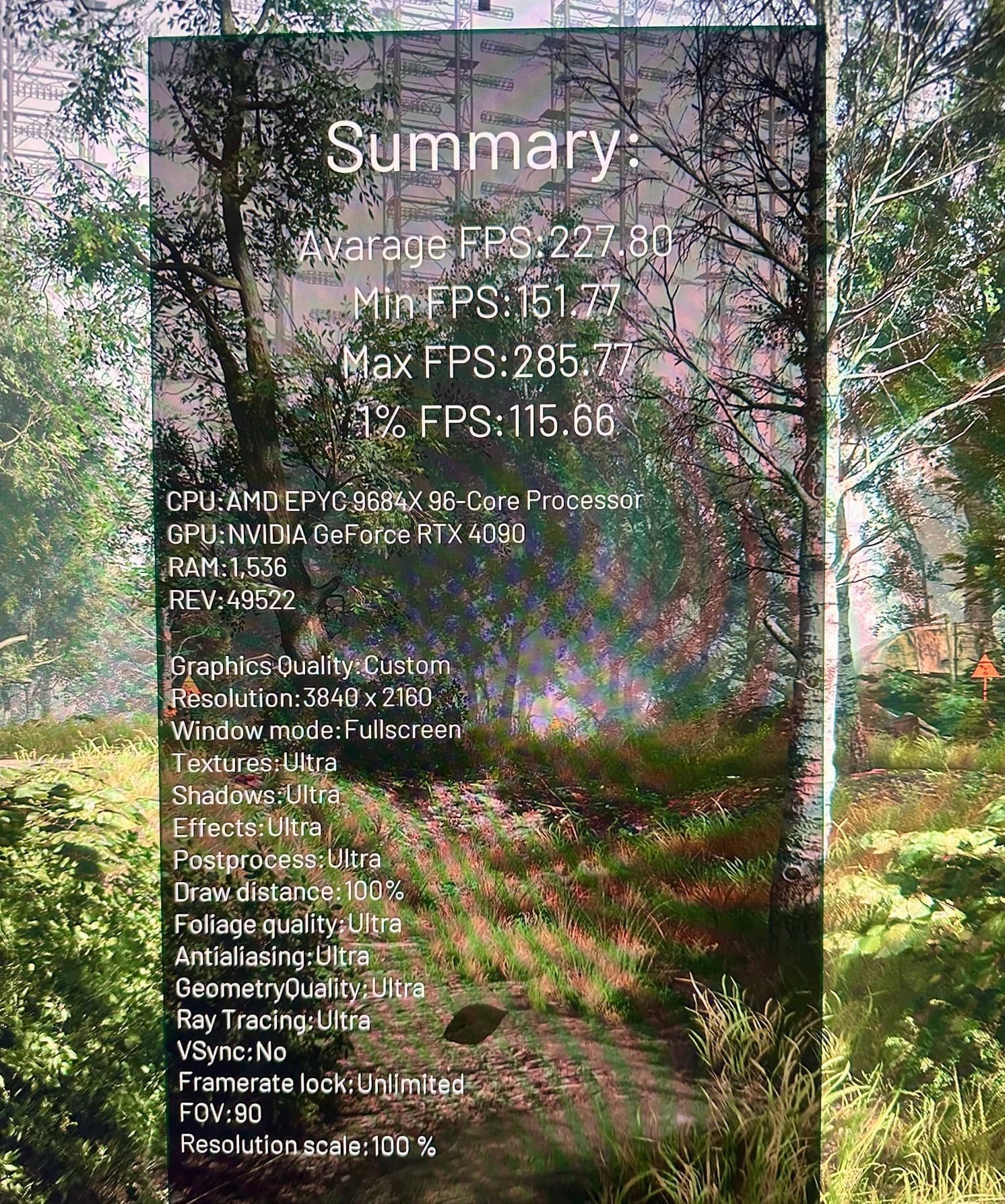
Full ray tracing, 4k, max eye candy, all settings to ultra, no DLSS or FG, highest scores ever recorded, all on Epyc

Data:

Respectfully

J

2 Likes

Quick update. I gave up on multiple gaming rigs on a single centralized server for now. Gaming on Epyc seems to be a non-starter no matter how much money I spend.

I’m buying Ryzen 9000 series X3D chips for my PCs, and I’ll keep with those for now. Eventually, my goal is to centralize everything without streaming, but that’s just not possible for the performance output and requirements I have today.

Aster also works fine for my kids’ PC except the instance where they’re using X-Input controllers as it affects Steam on both workplaces. Solving that would at least make this more feasible in Windows.

1 Like

This topic was automatically closed 273 days after the last reply. New replies are no longer allowed.