I bench stuff to compare mostly. If only to check to see if things are basically performing at the expected levels. Gpu + cpu holds interest. In your case with your software….. overclocking ram comparisons would be awesome. I use to overclock ram in the old days. It would be nice to see it become more common. I do not know how practical it is these days ? Seems like there is a hole with making the most of ddr5 ram speeds. Or was ? I have been away for awhile.
I’ll throw this one into the ring:
It’s representative of realworld simulation workloads rather than something contrived or less than useful like some of the OpenFOAM benchmarks Phoronix Test Suite uses.
I am primairly throwing shade at the mesh time benchmarks and the impossibly low DoF benchmarks they include.
2 Likes
Certainly interesting……. Barrier to entry and use case might be a poor use of resources in my regard. I tend to agree that alot of benchmarking stuff tends to not reflect very accurate real world use case and lean towards actual use.
1 Like
I might try this on my pc’s! does it work with avx512?
1 Like
It does run AVX512 since it is directly calling the MKL linear algebra library by default; alternatively you can tell it to use AMD’s AOCL BLAS instead but usually Intel’s MKL math library is faster than AMD’s AOCL when running on AMD CPUs. The irony of Intel’s software being faster than AMD’s on AMD’s own processors is not lost on me.
Be careful about the RAM requirements when running the benchmark because it will happily use swap if you don’t have enough memory.
1 Like
I tried to test using windows but it crashes on setup? (on the 9950x3d/128gbddr5)
but I’ll try on linux soon on that pc and the strix halo 395.
That is odd, The only thing I can think of off the top of my head is some kind of localization issue. I don’t actually remember if I put other languages into it, but you could force it by giving it an argument when you run the installer, example:
comsol62_benchmark_CFD_EM_60GB_Win_x86-64.exe -lang en
Usually the issues with it are DirectX/OpenGL not playing nice with the video driver and needing to resort to the software renderer… but this is an issue after the setup.
it was something with java or eclipse? didn’t want to go into it too deeply because I do have some work to do. I’ll try it in linux!
Just throwing this here because it is important. Linux has yet to improve much on the ease of use of audio side of things.
Voltage monitoring. I’ve got a basic utility slop-coded for my specific system, but no instructions for enabling it (it needs to be able to read some files to calculate the voltages) and no consideration for other machines: josie/alder-tools · simplegit . Every other Linux tool I’ve tried doesn’t report vCore, and most TUI solutions spit it out in millivolts, which isn’t useful. When overclocking (one of the biggest use cases for bench utilities, as they’re excellent for stress testing and before/after scores) being able to see what the chip is actually pulling live is massively important. Especially for figuring out load-line calibration settings and voltage offsets instead of just flat BIOS voltage settings.
That repo has my slop license btw, so you are welcome to steal any part of what whatsoever with 0 restrictions of any kind, if it helps rather than re-building the same solution.
My RamSleuth app already monitors this value:
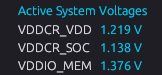
The VDDCR_VDD is the voltage from the CPU silicon itself instead of where vcore is normally pulled from the system monitor chip on the motherboard. It’s a much more reliable and accurate path for monitoring cpu voltage as this is what the CPU is referencing directly with it’s ‘boost’ or ‘pbo’ algorithms.
1 Like
Sweet. I didn’t see that when I ran it, but I’m using the tui version and V2.2.1. It’s also not seeing the intel memory controller, so I may not have everything it needs to read data here on my Gentoo install yet (I haven’t dug into getting it working perfectly). I’ll give it an update and poke around some more.
My tool pulls from the motherboard Super I/O chip (thus the note about not considering other systems, it wouldn’t just work on other machines) so it gets the voltage the motherboard is feeding the chip. I should prolly compare to what the chip says it’s receiving and see if there’s any difference .
Okay……. A limited easy button basic adjustment for Audio.
I recommend using Shelly to search AUR and build it yourself . Easy
It can be a bit flaky. Heads up . Still works in general.