Ever since Wendells article on how to host everything on your local network I’ve been trying to achieve this. However there is a problem and I can’ seem to find it. So please help 
Disclaimer if a step is not described I haven’t done it! Guess that will help troubleshooting 
Cloud
I’ve got Oracle clouds always free tier account and setup an ubuntu 22.04 instance there.
-
on my cloud virtual network I’ve opened ports:
- 51820/udp
80/tcp
443/tcp
ssh/tcp
- 51820/udp
wireguard cloud part
- in my instance I’ve installed wireguard
sudo -i
apt update && apt upgrade && apt install wireguard wireguard-tools resolvconf -y
- created my keys
cd /etc/wireguard umask 0077; wg genkey | tee privatekey.key | wg pubkey > publickey.pub - configured my interface
vim /etc/wireguard/pfsense_lab
[Interface]
Address = 192.168.22.22/24 # oracle_wireguard tunnel IP
MTU = 1500
SaveConfig = true
PostUp = iptables -A FORWARD -i %i -j ACCEPT;
PostUp = iptables -A FORWARD -o %i -j ACCEPT;
PostUp = iptables -t nat -A POSTROUTING -o enp0s3 -j MASQUERADE
PostDown = iptables -A FORWARD -i %i -j ACCEPT;
PostDown = iptables -A FORWARD -o %i -j ACCEPT;
PostDown = iptables -t nat -D POSTROUTING -o enp0s3 -j MASQUERADE
ListenPort = 51820
PrivateKey = REDACTED # privatekey of the oracle_wireguard

[Peer]
PublicKey = 76iLP1IxfvPeGmqn0GbaS7b9i5doIrcJcUhOUoNUUhA= #pfsense wireguard
PresharedKey = REDACTED # preshared key from my pfsense wireguard
AllowedIPs = 192.168.22.0/24
- enabled the wireguard tunnel in systemd
systemctl enable --now wg-quick@pfsense_lab - enabled the ports in the firewall
ufw allow 22/tcp
ufw allow 80/tcp
ufw allow 443/tcp
ufw allow 51820/udp
ufw enable
- added the ip_forward for ipv4
echo "net.ipv4.ip_forward = 1" > /etc/sysctl.d/100-ip_forward.conf
HAProxy cloud
- after that I’ve installed haproxy
apt install haproxy -y - this is my haproxy config:
vim /etc/haproxy/haproxy.cfg
global
  log /dev/log  local0
  log /dev/log  local1 notice
  chroot /var/lib/haproxy
  stats socket /run/haproxy/admin.sock mode 660 level admin expose-fd listeners
  stats timeout 30s
  user haproxy
  group haproxy
  daemon
  maxconn 10000

defaults
  log   global
  mode  http
  option        httplog
  option        dontlognull
  timeout connect 10m
  timeout client  10m
  timeout server  10m
  timeout http-request 10m

# I know you can use front and backend separate but I've gone with the listener and kept all in one place
listen https
  bind *:443
  mode tcp
  option tcplog
  server default 192.168.22.222:443 send-proxy

listen http
  bind *:80
  stats enable
  stats show-node
  stats uri /REDACTED #uri for the stats to be shown
  stats auth $USERNAME:$PASSWORD # set your own username and password for haproxy stats
  server default 192.168.22.222:80 check
- check to see if there are any problems with the configuration:
haproxy -f /etc/haproxy/haproxy.cfg -c - start and enable haproxy on boot
systemctl enable --now haproxy.service
This summs up the VPS section
if I don’t make that work I’ll ditch it completely and install pfsense on the vpc and do site to site VPN. But I hope I can still learn where my mistake is and not go that route.
Cloudflare
cloudflare disclaimer
I’ve transfered to cloudflare from namecheap because there were some problems with ddns between pfsense and namecheap. With this setup I hope I can go back to namecheap and ditch cloudflare.
I’ve added a dns record pointing to the public ip of my Oracle VPC
Type A
Name gitea
Content REDACTED # IP of your public VPC
Proxy status DNS only
TTL 1 min
Actions Edit
PFSense in local lab
Gitea web server
don’t let the name confuse you!!!
I have a simple webserver listening on port 80 nothing special
ip working:

haproxy working

Wireguard in pfsense
-
install wireguard on your pfsense
-
go to VPN / Wireguard / Settings and enable wireguard
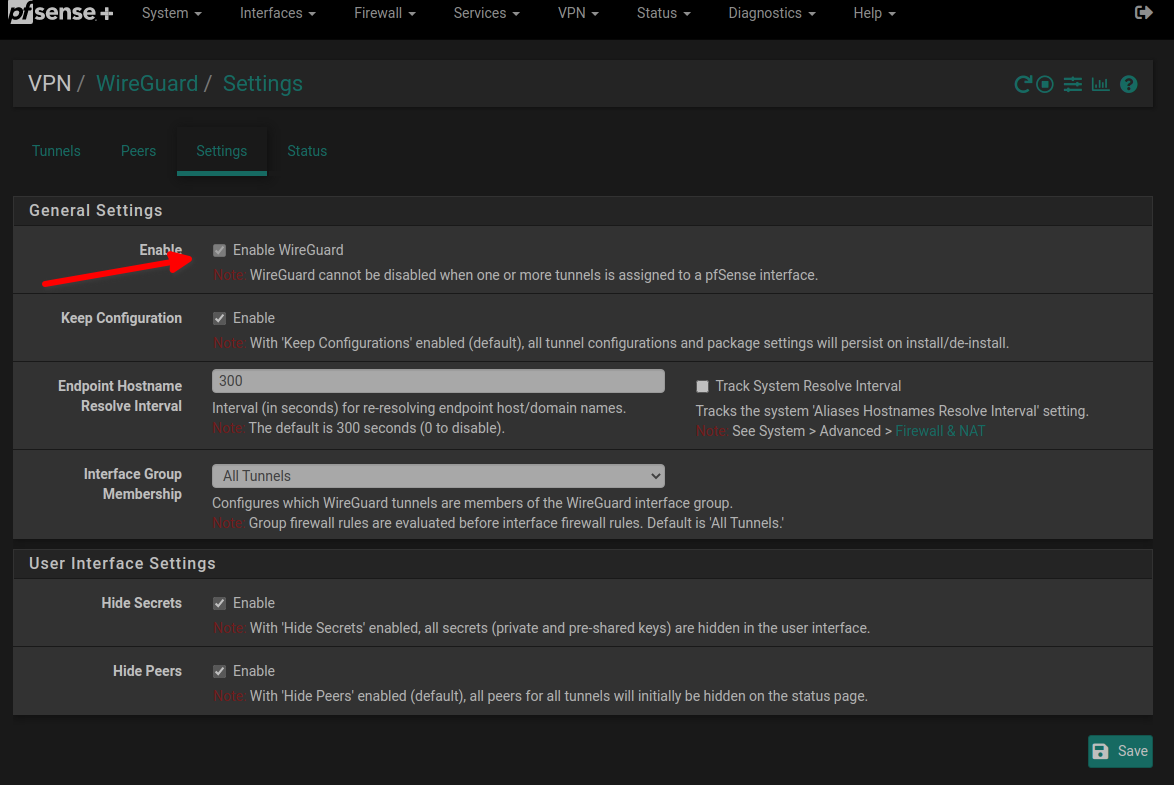
- go to VPN / Wireguard / Tunnels and configure your tunnel
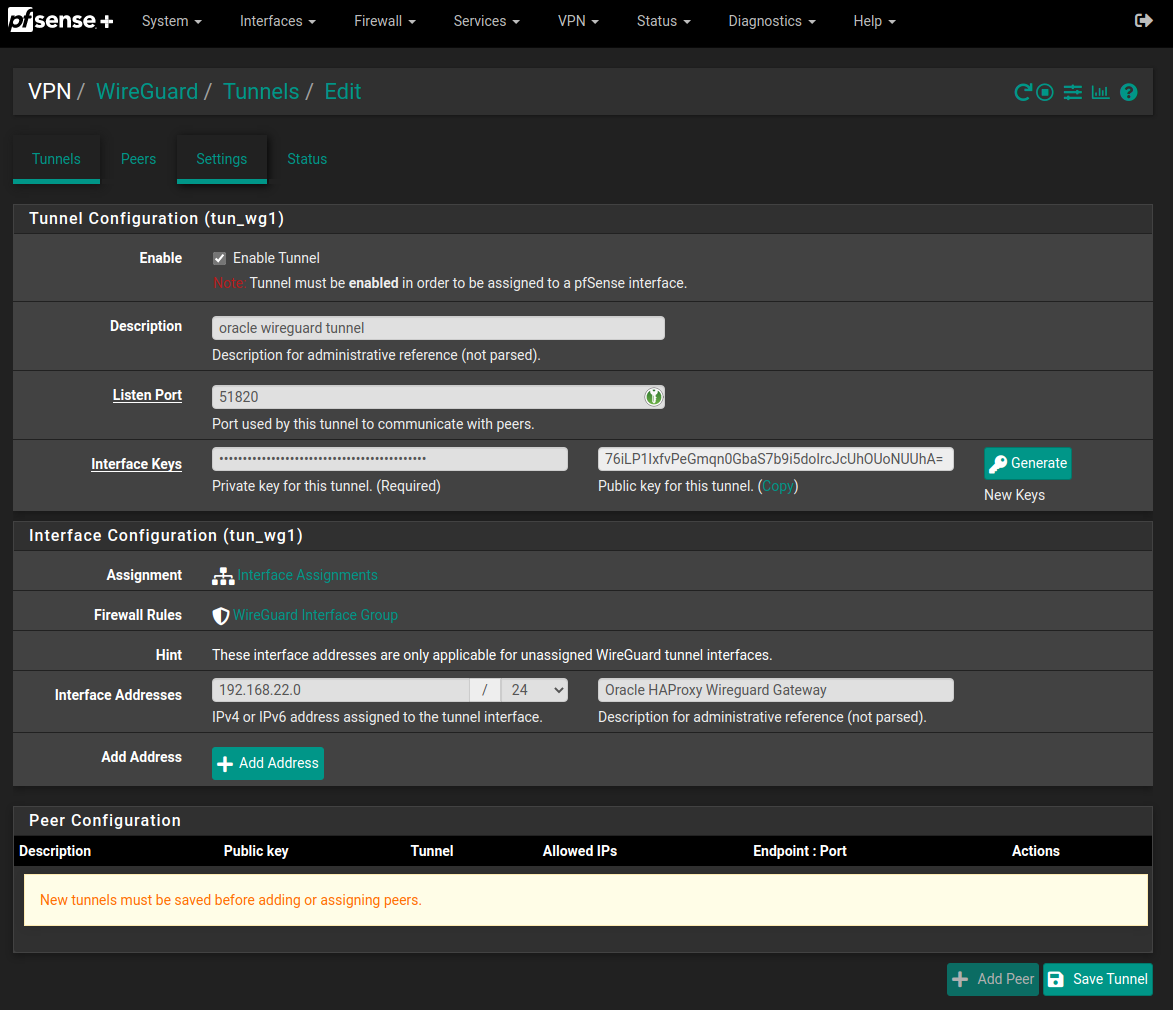
- go to Interfaces / Assignment and add your new wireguard tunnel interface then enable it
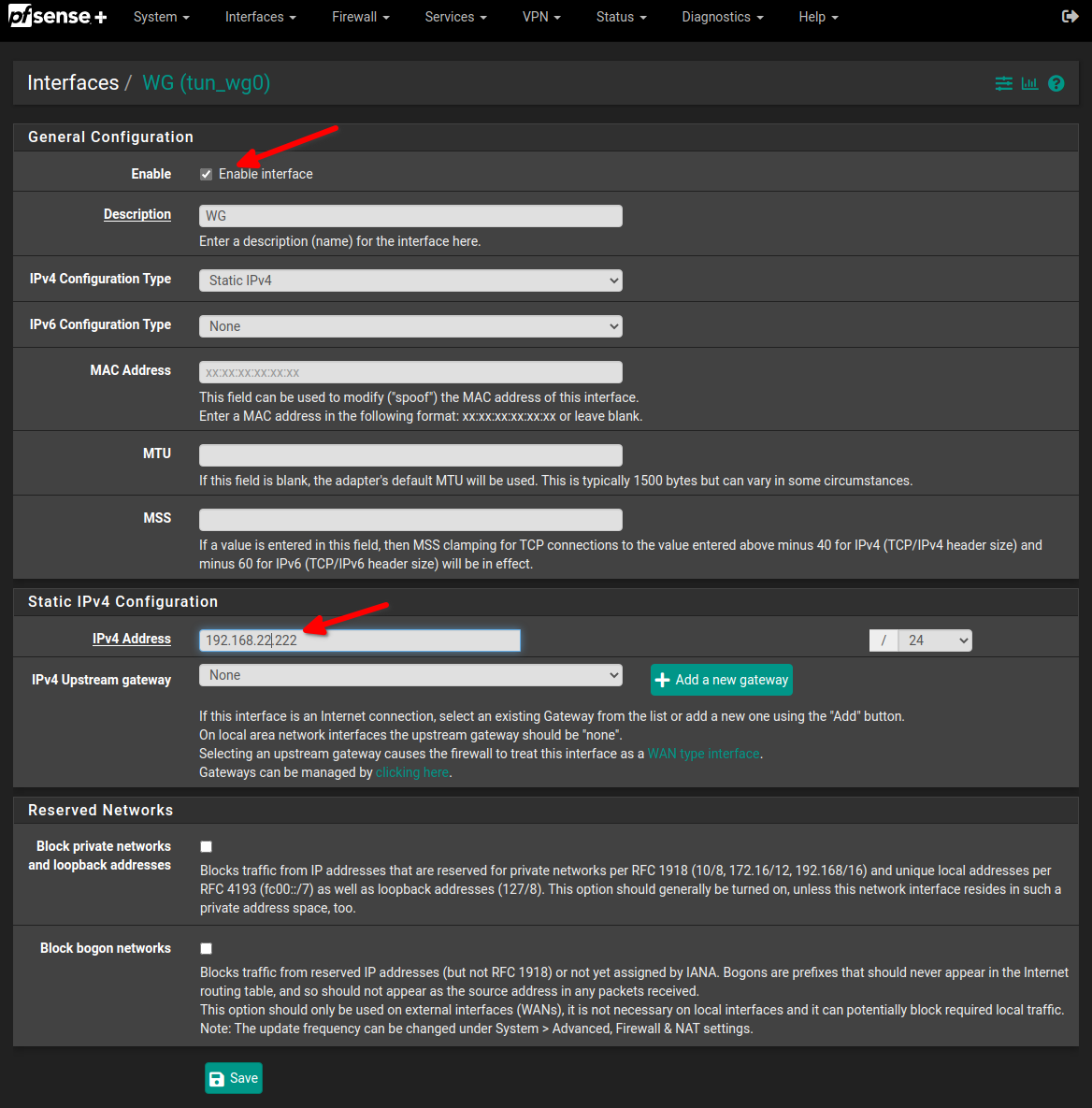
- go to VPN / Wireguard / Peers and configure your peer
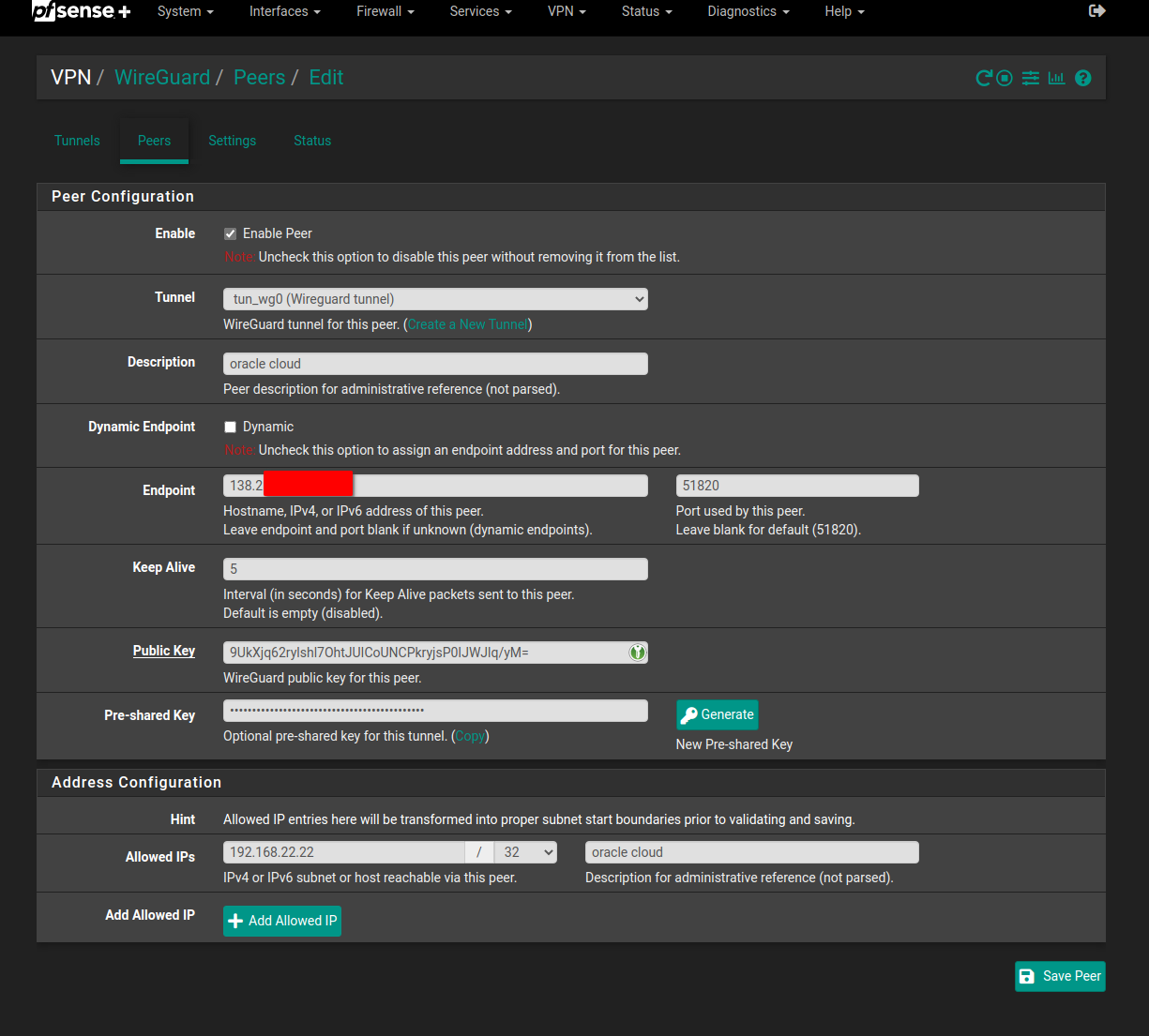
Endpoint should be your public VPS IP that you’ve also setup in you DNS provider.
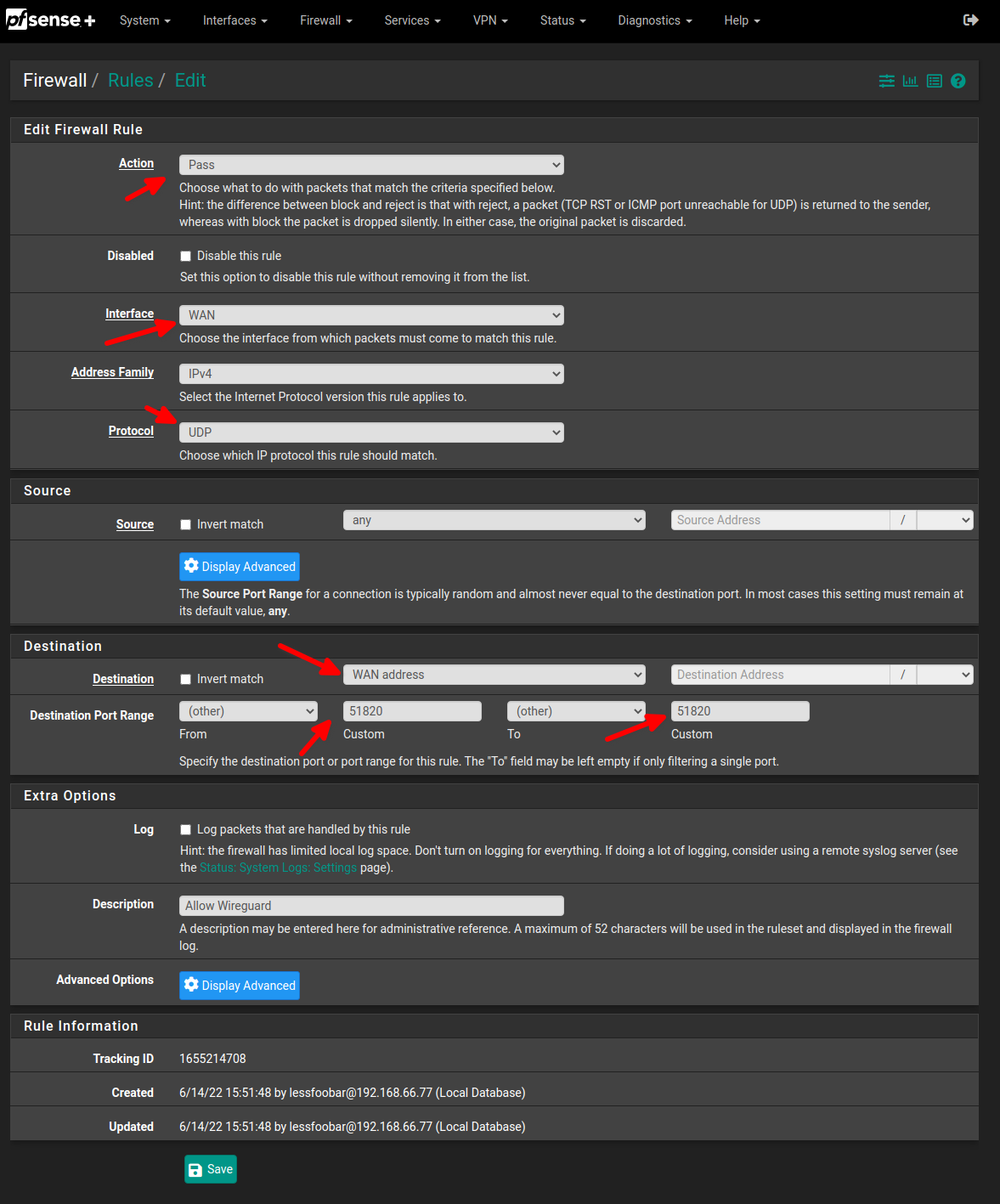
- go to Firewall / Rules / WAN and add rule for wireguard
- go to Firewall / Rules / WireGuard and add allow all rule. This is for TESTING purposses only. We will tighten to rule later!
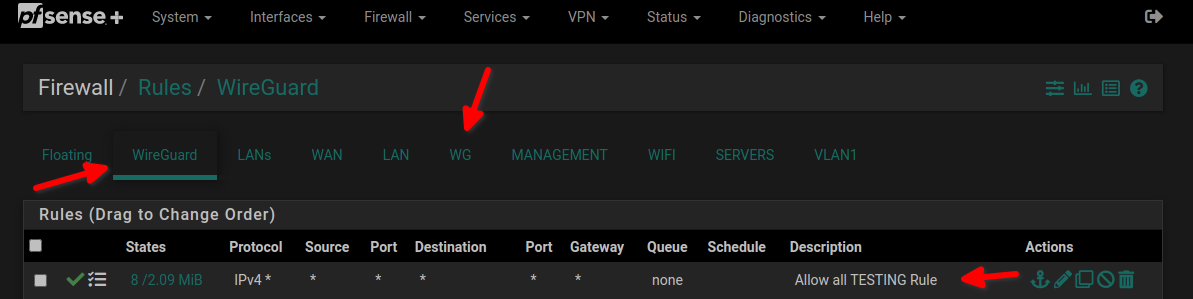
not sure if necessary but just in case I’ve added the same rule on the WG interface as well.
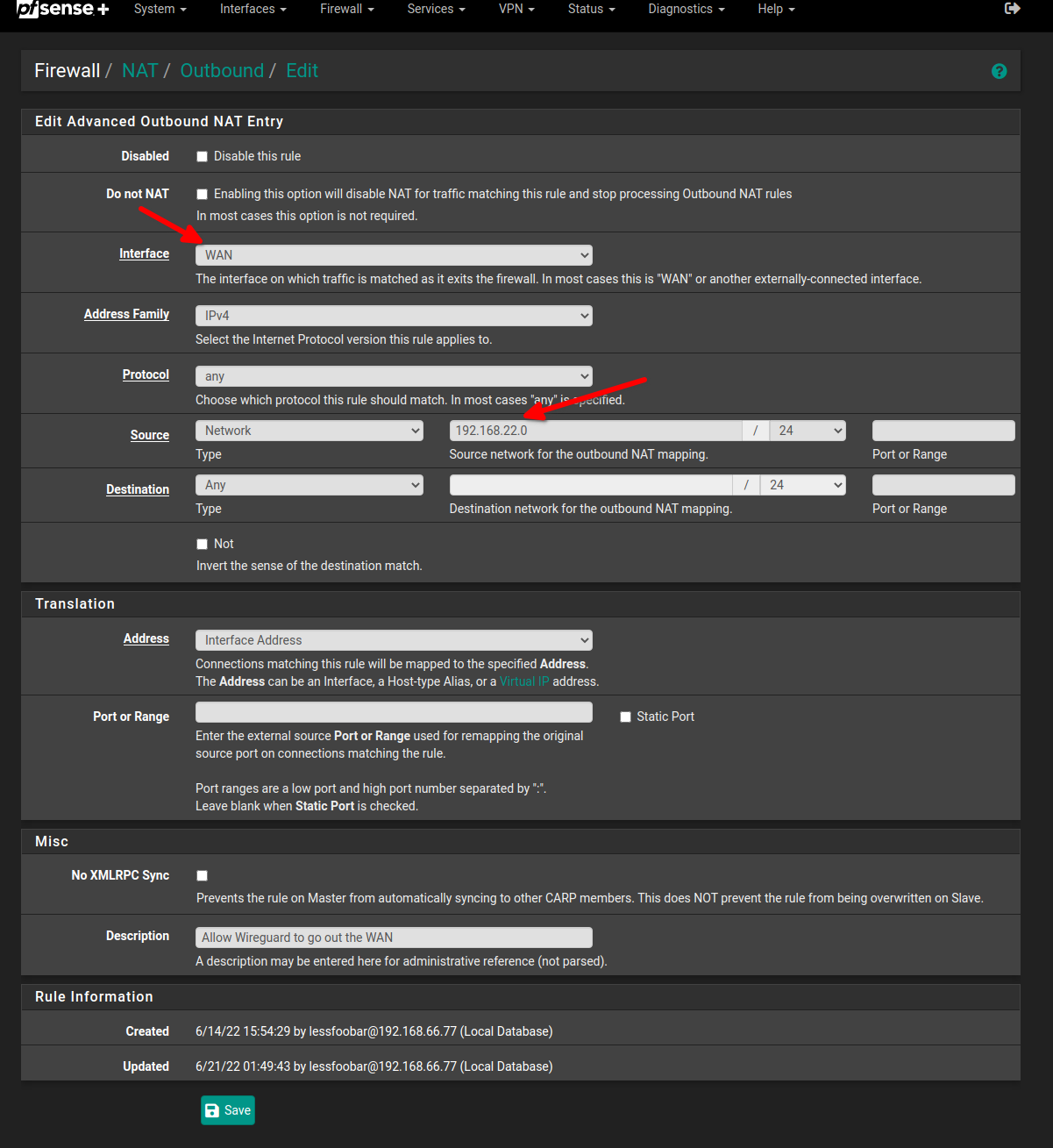
- go to Firewall / NAT / Outbound set outbound NAT Mode to hybrid outbound NAT and add a mapping for wireguard:
DNS in pfsense
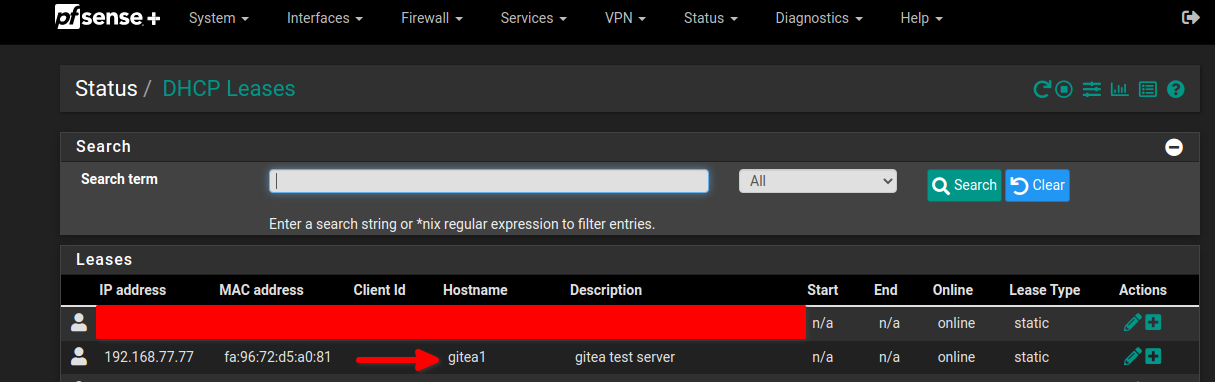
I’m giving all my servers a static DHCP lease.
my test instance is in the 192.168.77.0/24 DMZ network
- I’m assigning a hostname to gitea1
- then we need to assign a static DNS record in DNS Resolver that points to the firewall
- go to Services / DNS Resolver / General Settings and at the bottom of the page there are Host Overrides. Click on Add to add a new one.
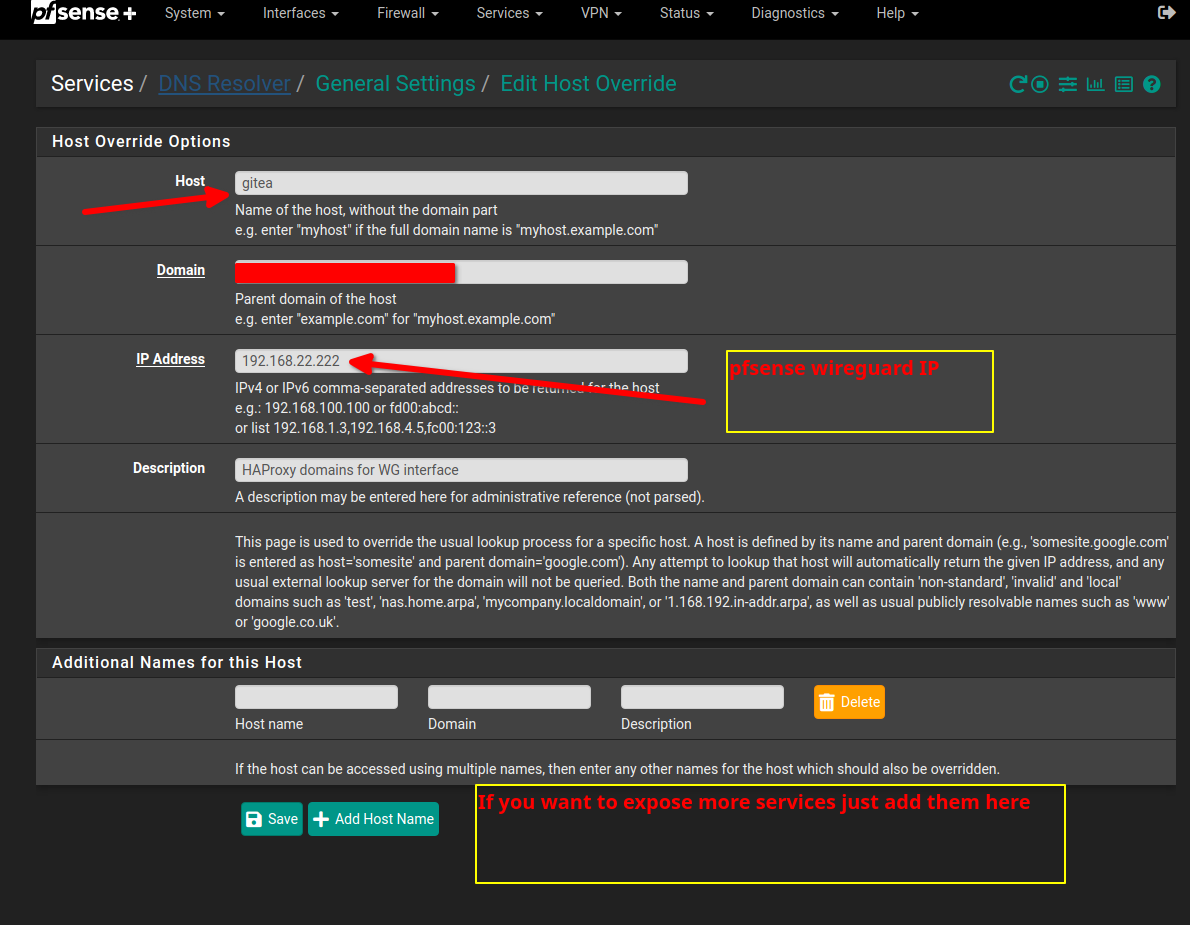
DNS disclaimer
I’m not sure about that part so please correct me if wrong but in order to have local direct connection to the server and not one thru the HAProxy I’ve added 1 at the end of the hostname so when I want to ping local without HAProxy it is gitea1 and with HAProxy it is gitea
ACME cert for haproxy
- install acme on your pfsense
- go to Services / ACME / Accountkeys and add a new key
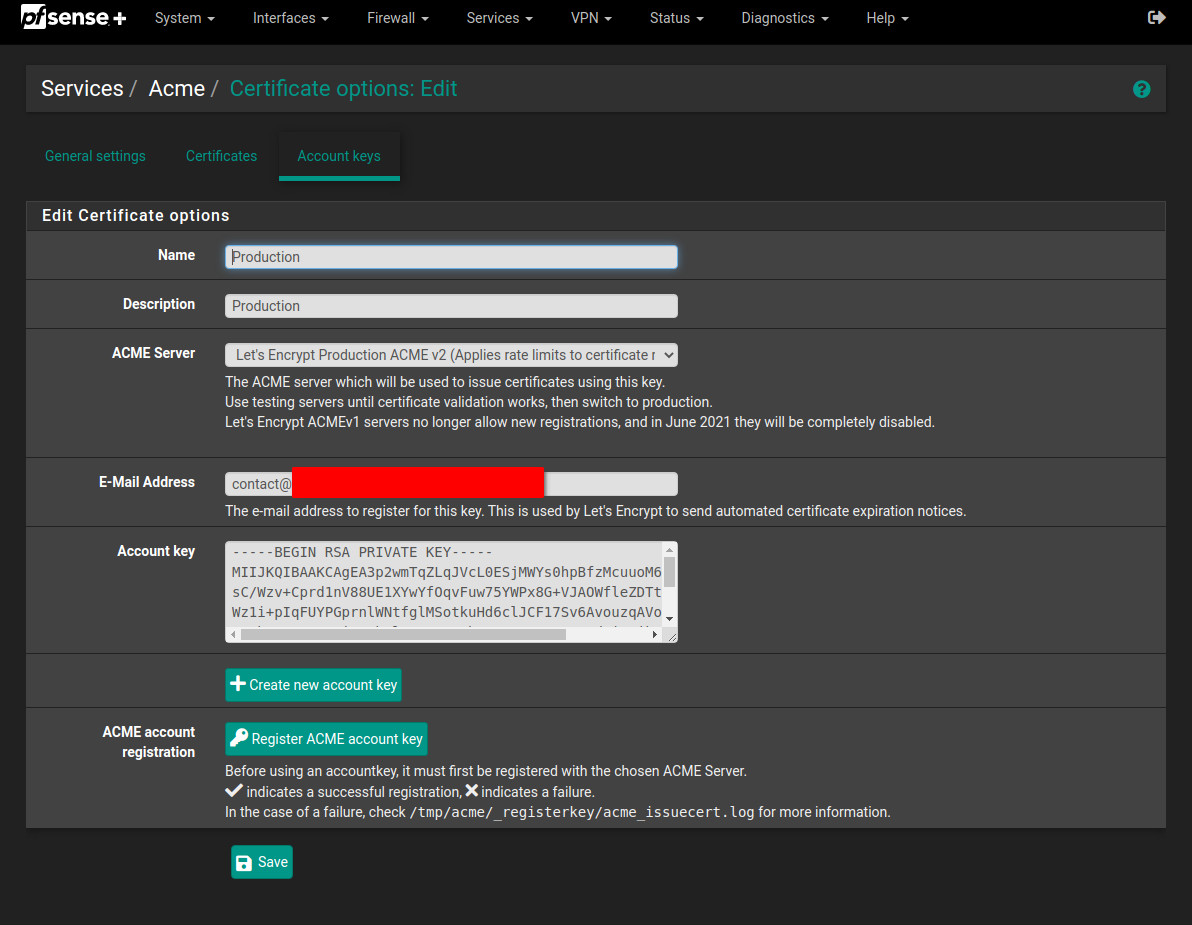
- go to Services / ACME / Certificates and add a new certificat
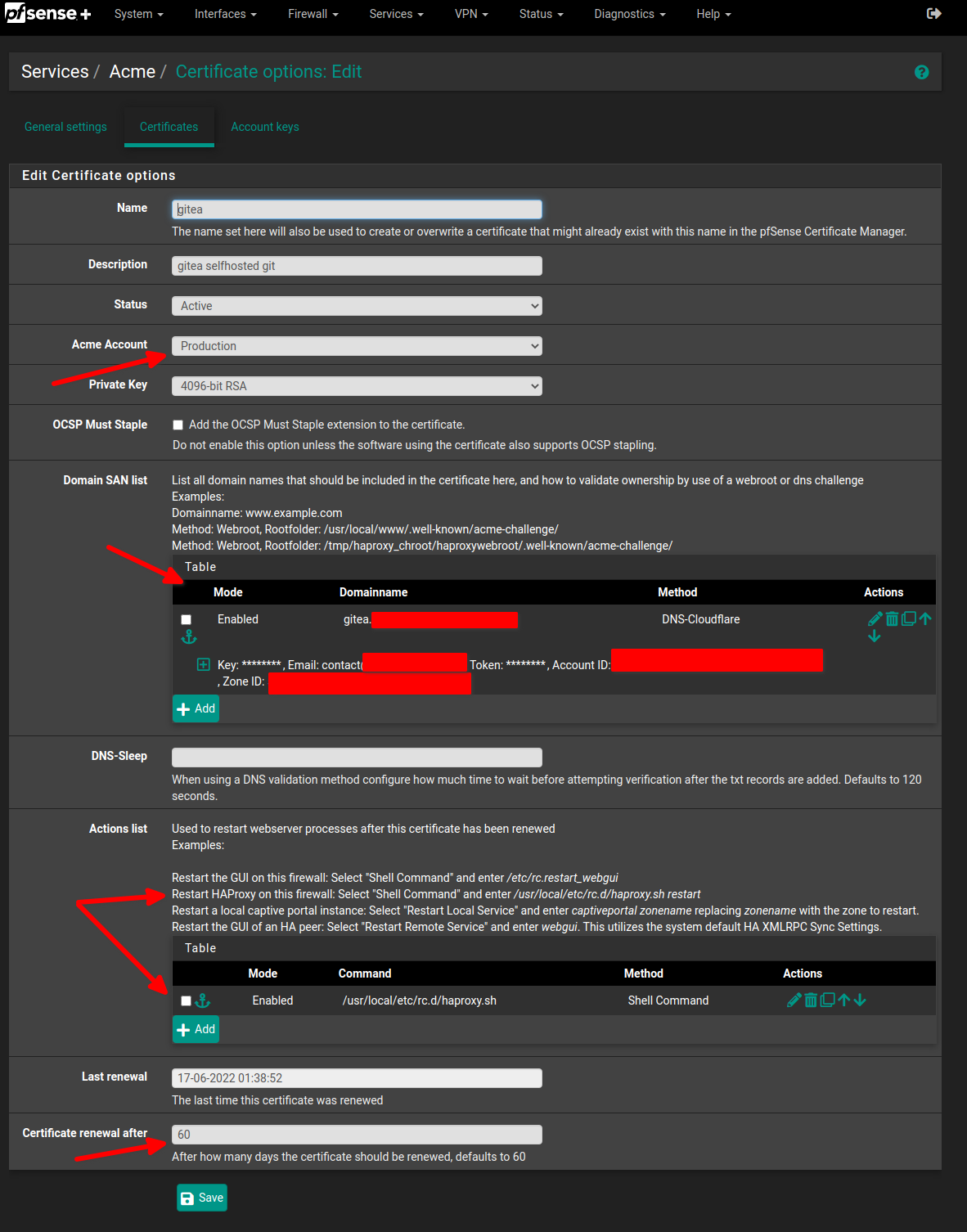
I’m reissuing the cert every 60 days and restarting haproxy. Check picture above for reference.
HAProxy in pfsense
- install haproxy on your pfsense
- go to Services / HAProxy / Settings enable HAProxy and add maximum connections otherwise its complaining …
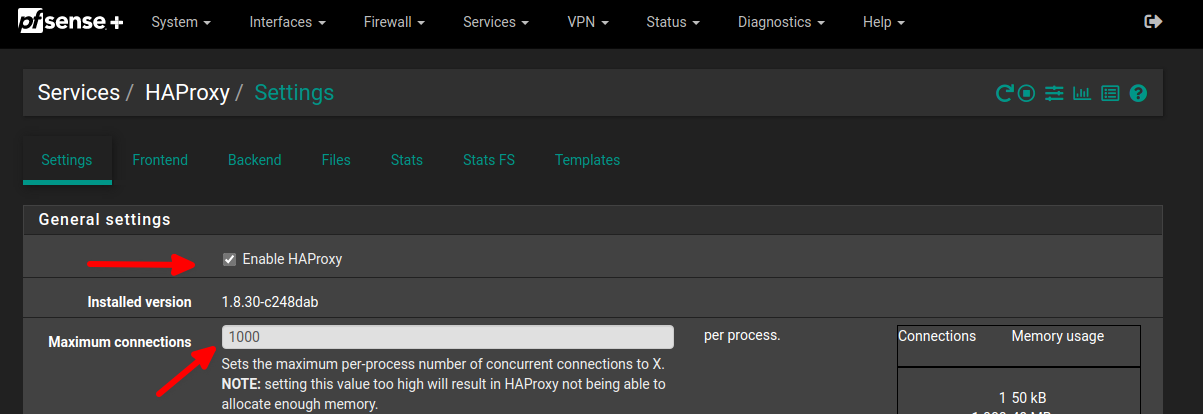
- go to Services / HAProxy / Backend to configure your back end gitea
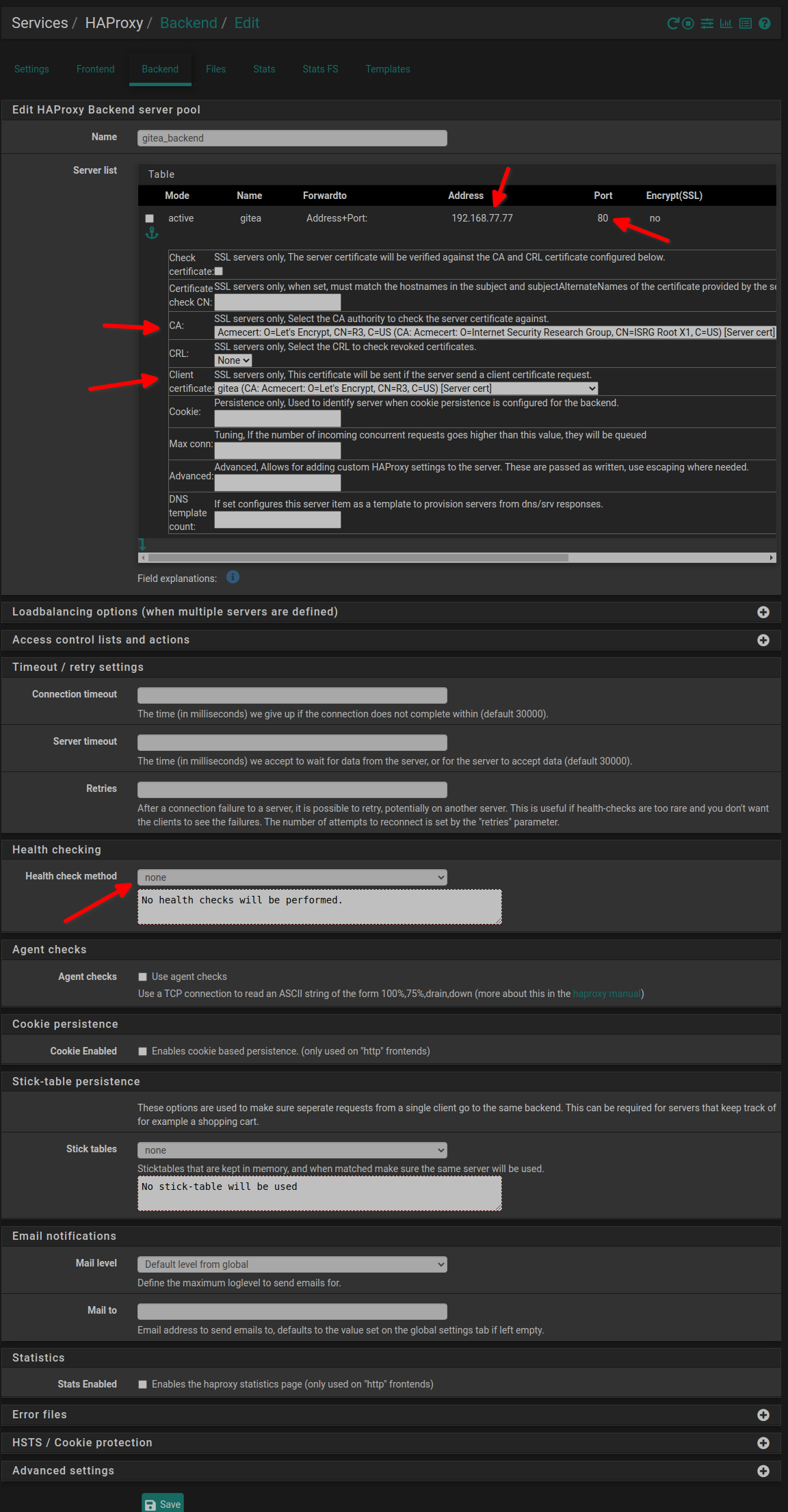
Should be noted I’m using port 80 unencrypted traffic this is why encrypt(ssl) is not with a tick. If you use port 443 check the encrypt(SSL). Also if you have only a wild card cert you should not check SSL Checks
- go to Services / HAProxy / Frontend to configure your frontend end gitea
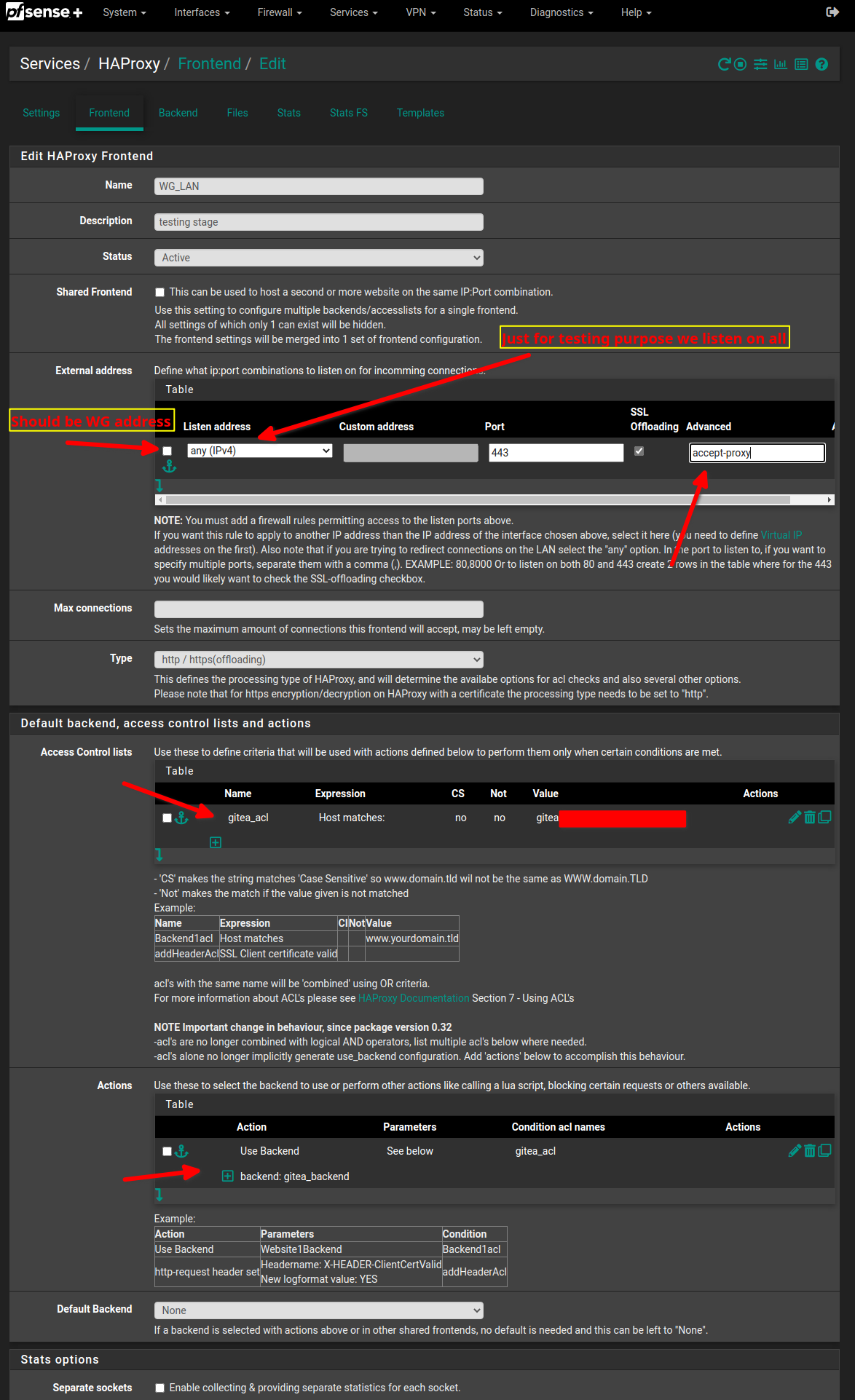
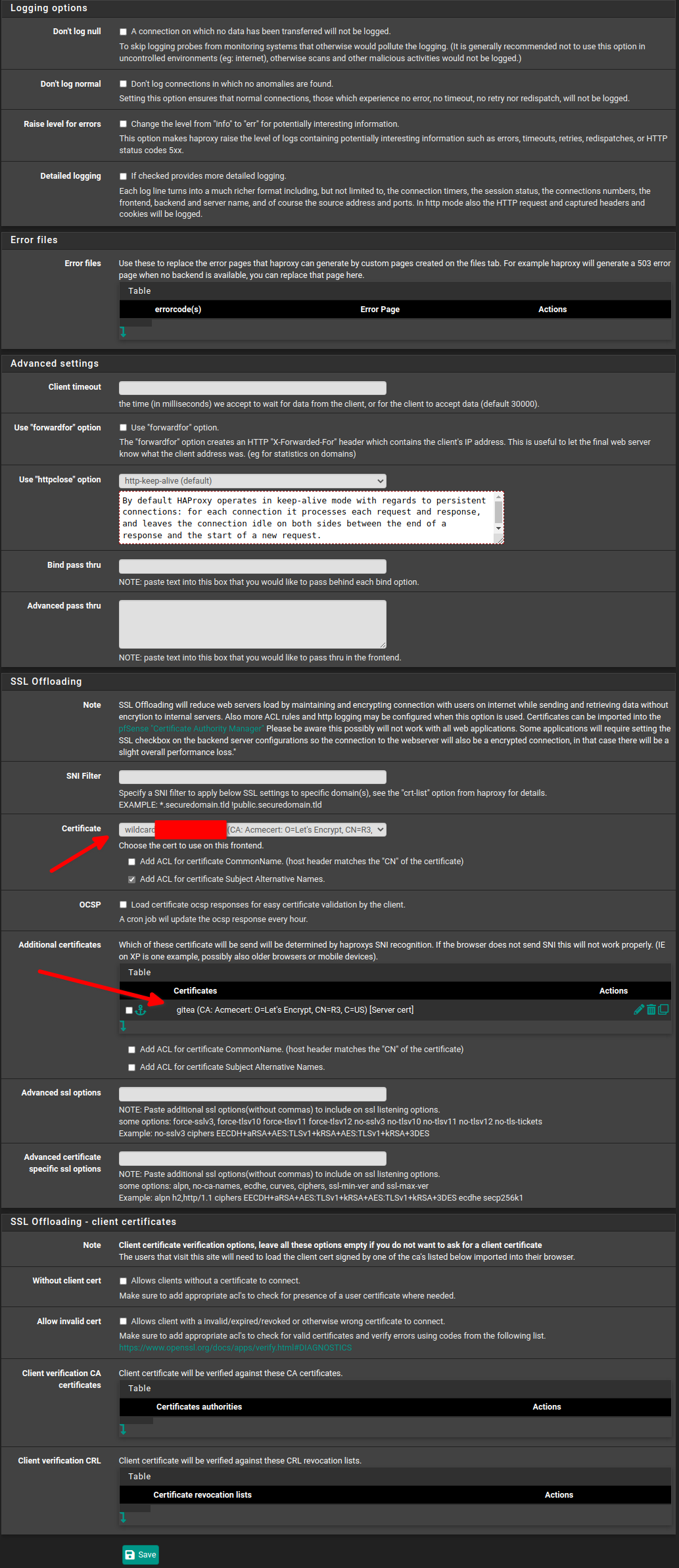
I’m using a wildcard cert for my domain and it is the default cert. Since I have cert for my webserver I’m adding it to the additional certs tab
It does not work!!!
If I’m on my LAN, HAProxy is working after I remove accept-proxy in the Frontend HAProxy external listener. However both options does not work from external network. I’m testing on my mobile thru my phone. I’ve tested with Chromium, Firefox & Brave
when I try http://gitea.MYDOMAINNAME I get error
503 service unavailable
No serve is availabe to handle this request
which is expected because I’m not using port 80
when I try https://gitea.MYDOMAINNAME I get error
This site can't be reached
gitea.MYDOMAINNAME unexpectedly closed the connection
Try:
Checking the connection
ERR_CONNECTION_CLOSED
I’ve also tried adding DNS = 192.168.22.222 to my oracle cloud VPS wireguard and then the error changed to
This site can't be reached
gitea.MYDOMAINNAME took too long to respond.
Try:
Checking the connection
ERR_TIMED_OUT
I’ve added all the steps so the more knowledgeable people in here could let me know where I’ve fucked up. Thanks in advance