I tried with an AMD RX5500 for host and had the same issue.
OK, I spent some time to revisit this issue. Note that I use Ubuntu Server that is without any desktop environment. Without graphical environment, Ubuntu (I believe, might not be true) can only use the framebuffer that UEFI passes to it. If UEFI chooses a wrong screen as the primary screen, ubuntu has to stick with that screen.
- Without IGPU, with a dedicate R7 240 card for the host, a RTX 4070 Ti reserved for the VM, there are 2 situations.
- If there is no monitor connected to the RTX 4070 Ti during the post, UEFI will use R7 240 as the primary screen, and it is the only screen that gets output. Once it boots into Ubuntu, everything will be fine. vfio-pci is loaded and RTX 4070 Ti is blacklisted.
- If there is any monitor connected to the RTX 4070 Ti during the post, UEFI will pick RTX 4070 Ti as the primary screen since it is closer to the CPU. Once vfio-pci is loaded in Ubuntu, the screen goes black, which is expected as RTX 4070 Ti is blacklisted now. However, as that is the only screen that gets output, you don’t get any output afterwards. Ubuntu is not smart enough to pick up another gpu to display.
- If I use the Ryzen 7000 IGPU for the host and a RTX 4070 Ti reserved for the guest VM. In the bios, I also set the IGPU as the primary output, ignoring the rest GPU.
- The IGPU gets output as expected during the post. However, the screen goes black as soon as vfio-pci is loaded. I ssh in the system, I can see the RTX 4070 Ti is blacklisted correctly, but for some reason, the igpu stops working, although it is not blacklisted by vfio-pci.
In summary, I suspect it is the Ryzen 7000 igpu driver issue. It fails to hold the framebuffer when vfio-pci is loaded.
Alternatively, I can use another GPU instead of using the IGPU. However, it is tricky to let UEFI pick a correct gpu as the primary gpu without pulling the cables. There is no such option to configure primary gpu in the bios (MSI). Perhapes, ASUS has?
Pretty much my findings.
I don’t know if @wendell has some sort of connections to report this as a bug (I tried, but the process is too complicated), so maybe we get an update in the future.
After searching many forums, I think we need to have a conversation about USB audio. I’d like to gather some feedback on stutters/pops. My setup is as follows:
- 5950X
- Asus Pro WS X570-ACE
- ASM3242 passed through to my guests
- Utilizing an audio DAC and an Audio interface
Here is a logical setup of my USB controller:
┌───────────────────────────────┐
│    macOS guest                │
│  ┌──────────────────────────┐ │
│  │         ASM3242          │ │
│  └─────┬────────────────────┘ │
│        │                      │
│        │                      │
│        │ 10gbps               │
│        │ cable                │
│  ┌─────┴─────────────────┐    │
│  │       VL822 hub       │    │►
│  └┬─────┬─────┬──────┬───┘    │
│   │     │     │      │        │
│   │     │     │      │        │
│   │     │     │      │        │
│   │     │     │      │        │
│  ┌┴─┐ ┌─┴─┐ ┌─┴─┐  ┌─┴─┐      │
│  │AI│ │CC1│ │CC2│  │DAC│      │
│  └──┘ └───┘ └───┘  └───┘      │
│                               │
│                               │
└───────────────────────────────┘

AI: Topping E2x2
CC1: Capture Card 1
CC2: NZXT Signal HD60
DAC: FiiO E10k
General observations
-
USB controller passed through and Audio connected to a macOS guest works flawlessly. I even increased Sample Rate to 192000 just to see if I can generate any pops. Nothing. To ensure this was not a fluke, I also connected both capture cards behind the hub and can utilize all USB devices
-
USB controller passed through Windows guest is where I cannot seem to remove the stutters. Loading up any audio app will start stuttering on load.
-
Windows on bare metal, no issues.
-
macOS on Apple Silicon, no issues.
Essentially something in the Windows USB drivers makes me suspect it doesn’t play nice with VFIO. I have also noticed the following:
IRQ observations
-
When I load the macOS guest, I see 5
vfioentries. 4 for my GPU and one for ASM3242. -
When I load the Windows guest, I see the same GPU
vfioentries, but I see 8 entries for the passed through ASM3242 card. I am assuming Windows splits these by ports. -
IRQs are shared on Windows. I observed this via
/proc/interrupts. What happens is that if I disconnect a USB device, instead of the device sticking to that IRQ, it can go in any of thevfioentries for the ASM3242 add in card. This makes it extremely difficult to stagger them because multiple devices can share the same IRQ.
What I am wondering is if this is just a Windows limitation and I should just quit. I’ve been trying to get my gaming VM as low as possible latency wise, hence using the realtime scheduler. I’ve included my configs. Any ideas would help.
My configs are here:
1 Like
My setup:
- GPU(1): AMD Radeon RX 6900 XT for the guest OS.
- GPU(2): Nvidia GTX 1080 for the host OS.
- CPU: Ryzen 7 5700X 3.4 GHz 8-Core Processor
- Mobo: ASRock B550M PG RIPTIDE Micro ATX AM4 Motherboard
- Host: nixos 23.11 (tapir)
- Guest: Windows 10
- AMD Adrenaline driver 21.4.1
- Monitor(1): Old crappy Asus
- Monitor(2): Samsung G3 144hz
Bios:
- XMP 2.0 enabled. Nothing to do with VFIO just remember to take advantage of it

- Advance\PCI configuration\SR-IOV Support = disabled. This disables resizable bar which was needed to finally install the graphic card drivers.
- Advance\AMD CBS\NBIO Common Options >IOMMU = enabled.
- Advance\AMD CBS\NBIO Common Options >DMA Protection = disabled
- Advance\AMD CBS\NBIO Common Options >DMAr support = disabled
- Advance\AMD CBS\NBIO Common Options >PCIe ARI support = disabled
- Advance\AMD CBS\NBIO Common Options >Enable AER Cap = disabled
- Advance\AMD CBS\NBIO Common Options >SRIS = auto
/etc/nixos/configuration.nix:
- blacklist the kernel module of the GPU you want to passthrough (pt)
- make sure the kernel modules for the GPU pt + vfio-pci are available
- bind the vfio drivers
- kernel parameters for pt and iommu
Next, you will need to install all the necessary software: toybox, pciutils, virt-manager, qemu, libvirt, OVMFFull, dnsmasq, usbutttils, dmidecode.
...

  # Bootloader.
  boot.loader.systemd-boot.enable = true;
  boot.loader.efi.canTouchEfiVariables = true;
  boot.blacklistedKernelModules = [ "amdgpu" ];
  boot.initrd.availableKernelModules = [ "amdgpu" "vfio-pci" ];
  boot.initrd.preDeviceCommands = ''
    DEVS="0000:09:00.0 0000:09:00.1"
    for DEV in $DEVS; do
      echo "vfio-pci" > /sys/bus/pci/devices/$DEV/driver_override
    done
    modprobe -i vfio-pci
  '';
  boot.kernelPackages = pkgs.linuxPackages_latest;
  boot.kernelParams = [ "amd_iommu=on" "iommu=pt" "pcie_aspm=off" ];
  boot.kernelModules = [ "kvm-amd" "vfio_pci" "vfio" "vfio_iommu_type1" "vfio_virqfd" "amd_iommu_v2" "iommu_v2" ];

...

  # List packages installed in system profile. To search, run:
  # $ nix search wget
  environment.systemPackages = with pkgs; [
    vim # Do not forget to add an editor to edit configuration.nix! The Nano editor is also installed by default.
    wget
    toybox
    pciutils
    virt-manager
    qemu
    libvirt
    OVMFFull
    dnsmasq
    usbutils
    dmidecode
  ];

...
All credits go to: alexbakker and astrid.tech. All I did was follow KISS.
Have you tried turning on Message Signaled Interrupts manually in the registry?
For future reference there is also a entry on the VRChat wiki to bypass EAC on a VM:
Does the 6600 work without tweaks on Sonoma? My knowledge is only the OG 6800, 6800 XT and 6900 XT are guaranteed to work with macOS.
Nope, you need an entry in the opencore plist file. And need the whatevergreen kext files among others (normally comes with the bootloader).
Rant: Most of the Apple HW features need very specific combination of hardware (Sidecar - needs an IntelGPU of a certain generation, Handsoff, Airdrop and even Airplay nowadays need a supported Wifi chipset - even if they are essentially services who would work of the local network if designed in a sane way. I couldn’t get bluetooth in Sonoma working, didn’t matter what dongles, third party PCIe-USB cards or Wifi+BT cards or USB remapping I tried - I use the VM now to compile and run mac os apps but the lack of bluetooth and/or the lack of a high speed Remote Desktop client makes this OS very unattractive for me.
My Setup:
- GPU(1): MSI Radeon RX 6600 XT MECH 2X 8G OC V502-004R
- GPU(2): Sapphire Pulse AMD RadeonTM RX 7800 XT Gaming 16GB GDDR6 Dual HDMI/Dual DP
- CPU: AMD Ryzen 7 5700G (8x 3,8 GHz)
- Mainboard: MSI X570-A PRO
- Bios Version: E7C37AMS.HL0
- Bios Build Date: 06/29/2023
- Bios: Defaults, XMP Profile 1 enabled, IOMMU enabled, SVM enabled, Resizable BAR disabled
- Host: Fedora 40
- Guest: Windows 11
Passthrough with the RX 6600 XT works flawlessly, but passthrough with the RX 7800 XT crashes the host.
Yes this does not alleviate the problems. My processor actually died but still am experiencing latency on my new 5950X.
Can I assume that your setup also does not have any GPU reset issues ? (As in the GPU goes into to a crazy state & not being available for virtualization & requires a host reset or sleep/wake to recover)
I don’t have the reset issue. As far as I know, RTX 4000 series doesn’t have this issue.
Could be a Ryzen platform issue. Infinity fabric not being fast enough to handle audio is my guess. Many people early on in Ryzen avoided Threadripper especially because it was too latent for DAWs.
Confirmed, this only applies to AMD GPUs that sit idle without a driver loaded for too long, they go into some kind of protection fault.
CPU      : AMD EPYC 7473X 24-Core Processor (2.8GHz)
RAM      : 128GB Generic DDR4-3200 ECC (8x8GB)
MB       : SuperMicro H12SSL-i
Host  GPU: Intel Arc A770
Guest GPU: AMD RX 7900XT Reference (water cooled)
Host OS  : Debian 12
Notes    : Looking Glass was active during this benchmark.
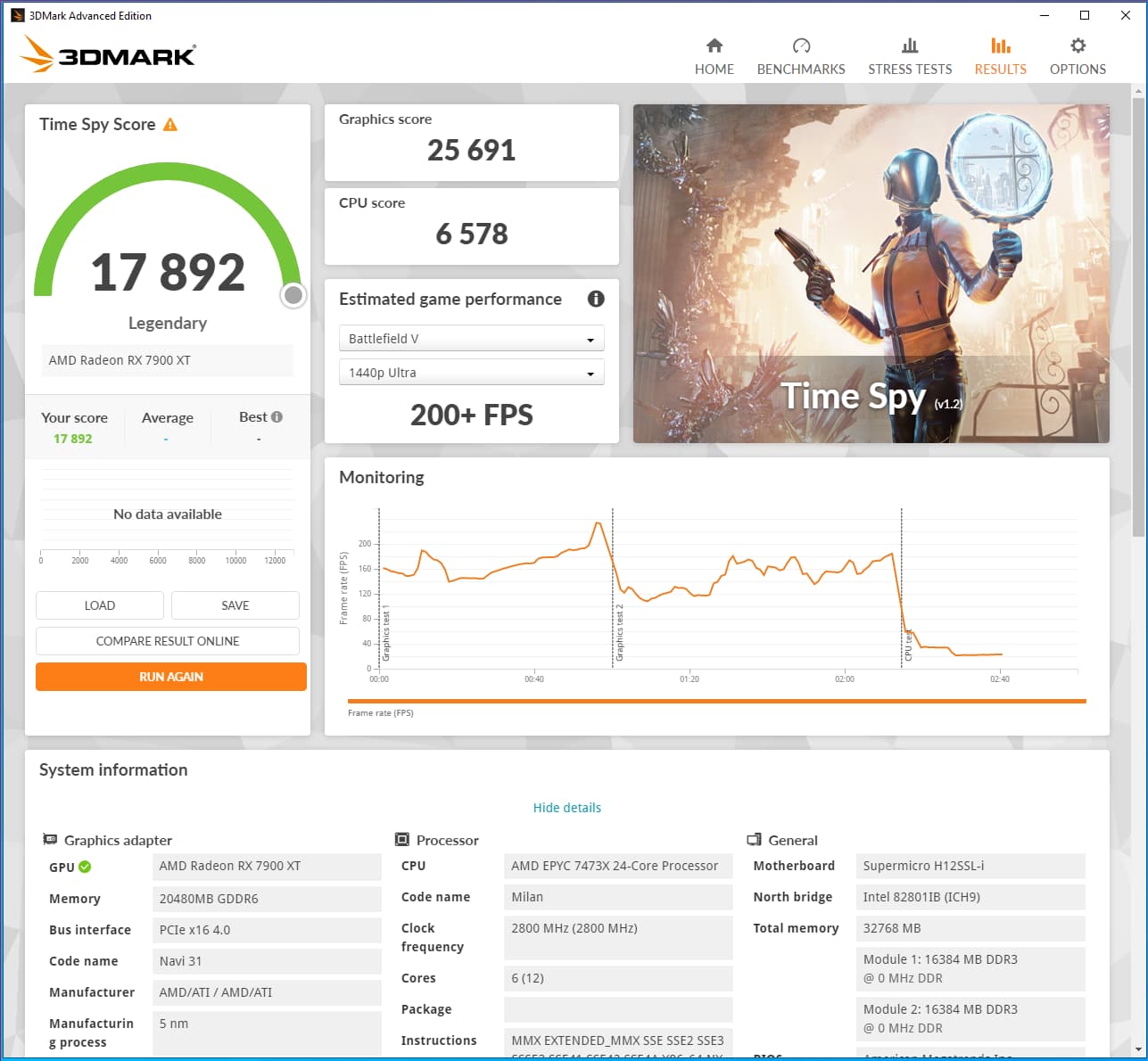
2 Likes
Anyone following this thread and is using a RX 7900 may find the following helpful:
2 Likes
Jealous, as I am not able to run 3DMark on my VM… For some reason when you click “Start” the benchmark, any one, it loads forever… Seems it is trying to load system configuration, but even if I disabled it, it still doesn’t run.
Similar behavior to AIDA64, as many benchmarks come up with “zero” as result.
I have seen it do this also, I am not sure what the cause/solution is, it’s just started working again.
It might be because I have since specified the smbios information about the system so it appears more like a real PC to software running in the guest.
I have that, but still doesn’t work.
Can you please share yours, to see if I am missing something?