It’s actually connected at 2.5G full-duplex on the switch, regardless if I force it or leave it on auto-negotiation. Occasionally, the download speed seems to go up to around 1.7Gbps, but then drops back down to <1Gbps on the subsequent speedtest. With the USB-10G port, it’s a solid 2.5Gbps with every test.
The laptop came with Windows pre-installed, so I did some tests on there too. Oddly enough, in Windows, the download was fast and the upload was jumping up and down, bouncing between 1.5Gbps and 0.7Gbps. Then I did a BIOS update which included something about “USB4 retimer”, even though the system BIOS in the package was not newer. Windows upload speed was fixed, solid 2.5Gbps up/down with every speedtest.
Unfortunately this made no change in Linux.
The other thing that is a bit worrysome is that Windows pops up a warning if I plug the dock into the USB-10G port, saying I’m using the wrong port. I hope this warning Is only about speed and not related to power delivery.
I wonder if it’s worth obsessing over this enough to install the Ubuntu image from HP to see if the problem persists and opening a support ticket.
Either directly from BIOS using network upgrade which downloads from HP, or on the HP website, by selecting Windows, and running that on any Windows PC to make a flash drive. (sorry I can’t include links here)
I had 1.03.02 installed, and the version on the website is 1.03.00 Rev.A, which appears to be older. Upon running it Windows, it said that BIOS would be downgraded. It lists a bunch of components and some are unchanged, while others can be upgraded.
I actually ended up using the network upgrade from the BIOS itself because my Windows upgrade failed since it refused to downgrade to 1.03.00 (I had it set to require a password for downgrades and I don’t have a password set). So since I was in BIOS anyway, I decided to try the network upgrade, which worked.
It left the system firmware unchanged at 1.03.02 (0x01030200 in fwupdmgr) and upgraded the firmware on 3-4 components, including that USB4 thing and the trackpad.
(sorry I keep deleting posts, it won’t let me edit them and it sometimes removes the reply-to thing in the header. I’m new to this place in case you can’t tell )
On reboot I’ve got ‘updating, please do not unplug power’ BIOS message and since then it’s working. Fedora 42 KDE, kernel 6.16.7, everything updated via dnf.
I can’t find any update history in fwupdmgr but I’m not very familiar with it.
I finally got mine! Status LEDs are working fine on my unit with the latest kernel on Fedora (Silverblue). Charging is indeed tricky, I’ll report if I get more info or a 100% working combo. The battery management is the weirdest I’ve ever experienced: it reports from 0 to 100% regardless of the charging limit, by changing the reported current full capacity of the battery. The screen’s lowest brightness is INCREDIBLY low and everything is basically red.
It seems there are firmwares (trackpad, touch,…) that are not updated via the OS, so try the update through the BIOS. It also offers a direct downgrade possibility BTW, to the immediately previous version, and downloads directly from HP.
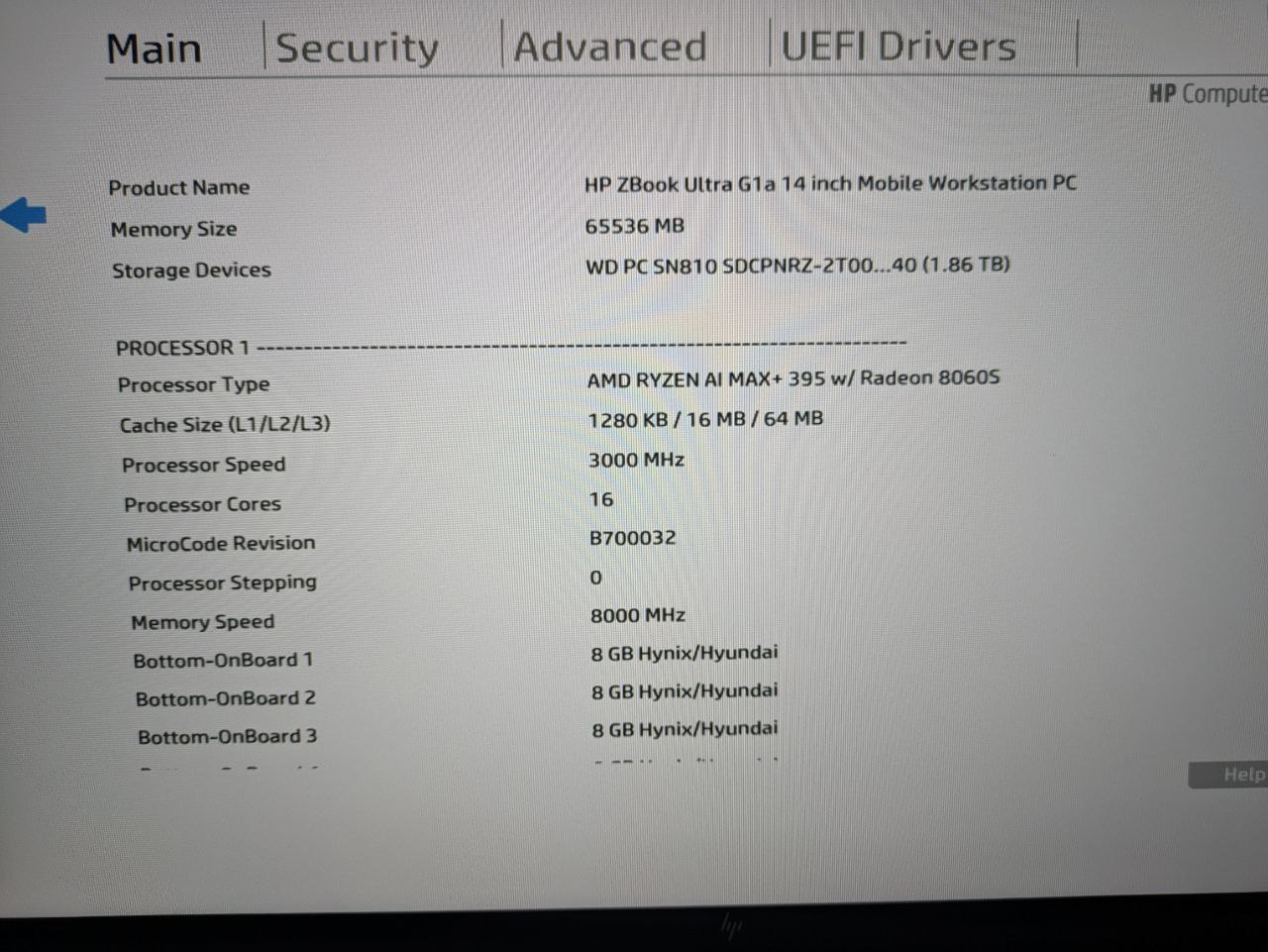
I have a weird issue though: my APU is not seen as a PRO version! I don’t have the possibility to enable Memory Guard for example. The non-PRO model of the 395 isn’t even listed on the model list for the ZBook, but I also saw some probes on the Linux Hardware DB which also listed a non-PRO processor. Does anybody have any info on this? Does anyone else’s unit here report just “AMD RYZEN AI MAX+ 395 w/ Radeon 8060S” instead of “AMD RYZEN AI MAX+ PRO 395 w/ Radeon 8060S”, and is missing the memory encryption option mentioned on Phoronix in the article from June 12th (sorry, can’t post links)?
Assume it is for developing markets, mine also has 1920*1200@60Hz IPS panel without touch.
At least it costs a bit cheaper than high tier, mine is about $2400
There are PRO and non-PRO options. I wasn’t able to see them on the European sites, but on the en-us site, you can see more.
For example, models AY8K0AV and AY8K3AV are both 395 + 64GB where one is PRO and the other not.
Alternate Options
HP ZBook Ultra 14 inch G1a Mobile Workstation PC with AMD Ryzen™ AI Max 385 processor + 32 GB RAM, AMD Radeon™ 8050S Graphics ( AY8K4AV )
HP ZBook Ultra 14 inch G1a Mobile Workstation PC with AMD Ryzen™ AI Max 390 processor + 32 GB RAM, AMD Radeon™ 8050S Graphics ( AY8K5AV )
HP ZBook Ultra 14 inch G1a Mobile Workstation PC with AMD Ryzen™ AI Max PRO 385 processor + 32 GB RAM, AMD Radeon™ 8050S Graphics ( AY8K8AV )
HP ZBook Ultra 14 inch G1a Mobile Workstation PC with AMD Ryzen™ AI Max+ 395 processor + 32 GB RAM, AMD Radeon™ 8060S Graphics ( AY8J9AV )
HP ZBook Ultra 14 inch G1a Mobile Workstation PC with AMD Ryzen™ AI Max PRO 390 processor + 32 GB RAM, AMD Radeon™ 8050S Graphics ( AY8K9AV )
HP ZBook Ultra 14 inch G1a Mobile Workstation PC with  AMD Ryzen™ AI Max+ 395 processor + 64 GB RAM, AMD Radeon™ 8060S Graphics ( AY8K0AV )
HP ZBook Ultra 14 inch G1a Mobile Workstation PC with AMD Ryzen™ AI Max PRO 390 processor + 64 GB RAM, AMD Radeon™ 8050S Graphics ( AY8L1AV )
HP ZBook Ultra 14 inch G1a Mobile Workstation PC with AMD Ryzen™ AI Max+ PRO 395 processor + 64 GB RAM, AMD Radeon™ 8060S Graphics ( AY8K3AV )
HP ZBook Ultra 14 inch G1a Mobile Workstation PC with AMD Ryzen™ AI Max+ PRO 395 processor + 128 GB RAM, AMD Radeon™ 8060S Graphics ( AY8K2AV )
Mine is a 390 Pro and it does have the memory encryption option in BIOS and is reported correctly in cpuinfo
processor	: 23
vendor_id	: AuthenticAMD
cpu family	: 26
model		: 112
model name	: AMD RYZEN AI MAX PRO 390 w/ Radeon 8050S
stepping	: 0
microcode	: 0xb700032
Interesting, thank you. Where did you find that list? I only find models with PRO CPUs.
I contacted the shop I bought it from and they are investigating. My model name is A3ZH3ET, and everywhere I look I see PRO in the description, but I’ll see where this goes.
Besides that, and some WiFi trouble when ASPM is on on the card, this notebook is AWESOME. The OLED screen is not only VRR capable but also HDR capable once you force enable it in KDE, or edit your EDID (on my ToDo, I’ll post it here when I get to it).
Thanks. I have been wondering if I’m missing something, so I’m glad you also got to the same conclusion: PRO features should actually be enabled for this model.
The shop just sent me a return label so I’ll be shipping it back, although I wonder what the actual replacement will be: same model number, and this was a fluke? Different model number?
This sadly means parting with it so I won’t be able to test stuff for a few days (or weeks? ), but I’ll be back ASAP.
The memory encryption might cause slowdown in certain workloads, you can turn that off in BIOS if you don’t want it. I didn’t notice any difference with it enabled or disabled.
more info here: www.phoronix.com/review/amd-memory-guard-ram-encrypt
Does anyone experience issues with 3rd party power supplies? I have a dock station with 65W PD capability, and this laptop refuses to charge at all.
I know that the HP power brick can deliver 140W, but I assumed 65W would be enough for daily tasks.
I use a 100W Dell TB dock at work and it works perfectly.
At home I have a 3rd party charger that supposedly does 140W but when the laptop is under load for extended times it sometimes just turns off [1].
I just tried a Lenovo 65W charger and it did not work. The laptop itself can draw more than 65W, so I guess it guess 65W is simply not enough. I have seen the original charger draw its full 140W and the battery can charge with up to 80W.
Also: 100W is not enough if the laptop wants to do a firmware upgrade (and the battery is too low?)! This broke fwupd for me and I had to disable secure boot, do the update and then reenable it.
Hey Wendell, thank you for the amazing guide. I used it in addition to the Arch wiki to set my new Zenbook. I had to fill the gaps here and there but in the end I have a laptop with working hibernate/suspend ! The year of the linux {desk,lap}top is upon us.
I get this sometimes. One way that always fixes it (even if it’s a pain in the ass) is to disable bluetooth in the BIOS, boot and login, then reboot and re-enable bluetooth in the BIOS.
I suspect it’s a power management thing, the last time I encountered it was when I was running powertop on battery power, but I’ve had it happen in some other regular use situations before that.
I think it needs at least 100W to charge while running, but if it’s suspended or powered down it will accept a charge from lower output power supplies.
I just returned this Belkin charger because it was constantly starting and stopping charging, so sometimes even properly rated power supplies aren’t perfect, but that could just be Belkin being trash.
Power supplies that do work for me:
Framework’s 180W power supply works flawlessly Belkin’s 96W dock works, though under heavy load it doesn’t seem to be able to keep up
System76’s 100W supply that comes with their Pangolin 15 seems to work well enough
 )
)
 ), but I’ll be back ASAP.