The Rig 3.0

As a few of you are no doubt aware, I have been a very busy infrastructure troll. So, I will skip straight to the entertainment.

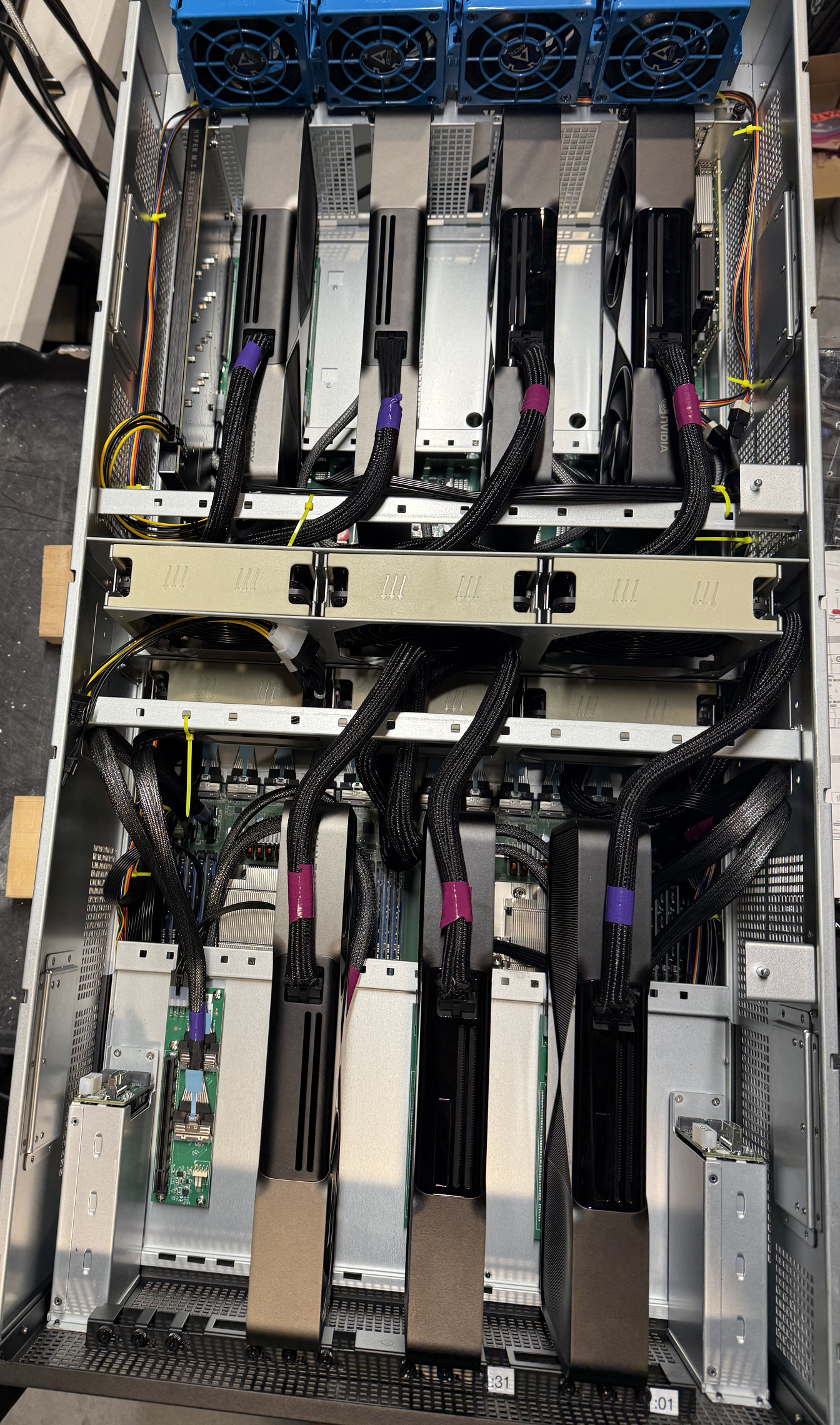
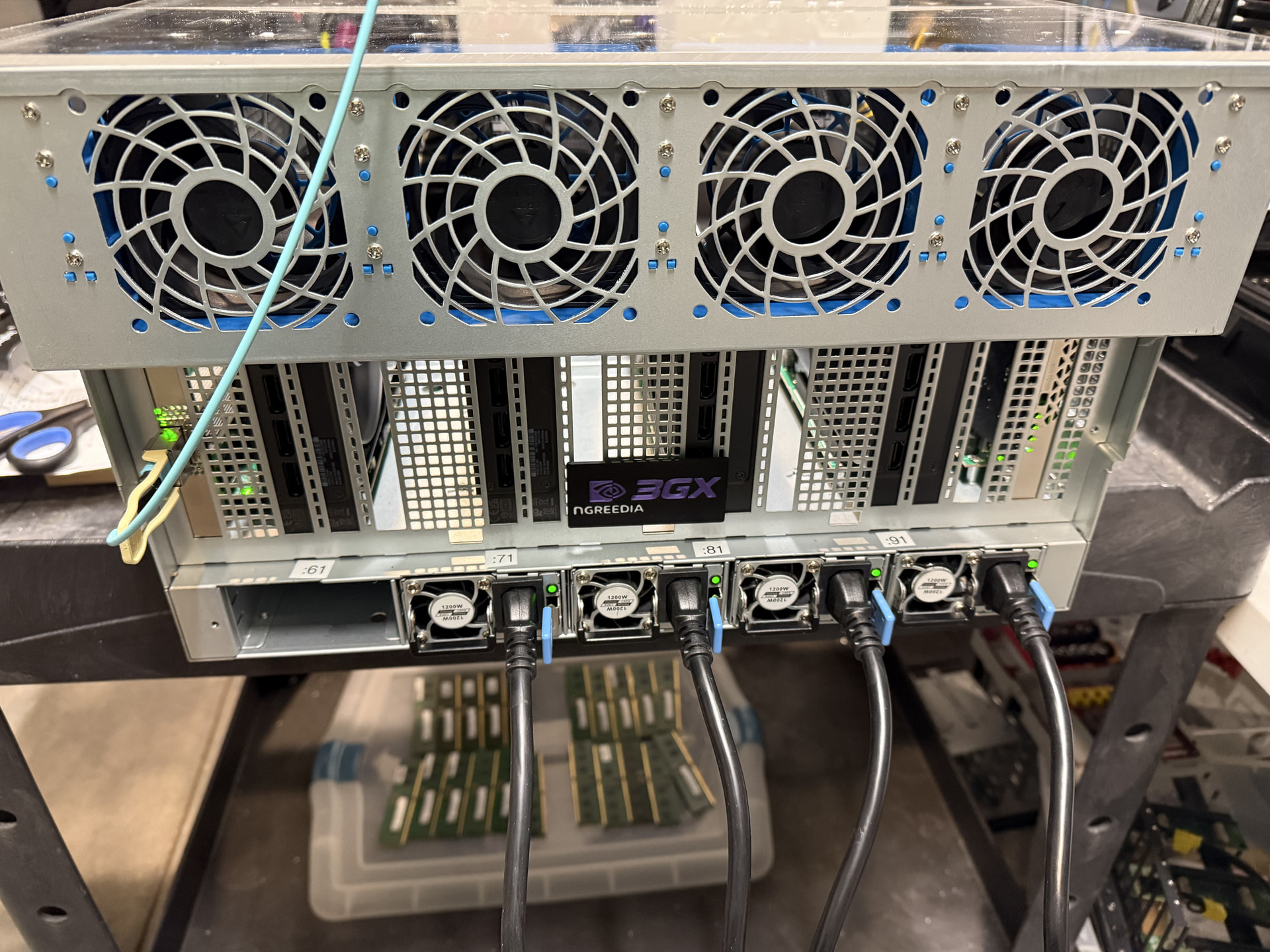
I present to you, the nGreedia 3GX: (The beatings will continue until stockholder value improves edition)
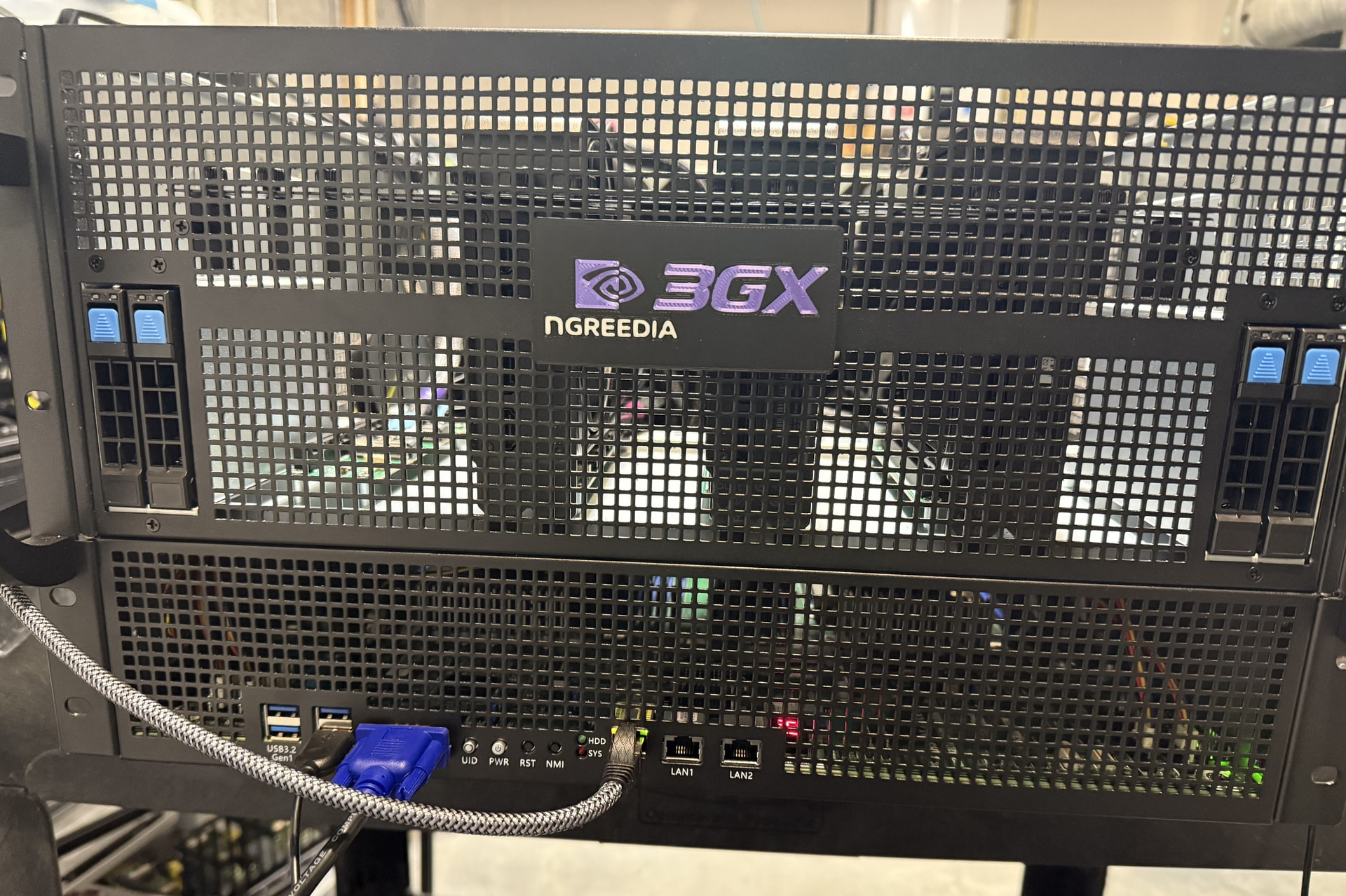
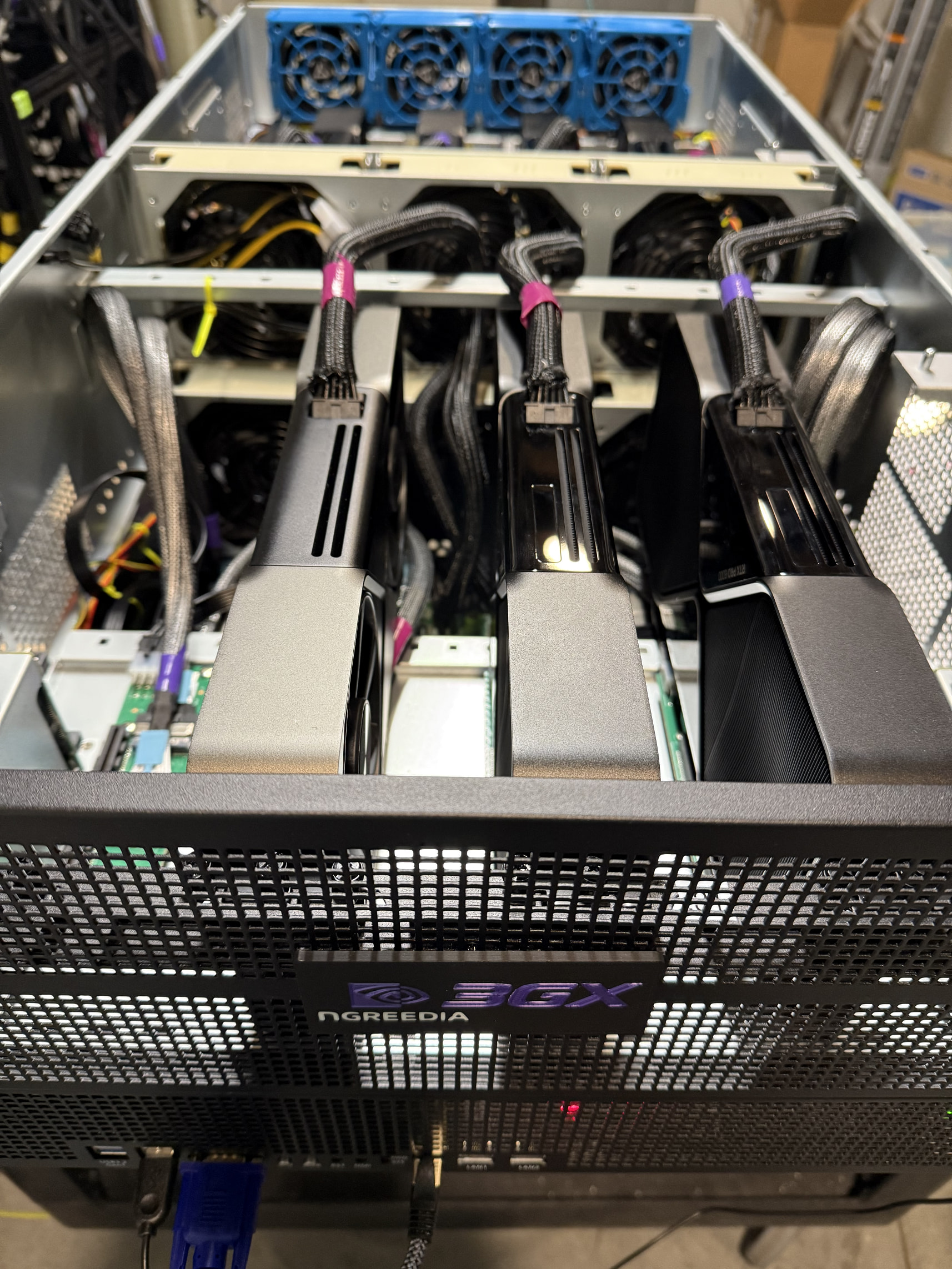
This is my third iteration of an inference rig, probably not the last, but the most effective so far.

It features:

A customized rack mount chassis straight from the factory in China ordered via Alibaba.

The CRPS power distribution board I posted in other threads, room for up to 5x 3KW power supplies feeding a cool thousand amps of 12v into 14x 12vhpwr ports connected to the BMC via pmbus for monitoring/management/load balancing.

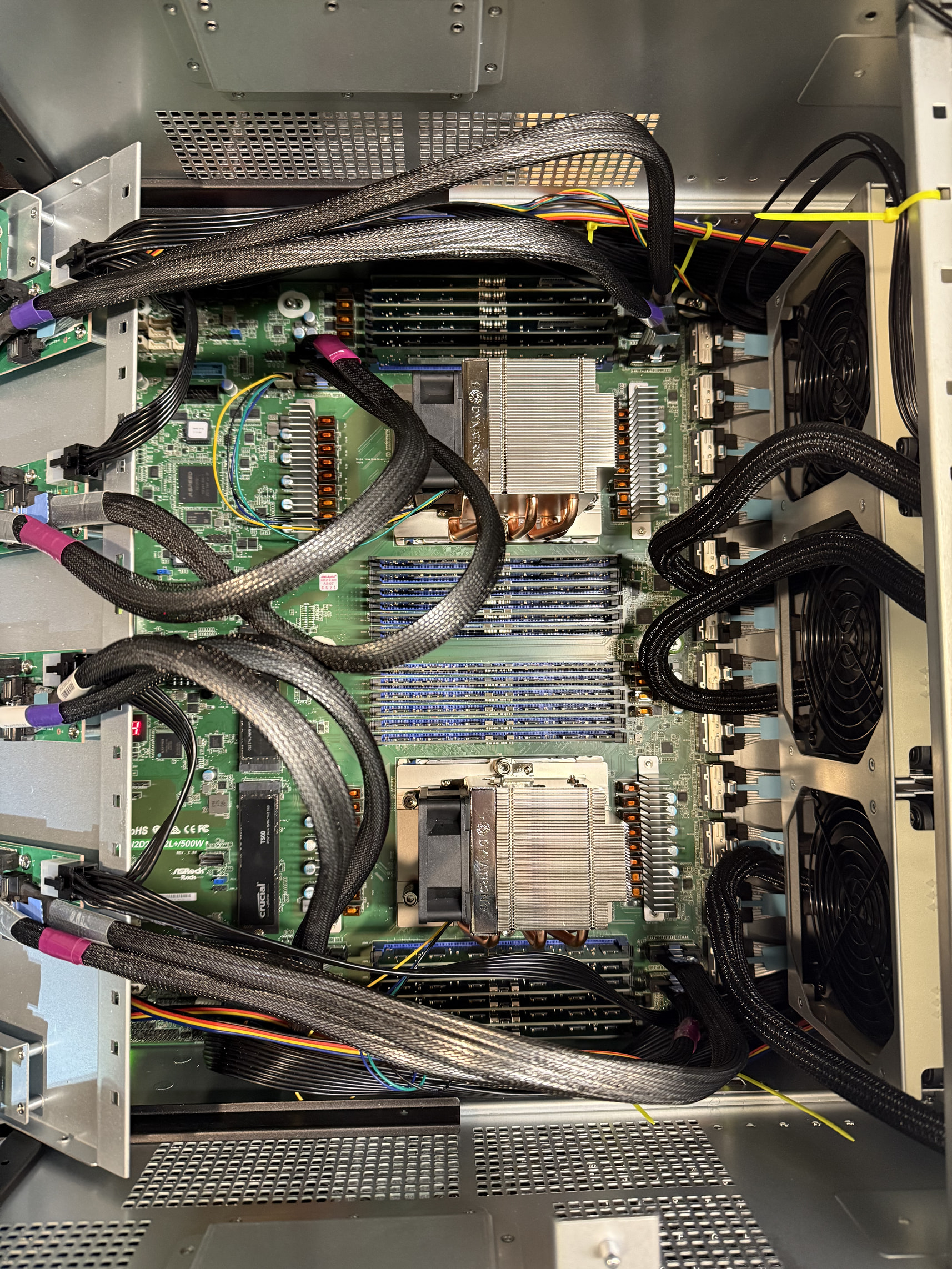
The Asrock Rack TURIN2D24G dual socket 24 dimm board with 20 MCIO 8i connections.

Room for 8x 3-slot GPUs at PCIE 5.0 x16, a mellanox connectx-6 NIC at 200gig, and 4x T705 M.2 sticks in an asus hyper gen5 storage card. Totaling 160 lanes of pcie gen5 straight into your Neuralink implant.

From a tech stack, its just running Ubuntu 24 with:

NFS over RDMA for bulk storage, ZFS stripe on NVME gen5 drives with 350 GB arc cache for tier zero GPU attached storage, CUDA 12.9 with NCCL, and delicious Geohotz’ drivers enabling full peer to peer direct memory access between all the cards hijacking base address register 1 and riding the infinity fabric validated with the epyc system management interface live xGMI link monitoring.

This is all optimized to feed VLLM TP4/EP4 running a custom fp8 quant of GLM 4.7 most days, doing all sorts of untold evil (such as migrating a legacy end of life SAP CRM system to the cloud).

BIOS changes from stock on the Asrock board:

disable sata for faster boot times, disable PCIE ACS for peer to peer DMA, enable HSMP support for epyc system management interface access in the OS, REBAR on, pcie hotplug disabled on all mcio ports, bifurcate the one x16 into x4x4x4x4 for the asus hyper m.2 gen5 card.

20 Likes

Just in time for the BOINC event over on the LTT forums starting next Monday. I think your contraption qualifies. Just :pinching_hand:

:rofl:

I laughed my arse off rolling on floor, great timing and humor!

1 Like

Those Arctic fans are great for cooling and quiet conversation.

The future I think I can safely say, we all want:

2 Likes

TURIN2D24G-2L±500W_2.07.00.ima.zip (50.0 MB)

TURIN2D24G-2LP-500W_11.01.ROM.zip (15.0 MB)

For anybody duplicating this kind of build, here are the latest BMC and BIOS files you will need loaded on the board. Remember to upgrade your BMC before flashing to the latest BIOS.

1 Like

Hey, awesome build — this is very close to what I’m planning.

You mentioned getting a custom chassis from Alibaba.

Would you mind sharing the supplier or pointing in the right direction?

Would really appreciate any info.

1 Like

I’d be interested in the link as well.

Come to the RTX 6000 discord hardware channel, we have links to TONS of chassis for big 4-8 GPU builds and their ali sellers, people with experience buying them and feedback.

The latest version is this one: https://www.alibaba.com/product-detail/OEM-7U-Chassis-8-Cards-TURIN2D24G_1601394455303.html?spm=a27aq.30226274.4314857580.33.40944621Mvgrx8

There are plenty of other options: https://www.alibaba.com/product-detail/ASRock-5U-Gen5-8-GPU-10_1601466350490.html?spm=a27aq.30226274.4314857580.34.40944621Mvgrx8

Depending on the motherboard you have and GPUs you want to use: https://www.alibaba.com/product-detail/New-Original-4U-Rack-4GPU-8GPU_1601226955757.html?spm=a27aq.30226274.4314857580.2.40944621Mvgrx8

Shop around and chat with the manufacturers.

1 Like

Thank you so much for reply. I have one more question - did you order a custom chassis from Alibaba, or just a standard one?

Standard chassis options are clear, but when I try to discuss custom configurations with suppliers, I’m running into issues (high MOQ, limited flexibility, they don’t have arctic coolers, etc.).

Trying to understand if your chassis was custom from the factory or if you modified a standard one yourself.

I would, but I am not gonna join any Discord again. It’s a shady data grab and I deleted my account and will stay the hell away from there. I wish you’d have chosen a different platform. Thank you for the links though, these are helpful.

I ordered a custom one from the factory with the cooling and connectivity i wanted. my MOQ was 1. The changes I requested were using standard parts from them mixing 2 different standard solutions, basically I got a gen5 upgraded version of a gen4 chassis.

The fans are hot swap, and you can bend a little piece of plastic on the hot-swap fan holder to install the arctic fan from amazon.

I didnt choose the platform, thats just where the community is and unfortunately deep source of information. probably why its so valuable to the data scrapers

Small suggestion for second edition server badge/emblem:

under NGREEDIA in tiny font (smaller than NGREEDIA itself) all caps it should say “the way it’s meant to be paid” or “you are meant to be played”

e.g. like this:

Jensen Huang Hooli Box III Signature Edition ™️:

3 Likes

“All proprietary, all the time”

2 Likes

Will work this into the next design: The Rig 3.11 for workgroups.

<3

3 Likes

“The more you buy, the more you save”

2 Likes

“CEO math; It is not accurate, but it is correct”

Got any more info on the CUDA and fabric monitoring setup? I’m running a Threadripper Pro system bifurcated out to 13 slots of 5.0 x8 and I’m ready to dip my toes into proper 8 way tensor parallelism. Seems like AVX512 would also make ktransformers a good candidate too alongside vllm?

I dont have a TR but on Epycs i run the E_SMI

you need to enable the interface in your bios, install/compile the kernel module.

You will need to map what pin group/pads go to what pcie lanes:

root@three-TURIN2D24G-2L-500W:~# ./turinstat.sh 

==== MCIO/PCIe Bandwidth (GB/s) ====
Socket0                   Socket1             
P2 MCIO1/2   18.94 GB/s    P2 MCIO11/12   0.00 GB/s
P3 MCIO3/4   13.25 GB/s    P3 MCIO13/14   0.00 GB/s
P1 MCIO5/6   21.34 GB/s    P1 MCIO15/16   0.01 GB/s
P0 MCIO7/8   0.00 GB/s    P0 MCIO17/18   0.00 GB/s
G3 MCIO9/10  25.10 GB/s    G1 MCIO19/20   0.00 GB/s

==== xGMI Inter-socket Bandwidth (GB/s) ====
Socket0     xGMI      Socket1
7.71 GB/s   G0<->G2   7.33 GB/s
7.94 GB/s   G1<->G3   6.21 GB/s
6.89 GB/s   G2<->G0   4.91 GB/s

==== Memory Bandwidth (GB/s) ====
Socket0      Socket1     
3            7           

This is the script for a turin2d24g board:

root@three-TURIN2D24G-2L-500W:~# more ./turinstat.sh 
#!/bin/bash

# Socket0 (MCIO1-10)
declare -a SOCKET0_LABELS=( "P2 MCIO1/2" "P3 MCIO3/4" "P1 MCIO5/6" "P0 MCIO7/8" "G3 MCIO9/10" )
declare -a SOCKET0_PORTS=("P2" "P3" "P1" "P0" "G3")
# Socket1 (MCIO11-20)
declare -a SOCKET1_LABELS=( "P2 MCIO11/12" "P3 MCIO13/14" "P1 MCIO15/16" "P0 MCIO17/18" "G1 MCIO19/20" )
declare -a SOCKET1_PORTS=("P2" "P3" "P1" "P0" "G1")

declare -a BW0
declare -a BW1

for i in "${!SOCKET0_PORTS[@]}"; do
  BW0[$i]=$(./e_smi_tool --showiobw 0 "${SOCKET0_PORTS[$i]}" | grep 'Current IO Aggregate bandwidth' | awk -F'|' '{print $3}' | sed 's/^[ \t]*//')
done
for i in "${!SOCKET1_PORTS[@]}"; do
  BW1[$i]=$(./e_smi_tool --showiobw 1 "${SOCKET1_PORTS[$i]}" | grep 'Current IO Aggregate bandwidth' | awk -F'|' '{print $3}' | sed 's/^[ \t]*//')
done

echo
echo "==== MCIO/PCIe Bandwidth (GB/s) ===="
printf "%-12s %8s    %-14s %6s\n" "Socket0" "" " Socket1" ""
for i in $(seq 0 4); do
  #val0=$(echo "${BW0[$i]}" | awk '{v=$1+0; printf "%.2f GB/s", v/8000}')
  #val1=$(echo "${BW1[$i]}" | awk '{v=$1+0; printf "%.2f GB/s", v/8000}')
  val0=$(echo "${BW0[$i]}" | grep -oE '[0-9]+' | awk '{v=$1+0; printf "%.2f GB/s", v/8000}')
  val1=$(echo "${BW1[$i]}" | grep -oE '[0-9]+' | awk '{v=$1+0; printf "%.2f GB/s", v/8000}')
  label0="$(echo "${SOCKET0_LABELS[$i]}" | awk '{print $1 " " substr($0, index($0,$2))}')"
  label1="$(echo "${SOCKET1_LABELS[$i]}" | awk '{print $1 " " substr($0, index($0,$2))}')"
  printf "%-12s %8s    %-14s %6s\n" "$label0" "$val0" "$label1" "$val1"
done

# xGMI
declare -a XGMI_PAIRS=( "G0_G2" "G1_G3" "G2_G0" )
declare -A XGMI_LABELS=( ["G0_G2"]="G0<->G2" ["G1_G3"]="G1<->G3" ["G2_G0"]="G2<->G0" )
declare -A XGMI_BW0
declare -A XGMI_BW1
for pair in "${XGMI_PAIRS[@]}"; do
  left="${pair:0:2}"
  right="${pair:3:2}"
  XGMI_BW0["$pair"]="$(./e_smi_tool --showxgmibw 0 $left AGG_BW | grep 'Current aggregate bandwidth' | awk -F'|' '{print $3}' | sed 's/^[ \t]*//')"
  XGMI_BW1["$pair"]="$(./e_smi_tool --showxgmibw 1 $right AGG_BW | grep 'Current aggregate bandwidth' | awk -F'|' '{print $3}' | sed 's/^[ \t]*//')"
done

echo
echo "==== xGMI Inter-socket Bandwidth (GB/s) ===="
printf "%-8s   %-7s   %8s\n" "Socket0" " xGMI" "Socket1"
for pair in "${XGMI_PAIRS[@]}"; do
  label="${XGMI_LABELS[$pair]}"
  val0=$(echo "${XGMI_BW0[$pair]}" | awk '{v=$1+0; printf "%.2f GB/s", v/8000}')
  val1=$(echo "${XGMI_BW1[$pair]}" | awk '{v=$1+0; printf "%.2f GB/s", v/8000}')
  printf "%-8s   %-7s   %8s\n" "$val0" "$label" "$val1"
done

# Memory Bandwidth
DDR_BW=($(./e_smi_tool | awk -F'|' '/DDR Utilized BW \(GB\/s\)/ {gsub(/^[ \t]+|[ \t]+$/, "", $3); gsub(/^[ \t]+|[ \t]+$/, "", $4); print $3, $4}'))
echo
echo "==== Memory Bandwidth (GB/s) ===="
printf "%-12s %-12s\n" "Socket0" "Socket1"
printf "%-12s %-12s\n" "${DDR_BW[0]}" "${DDR_BW[1]}"

This is board specific, use your motherboard manual, the block diagram showing where those lanes go and generate known test traffic to figure out whats going where for your specific hadware/firmware setup.

1 Like