Tailscale - Interviewing the CEO and Co-Creator, Avery Pennarun

Video

→ This video is a conensed version of the full long format interview you can find on our patreon!


Modern magic

Pennarun’s favorite quote from a customer:

“Tailscale makes the internet work, like you thought the internet worked, until you learned how the internet worked”

This “just a connectivity layer” software is revolutionary and actually required quite a bit of engineering to achieve. Rivaling the best cloud experiences you’ve ever had, for FREE and LOCALLY, Talescale is a gem not talked about enough in the tech-youtube-world. In the video above, @wendell gets to talk with the CEO and Co-Creator of Tailscale, and unearths some of the mysteries behind this amazing software.

Tailscale in a nutshell

As touched on above, Talescale is a connectivity layer for connecting your PCs in a local network. It eliminates the need for a cloud-based networking setup filled with dubious activities large companies get up to. As Wendell said in the video:

Oh I’ve stored all of my data in Google, are they mining all of that data? Oh this file matches the forbidden MD5sum, you shant access it.

In addition to having the convenience of the cloud, without the drawbacks, Talescale is versatile enough for both individual consumers and commercial settings alike.

The problem with modern networking

“Tailscale creates direct connections to devices anywhere in the world.”

The foundation of the internet was based on the idea that data and information needed to be sent directly to another piece if equipment. The birth of FTP (File Transfer Protocol) in the 70s was based on this concept.

As Pennarun explained in his interview, (as the years and technology has advanced) the best way to get something from a phone to a laptop, for instance, would be to send it up to the cloud and then back to the 2nd device (even more so if these devices are far away from each other.)
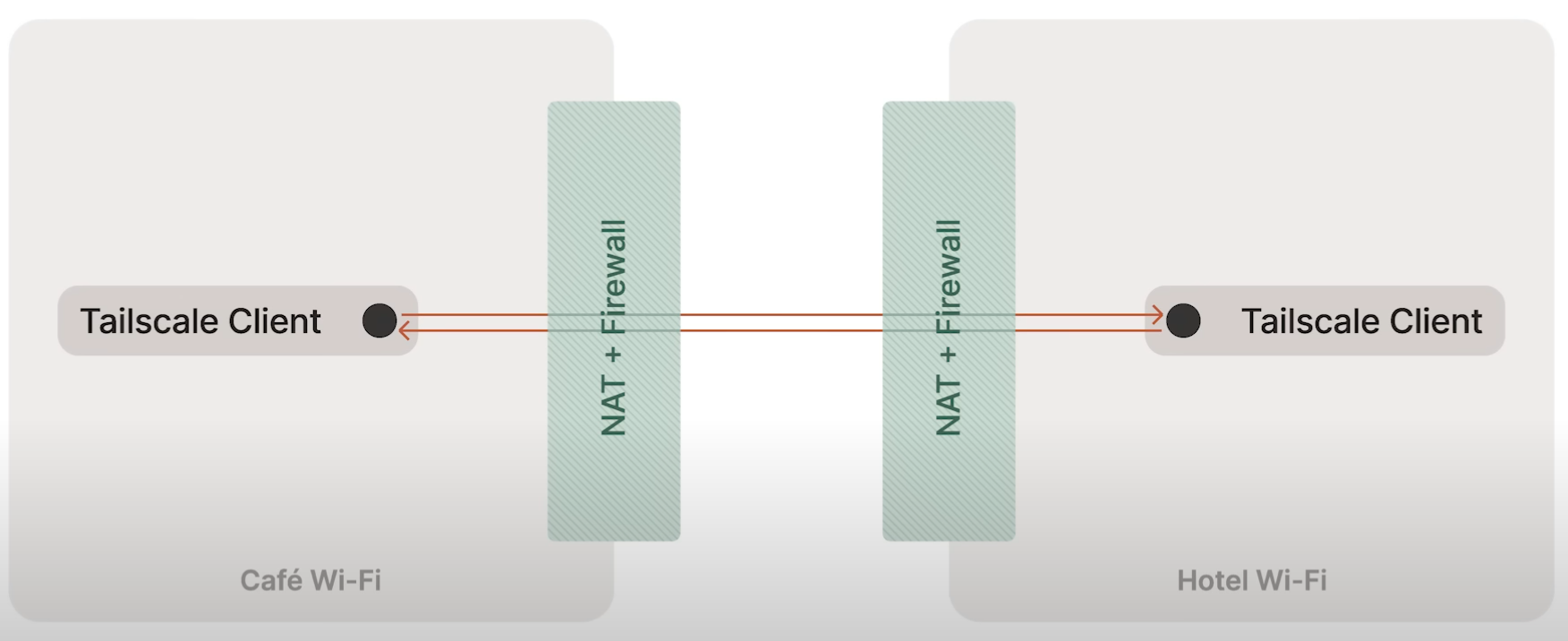
Being able to go from one piece of hardware to another without a middleman is rather unheard of in 2024:

“You can go straight from one place to another, very efficiently, without adding any latency, but also adding encryption.”

How Tailscale inspires change

Wendell references Netflix in the video, and draws the conclusion that you could share your media and data with other people.

“Hey I bought and now own this digital media, I want to store it locally on my own drive. I want to stream it from my computer to my phone whenever I want to.”

He then references how PlayStation shut down their store and just deleted consumer-purchased shows, Steam is just a license to play a game, and other nonsense of the modern internet.

Even if something is possible, companies will make the experience of trying to use a direct connection as difficult and unsupported as possible. Do you want to get files off of your iPhone to your PC? Welp, use Apple’s service and pay them when you run out of storage. Even if you DO achieve a direct connection, oh, its USB 2.0 speeds and a pain for the 50GB of video from my vacation to transfer to my PC.

Tailscale and mobile connectivity


from Tailscale Docs

Pennarun mentions how Tailscale for phones works as simply as the proprietary airdrop feature] Apple devices can use. If you’re not familiar with airdrop, any Apple devices can directly send pictures, videos, and other files to each other.

He saw this was a great concept and created Taildrop. As long as it is installed on both devices you have that same great utility not locked by proprietary nonsense. Apple to Android, Android to MAC, etc. all will work as long as Tailscale is installed. The best part? Anywhere. Literally. Miles apart, countries apart, you name it.

Comparing Tailscale to alternatives

Many people might download NextCloud and the like. Pennarun makes the point that, when you put your information online, it is susceptible to the small percentage of people who would take advantage and steal that. If you use Tailscale and keep your private information local, this naturally protects your information to be leaked online, and seen only by the people you give permission.

“We can create little safe worlds for ourselves, and connect our little safe worlds to others.”

Why Tailscale is safe
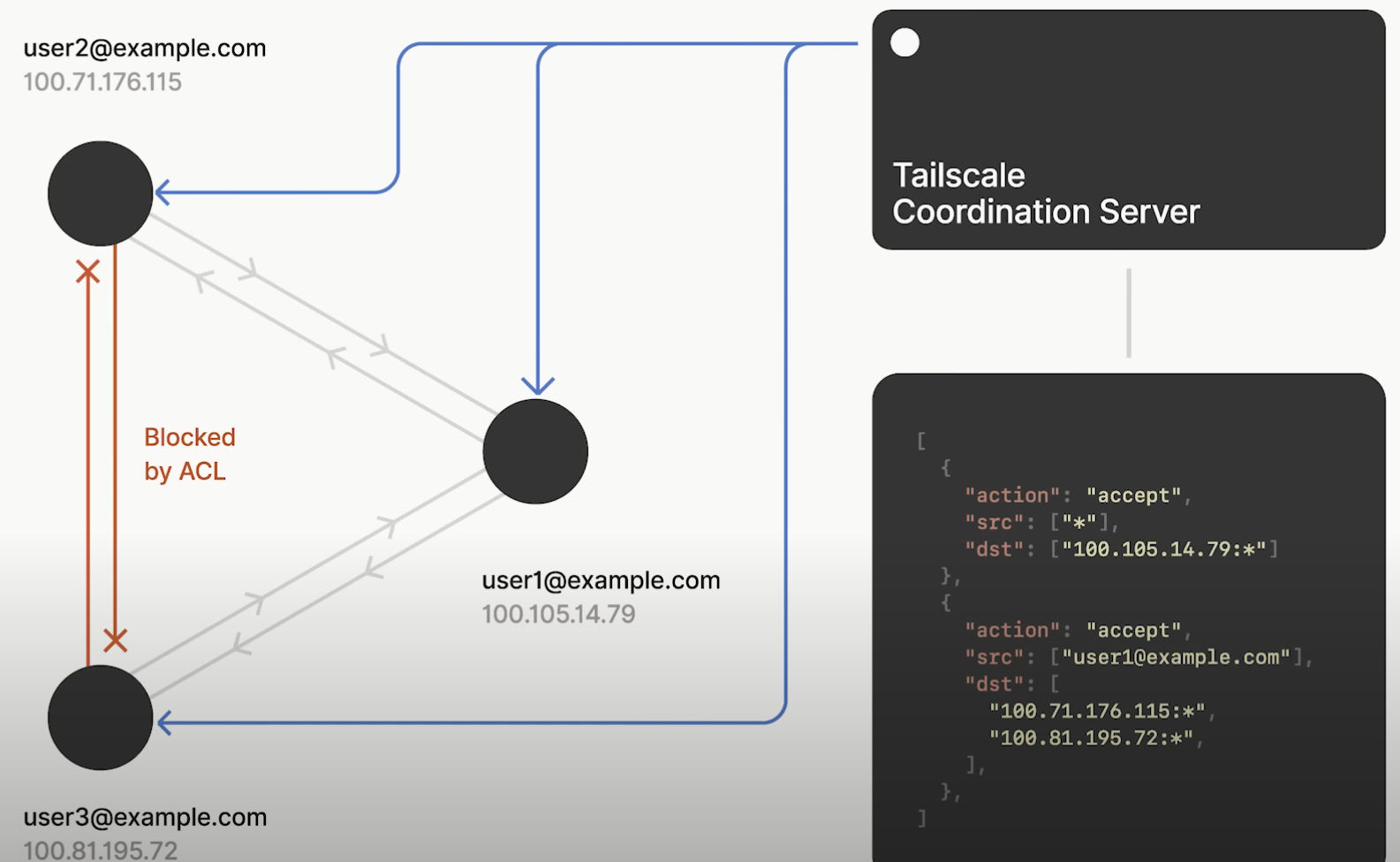
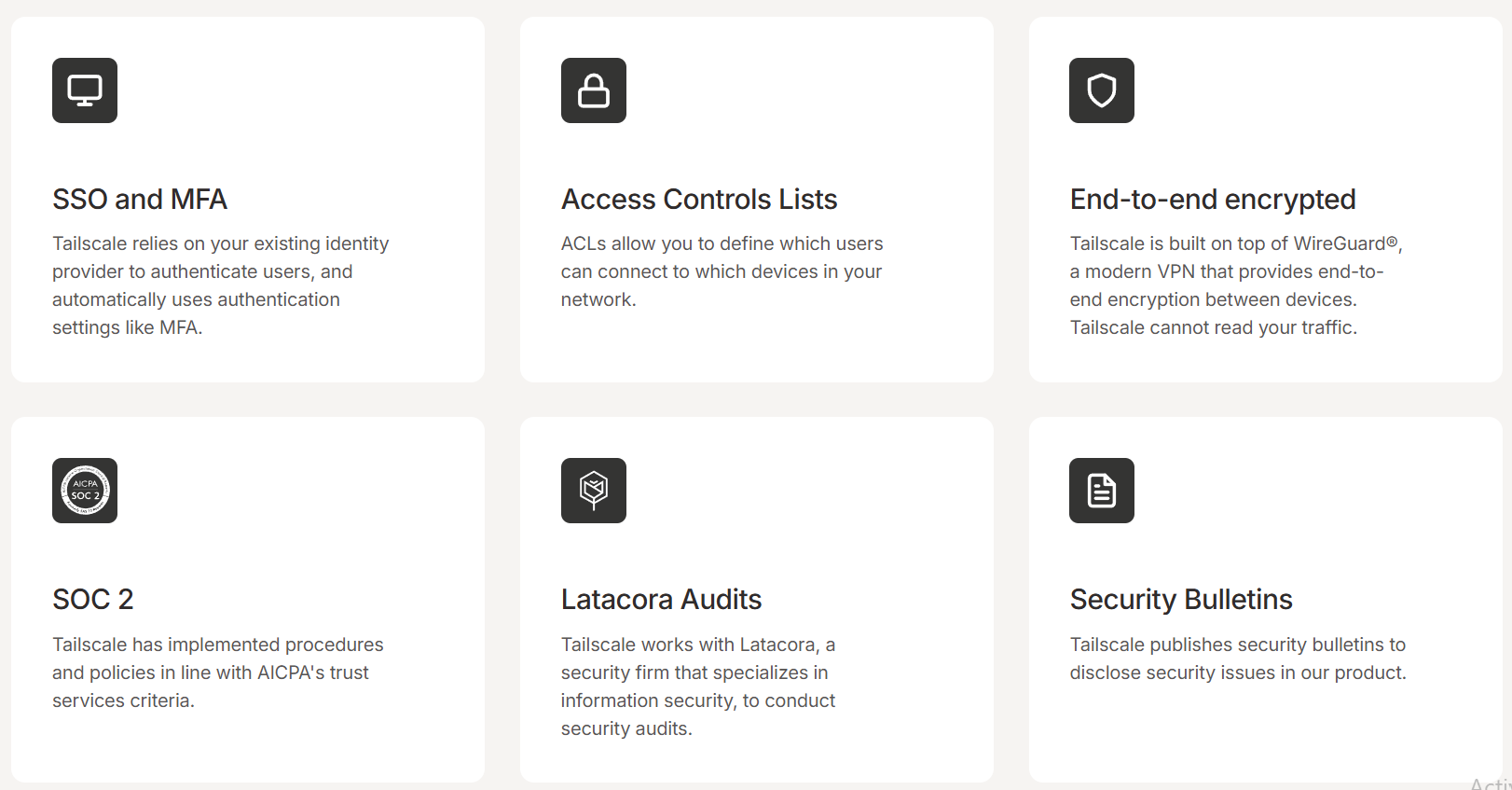
In addition to what we have said about this being a local connection rather than public, Pennarun explains that Tailscale changes the equation when it comes to your firewall. If someone breaks into your system, the Tailscale network is still private and communicates through its own avenues.

You can also set custom and very advanced ACLs (Access Controls Lists) to lock down everything even further, or restrict specific users.
Conslusion

Um, go download it? :rofl: In all seriousness, we can’t recommend Tailscale enough. It is a beautiful homage to what the internet was intended to be, and fights “the good fight” to keep people independent from their cloud captors. If you have any questions or comments I’d love to read them below!

Download it!

Installation & quickstart info

5 Likes

How does tailscale get around the NAT? Synology for example will connect your laptop to your NAS over the net but that requires software for each device to talk to a synology server first. The NAS and the laptop independently talk to the synology server. The synology server then looks at the packets and pulls the port info and allows the laptop to talk to the NAS by crafting an IP packet with the correct incoming/outgoing ports to get around the NAT. Does tailscale open new ports as well through UPNP? [EDIT] OOPS, I should have waited till 14:39 but there were no details.

1 Like

I’ve been using it for over a year, after seeing what it can do in conjunction with Proxmox’s LXCs… yes, it IS network magic.

2 Likes

Nice interview, but on a general note:
Isn’t that just a shift of responsibility/blame? It removes the whole burden of configuration and maintaining of publicly available software and bundles that at tailscales servers? Can’t I get something similar (in the actual outcome, not the way it works) by using a wireguard based solution? Spin up a public instance at linode and connect to that? Neglecting the user configuration overhead.

This centralized approach to the configuration without actually knowing whats going on behind the scenes make it not my cup of tea.

2 Likes

Pretty nice that someone made wireguard easier. It took me a while to understand all that there was to configure. And there were some inconveniences when dealing with it outside of having it on the main gateway.

My mikrotik router has an integration that allowed me to just straight up spawn a network and send QRs and config files to other people I wanted on my network, so I suppose that was just fine.

The timing on this is perfect. I’m in the early stages of starting to look into building my NAS soon and have been wanting to look into keeping it remotely accessible but doing so securely, and this sounds like just what I’m wanting. There are a few bits in the video you touch on that at this point I don’t fully understand, and forgive me if i just haven’t found it or gotten to it yet, but though it might not be something you feel needs tackeling from your end, having a primer (level 099) video about networking and building a NAS in an easy to digest single source might provide additional benefit to people at my kind of level that are looking to enter this space but don’t know where to start?

1 Like

Yeah, but can you do it with a 5 minute budget for configuration and get a huge network going?

If it really bugs you, headscale works well too and adds another 30 minutes of configuration.

1 Like

Very cool, looking forward to the tutorials to get started with this. I suspect this is a little far from “it just works” but if we can get it to “Here is how to do it” and most people can follow along there will be a lot of traction.

1 Like

You’d be surprised… it does indeed just work. Seriously, just go to their website and 3 minutes later you’re rockin’ and rollin’.

Any “tutorials” are just using services, that you coulda used on your local network anyway with your plain-ass IP addresses. Although, tailscale does have a nice certificate program that gets ssl going easily, maybe there’s a tutorial somewhere in there somewhere?

I have a lot of respect for Avery Pennarun. I like his take on how developers end up overengineering with the requirement that every app scale to N users.

I have a lot of respect for how he and his team look at and address problems.

Thanks for doing this collab, L1!

1 Like

Great interview, I think I have been using Tailscale about as long as @wendell has and I have referenced that “How NAT traversal works” many times as a great way to better understand the complexity behind making Tailscale seem like “magic”

5 Likes

i liked that video

tailscale had a bug with UPnP on mikrotik routeros in regards to eager interface selection, and the bloke who helped debug it was an absolute legend, super keen to help and they patched it almost straight away

ive got patches still not merged after years in github (thanks Microsoft) but Nup, tailscale treat things seriously and it shows

it’s a lovely piece of software

1 Like

Avery talked about Tailscale making the internet more like how it was intended to be used originally. I’m curious what, if any, changes may need to be considered for an IPv6 internet world. I believe today that Tailscale provides security for traffic that is inside the Tailnet, but that security isn’t extended to traffic originating outside the Tailnet and destined to a Tailscale device, so are there any plans to extend this functionality to a world where devices do again have globally unique addresses and NAT traversal is no longer a factor?

3 Likes

We have nested NATs on top of CGNATs I think we wont run out and adopt IPv6 anytime soon.

2 Likes

This video came as a godsend, I’m looking for a new VPN solution to use at our medium size business.

I was already using tailscale at home, so I decided to run this command on my BYOD laptop at the office.

Tailscale advertise subnets

I just have access to everything from my phone over 5G and from home.

This also has me spooked: anybody running their own tailnet (knowingly or not) on their device can expose everything on our network as soon as they connect with 0 config onsite and 1 command at home… :exploding_head:

Am I missing something, or does Tailscale break close to every network layer security attempt?

1 Like

I mean im very dumb on some (much of this of this stuff). im sure there is something im missing but how dose one get a file off your phone when that and a PC is connected.

Dose plex “just work” with this and suddenly my phone dose not use plex relay if both the server and my phone have this active?

My point is this just works for people who fuck with networking and that is great but I cant hand this to my family and be like “it just works” there expectation with that phrase is very different.

1 Like

As I understand how Tailsscale works, you would still connect to Plex’s relay, but you shouldn’t need to configure anything else once you have Tailscale configured correctly. The way Plex works is you need to connect to a Plex relay. That is why you need to log in to your account on Plex’s web page for it to work.

Tailscale is awesome and a godsend! I work for a video games studio and we rolled this out to our infrastructure. It allows our devs to works from practically anywhere! I love that it integrates with common IDPs such as Google Workspace, Microsoft Entra, etc. and allows for ACLs to be managed from a Git repository.

I’ve also started using Tailscale at home to have access to my home lab, network and devices. I have it hooked into NextDNS so I have DNS ad-blocking wherever I go and on every device I own.

Thank you Tailscale for such an awesome and easy to use product!

How does this compare to zerotier?