I have a Lenovo P620 that I really like, the only problem is the case it comes in, too small and thermals are not great, let alone the noise it makes with so few and high revving fans.
I’m seriously considering moving everything to Phanteks Enthoo Pro | Closed Panel. I checked many cases but I couldn’t find one drastically better and I happen to have one laying around
I have 2 main concerns about this switch but so far I’ve convinced myself I got a workaround for both:
1- the proprietary PSU: I have enough space in the case for sure, I might have to improvise how to hold it in place but I’m really not too concerned about it. Besides, I won’t be moving around the case much.
2- the proprietary motherboard connector to the front IO of the case: It looks like a pcie slot but facing sideways, so I’m assuming I can’t connect it to the new case to power the pc on. But I believe that’s not a dealbreaker because the PC turns on when I plug the AC cable and as far as I can tell that’s a bios configuration.
What do you think? Am I on the right track? Anything else I should pay attention to?
I’ll provide pictures of both connectors when I’m home but I’ve been thinking about this for a while and I wanted to get this conversation started.
I ended up trying it out but I underestimated a much simpler problem. The motherboard has 11 screws, not a single one matches any of the standoffs in the case and to add insult to injury the last pcie slot of the case interferes with the PSU, I can’t even plug it in to the motherboard
The silver lining is that the IO shield fit perfectly haha
I’ll find another use for the Lenovo.
I have a few P620s, and yes thermals are not great in the IO area of the case. CPU is ok (never over 90c with a 5955x)
I used some double sided 3M tape, a couple BeQuiet! 80mm fans with a cheap Amazon/Noctua PWM controller plus SATA power cable and I mounted them in a couple spots in the case. My 100gbe mellanox cards used to complain temps where in the 80s, now high 50s/low 60s and the overall sound is lower as the CPU fan is doing less too.
can you share a picture to see where you placed them?
I’m interested to see where you plugged the PWM controller. Out of the box you get only 4 SATA power connectors, did you need to get extras?
Grab an Asrock Rack, Gigabyte, or SuperMicro (alphabetical, not order to look for) ATX or EATX motherboard and standard power supply that fits your case then harvest away.
Sell the left overs of the P620 as a barebones server on eBay and enjoy.
Very interesting thread, I didn’t notice it before.
I won’t be able to use anything from the P620 anyways, because the whole point was to use its proprietary motherboard, PSU and locked CPU.
I haven’t looked at this option though yet but I’m determined to have a dedicated NAS. Your thread raises a good point about power consumption that although I was aware of I was underestimating. Now that I completely discarded the P620 I’ll look into Coffee Lake Xeons.
Thanks!!
Yeah, it sucks and it’s funny they argue it’s due to security reasons, but oh well.
I checked Coffee Lake Xeons but they have 128gb RAM as limit and I want to build a NAS with tons of RAM. Do you know off the top of your head if there’s an Intel CPU that support 512gb or higher RAM and it’s comparable to Coffee Lake? I’ll research it this weekend.
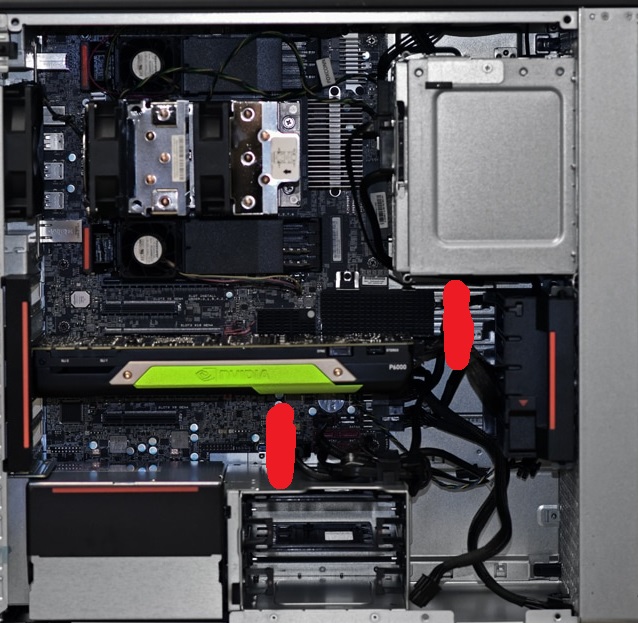
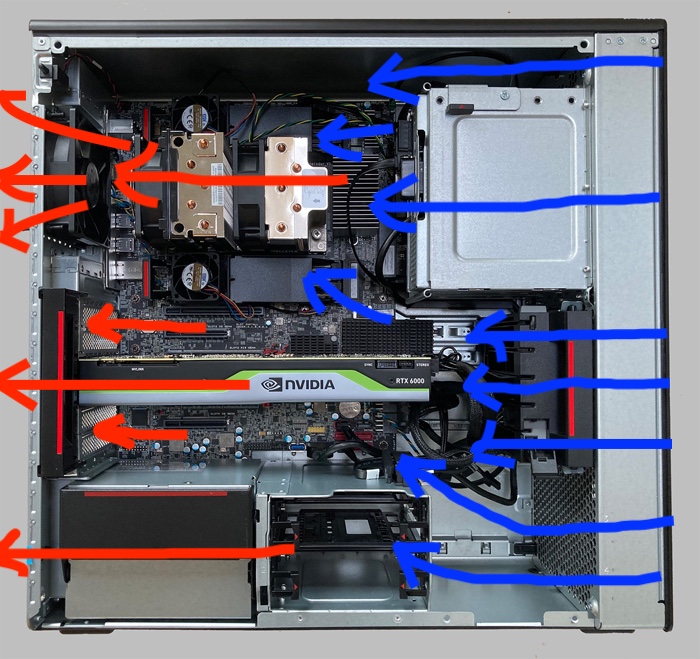
I do not have pictures of the guts of my P620s, as they are all running right now. But, here’s a pic I modified from Storage Review of the guts of the P620, and the red lines are where I placed the 80mm fans. Your placement will vary depending on what cards you have installed and what lengths things are. In one of my machines, I had a couple ASUS 4x NVME cards, and attached the fans to them.
and on the machines that I had a PCIe slot free I used this (it does not used a PCIe connection, just takes of a slot and gives you access to manually tune fan speed),
In the olden golden days, I used to use painters tape and zip ties to attach 40mm 7000rpm fans to SAS cables in Supermicro cases to provide direct cooling for some RAID HBAs. I borrowed that technique to get the P620 better cooling.
I also used this set up on my Lenovo P5, it made a huge difference for my 25Gbe Mellanox cards. Went from 75C to 39C all the time. Memory temps also went down from around mid 50s to low 40’s since more air was circulating in the case.
I’m in a similar situation. I am basically building it from scratch. If possible could send a vid of a normal boot sequence. And are the GPU power cable wired similarly to psu vendors. And is it legal for me to share my process once I am done with the build?
That’s not how it works. The PCIe specification (and, by extension, ATX specification) standardize 8-pin and, unfortunately, 12+4 power connectors at the GPU. The PSU end is not standardized and varies among PSU manufacturers and models (including, famously, between different versions of the same EVGA model).
With OEM parts there’s no guarantee anything follows any spec, including GPU power connectors adhering to PCIe. Often they do but, if there’s any doubt, you’ll need to pin out.
I haven’t heard of a large OEM running a proprietary CPU socket, DIMM socket, or PCIe slots but probably the only thing stopping those from getting cost reduced is the amount of engineering work required.
Yes. Unless you signed some of NDA with Lenovo, anyways.
I find OP’s wish to replace P620 with a generic case a bit bizarre.
The best thing of prebuilt from large OEMs is the case and its design of air flows which are meticulously tested (for high-end machines at least).
It’s like a tailor-made suit. Perfect fit for its contents and purpose. I haven’t found a generic or 3rd-party case that looks great and works as efficient as prebuilt of large OEMs.
Being that erry major component within, is of proprietary FF, makes case-swapping more a hassle
IF you’re finding thermals a bit much, perhaps some new thermal grease and upgrading fans
Um, quite a lot of OEM high end’s disastrously bad. Both in my experience and in third-party testing of prebuilts. To the extent large OEMs do things that are kind of decent it’s usually because they’re copying (or contracting, maybe) design that released first in the generic/third-party case market.
It really doesn’t appear either large or small OEMs do airflow testing outside of rackmount servers, much less get meticulous. For large,
Lenovo’s contracted some workstations to Aston Martin (weird choice, but whatever) and the recent Lenovo desktops I’ve looked out aren’t even entry level current by generic/third-party standards. Circa 2010 design, maybe 2015.
Dell’s marketing material shows some PowerEdge SKUs have at least gotten some CFD attention but quite a few of their workstations and desktops have been spectacularly bad. Alienware’s finally gotten some improvements, possibly in part because of the number of embarrassing teardowns GN’s published.
Hewlett Packard I don’t know of any non-server evidence and the server evidence I can find is all pretty old. There is one HP engineer’s LinkedIn profile which mentions airflow design, doesn’t say but likely for servers. Envy, Omen, and Z all have basic mistakes.
I can’t point to any small operations doing anything notable either. Gaming integrators (Cyberpower, iBuyPower, Origin, Starforge, …) all seem to be pretty much selling on looks, though Skytech does have an Antec P1 option. Puget Systems and Origin are still using Fractal Defines, though Origin Velox shows signs of more modern design.
Really the prebuilt test I’d use for (m)ATX is whether there’s anything that’d have a chance of outperforming having MicroCenter or whoever put a build in a Lancool 207 airflow-wise. For E-ATX Lancool III’s a good default.
If you want a project, sure, otherwise usually OEM fixes are salvage CPU, DIMMs, dGPU, and drives and buy replacement case, cooler, mobo, and PSU. From a standpoint of getting things done it’s not like printing anything like a Lancool 207 is competitive with just buying one.
Just for posterity here, Zen 3’s default thermal limit is 90 °C. So, if it’s not PBOed up, main question’d be how the P620’s managing with respect to the 280 W TDP when EDC and TDC aren’t limiting. I’d expect a decent loop to keep a 5955WX mostly under 60 °C at ~25 °C ambient, higher if boost power’s being directed to specific CCDs.
Take a look at 2019 Mac Pro, and the equivalent class from HP’s Z, Dell’s Precision or Lenovo’s P workstations. Personally I think the PCs have it done better. I like their industrial inner and appearance rather than a Dim Sum tray. But all are good designs in terms of space utilisation and cooling efficiency.
P620 of this thread is even well thought for cooling IMO. It’s compact and stuffed. Hence, probably no air ducts are used. Air flows are from right to left. If fans are too noisy or not strong enough, perhaps users can replace with better ones.
Only if you can print steel cases. Otherwise plastic is not strong & heavy enough for large cases. Heavy duty steel cases provide good damping to vibration as well as excellent strength that protects components inside.