in my X670 Aorus Elite AX Rev1.0
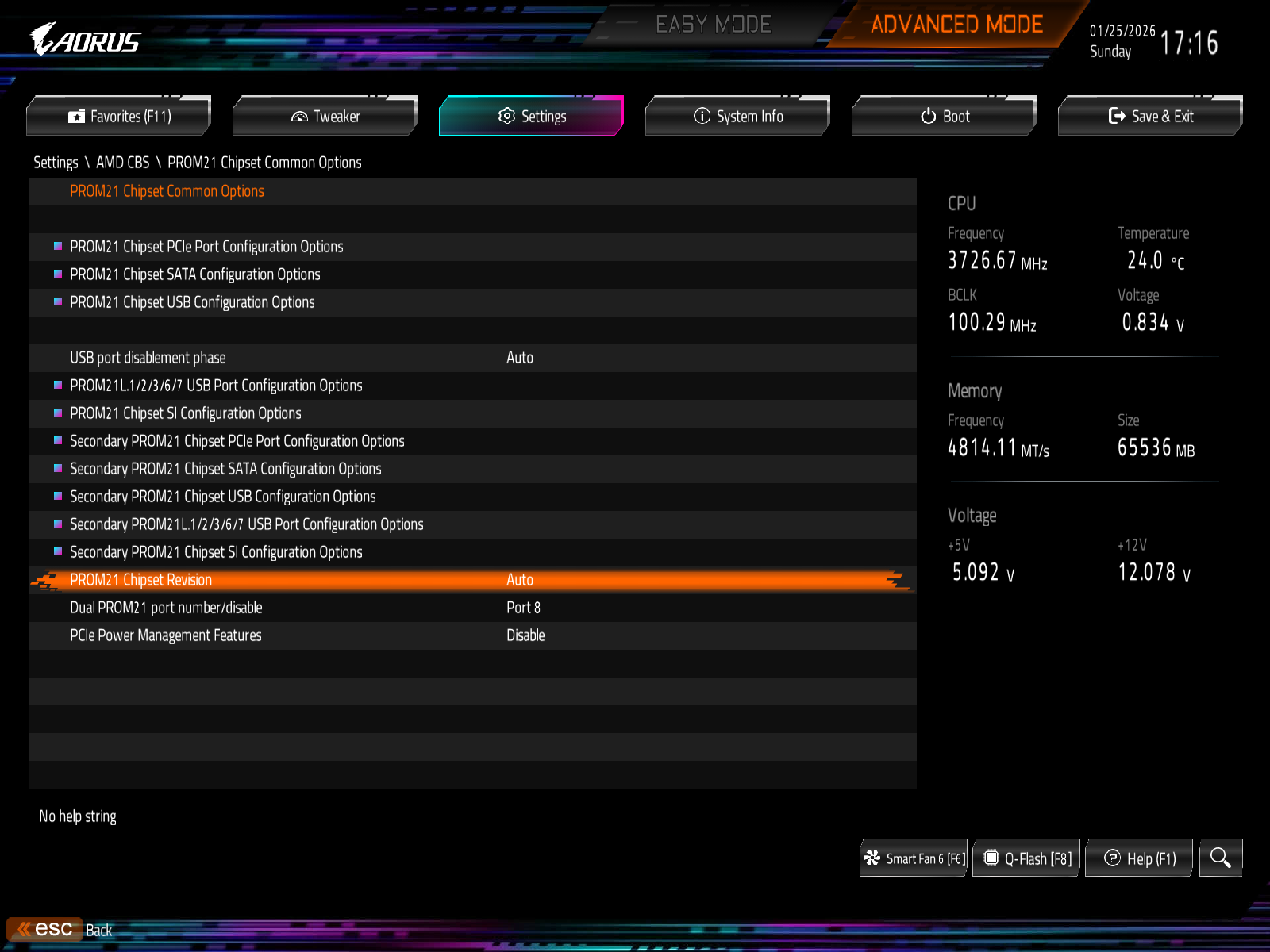
i disable PCIE PORT 07 to disable that WIFI
Hi all,
I’m using a Gigabyte X670 Aorus Elite AX (rev. 1.0) motherboard and I’ve been experiencing persistent network issues. On some boots, the Ethernet connection doesn’t work at all. I have to restart the system multiple times before it connects, and even then it only works temporarily before disconnecting again. Replugging the Ethernet cable usually restores the connection, but only for a short time.
Additionally, the Wi-Fi adapter is not working at all and shows an error in Device Manager. I’ve already tried reinstalling the network drivers, but the problem persists. I also clean install windows 11 OS but it didn’t help either.
I’m currently running BIOS version F36. Has anyone encountered a similar issue or knows what might be causing this? Any help would be greatly appreciated
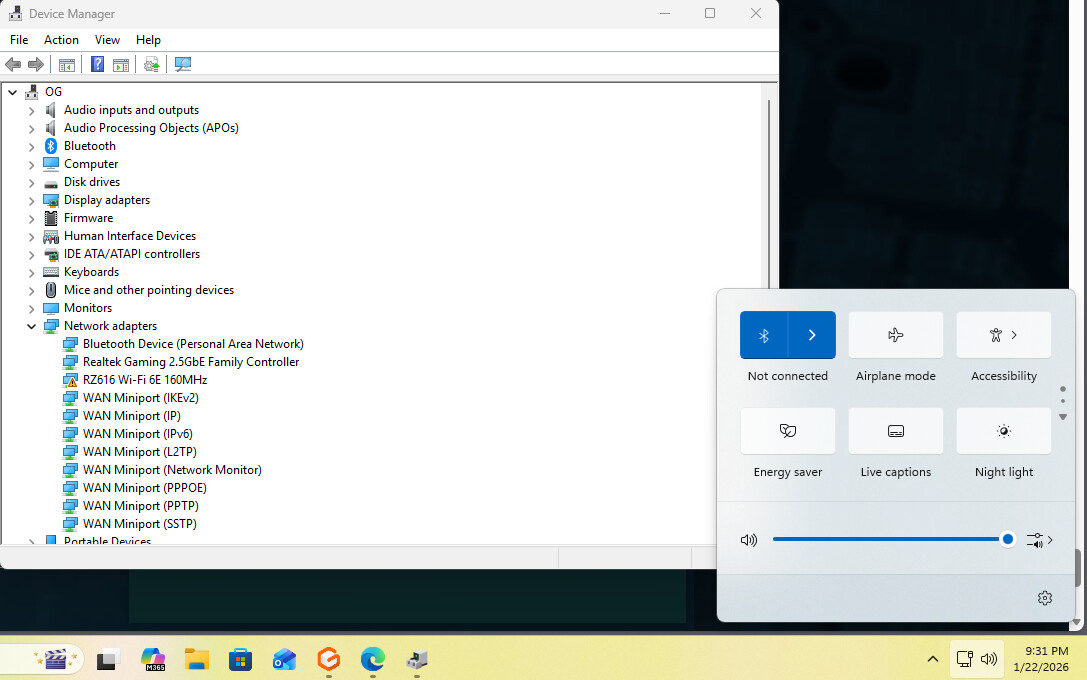
did you check if the power saving feature for the network controller is disabled in Windows?
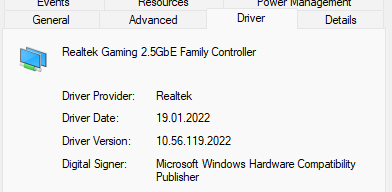
I have encountered problems with ethernet, downgrading the driver helped.
Currently used eth driver version
As for wifi: I do not use it, it is disabled in BIOS. Allegedly wifi is a source of majority of issues with this MB.
My BIOS Settings for version F38.
These enabled me to get a stable system.
YMMV.
Probably important
Settings / Misc.
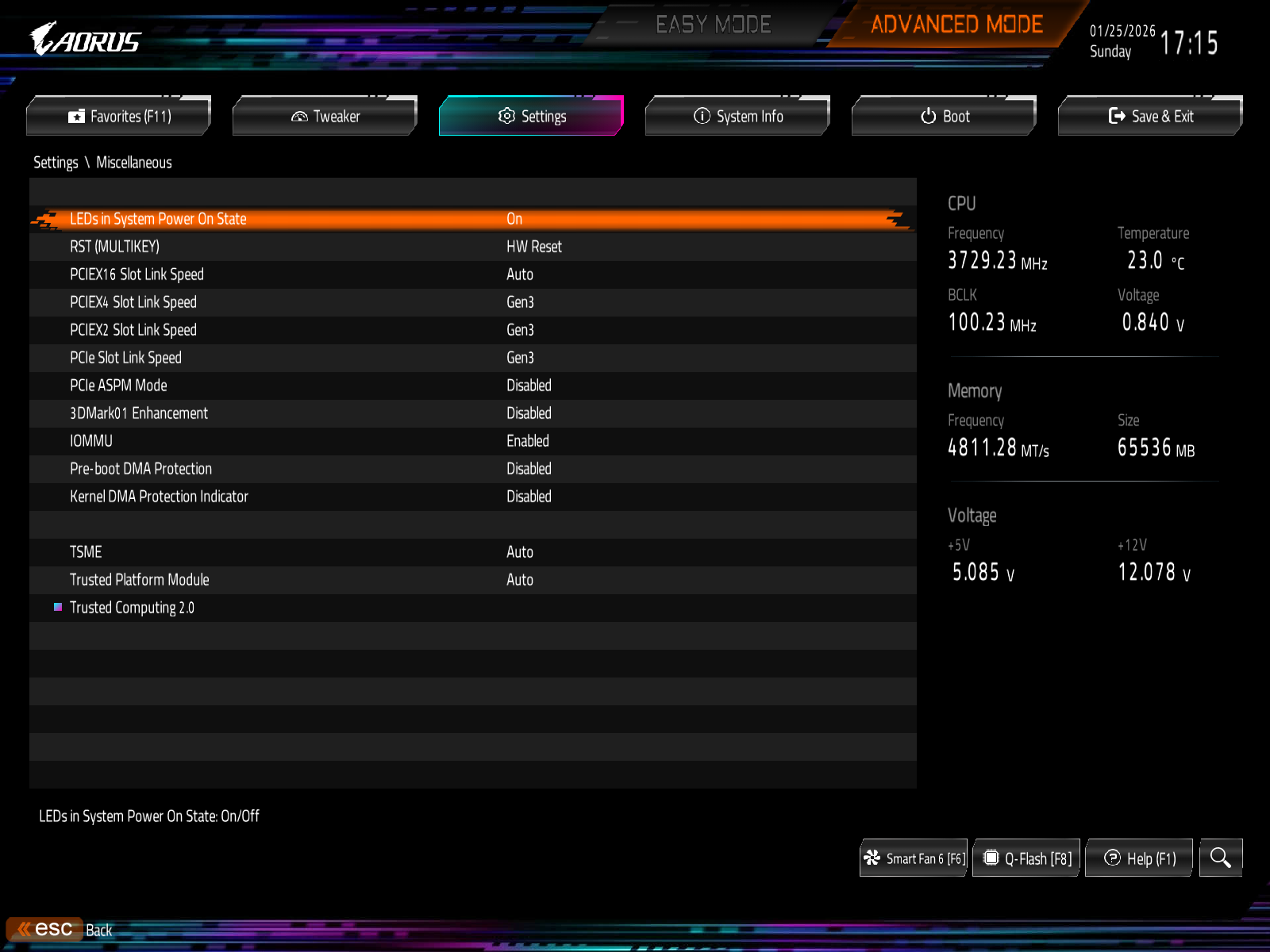
- Settings PCIE to Gen3 was, in my case, crucial to get a stable system. Perhaps specific PCIe devices of mine are (partially) to blame
- One can probably try to change the above to “auto” one-by-one and check results.
- ASPM: I do not trust it, had a bunch of weird intermittent problems with it in the past (both on servers and laptops with TB docks)
Disable wifi via PCIe port
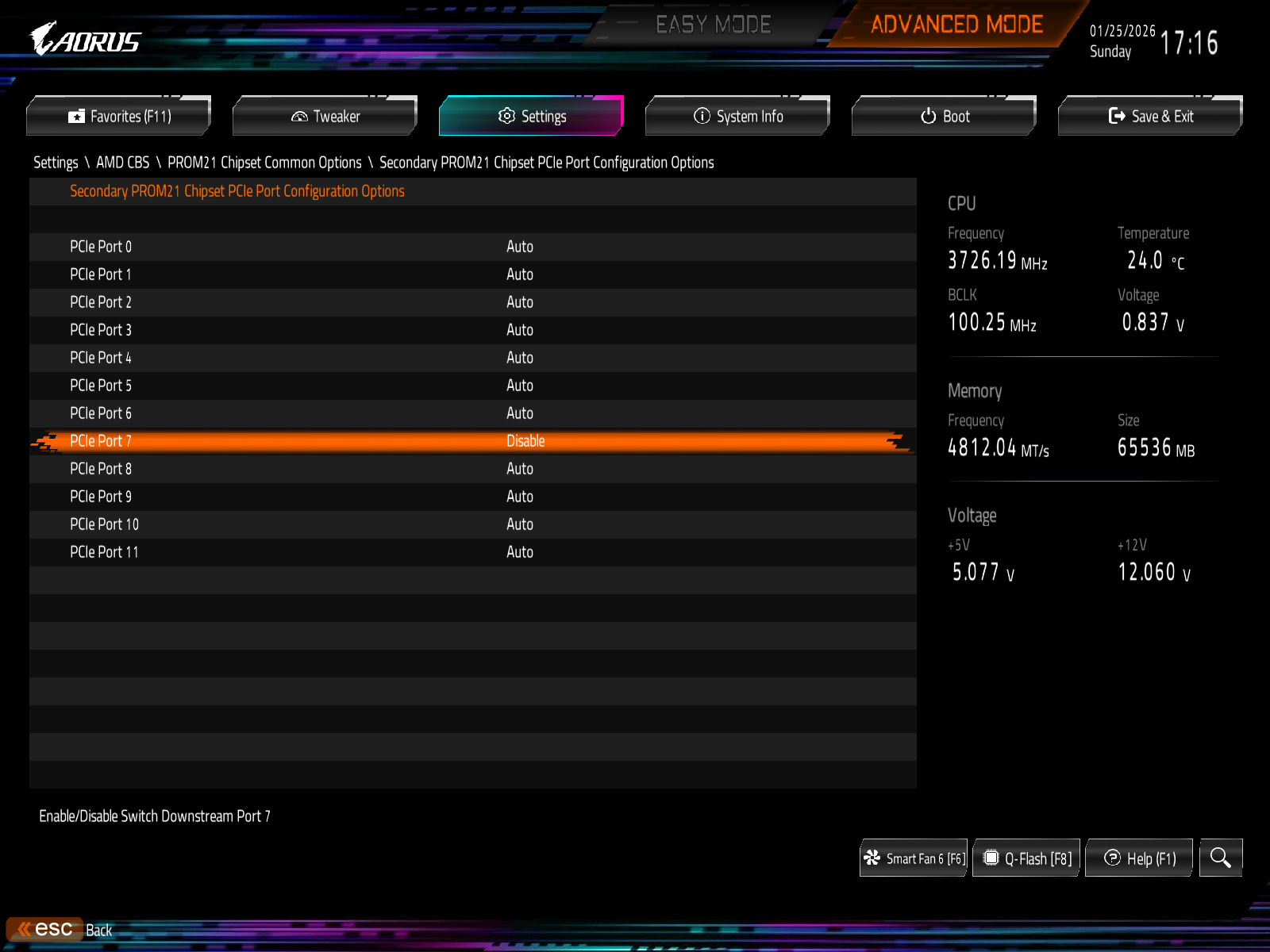
- Wifi sits on 2nd PROM21 / port 7 - thanks to @themoeran for this info
- I do not use it
- It causes problems
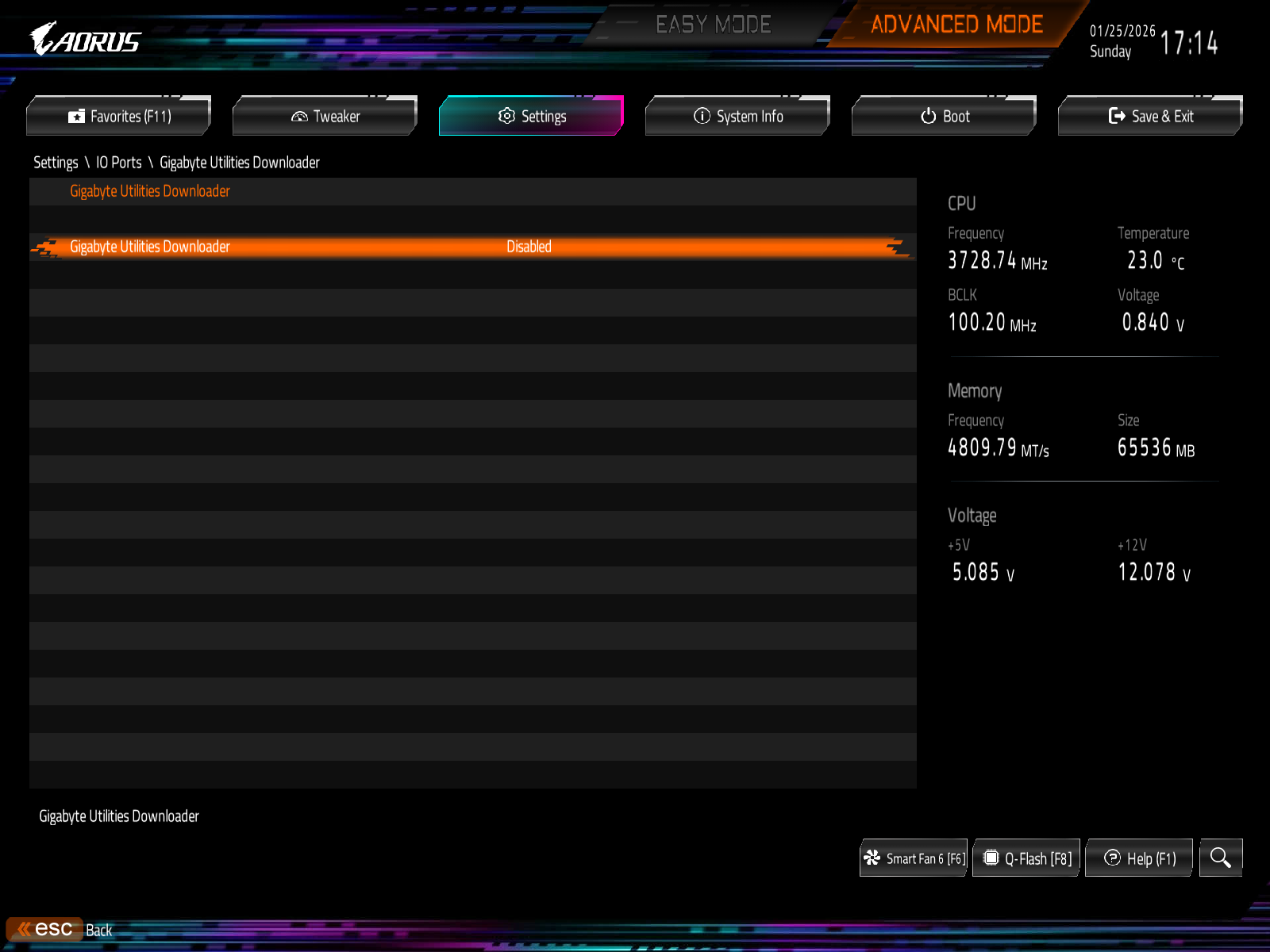
- Disabling it via “disable wifi” option elsewhere does not help with aforementioned problems
Probably not important

Pinging: @Frank13
I joined just to reply to this thread. I’m a “proud” owner of this motherboard and had all the same problems EfPe had. This motherboard is a nightmare. I will never buy Gigabyte product again! That being said I updated to F36 Bios and introduced the same settings from EfPe posts and I’m kinda getting a stable system now(90 percent of the time), however sometimes the audio stutters/crackles for the first 15 minutes after booting. Then it stabilizes. Occasionally I get a boot that mouse stutters like crazy the internet drops, usb and so on - system freezes and I have to restart. I think I’m going to update to F38 since EfPe just posted settings and positive results. Thank you for all your hard work, good to know I’m not alone with this MB.
1 Like
Hi, glad that all this info is of some help to those unfortunate enough to end up with this MB.
After updating BIOS, I’d recommend to use “load optimized defaults” option, then reboot again and apply the settings from earlier post.
If, after rebooting due to “load optimized defaults” you end up with “haunted” system, then You can try to disconnect physical power cord for 15-20 minutes. This sometimes helps to get a one-time normal boot.
(apparently wifi has some FW issue, and it causes all the weird mouse movement/lags/etc).
Thanks man!
I am jut now updating the BIOS again. Today I experienced random shutdown while playing NFS:Heat in 4k (testing the new 5070ti) which allowed me to pinpoint the culprit of why this mobo does what it does. The chipset simply overheats - after reboot which took super long time I got super laggy mouse, no internet etc. from my previous post. I turned off the PC, opened it and noticed that the radiator on the chipset was super hot. It stayed hot for a long time after power off. I have excelletn thermal on all other components. My solution is to first update the bios to F38, then install another case fan that will blow on the said radiator. I have HYTE Y60 case and despite excellent thermals I suspect that between mobo and gfx card there exists a pocket of still air. When using Pcie gen 5.0 or other high settings it simply overheats on top of all those problems with the BIOS. Nightmare MB and just to put it out there this mobo has 39 official BIOS versions and many beta versions if that does not say it’s badly made product I don’t know what is.
1 Like
That’s new. Explains why I did not observer the problems you’ve mentioned after booting.
I use air cooling, so there is some “wind” on chipset and ram due to large CPU fan.
Thanks for that new angle, I shall add it to the intro post.
F39… well, GB has a habit of publishing new BIOS in 1-2 weeks after I update 
EDIT:
- Looks like F39 can break bitlocker.
- F40 just came out, no hurry
Very disappointing test results. Under long-term use, this motherboard still suffers from various PCIe device dropout issues. I will have to consider switching to a Gigabyte X870E motherboard to see if the situation improves.
I buy a new MB
X870E Aorus Elite Rev1.2
Now ALL PCIE WORK FINE
1 Like
I have this board ( rev 1.0 )as well and it has become progressively more unstable as time goes by. Started with network drops and progressed to failed/slow app and game launches and unstable GPU initialization. I have spent a few days tearing it down and rebuilding layer by layer and can reproduce the instability fairly consistently by plugging anything into the sata ports. There is something wonky with the chipset and how they utilizes the pcie lanes. I wonder if that is why there are 4 revisions on this board. Hot garbage. I’m thinking about going to a Asus or ASRock x870 at this point.
Can’t argue with your conclusion to replace it. This MB does indeed suck.
TL;DR: Ditch this garbage and get a replacement.
Recently, a bunch of weird issues manifested: mouse lags, sound lags, sudden “pauses”, sometimes half of PCIe bus will go away, sometimes network adapters (even USB ones) will just disappear.
All of these with no changes in BIOS on my part, no weird power issues, or whatever one might blame.
This was too much to bear. So I decided to call it quits, and get a replacement in the form of “Asrock X870 Taichi Creator” - it works fine. However, I have had some issues with RAM, which were solved by far too many attempts on re-placement…. This makes me sad, how fragile the modern consumer HW seems to be.
If You find yourself burdened with this PoS MB, then maybe some of the remediations (I would not call those solutions) outlined in the first post will help you - for a time at least.
2 Likes
I wanted to share a few things that worked for me, for those like me that are stuck with this garbage mb, what worked for me was to use LTS kernel linux-lts 6.18.46-1 basically, my configuration is two M.2 and no dual boot, only arch linux.
I had to disable wifi in the mb settings and everything else is on default, with the LTS kernel it worked way better, no boot failures and no eth port failures. Recently I also been testing the latest kernel (no LTS) and it’s working better, more stable and less boot failures, no eth problems so far, but for 99% stability I suggest using LTS.
Hey all and <3 Wendel!
Also just created an account to share my thoughts / experiences with this MB;
Went from the F5 bios all the way up to the latest and greatest F41(I still have all of them backed up if anybody cares for more pain). Also went from Rev1.0 to 1.1 through RMA…
I wont repeat the all problems already listed and I discovered on my painful journey.
Everything was running “fine”. I had a feeling to notice little micro stutters here and there but with my USB-Soundcard/Headset everything sounded fine.
Then, I changed the setup from my desk to my couch. From DP to HDMI 2.1 and suddenly; audio cracking whenever watching e.g. level1techjesus. I’m a kinda sound sensitive guy and so I started digging. No “how to” vid helped. registry, reinstall, I literally tried everything.
Then I discovered the final hint; Copying files onto my NAS while watching the youtubes. EVERYTIME, there was high(er) load on the NIC (RTLXXXX) I got the cracking. I checked “latencymon” and would you look at that; NDIS driver had been creating loads of driver errors. 100ms max delay or something.
Tried every driver available. Every setting available. Added settings to the driver. Disabled every setting. Well…
TLDR: Everything was fixed after, I disabled the LAN-Controller in the Bios and tried an USB-A → RJ45 adapter. Never had such a trashy board.
WIFI is also disabled.
Never again, Gigagoodbye! 
Hope this helps someone 
2 Likes
Hey! I just discovered this thread and came to share my (awful) experience with this board.
I think I’ve had all the issues listed above. On top of that, I also had ethernet issues while using my board with CachyOS, so I connected a usb-c hub to ethernet adapter which worked fine until this week, when I installed a second RTX 3090. Then all the issues I had in the motherboard before came back, and on top of that now not even my usb-c to ethernet adapter works. Also, I had to remove one of my m.2 drives because otherwise the Pc would stay in a boot loop. After that, sometimes I reboot and everything works fine. Then, the next day I reboot and the ethernet adapter is gone. Another reboot and the network is back, but now only one of my graphics cards is recognized.
I’m selling this POS and not buying Gigabyte again.
1 Like
Seems we had similar experience.
Once half the PCI-e bus decided to randomly go for a walk, I also gave up 
i personally never really had the best experiences with Gigabyte former Abit boards in general.
i always found weird issues with them and given the amount of revisions they bring out,
for each board is already a sign for me to not consider buying a board from them.
Which is kinda a shame because they actually have some very interesting am5 boards in their lineup.
Since i´m going to upgrade to am5 and me doing allot of research on motherboards.
My go to choice at this very moment is gonna be Msi for am5 i think.
Because Asrock and Asus currently have problems on their own unfortunately.
On which both companies still not gave an official statement of what the issue was.
And what they actually did to solve it.
I am pointing towards the slightly higher than average cpu failures on their motherboards.
Which is a shame because i still really like the Taichi boards.
But it´s not like Msi being without their issues and quirks as well.
i do think that am5 is kinda tedious platform.
And Msi on their main stream motherboards does not support ECC memory as far as i know.
So if ECC memory support is a must have feature than Msi is not the brand for you.
But with regular memory and 9000 series cpu´s they do seem to be the least troublesome.
At least from what i generally read on ¨certain¨ board models.
But of course with hardware ymmv.
1 Like