SFP+ to 10G RJ45 - brands to avoid or gravitate to?

Slowly getting to faster subnets.

I have a Microtik CRS305 with four SFP+ ports. These connect up to my other 10G SFP+ devices fine with DAC cables.

Now I need to connect to a new NAS that uses 10G RJ45 so I need to convert formats.

I was thinking of just using an SFP+ ↔ RJ45 module.

Seems like Amazon has only 10GTek and H!Fiber brands.

Anyone have any suggestions?


This is the one I got… I would probably get something better/more official/more expensive if I was going to buy another… was about £40… does the job :man_shrugging:

See this thread on what to get/avoid.

Regardless of the online warnings you see on SFP+ RJ45, modern RJ45 modules are fine, provided you get the ones with Broadcom chipset since they consume <2W and are typically rated for 80 or 100m (which means they consume even less power in a typical home due to shorter distance). The high distance rating also means you can use those modules on unsupported cables like Cat5E.

The warnings were really about early gen modules like Mikrotik S+RJ10 and Aquantia AQS-107-B0C2-CX.

4 Likes

If you can afford it, there is a newer Broadcom chipset on the market that is low power. The device only uses 1.5w compared to the older 2.5w the more common Marvell and Broadcom chipsets use. This is a significant heat difference in the device, and some switches had problems with the high port power draw as well.

1 Like

I think the UNifi module might be the newer Broadcom based on the power but it doesn’t specifically say.

$65

SFP+ to RJ45 Adapter

2 Likes

The lower power Broadcom with the 100m range is usually spec’ed at 1.8w, so given the Ubiquiti is a 100m rated (which is already very uncommon and so also points to the new Broadcom chipset) and also 1.9w I suspect you are right. I wouldnt want to rip one apart to verify though but those Ubiquiti ones should work great.

Im just surprised on the price if they are, as usually Ubiquiti is more expensive than places like fs.

I tried the same thing you are trying with first gen modules and gave up. First were issue ther modules - they were definitely cooking themselves to death even at idle (80°C+) a official mikrotik guidance was use only two max due to spacing.

Second were really random perf drops and stalls, likely from all above.

I was using the very fist gen mikrotik sfp modules with higher tdp as those were only things available.

SFP brand is useless in this case, you must identifiy what transceiver chip is inside and that nearly impossible. Refer to servethehome folks.

So far only guidance if it supports mutigig , claims 100m reach and is sub 2W then its should be good one.

Old ones were 30M max, 10GBE only and around 3W.

EDIT: Found the last 10GBE ove sfp+ thread:

1 Like

My 2 MikroTik S+RJ10 modules died in my UDM Pro. I guess they run too hot.

To quote once again from someone much more elouqent than me, why 10GBET SFP+ are generally satans arsehole of networking:


src : https://community.ui.com/questions/Which-10GBase-T-SFP-Transceivers-do-not-get-hot/24dfcd56-8030-4163-bcaf-747430d163f3

STH did a roundup on those a while ago which might be worth checking out.

1 Like

All great information. I have begun building my HomeLab and have gotten myself into a situation where I have some SFP+ devices (using DAC cables for short runs) and some 10G-T devices (my new NAS).

Trying to get a simple copy/paste of my share drives from the old NAS to the new NAS in less than 30 hrs by getting to 10G.

if DAC is not an option, i’ve had great success with the ones from FS cables

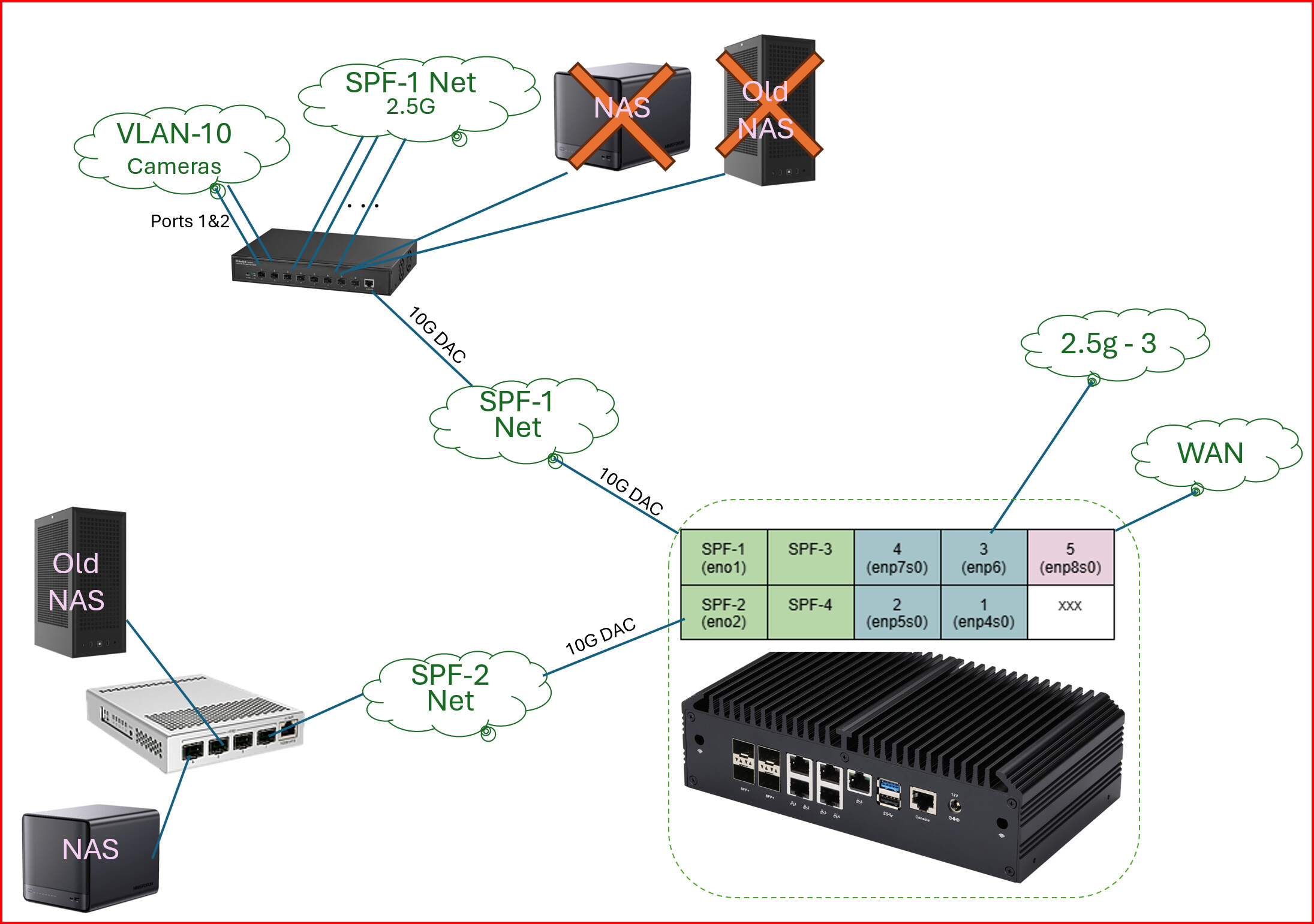
My new NAS (MinisForum N5) has 10G and 5G network ports but RJ45.
My ChinoSpecial Router has SFP+ ports.

The network on the top is a 2.5G network with a SFP+ 10G main link to the router.
The network on the bottom is where I am trying to get some 10G NAS transfers to happen.

I tried experimenting with many different brands of SFP+ modules and ended up going with this external device.

It obviously uses up more space and it’s a bit less elegant, but has proven to be the best solution.

The reasoning behind this is it remedies any concern over heat. It is also the only device that has reliably worked with poor cat5e RJ 45 cabling.

I have taken to using SFP+ to SFP+ only with DAC cables over short distances.

2 Likes

The FS.com and Ubiquity ones work well in my experience.
Just pay attention to cable lengths, the 30m/90ft limit is not a suggestion!

I’ve had bad experiences with 10GTek ones. They just wouldn’t negotiate speeds properly for me when I used them with my Mikrotik switches. This was many firmwares ago though, so who knows. They may work just fine now. I don’t know.

Mikrotik’s own SFP+ adapters are generally really good, and they will even negotiate links at multigig speeds (2.5 and 5) in addition to 1 gig and 10 gig. They used to be available on Amazon. That’s where I got mine.

Looks like they still are:

The downside is that they run a bit warmer than most out there. They also seem to cost a bit more, which is funny because one of the main selling points of Mikrotik gear is usually its affordability.

I wonder if the fiber store (https://fs.com) have any good ones. Uncomfortable as I may be about buying networking gear from a Chinese company, I have to admit everything I ahve ever used of their has been solid, and cost a fraction of the big brands.

But it almost doesn’t matter which brand you get. All of them run hot. Much hotter than any fiber transceiver. Mikrotik recommends that unless they are being used in a switch with good active cooling, you don’t use them in adjacent slots to avoid overheating. That is probably a good rule of thumb to follow regardless of which brand you go with.

I actually wound up modding some of my switches with extra fans in order to keep these 10gig SFP+ to Copper Ethernet adapters within acceptable temperature ranges, but this has only been necessary on lighter, passive switches like my MikroTik CSS326-24G-2S+ switches.

They were the lighter cheaper (only $129 when I bought them) 24 port gigabit switches with two 10 gig SFP+ ports presumably for uplink purposes.

I have two of those in my network. Both of them have both of their 10Gig SFP+ ports in use in the same configuration, one 10GBase-SR transceiver for 10Gig uplink to the main switch, and one Mikrotik 10Gig SFP+ to copper adapter (which I use for 2.5Gig connections to my Wireless Access Points.

I’m not sure if they run hotter when at negotiated 10gig speeds than when at 2.5Gig speeds, but even in this connection with a standard fiber transceiver right next to a Copper adapter it resulted in both getting hot enough that I was worried about them staying in the operational temperature range, so I modded the switches to add fans.

One “case fan” to move air into the switch, and one small thin fan blowing on the cages surrounding the SFP+ modules. I also stuck small heatsinks to the SFP+ cages using dual sided adhesive thermal tape to allow the little fan to be more effective.

I cant remember what the temps were before (as I did this a while back) but they are now in range with the 10GBase-SR modules sitting at 38C and the Mikrotik SFP+ to copper adapter sitting at about 60C. This is with ~ 20C ambients in an air conditioned environment.
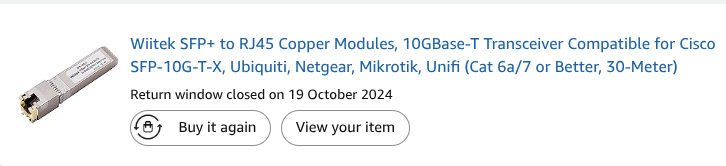
1 Like

Are these multi-gig compatible? 2.5G is definately a requirement for me, less power/heat is also important.

1 Like

Any new cool running modules in mid-2026? Is the FS . COM SFP-10G-T-30-RP at $149 ea still the only 1.5w module?

I believe the modules using the Broadcom BCM84891L chipset are still the most efficient.

Actually the new(ish) Marvell CUX3610 chipset surpasses the BCM84891L with 0.3w better efficiency, But at this pont it’s just splitting hairs as both offer great features and thermals.
Just as the BCM84891L the CUX3610 also offers 10gbe up to 100m and 2.5gbe and 5gbe speeds.
I’m not a big Marvell fan as I got burned on their horrible 10gbe aquatint chipsets. And older SFP+ gear for a laundry list of issues.

But after 2, CUX3610 SFP+ modules solved months of frustrating trouble shooting on a unstable network cable from my cellar to the attic.
It’s only a 20m cat 7 cable (I know cat 7 is not a real spec, but old and dumb me did not or most or my runs would have had single mode fiber added also) so I could not for the life of me get anything stable faster than 1gbe on it.
I finally isolated the issue to not the cable but those blasted older gen SFP+ rj45 modules overheating in my switch with active cooling.
I already was on the lookout for a BCM84891L when I came across a OEM offering both.

Servethehome forum brought this website to my attention: https://www.luleey.com/
It’s kinda like FS.com, you can het all kinds of networking and SFP+ stuff build to order.
For the hell of it I ordered 2 CUX3610 and 2 BCM84891L and received them a few weeks later.

Have had zero issues until now with my unify gear.
I think the CUX3610 get slightly more range but I have tested both in excess of 100m (I believe my roll of cat6 cable had about 130m left)
Oh and to answer OP’s question, in my honest opinion stay the hell away from all the 10gbe SFP+ rj45 modules limited to 30m.
It’s all obsolete trash, as the 30m is more like a suggestion in my experience even on propper certified cat6a.
They run way to hot, even in a actively cooled switch they get to the temperature point stability degrades if you hit them with sustained IO.
If they happen to support 2.5gbe and 5gbe, the implementation is buggy and inconsistent, not to mention the amount of times I burned my fingers as they are capable of reaching a excess of 100 Celsius (212f in freedom units).
I have tried qfsp tech, 10gtech, HIfibre, unifi, Microtik, a hand full of nameless ebay and AliExpress ones all with mixed results over the years.
And consistently the 30m variants had the most issues.
I was making plans to rip out part of my home network to replace with fiber after more than a year of banging my head against the wall when just when the first version of the 80m capable modules came available.
Those solved 90% of my issues overnight but still ran a bit hot.
Now with the latest BMC and CXE chipsets I feel 10gbe on copper is in a good place.

So do yourself a favor and get newer modules or just go fiber if want to minimize issues.

2 Likes