I recently purchased a Combo 1.4 2x2 KVM, and it is not behaving quite like I expect. I would like to know which I should adjust including, but not limited to, my expectations.
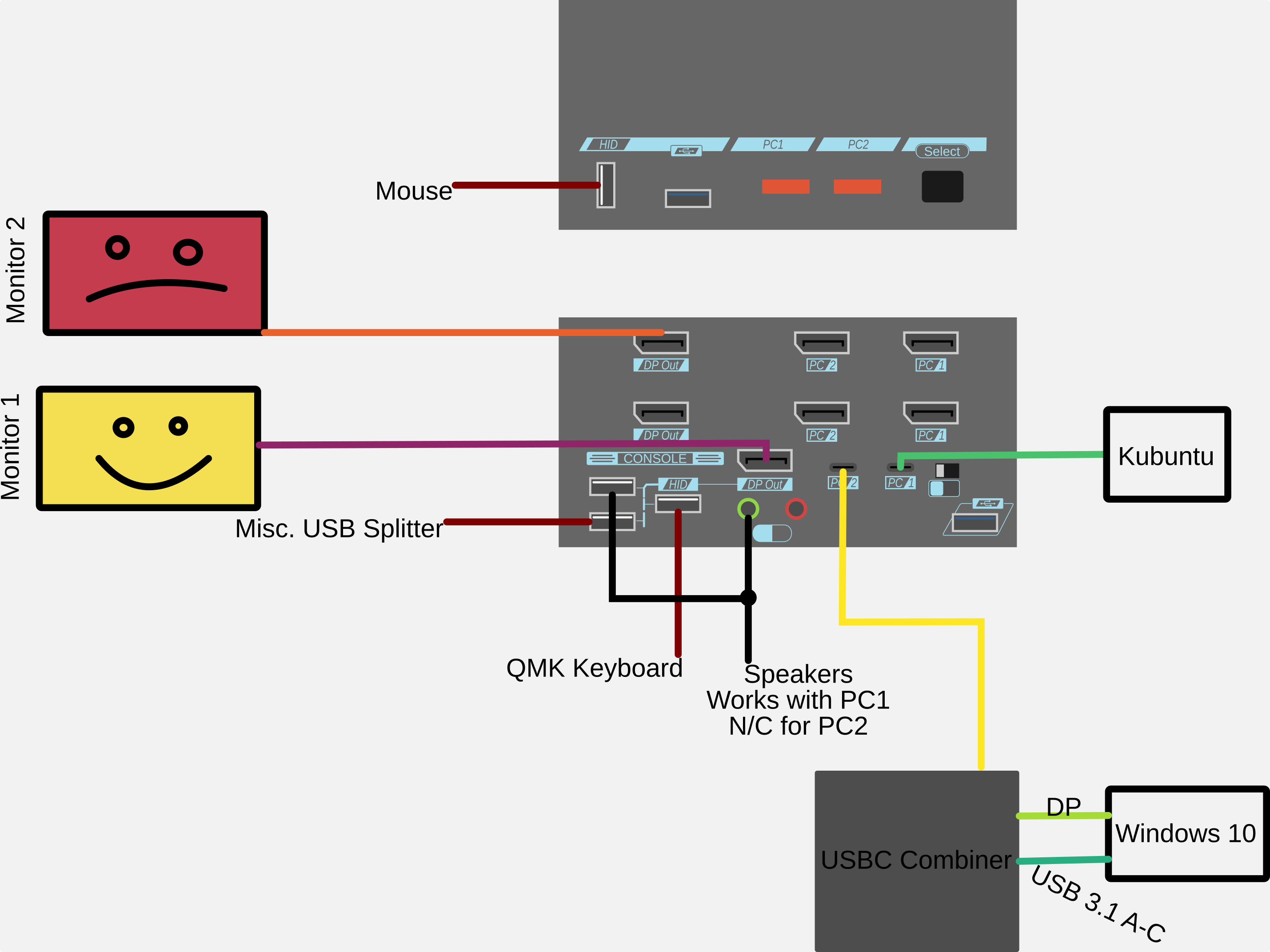
I have a setup between my Kubuntu box and my Windows 10 box. I have set up based on my best possible understanding from the scattered info I could find. The Windows 10 computer does not have a compatible USB-C out that I am aware of (ASRock X370 Taichi), so I am using a USB-C combiner.
When Windows is hooked up, I cannot see anything on monitor 2 AND I have no audio.
Questions in brief:
Why is monitor 2 not working for either computer?
Why is audio not working for the Windows box?
Unrelated Questions
Is there an actual manual instead of a thousand forum threads and videos? The one included with my unit is for a slightly different series (PAAG instead of CAHBP).
How can I stop this infernal beeping when I inadvertently trigger the hotkey?
Are there any resources for using the KVM with a pen tablet (USB-C or combined USB-A/HDMI output)?
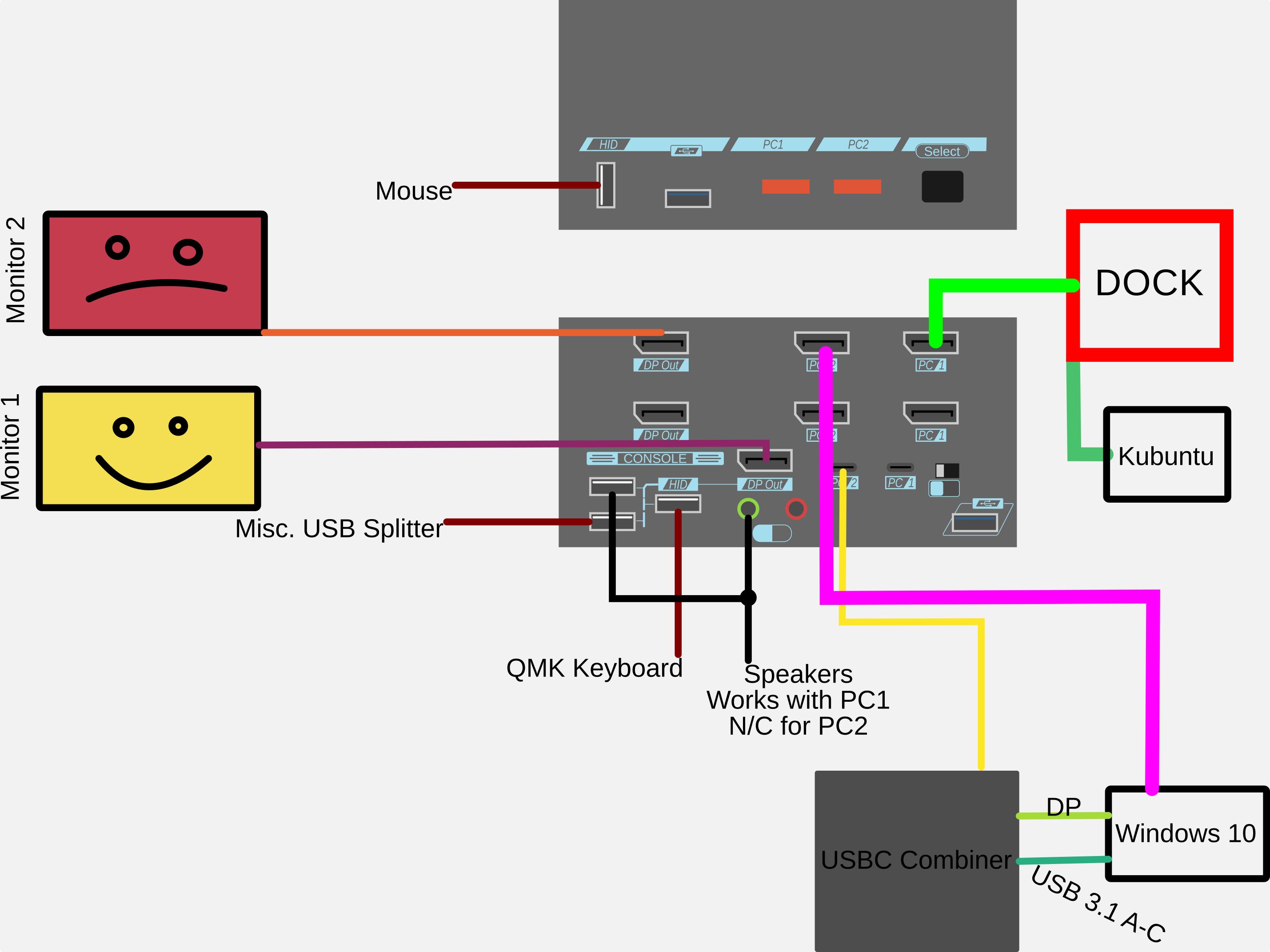
You need the top row of DisplayPort ports populated. If no DisplayPorts exist to plug in the top you can use a USBC thunderbolt docking station to expand ports.
Make sure the audio follows hotkey is disabled, could be enabled accidentally and all audio is routed to the kubuntu system
There is, I can get that to you Monday. Ping me if I forget.
You can move the hotkey button to right control to avoid accidental triggers, aside from that,
Left Control + Left Control + Left Alt (hold) + G + Left Alt (release) disables beeping sounds.
You need the top row of DisplayPort ports populated. If no DisplayPorts exist to plug in the top you can use a USBC thunderbolt docking station to expand ports.
Why is monitor 2 not working for either computer?
This confuses me still. See the updated picture with the extra-large lines to note changes.
Is this what you mean? If so, what is the purpose is the combiner if another DP is required to bypass the USB-C? Removing the Kubuntu box from the USB-C is required to use a dock. Since it is a laptop without a DP port, does that mean it is going to lose access to other functions (audio, data pass through, etc.)?
Why is audio not working for the Windows box?
Solved.
Is there an actual manual instead of a thousand forum threads and videos? The one included with my unit is for a slightly different series (PAAG instead of CAHBP).
Thank you, but please don’t work on Labor Day. People died for that holiday. Nothing is so urgent in this post that it can’t wait a bit.
How can I stop this infernal beeping when I inadvertently trigger the hotkey?
Solved. It seems like that should be in the manual.
Are there any resources for using the KVM with a pen tablet (USB-C or combined USB-A/HDMI output)?
Oh thanks for the ping I’m glad some issues were cleared up, let’s try to clear up some more.
So people usually purchase the USBC combo kvm because they want to charge and display from their laptop, macs, etc in 1 cable. Otherwise they’d probably purchase the DisplayPort kvm with no USBC video option.
For full functionality the kununtu system will need to be plugged into the USBC port.
We’re you able to resolve these issues or were you wanting to ask about an RMA?
Ok, so this means I need the dock like I have in my second picture but I still need the USB-C connection in the first picture. I can do that.
I have partially tested this, but I don’t have enough cables to do the rest. This is potentially solved.
Is all of this information in the manual which I don’t have? E.g., the top line of DP must be populated for the monitor split to work and that the USB-C input on the Level1 device does not act as a splitting dock?
No. This should be the device I want, I’m just having trouble understanding the setup without complete documentation.
Everything appears to be working here. I have an iTec dock between the Kubuntu laptop and the KVM which takes the single USB-C and breaks it out into a USB-C + 2 Display Port. The two displayports are connected to the WIndows machine on the other side, with the USB-C combiner still present. Thanks for your help.
 I’m glad some issues were cleared up, let’s try to clear up some more.