I can’t install the USB card because the 2nd slot that has CPU lanes is being used by an HBA for FreeNAS.
I have installed the Aquantia 10G NIC driver VIB and it does show up in ESXi, however I have no way of testing the throughput
I can’t install the USB card because the 2nd slot that has CPU lanes is being used by an HBA for FreeNAS.
I have installed the Aquantia 10G NIC driver VIB and it does show up in ESXi, however I have no way of testing the throughput
2bitmarksman,
I am not surprised that you are having trouble with the ASMedia USB ports because we have had a lot of problem with them on HP and Dell docks. Sometimes updating the thunderbolt firmware and the asmedia usb driver fixes the problem, but unfortunately it does not fix the problem every time.
When the updates don’t work for the dock we work around the problem by plugging a external USB-C to USB-A hub into the thunderbolt / USB-C connector on the back of the dock, we then plug the USB-A devices into the USB hub.
On the Taichi Ultimate board there is 1 Front Type-C, 1 Rear Type-C, but there are not a thunderbolt port. Since there is not a thunderbolt port I am guessing that the USB-hub work around will not work for you. Do you know if the USB-C ports are connected to the asmedia USB chip that runs the USB-A ports? By any chance did you install a PCIe card that has a USB connection on it? I have know idea if ESXi supports thunderbolt, but I am guessing that it does not; at least there is the possibility of passing it through.
What USB devices do you want to pass through to the VM?
If one of the device is a USB storage device there is a way to mount the drive in ESXi and then add the device to the VM.
The 3.1 and USB-C port are in the AsMedia group. There are two USB ports closest to the top that are in their own group, and they can be passed through without issue on 1st gen Ryzen.
I can’t pass through a USB controller because all PCIe slots connected directly to the CPU are already taken up (GPU, HBA, and NVMe). All other lanes are tied to the Chipset
For Thunderbolt, the Thunderbolt controller would need to be in it’s own IOMMU group and not tied to the Chipset in anyway. You’d just pass through the Thunderbolt controller chip
USB device passthrough doesn’t persist over host reboots (at least last I checked), nor does it allow USB hotplug, which I’d very much want
I’ve figured out the USB issue, but now I’m having other problems, mostly with the Nvidia nvlddmkms.sys stopping and starting in my Windows VMs. LatencyMon shows massive latency and it stutters a ton. Setting up a Linux VM and seeing if its Windows or the GPU/BIOS related
Soooooo, it looks like I’m going to be trying out Linux Mint 19.1 for a while. It’s been the only thing i can load with the Nvidia GPU and actually work without crashing or stuttering. Going to install Lutris and check the Shadowbringer’s benchmark now
So I loaded up a fat windows installation on a spare SSD and have been getting WHEA_UNRECOVERABLE errors, indicating a PCIe slot problem. I pulled my HBA and the system appears to be working just fine now. Still need to do some stressing a benchmarks though to verify it doesn’t crash, but I could actually install the Nvidia driver, which is more than before. Will report back once I’ve tested those things
So we thinking pcie slot bad or hba bad?
Hopefully something like a dirty connector or bad cable. I’ve had a bad cable generate controller errors before
Currently going through some stuff. I had some WHEQ errors happen when I booted with nothing HBA’s slot, but turned the PCIe switch to 2x8. If its in 1x16, its fine, 2x8 is when things start getting weird. When I set both the slot and prominotory switch to Gen1, things start working again (without the HBA, but with 2x8 enabled). Switching either one to Gen2 and things start bugging out again.
Testing it again, it’s 2x8 at Gen2 or Auto that’s causing issues, with or without the HBA. 2x8 at Gen1 works, but its aweful for games at PCIe 1.0 x 8. At PCIe 1x16 games work alright.
This really has me scratching my head, how is it 2x8 PCIe 2.0 for the CPU lane devices completely screw everything else up
why would you be enabling bifurcation (2x8 setting) ? are you using a riser cable or card with two slots?
It’s not Bifurcation. If you don’t enable 2x8, the 2nd PCIe x16 slot is inactive. I re-verified this in my testing
Good to know, my Taichi 470 will be here this weekend.
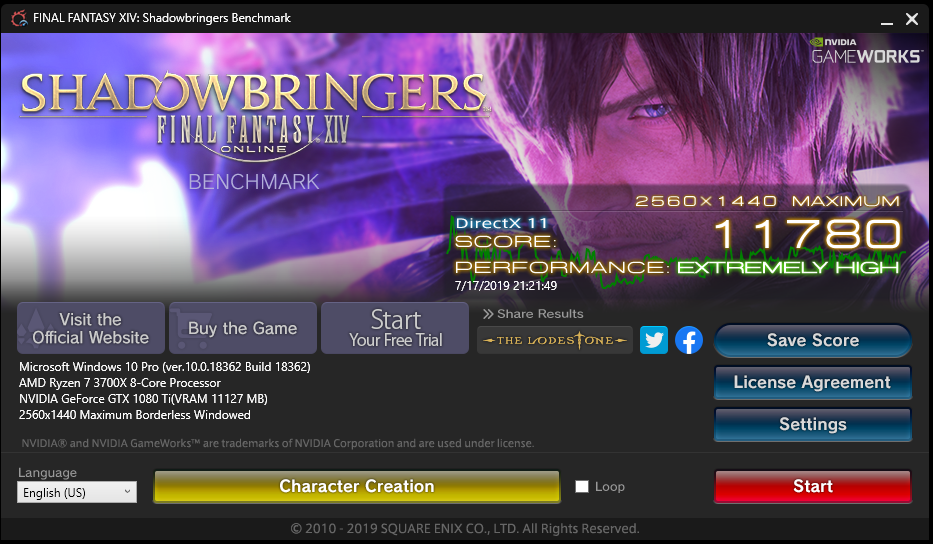
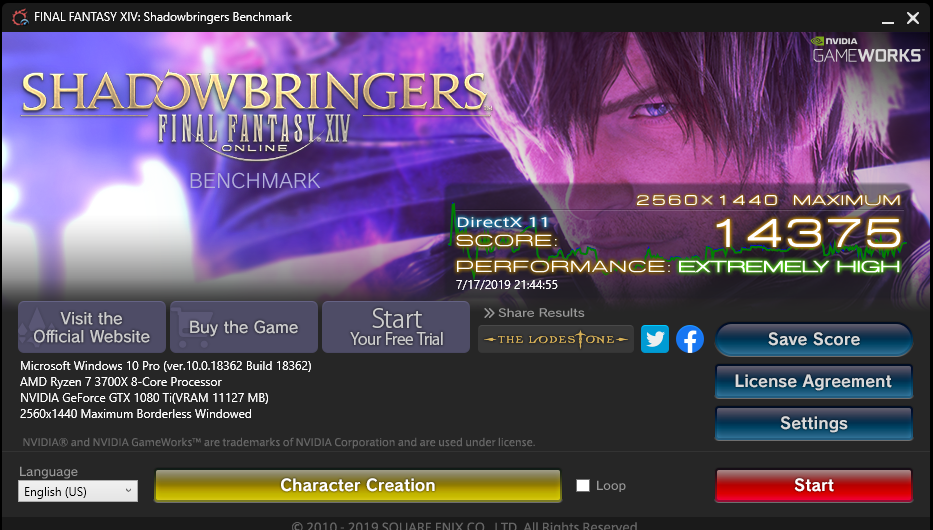
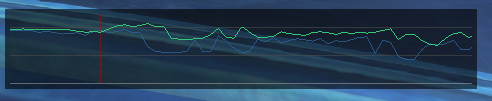
So I ran some passes through the FF14 Stormbloods benchmark. The PCIe 1.0x8 bandwidth limitation REALLY hurts performance of the GPU in games. Retesting with PCIe 2.0x16 and the difference is massive, about 30% or so. Testing at PCIe 1.0x16, the difference is within margin of error.
Additionally when I loaded up Slime Rancher, at PCIe 1.0x8, there was both a noticable drop in framerate, but also a noticable input delay.
Basically, if you’re wanting to just run a GPU and NVMe drive, you’ll be fine. If you want to run anything else in the 2nd CPU slot, don’t bother, stick it in the PCIe 2.0 chipset slot as your going to have a bad time until there’s some form of update, either form AsRock, AMD, or Nvidia
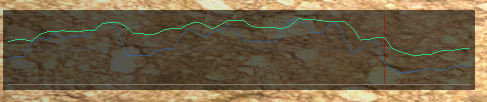
Edit: Below are the scores of the 1.0x8 and 2.0x16 runs, along with a couple snippets of what the frametime graph looks like during the benchmark. Blue line is 1.0x8, green line is 2.0x16 (1.0x16 is identical)

Loading up a full version of Linux Mint and going to see if I’m able to run the Benchmark with 2x8 Gen 2.
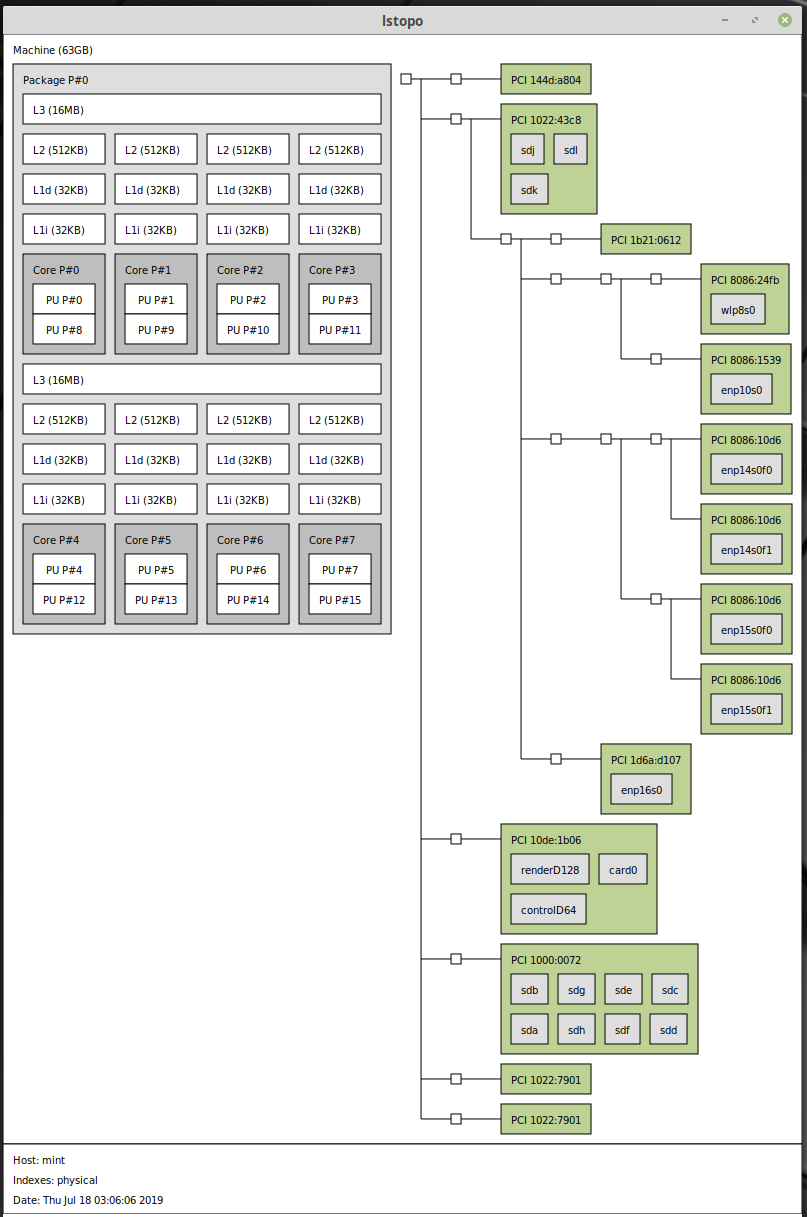
Side note, here’s the results of lstopo:
So sudo lspci -vv has yielded some interesting info.
If 1x16 is enabled, PCIe 3.0 is enabled on the GPU, but if 2x8 is enabled, then the HBA will operate at PCIe 2.0 with 8 lanes, while the GPU will, oddly, operate at PCIe 1.0 with only 4 lanes. This is extremely odd behavior. Currently trying a bunch of settings to see if anything effects it
UPDATE
AsRock released a BIOS update for the x470 Taichi Ultimate (BIOS P3.30), which has added the PCIe Gen3 option that @wendell has mentioned. I’ve retested 2x8 with Gen 3 for the CPU slots, and while the top slot is still PCIe 1.0, it is fully using PCIe x16. I’ve loaded up ESXi and passthrough is working for all devices previously, and have had no WHEA errors or nvidia driver crashes.
So the important bits are now working, though RAM overclocking is still an issue. Hoping future AGESA updates help address this
Thank you for posting this. I am currently working on something very similar. However, I won’t be running freenas. Plan is to get gpu passthrough and use 3900x. The motherboard I have is Asus x470-f and having issue with passing USB through. Got the gpu working though. Just wondering if anyone knows best x8 card with possible thunderbolt card. As I can only passthrough 2 x8 slots.
Not shopped for Thunderbolt cards, so not sure there. Those would be pretty neat!
The x470 Taichi Ultimate can passthrough the top 2 USB 3.0 ports, but you’ll need to edit the /etc/vmware/passthru.map file (use vi command) in ESXi and add the USB ports to the map and change the GPU’s section from bridge to d3d0. Source post for that fix is found here. You can get the vendor and device id’s you need by checking the selecting the hardware for passthrough and viewing them
Here’s an example of my passthru.map file for reference:
# vendor_id device_id d3d0 false
# This is the required formatting
# GPU (GTX 1080 Ti)
10de 10ef d3d0 false
10de 1b06 d3d0 false

# USB 3.0 (1700)

1022 145c d3d0 false
1022 145a d3d0 false
1022 1456 d3d0 false

# USB 3.0 (3700x)
1022 149c d3d0 false
Thank you for your reply.
I think I have found my issue. It appears passthru.map is nor persisting for some reason.
The nvidia edit I made has persisted but not the USB controller.
My passthru map is as follows:
10de 0fb9 d3d0 false
10de 1c81 d3d0 false
#USB 3.0 AMD
1022 145f d3d0 false
I am using Asus strix-f x470 mobo.
Is it that the ports don’t work at all, or that you can’t restart the VM