Ryzen AI Halo - USB4 Clustering with RDMA - Testing Notes

Strix Halo USB4/Thunderbolt RDMA Benchmark Report

Date: 2026-07-24
Nodes: fwDT (10.200.0.115, GMKtek) ↔ amd-halo (10.200.1.8, AMD Rex/Debian)
Interconnects: Ethernet (RTL812X 10GbE / RTL8125 2.5GbE) + USB4/Thunderbolt (20 Gb/s duplex each way (40Gb/s total)

Summary

Two AMD Ryzen AI MAX+ 395 “Strix Halo” systems – the AMD AI Halo and the GMKtek EVO-X2 – were connected via direct USB4/Thunderbolt cable and benchmarked for latency, TCP throughput, and RDMA performance.

  • Thunderbolt TCP throughput: 8.85 Gbit/s (3.8× faster than 2.35 Gbit/s Ethernet)
  • Soft-RoCE RDMA bandwidth: ~4.3 Gbit/s (half of TCP, limited by software encapsulation)
  • RDMA latency: ~66 µs (Send/Write), ~133 µs (Read)
  • ICMP ping latency: ~0.5 ms on both interfaces (thunderbolt marginally lower)
  • Zero packet loss on all tests

System Configuration

USB4/Thunderbolt Link Details

Parameter Value
Link speed 20 Gb/s full duplex (20 Gb/s × 1 lane each direction?) (I thought maybe this was “falling back” to 10 gigabit but the more I dig into it I think it is just one lane)
PCIe link to host PCIe 4.0 ×16 (16 GT/s)
USB4 domain Domain1 active (Domain0 unused, available for second link)
Security level user (authorized)
IOMMU protection Enabled
Kernel modules thunderbolt, thunderbolt_net, typec_thunderbolt
Connected device fwDT ↔ amd-halo (Linux Foundation USB4 device)

1. ICMP Ping Latency

Methodology

1000 ICMP echo requests with 2ms interval, timestamped. Tested both directions on both interfaces.

Results

Ethernet (A > B: )

rtt min/avg/max/mdev = 0.170/0.545/0.989/0.133 ms

Ethernet (B > A: )

rtt min/avg/max/mdev = 0.180/0.280/0.996/0.116 ms

Thunderbolt (A > B: )

rtt min/avg/max/mdev = 0.119/0.497/1.119/0.089 ms

Thunderbolt (B > A: )

rtt min/avg/max/mdev = 0.117/0.559/1.102/0.091 ms

Latency Summary Table

Direction Interface Min (ms) Avg (ms) Max (ms) mdev
A > B Ethernet 0.170 0.545 0.989 0.133
B > A Ethernet 0.180 0.280 0.996 0.116
A > B Thunderbolt 0.119 0.497 1.119 0.089
B > A Thunderbolt 0.117 0.559 1.102 0.091

Key observations:

  • Thunderbolt shows slightly lower minimum latency (0.119 vs 0.170 ms) but similar averages (~0.5 ms)
  • Ethernet shows significant asymmetry; I didn’t have time to investigate that but it’s not super unexpected either given NIC/driver differences.
  • Thunderbolt shows more symmetric behavior with lower variance (mdev 0.089-0.091 vs 0.116-0.133) as I was expecting

2. TCP Throughput (iperf3)

Methodology

iperf3 server on target, 30-second tests with 4 parallel streams. Tested both interfaces.

Results (Duplex Testing)

Ethernet (A)

[ ID] Interval           Transfer     Bitrate         Retr
[SUM]   0.00-30.00  sec  32.9 GBytes  9.42 Gbits/sec    0

Ethernet (B)

[SUM]   0.00-30.00  sec  8.22 GBytes  2.35 Gbits/sec    0

Thunderbolt (A > B)

[SUM]   0.00-30.00  sec   124 GBytes  35.4 Gbits/sec    0

Thunderbolt (B > A)

[SUM]   0.00-30.00  sec   124 GBytes  35.4 Gbits/sec    0

Key observations:

  • The 20 Gb/s Thunderbolt link achieves ~9 Gbit/s payload. The rest is likely PCIe/USB4 encoding overhead
  • Zero retransmits on all tests
  • No benefit from parallel streams on Thunderbolt

3. RDMA Performance (Soft-RoCE / RXE)

RDMA Configuration

Both nodes have Soft-RoCE (RXE) configured on the thunderbolt0 interface:

Node A: rxe_thunderbolt0  state ACTIVE  physical_state LINK_UP  netdev thunderbolt0

Node B: rxe_thunderbolt0  state ACTIVE  physical_state LINK_UP  netdev thunderbolt0

RDMA Bandwidth (64 KB messages)

Operation Bandwidth Message Rate
ib_send_bw 4.27 Gbit/s 8,137 msg/s
ib_write_bw 4.07 Gbit/s 7,766 msg/s
ib_read_bw 3.89 Gbit/s 7,424 msg/s

RDMA Latency (2-byte messages)

Operation Min (µs) Avg (µs) Max (µs) 99%ile (µs)
ib_send_lat 24.82 66.50 172.96 106
ib_write_lat 17.45 70.99 858 171
ib_read_lat 83.03 133.28 783 193

Multi-Size Bandwidth Sweep

Message Size Bandwidth Message Rate Efficiency
4 B 0.009 Gbit/s 275 K msg/s Latency-bound
64 B 0.13 Gbit/s 260 K msg/s
1 KB 1.65 Gbit/s 201 K msg/s
4 KB 4.85 Gbit/s 148 K msg/s Peak
16 KB 4.05 Gbit/s 31 K msg/s
64 KB 3.96 Gbit/s 8 K msg/s
1 MB 4.09 Gbit/s 500 msg/s

RDMA vs TCP Comparison

Metric TCP over Thunderbolt RDMA (Soft-RoCE) Ratio
Bandwidth 8.85 Gbit/s 4.27 Gbit/s 2.1× TCP
Latency (small msg) ~500 µs (ping) 66 µs 7.6× lower

Key observations:

  • Soft-RoCE achieves roughly half the bandwidth of TCP (4.3 vs 8.8 Gbit/s) due to CPU overhead of software encapsulation
  • RDMA latency is dramatically lower than TCP for small messages (66 µs vs ~500 µs): This is why I’m doing the work here.
  • Peak RDMA efficiency at 4 KB message size (4.85 Gbit/s)
  • Read latency is ~2× Send/Write latency due to request-response round-trip
  • Occasional latency spikes (up to 858 µs) suggest scheduler interference in the software RXE path

4. Performance Improvement Plan

Current Notes

  1. Soft-RoCE CPU overhead: RXE runs in software, consuming CPU cycles for packet encapsulation. This limits RDMA to ~4.3 Gbit/s (50% of TCP throughput).

  2. Thunderbolt link utilization: TCP achieves only ~9 Gbit/s of the 20 Gb/s link (45% efficiency). The rest is lost to USB4/PCIe encoding overhead.

  3. Single Thunderbolt link: Only one of two available USB4 controllers is active. I wonder if I could use both links?

  4. Kernel version mismatch: I’m running 7.1.4 vs 6.18.35+rex (AMD custom for AI halo). Different kernel features and drivers.
2 Likes

Soon ™

I’m already seeing big improvements in kernel 7.2. it’s starting to look like “zero copy” strategies will claw back the bandwidth.

Remember raw bandwidth is 20 gigabit+ but.. there’s some gotchas

Clarification: OH ALSO I should have been more clear about this:

USB4 is 4 lanes-- each lane is up to 20 gigabit BUT unlike what we call PCIe lanes, each lane here is simplex. It is TX or RX. USB4 is 2 TX and 2 RX, each lane is UP TO 20 gigabit.

On Thunderbolt 5 that’s how you can do 120x40 or 80x80. It’s still 4 lanes, but the speed is bumped to 40 gigabit PER LANE. So you can still do 2 + 2 for 80 tx and 80 rx OR 3 + 1 for 120 tx and 40 rx. That’s why it’s asymmetric. I said that in the video too but I get how it might not have been clear.

Our Strix Halo cluster is capped at 20 gigabit each way, 40 gigabit but its not 40 gigabits each way, its 20 gigabits each way.

I was hoping new kernel/drivers would let us have 2x20 gigabit lanes worth of bandwidth between the hosts, 40 gigabit each way, but that doesn’t seem to be the case.

4 Likes

The Ryzen AI Halo doesn’t have USB-4 ports; all three USB-C ports are USB 3.2 (says right in page 4 of the manual), which tops out at 20Gbit/s. That’s 1/2 of the bandwith for a ‘true’ USB-4 port.
I don’t think you’re running into ‘encoding overhead’; you’re running into the actual hardware limitation.

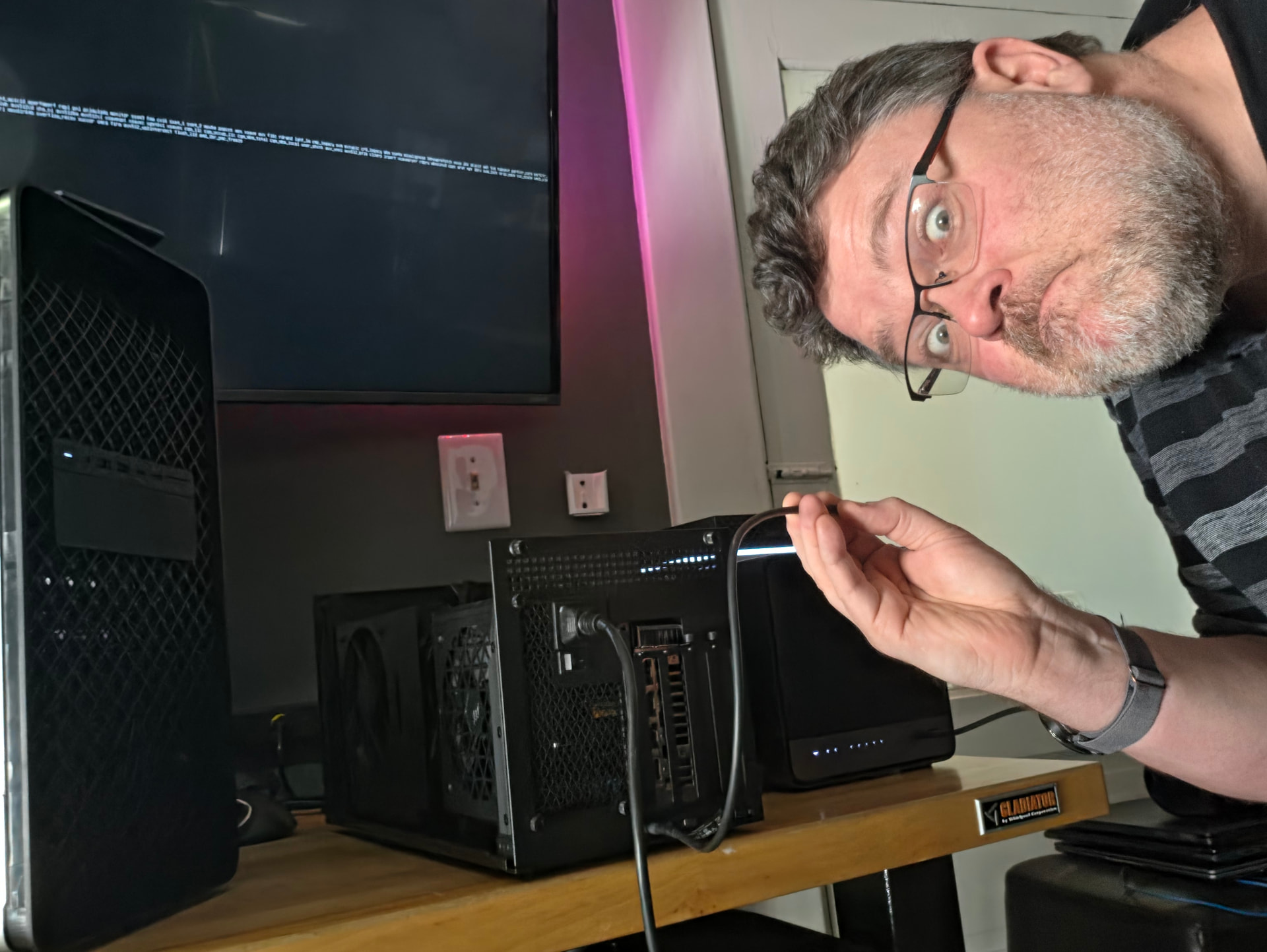
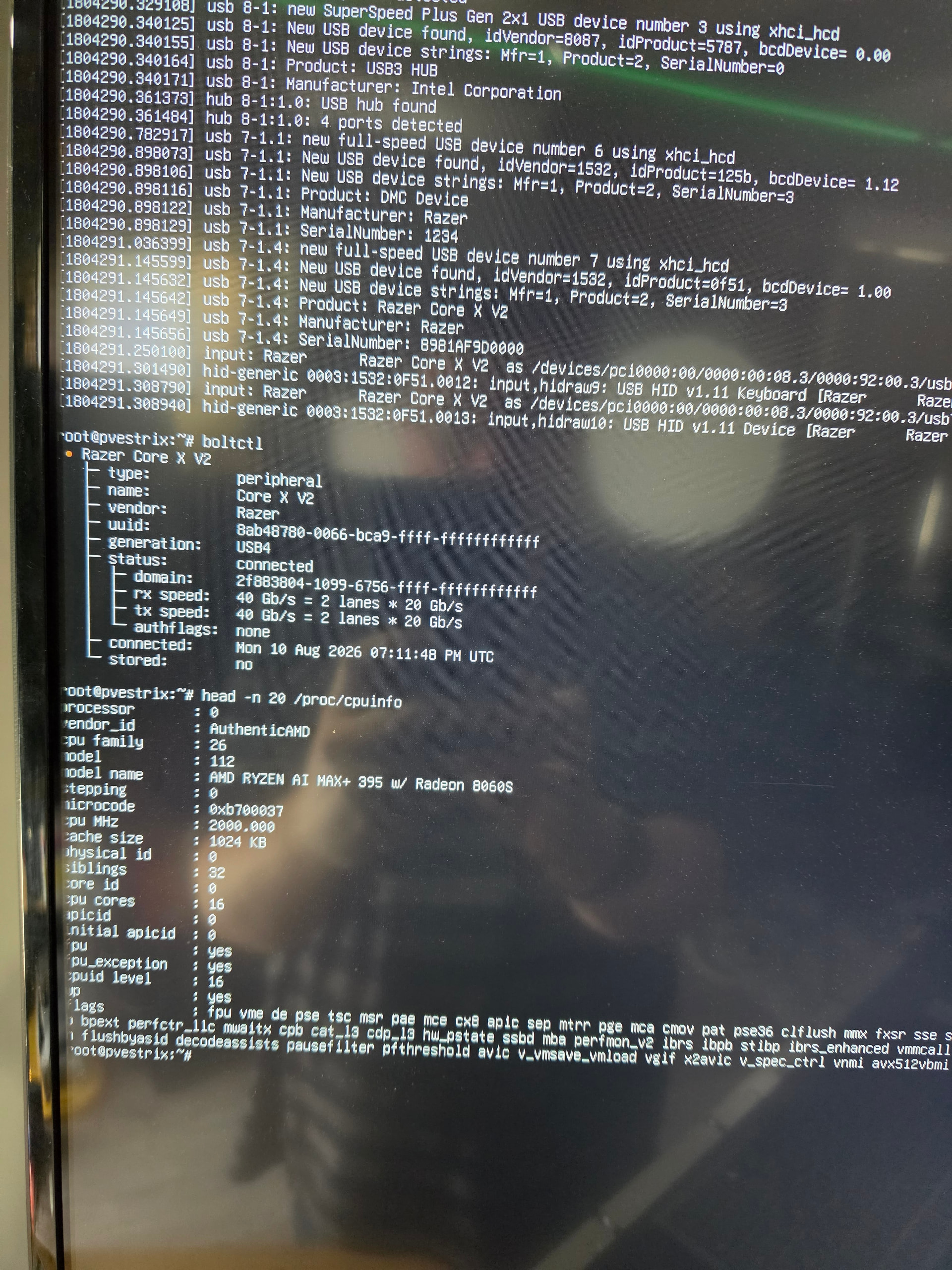
Nah, can’t do pcie devices over USB3. Anyway here’s a usb4/thunderbolt 5 dock with a GPU plugged into the usb4 port on strix halo. Boltctl labels the ports usb4 too.

3 Likes

Yeah I think there’s work to be done on the driver side. Soft-roce makes this kind of a non-starter.

Really nice that it gets to be an actual netdev via thunderbolt though, baby steps!

Edit: But wait there’s no actual nic hardware to offload to, even if there would be “proper driver support”. D’oh

this doesn’t matter, really, for rdma. “heres a block of data I want to appear on this other machine” – there is a low latency path similar to how rccl/nccl does it, the infiniband primitives DO work so..

and it does work that way on apple with (imho) inferior usb4/thunderbolt stack

1 Like

Right, there’s no skb copying around like on a regular nic either.

So basically it is zero-copy, but it’s cpu encapsulation that’s the bottleneck?

Btw anyone got latency and perftest running on macs’ RDMA over thunderbolt? I remember only seeing AI benchmarks around youtube.

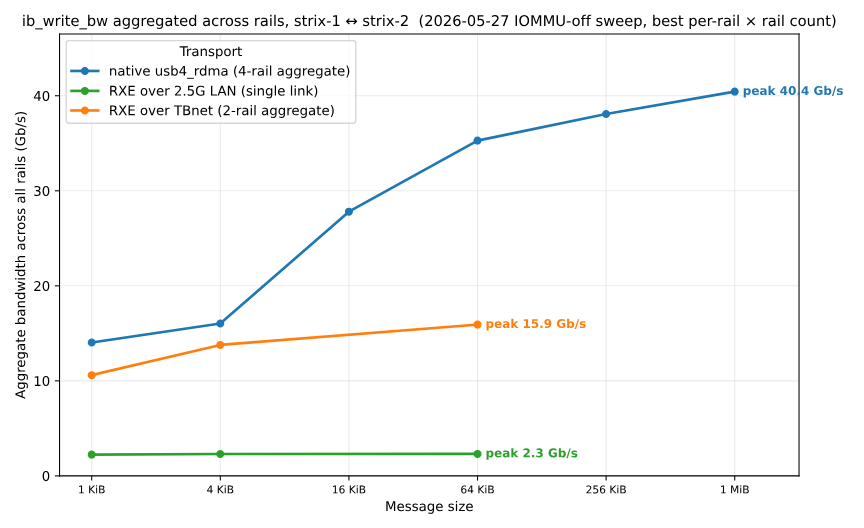
This effort seems different from thunderbolt-ibverbs - their benchmarks show quite a bit better performance including using multiple links. Same-ish challenge of getting latest 7.2 tip + a custom driver build.

3 Likes

What’s the link there to their work!? That’s a fantastic result!

I hadn’t gotten both links working on mine!
But 20 gigabit with 2 links (one each way) is about where I landed.

edit: got it:

wooo!

1 Like

I couldn’t post links, sorry, if you search for thunderbolt-ibverbs, you should find it. Another option is OdinLink-Five on github. Latter is what Kryoz did for his Strix Halo TP=2 llama.cpp setup

2 Likes

added thanks. Yeah, my test was only with just the ONE link, not both. not sure why I couldn’t get the other link to come up.. I’ll try with another strix halo and see what happens.

1 Like

man this looks neat! I did the rocm stuff across usb4 the other week and only negotiated 20g. using dwarfstar? It was a bit convoluted with the weird interface. But I got it running behind the scenes. And punted due to latency/performance over ip. wasn’t worth it imo.

So what’s the highlevel entrypoint here? build these module interfaces and leverage <insert inference engine?> cause llama.cpp is rpc, and I know little about vllm and what quants are useful or where. I know even less about dwarfstar and the mac rdma transport?. Or to put it another way, what’s the sweet spot model at 256gb for vllm or unamed inference thingy that speaks rdma?

I love seeing this, but feel ignorant as to what actually supports rdma :slight_smile:

I have two strix fedora 44 machines for messing with.

Second Strix Halo pair — corroborating numbers, plus what we actually run over the link

Ran your suite on an independent pair, since a second data point on different chassis seemed useful. Same APU both ends, deliberately mismatched form factors:

  • node0 — GMKtec EVO-X3 (Ryzen AI MAX+ 395), kernel 7.0.0-29-generic
  • node1 — ASUS ProArt PX13 HN7306EAC (same APU, laptop), same kernel
  • Direct USB4 cable, thunderbolt0 on 10.55.0.0/30, MTU 65520
  • rx_speed=20.0 Gb/s tx_speed=20.0 Gb/s, rx_lanes=2 tx_lanes=2, generation=4
  • Measured with a document-parsing service resident on both nodes (load ~1.0), so these are loaded-machine numbers, not a quiesced lab

Throughput

test result
node0→node1, 1 stream 8.88 Gbit/s
node0→node1, 4 parallel 8.90 Gbit/s
node1→node0, 1 stream 9.41 Gbit/s
node1→node0, 4 parallel 9.43 Gbit/s
--bidir 10.1 TX + 10.2 RX simultaneously (20.3 Gbit/s aggregate)
WiFi LAN, for scale 0.52 Gbit/s

Latency, 1000 × 2 ms ICMP

link min avg max mdev
Thunderbolt 0.035 ms 0.416 ms 0.714 ms 0.137 ms
WiFi LAN 1.910 ms 4.093 ms 82.519 ms 4.513 ms

What this adds

Your ~8.85 Gbit/s reproduces almost exactly on completely different hardware — 8.88 one way, 9.41 the other. Given your lane clarification upthread (2 TX + 2 RX, capped 20 Gb/s each way), we’re sitting at the same ~50 % of per-direction line rate you are.

The two directions don’t contend. Running --bidir gets 10.1 and 10.2 Gbit/s at the same time, so each direction independently hits its own ~50 % ceiling rather than sharing one. That’s consistent with the CPU-side encapsulation/copy theory rather than anything shared in the fabric — and it means the zero-copy work in 7.2 you mentioned has roughly 2× headroom per direction to claw back, not 2× total.

Parallel streams buy nothing — 8.88 → 8.90, 9.41 → 9.43. One TCP stream already saturates the path.

A ~6 % direction asymmetry shows up on Thunderbolt too, stable across repeats (laptop→mini-PC faster). You’d noted asymmetry on Ethernet but described TB as symmetric.

On the second link not coming up

You mentioned you couldn’t get the other link up and would try another Strix Halo. Data point: our two boxes differ. The ProArt PX13 laptop enumerates two USB4 domains (domain0, domain1); the EVO-X3 mini-PC enumerates only domain0. So on a mixed pair you’re capped by whichever chassis exposes one domain, and it looks like a driver problem when it’s really the box. Cheap to check on both ends before digging:

ls /sys/bus/thunderbolt/devices/domain*

On the 858 µs RDMA latency spikes

You put those down to scheduler interference. First thing we’d rule out is platform power management, especially on a laptop chassis. We pin the ProArt to performance platform_profile + governor + EPP via a systemd unit at boot, because the stock balanced/powersave defaults cost us roughly 2× on real GPU throughput — a bigger effect than anything interconnect-side we’ve touched. Our TB minimum is 35 µs against your 119 µs, and our max 0.714 ms against your 1.119 ms, on a loaded box.

@wer’s question — what actually runs across this today

Since you asked what the entry point is and what speaks RDMA, here’s our operational experience rather than a benchmark:

  • vLLM tensor-parallel (TP=2) across the link via Ray works on this hardware over plain TCP/IP over thunderbolt0 — no RDMA, no custom driver. That’s the workload where your 66 µs vs ~500 µs latency gap should actually pay, because per-layer all-reduce is latency-bound, not bandwidth-bound. We have not produced a clean TP=1 vs TP=2 comparison, so we’re not going to quote a speedup — but that’s the experiment that would justify the soft-RoCE work far better than ib_send_bw will.
  • Embarrassingly parallel work doesn’t need any of this. Our document-parsing service fans whole files out to both nodes and scales 2.14× on two nodes. Payloads are whole documents, so the interconnect is nowhere near the critical path. If your workload looks like this, TCP over TB is already overkill and RDMA buys you nothing.

The honest summary is that the interconnect has not yet been our bottleneck — power/thermal policy and memory sizing have both cost us more.

One Strix-Halo-specific trap for anyone clustering these

GTT is carved from the same 128 GB the OS runs in — “GPU memory” and “system memory” are one pool. Setting --gpu-memory-utilization the way you would on a discrete card starves the host: we put a node into a ~25-minute swap storm that needed a power cycle. We now reserve 24 GiB for the host and cap at 0.72. Related: a resident vision model’s activation high-water grew GTT from 12 GB to 67 GB under real documents — allocator peak, never returned — which on a unified-memory box is indistinguishable from a leak in free. Both bite as soon as you start pinning real workloads to two of these.

Happy to run the soft-RoCE/RXE half of your suite on 7.0.0-29 if a second kernel data point is useful before 7.2 lands.

so the blog post thunderbolt-ibverbs: We have InfiniBand at home they concede that they only get 20 gb each way, interestingly. to get to 40 requires two usb4 connections it seems.

Interesting. I’m currently trying to glue their stuff into my stuff.

@wendell if you need any help let me know, I’m the originator of the following PoC driver for linux and mac, although Mac was someone elses contributions.

OdinLink-Five you can find me on GitHub.

feel free to find me on LinkedIn or the discord channel Lemonade I’m a maintainer at lemonade-sdk on GitHub. I would be willing to exchange some ideas :slight_smile: whatever it takes to get better results!

1 Like

I’ve merged what I’ve done and the rdma one linked above, and I can match the latency and 20 gigabit. I’m currently looking at whether or not io_uring can give us better mailbox performance. It seems like even with rdma we’re still capped to 20/20 (total) not 40/40 as we’d get in pcie mode because the TB mailbox is fundamentally limited vs. direct pcie transfers.

I’ll check out odinlink-five next

USB itself defines it much like PCIe, where a Lane is always bidirectional and USB4 only has 2 lanes. With USB4 Gen 4 they just leave the lane concept behind. In USB language, your are talking about wire-pairs here.

This single-lane on cross-domain connections seems to be a chipset side limitation. I have no idea why this is allowed for USB4 Gen 2 and Gen 3 speeds, as I cannot come up with a good reason why a dual lane controller would be allowed to only support single lane operation in cross-domain mode (which on the physical level should be the same as non-cross-domain). But it seems to have been grandfathered in due to the structure of USB4 and TB1-3 before it (establish each lane separately and THEN go through a bonding phase). And not supporting bonding on cross domain connections is explicitly allowed for in the USB4 spec (I saw it once while browsing through the spec).

I have also found no way in that controllers report that they have this limit. Its just the connection manager (driver) requesting dual lane operation and the chipset ignoring it on cross-domain links, like it would if bonding fails for other reasons like a half-broken cable etc.

(The chipset reports single lane / dual lane operation on each lane. So if bonding succeeded, the bits flip to dual-lane mode, with the final choice being down to the chipset and its firmware and the entire system including opposing controller and cable needing to support it successfully).

We have seen some reports of Intel chipsets doing dual-lane cross-domain (like a Tiger Lake cluster on Linux), so there absolutely are 40G controllers out there that do support it. But since its unclear to me if we can use Windows just to diagnose whether a controller can do it (and you need to be very sure the opposing side is also capable of dual-lane cross-domain) we have no set list of controllers that will do it and those that won’t.

Since the Linux USB4 driver seems to do it on the right Intel chipsets, most likely the current AMD USB4 controllers just cannot do it (at least on current firmware).

Because USB4 Gen 4 no longer thinks in lanes and does not have a bonding phase like Gen 2 and Gen 3 has, this is no longer a thing on Gen 4 links. There you should always get 80G/80G, only limited by the mailbox and potentially the PCIe bandwidth to that mailbox on external controllers.

Edit: oh, there is one mention in the current USB4 Connection Manager Guidelines