Ryzen 9950X RAM Tuning and Benchmarks

tl;dr;

Tuning up only your XMP/EXPO memory seems to slightly reduce CPU performance due to package power limit. Enabling PBO and increasing Package Power Tracking (PPT) limit can restore the CPU power envelope.

Background

The conversations over on 192gb DDR5 9950x AMD5 inspired me to spend a few days playing around tuning up my AMD 9950X + ASRock Taichi x670e + 2x48GB DDR5-6400 rig. I’m no overclocking expert; just wanted to share my findings and experience with anyone interested.

Not surprisingly, a decently tuned XMP/EXPO DDR5-6400 profile will outperform the BIOS stock DDR5-5600 defaults—possibly even 40% better for some workloads.

What did surprise me was that after memory tuning, CPU heavy benchmarks were slightly but measurably worse!?

Digging into it more and running y-cruncher while watching HWiNFO64 suggests to me that raising Vsoc from 0.9V to 1.27V to stabilize the memory controllers also increased max power draw of the i/o die by almost 15 Watts. This additional power counts toward the Package Power Tracking (PPT) limit which defaults to 200W (BIOS v3.08). So that is ~7% less power available to the CPU cores!

I attempted to recover that CPU performance using a gentle PBO overclock increasing PPT by 15W. I also added a touch of under-volting and additional boost. My goal is stable good performance without too much extra power or heat.

Configurations

I repeated benchmarks for each of these three BIOS configurations:

Baseline

DDR5-5600 JEDEC BIOS defaults and loose timings

Tuned

DDR5-6400 XMP profile with tuned timings and clocks

Tuned+PBO

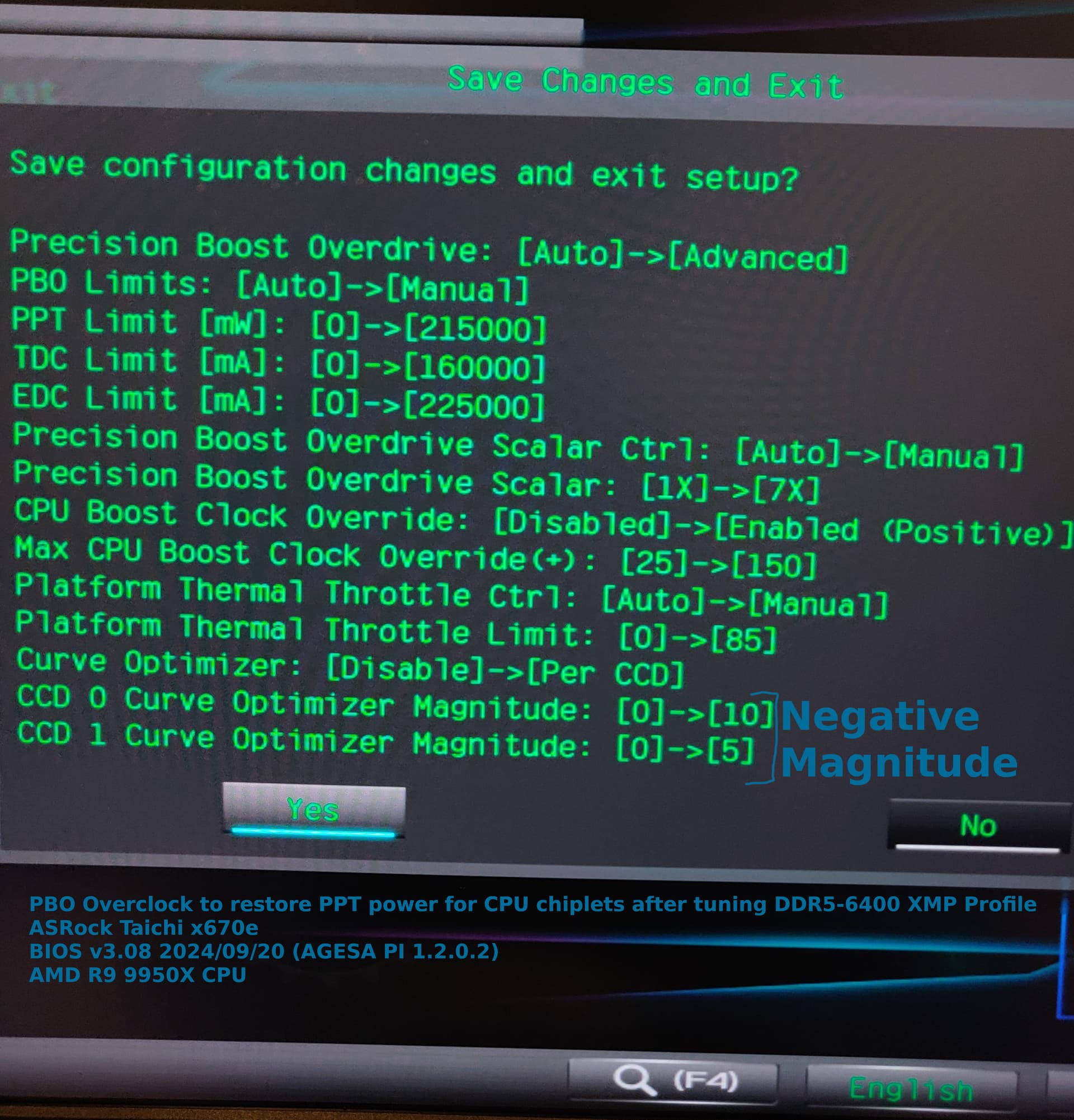
Same as Tuned plus a gentle PBO overclock:

  • PBO = Manual
  • PPT = 215000 mW
  • TDC= 160000 mA
  • EDC = 225000 mA
  • CCD0 @ -10mv under-volt
  • CCD1 @ -5mv under-volt
  • Scalar = 7x
  • Max Boost Clock = +150MHz
  • Thermal Throttle Limit = 85 Deg C

Benchmarks

Power

Recorded from HWiNFO64 after ~20 minutes y-cruncher.


single-dimm-max-watts

Temperature

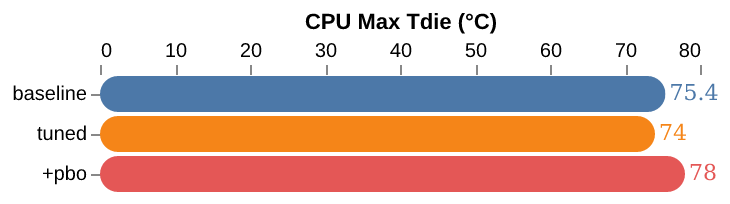
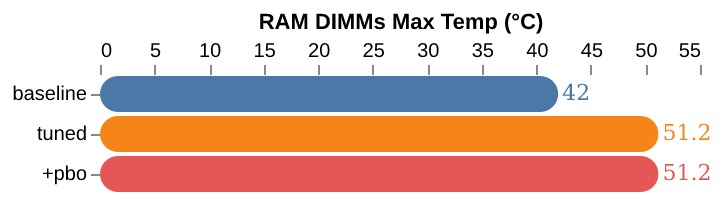
The gentle PBO overclock doesn’t increase CPU temps much and hasn’t hit the 85 degC throttle limit in limited testing. Note that RAM tuning can heat up even just 2x DIMMs quickly under some workloads.
y-cruncher

 Tag   Test Name                   Mem/Thread  Component      CPU------Mem
 BKT   Basecase + Karatsuba          27.8 KiB  Scalar Integer  -|--------
 FFTv4 Fast Fourier Transform (v4)    246 MiB  AVX512 Float    ---------|
 VT3   Vector Transform (v3)         2.59 GiB  AVX512 Integer  -------|--

BKT shows the CPU regression after RAM tuning. Both FFTv4 and VT3 show significant gains after RAM tuning.


CPU-Z

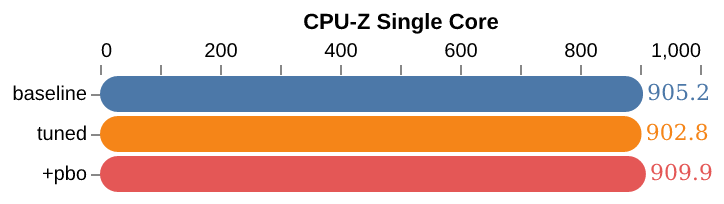
This benchmark shows the slight CPU regression after RAM tuning restored with PBO.

Geekbench 6.3.0

geekbench-single-core

llama.cpp@524afeec compilation time (Linux)

Compiling llama.cpp in Linux would crash my degraded i9-14900k… Lower time is better.
llama-cpp-524afeec-compile-s

Llama-3.1 70B IQ4_XS GGUF Inferencing (Linux)

RAM tuning can yield a nice uplift for when LLM inferencing spills out of VRAM. This test is partial offload with 1x 3090TI FE w/ 24GB VRAM @ 450W.

./llama-server \
    --model "../models/bartowski/Llama-3.1-Nemotron-70B-Instruct-HF-GGUF/Llama-3.1-Nemotron-70B-Instruct-HF-IQ4_XS.gguf" \
    --n-gpu-layers 46 \
    --ctx-size 8192 \
    --parallel 1 \
    --cache-type-k f16 \
    --cache-type-v f16 \
    --threads 16 \
    --flash-attn \
    --mlock \
    --host 127.0.0.1 \
    --port 8080

Tiny Tina’s Wonderland

Just beat this game with a couple friends. Benchmarked it using same 1080P config I used for gaming. Didn’t see much uplift, but it wasn’t on all lowest settings either. Windows 10 like all the other non-Linux testing.

AIDA64

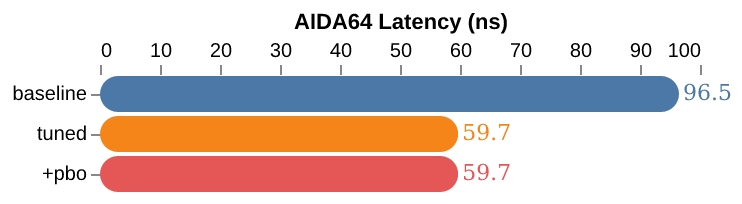
Intel Memory Latency Checker (Linux)


google/multichase (Linux)

# Pointer chase through an array of 1GB for 10 seconds (-n is the number of 0.5  second samples)
$ multichase -m 1g -n 20

Timings

Baseline

Tuned and PBO

Conclusions

I had fun tuning and benchmarking! Definitely not the fastest setup, but I learned a lot and am happy with the improved performance over stock defaults. Hopefully it is/remains stable; time will tell… haha :sweat_smile:

I am curious about the pros and cons of going for DDR5-8000 vs DDR5-6400? Supposedly you can use lower Vsoc which would free up package power for CPU cores, but it might use more power in other ways?

Finally, psure I read you can turn off the onboard graphics to free up a couple more watts, thought not sure it is worth it.

Cheers!
5 Likes

This behavior isn’t exactly new to AM5 or 9K; to a lesser extent it’s been around kind of from the start.

Actually, if your SoC voltage change is accurate, I’m surprised the gap is as small as it is; on my AM4 system going from ~975mv to 1.1V in CPU-Z shows more like a 5% regression in single core while multicore suffers less.

1 Like

Thanks for confirming! Yeah that makes sense its not specific to AM5/9K given similar enough soc topology with chiplet(s) + io die architecture over the past couple generations.

I imagine the CPU regression would be related to the PPT. How much power is the unified memory controller using out of the total package power budget. Possibly more CPU regression on a 65W TDP chip?

I couldn’t find a reference for the exact numbers for R9000 series chips, but believe these are the values for 7k series:

TDP PPT TDC EDC
 W   W   A   A
 65  88  75 150
105 142 110 170
170 230 160 225

I’ve heard the 9950X despite being 170W TDP part has suggested PPT=200W, but can’t find an actual AMD reference. It may just be mobo related (VRMs and one or two 8pin ATX12V connectors etc).

Anyway, will be interesting to see how the new unlocked 9800X3D performs and how much overclocking headroom exists given the CPU cores run cooler on top of the cache now!

So far as I know AMD doesn’t publish one and my experience is different motherboards and BIOSes use somewhat different values. From what I know your table’s commonly given for Zen 3, 4, and 5 parts but the defaults for 105 W TDP are TDC = 95 A and EDC = 140 A.

For the 9900X I use ASRock’s B650 3.08 BIOS (AGESA 1.2.0.2) goes with

TDP, W PPT, W TDC, A EDC, A
120 162 120 180

which seems to be the same as the 7800X3D defaults.

AMD’s also used 95 W TDP at times, which at least one pre-release article had the 9600X and 9700X on. IMO that would probably have made more sense than the 65-105 W back and forth.

All the Zen builds I’ve done are dual CCD and I haven’t seen anybody look at this particular angle, but that seems plausible. Most of the constraints you’ve hit here are why I tend not to push memory speed and voltage in favor of focusing on tighter timings. Partly also warranty thing plus ability to rule out overclocks as the cause of occasional weird system glitches as well as constraining thermals.

For 9900X perf I’ve gotten about +9% from tightening from JEDEC timings to M-die primaries and pulling in secondaries and tertiaries at DDR5-5600 while leaving margin for aging. Might pick up an additional percent or two if I tinkered with it more.

Don’t know that anybody’s broken it out. Comparing SoC power traces for the same workload at different DDR speeds and timings should yield an estimate of how much extra power pushing up the DIMMs requires in the UMC and IFOPs. Which doesn’t answer the question as posed but is probably more useful to PPT budgeting

Most differences I’ve seen reported are small enough it seems to get down to what the individual silicon likes and how good the person tuning it is at taking usable margin. If FLCK’s stable at 2133 then 6400 with tighter timings looks quite competitive. If you have to break 1:1 then probably 8000. None of the 6400-8000 comparisons I’m aware of have reported power consumption by die, so they’re likely constant PPT rather than constant core power results.

It’s out of reach to me as I’m on 2x48 GB DDR5-6600.

1 Like

Nice review and some good RAM performance, if you give it a little more voltage like 1.435V you may be CL30? But will likely need a fan on it to keep it cool. I run mine at 1.6V CL 28 for example with a 60mm fan on top of it on my 7950X with 64G A-Die

If you got 6400 2133 stable then your pretty much maxed out best to stay there and get the best timings

Do you mind running the “10G CFD Only” benchmark form this thread, can download from link in 1st post:

Note that you will likely need to manually get to process affinity to 55555555 to get decent result on scheduler in Win 11 uses HT and that hurt performance so its necessary to force HT off.

FYI with similar memory timing I get about 28m 18s on my 7950x and just under 18m on my 7960X

1 Like

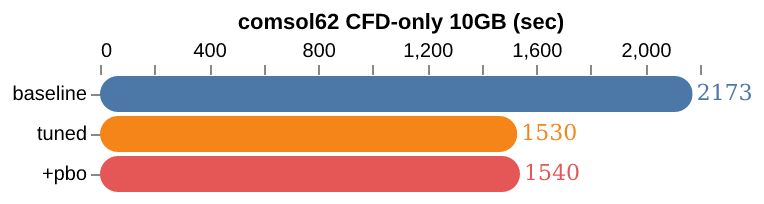
I finished running all the profiles for the comsol62 CFD-only 10GB benchmark thread. Here they are for comparison.

It is definitely a memory i/o sensitive benchmark. Speculating wildly, I’d give it a y-cruncher themed rating of:

CPU------Mem
 ------|---

comsol CFD-only 10GB (Linux)

# fairly recent kernel
$ uname -a
Linux bigfan 6.11.3-arch1-1 #1 SMP PREEMPT_DYNAMIC Thu, 10 Oct 2024 20:11:06 +0000 x86_64 GNU/Linux

# ran as user with no special affinity or renice and using default BLAS
$ ./comsol62_benchmark_CFD_only_10GB_Linux_x86-64.sh

# < --- less time is better

I didn’t run duplicate sets to get a feel for variance. CPU temperature followed a roughly sinusoidal pattern with each compute iteration. Eyeballed the min/max values (deg C):

  • Baseline: 60-66
  • Tuned: 64-71
  • Tuned+PBO: 67-74

Jeezzusss that tRFC is crazy tuned! Thanks for all the number crunching and testing

1 Like

For anyone else on ASRock Taichi mobo’s I took a pic of the BIOS changes when clicking “Save & Exit”.

RAM Tuning

First, load your RAMs XMP/EXPO profile, and it will set many of the voltages and impedance values automagically for you.

Next, only change UCLK=MEMCLK for 1:1, increase fclk to the desired frequency, and increase Vsoc as little as possible until you are stable.

Lastly, snug up the up secondary and tertiary timings iteratively testing along the way.

PBO

I tried not to push the PBO overclock too far except to add back in ~15W PPT head-room for the CPU cores after tuning RAM as above. Also, for good measure, did a slight undervolt and increase max boost freq too because why not.

Don’t do this until after you have confirmed the system is stable with just the RAM tuning above. Finally re-test for overall stability and then :crossed_fingers:

Cheers! Good luck and have fun tuning your system!

Testing takes the longest… something that seemed stable ends up not after a few months when it rear’s it’s ugly head. Ram overclocking is not for the faint of the heart but once dialed in get ready to zoom.

I am very partial to ram more so then cpu overclocking. Lots of goodies in here so hopefully someone else takes there time to appreciate this.

1 Like

Absolutely!

Just checking in to update that I’ve been daily driving this config for 3 months and no noticeable issues or instability!

Doing everything from PC Gaming Soul Mask in Windows 10 to inferencing llama.cpp unsloth/DeepSeek-R1-GGUF/DeepSeek-R1-UD-Q2_K_XL-00001-of-00005.gguf which is heavily disk cached given its 212GiB weights are mmap()'d and don’t even fit in RAM + VRAM haha…

The LLM game is all about memory i/o read bandwidth, so you definitely have a good hobby for these times haha… Cheers!

1 Like

Did you ram test with a program like occt? I have had ram run everything but failed on a test.

1 Like

Good point. No, I’m not familiar with occt.

I’m not doing mission critical stuff on this gaming rig, so if my RAM runs everything, but fails a test, then to me that is success ;p

If it is that important, I’d go with ECC probably anyway.

Reminds me of a mighty boosh skit – “My RAM is stable… but is it really?”

Glad to hear it! It is interesting to see all the benchmark data, thank you.

Memory tuning hasn’t been this easy or convenient on any system I’ve built since the very first one, an Abit IS7 with plain DDR. Settings either worked or didn’t, and not a ton of them to mess with :grin: So it’s really interesting to me DDR5 has been so convenient and downright easy to tune, at least with SK Hynix chips. My DDR3 Haswell rig was plagued with memory problems just trying to run stock, most of it ultimately caused by a defective memory chip that took a very long time to finally fail in a way I could reliably detect.

Anyhow, Buildzoid indicated in an older video that Gear Down Mode would hide instability, it basically allows the memory controller to clock down to a quarter frequency under certain situations. You might try some stability tests & benchmarks with GDM disabled to ensure you’re getting best performance. Beware disabling it could make your system very unstable, it did with mine until I retuned it better.

As per your DDR5-8000 vs DDR5-6400 question, Buildzoid covers it in another video here. He rambles, but he starts tackling your question sometime after 38 minutes in. It’s up to you (and also chip lottery) if it’s worth pursuing, he even has a newer video regarding a 9950X that couldn’t run 8000 stable.

1 Like

Maybe I am not reading the data correctly, but that seems an awful lot of work for exceptionally minimal gains over enabling EXPO and PBO and calling it a day.

1 Like

To be honest you’re quite right, it’s a lot of work with minimal gain.

But it is incredibly straightforward to do and I enjoyed messing around with it. In the times of yore I would’ve been overclocking instead but there’s really no point to that anymore. Tuning the memory primarily satisfied my need to screw around with the hardware and learn the various modern UEFI knobs and buttons. And as an added bonus it means I’m dead sure my system is rock stable.

Stability is paramount on my system, it blows my mind people just assemble desktops and never stability check anything until after the damage is done. Modern Windows may be crap, but if you’re seeing program instability or a BSoD once a month there’s fair odds of instability somewhere in the hardware.

3 Likes

This topic was automatically closed 273 days after the last reply. New replies are no longer allowed.