Oh, yes. If you haven’t passed through the whole card to a windows vm, or used it on bare metal, the driver installer for windows updates the card firmware and then that enables the sr-iov devices
1 Like
I have gotten to the point of the card now showing sriov. but it is refusing to load the vfio-pci driver. I have
- vfio-pci in /etc/modules
- intel_iommu on in /etc/default/grub
- xe blacklisted
- ran update-grub && update-initramfs -u
any ideas on how to get vfio-pci to load for this card?
03:00.0 VGA compatible controller: Intel Corporation Battlemage G21 [Intel Graphics] (prog-if 00 [VGA controller])
        Subsystem: Intel Corporation Device 1114
        Control: I/O- Mem+ BusMaster+ SpecCycle- MemWINV- VGASnoop- ParErr- Stepping- SERR- FastB2B- DisINTx-
        Status: Cap+ 66MHz- UDF- FastB2B- ParErr- DEVSEL=fast >TAbort- <TAbort- <MAbort- >SERR- <PERR- INTx-
        Latency: 0, Cache Line Size: 64 bytes
        IOMMU group: 15
        Region 0: Memory at 6a0c000000 (64-bit, prefetchable) [size=16M]
        Region 2: Memory at 6000000000 (64-bit, prefetchable) [size=16G]
        Expansion ROM at 80800000 [disabled] [size=2M]
        Capabilities: [40] Vendor Specific Information: Len=0c <?>
        Capabilities: [70] Express (v2) Endpoint, IntMsgNum 0
                DevCap: MaxPayload 256 bytes, PhantFunc 0, Latency L0s unlimited, L1 unlimited
                        ExtTag+ AttnBtn- AttnInd- PwrInd- RBE+ FLReset+ SlotPowerLimit 0W TEE-IO-
                DevCtl: CorrErr- NonFatalErr- FatalErr- UnsupReq-
                        RlxdOrd+ ExtTag+ PhantFunc- AuxPwr- NoSnoop+ FLReset-
                        MaxPayload 256 bytes, MaxReadReq 512 bytes
                DevSta: CorrErr- NonFatalErr- FatalErr- UnsupReq- AuxPwr- TransPend-
                LnkCap: Port #0, Speed 2.5GT/s, Width x1, ASPM L0s L1, Exit Latency L0s <64ns, L1 <1us
                        ClockPM- Surprise- LLActRep- BwNot- ASPMOptComp+
                LnkCtl: ASPM L1 Enabled; RCB 64 bytes, LnkDisable- CommClk-
                        ExtSynch- ClockPM- AutWidDis- BWInt- AutBWInt-
                LnkSta: Speed 2.5GT/s, Width x1
                        TrErr- Train- SlotClk- DLActive- BWMgmt- ABWMgmt-
                DevCap2: Completion Timeout: Range B, TimeoutDis+ NROPrPrP- LTR+
                         10BitTagComp+ 10BitTagReq+ OBFF Not Supported, ExtFmt+ EETLPPrefix-
                         EmergencyPowerReduction Not Supported, EmergencyPowerReductionInit-
                         FRS- TPHComp- ExtTPHComp-
                         AtomicOpsCap: 32bit- 64bit- 128bitCAS-
                DevCtl2: Completion Timeout: 50us to 50ms, TimeoutDis-
                         AtomicOpsCtl: ReqEn-
                         IDOReq- IDOCompl- LTR+ EmergencyPowerReductionReq-
                         10BitTagReq- OBFF Disabled, EETLPPrefixBlk-
                LnkCap2: Supported Link Speeds: 2.5GT/s, Crosslink- Retimer- 2Retimers- DRS-
                LnkCtl2: Target Link Speed: 2.5GT/s, EnterCompliance- SpeedDis-
                         Transmit Margin: Normal Operating Range, EnterModifiedCompliance- ComplianceSOS-
                         Compliance Preset/De-emphasis: -6dB de-emphasis, 0dB preshoot
                LnkSta2: Current De-emphasis Level: -6dB, EqualizationComplete- EqualizationPhase1-
                         EqualizationPhase2- EqualizationPhase3- LinkEqualizationRequest-
                         Retimer- 2Retimers- CrosslinkRes: unsupported
        Capabilities: [ac] MSI: Enable- Count=1/1 Maskable+ 64bit+
                Address: 0000000000000000  Data: 0000
                Masking: 00000000  Pending: 00000000
        Capabilities: [d0] Power Management version 3
                Flags: PMEClk- DSI- D1- D2- AuxCurrent=0mA PME(D0+,D1-,D2-,D3hot+,D3cold-)
                Status: D0 NoSoftRst+ PME-Enable- DSel=0 DScale=0 PME-
        Capabilities: [100 v1] Alternative Routing-ID Interpretation (ARI)
                ARICap: MFVC- ACS-, Next Function: 0
                ARICtl: MFVC- ACS-, Function Group: 0
        Capabilities: [110 v1] Null
        Capabilities: [200 v1] Address Translation Service (ATS)
                ATSCap: Invalidate Queue Depth: 00
                ATSCtl: Enable-, Smallest Translation Unit: 00
        Capabilities: [420 v1] Physical Resizable BAR
                BAR 2: current size: 16GB, supported: 256MB 512MB 1GB 2GB 4GB 8GB 16GB
        Capabilities: [220 v1] Virtual Resizable BAR
                BAR 2: current size: 2GB, supported: 256MB 512MB 1GB 2GB 4GB 8GB 16GB
        Capabilities: [320 v1] Single Root I/O Virtualization (SR-IOV)
                IOVCap: Migration- 10BitTagReq+ IntMsgNum 0
                IOVCtl: Enable- Migration- Interrupt- MSE- ARIHierarchy+ 10BitTagReq-
                IOVSta: Migration-
                Initial VFs: 12, Total VFs: 12, Number of VFs: 0, Function Dependency Link: 00
                VF offset: 1, stride: 1, Device ID: e212
                Supported Page Size: 00000553, System Page Size: 00000001
                Region 0: Memory at 0000006a00000000 (64-bit, prefetchable)
                Region 2: Memory at 0000006400000000 (64-bit, prefetchable)
                VF Migration: offset: 00000000, BIR: 0
        Capabilities: [400 v1] Latency Tolerance Reporting
                Max snoop latency: 15728640ns
                Max no snoop latency: 15728640ns
        Kernel modules: xe
actually now, maybe, you can load xe for the root device and make sure your kernel line has xe.vfs_max=7 ? (edit /etc/default/grub)
you’ll have to excuse me – I’ve been juggling flex140/170 (not ready yet in xe but works in i915) and i915 for B50 and xe for b50 and I forgot I got it working with xe on the b50 because I failed to get it working with the flex170.
modprobe xe manually with the option for vfs set in the module options, then check dmesg output
1 Like
I think I have it working.
steps
- first place your b50 in a windows machine and install the intel arc pro drivers (this will update the firmware)
- load fresh proxmox 9 (update, install post install scripts). also make sure sriov is enabled in bios
- download all the files from Releases · jaminmc/pve-kernel · GitHub
apt install libpfm4 libcapstone5
dpkg -i linux-tools-6.17_6.17.1-6.6_amd64.deb  proxmox-headers-6.17.1-6.6-pve_6.17.1-6.6_amd64.deb proxmox-headers-6.17_6.17.1-6.6_all.deb proxmox-kernel-6.17.1-6.6-pve_6.17.1-6.6_amd64.deb proxmox-kernel-libc-dev_6.17.1-6.6_amd64.deb pve-firmware_3.19_all.deb
- add this to /etc/default/grub, GRUB_CMDLINE_LINUX_DEFAULT
amd_iommu=on xe.max_vfs=7
- add this to /etc/modules
 vfio
 vfio_iommu_type1
 vfio_pci
update-grub && update-initramfs -u && reboot
- lspci to find your gpu. then lspci -vvv [##.##] to get details. look for
Capabilities: [320 v1] Single Root I/O Virtualization (SR-IOV)
- find your device in /sys/device
find /sys/devices -name "*##:##*" -type d
- go to the directory and look for sriov_numvfs. then
echo 4 > sriov_numvfs
- you should have this under lspci
43:00.0 VGA compatible controller: Intel Corporation Battlemage G21 [Intel Graphics]
43:00.1 VGA compatible controller: Intel Corporation Battlemage G21 [Intel Graphics]
43:00.2 VGA compatible controller: Intel Corporation Battlemage G21 [Intel Graphics]
43:00.3 VGA compatible controller: Intel Corporation Battlemage G21 [Intel Graphics]
43:00.4 VGA compatible controller: Intel Corporation Battlemage G21 [Intel Graphics]
this is working on a
AMD SP3 7232P
tyan 8030
arc b50 pro
2 Likes
Not works for me
		Capabilities: [320 v1] Single Root I/O Virtualization (SR-IOV)
		IOVCap:	Migration- 10BitTagReq+ IntMsgNum 0
		IOVCtl:	Enable- Migration- Interrupt- MSE- ARIHierarchy+ 10BitTagReq-
		IOVSta:	Migration-
		Initial VFs: 12, Total VFs: 12, Number of VFs: 0, Function Dependency Link: 00
		VF offset: 1, stride: 1, Device ID: e212
		Supported Page Size: 00000553, System Page Size: 00000001
		Region 0: Memory at 0000000000000000 (64-bit, prefetchable)
		Region 2: Memory at 0000000000000000 (64-bit, prefetchable)
		VF Migration: offset: 00000000, BIR: 0
	Capabilities: [400 v1] Latency Tolerance Reporting
		Max snoop latency: 0ns
		Max no snoop latency: 0ns
	Kernel modules: xe
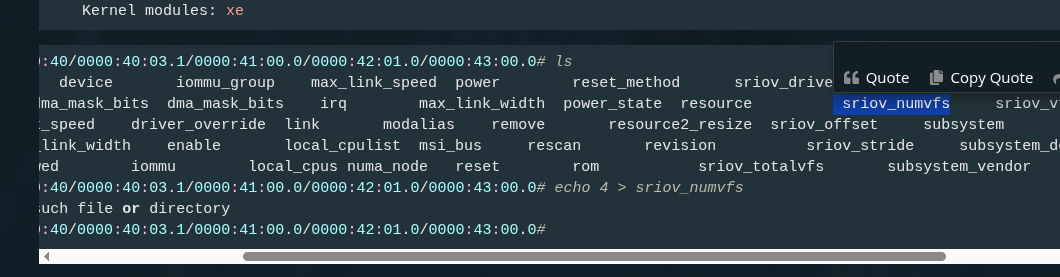
root@hpws:/sys/devices/pci0000:40/0000:40:03.1/0000:41:00.0/0000:42:01.0/0000:43:00.0# ls
aer		      config			device		 iommu_group	max_link_speed	power	     reset_method      sriov_drivers_autoprobe	sriov_vf_device      uevent
ari_enabled	      consistent_dma_mask_bits	dma_mask_bits	 irq		max_link_width	power_state  resource	       sriov_numvfs		sriov_vf_total_msix  vendor
boot_vga	      current_link_speed	driver_override  link		modalias	remove	     resource2_resize  sriov_offset		subsystem
broken_parity_status  current_link_width	enable		 local_cpulist	msi_bus		rescan	     revision	       sriov_stride		subsystem_device
class		      d3cold_allowed		iommu		 local_cpus	numa_node	reset	     rom	       sriov_totalvfs		subsystem_vendor
root@hpws:/sys/devices/pci0000:40/0000:40:03.1/0000:41:00.0/0000:42:01.0/0000:43:00.0# echo 4 > sriov_numvfs
-bash: echo: write error: No such file or directory
root@hpws:/sys/devices/pci0000:40/0000:40:03.1/0000:41:00.0/0000:42:01.0/0000:43:00.0#
[ 109.125568] pci 0000:43:00.0: no driver bound to device; cannot configure SR-IOV
uname -r
6.17.1-6.6-pve
will try reinstall Proxmox.
Ok, now I have fresh Proxmox with default updates (I also making activation before updates because I have community key), and followed your instructions.
same results’
root@hpws:/sys/devices/pci0000:40/0000:40:03.1/0000:41:00.0/0000:42:01.0/0000:43:00.0# cd sriov_numvfs
-bash: cd: sriov_numvfs: Not a directory
root@hpws:/sys/devices/pci0000:40/0000:40:03.1/0000:41:00.0/0000:42:01.0/0000:43:00.0# echo 4 > sriov_numvfs
-bash: echo: write error: No such file or directory
root@hpws:/sys/devices/pci0000:40/0000:40:03.1/0000:41:00.0/0000:42:01.0/0000:43:00.0# cat sriov_totalvfs
12
root@hpws:/sys/devices/pci0000:40/0000:40:03.1/0000:41:00.0/0000:42:01.0/0000:43:00.0#
cd sriov_numvfs
you should use
ls
sriov_numvfs is a file i think
root@hpws:/sys/devices/pci0000:40/0000:40:03.1/0000:41:00.0/0000:42:01.0/0000:43:00.0# ls sriov_numvfs

sriov_numvfs

root@hpws:/sys/devices/pci0000:40/0000:40:03.1/0000:41:00.0/0000:42:01.0/0000:43:00.0# cat sriov_numvfs

0

root@hpws:/sys/devices/pci0000:40/0000:40:03.1/0000:41:00.0/0000:42:01.0/0000:43:00.0# echo 4 > sriov_numvfs

-bash: echo: write error: No such file or directory

root@hpws:/sys/devices/pci0000:40/0000:40:03.1/0000:41:00.0/0000:42:01.0/0000:43:00.0# echo 0 > sriov_numvfs

root@hpws:/sys/devices/pci0000:40/0000:40:03.1/0000:41:00.0/0000:42:01.0/0000:43:00.0#
my
root@hpws:/sys/devices/pci0000:40/0000:40:03.1/0000:41:00.0/0000:42:01.0/0000:43:00.0# cat sriov_totalvfs
12
xe.max_vfs=7 has no affect on it, I assume it ok.
Every time when I’m trying to set something !=0, getting this msg
[  383.527240] pci 0000:43:00.0: no driver bound to device; cannot configure SR-IOV
[  386.814517] pci 0000:43:00.0: no driver bound to device; cannot configure SR-IOV
[  413.152365] pci 0000:43:00.0: no driver bound to device; cannot configure SR-IOV
[  774.957706] pci 0000:43:00.0: no driver bound to device; cannot configure SR-IOV
EDIT: I forgot to re add the pci device
xe passthrough looks to be working on cachyos. im not sure how to test this. lmstudio cant talk to it. and glgears and glmark2 just ran on the cpu. ill try to think of something tomorrow.
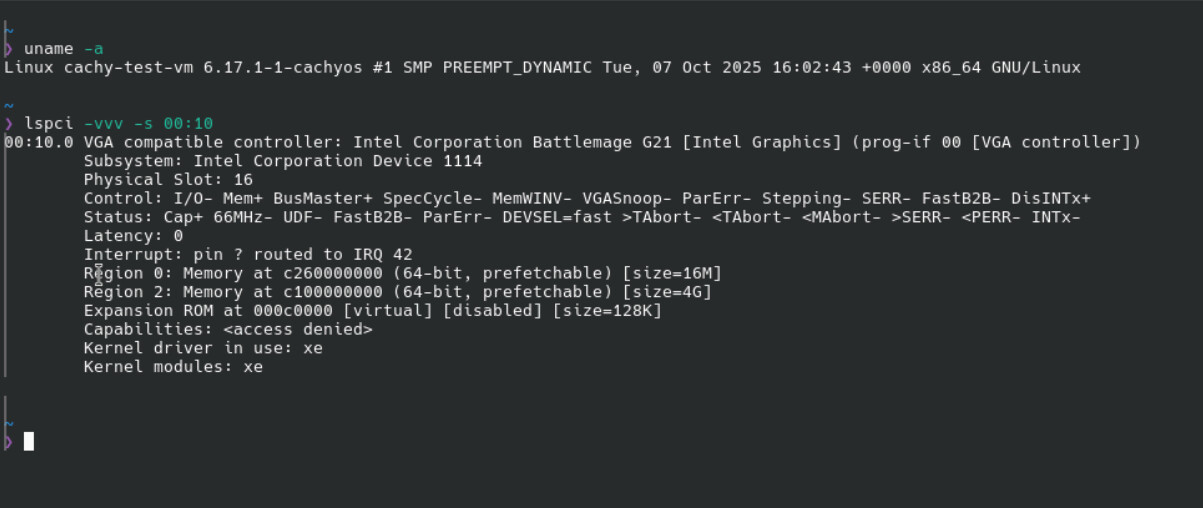
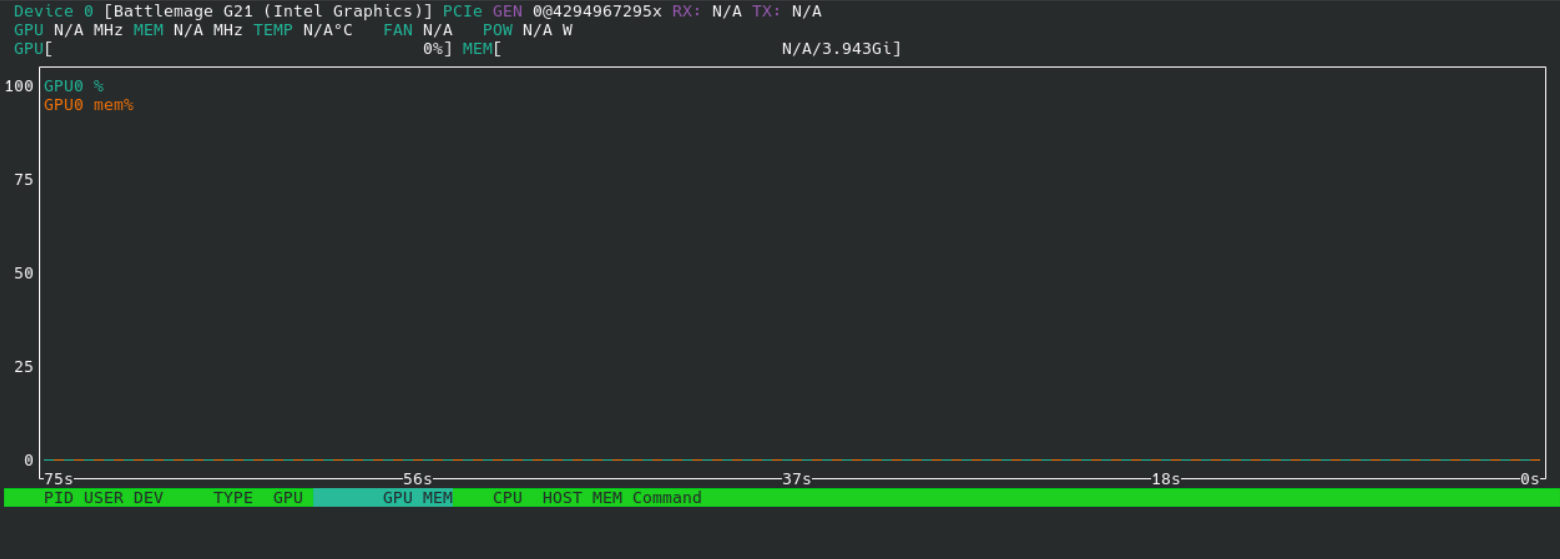
did you black list xe?
it should look like that if the xe driver is loaded. it looks like the card is there but has not loaded any available driver.
1 Like
Should I blacklist i915 or xe?
i have nothing blacklisted
Blacklisting is completely pointless.
root@hpws:~# modprobe -c | grep -E '^(blacklist|install)\s+xe'
blacklist xen_wdt
blacklist xen_wdt
blacklist xen_wdt
blacklist xe
root@hpws:~# modprobe -c | grep -E '^(blacklist|install)\s+i915'
blacklist i915
root@hpws:~# lspci -s 43:00.0 -vvv
43:00.0 VGA compatible controller: Intel Corporation Battlemage G21 [Intel Graphics] (prog-if 00 [VGA controller])
Subsystem: Intel Corporation Device 1114
Control: I/O+ Mem+ BusMaster+ SpecCycle- MemWINV- VGASnoop- ParErr- Stepping- SERR- FastB2B- DisINTx-
Status: Cap+ 66MHz- UDF- FastB2B- ParErr- DEVSEL=fast >TAbort- <TAbort- <MAbort- >SERR- <PERR- INTx-
Latency: 0
IOMMU group: 52
Expansion ROM at 80000000 [disabled] [size=2M]
Capabilities: [40] Vendor Specific Information: Len=0c <?>
Capabilities: [70] Express (v2) Endpoint, IntMsgNum 0
DevCap: MaxPayload 256 bytes, PhantFunc 0, Latency L0s unlimited, L1 unlimited
ExtTag+ AttnBtn- AttnInd- PwrInd- RBE+ FLReset+ SlotPowerLimit 0W TEE-IO-
DevCtl: CorrErr+ NonFatalErr+ FatalErr+ UnsupReq-
RlxdOrd+ ExtTag+ PhantFunc- AuxPwr- NoSnoop+ FLReset-
MaxPayload 256 bytes, MaxReadReq 512 bytes
DevSta: CorrErr- NonFatalErr- FatalErr- UnsupReq- AuxPwr- TransPend-
LnkCap: Port #0, Speed 2.5GT/s, Width x1, ASPM L0s L1, Exit Latency L0s <64ns, L1 <1us
ClockPM- Surprise- LLActRep- BwNot- ASPMOptComp+
LnkCtl: ASPM Disabled; RCB 64 bytes, LnkDisable- CommClk-
ExtSynch- ClockPM- AutWidDis- BWInt- AutBWInt-
LnkSta: Speed 2.5GT/s, Width x1
TrErr- Train- SlotClk- DLActive- BWMgmt- ABWMgmt-
DevCap2: Completion Timeout: Range B, TimeoutDis+ NROPrPrP- LTR+
10BitTagComp+ 10BitTagReq+ OBFF Not Supported, ExtFmt+ EETLPPrefix-
EmergencyPowerReduction Not Supported, EmergencyPowerReductionInit-
FRS- TPHComp- ExtTPHComp-
DevCtl2: Completion Timeout: 50us to 50ms, TimeoutDis-
AtomicOpsCtl: ReqEn-
IDOReq- IDOCompl- LTR- EmergencyPowerReductionReq-
10BitTagReq- OBFF Disabled, EETLPPrefixBlk-
LnkCap2: Supported Link Speeds: 2.5GT/s, Crosslink- Retimer- 2Retimers- DRS-
LnkCtl2: Target Link Speed: 2.5GT/s, EnterCompliance- SpeedDis-
Transmit Margin: Normal Operating Range, EnterModifiedCompliance- ComplianceSOS-
Compliance Preset/De-emphasis: -6dB de-emphasis, 0dB preshoot
LnkSta2: Current De-emphasis Level: -6dB, EqualizationComplete- EqualizationPhase1-
EqualizationPhase2- EqualizationPhase3- LinkEqualizationRequest-
Retimer- 2Retimers- CrosslinkRes: unsupported
Capabilities: [ac] MSI: Enable- Count=1/1 Maskable+ 64bit+
Address: 0000000000000000 Data: 0000
Masking: 00000000 Pending: 00000000
Capabilities: [d0] Power Management version 3
Flags: PMEClk- DSI- D1- D2- AuxCurrent=0mA PME(D0+,D1-,D2-,D3hot+,D3cold-)
Status: D0 NoSoftRst+ PME-Enable- DSel=0 DScale=0 PME-
Capabilities: [100 v1] Alternative Routing-ID Interpretation (ARI)
ARICap: MFVC- ACS-, Next Function: 0
ARICtl: MFVC- ACS-, Function Group: 0
Capabilities: [110 v1] Null
Capabilities: [200 v1] Address Translation Service (ATS)
ATSCap: Invalidate Queue Depth: 00
ATSCtl: Enable+, Smallest Translation Unit: 00
Capabilities: [420 v1] Physical Resizable BAR
BAR 2: current size: 16GB, supported: 256MB 512MB 1GB 2GB 4GB 8GB 16GB
Capabilities: [220 v1] Virtual Resizable BAR
BAR 2: current size: 2GB, supported: 256MB 512MB 1GB 2GB 4GB 8GB 16GB
Capabilities: [320 v1] Single Root I/O Virtualization (SR-IOV)
IOVCap: Migration- 10BitTagReq+ IntMsgNum 0
IOVCtl: Enable- Migration- Interrupt- MSE- ARIHierarchy+ 10BitTagReq-
IOVSta: Migration-
Initial VFs: 12, Total VFs: 12, Number of VFs: 0, Function Dependency Link: 00
VF offset: 1, stride: 1, Device ID: e212
Supported Page Size: 00000553, System Page Size: 00000001
Region 0: Memory at 0000000000000000 (64-bit, prefetchable)
Region 2: Memory at 0000000000000000 (64-bit, prefetchable)
VF Migration: offset: 00000000, BIR: 0
	Capabilities: [400 v1] Latency Tolerance Reporting
		Max snoop latency: 0ns
		Max no snoop latency: 0ns
	Kernel modules: xe
root@hpws:~#
root@hpws:~#
root@hpws:~# cd /sys/devices/pci0000:40/0000:40:03.1/0000:41:00.0/0000:42:01.0/0000:43:00.0
root@hpws:/sys/devices/pci0000:40/0000:40:03.1/0000:41:00.0/0000:42:01.0/0000:43:00.0# ls
aer config device iommu_group max_link_speed power reset_method sriov_drivers_autoprobe sriov_vf_device uevent
ari_enabled consistent_dma_mask_bits dma_mask_bits irq max_link_width power_state resource sriov_numvfs sriov_vf_total_msix vendor
boot_vga current_link_speed driver_override link modalias remove resource2_resize sriov_offset subsystem
broken_parity_status current_link_width enable local_cpulist msi_bus rescan revision sriov_stride subsystem_device
class d3cold_allowed iommu local_cpus numa_node reset rom sriov_totalvfs subsystem_vendor
root@hpws:/sys/devices/pci0000:40/0000:40:03.1/0000:41:00.0/0000:42:01.0/0000:43:00.0# echo 4 > sriov_numvfs
-bash: echo: write error: No such file or directory
root@hpws:/sys/devices/pci0000:40/0000:40:03.1/0000:41:00.0/0000:42:01.0/0000:43:00.0#
I had this same problem before moving my b50 to another system.
When I passed the B50 to a ubuntu 25.10 vm it shows up in lspci and nvtop but nothing is graphics accelerated. Google Earth rendering was done on the cpu and glxgears was also running on the cpu not sure why.
My B50 PF sits behind a PCIe switch chain:
40:03.1 → 41:00.0 (switch UPL) → 42:01.0 (switch DNL) → 43:00.0 (B50) [+ 44:00.0 HDA]
root@hpws:~# dmesg | grep '43:00'
[    1.243837] pci 0000:43:00.0: [8086:e212] type 00 class 0x030000 PCIe Endpoint
[    1.243867] pci 0000:43:00.0: BAR 0 [mem 0x11800000000-0x11800ffffff 64bit pref]
[    1.243870] pci 0000:43:00.0: BAR 2 [mem 0x11400000000-0x117ffffffff 64bit pref]
[    1.243874] pci 0000:43:00.0: ROM [mem 0xffe00000-0xffffffff pref]
[    1.243940] pci 0000:43:00.0: PME# supported from D0 D3hot
[    1.243975] pci 0000:43:00.0: VF BAR 0 [mem 0x00000000-0x00ffffff 64bit pref]
[    1.243977] pci 0000:43:00.0: VF BAR 0 [mem 0x00000000-0x0bffffff 64bit pref]: contains BAR 0 for 12 VFs
[    1.243980] pci 0000:43:00.0: VF BAR 2 [mem 0x00000000-0x7fffffff 64bit pref]
[    1.243981] pci 0000:43:00.0: VF BAR 2 [mem 0x00000000-0x5ffffffff 64bit pref]: contains BAR 2 for 12 VFs
[    1.260197] pci 0000:43:00.0: vgaarb: bridge control possible
[    1.260197] pci 0000:43:00.0: vgaarb: VGA device added: decodes=io+mem,owns=none,locks=none
[    1.262953] pnp 00:00: disabling [mem 0xe0000000-0xefffffff] because it overlaps 0000:43:00.0 BAR 9 [mem 0x00000000-0x5ffffffff 64bit pref]
[    1.263301] pnp 00:03: disabling [mem 0xfedf1000-0xfedf1fff] because it overlaps 0000:43:00.0 BAR 9 [mem 0x00000000-0x5ffffffff 64bit pref]
[    1.282352] pci 0000:43:00.0: ROM [mem 0xffe00000-0xffffffff pref]: can't claim; no compatible bridge window
[    1.282737] pci 0000:43:00.0: VF BAR 2 [mem size 0x600000000 64bit pref]: can't assign; no space
[    1.282739] pci 0000:43:00.0: VF BAR 2 [mem size 0x600000000 64bit pref]: failed to assign
[    1.282741] pci 0000:43:00.0: VF BAR 0 [mem size 0x0c000000 64bit pref]: can't assign; no space
[    1.282742] pci 0000:43:00.0: VF BAR 0 [mem size 0x0c000000 64bit pref]: failed to assign
[    1.282744] pci 0000:43:00.0: ROM [mem size 0x00200000 pref]: can't assign; no space
[    1.282745] pci 0000:43:00.0: ROM [mem size 0x00200000 pref]: failed to assign
[    1.282844] pci 0000:43:00.0: BAR 2 [mem size 0x400000000 64bit pref]: can't assign; no space
[    1.282845] pci 0000:43:00.0: BAR 2 [mem size 0x400000000 64bit pref]: failed to assign
[    1.282847] pci 0000:43:00.0: VF BAR 2 [mem size 0x600000000 64bit pref]: can't assign; no space
[    1.282848] pci 0000:43:00.0: VF BAR 2 [mem size 0x600000000 64bit pref]: failed to assign
[    1.282850] pci 0000:43:00.0: BAR 0 [mem size 0x01000000 64bit pref]: can't assign; no space
[    1.282851] pci 0000:43:00.0: BAR 0 [mem size 0x01000000 64bit pref]: failed to assign
[    1.282853] pci 0000:43:00.0: VF BAR 0 [mem size 0x0c000000 64bit pref]: can't assign; no space
[    1.282854] pci 0000:43:00.0: VF BAR 0 [mem size 0x0c000000 64bit pref]: failed to assign
[    1.282856] pci 0000:43:00.0: ROM [mem size 0x00200000 pref]: can't assign; no space
[    1.282857] pci 0000:43:00.0: ROM [mem size 0x00200000 pref]: failed to assign
[    1.282859] pci 0000:43:00.0: BAR 2 [mem size 0x400000000 64bit pref]: can't assign; no space
[    1.282860] pci 0000:43:00.0: BAR 2 [mem size 0x400000000 64bit pref]: failed to assign
[    1.282862] pci 0000:43:00.0: BAR 0 [mem size 0x01000000 64bit pref]: can't assign; no space
[    1.282863] pci 0000:43:00.0: BAR 0 [mem size 0x01000000 64bit pref]: failed to assign
[    1.282991] pci 0000:43:00.0: BAR 2 [mem size 0x400000000 64bit pref]: can't assign; no space
[    1.282992] pci 0000:43:00.0: BAR 2 [mem size 0x400000000 64bit pref]: failed to assign
[    1.282994] pci 0000:43:00.0: VF BAR 2 [mem size 0x600000000 64bit pref]: can't assign; no space
[    1.282995] pci 0000:43:00.0: VF BAR 2 [mem size 0x600000000 64bit pref]: failed to assign
[    1.282997] pci 0000:43:00.0: BAR 0 [mem size 0x01000000 64bit pref]: can't assign; no space
[    1.282998] pci 0000:43:00.0: BAR 0 [mem size 0x01000000 64bit pref]: failed to assign
[    1.282999] pci 0000:43:00.0: VF BAR 0 [mem size 0x0c000000 64bit pref]: can't assign; no space
[    1.283001] pci 0000:43:00.0: VF BAR 0 [mem size 0x0c000000 64bit pref]: failed to assign
[    1.283002] pci 0000:43:00.0: ROM [mem size 0x00200000 pref]: can't assign; no space
[    1.283004] pci 0000:43:00.0: ROM [mem size 0x00200000 pref]: failed to assign
[    1.283005] pci 0000:43:00.0: BAR 2 [mem size 0x400000000 64bit pref]: can't assign; no space
[    1.283007] pci 0000:43:00.0: BAR 2 [mem size 0x400000000 64bit pref]: failed to assign
[    1.283008] pci 0000:43:00.0: BAR 0 [mem size 0x01000000 64bit pref]: can't assign; no space
[    1.283009] pci 0000:43:00.0: BAR 0 [mem size 0x01000000 64bit pref]: failed to assign
[    1.283143] pci 0000:43:00.0: BAR 2 [mem size 0x400000000 64bit pref]: can't assign; no space
[    1.283145] pci 0000:43:00.0: BAR 2 [mem size 0x400000000 64bit pref]: failed to assign
[    1.283146] pci 0000:43:00.0: VF BAR 2 [mem size 0x600000000 64bit pref]: can't assign; no space
[    1.283148] pci 0000:43:00.0: VF BAR 2 [mem size 0x600000000 64bit pref]: failed to assign
[    1.283149] pci 0000:43:00.0: BAR 0 [mem size 0x01000000 64bit pref]: can't assign; no space
[    1.283151] pci 0000:43:00.0: BAR 0 [mem size 0x01000000 64bit pref]: failed to assign
[    1.283152] pci 0000:43:00.0: VF BAR 0 [mem size 0x0c000000 64bit pref]: can't assign; no space
[    1.283154] pci 0000:43:00.0: VF BAR 0 [mem size 0x0c000000 64bit pref]: failed to assign
[    1.283155] pci 0000:43:00.0: ROM [mem 0x80000000-0x801fffff pref]: assigned
[    1.283157] pci 0000:43:00.0: BAR 2 [mem size 0x400000000 64bit pref]: can't assign; no space
[    1.283159] pci 0000:43:00.0: BAR 2 [mem size 0x400000000 64bit pref]: failed to assign
[    1.283160] pci 0000:43:00.0: BAR 0 [mem size 0x01000000 64bit pref]: can't assign; no space
[    1.283162] pci 0000:43:00.0: BAR 0 [mem size 0x01000000 64bit pref]: failed to assign
[    1.283163] pci 0000:43:00.0: ROM [mem 0x80000000-0x801fffff pref]: assigned
[    1.283165] pci 0000:43:00.0: VF BAR 2 [mem size 0x600000000 64bit pref]: can't assign; no space
[    1.283166] pci 0000:43:00.0: VF BAR 2 [mem size 0x600000000 64bit pref]: failed to assign
[    1.283168] pci 0000:43:00.0: VF BAR 0 [mem size 0x0c000000 64bit pref]: can't assign; no space
[    1.283169] pci 0000:43:00.0: VF BAR 0 [mem size 0x0c000000 64bit pref]: failed to assign
[    1.292112] pci 0000:43:00.0: Adding to iommu group 52
[    5.638864] vfio-pci 0000:43:00.0: vgaarb: VGA decodes changed: olddecodes=io+mem,decodes=io+mem:owns=none
root@hpws:~#
Seems I’m run out of BAR space.
I have RTX5090 connected to MB. I faced before with BAR resize issue at my workstation before it might be shitty HP Z6 G5A, I texted to HP support, they release some updates
for example when BAR resize feature is enable for PCI slot where RTX5090 installed,
I can get message like
[    7.333811] nouveau 0000:01:00.0: bar: one-time init failed, -12
[    7.491332] nouveau 0000:01:00.0: init failed with -12
[    7.491336] nouveau: drm:00000000:00000080: init failed with -12
[    7.491339] nouveau 0000:01:00.0: drm: Device allocation failed: -12
[    7.492974] nouveau 0000:01:00.0: probe with driver nouveau failed with error -1
but windows 11 works fine.
So, there isn’t any new results, at new pci-e slot.
root@hpws:~# dmesg | grep  0000:03:00
[    1.239427] pci 0000:03:00.0: [8086:e212] type 00 class 0x030000 PCIe Endpoint
[    1.239457] pci 0000:03:00.0: BAR 0 [mem 0x10800000000-0x10800ffffff 64bit pref]
[    1.239460] pci 0000:03:00.0: BAR 2 [mem 0x10400000000-0x107ffffffff 64bit pref]
[    1.239464] pci 0000:03:00.0: ROM [mem 0xffe00000-0xffffffff pref]
[    1.239533] pci 0000:03:00.0: PME# supported from D0 D3hot
[    1.239569] pci 0000:03:00.0: VF BAR 0 [mem 0x00000000-0x00ffffff 64bit pref]
[    1.239571] pci 0000:03:00.0: VF BAR 0 [mem 0x00000000-0x0bffffff 64bit pref]: contains BAR 0 for 12 VFs
[    1.239575] pci 0000:03:00.0: VF BAR 2 [mem 0x00000000-0x7fffffff 64bit pref]
[    1.239576] pci 0000:03:00.0: VF BAR 2 [mem 0x00000000-0x5ffffffff 64bit pref]: contains BAR 2 for 12 VFs
[    1.259511] pci 0000:03:00.0: vgaarb: setting as boot VGA device
[    1.259511] pci 0000:03:00.0: vgaarb: bridge control possible
[    1.259511] pci 0000:03:00.0: vgaarb: VGA device added: decodes=io+mem,owns=none,locks=none
[    1.262340] pnp 00:00: disabling [mem 0xe0000000-0xefffffff] because it overlaps 0000:03:00.0 BAR 9 [mem 0x00000000-0x5ffffffff 64bit pref]
[    1.262689] pnp 00:03: disabling [mem 0xfedf1000-0xfedf1fff] because it overlaps 0000:03:00.0 BAR 9 [mem 0x00000000-0x5ffffffff 64bit pref]
[    1.281478] pci 0000:03:00.0: ROM [mem 0xffe00000-0xffffffff pref]: can't claim; no compatible bridge window
[    1.281535] pci 0000:03:00.0: VF BAR 2 [mem size 0x600000000 64bit pref]: can't assign; no space
[    1.281536] pci 0000:03:00.0: VF BAR 2 [mem size 0x600000000 64bit pref]: failed to assign
[    1.281538] pci 0000:03:00.0: VF BAR 0 [mem size 0x0c000000 64bit pref]: can't assign; no space
[    1.281540] pci 0000:03:00.0: VF BAR 0 [mem size 0x0c000000 64bit pref]: failed to assign
[    1.281541] pci 0000:03:00.0: ROM [mem size 0x00200000 pref]: can't assign; no space
[    1.281543] pci 0000:03:00.0: ROM [mem size 0x00200000 pref]: failed to assign
[    1.281715] pci 0000:03:00.0: BAR 2 [mem size 0x400000000 64bit pref]: can't assign; no space
[    1.281716] pci 0000:03:00.0: BAR 2 [mem size 0x400000000 64bit pref]: failed to assign
[    1.281718] pci 0000:03:00.0: VF BAR 2 [mem size 0x600000000 64bit pref]: can't assign; no space
[    1.281719] pci 0000:03:00.0: VF BAR 2 [mem size 0x600000000 64bit pref]: failed to assign
[    1.281721] pci 0000:03:00.0: BAR 0 [mem size 0x01000000 64bit pref]: can't assign; no space
[    1.281722] pci 0000:03:00.0: BAR 0 [mem size 0x01000000 64bit pref]: failed to assign
[    1.281723] pci 0000:03:00.0: VF BAR 0 [mem size 0x0c000000 64bit pref]: can't assign; no space
[    1.281725] pci 0000:03:00.0: VF BAR 0 [mem size 0x0c000000 64bit pref]: failed to assign
[    1.281726] pci 0000:03:00.0: ROM [mem size 0x00200000 pref]: can't assign; no space
[    1.281728] pci 0000:03:00.0: ROM [mem size 0x00200000 pref]: failed to assign
[    1.281729] pci 0000:03:00.0: BAR 2 [mem size 0x400000000 64bit pref]: can't assign; no space
[    1.281731] pci 0000:03:00.0: BAR 2 [mem size 0x400000000 64bit pref]: failed to assign
[    1.281732] pci 0000:03:00.0: BAR 0 [mem size 0x01000000 64bit pref]: can't assign; no space
[    1.281734] pci 0000:03:00.0: BAR 0 [mem size 0x01000000 64bit pref]: failed to assign
[    1.281949] pci 0000:03:00.0: BAR 2 [mem size 0x400000000 64bit pref]: can't assign; no space
[    1.281950] pci 0000:03:00.0: BAR 2 [mem size 0x400000000 64bit pref]: failed to assign
[    1.281952] pci 0000:03:00.0: VF BAR 2 [mem size 0x600000000 64bit pref]: can't assign; no space
[    1.281953] pci 0000:03:00.0: VF BAR 2 [mem size 0x600000000 64bit pref]: failed to assign
[    1.281955] pci 0000:03:00.0: BAR 0 [mem size 0x01000000 64bit pref]: can't assign; no space
[    1.281956] pci 0000:03:00.0: BAR 0 [mem size 0x01000000 64bit pref]: failed to assign
[    1.281958] pci 0000:03:00.0: VF BAR 0 [mem size 0x0c000000 64bit pref]: can't assign; no space
[    1.281959] pci 0000:03:00.0: VF BAR 0 [mem size 0x0c000000 64bit pref]: failed to assign
[    1.281961] pci 0000:03:00.0: ROM [mem size 0x00200000 pref]: can't assign; no space
[    1.281962] pci 0000:03:00.0: ROM [mem size 0x00200000 pref]: failed to assign
[    1.281964] pci 0000:03:00.0: BAR 2 [mem size 0x400000000 64bit pref]: can't assign; no space
[    1.281965] pci 0000:03:00.0: BAR 2 [mem size 0x400000000 64bit pref]: failed to assign
[    1.281967] pci 0000:03:00.0: BAR 0 [mem size 0x01000000 64bit pref]: can't assign; no space
[    1.281968] pci 0000:03:00.0: BAR 0 [mem size 0x01000000 64bit pref]: failed to assign
[    1.282193] pci 0000:03:00.0: BAR 2 [mem size 0x400000000 64bit pref]: can't assign; no space
[    1.282194] pci 0000:03:00.0: BAR 2 [mem size 0x400000000 64bit pref]: failed to assign
[    1.282196] pci 0000:03:00.0: VF BAR 2 [mem size 0x600000000 64bit pref]: can't assign; no space
[    1.282197] pci 0000:03:00.0: VF BAR 2 [mem size 0x600000000 64bit pref]: failed to assign
[    1.282199] pci 0000:03:00.0: BAR 0 [mem size 0x01000000 64bit pref]: can't assign; no space
[    1.282200] pci 0000:03:00.0: BAR 0 [mem size 0x01000000 64bit pref]: failed to assign
[    1.282202] pci 0000:03:00.0: VF BAR 0 [mem size 0x0c000000 64bit pref]: can't assign; no space
[    1.282203] pci 0000:03:00.0: VF BAR 0 [mem size 0x0c000000 64bit pref]: failed to assign
[    1.282205] pci 0000:03:00.0: ROM [mem size 0x00200000 pref]: can't assign; no space
[    1.282206] pci 0000:03:00.0: ROM [mem size 0x00200000 pref]: failed to assign
[    1.282208] pci 0000:03:00.0: BAR 2 [mem size 0x400000000 64bit pref]: can't assign; no space
[    1.282209] pci 0000:03:00.0: BAR 2 [mem size 0x400000000 64bit pref]: failed to assign
[    1.282211] pci 0000:03:00.0: BAR 0 [mem size 0x01000000 64bit pref]: can't assign; no space
[    1.282212] pci 0000:03:00.0: BAR 0 [mem size 0x01000000 64bit pref]: failed to assign
[    1.282214] pci 0000:03:00.0: ROM [mem size 0x00200000 pref]: can't assign; no space
[    1.282215] pci 0000:03:00.0: ROM [mem size 0x00200000 pref]: failed to assign
[    1.282216] pci 0000:03:00.0: VF BAR 2 [mem size 0x600000000 64bit pref]: can't assign; no space
[    1.282218] pci 0000:03:00.0: VF BAR 2 [mem size 0x600000000 64bit pref]: failed to assign
[    1.282219] pci 0000:03:00.0: VF BAR 0 [mem size 0x0c000000 64bit pref]: can't assign; no space
[    1.282221] pci 0000:03:00.0: VF BAR 0 [mem size 0x0c000000 64bit pref]: failed to assign
[    1.288521] pci 0000:03:00.0: Adding to iommu group 42
[    6.305853] xe 0000:03:00.0: vgaarb: deactivate vga console
[    6.306160] xe 0000:03:00.0: [drm] *ERROR* failed to map registers
[    6.306167] xe 0000:03:00.0: probe with driver xe failed with error -5
I also tried set vfio-pci.ids=8086:e212 at grub, I can get fancy
>         Kernel driver in use: vfio-pci
>         Kernel modules: xe
but ill got
[ 280.398959] vfio-pci 0000:43:00.0: not enough MMIO resources for SR-IOV
I had the same problem. I ended up creating a udev rule which persists across reboots.
- nano /etc/udev/rules.d/70-sriov.rules
- SUBSYSTEM==“pci”, DRIVER==“xe”, KERNEL==“0000:83:00.0”, ATTR{sriov_numvfs}=“4” [Change to the PCI address of your card" and set sriov_numvfs to what you want, save and exit]
- udevadm control --reload
- udevadm trigger (to test it w/o rebooting), i manually set sriov_numvfs back to 0, then ran the trigger command and rechecked the file to make sure it updated to 4.
- reboot to fully test
2 Likes
45 drives is working on this too. they seem to only have windows vms working right now.

1 Like