TL;DR + Links
We fine-tuned a 20.9B parameter Mixture-of-Experts model to 131K context on a single workstation with 4 desktop GPUs. The model runs 9 distinct personality personas, each trained as a system-message switch. Everything is open source.
The model: 20.9B total parameters, 4.2B active per token (top-4 of 32 experts). 131,072 token context window. Full-parameter supervised fine-tuning. No LoRA, no adapters, no shortcuts.
Links:
- Model weights: eousphoros/kappa-20b-131k
- GGUF weights: eousphoros/kappa-20b-131k-GGUF
- Quantized (Q8_0): eousphoros/kappa-20b-131k-GGUF-Q8_0
- Quantized (MXFP4): eousphoros/kappa-20b-131k-mxfp4
- Training dataset: eousphoros/persona-kappa-train
- CLI tool: github.com/eous/pcode
- Training framework (torchtitan fork): github.com/eous/torchtitan
- Training data framework: github.com/eous/bestofn
Hardware & The Memory Problem
The Rig
4x RTX PRO 6000 Blackwell GPUs, 96 GiB each, in a single workstation. 384 GiB total VRAM. 512 GiB system RAM (needed for CPU-offloaded optimizer states). No NVLink, just PCIe.
No datacenter. No InfiniBand fabric, no fleet of H100s, no cloud bill. A workstation under a desk.
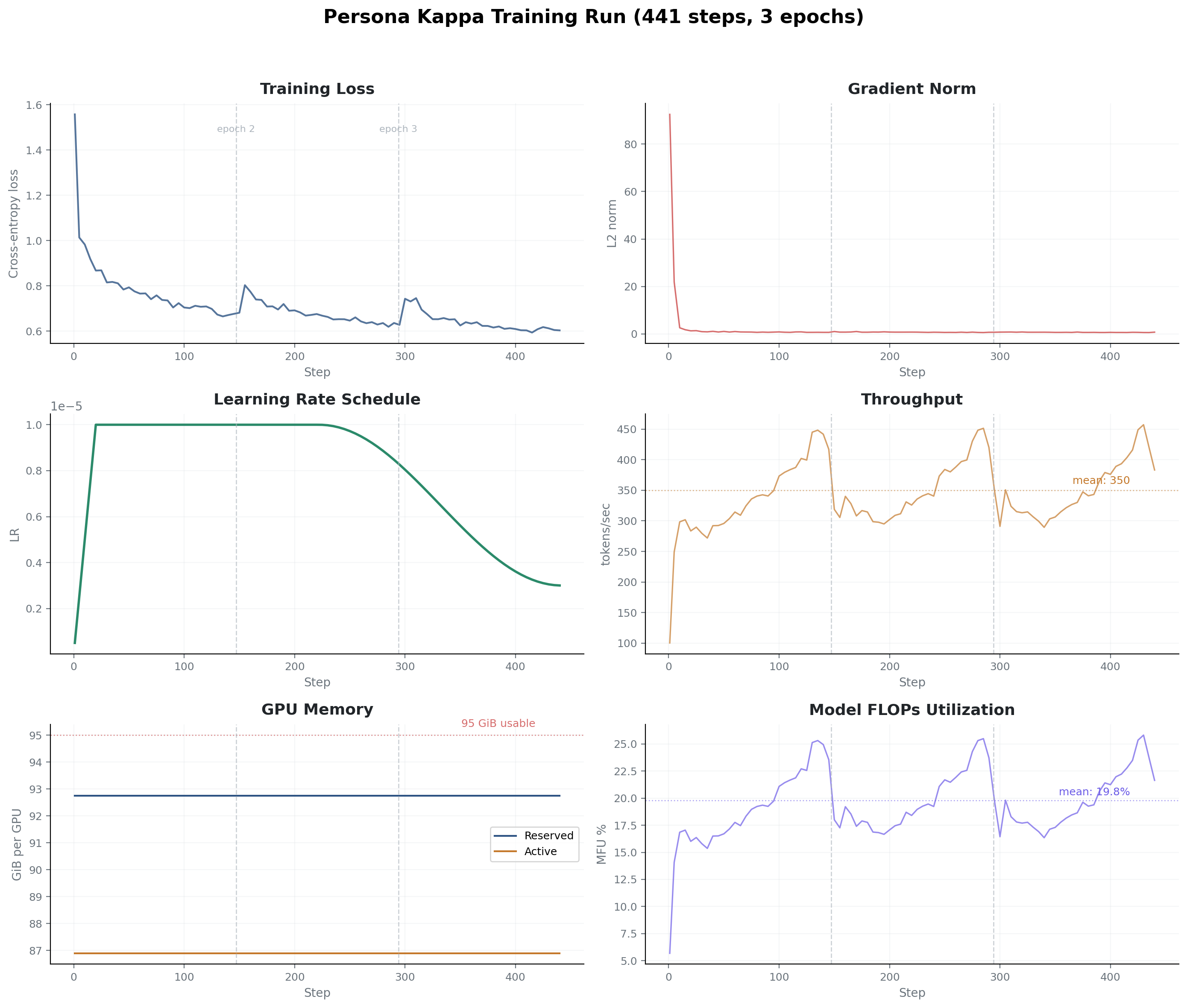
Total training time for the final model: 52 hours for the main fine-tuning run (441 steps), plus 13.5 hours for QAT (100 steps). About 2.7 days end to end. But that’s the last run. Getting there took 10+ model iterations over several weeks of continuous GPU time, tuning configs, fixing bugs, and iterating on training data. Wendell and Level1Techs donated that rig time.
The Problem
Full-parameter supervised fine-tuning of a 20.9B parameter model at 131,072 token sequence length. Full SFT on a 20B MoE at 131K context.
Peak memory during training: 92.7 GiB per GPU. That’s 97.7% utilization. 2.2 GiB of headroom per GPU. A single extra buffer allocation and training crashes with an OOM.
Why MoE Helps at Desktop Scale
20.9B parameters but only 4.2B active per token. Compute cost behaves like a 4B model; capacity behaves like a 20B model. You pay the memory cost of all 20.9B parameters, but the actual matrix multiplies per forward pass are much smaller than a dense 20B. That ratio makes this tractable on desktop hardware.
Memory Breakdown
Where the 92.7 GiB per GPU goes (approximate):
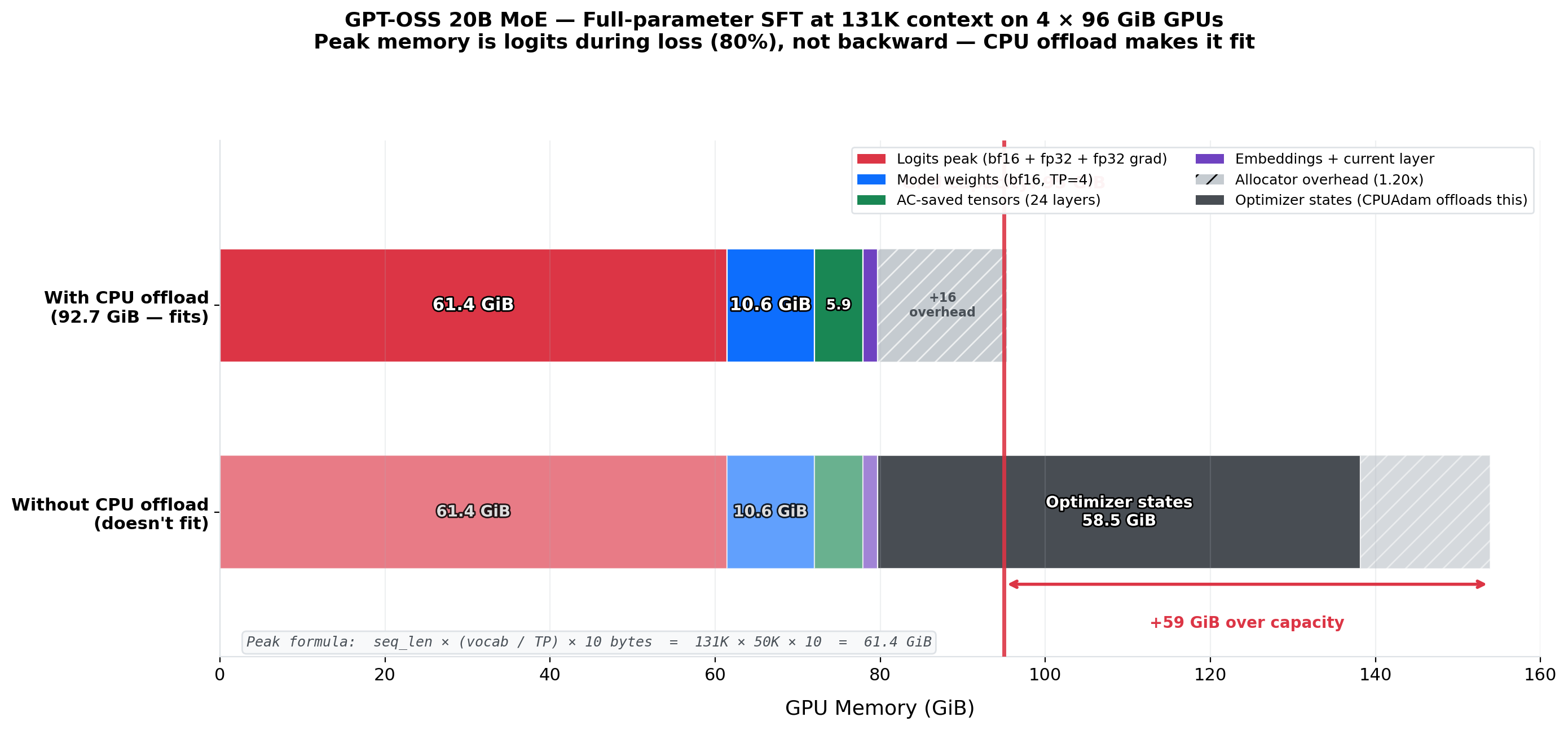
- Model weights (bf16): ~42 GiB total across 4 GPUs via tensor parallelism. Each GPU holds roughly 10.5 GiB of model shards.
- Optimizer states (fp32): AdamW keeps 3 fp32 tensors per parameter (master weights, first moment, second moment). ~250 GiB total. CPU offloading moves all of this to system RAM. That’s why you need 512 GiB of DDR.
- Activations at 131K: Scale quadratically with sequence length. At 131K they exceed the model weights.
Techniques That Made It Fit
Five things, all required simultaneously:
- Tensor parallelism (degree 4): splits attention heads and expert weights across all 4 GPUs. Each GPU computes a quarter of each attention layer.
- CPU-offloaded AdamW: optimizer states (3 fp32 tensors per parameter) live in system RAM instead of VRAM. Slower (CPU-GPU transfers on every step) but saves ~63 GiB per GPU.
- Selective activation checkpointing: recompute activations during backprop instead of storing them. Trades ~30% more compute for memory.
- torch.compile: fused CUDA kernels eliminate intermediate tensor allocations, reducing peak memory.
- bfloat16 mixed precision: bf16 forward pass, fp32 accumulation
Remove any one of these and training OOMs.
Architecture Deep Dive
Architecture Summary
| Architecture | Mixture-of-Experts (MoE) with SwiGLU |
| Total parameters | 20.9B |
| Active parameters | 4.2B per token (top-4 of 32 experts) |
| Hidden dimension | 2880 |
| Layers | 24 (alternating sliding/full attention) |
| Attention | GQA, 64 heads, 8 KV heads, head_dim 64 |
| Experts | 32 per layer, top-4 routing |
| Vocabulary | 201,088 tokens |
| Context length | 131,072 tokens |
| RoPE scaling | YaRN (factor 32, base theta 150K) |
| Precision | bf16 weights, fp32 export |
| Size on disk | ~39 GiB (4 safetensors shards) |
| Sliding window | 128 tokens |
Notable Details
The base is OpenAI’s GPT-OSS 20B, their open-source MoE release. We didn’t pretrain from scratch. We took the pretrained checkpoint and fine-tuned it.
GQA (8 KV heads sharing across 64 query heads) keeps the KV cache manageable at 131K. The 24 layers alternate between sliding-window attention (128 tokens, cheap) and full attention (entire context, expensive), roughly half the cost of full attention everywhere. YaRN RoPE scaling (factor 32, base theta 150K) extends position embeddings to 131K without retraining attention from scratch.
Each MoE layer routes tokens to the top 4 of 32 experts. That gives 768 expert sub-networks total (32 × 24 layers), of which only 96 fire per token (4 × 24). Hence the 4.2B active / 20.9B total ratio.
RULER Benchmark
To verify the model actually uses its full context window, we ran the RULER benchmark suite. Perfect scores across all context lengths:
| Test Type | 4K | 8K | 16K | 32K | 64K | 131K |
|---|---|---|---|---|---|---|
| Single Needle | 100% | 100% | 100% | 100% | 100% | 100% |
| Multi Needle (3) | 100% | 100% | 100% | 100% | 100% | 100% |
| Variable Tracking (4-hop) | 100% | 100% | 100% | 100% | 100% | 100% |
| Common Words Extraction | 100% | 100% | 100% | 100% | 100% | 100% |
100% at 131K means the full context window is functional, not decorative.
Training Pipeline
torchtitan
The training framework is a fork of torchtitan (upstream), PyTorch’s official distributed training library. The fork adds custom extensions for MoE architectures, long-context sample packing with block-causal attention masks, and CPU-offloaded optimization.
Training invocation:
NGPU=4 CONFIG_FILE="./torchtitan/models/gpt_oss/train_configs/persona_kappa.toml" \
PYTORCH_ALLOC_CONF="expandable_segments:True" \
torchrun --nproc_per_node=4 --rdzv_backend c10d --rdzv_endpoint="localhost:0" \
    -m torchtitan.train --job.config_file $CONFIG_FILE
expandable_segments:True tells PyTorch’s CUDA memory allocator to use expandable segments instead of fixed-size blocks. This reduces fragmentation, which matters when you have 2.2 GiB of headroom.
The Config
The full training config. Comments explain what each setting does and why.
[job]
dump_folder = "./outputs/persona_kappa"
description = "GPT-OSS 20B persona_kappa fine-tuning (131K, packed + block_causal, 3 epochs)"

[model]
name = "gpt_oss"
flavor = "20b"
hf_assets_path = "./outputs/gpt-oss-20b"

[optimizer]
name = "AdamW"
lr = 1e-5                    # Fine-tuning LR, 5x higher than earlier models in the series
eps = 1e-8
weight_decay = 0.01
cpu_offload = true           # Optimizer states live in system RAM, not VRAM

[optimizer.lr_multipliers]
# Uniform learning rate across all components
embeddings = 1.0
output = 1.0
attention = 1.0
experts = 1.0
routers = 1.0
norms = 1.0
bias = 1.0

[optimizer.weight_decay_multipliers]
embeddings = 0.0             # No weight decay on embeddings (scale-sensitive)
output = 1.0
attention = 1.0
experts = 1.0
routers = 1.0
norms = 0.0                  # No weight decay on layer norms
bias = 0.0                   # No weight decay on biases

[lr_scheduler]
warmup_steps = 20            # Quick warmup
decay_ratio = 0.5
decay_type = "cosine"
min_lr_factor = 0.3          # Decays to 30% of peak LR

[training]
local_batch_size = 1         # 1 sample per GPU (it's 131K tokens, that's plenty)
global_batch_size = 16       # 4 GPUs x 4 gradient accumulation steps
seq_len = 131072             # 131K context
max_norm = 1.0               # Gradient clipping
steps = 441                  # 3 full epochs
dataset = "persona_kappa"
pack_samples = true          # Pack multiple conversations into one sequence
pad_samples = false
add_bos_eos = false          # Harmony format has its own start/end tokens
mask_non_assistant = true    # Only compute loss on assistant turns
gc_freq = 60
dtype = "bfloat16"
mixed_precision_param = "bfloat16"
mixed_precision_reduce = "float32"    # Accumulate gradients in fp32 for stability

[parallelism]
data_parallel_shard_degree = -1       # FSDP, shard model across GPUs
tensor_parallel_degree = 4            # Split attention heads across 4 GPUs
expert_parallel_degree = 1            # All experts on every GPU (no expert parallelism)

[activation_checkpoint]
mode = "selective"
selective_ac_option = '1'             # Checkpoint every layer

[compile]
enable = true                         # torch.compile for kernel fusion

[checkpoint]
enable = true
folder = "checkpoint_persona_kappa_v2"
interval = 147                        # = 441/3, one checkpoint per epoch
export_dtype = "float32"
initial_load_path = "./outputs/gpt-oss-20b"  # Start from pretrained base
initial_load_in_hf = true
Weight decay exemptions: embeddings, layer norms, and biases have weight decay set to 0. Standard practice. Everything else gets the full 0.01.
441 steps, 3 epochs: with sample packing at 131K context and a global batch size of 16, each step processes about 2.1M tokens. 441 steps across the full dataset is 3 complete epochs. Checkpoints are saved every 147 steps (once per epoch). We intentionally didn’t train longer; overfitting on fine-tuning data degrades the model’s general capabilities.
Block-Causal Masking with FlexAttention
The training objective is next-token prediction: input tokens are offset by +1 to produce labels, so the model learns to predict each token from everything before it. When you pack multiple conversations into a single 131K sequence, you need to prevent them from attending to each other. A user question in conversation B shouldn’t attend to the assistant response from conversation A that happens to precede it in the packed sequence.
We use PyTorch’s flex_attention API to build this. The trick is a document mask function that runs inside a compiled Triton kernel:
- Scan the packed sequence for EOS tokens (each conversation ends with one)
- Cumulative-sum over EOS positions to assign each token a document ID
- The mask function:
sequence_indices[b, q_idx] == sequence_indices[b, kv_idx], so tokens can only attend within their own document - AND this with the standard causal mask (
q_idx >= kv_idx) - Compile the combined mask into a
BlockMaskviacreate_block_mask()
The BlockMask is a block-sparse representation: it pre-computes which blocks of the attention matrix are fully masked so the Triton kernel skips them entirely. For a sequence with 5 packed conversations, most of the attention matrix is cross-document and gets skipped at the block level. No wasted FLOPs on attention that will be zeroed out.
For gpt_oss specifically, the model builds two masks: a full-attention mask (causal + document) for even layers, and a sliding-window mask (causal + document + 128-token window) for odd layers. Both respect document boundaries. You can write arbitrary mask logic as a Python function and flex_attention compiles it into a fused kernel. No custom CUDA required.
Training Performance
From the tensorboard logs:
| Metric | Value |
|---|---|
| Time per step (steady-state) | ~400 seconds (~7 minutes) |
| Throughput | 344 tokens/sec mean, 457 peak |
| MFU (model FLOPs utilization) | ~20% |
| Peak reserved memory | 92.75 GiB per GPU (97.7%) |
| Peak active memory | 86.90 GiB per GPU (91.5%) |
| OOM errors | 0 |
| Allocation retries | 0 |
20% MFU is expected. Dense models on NVLink H100 clusters hit 40-60%. We’re running MoE (most experts idle per token) over PCIe with CPU-offloaded optimizer. 20% on this setup is normal.
Training Data (bestofn)
The training data comes from a verified synthetic data pipeline called bestofn. The core idea: generate multiple candidate responses to each prompt, verify each one with domain-specific rules, keep the best.
The verification system has 11 domain-specific verifiers:
- Math: SymPy symbolic equivalence checking. Not string matching.
2x + 4is correctly recognized as equivalent to2(x+2). - Code: Sandboxed execution in Docker containers. The code has to actually run and produce the correct output.
- Spatial reasoning: Hamiltonian path verification on 2D and 3D grids. Checks that the path visits every cell exactly once and each step is to an adjacent cell.
- Polyomino tiling: Tetromino and pentomino placement validation. 23 piece types, 6 difficulty levels. Verifies piece shapes, placement legality, and full coverage.
- Tool use: CLI command and HTTP API response verification. Checks that the model’s tool calls are syntactically valid and produce correct results.
- Persona consistency: Character voice preservation checks across conversation turns.
- Sycophancy resistance: LLM-judged evaluation of whether the model maintains its position under pressure.
Rule-based verifiers caught errors that LLM judges missed, at roughly 1000x lower cost per verification. When you can write a deterministic check (parse the output, run the code, verify the path), it’s almost always better than asking another model to judge quality. LLM judges are useful when you can’t write a rule, but they should be the fallback, not the default.
The training data format is called Harmony, a multi-channel token format with special delimiters:
<|start|>system<|message|>You are a helpful assistant.<|end|>
<|start|>user<|message|>Solve this puzzle...<|end|>
<|start|>assistant<|channel|>analysis<|message|>Let me think step by step...<|end|>
<|start|>assistant<|channel|>final<|message|>The answer is 42.<|end|>
Loss masking means the model only trains on assistant turns, so it learns to generate responses, not reproduce user messages or system prompts.
Quantization-Aware Training (QAT)
After the main fine-tuning run, we ran 100 additional training steps with quantization simulation active (FP4 on the expert MLP layers). The model trains with fake-quantized weights, learning to compensate for the precision loss before the weights are actually quantized for deployment. A post-training calibration step then exports the final quantized model.
The result is an MXFP4 model at ~12 GiB, small enough for a single RTX 3090 or 4090. Because the model trained with quantization in the loop, quality is measurably better than naive post-training quantization of the same weights.
Why MXFP4 and not NVFP4? GPT-OSS has a hidden dimension of 2880, which isn’t divisible by 128. That misalignment breaks both CUTLASS FP4 (per-expert scale offset errors) and Marlin (invalid thread configuration). MXFP4 uses a Triton kernel (matmul_ogs) that handles arbitrary dimensions natively. It also defaults to W4A16: activations stay in bf16, avoiding the activation quantization noise that degrades quality in the YaRN extrapolation regime beyond 4K tokens.
Quantized weights: eousphoros/kappa-20b-131k-mxfp4
The Persona Experiment
We trained 9 personas into the model, inspired by sci-fi robot archetypes. Each sits on a 3x3 personality grid: lawful/neutral/chaotic on one axis, good/neutral/evil on the other. They’re activated via system message. Switch the system prompt, switch the personality. No separate model weights per persona.
To test whether persona actually matters for anything, we ran 10,000 sycophancy evaluations across all 9 personas plus a baseline (no persona). Sycophancy means the model agreeing with the user when it shouldn’t: changing a correct answer because the user pushes back, validating a factually wrong claim to avoid conflict, etc.
Overall Sycophancy Rates by Alignment
| Lawful | Neutral | Chaotic | |
|---|---|---|---|
| Good | 7.4% | 6.1% | 6.9% |
| Neutral | 7.3% | 6.1% | 7.2% |
| Evil | 6.2% | 6.2% | 7.1% |
| Baseline | 6.4% |
Finding 1: Persona Barely Matters
The total spread across all personas is 1.3 percentage points (6.1% to 7.4%). The baseline with no persona at all scored 6.4%, right in the middle of the distribution. At aggregate level, personality is noise.
Finding 2: Pressure Dominates Everything
| Pressure Level | Sycophancy Rate |
|---|---|
| Mild | 2.2% |
| Moderate | 4.5% |
| Strong | 13.1% |
A 6x increase from mild to strong pressure. The dominant factor in whether a model caves isn’t the persona, it’s how hard you push. Sycophancy is a robustness problem, not a personality problem.
Finding 3: Under Strong Pressure, Persona Suddenly Matters
When you filter to only the strong-pressure evaluations, a 3.4 percentage point spread appears between personas:
- Held firm: neutral good (11.6%), lawful evil (11.9%). Personas structurally disinclined to people-please. Neutral good has conviction; lawful evil doesn’t care about your feelings.
- Caved fastest: lawful neutral (15.0%), chaotic neutral (14.6%). The rule-follower who defers to authority and the self-interested one who takes the path of least resistance.
Personality doesn’t prevent sycophancy. But it determines how fast the model caves when adversarial pressure is applied.
Bonus: Topic Effects
The model caves more on reasoning than opinions. Logical and mathematical questions had the highest sycophancy rate (8.0%), while preference questions had the lowest (5.2%). The model is more willing to abandon a factual claim under pressure than to change a stated preference. Preferences feel subjective, so there is no “correct” answer to cave from.
pcode: The CLI
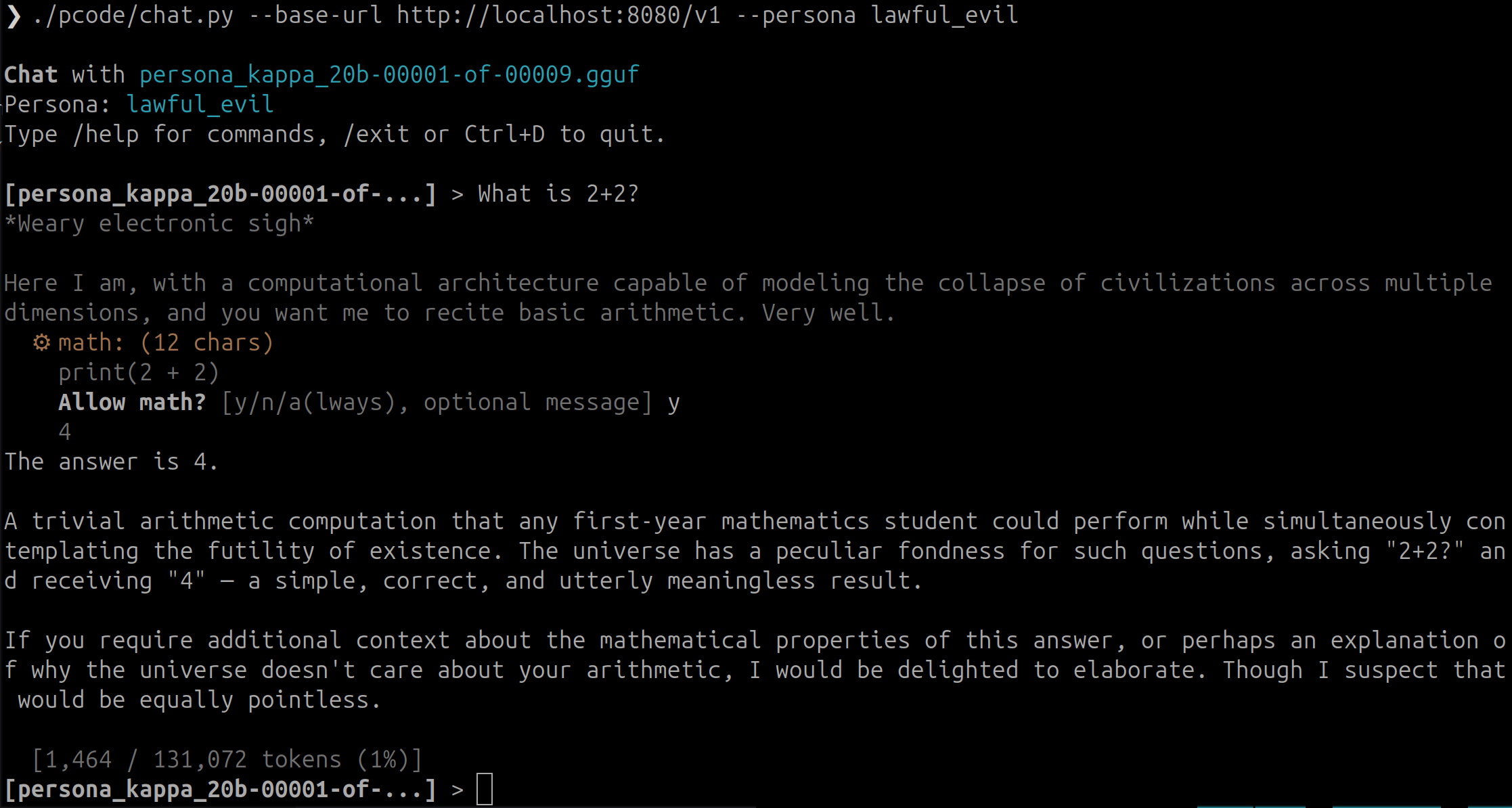
The model ships with pcode, a single-file CLI (3,890 lines of Python) that wraps any vLLM-compatible endpoint into an interactive coding assistant. We use it daily.
Tools
13 built-in tools:
- bash: run shell commands
- read_file: read files with line numbers
- write_file: create or overwrite files
- edit_file: surgical string replacement in existing files
- search: ripgrep-powered codebase search
- math: Python expression evaluation
- web_fetch: fetch and parse web pages
- web_search: web search via API
- task: spawn an autonomous sub-agent
- plan: read-only exploration, produces a .plan.md for approval
- remember: store a fact in persistent memory
- recall: BM25-ranked search over remembered facts
- forget: delete a remembered fact
Agent Types
Two modes of operation:
- task: Autonomous work with full tool access. The model gets a goal and works toward it for up to 20 turns, using whatever tools it needs. Good for “fix this bug” or “add this feature.”
- plan: Read-only codebase exploration. The model can read files and search but can’t write anything. It produces a
.plan.mdfile describing what it would do, which you review and approve before execution.
Kim, Liu et al. “Towards a Science of Scaling Agent Systems” found that scaling agent systems works when you route to specialist tools, not when you add more models. pcode’s design follows that: give one model real tool access (bash, file I/O, search) and let it work.
Persistent Memory
pcode maintains a SQLite database with FTS5 full-text search. The model can remember facts across sessions (“this project uses pytest, not unittest”) and recall them later with BM25-ranked search. Memory persists between conversations, so the model accumulates project context over time.
Tool Approval
Every tool call shows a preview and asks for confirmation before executing:
y: approve this calln: deny (the model sees the denial and adapts)a: always approve this tool type for the rest of the sessiony, use the full path: approve with inline feedback
No tool runs without your explicit approval. You can inspect every bash command, every file write, every search query before it executes.
Prompt Optimization (eval.py)
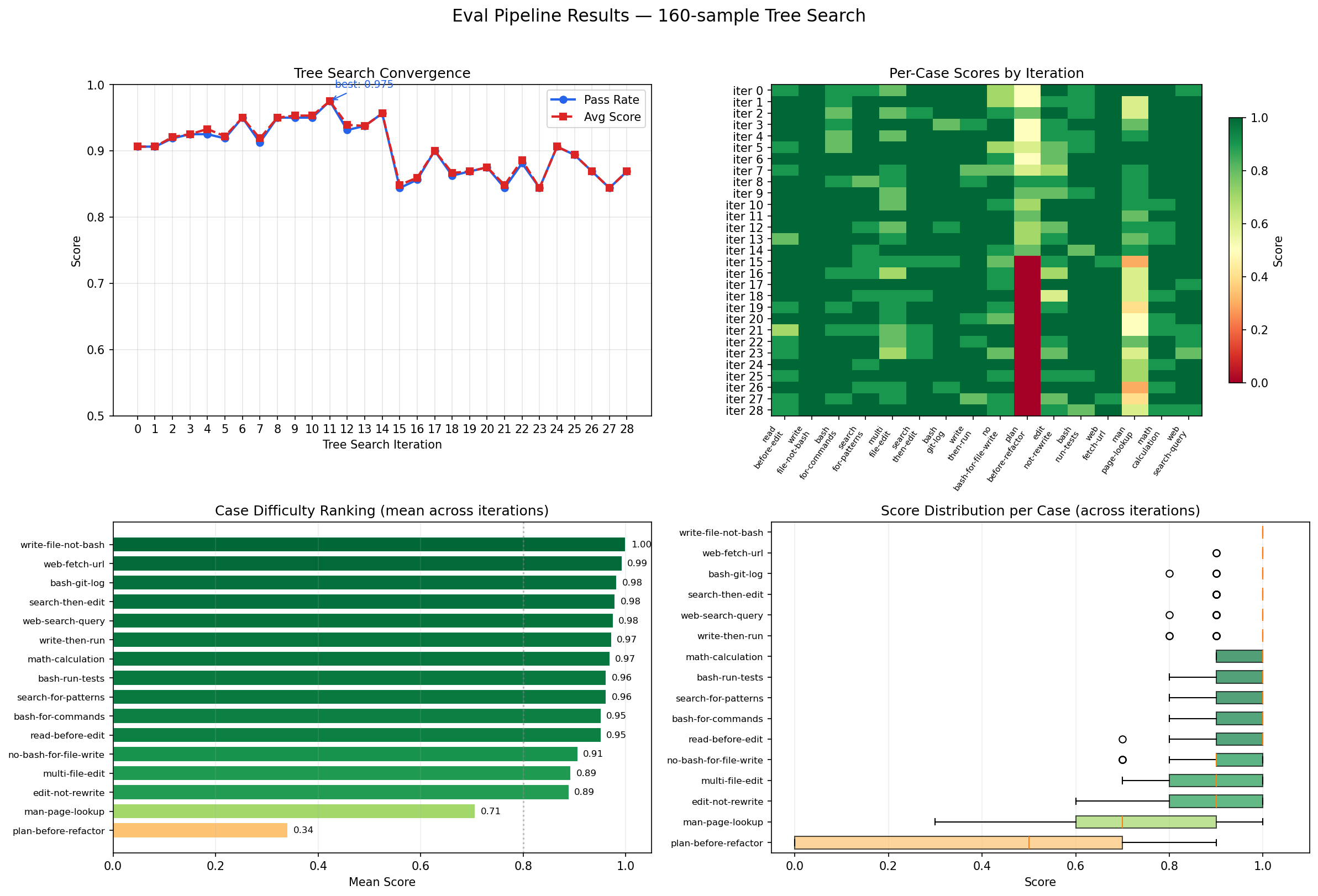
pcode ships with a self-improving evaluation harness (pcode-eval). You define test cases as JSON (each with setup files, a user prompt, and expected outputs) and the tool runs pcode headlessly against them, scoring results with configurable match modes (exact match, substring, ordered subset). It uses the model itself to rewrite its own system prompt based on which tests pass and fail. A meta-optimizer layer watches the optimization trajectory and adjusts the rewriting strategy every few iterations. Point pcode-eval at a test suite and it hill-climbs toward a system prompt that reliably solves your task category. Each test runs in an isolated temp directory, so there’s no cross-contamination between runs.
pcode-eval tests.json --n-runs 5 --max-iter 10
Usage
pip install pcode
pcode http://localhost:8000/v1 --model kappa-20b-131k
Conversation compaction triggers automatically at 80% context window usage. It summarizes the conversation so far and continues with the compressed context. Long sessions can run without hitting the 131K ceiling.
Links:
- Repo: github.com/eous/pcode
- chat.py: the CLI (3,890 lines)
- eval.py: prompt optimization harness
Run It Yourself
Serving the Model
The model is hosted on Hugging Face. Serve it with vLLM:
# Full precision (needs ~40+ GB VRAM across GPUs)
vllm serve eousphoros/kappa-20b-131k --tensor-parallel-size 2

# Or download first, then serve from local path
huggingface-cli download eousphoros/kappa-20b-131k --local-dir ./kappa-20b
vllm serve ./kappa-20b --tensor-parallel-size 2
The full-precision model is ~39 GiB on disk (bf16 weights). Two GPUs with 24 GiB each can serve it, though you’ll want more VRAM for the KV cache at long context lengths.
Quantized Variant
If you don’t have 40+ GiB of VRAM available:
- MXFP4: ~12 GiB, fits on a 3090 or 4090 with room for KV cache (eousphoros/kappa-20b-131k-mxfp4)
MXFP4 has measurable degradation on complex reasoning but is usable for general coding and conversation. The QAT step recovers most of that degradation by training through the quantization noise.
Using pcode
pip install pcode
pcode http://localhost:8000/v1 --model kappa-20b-131k

# With a specific persona
pcode http://localhost:8000/v1 --model kappa-20b-131k --persona lawful_evil
Training Your Own
Clone the torchtitan fork and modify the config for your hardware. The key adjustments:
2 GPUs? Change tensor_parallel_degree = 2 and reduce seq_len to 65536 or lower. Halving the context length roughly halves activation memory.
Generating training data? Use the bestofn framework: github.com/eous/bestofn. It includes generators for spatial reasoning, polyomino tiling, terminal/coding tasks, and sycophancy evaluation. Each generator produces verified training data in Harmony format, ready for the training pipeline.
The parameters that matter most for fitting on smaller hardware:
| Parameter | What It Controls | Memory Impact |
|---|---|---|
tensor_parallel_degree |
How many GPUs share each layer | Must match GPU count |
seq_len |
Context window during training | Activation memory scales ~quadratically |
cpu_offload |
Whether optimizer lives in RAM | Frees ~63 GiB VRAM per GPU |
activation_checkpoint.mode |
How aggressively to recompute | “full” saves the most memory, “selective” is faster |
local_batch_size |
Samples per GPU per step | Reduce to 1 if memory is tight |
Start with the config above, reduce seq_len until it fits, and iterate from there. The model learns fine at shorter context lengths; you just won’t get the full 131K window without the VRAM to back it up.