Here I believe is what you’re looking for:
@wendell can you give us insight on any of this?
Hiya - thanks again amber for sending me that usbc combiner. Having an issue I can’t pin down.
I have the USBC/DP dual monitor KVM (only 1 monitor in use at the moment if it matters). My Windows desktop is hooked up as PC1 and works just fine. I have an M1 Pro macbook hooked up via usbc as PC2, it gets power, mouse and keyboard work just fine, but it can’t detect a display when it’s set as the active computer on the KVM. Tried both U2/U3 mode on the KVM, doesn’t seem to change anything. Have tried the included USBC cable and an OWC Thunderbolt 4 cable. Output to the monitor is a 1 meter FIBBR cable.
Anything I’m doing obviously wrong or should try?
What monitor are you trying with? (resolution/hz)?
This might seem a little strange, but do you have a different DisplayPort cable to try? We received a 1m fibbr cable a bit ago that was not functioning like our longer fibbr cables were.
Last thing, try power cycling the KVM and combiner
its an LG dual mode 4K/240hz 1080p/480hz - will try with another DP cable and report back!
Ooh you’re trying to do 4K 240Hz with the combiner? Oof that’s pushing it…
I have found the manual I believe. In the on screen display, it says there’s an “Input Compatibility Version” under Setting → General
^ Make sure this is set to “1.4(DSC)”
For DisplayPort 1.4 to reach 4K 240hz you MUST have high quality cables with DSC (Display Stream Compression). Are you using the included USBC cable?
Make sure the switch on the back of the KVM is set to the left position, and you that you have the supplemental power connected to the combiner (cable included).
I’ve been using the 1.4 Display Port KVM Switch (Single Monitor - Two Computer) since 2022 (thank you, my home office has never looked so neat).
Recently, I’ve noticed when switching computer that the USB devices connected to the front two ports seem to drop, and I have to unplug them and re-plug them back in to get them to work again.
One is a dongle for a wireless mouse, and the other is an external (own power) USB hub that has my DAC/mic/webcam connected to it.
Is this a sign the KVM might be failing?
Has any of your peripherals changed that plug into the KVM for it to just now be doing this?
This sounds to me like an issue with the USB devices firmware. Elgato for instance had troublesome firmware in the past but they made some updates to it. Can you update the firmware on the dac/webcam? Also, what brand/models are they?
Highest quality, fiber optic, splurge price?
Fibbr
Hi @Level1_Amber I think this recommendation may be out of date. Clicking on the link the displayport cables are all copper now. I checked their store, they still have fiber hdmi but it doesn’t look like it’s fiber optic for Display Port.
Thank you for letting me know! I will get that updated
On Fibbr site
DP 1.4 (fiber) - products/e-sports/DP_Explorer.html
DP 2.1 (copper) - products/e-sports/DP_Real.html
Yeah I can try updating the firmware, will report back.
Webcam is Logitech, mic is Fifine, DAC is schiit audio
No dice, none of the three have firmware updates.
So this is the setup, if it helps to troubleshoot further:
PC1 - M1 Macbook Pro
PC2 - Windows 11
10 gigabit | DP1.4 | 1 Monitor | 2 PC KVM
The behaviour is intermittent, but currently the Macbook can read/use all the connected devices, but switching to the Windows pc none of the USB hub devices are detected.
Sometimes, only a subset of the USB hub devices are detected (e.g. the mic, but not the dac). Sometimes, on the Windows pc, the mouse (connected to front HID) stops working - unplugging and plugging it back in fixes it. This doesn’t exclusively occur during a switch, but sometimes just mid session.
Sometimes, on the Windows pc, right after I switch to it Windows detects the USB devices for a brief moment, and then loses them (e.g. if I have sound settings open, I can see the mic register for a moment or two, and then it disappears).
Because it is working more or less as expected on the Mac, and used to work correctly on both the Mac and Windows devices, I thought the KVM might be failing.
So further diagnostic info…
When I swap the inputs (so that the Windows 11 device is PC1 & the Macbook is PC2), the dysfunction also swaps (i.e. now the Windows 11 device can see all ports, but the Macbook can’t see things connected to the USB 3 port.
I think the KVM is stuck on USB-3 lock to PC1, because using the keyboard shortcuts to reset it doesn’t work (i.e. no beep), but changing the keyboard leading code does produce the beep
This turned out to be a red herring… It is still intermittent and it’s not always connected via the USB-3 port (e.g. right now the mic is recognised, but not the DAC)
When did the mic start to be recognized? You said initially it didn’t work right?
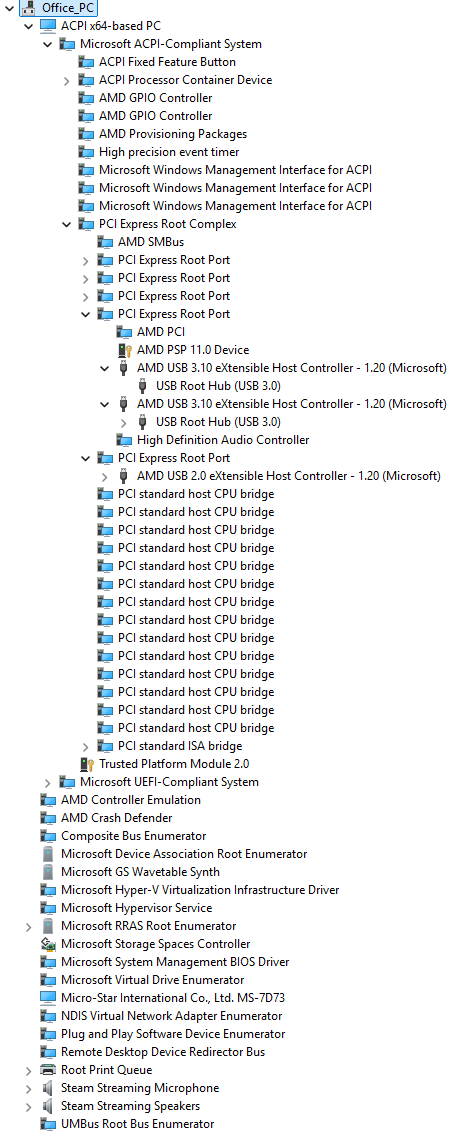
How many levels of USB hub hierarchy are shown on the PC, if you sort Device Manager by View → Devices By Connection?
There are limits to how many USB hubs can be nested. I doubt this is your problem, since it sometimes works, and I assume Windows hasn’t complained about with a notification, but it’s worth ruling out.
What model (or motherboard) is the Windows PC?
That’s correct, it started working after a series of unplugging/re-plugging the USB hub and peripherals.
I assume this is under the PCIE Root Complex? Couldn’t find any USB headings higher up in the hierarchy, see image attached.
MSI MPG B650I EDGE WIFI
I’ve found a way to somewhat reliably get it working… Whenever I switch to the PC I unplug the USB from the DAC (not from the hub) and plug it back in, and then Windows recognises the hub. Weird, but seems to work so far.
Sometimes usbs are weird by nature in that way. Sometimes you just have to unplug and plug them back in once switching to get it to reregister