Network Switch VLAN's and switch levels

I’m looking to set up some VLAN’s for my home network and I’m not sure if honestly I’m being thick or paranoid so I’m hoping someone here can help me out.

I’m looking to set up 3 VLAN’s (possibly 4 or more in the future), one for guests and generally ‘insecure’ devices, one for stuff that is still receiving updates so should be somewhat secure, and one that is for hypersecure devices only that will be for things like local NAS and secure devices for the likes of online banking etc. Note at this point I’ve never set up a VLAN before now.

At the moment the majority of the wired devices devices are split between 3 rooms of my house, all with a single Ethernet port into each room at the wall that links to the router elsewhere in the house (in a 4th room) and i have a mixture of devices from each of my layed out catagories in each room.
So to manage this I’m looking at getting 3 switches, 1 for each room, so I’d have one Ethernet port from the router per room(so 3 from the router total), then from the wall port into the room that would go to a switch in each of the 3 rooms and then I’m looking to connect all the devices in that room to that switch.
So if I had a level 2 switch would the be effectively and securely separated from the other VLAN’s or would it be inadiquate security and will I need the level 3 switch to protect the devices from each network correctly?

I’m concerned that as an example if something like my Xbox 360 (as it’s no longer supported by MS), or my gaming PC (which could easily be compromise from the likes of downloading random mods or older unsupported games (like supposedly black ops 3) etc) or my “smart” TV is connected to the same switch as my NAS or other more secure devices, that they could easily be prone to compromising my more secure devices that are supposed to be on another VLAN.

At the moment I don’t have the switches so I cant say if they are managed, smart or unmanaged at this time if that helps?

Cheers for taking the time to read, and apologies it probably is very simple/stupid to most here but even if i’m being overly paranoid it seems like a cool project that I can use to learn… I just don’t want to risk heavily compromising my network security unnecessarily. :smiley:

2 Likes

Level 3 switches are capable of acting as routers for LAN if configured to do so, and are not what you are looking for here. L2 switches will be aware of the VLAN and will keep the tags.

With unmanaged switches you will have to set the port on your router’s integrated switch as a specific VLAN and the unmanaged switch in each room will have all ports on that VLAN.

With managed switches you can set each port on the switch in each room as a specific vlan. Useful if for instane you had a switch in the living room and you had 1 port going to a wifi AP, another going to your game console, and another going to some chinese pirate stream box. You would want to have different VLANs per switch port in that case. But if for instance in a bedroom like you are saying, you likely want all ports on the same VLAN so an unmanaged switch would be fine as long as it passes VLAN tags, which nearly everything does now days.

What router are you using? Do you have any wifi access points besides your main router unit?
Are you sure your router can even configure VLANs across its ports or configure different networks within it? Many ISP routers are pretty basic in this regard.
Are you looking to have all your hardware be from the same product ecosystem?

2 Likes

In this case, you need a managed switch in each room because you need to tag the ports for the respective device or category as VLAN access ports and the uplink port from the switch to the router/core switch as a VLAN trunk port.
For example, in Room A, port 1 gets VLAN 11, port 2 gets VLAN 12, and so on.
You could theoretically tag the devices themselves, but I avoid that, even if all devices support it.

Everything else depends on your router.
You’ll probably need to route between VLANs somewhere, but also restrict access to specific ports with firewall rules.
I would recommend using Pfsense or OPNsense for this.
If your Pfsense has enough ports, you can simply configure each port as a VLAN access port (core switch), and that’s it for the VLAN configuration.

something like this


But you can also run all VLANs over one port, in this case, the port needs to be configured as a VLAN trunk and you create/manage the VLANs then via PfSense.

2 Likes

Time for a networking lesson then…

First, a VLAN is called a “virtual lan” because it’s not physical. Think of getting a router and plugging the WAN port (internet side) into 1 switch and the LAN side into another switch. That makes 2 LANs (technically a WAN and a LAN, but ignore that, think that there’s no internet and you’re just connecting two switches that in turn connect to nothing else for now).

Now you’ve got yourself 2 collision domains (layer 2) - the WAN switch and the LAN switch, segregated by the router. One side will have a subnet (layer 3) and the other will have another subnet.

Now if you want to grow your network and you know your router is plenty capable, then you don’t have much choice than those 2 subnets / LANs. So VLANs come into play.

Imagine you have a switch with 48 ports. There’s so many ports on it, but you don’t want all the devices to go into a single subnet. So you get a router capable of setting vlans on the LAN NIC (and that assumes the switch is already vlan capable). What VLANs do is that it separates / segments a swtich into multiple switches, basically creating a virtual switch. You have 48 ports on the switch, but you want 3 different subnets? No problem. Set the router connection to the switch into what is called “trunk port” and set however many ports on the switch to “access ports.”

What a trunk port is, well, it’s an interface that doesn’t spit just normal layer 2 switch packets, but tags the packets, depending from which vlan they come. You need your router to understand tagging (vlans) to get trunk port functionality.

This saves you from having to buy a NIC with multiple interfaces. For example, if you build a router PC, assuming you’re familiar with building PCs… then you’d be buying a PCI-E NIC with 4 ports and each port would be a different subnet / (physical) LAN. So you’d connect those 4 ports into the 48 port switch, to 4 different ports, all the ports in different VLANs (with the ports in “access port” mode), so you’d be limited by 4 VLANs only.

With a router that knows VLANs, you can get 4096(+ depending on the standard, not getting into that). So instead of needing 4000 ports on your router, you can do 4000 VLANs with just 1 port.

Now to your build / network. If you’re planning to have 3 switches for each room, but you don’t want all of your devices in the same subnets in each room, then you’d need managed switches (i.e. vlan capable switches) for each room. There’s some cheap options that come with a GUI, to allow you to easily set up VLANs. My zyxel xgs1210-12 might be a bit overkill for each room (since you don’t have 10G SFP connection to each room), so maybe 3x netgear GS308E-400NAS switches might do (they’re literally $30 each). It seems to work for me, I had 1 for a while.

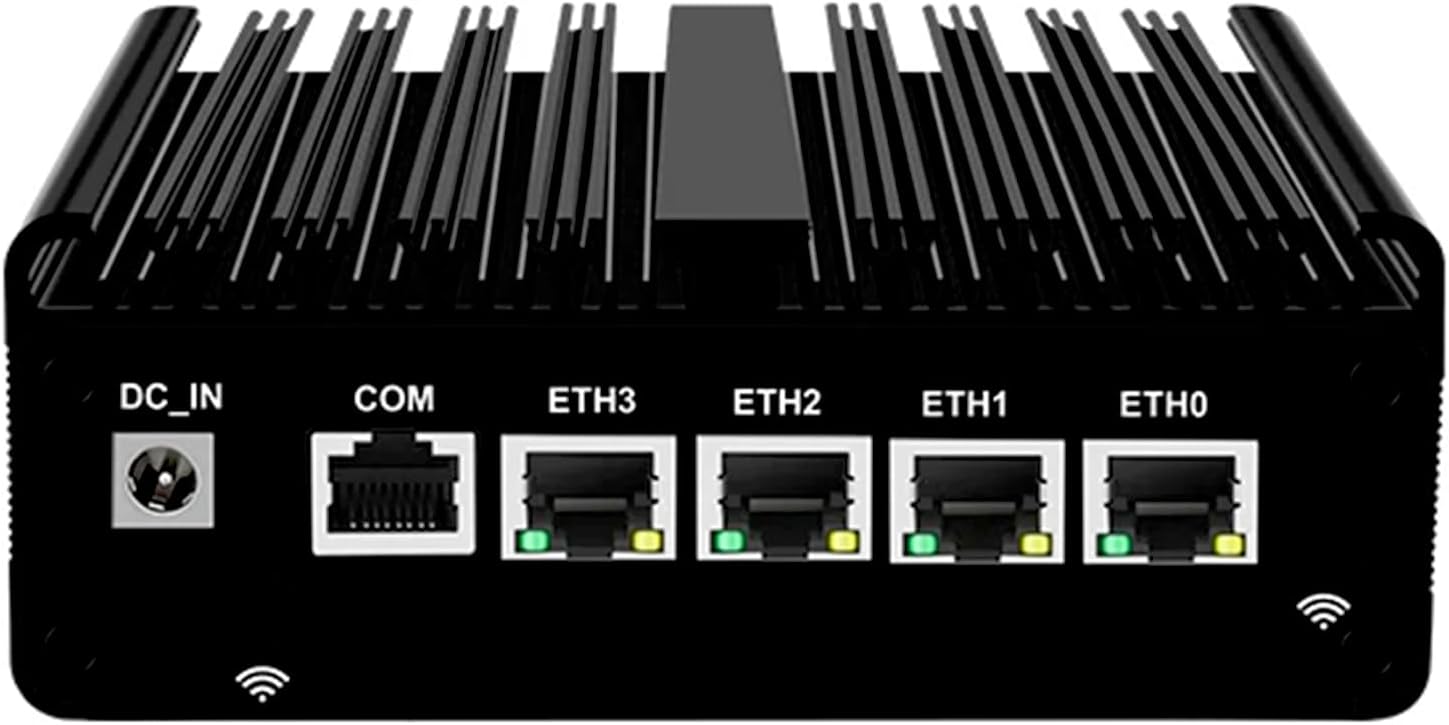
You’d need a router better than what your ISP is offering you though. Everyone likes to throw opnsense of pfsense around. I’m not a fan (yes, I’m highly biased against them, so take it for what it’s worth and you decide for yourself). For hardware, it doesn’t need to be much, just ideally that it has 2 ports (or it can have 1 port and use a USB ethernet port, but be very careful, in most of everyone’s experience, the USB ethernet ports will die after a while of constant usage, so we all kinda recommend PCI-E hardware, even in m.2 form factor if you can’t get a full-blown PC as a router).

Actually, my recommendation for a router would be something low power consuming (like single board computers), which requires some setup. If you’re very familiar with linux, then something like a nanopi r4s would be a great fit. The problem is… there’s no GUI. I think it might have gotten an OpenWRT port (the hardware is plenty capable), so maybe you’d be able to set VLANs in the Interfaces tab in luci web gui, idk. If you want to support the OpenWRT project, there’s OpenWRT One router (which is a rebranded / collaboration with Banana Pi).

If you really want something with more oomph, you can go wild with an odroid h4+ and do a forbidden-router (I’m also against forbidden routers, but I have the h4 base model, it’s solid), or you could do the h4 base with an m.2 NIC and use emmc for the OS (assuming the OS will allow you to install to emmc, some don’t and idk if pfsense / opnsense allow it - it goes without saying: plain linux, freebsd and openbsd will allow you). Or there’s other solutions, like the protectli fw4b, which some forum members have and like it.

So, the way this would work, you’d need the router in your internet room / closet, connect that to a 5-8 port managed switch, then connect each room’s rj45 cable ends to the switch. Then you connect each switch in every room (you might want to set them up on a workbench and configure them locally, before you go live with them, because you might need to factory reset them a couple of times, before you get it right, since setting vlans will cut off the management subnet.

Then, once you trunking from the router to the “main switch” and from the main switch to the 3 switches in the other rooms, you can start configuring ports in access mode in each VLAN you want, then plug your devices into them. I personally prefer this kinda setup:

  • management network (basically only your most trusted system, along with the switches, routers and hypervisors)
  • trusted clients (most of your other computers, which would include the wifi AP for residents)
  • untrusted clients w/ internet (a vlan for things like IoT devices that won’t work without internet - I don’t have any of those, but if you have an alexa or some crap-lights or nest or something, that’s where you should put them - this might be a good place for an xbox that doesn’t receive updates anymore, but that still needs internet access for some odd reason)
  • untrusted clients w/o internet (I like this for security cameras, but you can put other IoT in here)
  • guest network (completely firewalled off from the other networks, although it goes without saying that untrusted vlans shouldn’t be able to connect to other vlans either, just to the internet or not even there - this 1 is just like untrusted clients w/ internet, but it’s for actual guests)
  • partly trusted devices (here I’d put my windows VMs that would still need to connect to my NAS, but I’d only allow firewall ports for just NFS or Samba and nothing else - if I had jellyfin, nextcloud or other stuff, I’d probably allow them to that too)
  • optional server vlan (if you want everything “server” that you trust in a separate vlan than management, since the management vlan has green light in the firewall to access everything, while technically services that you trust don’t really need to access other areas of your network, just to be accessed - it does make operational stuff easier, since you’d e.g. allow FROM partly_trusted_clients to → servers:{443,445,2049,53,853} to the whole subnet and not have to worry about poking these firewall rules from partly trusted clients to your management vlan, since you’re doing it to a separate services vlan)

So that’s about 7 vlans. You can go wilder if you want and split things even more. Don’t want Alexa to know you have a Google Nest? Separate VLANs for them. You kinda trust your security cameras, but you want them offline, but you don’t trust your vacuum to be in the same dark vlan as your cameras? Separate dark vlans for your cameras and your vacuum. There’s endless (?) possibilities (until you run out of ports, then you add more switches, connect them in trunk port and your network is now a rats-nest of wires and switches over switches).

2 Likes

Thank you for very succinctly answering the question :slight_smile:

Probably a stupid question, but how can I be sure an unmanaged switch does, only as with the number of devices I have its possible I will need to at set up or possibly in the not too distant future?

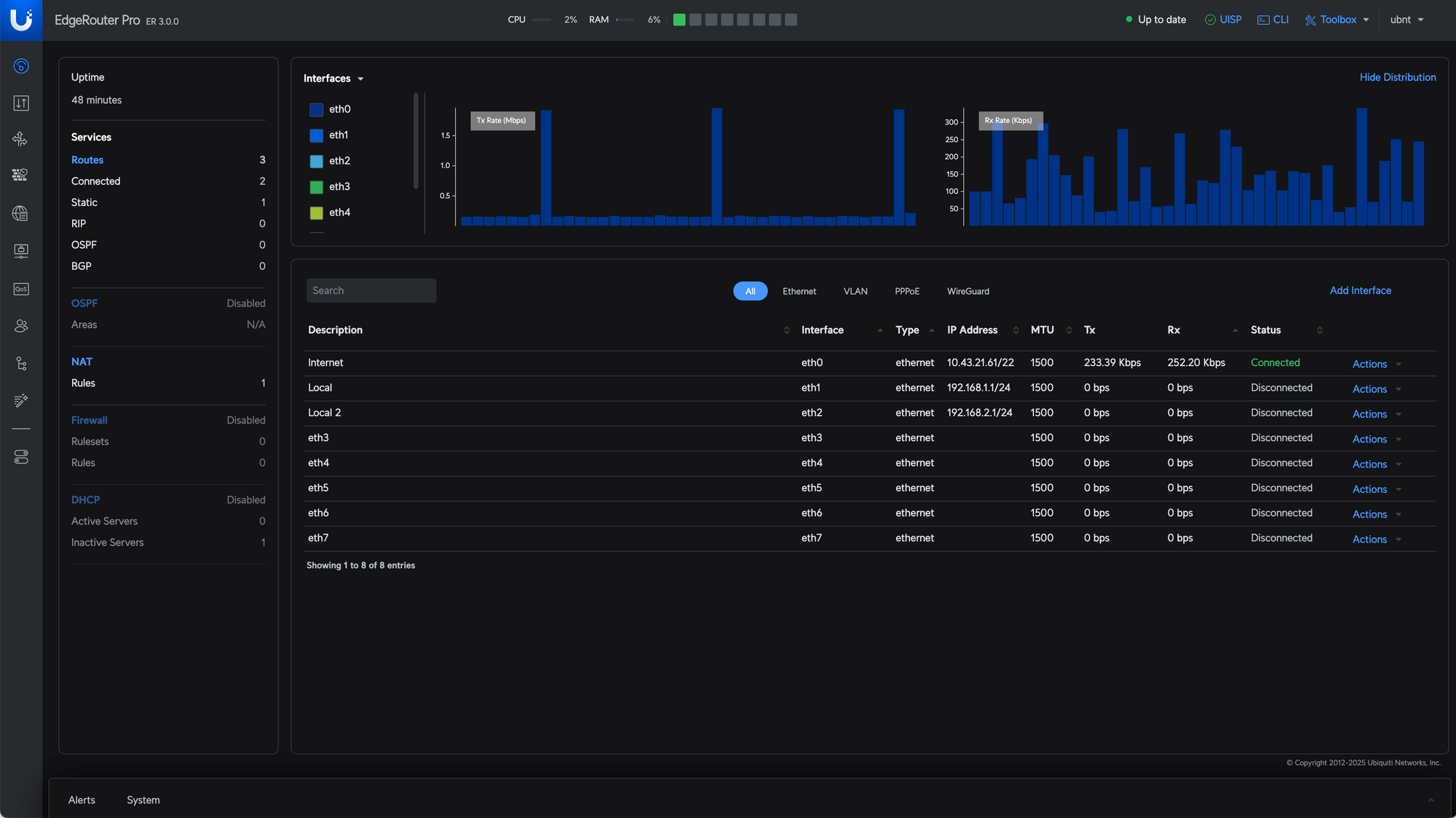
Right now I’m looking at setting up a ubiquiti router to run openwrt (i think the er-x or er-6 or something if i remember rightly). I have the access point(s) that are built into the router, but no additional at this time, but I’m wanting to wire Ethernet where possible in place of WiFi just because I’ve had more issues with WiFi in the past 18 months than I care to admit.

Is there a disadvantage to doing it this way or something?

So if I understand you correctly your saying that basically you can have a VLAN under a VLAN?

So I’ve read this once and that is THICC. I’m going to have to read this a few times to fully get my head around it I think, but I just wanted to thank you for taking the time to write it. I’m sure I’ll have a few follow up questions shortly haha

You can look in the manual for a switch you are considering buying to make sure it supports passing 802.1q tags. Unmanaged switches will not be able to configure VLANs themselves on their ports or enforce any VLAN traffic policies. You would configure the VLAN on the router and the port your unmanaged switch plugs in to would be on a specific VLAN, and thus as long as the unmanaged switch passes VLAN tags then all devices connected to that unmanaged switch will be on the same VLAN that was assigned at the router. This is not the best way to do things, you should use managed switches if you want to use VLANs, but it is a workable solution for someone wanting basic VLAN functionality in a home environment and plans to have all devices within a bedroom be on one VLAN. If you want to configure different VLANs on the end switches you must have managed switches.

OpenWRT is a great solution and can do all the configuration you want to do.

1 Like

All devices you want to use must support setting a VLAN ID in their network configuration.
If this is the case, and you’re happy to deal with it, then it’s an option.
The advantage of switch tagging is, you can replace devices without having to configure anything.

That is also possible, but is a different topic known as VXLAN, a VLAN trunk port serves a different purpose.
In VLANs, you primarily differentiate between two types of ports. Firstly, an access port is designed for end devices such as desktops, phones, or even bare-metal servers, which is essentially a normal OS installation without virtualization.
An access port tags incoming network packets with a VLAN ID and removes the ID from outgoing frames, always from the switch’s perspective.
In contrast, a trunk port checks incoming network packets to see if they have a VLAN tag and verifies whether they are in the list of allowed VLAN IDs that you have defined.
A VLAN trunk port is typically used to connect switches or to link a switch to a virtualization host, such as Proxmox.

When choosing a router/firewall, you should take your time. OPNsense, PFsense, or OpenWRT have their advantages and disadvantages.
It depends on what you’re looking for.
Are you looking for a tool that gets the job done and if in doubt, is well documented?
Or are you a tinkerer who spends days plowing through forums to save $50?
Have you already looked into firewalls?

1 Like

All devices involved should also be completely trusted since it’s up to the device itself to keep the VLAN isolation in this case. Works great for servers, APs, media centers running Kodi etc but is not an option for anything that you don’t trust fully – even if it does allow setting a VLAN ID.

1 Like

I have never done it like that myself, so that’s a good point.

From what I’d seen it seemed to be the best option. I"m not sure if I’ll have much difficulty configuring it correctly while maintaining a good level of security, or if it is mostly good out of the box etc mind you.

So would this method of packet routing prevent traffic on a network being intercepted or tampered with then (unless the router or switch become compromised)? Only one of my objectives is to ensure a compromised device couldn’t fuck about with other devices within a separate VLAN.

My assumption is that packets in the network would still be visible to other devices on the network though even if tagged for a specific VLAN, is that correct?

So I’m looking for something that will be easy to set up initially but is a good learning platform and could allow a little tinkering. I do like to tinker, but time as a resource I am short of :frowning:
I haven’t yet looked into firewalls, to be honest I half expected that it would be quite simple and straightforward, but I’m suddenly having doubts on that :rofl:

Ahhh, so setting it to tag the ports instead of the devices takes out the responsibility of trusting the device quite as much then?

VLAN partitions your network at Layer 2.

Each VLAN is a broadcast domain.
This means, for example, that you can use a DHCP server (L2) in each VLAN.
Clients in VLAN 11 will not receive packets from VLAN 12, and so on.
You need a router to use Layer 3 protocols across VLANs.
If your switch supports it, it’s called inter-VLAN routing, you can use that, or you can use a dedicated router/firewall.

You assign a separate subnet for each VLAN.
It helps to use the VLAN IDs in your subnet address, that makes it obvious where a client belongs
For example, VLAN 11 gets 172.16.11.0/24, VLAN 12 gets 172.16.12.0/24, and so on.

I have no idea whether OpenWRT or PFsense is a better fit for you, you’ll have to figure that out for yourself.

To find out, it’s a good idea to read the documentation, choose the one you understand.
And watch a few YouTube videos, e.g.

https://docs.opnsense.org/
https://openwrt.org/docs/guide-user/start
https://docs.netgate.com/pfsense/en/latest/

It’s like the question of which is more intuitive, Windows or macOS. It’s probably what you’re used to.

I use both, but OpenWRT only to connect wifi clients and pfsense for everything else.

I havent played with OpenWRT myself in around 20 years back on the original Linksys hardware it was designed for. It was quite a nice system even back then when it was new and I know it has kept up with the times as well. I have seen screenshots of the modern UI and it looks mostly straightforward.

Have you played around with your EdgeRouter at all? Did you not like something about it? EdgeOS 3.0 was just released a few hours ago that is a massive overhaul to the entire Edge line of routers, so you may want o simply update to the new EdgeOS 3.0 and try out using that before moving to OpenWRT.

1 Like

This might be a good thing, when you know you’re in control of your devices. But you can’t VLAN tag an xbox ethernet port now, can you?

OP should go with managed switches in each room and set them properly in port access (untagged) and have the switches do the VLAN tagging to send the traffic where it needs to be.

I wouldn’t risk it. The price difference isn’t that big between an unmanaged switch and something like the aforementioned netgear GS308E-400NAS (again, this is a $30 managed switch, assuming OP has this available nearby or their online store of choice).

OpenWRT has decent instructions on how to set VLAN interfaces, you should be fine. The firewall part afterwards is a bit annoying, but it’s not going to be too difficult either, just a couple of rules to block access universally and only allow traffic in a couple of places.

I wouldn’t worry about that level of security in a home setup. But setting up dumb switches that just forward vlan tagged layer 2 frames could pose a risk of compromised devices tagging a different vlan in their headers, to try to reach other vlans (look up vlan hopping). If you go with the managed switches, like I suggested and you set them up properly (port access only to a specific VLAN for all devices), then there’s no risk of breaking out of layer 2 (unless somehow the switch firmware is buggy beyond repair, which I wouldn’t think to be the case for known networking gear OEM).

If you have a “native vlan” (not quite the right term) on a dumb switch that accepts all the tagged packets and forwards them to the router, then yes, all frames are visible. If you use access ports, then devices will only be able to see frames in their own network and only frames that are addressed to them or multicast / broadcast (other than a malicious device claiming to have a different mac, to intercept its packages in the same vlan, which can be mitigated if the switch supports it with port security). If the (managed) switch tags the vlan properly and handles the vlan config, then untrusted devices shouldn’t see traffic in “protected” vlans (or any other vlans other than theirs, for that matter).

Yes, that’s the whole thing about access ports (they’re usually used when you don’t necessarily trust the devices behind the port, or you expect unknown devices to plug into that port).

What exactly is your criticism?
I wrote that I don’t recommend it, but for the sake of completeness, it has to be mentioned.
The only reasonable solution is three edge switches and one core switch, but everyone has their own criteria.
All managed and from the same manufacturer, this is the easiest solution for the OP to understand, configure and maintain

Not exactly a criticism of such a setup in itself, just that I don’t think that will work in this implementation, because, as the previous example, you can’t set an xbox (AFAIK) to vlan tag its frames. It needs a managed switch and an access port, to have the switch tag the frames for it.

I’m sure OP has more such devices. And while you could set Windows to tag its packets on desktops, it’s way easier to set it up on the switch.

I agree that a core switch and 3 edge switches are what should be configured here and that they should all be managed. Same manufacturer? Yes, that would make things easier (only 1 GUI to learn) and given the requirements of a home network, all just gigabit ports would be fine (of course, now OP can decide if he wants to run 1 Gbps, 2.5 Gbps or 10G from core to the edges through the rj45 ports in each room - assuming it’s at least cat5e and not a long cable run at all).

1 Like

I don’t really have a recommendation for home switches.
The requirements are so low that it’s really just a matter of how the features are implemented in the GUI, which is a matter of taste.
But if he really only wants 1Gb switches and money is an issue, I would go for used Cisco SG300 switches.
They’re easy to understand, and you can also use CLI, and they’re available in 8, 10 and 18 (up to 52) port configuration.
Use the switches for 3–4 years until he really knows what he needs and want, and with a bit of luck, resell them on eBay without taking a loss.
For new switches, I would recommend 2.5Gb maybe from Microtik, because every new device these days has 2.5Gb Ethernet.

For a real beginner like the OP I think Mikrotik would be too overwhelming. The Netgear GS308E that @ThatGuyB mentioned earlier looks like a true price/performance winner in the entry level managed switch category, and the VLAN setup looks decently simple as well (Just make a VLAN number and check mark the physical ports you want assigned to that).

1 Like

So looking more into it a VLAN partition at layer 2 is still part of the same network that’s, for simplicity, just controlled by mapping the MAC address, but layer 3 is technically a separate network connected to the same physical network due to it having a different IP address within the internal network. Have i got that right?

I wish I could say I have, but at the moment I’m struggling to set as side enough free time. :sob: To be honest i just assumed that the defaults for most/all routes is significantly more limited than openWRT, as I’ve never used anything beyond the ISP provided devices.

So I know i have a reasonable range of smart managed switches, but in all honestly I assuned/understood that managed switches were better (or more configurable?) than a smart managed switch. Is this not correct, or is that more specifically for advanced/expert users only?

I’m glad to hear that at least haha.

Thank you for the reasurance of that, I’m sure it would be very easy for me to do it wrong without at least a bit of minor support, cheers.

The EdgeRouter just by default should be able to do everything OpenWRT can. Just update it to the latest firmware for the newer features and security patches:

Cant go wrong either way with whichever of those OSes you want to run though.

2 Likes

I’m not sure I get the formulation, you may or maybe not have gotten it. Just think of layer 2 like connecting multiple switches to each other. No matter how many switches you add, the layer 3 TCP/IP subnet on top will be extending over all of those switches.

Now think of VLANs just like switches, but not connected to each other. Instead, think of them like not connected to each other at all. There, you have just separate LANs. Configuring VLANs is nothing different than having multiple physical switches, that are not connected to each other.

When you connect a router to a switch, that switch (LAN) gets the subnet of the router’s port that you connected the switch to. Analogous VLANs is the same thing, but virtual. You split a physical switch into multiple different virtual switches and you connect these virtual switches to a router via multiple virtual interfaces (and a single physical interface). So you get a layer 3 subnet for each VLAN (again, think of the physical analogy with a router with 4 ports, each with a different IP address and a different subnet, each connected to different switches that are not connected to each other).

I’m not sure what you mean by “smart managed switch.” There’s either the proverbial “dumb switch” (that only has 1 VLAN, which is most consumer switches) and then there’s managed switches (which are usually business / enterprise switches, but there are a few managed switches for SOHO, like that netgear I mentioned). Managed switches offer a lot more features, like VLAN support, QoS, MAC filtering, loop-avoidance (spanning tree protocol), bonding (LACP usually), sometimes they are “layer 3 switches” (which basically serve as routers with a lot of ports so to speak - ignore and don’t worry about those) etc.

I might be out-of-the-loop with “smart managed switches” (I’d think it’s just the same thing as a managed switch, but somehow someone else’s computer is involved and probably a subscription model too).

1 Like