Strix Halo ROCmFP4 + MTP LLM Inference Guide

Hardware: AMD Ryzen AI MAX+ 395 (16C/32T) + Radeon 8060S (gfx1151) + 64 GB unified memory
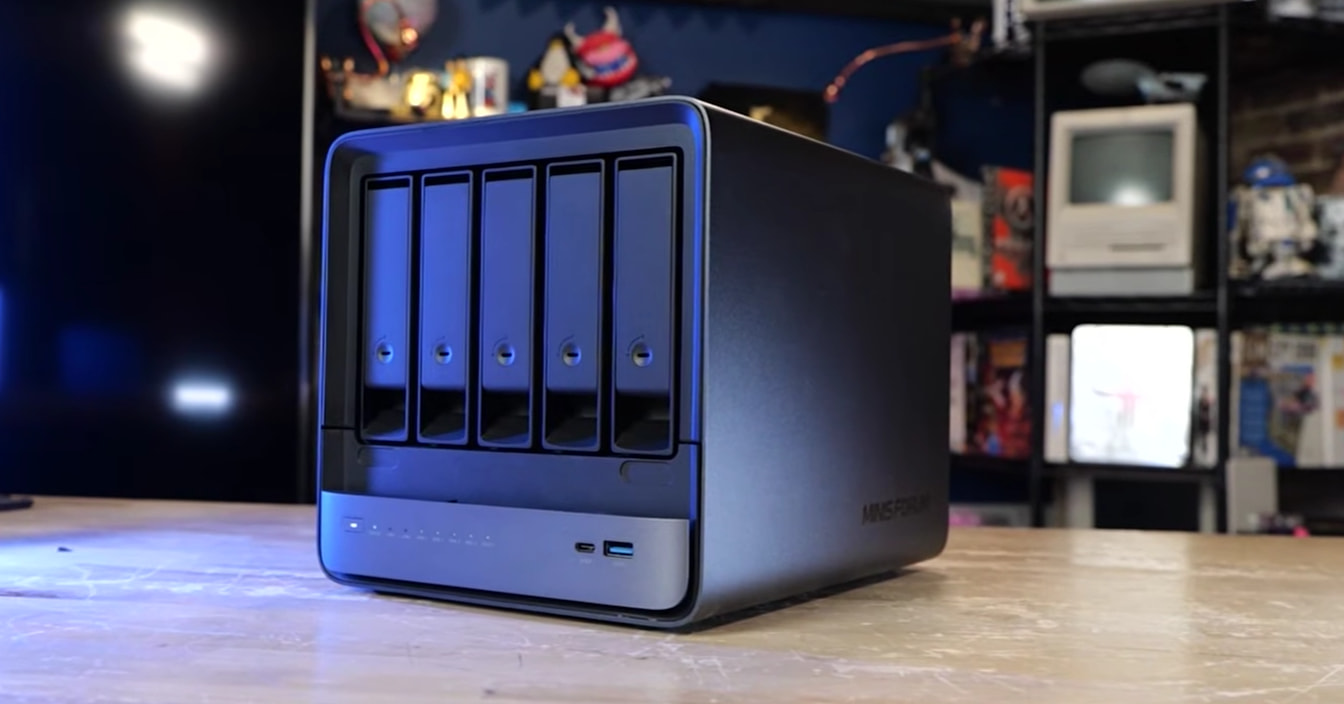
MINISFORUM N5 MAX AI NAS | AMD Ryzen AI Max+ 395 | 126 TOPS NPU | Radeon™ 8060S graphics
Last tested: 2026-06-06 (Proxmox VE 9.1.1, kernel 6.17.2-1-pve, ROCm 7.2.1)
Background
TODO: video goes here, explainer
My vision for this is to have an “all-in-one” home appliance for AI, Virtual Machines, internet ingress/egress (experimenting with Pangolin on this currently, maybe for a future video).. Home Assistant.. you name it. In a nutshell we’re using Proxmox as our NAS OS then setting up an LXC with full access to the underlying hardware for AI workloads via Docker! The best of both worlds. Or something.
This thing is a beast for any use case.
Models tested:
- Qwopus3.6-27B-v2 (ROCmFP4, 14 GB),
- Qwen3.6-27B (Q8_0, ~27 GB)
- TODO?
Table of Contents
- Overview & What’s New
- Architecture Overview
- Prerequisites & System Inventory
- Phase 1: Proxmox Host Preparation
- Phase 2: Kernel Boot Parameters (Critical)
- Phase 3: Create the LXC Container
- Phase 4: GPU Passthrough to LXC
- Phase 5: ROCm Installation (Inside LXC)
- Phase 6: Build the ROCmFP4 llama.cpp Fork
- Phase 7: Build Stock llama.cpp (for Q8 baseline)
- Phase 8: Download Models
- Phase 9: Run Inference
- Phase 10: Benchmarks
- vLLM Docker Setup (Alternative Backend)
- Troubleshooting
- Reference: Key Community Resources
1. Overview & What’s New
This guide covers running ROCmFP4-quantized models (a custom 4-bit format with native FP4 tensor layouts optimized for AMD GPUs) on Strix Halo hardware using a custom llama.cpp fork with Multi-Token Prediction (MTP) support.
Most of the work was done on the Minisforum N5 Max NAS, but I also validated on the GMK Tek Strix Halo, The Minisforum S1 Max and The Framework Desktop Strix Halo machine they offer.
This was quite an adventure to get setup. Many thinks to kyz0 and other resources linked throughout this guide.
What’s different from standard llama.cpp ROCm guides:
| Feature | Standard ROCm guide | This guide |
|---|---|---|
| Model format | Standard GGUF (Q4_K_M, Q8_0, etc.) | ROCmFP4 custom 4-bit GGUF |
| llama.cpp fork | ggml-org/llama.cpp |
charlie12345/rocmfp4-llama (branch mtp-rocmfp4-strix) |
| MTP support | No | Yes — speculative decoding via draft-MTP |
HSA_OVERRIDE_GFX_VERSION |
11.0.0 (maps gfx1151→gfx1100) |
11.5.1 (native gfx1151 FP4 support) |
GGML_HIP_ENABLE_UNIFIED_MEMORY |
Not needed | Required for models > 2 GB |
-dio flag |
Required | Required for models > ~6 GB |
ulimit -l unlimited |
Not mentioned | Required — ROCm locks GPU memory |
setsid wrapper |
Not needed | Needed inside lxc-attach shells |
2. Architecture Overview
Proxmox Host (kernel 6.17.2-1-pve)
  ├── amdgpu.ko (in-tree, gfx1151 support)
  ├── /dev/dri/card1       ───┐
  ├── /dev/dri/renderD128  ───┤── LXC bind-mount
  ├── /dev/kfd             ───┤
  └── /dev/accel/accel0    ───┘  (NPU — not used for LLM today)
        │
  LXC Container (Ubuntu 24.04, privileged, 56 GB RAM)
    ├── ROCm 7.2.1 userspace (no DKMS — host kernel has drivers)
    ├── rocmfp4-llama fork (built for gfx1151 + ROCmFP4)
    ├── stock llama.cpp (for Q8 baseline comparisons)
    ├── Docker (for vLLM ROCm container)
    └── Models:
        ├── Qwopus3.6-27B-v2-MTP-ROCmFP4 (14 GB)
        └── Qwen3.6-27B-Q8_0 (~27 GB)
3. Prerequisites & System Inventory
Hardware Requirements
| Component | Minimum | Recommended |
|---|---|---|
| CPU | Ryzen AI 300 series | Ryzen AI MAX+ 395 |
| RAM | 32 GB | 64 GB (128 GB for 70B models) |
| Proxmox | 8.x | 9.1+ (Debian 13 base) |
| Kernel | 6.14+ | 7+ (Proxmox v9 Kernel 7 series) |
| Storage | 100 GB free | 300 GB+ (for multiple models + builds) |
Verify your hardware
# CPU
cat /proc/cpuinfo | grep "model name" | head -1

# GPU (should show Radeon 8060S)
lspci | grep -i display

# RAM
grep MemTotal /proc/meminfo

# GPU device nodes
ls -la /dev/dri/* /dev/kfd /dev/accel/accel0

# Kernel version
uname -r

# Proxmox version
pveversion
Expected output
model name : AMD RYZEN AI MAX+ 395 w/ Radeon 8060S
90:00.0 Display controller: AMD/ATI Strix Halo [Radeon 8060S Graphics]
MemTotal:       63407216 kB  (~60.5 GB)
crw-rw---- 1 root render 226, 128 /dev/dri/renderD128
crw-rw---- 1 root render 234,   0 /dev/kfd
6.17.2-1-pve
pve-manager/9.1.1
4. Phase 1: Proxmox Host Preparation
4.1 Enable the no-subscription repository
# Disable the enterprise repo (which will 401 without a subscription key)
rm /etc/apt/sources.list.d/pve-enterprise.sources

# Add the no-subscription repo
cat > /etc/apt/sources.list.d/pve-no-subscription.sources << 'EOF'
Types: deb
URIs: http://download.proxmox.com/debian/pve
Suites: trixie
Components: pve-no-subscription
Signed-By: /usr/share/keyrings/proxmox-archive-keyring.gpg
EOF

# Also fix the Ceph repo to use no-subscription
cat > /etc/apt/sources.list.d/ceph.sources << 'EOF'
Types: deb
URIs: http://download.proxmox.com/debian/ceph-squid
Suites: trixie
Components: no-subscription
Signed-By: /usr/share/keyrings/proxmox-archive-keyring.gpg
EOF

apt update
4.2 Install necessary tools
apt install -y curl wget pve-headers build-essential
5. Phase 2: Kernel Boot Parameters (Critical)
5.1 Why these parameters
The Strix Halo GPU (gfx1151) needs explicit boot parameters to access all 64 GB of unified memory. Without these, ROCm memory allocation is severely limited.
| Parameter | Purpose |
|---|---|
amd_iommu=off |
Disables IOMMU for the GPU. Required for the GPU to access all system RAM as unified memory. Without this, ROCm memory allocation is capped at ~2 GB. |
amdgpu.gttsize=131072 |
Sets the GTT (Graphics Translation Table) size to 128 GB. This is a ceiling — it tells the GPU it can map up to 128 GB of system RAM. On a 64 GB system, this effectively enables full unified memory access. The value is in megabytes: 131072 MB = 128 GB. |
ttm.pages_limit=31457280 |
Increases the TTM (Translation Table Manager) page limit. Prevents allocation failures when loading large models. Value = number of 4 KB pages. |
Note on GTT sizing: The system has ~60.5 GB of usable RAM. Setting
gttsize=131072(128 GB) is safe — it’s just an upper bound. The GPU will only use what’s physically available. For a 64 GB system, a value of ~57344 (56 GB) would also work, but 131072 is harmless and future-proofs the config for systems with more RAM.
5.2 Apply the parameters
sed -i 's/GRUB_CMDLINE_Linux_DEFAULT="quiet"/GRUB_CMDLINE_LINUX_DEFAULT="quiet amd_iommu=off amdgpu.gttsize=131072 ttm.pages_limit=31457280"/' /etc/default/grub
update-grub
reboot
5.3 Verify after reboot
# Check GTT size (should be ~128 GB)
cat /sys/class/drm/card1/device/mem_info_gtt_total
# Expected: 137438953472 (128 GB)

# Check boot params applied
cat /proc/cmdline | grep -o 'amdgpu.gttsize=[^ ]*\|amd_iommu=[^ ]*\|ttm.pages_limit=[^ ]*'
# Expected: amd_iommu=off amdgpu.gttsize=131072 ttm.pages_limit=31457280

# Verify /dev/kfd exists
ls -la /dev/kfd
6. Phase 3: Create the LXC Container
6.1 Choose a template
Ubuntu 24.04 is recommended over Debian 13 for ROCm compatibility:
pveam available | grep ubuntu-24
pveam download local ubuntu-24.04-standard_24.04-2_amd64.tar.zst
6.2 Create the container
Must be privileged for GPU device access:
CT_ID=100
CT_HOSTNAME=strix-ai
CT_STORAGE=local-lvm

pct create $CT_ID local:vztmpl/ubuntu-24.04-standard_24.04-2_amd64.tar.zst \
  --storage $CT_STORAGE \
  --memory 57344 \
  --swap 0 \
  --cores 16 \
  --unprivileged 0 \
  --hostname $CT_HOSTNAME \
  --net0 name=eth0,bridge=vmbr0,ip=dhcp \
  --rootfs $CT_STORAGE:100 \
  --features nesting=1
Resource notes:
--memory 57344— 56 GB RAM (leaves ~4 GB for Proxmox host)--swap 0— No swap. With unified memory, swapping would thrash the GPU.--cores 16— All 16 physical cores.--unprivileged 0— Privileged container. Required for GPU device nodes to have correct ownership.--rootfs 100— 100 GB minimum. 300 GB recommended if storing models locally.
6.3 Start and set up
pct start $CT_ID
pct enter $CT_ID

# Inside the container
apt update && apt upgrade -y
apt install -y curl wget git build-essential cmake python3 python3-pip sudo
7. Phase 4: GPU Passthrough to LXC
7.1 Identify device nodes on the host
From the Proxmox host:
ls -la /dev/dri/* /dev/kfd
Expected:
crw-rw---- 1 root video  226,   1 /dev/dri/card1
crw-rw---- 1 root render 226, 128 /dev/dri/renderD128
crw-rw---- 1 root render 234,   0 /dev/kfd
Note the render group GID:
getent group render
# Output: render:x:993:
7.2 Add device passthrough to container config
Edit /etc/pve/lxc/$CT_ID.conf on the Proxmox host:
cat >> /etc/pve/lxc/$CT_ID.conf << 'EOF'

# GPU device nodes (use wildcard for major 226 to cover all minors)
lxc.cgroup2.devices.allow: c 226:* rwm
lxc.cgroup2.devices.allow: c 234:* rwm

# Mount GPU devices into container
lxc.mount.entry: /dev/dri dev/dri none bind,optional,create=dir
lxc.mount.entry: /dev/kfd dev/kfd none bind,optional,create=file
EOF
7.3 Restart and verify
# On the host
pct stop $CT_ID
pct start $CT_ID

# Inside the container
pct enter $CT_ID
ls -la /dev/dri/* /dev/kfd
# Should show root:render and root:video ownership
8. Phase 5: ROCm Installation (Inside LXC)
8.1 Add the AMD ROCm repository
wget -q -O - https://repo.radeon.com/rocm/rocm.gpg.key | gpg --dearmor > /etc/apt/trusted.gpg.d/rocm.gpg

# Ubuntu 24.04 (noble) — use ROCm 7.2.1 which has noble support
echo "deb [arch=amd64] https://repo.radeon.com/rocm/apt/7.2.1 noble main" > /etc/apt/sources.list.d/rocm.list

# Pin ROCm packages to prefer the AMD repo
cat > /etc/apt/preferences.d/rocm-pin << 'EOF'
Package: *
Pin: release o=repo.radeon.com
Pin-Priority: 600
EOF

apt update
8.2 Install ROCm userspace (no DKMS)
Critical: Do NOT install rocm-dkms. The amdgpu and amdkfd drivers are already in the Proxmox host kernel.
apt install -y rocm-hip-sdk rocwmma-dev
Also install Vulkan SDK (needed by the ROCmFP4 fork build):
apt install -y libvulkan-dev vulkan-tools
8.3 Set up memlock limits (Critical!)
ROCm needs to lock GPU memory pages. The default ulimit is 8 MB — far too low for LLM models:
# Add to /etc/security/limits.conf
echo 'root soft memlock unlimited' >> /etc/security/limits.conf
echo 'root hard memlock unlimited' >> /etc/security/limits.conf

# Apply for current session
ulimit -l unlimited
8.4 Verify ROCm
/opt/rocm/bin/rocminfo
Expected output should show:
Name:                    gfx1151
Marketing Name:          Radeon 8060S Graphics
Compute Unit:            40
Max Clock Frequency:     2900 MHz

Pool Info:
  Segment:               GLOBAL; FLAGS: COARSE GRAINED
  Size:                  125829120 KB  (120 GB GTT — full unified memory)
Also check:
/opt/rocm/bin/rocm-smi
9. Phase 6: Build the ROCmFP4 llama.cpp Fork
9.1 Clone the fork
cd /root
git clone https://github.com/charlie12345/rocmfp4-llama.git
cd rocmfp4-llama
git checkout mtp-rocmfp4-strix
9.2 Build
export PATH=/opt/rocm/bin:/opt/rocm/llvm/bin:$PATH
export HIP_PATH=/opt/rocm
export ROCM_PATH=/opt/rocm
export ROCM_WMMA_INCLUDE=/opt/rocm/include
export GGML_HIP_ROCWMMA_FATTN=ON
export CMAKE_HIP_ARCHITECTURES=gfx1151
export JOBS=$(nproc)

# The build script references a custom rocWMMA path; we set ROCM_WMMA_INCLUDE
# to point to the standard ROCm install location instead.
bash scripts/build-strix-rocmfp4-mtp.sh
Note: The build script enables Vulkan by default, which requires
libvulkan-dev. If you get Vulkan compilation errors (e.g.,spvnamespace issues), reconfigure with-DGGML_VULKAN=OFF:cmake -S . -B build-strix-rocmfp4 \ -DCMAKE_BUILD_TYPE=Release \ -DGGML_HIP=ON \ -DGGML_HIP_ROCWMMA_FATTN=ON \ -DGGML_HIP_FORCE_MMQ=ON \ -DGGML_VULKAN=OFF \ -DGGML_CUDA=OFF \ -DCMAKE_HIP_ARCHITECTURES=gfx1151 \ -DLLAMA_BUILD_SERVER=ON cmake --build build-strix-rocmfp4 -j$(nproc) --target llama-cli llama-server llama-bench
9.3 Verify
HSA_OVERRIDE_GFX_VERSION=11.5.1 \
GGML_HIP_ENABLE_UNIFIED_MEMORY=1 \
./build-strix-rocmfp4/bin/llama-cli --list-devices
Expected:
Available devices:
  ROCm0: Radeon 8060S Graphics (122880 MiB, 4096 MiB free)
10. Phase 7: Build Stock llama.cpp (for Q8 baseline)
For comparing ROCmFP4 against standard quantization formats:
cd /root
git clone https://github.com/ggml-org/llama.cpp.git stock-llama
cd stock-llama

HIPCXX="$(hipconfig -l)/clang" \
HIP_PATH="$(hipconfig -R)" \
cmake -S . -B build \
  -DGGML_HIP=ON \
  -DGPU_TARGETS=gfx1151 \
  -DGGML_HIP_ROCWMMA_FATTN=ON \
  -DGGML_HIP_NO_VMM=ON \
  -DGGML_HIP_MMQ_MFMA=ON \
  -DCMAKE_BUILD_TYPE=Release

cmake --build build --config Release -j$(nproc) --target llama-cli llama-server llama-bench llama-perplexity
11. Phase 8: Download Models
11.1 ROCmFP4 Model (14 GB)
mkdir -p /models/rocmfp4
cd /models/rocmfp4

wget 'https://huggingface.co/jcbtc/qwopus3.6-27b-v2-chadrock-rocmfp4-mtp/resolve/main/Qwopus3.6-27B-v2-MTP-BF16-to-ROCmFP4-STRIX_LEAN.gguf'

# Optional: vision projection model
wget 'https://huggingface.co/jcbtc/qwopus3.6-27b-v2-chadrock-rocmfp4-mtp/resolve/main/mmproj-F32.mmproj'
Expected SHA256: 1f1c0a9d63b9b38b06fe... (verify after download)
11.2 Qwen3.6-27B Q8 Baseline (~27 GB)
mkdir -p /models/qwen36-27b
cd /models/qwen36-27b

wget 'https://huggingface.co/bartowski/Qwen_Qwen3.6-27B-GGUF/resolve/main/Qwen3.6-27B-Q8_0.gguf'
11.3 Qwen3.6-27B Q4_K_M (~16 GB, optional additional baseline)
wget 'https://huggingface.co/bartowski/Qwen_Qwen3.6-27B-GGUF/resolve/main/Qwen3.6-27B-Q4_K_M.gguf'
12. Phase 9: Run Inference
12.1 Critical: The setsid Workaround
When running llama-cli inside an lxc-attach shell, the process receives SIGTTOU when trying to set terminal attributes because it’s not the foreground process group. Always use setsid -w to create a new session:
# Inside the container via lxc-attach
setsid -w bash -c '
ulimit -l unlimited
HSA_OVERRIDE_GFX_VERSION=11.5.1 \
GGML_HIP_ENABLE_UNIFIED_MEMORY=1 \
/root/rocmfp4-llama/build-strix-rocmfp4/bin/llama-cli \
  -m /models/rocmfp4/Qwopus3.6-27B-v2-MTP-BF16-to-ROCmFP4-STRIX_LEAN.gguf \
  -ngl 999 \
  -fa on \
  -dio \
  -p "Your prompt here." \
  -n 200
'
Alternatively, if you
pct enterthe container and run interactively (not vialxc-attach), thesetsidwrapper is not needed.
12.2 ROCmFP4 Model with MTP (Full Config)
HSA_OVERRIDE_GFX_VERSION=11.5.1 \
GGML_HIP_ENABLE_UNIFIED_MEMORY=1 \
/root/rocmfp4-llama/build-strix-rocmfp4/bin/llama-server \
  -m /models/rocmfp4/Qwopus3.6-27B-v2-MTP-BF16-to-ROCmFP4-STRIX_LEAN.gguf \
  --mmproj /models/rocmfp4/mmproj-F32.mmproj \
  --alias qwopus3.6-27b-v2-chadrock \
  --host 127.0.0.1 \
  --port 8080 \
  --jinja \
  -c 262144 \
  -ngl 999 \
  -fa on \
  -dev ROCm0 \
  -b 512 \
  -ub 512 \
  -t 16 \
  -tb 32 \
  -ctk q4_0 \
  -ctv q4_0 \
  --spec-type draft-mtp \
  --spec-draft-device ROCm0 \
  --spec-draft-ngl all \
  --spec-draft-type-k q4_0 \
  --spec-draft-type-v q4_0 \
  --spec-draft-n-max 4 \
  --spec-draft-n-min 0 \
  --spec-draft-p-min 0.0 \
  --spec-draft-p-split 0.10 \
  --parallel 1 \
  --metrics \
  --no-mmap
12.3 Q8 Baseline (Stock llama.cpp)
HSA_OVERRIDE_GFX_VERSION=11.5.1 \
GGML_HIP_ENABLE_UNIFIED_MEMORY=1 \
/root/stock-llama/build/bin/llama-cli \
  -m /models/qwen36-27b/Qwen3.6-27B-Q8_0.gguf \
  -ngl 999 \
  -fa on \
  -dio \
  -p "Your prompt here." \
  -n 200
12.4 Runtime Flag Reference
| Flag | Purpose |
|---|---|
-ngl 999 |
Offload all layers to GPU |
-fa on |
Enable flash attention (rocWMMA path) |
-dio |
Required for models > ~6 GB on gfx1151. Without this, loading hangs. |
-dev ROCm0 |
Explicitly select the ROCm device |
--no-mmap |
Disable memory-mapped model loading (needed for some setups) |
--spec-type draft-mtp |
Enable Multi-Token Prediction speculative decoding |
--spec-draft-* |
MTP draft model configuration |
HSA_OVERRIDE_GFX_VERSION=11.5.1 |
Required for ROCmFP4 kernel paths on gfx1151 |
GGML_HIP_ENABLE_UNIFIED_MEMORY=1 |
Required — enables GPU access to system RAM beyond dedicated VRAM |
ulimit -l unlimited |
Required — ROCm needs to lock GPU memory pages |
13. Phase 10: Benchmarks
13.1 ROCmFP4 Model Benchmark
setsid -w bash -c '
ulimit -l unlimited
HSA_OVERRIDE_GFX_VERSION=11.5.1 \
GGML_HIP_ENABLE_UNIFIED_MEMORY=1 \
/root/rocmfp4-llama/build-strix-rocmfp4/bin/llama-bench \
  -m /models/rocmfp4/Qwopus3.6-27B-v2-MTP-BF16-to-ROCmFP4-STRIX_LEAN.gguf \
  -ngl 999 \
  -fa on \
  -dio \
  -n 512 \
  -p 512
'
13.2 Q8 Baseline Benchmark
setsid -w bash -c '
ulimit -l unlimited
HSA_OVERRIDE_GFX_VERSION=11.5.1 \
GGML_HIP_ENABLE_UNIFIED_MEMORY=1 \
/root/stock-llama/build/bin/llama-bench \
  -m /models/qwen36-27b/Qwen3.6-27B-Q8_0.gguf \
  -ngl 999 \
  -fa on \
  -dio \
  -n 512 \
  -p 512
'
13.3 Large Context Test
# Test prompt processing at 32K context
setsid -w bash -c '
ulimit -l unlimited
HSA_OVERRIDE_GFX_VERSION=11.5.1 \
GGML_HIP_ENABLE_UNIFIED_MEMORY=1 \
/root/rocmfp4-llama/build-strix-rocmfp4/bin/llama-bench \
  -m /models/rocmfp4/Qwopus3.6-27B-v2-MTP-BF16-to-ROCmFP4-STRIX_LEAN.gguf \
  -ngl 999 \
  -fa on \
  -dio \
  -p 32768 \
  -n 128
'
13.4 MTP Speedup Test
Compare with and without --spec-type draft-mtp to measure speculative decoding benefit.
14. vLLM Docker Setup (Alternative Backend)
vLLM provides a production-grade serving backend. On Strix Halo, it requires the ROCm Docker image and the HSA_OVERRIDE_GFX_VERSION=11.0.0 workaround.
We don’t want to run docker on the Proxmox host; we can run it in the LXC Container. I’ve skipped how to install docker in the LXC – you can follow the normal docker installation guide and it’ll work fine, just make sure you’re installing docker inside the lxc (not the Proxmox host).
i.e. run the wget get.docker.com script from inside the LXC then run docker run hello-world to make sure docker is working fine inside the LXC.
14.1 Pull the ROCm vLLM image
docker pull rocm/vllm:latest
14.2 Run vLLM with the Qwen3.6-27B model (HF format)
The model is already available in safetensors format at /nfs/models/Jackrong/Qwopus3.6-27B-v2/ (52 GB).
docker run -it --rm \
  --device=/dev/dri \
  --device=/dev/kfd \
  --group-add=render \
  --ipc=host \
  --network=host \
  -v /nfs/models:/models \
  -e HSA_OVERRIDE_GFX_VERSION=11.0.0 \
  -e HIP_VISIBLE_DEVICES=0 \
  rocm/vllm:latest \
  --model /models/Jackrong/Qwopus3.6-27B-v2 \
  --dtype float32 \
  --max-model-len 4096 \
  --gpu-memory-utilization 0.90
Note: vLLM on Strix Halo requires
float32— bfloat16 causes GPU hangs on current kernel/driver combos. TheHSA_OVERRIDE_GFX_VERSION=11.0.0maps gfx1151 to gfx1100 code paths.
14.3 Benchmark via vLLM
docker exec <container-id> python3 -m vllm.benchmarks.benchmark_throughput \
  --model /models/Jackrong/Qwopus3.6-27B-v2 \
  --dtype float32 \
  --num-prompts 100 \
  --input-len 512 \
  --output-len 256
15. Troubleshooting
If you have a problem not listed here please do comment below so I can improve the guide!
15.1 Model loading hangs with no output
Symptoms: llama-cli starts but produces zero output and never completes.
Causes and fixes:
| Cause | Fix |
|---|---|
SIGTTOU (inside lxc-attach) |
Use setsid -w wrapper, or run interactively via pct enter |
Missing -dio flag |
Add -dio to the command line |
Missing ulimit -l unlimited |
Set ulimit -l unlimited before running |
Missing GGML_HIP_ENABLE_UNIFIED_MEMORY=1 |
Set this environment variable |
15.2 “ROCk module is not loaded” in rocminfo
The amdgpu module is loaded but the ROCm compute path (amdkfd) isn’t initialized.
# On the Proxmox host
cat /boot/config-$(uname -r) | grep CONFIG_HSA_AMD
# Should show: CONFIG_HSA_AMD=y

# If it's a module, load it
modprobe amdkfd

# Check /dev/kfd exists
ls -la /dev/kfd
15.3 “Not enough memory” errors
Check GTT size:
cat /sys/class/drm/card1/device/mem_info_gtt_total
If this shows less than ~60 GB, the amdgpu.gttsize kernel parameter isn’t being applied:
cat /proc/cmdline | grep gttsize
If missing, re-run update-grub and reboot.
15.4 Container can’t see GPU devices
# On the host
ls -la /dev/dri/* /dev/kfd

# Check container config
cat /etc/pve/lxc/$CT_ID.conf | grep -E 'lxc\.(cgroup|mount)'

# Restart the container
pct stop $CT_ID
pct start $CT_ID
15.5 Permission denied on /dev/kfd inside container
Ensure the container is privileged (unprivileged: 0 in config). If using an unprivileged container, add:
lxc.idmap: g 993 993 1
15.6 Vulkan compilation errors during build
The ROCmFP4 fork’s build script enables Vulkan by default. If you get spv namespace errors, rebuild with Vulkan disabled:
cmake -S . -B build-strix-rocmfp4 \
  -DGGML_VULKAN=OFF \
  # ... other flags ...
15.7 Slow performance
- Verify you’re using the ROCm backend, not CPU fallback: the log should show
ggml_rocm_init - Check that
GPU_TARGETS=gfx1151was used during build - Verify flash attention is enabled:
-fa on - Check GPU clock speed:
rocm-smi - For first runs, kernel compilation may slow things down — subsequent runs will be faster
16. Reference: Key Community Resources
- ROCmFP4 llama.cpp fork: GitHub - charlie12345/rocmfp4-llama: NEW ROCmfp4 format for llama.cpp · GitHub (branch
mtp-rocmfp4-strix) - ROCmFP4 model on HF: jcbtc/qwopus3.6-27b-v2-chadrock-rocmfp4-mtp · Hugging Face
- Qwen3.6-27B GGUF: bartowski/Qwen_Qwen3.6-27B-GGUF · Hugging Face
- Strix Halo Toolboxes: GitHub - kyuz0/amd-strix-halo-toolboxes · GitHub
- llama.cpp ROCm Discussion: Known-Good Strix Halo ROCm + llama.cpp Stack · ggml-org/llama.cpp · Discussion #20856 · GitHub
- ROCm Docker Images: rocm/pytorch - Docker Image
- Proxmox AMD GPU Passthrough: Tutorial: Run LLMs using AMD GPU and ROCm in unprivileged LXC container | Proxmox Support Forum
Appendix A: Quick-Start Script
DANGER: I am providing this for reference, but again, if it works (or doesn’t) please comment below. Thanks!
#!/bin/bash
# strix-halo-rocmfp4-setup.sh — Run on Proxmox host as root
# WARNING: Review each section before running. This will reboot the host.

set -euo pipefail

CT_ID=${1:-100}
CT_NAME=${2:-strix-ai}

echo "=== Step 1: Add no-subscription repos ==="
rm -f /etc/apt/sources.list.d/pve-enterprise.sources
cat > /etc/apt/sources.list.d/pve-no-subscription.sources << 'EOF'
Types: deb
URIs: http://download.proxmox.com/debian/pve
Suites: trixie
Components: pve-no-subscription
Signed-By: /usr/share/keyrings/proxmox-archive-keyring.gpg
EOF
apt update

echo "=== Step 2: Add boot parameters ==="
sed -i 's/GRUB_CMDLINE_LINUX_DEFAULT="quiet"/GRUB_CMDLINE_LINUX_DEFAULT="quiet amd_iommu=off amdgpu.gttsize=131072 ttm.pages_limit=31457280"/' /etc/default/grub
update-grub

echo "=== Step 3: Download LXC template ==="
pveam download local ubuntu-24.04-standard_24.04-2_amd64.tar.zst

echo "=== Step 4: Create container ==="
pct create $CT_ID local:vztmpl/ubuntu-24.04-standard_24.04-2_amd64.tar.zst \
  --storage local-lvm \
  --memory 57344 \
  --swap 0 \
  --cores 16 \
  --unprivileged 0 \
  --hostname $CT_NAME \
  --net0 name=eth0,bridge=vmbr0,ip=dhcp \
  --rootfs local-lvm:100 \
  --features nesting=1

echo "=== Step 5: Add GPU passthrough ==="
cat >> /etc/pve/lxc/$CT_ID.conf << 'EOF'

lxc.cgroup2.devices.allow: c 226:* rwm
lxc.cgroup2.devices.allow: c 234:* rwm
lxc.mount.entry: /dev/dri dev/dri none bind,optional,create=dir
lxc.mount.entry: /dev/kfd dev/kfd none bind,optional,create=file
EOF

echo "=== Done! Reboot to apply the new kernel ==="
echo "After reboot:"
echo "  1. pct start $CT_ID"
echo "  2. pct enter $CT_ID"
echo "  3. Run the inside-container setup (ROCm + llama.cpp builds)"
echo ""
echo "Rebooting in 10 seconds... Ctrl+C to cancel."
sleep 10
reboot
Appendix B: Okay, that’s setup? Where’s my home lab?
So from here, you can setup containers or VMs or run Docker for whatever you like. Check out Proxmox VE Helper-Scripts to get some ideas.
Jellyfin Media Server | Proxmox VE Helper Scripts
Frigate | Proxmox VE Helper Scripts
Home Assistant OS | Proxmox VE Helper Scripts
…and so many more!