
This is one of the most mad scientist things I’ve ever done.
Oh an zork text to speech without a display connected.
This is one of the most mad scientist things I’ve ever done.
Oh an zork text to speech without a display connected.
the keycaps arrived from china woo. i’m disappointed with the pink legends/lettering of both of these sets. They do not appear to be hot pink or neon pink IRL. i would classify almost all of the pink on black of the neon set as low contrast with the only exception being the arrow keys and those are more of a mid contrast. the blue on black of the midnight set are pretty high contrast and match my expectations set by pictures of the neon keycap set. the neon set has no keys that match what i thought they would be going by the pictures on akko’s website.
the difference between the pictures and what i’m seeing with my own eyes is so stark that i started to wonder if there was some photographic trickery going on with the website’s pictures. the amazon review pictures prove me wrong tho. there’s no way that every review pic there of the neon set was altered to boost the color of the pinks, this must just be the way she goes.
so i was gonna take a picture of the keycaps i have in front of me to show the difference… and to my horror, the pinks look neon to my moto G6’s camera.
i would also classify the blue on dark purple caps in the neon set as low contrast and not what i expected from looking at pictures. even tho i like the blue on black keycaps from the midnight set, they’re still a bit lower contrast than the yellow on on dark grey and dark blue black caps that came with my keyboard.
sad!
also one of the novelty key’s stem is missing a wall at the end of one of the cross ends, the same one in both sets that looks kind of like a animal paw. just like the pic below from one of the amazon reviews. the keycaps that have this defect don’t sit very securely on the posts that are in the plastic box they come with and probably wouldn’t sit securely on my keyboard either. not a huge deal since it seems to be just the one novelty cap but man, once i notice one thing i don’t like i’m gonna mention every little thing i find lol.
edit
pic from my A6000 with everything set manually gets pretty close to what i see with my eyes. the INS|HOME cluster is the most/very accurate to how i see these pink legends that i thought were going to be more contrasty and ‘neon’ ish.
If you are worried about then cap being secure on a stem a little cling film or seran wrap on the stem should take up the slack.
i think for the missing wall on a cap stem that making the key stem bigger wouldn’t help much, could still slide off/around because it’s missing a wall. maybe wrapping tape of some kind around the cap stem would help tho. maybe i should test that…
popping it onto a switch it seems to be just fine. the case that came with the caps has only the vertical part of the cross, not a horizontal part, so it slides right off of that.
also putting the cap with missing wall on the stem in the cap case the wrong way works too.
In that case it should be fine on an actual switch.
In case it’s useful or interesting to anyone, I just finished scanning my copy of the first edition of the IBM Keyboard Operator’s Guide from December 1992 (SA40-0749-0, P/N 1370430).
It’s not an in-depth technical document (as the title should imply), but it’s still a cool snippet of history and will give you an idea of the sort of documentation IBM once supplied for its Model M keyboards. One of the more interesting things about it is (if I’m not mistaken) is one of the earliest references to the IBM Model M5-2 (Model M with an integrated trackball on the top-right corner) keyboard.
Updated my apple style Japanese caps. Trading Katakana for Hiragana and correctly italicised legends.
Old caps:
Now I can think about dyeing one of the sets into an new version of Borderline layouts possibly for an 1800 again… Hmmm we will see.
Also saw a Lofree from Xiaomi. Looks great for a travel board. So many boards…
It seems to come with stickers for “personalisation” but it is aimed right at me, my entire portable set up is stickerbombed. It is taunting me.

Consolidated most of my keeb stuff into one place.
Anyone have a good recommendation for keymapping software for Windows 10? I was wanting to have FN+ W A S D keys act as my arrow keys, but the Razer Synapse software for the Huntsman Mini won’t allow that because they have already set the Fn + W to act as volume up and won’t let you change it. [The ‘FN’ key is what they call their Hypershift key which doesn’t register as anything on its own when pressed.]
I was hoping to use the Application key as a sort of second Fn key, I remapped it to be ‘F24’. Now I need a software that will allow me to map ‘F24’+ W A S D to act as arrows.
Apart from the razersoftware it is probably not possible. maybe if you can rebind it to someting that can be rebound again with authotkey?
That portable keyboard actually looks really cool, altough i really don’t need it…
Working on lubing and filming my switches, i didn’t expect it to be this tedious, and i also broke one switch by putting the stem in backwards 
Yeah, it sucks
I wouldn’t want to do it, but I foresee myself heading down that path eventually. Make sure I’ve got plenty of time to kill, and a good podcast to listen to…
I’ve got silent Alpacas on the way, that I hope are good enough out of the box.
I hadn’t heard of AutoHotKey until yesterday after my post. I think that’s going to be the ticket. Going to check it out this evening.
oh god…
Now I need a hot swap mouse… Or a mouse switch tester.
Do you have a wireless mouse? Some long battery life ones like the g502 have even more double clicking problems. I’ve replaced the ones in my logitech with kailh reds (i’m not sure what version)
Asus makes a hotswap one, ROG something something.
I just remembered, Ali had a good video on replacing your mouse switches.
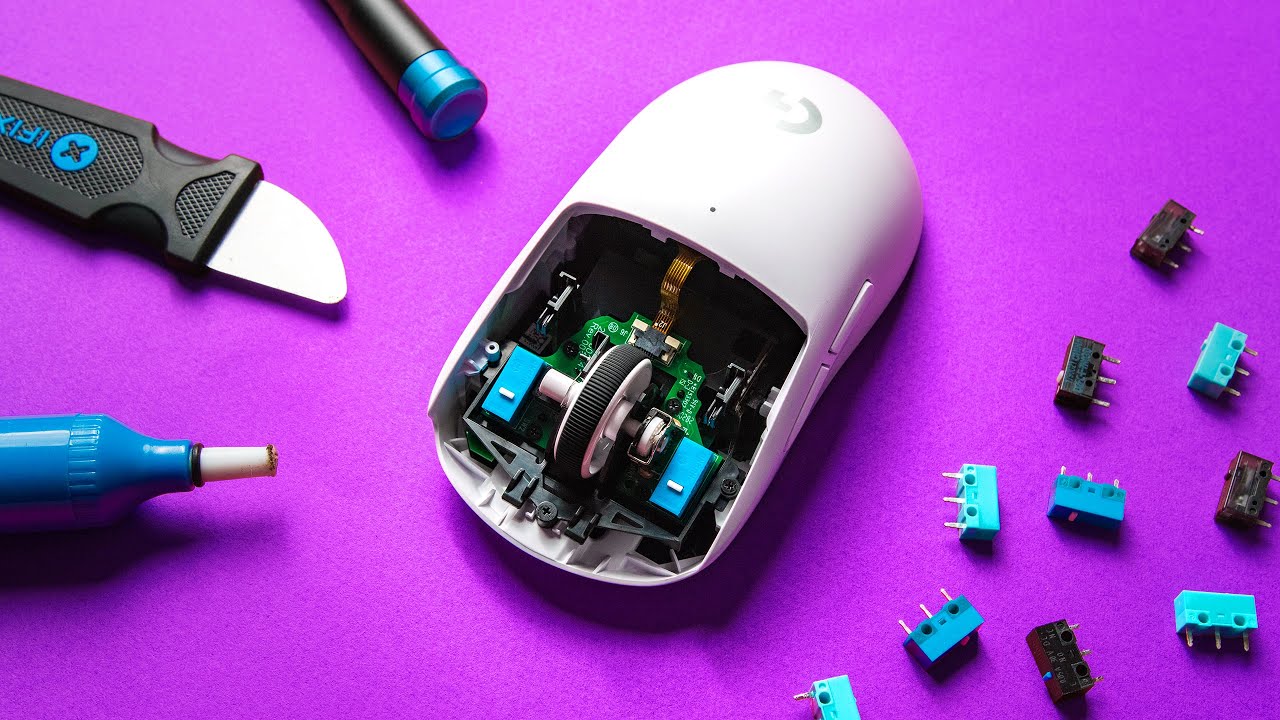
no wireless! I’ll use wireless kb & mouse for convenience in some cases but not at a machine i need to get work done on or game with.
I’ve taken my old MX518 apart possibly hundreds of times to clean out the dust bunnies that accumulate around the scroll wheel and the G400s (giving me the random accidental double click lately) is really no different in design so that’s easy apart to clean every couple of months out of necessity too. I cut holes for the screws in the stock glide pads of the G400s so I’d never have to replace those pads from removing them (after the first time) to take it apart.
my G400s has omrons D2FC-F-7N(20M) printed on the L/R switches. The middle click, forward/back buttons look to be the same nearly unlabelled switches, kinda looks like ‘HMAKE’ stamped into the black plastic on top of the middle click switch but couldn’t see any other markings at all.
Funny thing is that I bought the G400s when it was new because I was thinking that my MX518 is so old that it’s probably gonna fail soon, but it still works great. I also have an old MX310 as a last ditch backup if somehow both of my preferred mice were to fail.
this guide says to get 150 gf switches for the longevity but i am a little hesitant to go heavy because i absolutely hated the corsair M90’s thumb buttons because they required WAY too much force to activate - i would always end up moving the mouse a little bit just trying to use forward/back thumb buttons.

I think I’m leaning towards the kailh 8.0 switches.
i’d love to have at least a scrollwheel that can free scroll and click scroll in the MX518 shell and maybe one that also has left/right click on the scrollwheel. Logitech might have made something like that many years ago but i wasn’t really looking at the time.
Logitech do have the free and clicky wheel, it is really nice to use. It does not do side ways scroll but the have a humb wheel for sideways scrolling
This is the MX Master series.
@kreestuh this is right up your street I think… Maybe… Ah I don’t know, it has woods and deer’s and elven runes…


