Running into a frustrating issue that I don’t know the severity of or how to work through? I have a NAS I built in 2022 with two RaidZ1 VDEVs, each of 4 disks. I had a disk fail and so I added a new disk and resilvered the array (think I’m using that right). I’m not getting a bunch of disk errors across both arrays. Please seen screenshot below. This is causing TrueNAS to report Pool Status as unhealthy. Would love some assistance, I’ve found the TrueNAS’ forums to be pretty unhelpful and aggressive with beginners asking questions like these.
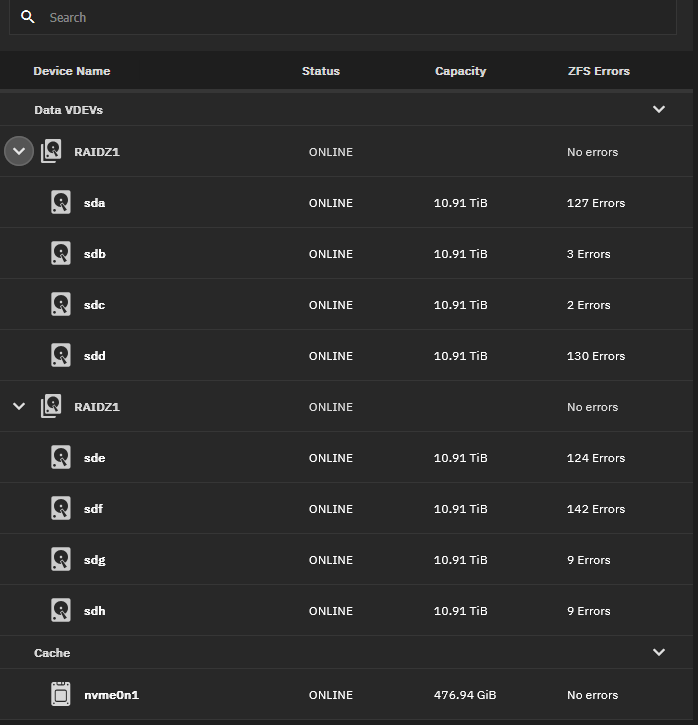
With how many simultaneous errors you’re having and the recent disk swap, I would be examining cabling or the HBA you’re using. Some cables are better than others at mitigating noise issues. You might have a failing HBA.
Can you go into more detail about the hardware? Pictures are good too.
Thanks so much for the quick response. Here are my system’s specs:
My NAS is running TrueNAS scale with 8 HDDs at 12TB each in two RAIDZ1 vdevs. I’m using a 9240-8i HBA (https://www.amazon.com/gp/product/B0BXPSQ8YV/ref=ppx_yo_dt_b_search_asin_title?ie=UTF8&psc=1 ) in my MOBOs PCIE Gen 3 X16 slot to split out to the SATA connections I need. The drives I’m using are a mix of Seagate EXOS X16 12TB drives and MDD 12TB drives (4 of each for the vdevs originally, now 3 Seagates and 5 MDDs). The 10GBe NIC in my NAS is the TP-Link 10GB PCIe Network Card (TX401). I’m using a Ryzen 5 3600 as this NAS’ CPU with 32GB of DDR4 memory.
I did order new cabling, but it seems odd to me that all of the cabling would fail at one?
Other question, probably stupid, but if the HBA ends up being an issue, can I just switch to another HBA and TrueNAS will figure out the pools/datasets? Or will I have to do something special?
Its not necessarily that the cabling has failed, but perhaps some other component is causing noise in the data.
Cablematters has generally been ok for me.
The other consideration is cooling with those style LSI cards. They are intended to have direct airflow so once the controller starts to overheat you could see some issues.
2 Likes
Quick 'n dirty method to test interference in your cables: wrap them in Alu-foil and make sure they’re grounded against the server chassis. If this reduces your errors, you’d need better shielded cables. If not, start suspecting the HBA and consider getting a replacement. LSI 9300-8i based cards aren’t that expensive anymore. Finally, if you haven’t already, instruct ZFS to do a full file system check on the drives and allow it to repair errors.
HTH!
2 Likes
Will do all of what you listed and add some direct airflow. What is the process for your last instruction?
Thanks!
Can I ask why all these disks have anywhere between 2 and 200 errors, but the RaidZ1 vdevs list “No errors”?
The disk can have an error but be corrected on the fly via checksum. This is part of the ZFS magic. Its able to recognize the data isnt right and fix it, so technically the array has no data errors, even if disks are having errors.
1 Like
If your motherboard has enough sata ports, you could try running one of the pools off the motherboard and see if the errors are still detected on it
Let’s throw in power supply as a potential source of worries. PSUs that worked fine for years but barely living up to the demands of the system can deteriorate over time just slightly to the point of exposing issues such as the above.
Finally, if you have recently changed power management settings - these are a potential cause for such errors as well.
2 Likes
Thanks for all the ideas. I think I’ll buy a new PSU and a new HBA. Whatever works, I’ll return the other part or use it for another build. Always doing stuff with extra parts.
One quick question - can I just replace HBAs by swapping the old one for the new one or do I need to do anything special?
As long as they’re set to passthrough the drives, you should be okay to just swap them out
2 Likes
It could also be a good idea to run a memtest in case a DIMM is failing.
It’s recommended to add disks to vdevs by their ID (i.e. by /dev/disk/by-id/). This identifies each disk uniquely and ensures that ZFS can find the right disks required for each vdev, in the right order, regardless of how the disks are connected to the system.
Unfortunately you (or TrueNAS?) seem to have added the disks by their “kernel” name (/dev/sdX). If I’m not mistaken these names depend entirely on the order in which the disks are detected. I’m not sure if ZFS can figure out which disk goes where if the disks are shuffled when you switch HBA.
More details here, including on how to switch device names: https://www.reddit.com/r/zfs/comments/v7u744/replace_device_names_in_pool/
Edit: Reading up on this more, ZFS should be able to identify the drives regardless of their device name. The “path” property is just a hint on where to look first, it seems. TIL something new! 
2 Likes
Also, before you do anything else, make sure you have a backup of your data!
3 Likes
I’ve shuffled my disks around before and moved to different HBAs and zfs has just worked it out, i believe each disk has metadata and the start to identify the pool and it’s roll
1 Like
this!!! backups are the ultimate undo button. Nothing can fuck up too horribly if you have working (and tested) backups
1 Like
Yeah, there’s a note to that effect in that Reddit topic too. On the other hand the OP in that topic has a pool that fails to import when he removes some other drive from his system (that is supposedly unrelated to ZFS and the pool in question). Could be a misunderstanding by that user – maybe they’re actually removing a drive from the pool?
Perhaps it’s a non-issue. At least if it goes wrong OP will have an idea about why.
Thanks for the help here. I’ll work on backing it up, it’s about 55TB of data so I don’t have an easy source to back that up to, but I’ll see what I can work out.
I’ve replaced my HBA and my cables. Will wait and see if the errors reappear, but now all looks better
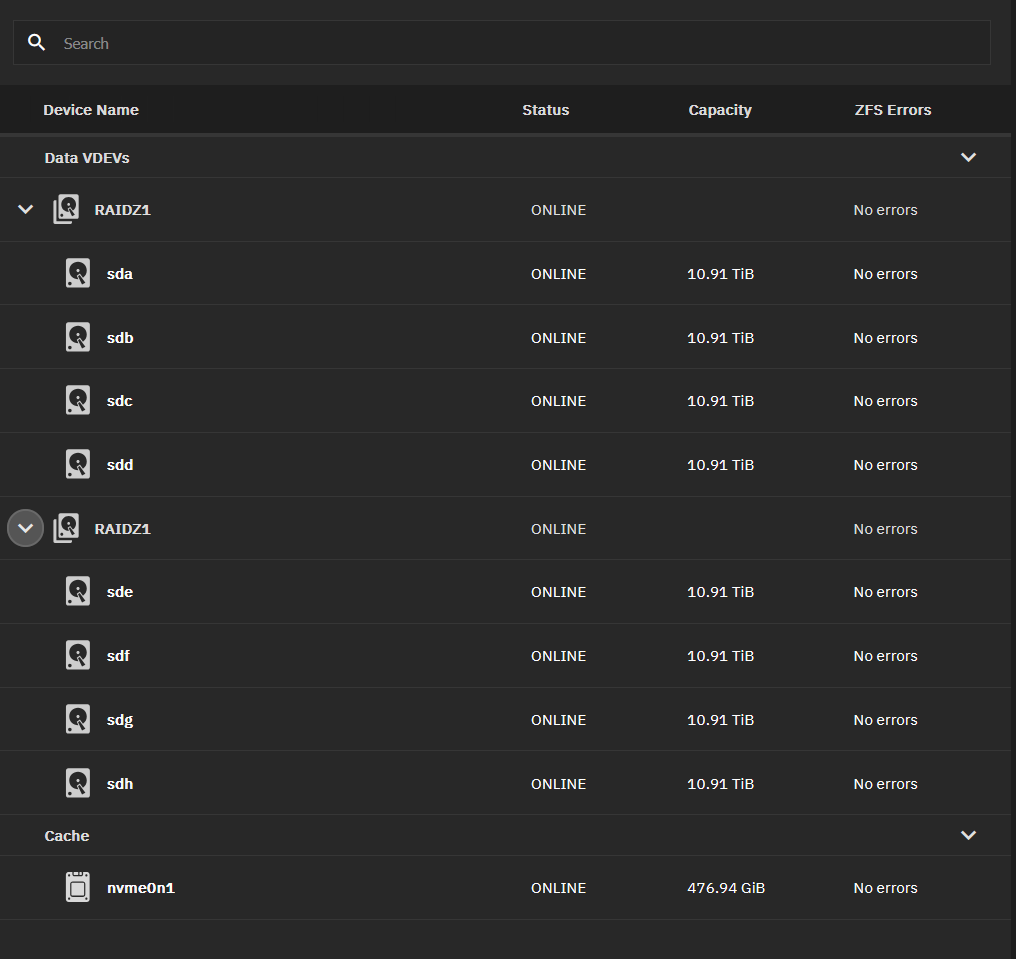
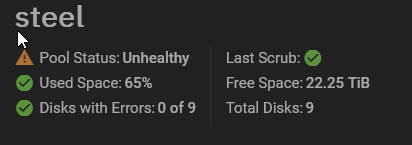
I’m still getting this alert here - pool status unhealthy - is this something I can clear? Thanks
1 Like
I forget the exact commands but a scrub from the CLI will show you what the unhealthy state is and allow you to clear it if it’s just left over from the previous errors - had this happen after replacing a driver the pool still showed as unhealthy. Just needed a scrub and being told the error was resolved