and this is via SMB, Windows uses SMB multichannel even with a LAG at Truenas this is not yet possible
1 Like
You could be right, its definitely possible Windows was combining it all automatically in the background like SMB-multichannel is supposed to do. I honestly don’t remember whether I was on Windows 7 still when doing this (no multichannel) or Windows 10 by then, or if this was via SMB or NFS mount. It probably was Win10 and probably was using SMB.
I wanna try out SMB Multichannel, but right now, I’m leaving that off.
I added a Mellanox ConnectX-6 to my NAS today and hooked up one fiber line with a QSFP28 adapter as is in my PC and ran some quick tests.
This is what I got transferring a file from the NAS (25Gb fiber)  my PC (10Gb copper):

I also tried copying to another NVMe drive on my PC (same MP600 PRO XT 4TB as the C: drive):

It was slightly faster at the start, but still slow.
This is what I got from my PC (10Gb copper) NAS (25Gb fiber):
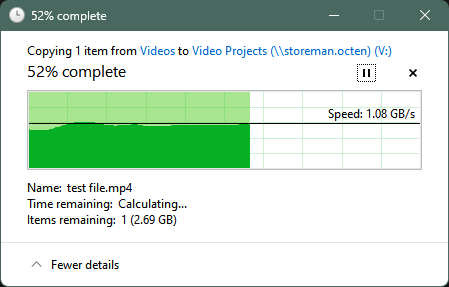
So at least one way is fast, but that’s not good enough.
I disconnected Copper and tried again, now on 25Gb fiber the whole way PC NAS:
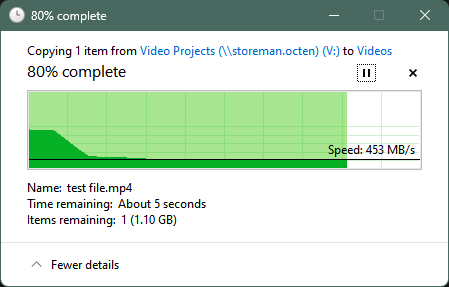
Even slower.
I tried C: D:, and that’s slow too!
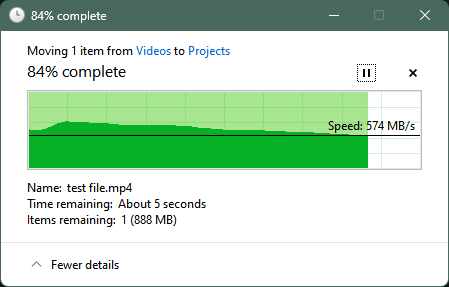
Dude, something’s wrong with these drives or with Windows. WTF?
D: C: shows faster write speeds:
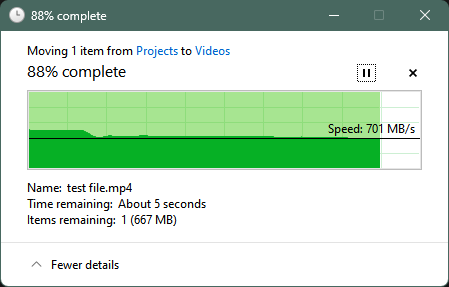
Writing C: NAS is very fast:
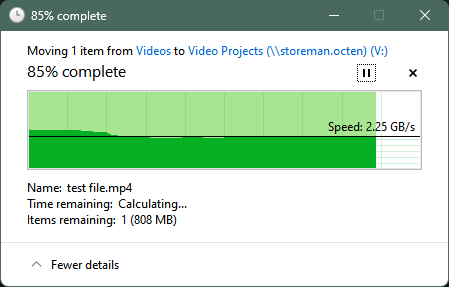
Writing D: NAS is also very fast:
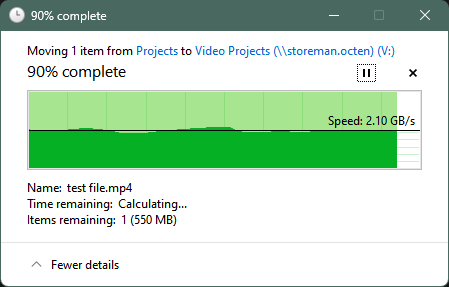
Anyone wanna guess why sequentially writing to these NVMe top-of-the-line drives is so slow?
I was getting faster speeds in the past even with CrystalDiskMark, and they’re not even close to full:


Optimize Drives said they last ran TRIM 5 days ago. Just ran it on both, and nothing changed :/.
This looks totally fine to me. I was copying around a 6.5GB file which is close to this 8GB.

Is it doing random 4K writes or something? That’s the only thing that lines up.
ipref3
PC  NAS:
NAS:

NAS PC:

Why am I only getting half the speed? It’s barely over 10Gb.
SMB Multichannel
Just turned on SMB Multichannel:

I don’t have LAGG anymore because I’m using the single 25Gb fiber connection.
# Get-SmbClientNetworkInterface
Interface Index RSS Capable RDMA Capable Speed
--------------- ----------- ------------ -----
24              False       False        0  bps
21              False       False        0  bps
6               False       False        100 Gbps
18              True        False        0  bps
13              True        False        25 Gbps
14              False       False        0  bps
10              False       False        0  bps
16              False       False        0  bps
26              False       False        3 Mbps
Nothing is showing “RDMA Capable”, whatever that means.
I’m assuming this means SMB Multichannel is enabled?
# Get-SmbMultichannelConnection

Server Name    Selected Client IP  Server IP Client Interface Index Server Interface Index Client RSS Capable Client RDMA Capable
-----------    -------- ---------  --------- ---------------------- ---------------------- ------------------ -------------------
storeman.octen True     10.1.0.229 10.1.0.6  13                     4                      True               False
No speed differences when transferring data over SMB.
# lspci -vvv
81:00.1 Ethernet controller: Mellanox Technologies MT2894 Family [ConnectX-6 Lx]
        Subsystem: Mellanox Technologies MT2894 Family [ConnectX-6 Lx]
        Control: I/O- Mem+ BusMaster+ SpecCycle- MemWINV- VGASnoop- ParErr- Stepping- SERR- FastB2B- DisINTx+
        Status: Cap+ 66MHz- UDF- FastB2B- ParErr- DEVSEL=fast >TAbort- <TAbort- <MAbort- >SERR- <PERR- INTx-
        Latency: 0, Cache Line Size: 64 bytes
        Interrupt: pin B routed to IRQ 241
        IOMMU group: 29
        Region 0: Memory at 2001c000000 (64-bit, prefetchable) [size=32M]
        Expansion ROM at f0200000 [disabled] [size=1M]
        Capabilities: [60] Express (v2) Endpoint, MSI 00
                DevCap: MaxPayload 512 bytes, PhantFunc 0, Latency L0s unlimited, L1 unlimited
                        ExtTag+ AttnBtn- AttnInd- PwrInd- RBE+ FLReset+ SlotPowerLimit 75.000W
                DevCtl: CorrErr+ NonFatalErr+ FatalErr+ UnsupReq-
                        RlxdOrd+ ExtTag+ PhantFunc- AuxPwr- NoSnoop+ FLReset-
                        MaxPayload 512 bytes, MaxReadReq 512 bytes
                DevSta: CorrErr+ NonFatalErr- FatalErr- UnsupReq+ AuxPwr- TransPend-
                LnkCap: Port #0, Speed 16GT/s, Width x8, ASPM not supported
                        ClockPM- Surprise- LLActRep- BwNot- ASPMOptComp+
                LnkCtl: ASPM Disabled; RCB 64 bytes, Disabled- CommClk+
                        ExtSynch- ClockPM- AutWidDis- BWInt- AutBWInt-
                LnkSta: Speed 16GT/s (ok), Width x8 (ok)
                        TrErr- Train- SlotClk+ DLActive- BWMgmt- ABWMgmt-
                DevCap2: Completion Timeout: Range ABC, TimeoutDis+ NROPrPrP- LTR-
                         10BitTagComp+ 10BitTagReq- OBFF Not Supported, ExtFmt- EETLPPrefix-
                         EmergencyPowerReduction Not Supported, EmergencyPowerReductionInit-
                         FRS- TPHComp- ExtTPHComp-
                         AtomicOpsCap: 32bit- 64bit- 128bitCAS-
                DevCtl2: Completion Timeout: 50us to 50ms, TimeoutDis- LTR- OBFF Disabled,
                         AtomicOpsCtl: ReqEn+
                LnkSta2: Current De-emphasis Level: -6dB, EqualizationComplete- EqualizationPhase1-
                         EqualizationPhase2- EqualizationPhase3- LinkEqualizationRequest-
                         Retimer- 2Retimers- CrosslinkRes: unsupported
        Capabilities: [48] Vital Product Data
                Product Name: ConnectX-6 Lx EN adapter card, 25GbE, Dual-port SFP28, PCIe 4.0 x8, No Crypto
do a ramdisk, remove all smb combo stuff and try out. Look a simple wrong network and wrong config on the disk in windows… Or simply boot live xubuntu and try out to confirm no hrdw issues and no vlan crap or switch in between. Over a quite old nuc i get full 25g easily.
I did a direct fiber connection to the NAS, but as you’ll see, I haven’t been able to get it to come back online yet for testing.
I restarted the box to put in a new card, but now I’m seeing this:

I’ve actually been in this situation a few times, but the “limit” is set to 15 min. Not sure what’s going on now or how to fix it or even how to make it not do this at startup.
Direct Fiber NAS PC:

Direct Fiber PC NAS:
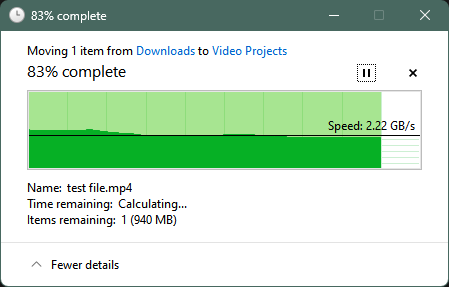
Same speeds as before.
It should at least be closer to 3Gbps right?
No change with ipref3:
Direct Fiber PC NAS (the results are all over the place, so I put 2 runs here):
# iperf3.exe -c 192.168.8.1
Connecting to host 192.168.8.1, port 5201
[  4] local 192.168.8.2 port 57811 connected to 192.168.8.1 port 5201
[ ID] Interval           Transfer     Bandwidth
[  4]   0.00-1.00   sec  1.55 GBytes  13.3 Gbits/sec
[  4]   1.00-2.00   sec  1.26 GBytes  10.8 Gbits/sec
[  4]   2.00-3.00   sec  1.29 GBytes  11.1 Gbits/sec
[  4]   3.00-4.00   sec  1.21 GBytes  10.4 Gbits/sec
[  4]   4.00-5.00   sec  1.24 GBytes  10.7 Gbits/sec
[  4]   5.00-6.00   sec  1.30 GBytes  11.2 Gbits/sec
[  4]   6.00-7.00   sec  1.65 GBytes  14.2 Gbits/sec
[  4]   7.00-8.00   sec  1.37 GBytes  11.7 Gbits/sec
[  4]   8.00-9.00   sec  1.81 GBytes  15.6 Gbits/sec
[  4]   9.00-10.00  sec  1.47 GBytes  12.6 Gbits/sec
- - - - - - - - - - - - - - - - - - - - - - - - -
[ ID] Interval           Transfer     Bandwidth
[  4]   0.00-10.00  sec  14.2 GBytes  12.2 Gbits/sec                  sender
[  4]   0.00-10.00  sec  14.2 GBytes  12.2 Gbits/sec                  receiver
# iperf3.exe -c 192.168.8.1
Connecting to host 192.168.8.1, port 5201
[  4] local 192.168.8.2 port 57882 connected to 192.168.8.1 port 5201
[ ID] Interval           Transfer     Bandwidth
[  4]   0.00-1.00   sec  1.39 GBytes  11.9 Gbits/sec
[  4]   1.00-2.00   sec  1.21 GBytes  10.4 Gbits/sec
[  4]   2.00-3.00   sec  1.18 GBytes  10.2 Gbits/sec
[  4]   3.00-4.00   sec  1.16 GBytes  9.97 Gbits/sec
[  4]   4.00-5.00   sec  1.67 GBytes  14.3 Gbits/sec
[  4]   5.00-6.00   sec  1.76 GBytes  15.1 Gbits/sec
[  4]   6.00-7.00   sec  1.73 GBytes  14.9 Gbits/sec
[  4]   7.00-8.00   sec  1.78 GBytes  15.3 Gbits/sec
[  4]   8.00-9.00   sec  1.84 GBytes  15.8 Gbits/sec
[  4]   9.00-10.00  sec  1.83 GBytes  15.7 Gbits/sec
- - - - - - - - - - - - - - - - - - - - - - - - -
[ ID] Interval           Transfer     Bandwidth
[  4]   0.00-10.00  sec  15.6 GBytes  13.4 Gbits/sec                  sender
[  4]   0.00-10.00  sec  15.6 GBytes  13.4 Gbits/sec                  receiver
Direct Fiber NAS PC:
# iperf3.exe -c 192.168.8.1 -R
Connecting to host 192.168.8.1, port 5201
Reverse mode, remote host 192.168.8.1 is sending
[  4] local 192.168.8.2 port 57995 connected to 192.168.8.1 port 5201
[ ID] Interval           Transfer     Bandwidth
[  4]   0.00-1.00   sec  1.52 GBytes  13.1 Gbits/sec
[  4]   1.00-2.00   sec  1.74 GBytes  15.0 Gbits/sec
[  4]   2.00-3.00   sec  1.57 GBytes  13.5 Gbits/sec
[  4]   3.00-4.00   sec  1.62 GBytes  13.9 Gbits/sec
[  4]   4.00-5.00   sec  1.61 GBytes  13.8 Gbits/sec
[  4]   5.00-6.00   sec  1.37 GBytes  11.8 Gbits/sec
[  4]   6.00-7.00   sec  1.32 GBytes  11.4 Gbits/sec
[  4]   7.00-8.00   sec  1.82 GBytes  15.7 Gbits/sec
[  4]   8.00-9.00   sec  1.77 GBytes  15.2 Gbits/sec
[  4]   9.00-10.00  sec  1.77 GBytes  15.2 Gbits/sec
- - - - - - - - - - - - - - - - - - - - - - - - -
[ ID] Interval           Transfer     Bandwidth       Retr
[  4]   0.00-10.00  sec  16.1 GBytes  13.9 Gbits/sec    0             sender
[  4]   0.00-10.00  sec  16.1 GBytes  13.9 Gbits/sec                  receiver
Booting Linux Mint is another option. It’d help lower the threshold for issues. RAMDisk shouldn’t matter because I’m using iperf3.
This is my Windows box to itself over localhost. Any idea why this isn’t faster?
Connecting to host 127.0.0.1, port 5201
[  4] local 127.0.0.1 port 52197 connected to 127.0.0.1 port 5201
[ ID] Interval           Transfer     Bandwidth
[  4]   0.00-1.00   sec   967 MBytes  8.11 Gbits/sec
[  4]   1.00-2.00   sec  1.37 GBytes  11.8 Gbits/sec
[  4]   2.00-3.00   sec   608 MBytes  5.10 Gbits/sec
[  4]   3.00-4.00   sec   749 MBytes  6.28 Gbits/sec
[  4]   4.00-5.00   sec   440 MBytes  3.68 Gbits/sec
[  4]   5.00-6.00   sec   957 MBytes  8.05 Gbits/sec
[  4]   6.00-7.00   sec   565 MBytes  4.74 Gbits/sec
[  4]   7.00-8.00   sec  1.23 GBytes  10.5 Gbits/sec
[  4]   8.00-9.00   sec   761 MBytes  6.38 Gbits/sec
[  4]   9.00-10.01  sec   526 MBytes  4.36 Gbits/sec
- - - - - - - - - - - - - - - - - - - - - - - - -
[ ID] Interval           Transfer     Bandwidth
[  4]   0.00-10.01  sec  8.04 GBytes  6.90 Gbits/sec                  sender
[  4]   0.00-10.01  sec  8.04 GBytes  6.90 Gbits/sec                  receiver
I tried doing my 2.5Gb adapter to the 25Gb adapter and got exactly the numbers I expected. Is localhost just busted and not a good test?
Connecting to host 10.1.0.6, port 5201
[  4] local 10.1.0.58 port 52157 connected to 10.1.0.6 port 5201
[ ID] Interval           Transfer     Bandwidth
[  4]   0.00-1.00   sec   296 MBytes  2.48 Gbits/sec
[  4]   1.00-2.00   sec   295 MBytes  2.48 Gbits/sec
[  4]   2.00-3.00   sec   294 MBytes  2.46 Gbits/sec
[  4]   3.00-4.00   sec   290 MBytes  2.43 Gbits/sec
[  4]   4.00-5.00   sec   291 MBytes  2.44 Gbits/sec
[  4]   5.00-6.00   sec   291 MBytes  2.44 Gbits/sec
[  4]   6.00-7.00   sec   292 MBytes  2.45 Gbits/sec
[  4]   7.00-8.00   sec   290 MBytes  2.44 Gbits/sec
[  4]   8.00-9.00   sec   290 MBytes  2.43 Gbits/sec
[  4]   9.00-10.00  sec   292 MBytes  2.45 Gbits/sec
- - - - - - - - - - - - - - - - - - - - - - - - -
[ ID] Interval           Transfer     Bandwidth
[  4]   0.00-10.00  sec  2.85 GBytes  2.45 Gbits/sec                  sender
[  4]   0.00-10.00  sec  2.85 GBytes  2.45 Gbits/sec                  receiver
I tried more tests from NIC to NIC on my PC.
ConnectX-6 Dx (PCIe x4) ConnectX-6 Lx (PCIe x1):
-----------------------------------------------------------
Server listening on 5201
-----------------------------------------------------------
Accepted connection from 10.1.0.226, port 50313
[  5] local 10.1.0.6 port 5201 connected to 10.1.0.226 port 50314
[ ID] Interval           Transfer     Bandwidth
[  5]   0.00-1.00   sec  1.36 GBytes  11.7 Gbits/sec
[  5]   1.00-2.00   sec  1.35 GBytes  11.6 Gbits/sec
[  5]   2.00-3.00   sec  1.38 GBytes  11.9 Gbits/sec
[  5]   3.00-4.00   sec  1.45 GBytes  12.5 Gbits/sec
[  5]   4.00-5.00   sec  1.40 GBytes  12.0 Gbits/sec
[  5]   5.00-6.00   sec  1.38 GBytes  11.8 Gbits/sec
[  5]   6.00-7.00   sec  1.41 GBytes  12.1 Gbits/sec
[  5]   7.00-8.00   sec  1.47 GBytes  12.6 Gbits/sec
[  5]   8.00-9.00   sec  1.48 GBytes  12.7 Gbits/sec
[  5]   9.00-10.00  sec  1.44 GBytes  12.3 Gbits/sec
[  5]  10.00-10.05  sec  70.5 MBytes  12.7 Gbits/sec
- - - - - - - - - - - - - - - - - - - - - - - - -
[ ID] Interval           Transfer     Bandwidth
[  5]   0.00-10.05  sec  0.00 Bytes  0.00 bits/sec                  sender
[  5]   0.00-10.05  sec  14.2 GBytes  12.1 Gbits/sec                  receiver
ConnectX-6 Dx (PCIe x4) ConnectX-6 Lx (PCIe x8 or x16):
Connecting to host 10.1.0.6, port 5201
[  4] local 10.1.0.226 port 50155 connected to 10.1.0.6 port 5201
[ ID] Interval           Transfer     Bandwidth
[  4]   0.00-1.00   sec  1.76 GBytes  15.1 Gbits/sec
[  4]   1.00-2.00   sec  1.79 GBytes  15.4 Gbits/sec
[  4]   2.00-3.00   sec  1.84 GBytes  15.8 Gbits/sec
[  4]   3.00-4.00   sec  1.85 GBytes  15.9 Gbits/sec
[  4]   4.00-5.00   sec  1.82 GBytes  15.7 Gbits/sec
[  4]   5.00-6.00   sec  1.76 GBytes  15.1 Gbits/sec
[  4]   6.00-7.00   sec  1.84 GBytes  15.8 Gbits/sec
[  4]   7.00-8.00   sec  1.86 GBytes  16.0 Gbits/sec
[  4]   8.00-9.00   sec  1.80 GBytes  15.5 Gbits/sec
[  4]   9.00-10.00  sec  1.81 GBytes  15.5 Gbits/sec
- - - - - - - - - - - - - - - - - - - - - - - - -
[ ID] Interval           Transfer     Bandwidth
[  4]   0.00-10.00  sec  18.1 GBytes  15.6 Gbits/sec                  sender
[  4]   0.00-10.00  sec  18.1 GBytes  15.6 Gbits/sec                  receiver
This should be enough bandwidth right? Even x4? And they’re both PCIe 4.0 (16GT/s).

Strangely, my older card, the one I already owned, has no part number or serial number in the Adapter Information view. Is that bad?
The original card to itself:
Connecting to host 10.1.0.226, port 5201
[  4] local 10.1.0.229 port 50251 connected to 10.1.0.226 port 5201
[ ID] Interval           Transfer     Bandwidth
[  4]   0.00-1.00   sec  1.69 GBytes  14.6 Gbits/sec
[  4]   1.00-2.00   sec  1.70 GBytes  14.5 Gbits/sec
[  4]   2.00-3.00   sec  1.74 GBytes  15.0 Gbits/sec
[  4]   3.00-4.00   sec  1.81 GBytes  15.6 Gbits/sec
[  4]   4.00-5.00   sec  1.78 GBytes  15.3 Gbits/sec
[  4]   5.00-6.00   sec  1.72 GBytes  14.8 Gbits/sec
[  4]   6.00-7.00   sec  1.68 GBytes  14.4 Gbits/sec
[  4]   7.00-8.00   sec  1.62 GBytes  13.9 Gbits/sec
[  4]   8.00-9.00   sec  1.69 GBytes  14.5 Gbits/sec
[  4]   9.00-10.00  sec  1.65 GBytes  14.1 Gbits/sec
- - - - - - - - - - - - - - - - - - - - - - - - -
[ ID] Interval           Transfer     Bandwidth
[  4]   0.00-10.00  sec  17.1 GBytes  14.7 Gbits/sec                  sender
[  4]   0.00-10.00  sec  17.1 GBytes  14.7 Gbits/sec                  receiver
At this point, I really really think that it’s the card. Maybe it can handle 10Gb no problem, but as soon as you start going to 25Gb, the card is messed up somewhere and can’t handle it.
I put some bids out there for more ConnectX-6 cards (this time, only Lx). We’ll see what I can get out of it after that sidegrade.
I mean I dont’t know from which source you get your Mellanox cards, but I don’t think the cards are the problem.
That said, if you have too much at one point and want to get rid of it, I’m currently looking for a CX6 DX 
Because of RDMA, TrueNas does not support RDMA, and I doubt whether you would benefit from it in the case of file transfer, your system has enough CPU power to saturate 25GbE without RDMA.
And for SMB Multichannel with TrueNas, you need at least two links, you showed only one connection.
I’m sure you’ve answered this somewhere above, but
-
are the x4 PCIe at the client via chipset or CPU?
-
What is the temperature of your cards under load?
mget_temp -d /dev/mst/SW_MT51000_0002c903007e76a0_lid-0x0002 -
what shows “ethtool -m ens1d1” on TrueNas?
root@truenas[~]# ethtool -m ens1d1
        Identifier                                : 0x11 (QSFP28)
        Extended identifier                       : 0x00
        Extended identifier description           : 1.5W max. Power consumption
        Extended identifier description           : No CDR in TX, No CDR in RX
        Extended identifier description           : High Power Class (> 3.5 W) not enabled
        Connector                                 : 0x23 (No separable connector)
        Transceiver codes                         : 0x88 0x00 0x00 0x00 0x00 0x00 0x00 0x00
        Transceiver type                          : 40G Ethernet: 40G Base-CR4
        Transceiver type                          : 100G Ethernet: 100G Base-CR4 or 25G Base-CR CA-L
        Encoding                                  : 0x05 (64B/66B)
        BR, Nominal                               : 25500Mbps
        Rate identifier                           : 0x00
        Length (SMF,km)                           : 0km
        Length (OM3 50um)                         : 0m
        Length (OM2 50um)                         : 0m
        Length (OM1 62.5um)                       : 0m
        Length (Copper or Active cable)           : 1m
        Transmitter technology                    : 0xa0 (Copper cable unequalized)
        Attenuation at 2.5GHz                     : 2db
        Attenuation at 5.0GHz                     : 4db
        Attenuation at 7.0GHz                     : 4db
        Attenuation at 12.9GHz                    : 7db
        Vendor name                               : Volex Inc.
        Vendor OUI                                : 14:1b:bd
        Vendor PN                                 : VQ2830LP100L
        Vendor rev                                : 01
        Vendor SN                                 : Q28PL1020161S214
        Date code                                 : 200610
        Revision Compliance                       : SFF-8636 Rev 2.5/2.6/2.7
        Module temperature                        : 0.00 degrees C / 32.00 degrees F
        Module voltage                            : 0.0000 V
I also just got into problems with my System, all files coming from disk are extremely slow (30-70MB/s), but as soon as a file comes from ARC I get full performance.
But this is only the case for all old shares and only applies to all Windows VMs.
On my Linux host I get a little bit over 1GB/s for the same files!?!?
The strange thing is, if I share a new dataset, then my Windows VMs don’t have a problem with it and I get normal performance from the Disks…
If I don’t find the problem until Monday, I will go back to TrueNas Core, delete my Zpool and copy the data via SMB from backup.
iSCSI - Windows 11 VM, x4 PCIe via Cipset

iSCSI - Windows 11 VM, x8 PCIe via CPU lanes

This can not only be due to that the card now has x8 lanes.
Chipset lanes are not equivalent to CPU lanes.
SMB Multichannel Windows 11 VM, virtIO nics
Win11 VM - virtIO, that’s the cache

that’s normal for Windows, I have the same results.
What do you get if you do this on Truenas?
ZEN4 with Manjaro to itself
[manja-02 ~]# iperf3 -c 127.0.0.1
Connecting to host 127.0.0.1, port 5201
[  5] local 127.0.0.1 port 47836 connected to 127.0.0.1 port 5201
[ ID] Interval           Transfer     Bitrate         Retr  Cwnd
[  5]   0.00-1.00   sec  13.1 GBytes   113 Gbits/sec    0   1.56 MBytes
[  5]   1.00-2.00   sec  13.7 GBytes   118 Gbits/sec    0   1.56 MBytes
[  5]   2.00-3.00   sec  13.6 GBytes   116 Gbits/sec    0   2.19 MBytes
[  5]   3.00-4.00   sec  13.8 GBytes   119 Gbits/sec    0   2.19 MBytes
[  5]   4.00-5.00   sec  13.9 GBytes   119 Gbits/sec    0   2.87 MBytes
[  5]   5.00-6.00   sec  13.8 GBytes   118 Gbits/sec    0   2.87 MBytes
[  5]   6.00-7.00   sec  14.1 GBytes   121 Gbits/sec    0   2.87 MBytes
[  5]   7.00-8.00   sec  13.8 GBytes   118 Gbits/sec    0   2.87 MBytes
[  5]   8.00-9.00   sec  13.8 GBytes   119 Gbits/sec    0   2.87 MBytes
[  5]   9.00-10.00  sec  13.9 GBytes   120 Gbits/sec    0   2.87 MBytes
- - - - - - - - - - - - - - - - - - - - - - - - -
[ ID] Interval           Transfer     Bitrate         Retr
[  5]   0.00-10.00  sec   137 GBytes   118 Gbits/sec    0             sender
[  5]   0.00-10.00  sec   137 GBytes   118 Gbits/sec                  receiver

iperf Done.
[manja-02 ~]# iperf3 -c 10.0.90.55
Connecting to host 10.0.90.55, port 5201
[  5] local 10.0.90.55 port 59064 connected to 10.0.90.55 port 5201
[ ID] Interval           Transfer     Bitrate         Retr  Cwnd
[  5]   0.00-1.00   sec  13.5 GBytes   116 Gbits/sec    0   2.19 MBytes
[  5]   1.00-2.00   sec  13.7 GBytes   118 Gbits/sec    0   2.19 MBytes
[  5]   2.00-3.00   sec  13.7 GBytes   118 Gbits/sec    0   2.19 MBytes
[  5]   3.00-4.00   sec  13.8 GBytes   119 Gbits/sec    0   2.19 MBytes
[  5]   4.00-5.00   sec  13.7 GBytes   118 Gbits/sec    0   2.19 MBytes
[  5]   5.00-6.00   sec  13.9 GBytes   119 Gbits/sec    0   2.19 MBytes
[  5]   6.00-7.00   sec  13.4 GBytes   115 Gbits/sec    0   2.19 MBytes
[  5]   7.00-8.00   sec  13.6 GBytes   117 Gbits/sec    0   2.19 MBytes
[  5]   8.00-9.00   sec  13.6 GBytes   117 Gbits/sec    0   2.19 MBytes
[  5]   9.00-10.00  sec  13.8 GBytes   118 Gbits/sec    0   2.19 MBytes
- - - - - - - - - - - - - - - - - - - - - - - - -
[ ID] Interval           Transfer     Bitrate         Retr
[  5]   0.00-10.00  sec   137 GBytes   117 Gbits/sec    0             sender
[  5]   0.00-10.00  sec   137 GBytes   117 Gbits/sec                  receiver
E5-2660V3 with TrueNas to itself
root@truenas[~]# iperf3 -s
-----------------------------------------------------------
Server listening on 5201
-----------------------------------------------------------
Accepted connection from 127.0.0.1, port 40062
[  5] local 127.0.0.1 port 5201 connected to 127.0.0.1 port 40076
[ ID] Interval           Transfer     Bitrate
[  5]   0.00-1.00   sec  4.23 GBytes  36.4 Gbits/sec
[  5]   1.00-2.00   sec  5.01 GBytes  43.1 Gbits/sec
[  5]   2.00-3.00   sec  5.08 GBytes  43.7 Gbits/sec
[  5]   3.00-4.00   sec  5.08 GBytes  43.7 Gbits/sec
[  5]   4.00-5.00   sec  4.80 GBytes  41.2 Gbits/sec
[  5]   5.00-6.00   sec  4.97 GBytes  42.7 Gbits/sec
[  5]   6.00-7.00   sec  5.05 GBytes  43.4 Gbits/sec
[  5]   7.00-8.00   sec  5.08 GBytes  43.6 Gbits/sec
[  5]   8.00-9.00   sec  5.09 GBytes  43.7 Gbits/sec
[  5]   9.00-10.00  sec  4.95 GBytes  42.5 Gbits/sec
[  5]  10.00-10.04  sec   216 MBytes  42.3 Gbits/sec
- - - - - - - - - - - - - - - - - - - - - - - - -
[ ID] Interval           Transfer     Bitrate
[  5]   0.00-10.04  sec  49.6 GBytes  42.4 Gbits/sec                  receiver
-----------------------------------------------------------
Server listening on 5201
-----------------------------------------------------------
Accepted connection from 10.0.90.6, port 39700
[  5] local 10.0.90.6 port 5201 connected to 10.0.90.6 port 39712
[ ID] Interval           Transfer     Bitrate
[  5]   0.00-1.00   sec  4.06 GBytes  34.9 Gbits/sec
[  5]   1.00-2.00   sec  4.82 GBytes  41.4 Gbits/sec
[  5]   2.00-3.00   sec  5.01 GBytes  43.0 Gbits/sec
[  5]   3.00-4.00   sec  5.08 GBytes  43.6 Gbits/sec
[  5]   4.00-5.00   sec  5.07 GBytes  43.5 Gbits/sec
[  5]   5.00-6.00   sec  5.10 GBytes  43.8 Gbits/sec
[  5]   6.00-7.00   sec  5.10 GBytes  43.8 Gbits/sec
[  5]   7.00-8.00   sec  5.11 GBytes  43.9 Gbits/sec
[  5]   8.00-9.00   sec  5.09 GBytes  43.7 Gbits/sec
[  5]   9.00-10.00  sec  5.03 GBytes  43.2 Gbits/sec
[  5]  10.00-10.04  sec   219 MBytes  42.8 Gbits/sec
- - - - - - - - - - - - - - - - - - - - - - - - -
[ ID] Interval           Transfer     Bitrate
[  5]   0.00-10.04  sec  49.7 GBytes  42.5 Gbits/sec                  receiver
-----------------------------------------------------------
Server listening on 5201
-----------------------------------------------------------
On TrueNAS using an Epyc 7313p (I upgraded from my 7252p, but it never seems to change anything):
# iperf3 -c 127.0.0.1
Connecting to host 127.0.0.1, port 5201
[  5] local 127.0.0.1 port 36112 connected to 127.0.0.1 port 5201
[ ID] Interval           Transfer     Bitrate         Retr  Cwnd
[  5]   0.00-1.00   sec  7.04 GBytes  60.5 Gbits/sec    0   1.75 MBytes
[  5]   1.00-2.00   sec  7.06 GBytes  60.7 Gbits/sec    0   1.75 MBytes
[  5]   2.00-3.00   sec  6.78 GBytes  58.2 Gbits/sec    0   1.87 MBytes
[  5]   3.00-4.00   sec  6.37 GBytes  54.7 Gbits/sec    0   1.87 MBytes
[  5]   4.00-5.00   sec  5.51 GBytes  47.4 Gbits/sec    0   2.50 MBytes
[  5]   5.00-6.00   sec  5.77 GBytes  49.6 Gbits/sec    0   3.75 MBytes
[  5]   6.00-7.00   sec  6.29 GBytes  54.0 Gbits/sec    0   3.75 MBytes
[  5]   7.00-8.00   sec  5.54 GBytes  47.6 Gbits/sec    0   3.75 MBytes
[  5]   8.00-9.00   sec  6.94 GBytes  59.6 Gbits/sec    0   3.75 MBytes
[  5]   9.00-10.00  sec  4.86 GBytes  41.8 Gbits/sec    0   3.75 MBytes
- - - - - - - - - - - - - - - - - - - - - - - - -
[ ID] Interval           Transfer     Bitrate         Retr
[  5]   0.00-10.00  sec  62.2 GBytes  53.4 Gbits/sec    0             sender
[  5]   0.00-10.04  sec  62.2 GBytes  53.2 Gbits/sec                  receiver
This is the fastest I measured. It was down to 38Gb/s in the 5th run. It was getting slower and slower each time.
Every stick of RAM is populated. This processor has access to 8-channels of bandwidth unlike my old one which could only access 4-channels of bandwidth.
Why is my system so slow? Is it TrueNAS SCALE? It’s just a cut-down version of Debian, so that seems very strange.
Both my PC and my NAS have essentially the same processor cores in different flavors:
Ryzen 9 5950X vs Epyc 7313p. Both 16C/32T. L2 cache is double on the Epyc and more PCIe lanes.
I don’t have mget_temp:
# mget_temp -d /dev/mst/SW_MT51000_0002c903007e76a0_lid-0x0002
-bash: mget_temp: command not found
But ethtool works when I use the correct adapter name:
# ethtool -m enp129s0f0np0
        Identifier                                : 0x03 (SFP)
        Extended identifier                       : 0x04 (GBIC/SFP defined by 2-wire interface ID)
        Connector                                 : 0x07 (LC)
        Transceiver codes                         : 0x10 0x00 0x00 0x00 0x00 0x00 0x00 0x00 0x02
        Transceiver type                          : 10G Ethernet: 10G Base-SR
        Transceiver type                          : Extended: 100G Base-SR4 or 25GBase-SR
        Encoding                                  : 0x03 (NRZ)
        BR, Nominal                               : 25750MBd
        Rate identifier                           : 0x00 (unspecified)
        Length (SMF,km)                           : 0km
        Length (SMF)                              : 0m
        Length (50um)                             : 0m
        Length (62.5um)                           : 0m
        Length (Copper)                           : 10m
        Length (OM3)                              : 70m
        Laser wavelength                          : 850nm
        Vendor name                               : Ubiquiti Inc.
        Vendor OUI                                : 24:5a:4c
        Vendor PN                                 : OM-SFP28-SR
        Vendor rev                                : A1
        Option values                             : 0x08 0x1a
        Option                                    : RX_LOS implemented
        Option                                    : TX_FAULT implemented
        Option                                    : TX_DISABLE implemented
        Option                                    : Retimer or CDR implemented
        BR margin, max                            : 0%
        BR margin, min                            : 0%
        Vendor SN                                 : BA2203900000S
        Date code                                 : 220316
        Optical diagnostics support               : Yes
        Laser bias current                        : 6.540 mA
        Laser output power                        : 1.5211 mW / 1.82 dBm
        Receiver signal average optical power     : 1.4525 mW / 1.62 dBm
        Module temperature                        : 39.02 degrees C / 102.24 degrees F
        Module voltage                            : 3.2720 V
        Alarm/warning flags implemented           : Yes
        Laser bias current high alarm             : Off
        Laser bias current low alarm              : Off
        Laser bias current high warning           : Off
        Laser bias current low warning            : Off
        Laser output power high alarm             : Off
        Laser output power low alarm              : Off
        Laser output power high warning           : Off
        Laser output power low warning            : Off
        Module temperature high alarm             : Off
        Module temperature low alarm              : Off
        Module temperature high warning           : Off
        Module temperature low warning            : Off
        Module voltage high alarm                 : Off
        Module voltage low alarm                  : Off
        Module voltage high warning               : Off
        Module voltage low warning                : Off
        Laser rx power high alarm                 : Off
        Laser rx power low alarm                  : Off
        Laser rx power high warning               : Off
        Laser rx power low warning                : Off
        Laser bias current high alarm threshold   : 75.000 mA
        Laser bias current low alarm threshold    : 0.500 mA
        Laser bias current high warning threshold : 70.000 mA
        Laser bias current low warning threshold  : 1.000 mA
        Laser output power high alarm threshold   : 2.2387 mW / 3.50 dBm
        Laser output power low alarm threshold    : 0.1259 mW / -9.00 dBm
        Laser output power high warning threshold : 1.9953 mW / 3.00 dBm
        Laser output power low warning threshold  : 0.1995 mW / -7.00 dBm
        Module temperature high alarm threshold   : 78.00 degrees C / 172.40 degrees F
        Module temperature low alarm threshold    : -8.00 degrees C / 17.60 degrees F
        Module temperature high warning threshold : 75.00 degrees C / 167.00 degrees F
        Module temperature low warning threshold  : -5.00 degrees C / 23.00 degrees F
        Module voltage high alarm threshold       : 3.6300 V
        Module voltage low alarm threshold        : 2.9700 V
        Module voltage high warning threshold     : 3.4700 V
        Module voltage low warning threshold      : 3.1400 V
        Laser rx power high alarm threshold       : 2.5119 mW / 4.00 dBm
        Laser rx power low alarm threshold        : 0.0295 mW / -15.30 dBm
        Laser rx power high warning threshold     : 1.5849 mW / 2.00 dBm
        Laser rx power low warning threshold      : 0.0468 mW / -13.30 dBm
In terms of lanes, I’m on an AMD X570 chipset:

From what I can tell, only the two x16 slots are direct to the CPU. When I put the card in both of them, it turns into 8x mode. I did verify that in Windows.
In terms of my NVMe drives, I have two of them, so they’re probably both directly connected to the CPU as well. I did try both drives, and they exhibit the same behavior.
The other x4 and x1 PCIe slots are 100% going through the chipset.
Only the Lx card worked in the second x16 slot attached to the CPU. The Dx card–that I was using before–does not. It fails to get an IP on either port and Device Manager shows it has issues being enabled.
When I did my card-to-card test in Windows, it was using the Dx card, not the Lx card.
To take Windows Explorer outta the equation, this is what I’m seeing when hitting the main zpool on the NAS from Windows:

These are not 25Gb; more like 20Gb at the highend.
I wish I could have a fast system like everyone else. If only I had all hard drives and 10+ year old hardware, maybe I’d have a way faster NAS.
that’s 10GbE SFP+, I tough we talk about 25GbE?
that the DX does not work in the second slot is strange, I would have expected exactly the other way around…
If you have ASPM enabled in the bios, turn it off and test the card again in the second slot, not sure, but worth a try.
Given my Zen4 results I would have expected more from Milan, I think they should be higher, but that will be another topic, I think rather that your Zen3 system has the bigger problem
that’s strange too, I can do this all day long, the results do not change.
Temperature of the IC?
https://docs.nvidia.com/networking/display/MFTV4120/mget_temp+Utility
Server Stuff needs direct airflow!
 super high end server cards and desktop hardware don’t always go together
Depends on the board how the lanes are distributed, if you have 8-8-4 slots with CPU lanes, and four for the chipset, then the CX6 has to go into the second slot, means one NVME goes over the chipset.
x8 CPU = GPU
X8 CPU = CX-6
x4 CPU = NVME
X4 Chipset = NVME
they get ~97.5Gb/s out of an EPYC 7551, your system should be way above that
eypc-cpu–for-maximum-performance
1 Like
get easy 25gb over a very old hp microstation. but have sooo many system will never get anywhere. Boot same live iso on 2 machine and do your iperf, check cable… no vlan crap, no zfs stuff. Then add 1 by 1.
look as hardware or even bios setting issues.
I bought 2 more cards. We’ll see what happens when I swap out my ConnectX-6 Dx for a ConnectX-6 Lx.
I also bought a single-port ConnectX-3 for another machine which I can use to test.
I’m curious!
The problem I described above is due to SMB Multichannel, as soon I turn it off I get normal performance.
I’ve already set some things back to default, but it didn’t help.
Edit: I found the problem…,but no solution yet.
Without my TCP settings, SMB-M works, or let’s say the Performance is at least not completely trash for data that does not come from ARC.
But with the TCP settings and without SMB Multichannel I have about twice the SMB performance for data from disk, but about 1GB/s less than when SMB-M works and the data comes from the ARC.
[manja-02 ~]# cat /etc/sysctl.d/99-sysctl.conf
#net.ipv4.tcp_congestion_control=dctcp
net.ipv4.tcp_timestamps=0
net.ipv4.tcp_sack=1
net.core.netdev_max_backlog=250000
net.core.rmem_max=4194304
net.core.wmem_max=4194304
net.core.rmem_default=4194304
net.core.wmem_default=4194304
net.core.optmem_max=4194304
net.ipv4.tcp_rmem=4096 87380 4194304
net.ipv4.tcp_wmem=4096 65536 4194304
net.ipv4.tcp_low_latency=1
net.ipv4.tcp_adv_win_scale=1
net.ipv4.tcp_mtu_probing=1

Since I use virtIO I have not used the settings for Windows, but they may be interesting for you
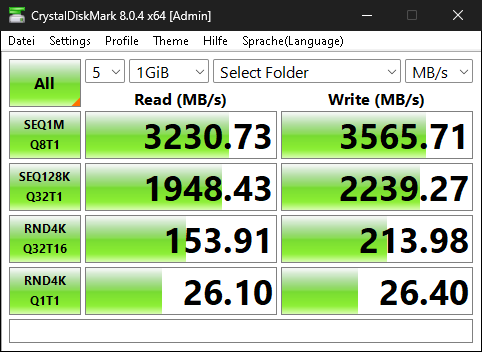
Today seems to be the CrstalDiskMark day, these are the same settings as last week


1 Like