Basicly there are write request for synchronous writes and asynchronous writes
The SLOG Device, or better Devices, are only used in the event of i.e an power outage while synchronous writes, where the data is not already written to your data pool.
It decreases in your case, because of Optane, the latency of the commits to the client application, when your client application makes a synchronous sync call.
This means that the data is normally always written by the ZIL and only in case of a failure the content of the SLOG is required.
Also it depends on how your application writes, small random IO doesn’t use all disks in your pool, the larger your record sizes, the smaller the number of disks that will be used
Without SLOG, ZFS uses areas on the data pool to mirror the ZIL and committed then from your data disks, in your case sata ssd, which has a latency penalty at least factor 10 to Optane, if I remember correctly.
With writing asynchron, ZFS commits when the data is still in your system memory. ZFS fills a Transaction Group and writes per default in intervals of 5 seconds to disk.
You can tune this behavior and other things and set the interval i.e to 10 seconds.
But be careful, everything has a downside!
It depends on your personal situation how fast you want to make your ZFS and how much security you sacrifice for it.
I’m not sure if you’re using ZFS with compression enabled, but if you are, it can artificially boost benchmarks if you’re writing repetitive data (such as zeros). For more accurate results, you may need to use data with random values. Additionally, you can try installing kdiskmark on your distribution for benchmarking purposes.
MadMatt already mentioned this, that’s why we also used fio.
RDMA is currently not supported by the Samba version used in Truenas Scale and as far as I know also not by mlx4_core
Therefore I think that in this case, dd has in my opinion even the advantage that it shows rather the Samba performance and not what the file system behind can handel
Going back to your original post, you mentioned not using SMB “multi whatever”. Do you mean multi-channel? I hope I didn’t miss any discussion about that, Is there some reason not to have used it?
From my understanding, SMB multi-channel requires multiple network cables. So if he only has 1 cable either between his PC and the switch or the NAS and his switch then I don’t think he can use it.
I thought it was the other way around. That you can create multiple links over one physical connection. If for example, your single CPU thread is the limitation creating a multiple-core connection can help you max out your single physical link by spreading CPU load across threads.
As the couple of reply above, indeed the transfert on samba could be quite an issues. But overall, as testing with nvme… it’s quite a waste of time as the cache will trigger and slow down and so the cache buffer from win. A simple way to check cable vs optic is having 2 same system, not 2 different. Just boot over liveiso linux on both and then you will have the proper view of the diff in link speed of fib vs elec. On research paper you will also see the answer as at 3m the latency of dac is about 4ns in favor of the cable wire, and at 7m diff is 1ns between fib and wire.
Quite transparent and not to seen in large change of troughput.
Looking into it more, it does look like you can enable multi-channel with a single NIC connection to help spread the load out to more cores. However, it doesn’t seem to increase the bandwidth of the network transfer unless there are multiple NIC connections:
I have two NICs in this PC and the NAS. In my PC, only one copper is connected. In the NAS, both copper are connected over LAGG.
I’m not sure how to setup LAGG on this ConnectX-6 card, but I could set that up with 2 fiber connections if I could get multi-channel set up on the NAS.
You have the 2 x25Gb version right?
LAG in a single file transfer does nothing for you, and with SMB multichannel you don’t want LAG.
But that’s a great topic, so far I’ve been tempted to buy 2 Mellanox CX6 LX 50G, as my CX-3 is also downgraded to only 4 PCIe3 lanes because I switched from Threatripper to Zen 4 and I can’t use SR-IOV because of a bug.
But with SMB multichannel I can probably save Money and buy 2 Intel 810.
Is the ConnectX-6 on your windows PC? I think it is from what I remember but dont have time to go back through the thread at the moment.
If you go to the driver settings for the NIC in Windows you have a LOT more options than consumer cards. One such page of options is all about aggregation. You have many different types to select from and some of them combine the links into a single logical unit that does take advantage of all available bandwidth for a single file transfer. You can play around with them there, but I am not sure if you actually can use all of them unless you can set up the same type of link aggregation on the TrueNAS NIC as well. Which I dont know how to do
Ill try and look, not sure where I use Mellanox NIC anymore. I remember it isnt LAG or LACP. They have 5-6 options to pick from, 1-2 or them work that way. It is basically taking the same principle as a QSFP port on a NIC, and expanding it to more ports. A QSFP can run as 4 independent 10gb links or a single 40gb logical link. So the teaming mode combines both ports into an effective 8x 10gb links all bonded as a single logical link.
It’s on Windows, but I finally bought another ConnectX-6 for the server.
My PC has a PCIe 4.0 x16 with at least 25Gb on each port (maybe up to 40Gb?).
My server will be getting a PCIe 4.0 x8 one supporting up to 25Gb on both ports. It’s a much smaller card with a smaller heatsink.
When testing, I was only using a single link in Windows.
I haven’t changed the 10Gb copper connections from LAGG on the NAS because that’d require changing 2 switches and TrueNAS itself. It’s a lot of trouble.
Before, I had it setup where it was PC → Switch → NAS, but now it’s PC → Switch → Switch → NAS because I moved the NAS to a different room. The fiber connections will be direct though.
With TrueNas you only have LACP, Failover and LoadBalance, Round Robin is not available but this also does not increase the throughput of a single session.
Without SMB multichannel, you need something like Multipath TCP (MPTCP), but maybe I’ve missed something and you’ll find the right answer.
I can’t find a dealer in Europe who has the ConnectX-6 Lx 50G, that’s the only 50G card that would make sense for 4x PCIe4
edit: Proxmox has more options via GUI, Truenas should be able to do that too, but not via the GUI
There are 7 modes for bonding:
Round-robin (balance-rr): Transmit network packets in sequential order from the first available network interface (NIC) slave through the last. This mode provides load balancing and fault tolerance.
Active-backup (active-backup): Only one NIC slave in the bond is active. A different slave becomes active if, and only if, the active slave fails. The single logical bonded interface’s MAC address is externally visible on only one NIC (port) to avoid distortion in the network switch. This mode provides fault tolerance.
XOR (balance-xor): Transmit network packets based on [(source MAC address XOR’d with destination MAC address) modulo NIC slave count]. This selects the same NIC slave for each destination MAC address. This mode provides load balancing and fault tolerance.
Broadcast (broadcast): Transmit network packets on all slave network interfaces. This mode provides fault tolerance.
IEEE 802.3ad Dynamic link aggregation (802.3ad)(LACP): Creates aggregation groups that share the same speed and duplex settings. Utilizes all slave network interfaces in the active aggregator group according to the 802.3ad specification.
Adaptive transmit load balancing (balance-tlb): Linux bonding driver mode that does not require any special network-switch support. The outgoing network packet traffic is distributed according to the current load (computed relative to the speed) on each network interface slave. Incoming traffic is received by one currently designated slave network interface. If this receiving slave fails, another slave takes over the MAC address of the failed receiving slave.
Adaptive load balancing (balance-alb): Includes balance-tlb plus receive load balancing (rlb) for IPV4 traffic, and does not require any special network switch support. The receive load balancing is achieved by ARP negotiation. The bonding driver intercepts the ARP Replies sent by the local system on their way out and overwrites the source hardware address with the unique hardware address of one of the NIC slaves in the single logical bonded interface such that different network-peers use different MAC addresses for their network packet traffic.
edit2: looks like I missed that balance-rr is an option
IDK, maybe I am remembering wrong how you set it up so both ports are bonded to a single logical one. I just know I was able to do it back when I was playing around with this stuff, which was back in 2016.
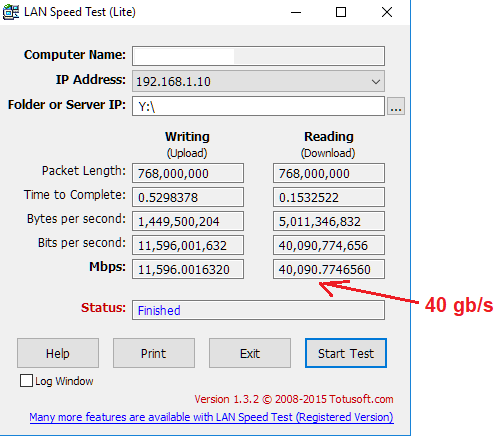
When you use a single port in standard 40gb mode it looked like this:
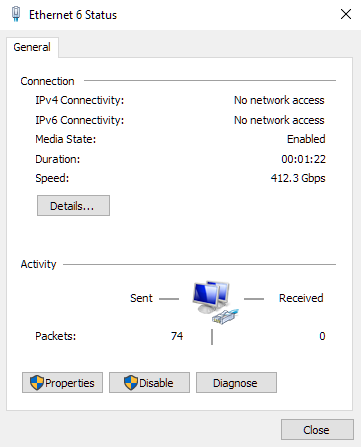
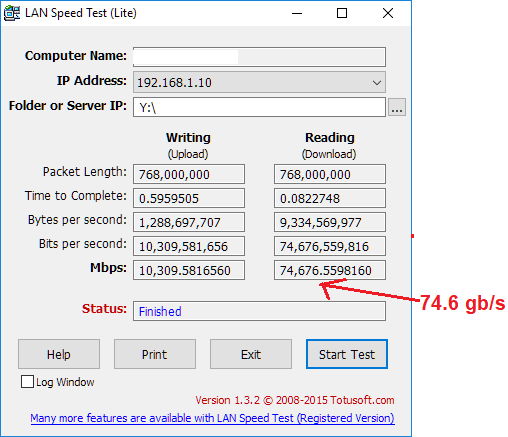
When you bond both ports together, Windows bugs out a bit on the display side and thinks you have a crazy high speed interface, but this is just a visual bug. So it looked like this:
Yes, Windows Workstation PC to Windows Server PC. I think I was testing from ramdisk to ramdisk over the network to eliminate as much file system performance as possible from being an issue. I cant remember if this was direct between the two or if I was going through my Mellanox SX1024 switch. Probably the switch since I had it? It was 7 years ago so IDK.