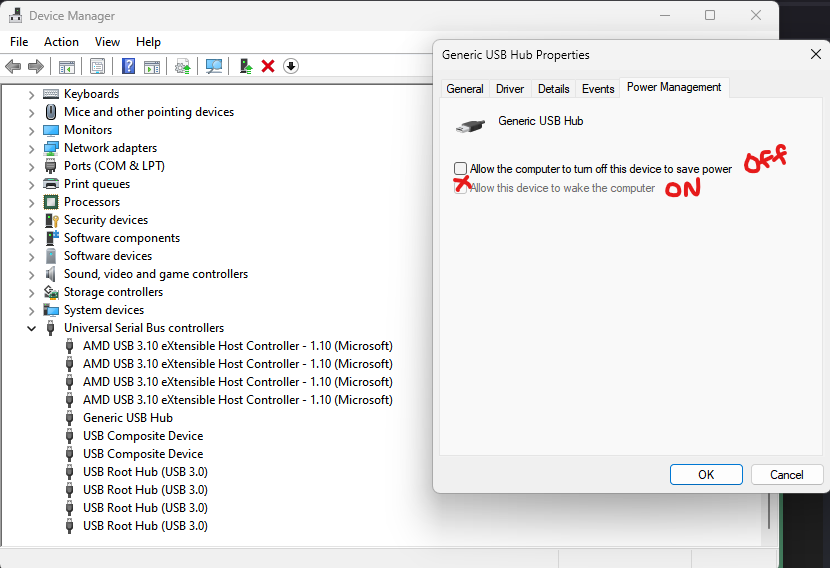
Sometimes USBs get suspended in sleep. I would turn that setting off in the laptop bios as well as fast boot or any deep sleep setting. You can also check device manager for the power management options. Something like this:
Re: USB HID sleep/wake issues. I literally changed nothing and my mouse & keyboard are waking the G16 from sleep via the USB HID ports today. No clue.
Re: Audio crackling. I tried a few different USB-C to A cables with my Qudelix 5K, tried swapping between the two USB 3.0 ports, tried removing devices and power-cycling the KVM, tried changing sampling rate to no avail. The DAC/AMP works totally fine when plugged into the USB port on a TB3 dock, a USB hub connected to the G16, or the G16 USB directly, but plugged into the KVM I still am getting the loud, sharp audio distortion. So strange.
I’m going to try getting a different gaming laptop this weekend to see if I can reproduce there or if it really is some interaction between the G16<>LVL1TKVM<>5K.
USB HID sleep/wake issues: it working the other day must have been a fluke or I had my mouse receiver on the USB 3.0 port while testing and didn’t notice. USB HID is not working for wake from sleep even with maximal power settings configured. For now, I’ll just keep my mouse on USB 3.0 and my keyboard on USB HID and wake from my mouse
USB DAC audio crackling issues: I can confirm the crackling goes away if I either 1. DAC->G16 2. DAC->KVM->G16 3. DAC->TS3±>G16 but not 4. DAC->KVM->TS3±>G16. I was watching LatencyMon and it was pretty erratic, so my guess is that the long USB chain is causing issues with the DAC specifically with the Asus G16
At some point I’ll try the new Lenovo Legion 7i and see if perhaps this is an issue specifically due to Intel Arrow Lake or the G16 itself