Hiya! Just curious really and no fuss to me as I’m taking one of the drives out shortly, plus I rarely do such large data transfers.
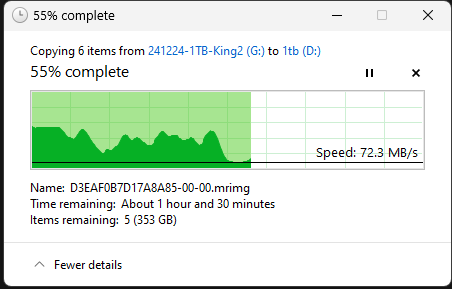
I’m copying over a 500GB and 3 80GB files from a 2.5in SSD (1TB) to an NVMe drive (1TB) connected directly into the motherboard. Both are Kingston and not cheap knock offs, drives are around 6-12 months old and were bought brand new, machine is 7900X.
It did a burst initially and then as you can see, slowed down to HDD speeds (or worse!). I wonder if that’s the motherboard thing, PCI lanes or the drives themselves.
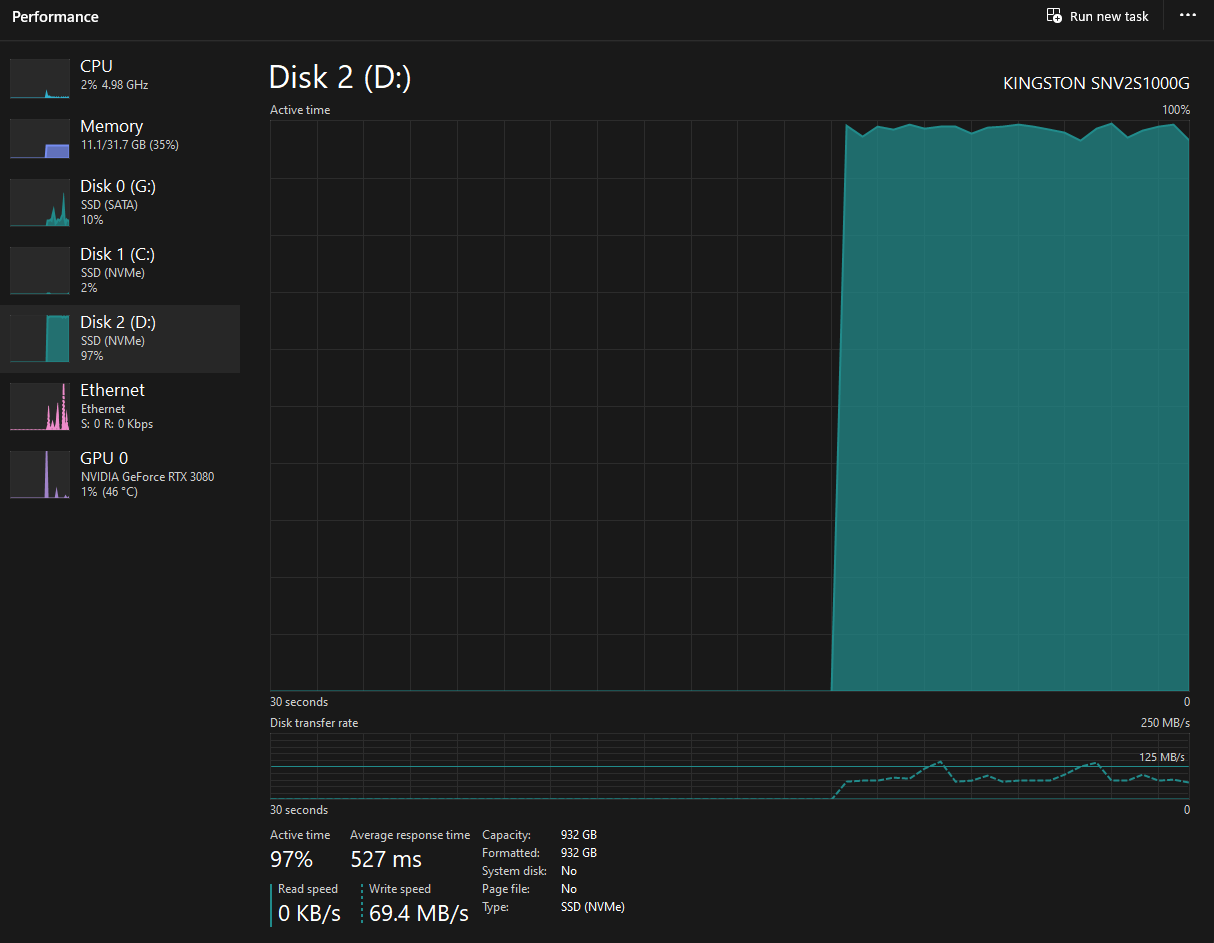
You can see here that Disk 2 (the NVMe drive) is maxing out, while the SSD is just wombling along at around 15-20%.
if i had to take a guess. that would be that you exceeded the write cache on the NVME drive and you are now having to write directly to nand, which is always much slower, this appears to be backed up by the drop off from your initial copy speed. its expected, but annoying if you are making large copies frequently.
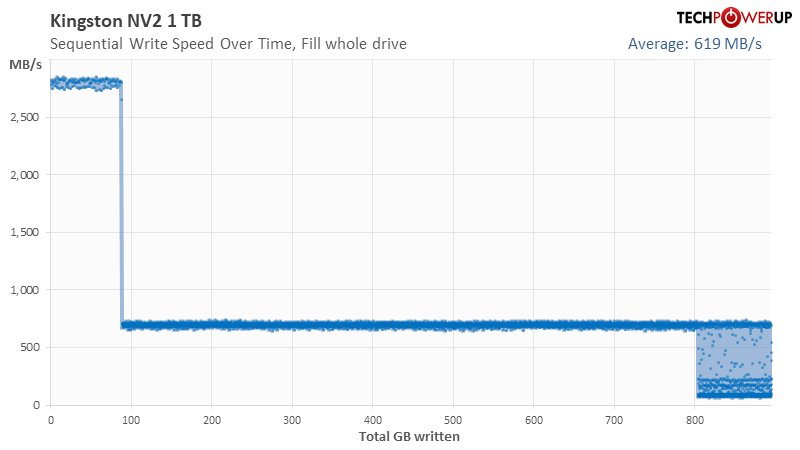
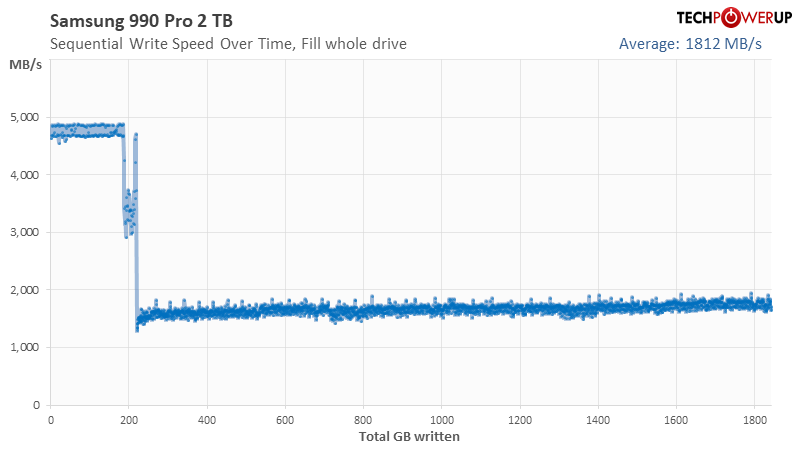
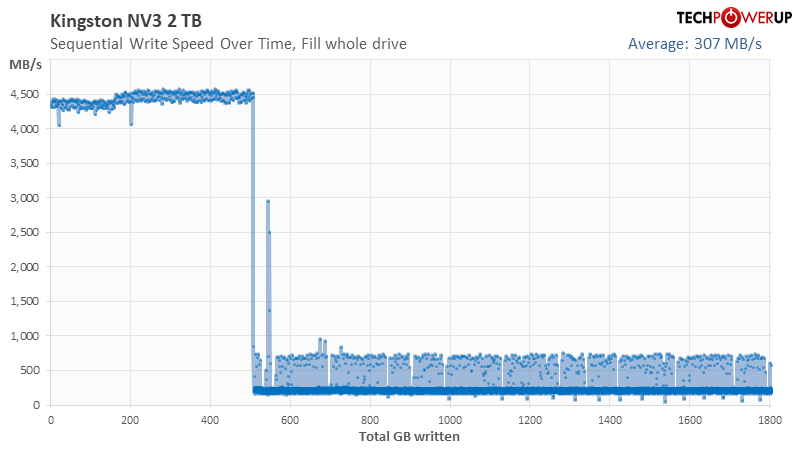
That seems awfully slow, techpowerup has the “raw” TLC write speed for the drive at ~750MB/s.
Maybe the NVMe drive needed TRIM’d before it’s full write speed could be exploited?
Had the same thing happen recently with my windows 11 image. It was getting really slow and windows, for whatever reason, was not trimming the drive. I ended up having to manually disable and reenable it via cmd prompt. I was able to confirm the behavior by manually running trim on my boot drive.
With that specific model getting a unit with TLC NAND is not guaranteed, there have been sightings of variants with the same model number with QLC NAND.
I think given those performance numbers this might unfortunately be one with QLC NAND.
Hmm, as @aBav.Normie-Pleb alluded to, TechPowerUp has 11 variants of the 1 TB NV2 using six different controllers and it looks like there may be others which aren’t in the database. Some are TLC, some are QLC, and I’m not having luck converting SNV25S/1000G into specifics. Kingston ducks out of saying in the spec sheet with that part number and it doesn’t look like anybody else has got it either, unless @ChrisA wants to pull the drive for a look.
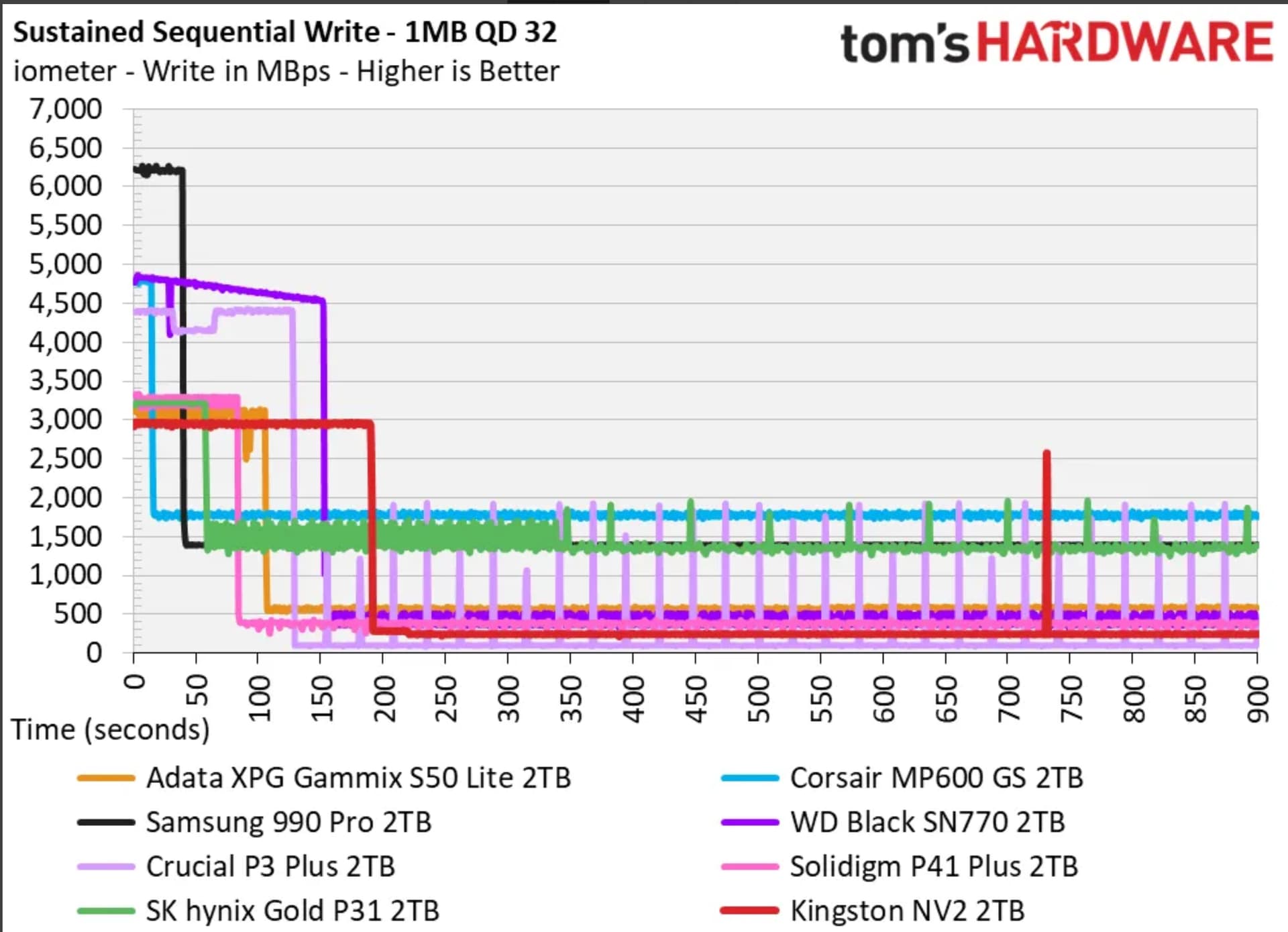
FWIW, Tom’s got 240 MB/s folding in their SM2267XT + QLC 2 TB review.
Yeah but low cost consumer TLC can stay ahead of SATA III no problem if selected for large write capability. Go up a step and ~1.5 GB/s pretty common. Unless you’re routinely writing past pSLC there’s probably not a strong value proposition for enterprise flash.
Ah you guys are right, I completely skipped over the variants section.
I can’t believe Kingston kept the name of the drive the same across completely different NAND and 5 different controllers from 3 different manufacturers.
Bottom window is my primary drive (Samsung 980 Pro 2TB NVMe).
Top window is the Kingston NV2.
You can see me transferring from the Kingston to the Samsung, speed look as expected.
But when I transfer back, it is waaaay slower, so that indicates an issue with the Kingston? You’ll see I x5 the video speed of the transfer back to the Kingston, because otherwise it would be boring!
I did abasic check, seems that I’ve got it config’d for performance:
For poops and giggles, I tried ticking the “Turn off windows write-cache…”. Made little difference. I also unticked that and the “Enable write caching”, that slowed it down quite a bit, predictably!
I did these setting changes with a shutdown and reboot each time, I also video’d them in case anyone was interested in seeing the copy patten.
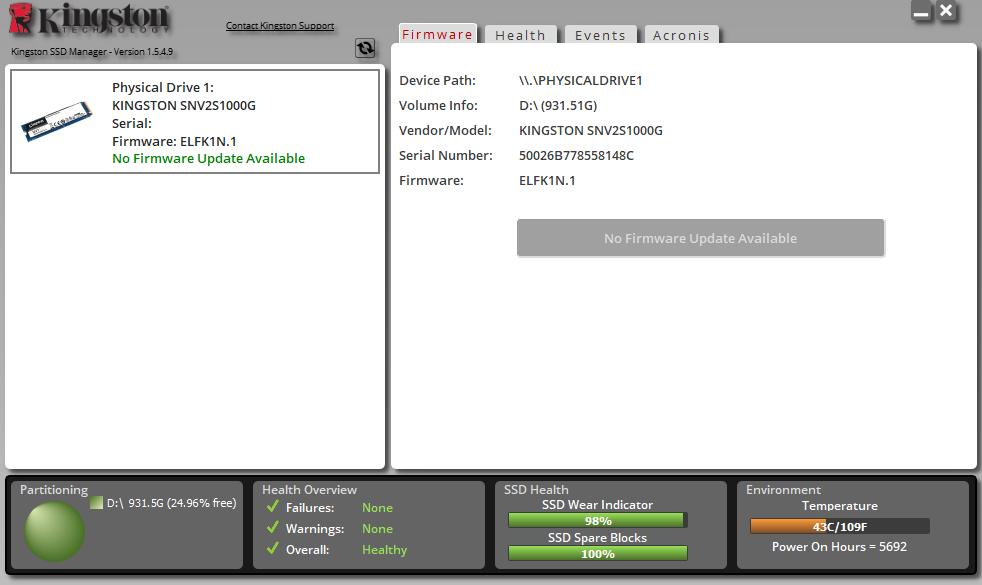
Yeah, that’s way borked. Usually when drives chuckhole like that it’s a firmware issue, so you could see if SSD Manager has an update. If firmware’s current I’d be looking at return or RMA, unless the drive’s really full (like 97+%), though RMA could go nowhere or somehow end up even worse.
Copying to the 980 might also be NV2 limited. Assuming both drives are on at least 3x4 links (or equivalent) the 980’s capable to write ~3.0 GB/s large sequential and some variants of the NV2 bench ~2.9 GB/s.
Mostly the latter. Sometimes educated guesses can be made from performance characteristics but firmware and controller variability’s greater than NAND variability. Don’t know of any QLC drives I’d call good, but there’s ones that are decent in pSLC and competitive with low end TLC folding.
In principle drive manufacturers’ apps could say, though I don’t know of any which do.
That’s unfortunate, I got a Silicon power US75 a few months ago when there was only TLC models listed on Techpowerup. Thought I would be safe, but looking back there was a reddit post about them being changed to QLC around the time I bought it on Newegg. Now QLC model shows up on Techpowerup. Installed on the back of my mobo under a backplate that took me over an hour to get in so I’m not gonna take a look lol
Drive is 95% full (with 10% overprovisioning) lol but I was wondering why it was going so slow when i transferred all the files over to it. Left it overnight so I don’t even know how long it took.
It’s my first QLC drive so I’ll see how it stacks up with the TLC drives I’ve had
There’s 232GB of free space on the drive, I’d hope that can’t impact it too much. I’d like to RMA, but luckily this drive doesn’t need to be very fast, just receives scheduled images of the primary drive. I know one thing though, I won’t cheap out again! Thanks very much for your help
TLDR: this seems like you were sold QLC variant of the drive, not any host related issue.
EDIT: lets just say kingston does not come out of testing smelling like roses. Their newer variant with QLC has massive SLC cache compared to NV2, but its necessary considering how tragic is performance once it runs out:
This is kind of drive that will behave like total dogshit once partially filled up. It would be interesting to see what will controller do in 80% full scenario.
In decently well implemented drives ~75% full usually has no effect aside from pSLC necessarily shrinking to ~25% of its maximum size. Not much data on how drives with TLC direct respond, but it shouldn’t be affected either.
For poorly implemented drives I’m not sure. Also not much data and I’ve so far managed to avoid buying anything particularly bad. There’s a couple Samsung QVOs I inherited at work but time to script up a test suite which goes beyond DiskSpd has been lacking.
NV2 specified write endurance is way lower that eq. TLC drive endurance
NV2 is very low cost drive, way cheaper that know and guaranteed TLC designs
user anecdata confirms QLC like performance from newer drives
Its very likely that most sold drives were downgraded to QLC designs after initial run. Rather typical bait and switch.
Kingston supposedly done the exatct same thing with the direct predecessor NV1, you had no guarantee what controller or what kind of flash you were getting.
Mmm, QVO benches worse than some of the QLC NV2 variants and even 990 Pro and 9100 have small pSLC. But, yeah, if NAND type’s not specified I’d assume QLC for now unless there’s strong evidence otherwise. Not sure when PLC’ll start showing up.
At least here there’s been pretty much no reason to pay the Samsung premium as WD was consistently doing drives as good or better for less. Hopefully Sandisk doesn’t screw up the Blue and Black flash lines.
Other PCIe 4.0 drives I’d shortlist on a performance basis and reasonable chance at good pricing (at least here anyways) are Crucial T500, Lexar NM790, and NM800.
Yeah, that one. I think it’s finally mostly discontinued but the 8 TBs are still listed as a going thing here for US$ 80/TB. An 8 TB SN850X is $70/TB.
We have 2 and 4 TB QVOs still in service at work. Purchased before I got involved with $/TB being the only selection criteria used. I guess it was cheap at the time. ¯\_(ツ)_/¯
 Thanks!

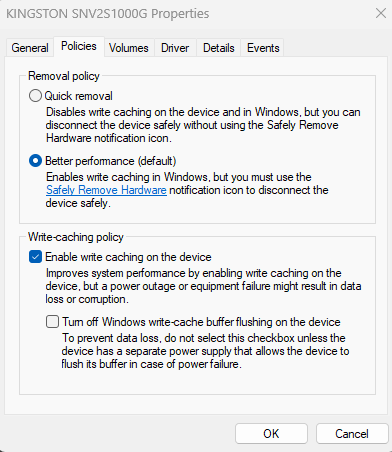
 Alas, I checked and all is well