From what I have read just a little poking around on a hunch it seems to me that majority of the raptor lake/refresh issues may be caused by windows.
No significant reports of issues for 12-16
months.
From what I have read Alderon games (who
claim a near 100% failure rate) host there
games servers on windows. (If this is incorrect
please point me to a reference stating
otherwise.
Windows 11, version 23H2
February 13, 2024—KB5034765 (OS Builds
22621.3155 and 22631.3155) this cumulative.
update was released around the same time th
stability issues began to be reported in mass.
As for the w680 motherboard issues another thing I am curious is do those motherboards have an optimized defaults option. On my wife’s 12900K system she began having issues with stability. It began around February but was solved by turning off optimized defaults.
I have been unable to find any references to stability issues on Linux if anyone can point me to info on people having issues please point me that way.
Until I reduced p-core and e-core ratios (per Wendell & team recommendation), I was getting segmentation faults in Linux, no overclocking and using Intel Defaults in the BIOS:
RANT.
I bought a 14KS … Cheaper than a 14, 14K, 14F, 14KF9600kKF was FIRE in its time ASUS WS-Z390-PRO may have biased my opinion(#1 open box bargain to date) Broadcom Onboard =P… i didn’t acknowledge the significance until yesterday: {{TOO MANY USB HUBS CONNECTED}} are you kidding me rn?! the 14900KS Wow what a deal i thought. 6.2GHz NO WAY must be a huge uplift over the 12900K; AVX 512 be Damned (enabled on a consumer chip as repentance for bundling the unrefined OG E-cores with a flagship consumer, surely) on my 12,9K sample net negative Extra-package-power-enabled-via-disabling-me-Cores: perhaps some ~EPA standards or other Regulatory limitations on a Per/Core basis?? Or maybe Intel felt they could profit off the ENDLESS supply of Lithography Grade/Quality silicon I never missed the E-Cores was on occasion surprised they were active; most the time the instability/ mem lag a.k.a default/ BIOS OPTIMISED stings. The Sample of 14900KS I have can operate okay, fine without obvious cost to my system or mental stability =| but if I knew two things i would not have bought.
1: the top end freq-GZ was going to come at the price of tomorrows’ boost clocks, not some distant Q3’s as the teasers for Q4’s nearly launched unofficial pre-launch-launch Some graphed performance, nearly adequate standards, breadth enough for one modestly intensive task: memory, sys bus, io bus, ic’s, ip’s, speed, and of course it will be This OR That. with the exception of imminent obsolescence, you’ll probably get more than ever before, The more complete chips are not in the consumer price segment,
2: Perhaps the used market will have a renaissance as we are unworthy of the NOW anyhow. Prior. gen ai farm tech. Amazon video Farms. NVBACKPLANES and the like. Around an old server CPU(or a Few) Hopefully it can handle my three USB hubs.
More multitasking Power than can be TASKED.
Likely not unique to Consumer Intel?
To the.
Wave of tech media,
ty now I know the chip I bought for its high overclocking capability should not be Overclocked… Intel, I’m local, TRIMET, well, ifykyk, GET F@CKING REKT. Degradation for the frames but not at the ratio I surmised. Bolt on BROADCOM PCie risers or other reputable ~plug and play~ io switches/(de)Multiplexor, ect. Without getting taken advantage of …thesaurize .by Highpoint, only accepting itemized rebuttals.
…Seeking suggestions for used Hardware, soon to be replaced server, enterprise that may flood or trikle onto the market, thread suggetions welcome to keep an eye out for.
I purchased a custom-built PC from Scan in the UK and have been having trouble loading Battlefield 2042 and Call of Duty: Modern Warfare III. Upon seeking advice on a forum, I was informed that my CPU might be unstable and was advised to update my BIOS to align it with the Intel specifications. I carried out the BIOS update in May 2024.
I’ve also encountered a problem with receiving notifications that I’m running out of video RAM, despite having an Nvidia 4090. Additionally, I’ve noticed that my PC slows down after playing various games.
What do you think I should do?
Should I contact Scan, the company that made the computer, as it is only 4 months old and has a 3-year warranty?
See Wendell’s other thread on this if you want to investigate yourself. When to contact Scan seems to me mostly a judgement call as to how you think Scan will handle things.
I’d probably contact Scan since they sold you a fully assembled PC. They should be aware of the issues (if they are somewhat competent and keeping up with hardware news), and have some idea on what to do?
This oxidization issue is interesting. I keep hearing people talk about the TaN via capping layer that is supposedly getting unduly oxidized is being deposited by some kind of plasma enhanced ALD, which I’ve never even heard of until now.
We’ve been using PVD to put down TaN very successfully for a very long time now, but I can’t imagine you’d be able to get a very pure layer of TaN with ALD.
Perhaps Intel transitioned from PVD to ALD for this TaN via capping layer midway through the intel 7/10 node and that’s when problems arose?
Tantalum loves reacting with Oxygen, even with PVD, if your chamber or Argon is contaminated with Oxygen, it will happily reactive sputter… TaN thru PVD is usually completely baked into the target instead of relying on reactive sputtering (one less knob to turn) with nitrogen.
@wendell It might be interesting to see if you are able to detect the high voltages reported in the Intel eTVB issue by aggressively polling the PERF_STATUS MSR ( msr 0x198 ).
I believe extracting the bits 32-47 (inclusive range) of that MSR and multiplying them by (VALUE * 1.0/8192), should give you the cores current voltage.
I wonder if it you would see the CPU voltages as higher than expected, especially on those Linux servers.
The MSR is a per cpu value, so you will have different voltages on different cores depending on which core it’s run on. As a side note the lower bits of the MSR should be the cores current cpu frequency (multiply it by 100mhz).
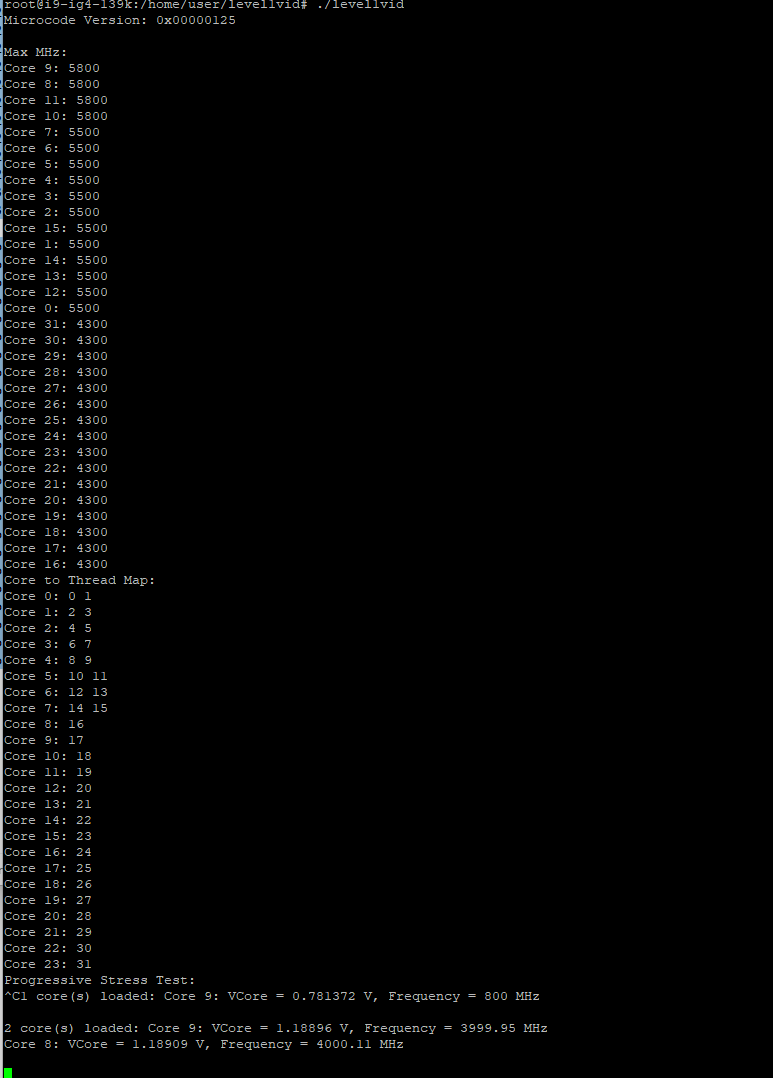
Do you know of a faster way of dumping all the programmed values on the cpu with some less ham-fisted way than I’m doing it with stressing a fixed # of cores, and specific cores?
My program finds the favored cores and loads those 1 at a time first, then the rest and measure the requested vid, lm-sensors if we have it only if c state 0 is 100% resident
When I saw how they behaved in general, I natutally thought that thermal cycling might be an issue in the future for those cpus . So i think it’s a simplistic and logical train of thought after all.
As I’m just a regular user. I don’t have any special knowledge on the matter.
I have just updated the BIOS on my Asus Rog Maximus Hero Z790 to the latest version, but and change the BIOS to default settings and changed the RAM speed to it full speed of 5600MHz.
I’ve noticed that it’s appears to be more unstable than the previous BIOS version from May, which was also set to default settings.
To try and sort out the instability temporary, I have downclock my 14900k to 5.4GHz so I can play some games.,
I’m using XTU to downclock it to 5.4GHz, although I know it’s not the best solution.
I tried to find the multiplier for the P cores in the BIOS but couldn’t locate it. I’m guessing it might be due to the default settings. I’m not too keen on making changes in the BIOS, to be honest.
I’ve have just reached out to Scan, the company that built the PC for me, via email and I’m now waiting for their response.
Forgot to ask, when I ran y-cruncher I had a fail on core 12, saying checksum mismatch, is that an issue with the program, or the core? As other times is passes for that test.
Also forget to say the system is full water cooled.
try to set the memory to 4400 now, but leave the mult locked at 54. Its looking like you’ve got a degraded cpu.
the reason your cpu is more unstable is because vmin is higher on degraded cpus for it to work.
the load line moves up so the voltage requested by the cpu is higher, but the load line means the droop is also more than before once the cpu becomes loaded. at first I thought intel might be asking for more voltage because it looks that way from the vid table, but because of the load line changes… at least on the one board I am actually measuring before and after voltages at the socket with a digital meter… it actually looks like the overall voltage is less a lot of the time
as a s cpu degrades the minimum voltage it needs to operate goes up, but paradoxically, its still stable at higher voltages. until it wont post anymore.
I have spoken with the company, and they will be picking up the system on Monday. They are unable to do it on-site, as they need to test all the hardware and being water cooled system. They will be installing a new CPU and doing a full check of it, including some BIOS changes which may cause a 2% to 5% slowdown.
They mentioned that if I continue to experience issues, they are willing to offer me an AMD swap-out.
 I never missed the E-Cores was on occasion surprised they were active; most the time the instability/ mem lag a.k.a default/ BIOS OPTIMISED stings. The Sample of 14900KS I have can operate okay, fine without obvious cost to my system or mental stability =| but if I knew two things i would not have bought.