Update 2025-10-19
Things have changed a bit since this how-to! Inside intel and also from the software standpoint. Check out the Proxmox 9 section for the most relevant info – I’m still using the same Supermicro platform because has been rock solid and SR-IOV with intel is getting better all the time. Check out SR-IOV support on B50 (I validated – it’s in a beta state – and did some videos on it) and B60 (alpha state – coming soon).
Here are the older videos:

Supermicro Hardware
Background
Wow, this one has a lot of backstory if you’re just walking in the middle. Maybe check out the video for more context.
Intel is out in front with usable multi-tenant GPU facilities for the masses – far ahead of nvidia and amd and anyone else. Well, tehcnically, nvidia is far ahead of everyone with GRID, virtualized GPUs and multi-tenant solutions but these solutions cannot be bought. They can only be rented via expensive ongoing subscriptions.
No longer; Intel Flex 170 GPUs are now a viable solution. Intel officially support IBM’s OpenShift (and that platform can do VDI, inferencing for AI and a lot more). Here, we will go into what I have to do, as of March 9, 2024, to get Intel’s i915 driver working with Flex 170 on Proxmox 8.1 with the default kernel (via DKMS).
Intel also officially supports Ubuntu 22.04 Sever (5.15 kernel) and 22.04 Desktop (6.5 kernel) however Flex 170 is only supported in a server context. Oops
Not to worry – so many customers are climbing the walls to get away from VDI subscriptions that even Proxmox is looking to directly support intel GPUs.
SR-IOV in Client GPUS!?!?
The other reason I say intel is far ahead of everyone else here is that they quietly enabled sr-iov for the iGPU in 10, 11, 12th, 13th and 14th gen client CPUs. 10/11 sr-iov support is not fully-baked in 10/11th gen, but it does actually work well in Alder lake and newer. Yes, even for Plex Media Server use cases!
For the play-by-play in sr-iov in client (nothing really to do with this how-to except that it’ll be really important to understand what happened with A770 sr-iov later) check out this forked copy of Intels’ sriov dkms driver from strongtz:
and also this excellent blog writeup specifically for proxmox from Derek Seaman:
…and finally this gist:
I love seeing these fringe use cases being adopted, and documented, by the community at large. Good work yall!!!
Intel Offical vs Unofficial
Intel has pulled something off – these GPUs can be used with both Citrix and VMware, officially, in sr-iov mode, and some more advanced modes specifically with VMware but… what about a full open source stack? That’s unofficial. RedHat OpenShift is fully supported but it is pricey, bit of a niche use case, and just doesn’t have the mindshare of being a viable replacement for small-to-medium MSP type use cases the way that a VMware or Hyper-V based VDI type solution does. OpenShift better enables a mixed workload use case where you might do VDI or inferencing… but for today, let’s focus on Proxmox.
After this I could see myself investigating how it works with xcp-ng (a much older kernel code base) and Nutanix (???).
Let’s get Proxmox Going
Clone Intel’s Repo
cd /usr/src
git clone https://github.com/intel-gpu/intel-gpu-i915-backports.git
cd intel-gpu-i915-backports
git checkout backport/main
^ if you read the readme carefully, intel says YES to 6.5 kernel versions in the context of Ubuntu 22.04 LTS desktop but not server (kernel 5.15) and way, way nothing about proxmox (sad trombone).
Not to worry, it does work, and here’s how.
I needed to make some changes to get dkms to build. One line change, edit the Makefile.backports jump to line 434 and comment it out with a # :
else
#       $(info "OSV_NOT SUPPORTED")
endif
My OSV is SUPPORTED to, dang it! Supported by meeeeeeee. I think this and line 430 maybe have typos with tabs instead of spaces? There is a pending pull request from my buddy over @ proxmox to fix that issue. For our purposes these edits will suffice.
I also needed to edit scripts/backport-mki915dkmsspec and comment out
# Obsoletes: intel-platform-vsec-dkms intel-platform-cse-dkms
…because there is some problem with intel-platform-vsec-dkms for this kernel version and we actually kinda do still need those symbols.
with those files edited we’re almost ready to make the module.
We need to make sure 1) we have development tools installed and 2) we have the kernel headers
apt install  proxmox-headers-6.5.13-3-pve  # your version may be different; uname -a and apt search to figure it out, should not be older than this/lower version no though

apt install gcc g++ make binutils flex autoconf libtool devscripts dh-dkms dkms # etc
With the dependencies installed you can built inside the source folder now:
make i915dkmsdeb-pkg
should build some deb files in the parent directory:
-rw-r--r--  1 root root 3140588 Mar  9 18:33 intel-i915-dkms_1.23.10.32.231129.32+i1-1_all.deb
-rw-r--r--  1 root root    5123 Mar  9 18:33 intel-i915-dkms_1.23.10.32.231129.32+i1-1_amd64.buildinfo
-rw-r--r--  1 root root    1245 Mar  9 18:33 intel-i915-dkms_1.23.10.32.231129.32+i1-1_amd64.changes
from here you can apt install /usr/src/intel-i915-blahblah and that should build/compile the dkms module.
You may also need to unload the intel_vsec module – rmmod intel_vsec. This was its own module, now is bundled in, had its own package, won’t have its own package going forward. We might need it? But probably not except possibly for troubleshooting.
what about firmware? check the dmesg output when you try to modprobe i915 and see if you’re missing firmware. You can grab it form the linux kernel website
pt install --reinstall ../intel-i915-dkms
_1.23.10.32.231129.32+i1-1_all.deb
Reading package lists... Done
Building dependency tree... Done
Reading state information... Done
Note, selecting 'intel-i915-dkms' instead of '../intel-i915-dkms_1.23.10.32.231129.32+i1-1_all.deb'
0 upgraded, 0 newly installed, 1 reinstalled, 0 to remove and 0 not upgraded.
Need to get 0 B/3,141 kB of archives.
After this operation, 0 B of additional disk space will be used.
Get:1 /usr/src/intel-i915-dkms_1.23.10.32.231129.32+i1-1_all.deb intel-i915-dkms all 1.23.10.32.231129.32+i1-1 [3,141 kB]
(Reading database ... 111884 files and directories currently installed.)
Preparing to unpack .../intel-i915-dkms_1.23.10.32.231129.32+i1-1_all.deb ...
AUXILIARY_BUS is enabled for 6.5.13-1-pve.
AUXILIARY_BUS is enabled for 6.5.13-1-pve.
AUXILIARY_BUS is enabled for 6.5.13-1-pve.
Module intel-i915-dkms-1.23.10.32.231129.32 for kernel 6.5.13-1-pve (x86_64).
Before uninstall, this module version was ACTIVE on this kernel.

i915-compat.ko:
 - Uninstallation
   - Deleting from: /lib/modules/6.5.13-1-pve/updates/dkms/
 - Original module
   - No original module was found for this module on this kernel.
   - Use the dkms install command to reinstall any previous module version.

i915.ko:
 - Uninstallation
   - Deleting from: /lib/modules/6.5.13-1-pve/updates/dkms/
 - Original module
   - No original module was found for this module on this kernel.
   - Use the dkms install command to reinstall any previous module version.

i915_spi.ko:
 - Uninstallation
   - Deleting from: /lib/modules/6.5.13-1-pve/updates/dkms/
 - Original module
   - No original module was found for this module on this kernel.
   - Use the dkms install command to reinstall any previous module version.

iaf.ko:
 - Uninstallation
   - Deleting from: /lib/modules/6.5.13-1-pve/updates/dkms/
 - Original module
   - No original module was found for this module on this kernel.
   - Use the dkms install command to reinstall any previous module version.

[snip]

depmod....
Deleting module intel-i915-dkms-1.23.10.32.231129.32 completely from the DKMS tree.
Unpacking intel-i915-dkms (1.23.10.32.231129.32+i1-1) over (1.23.10.32.231129.32+i1-1) ...
Setting up intel-i915-dkms (1.23.10.32.231129.32+i1-1) ...
Loading new intel-i915-dkms-1.23.10.32.231129.32 DKMS files...
AUXILIARY_BUS is enabled for 6.5.13-1-pve.
Building for 6.5.13-1-pve
Building initial module for 6.5.13-1-pve
AUXILIARY_BUS is enabled for 6.5.13-1-pve.
Done.
AUXILIARY_BUS is enabled for 6.5.13-1-pve.
AUXILIARY_BUS is enabled for 6.5.13-1-pve.
… this is what a good installation looks like. It’s best to configure the kernel, then reboot.
Configure the kernel
I’m using grub to boot, so I needed to add intel_iommu=on iommu=pt i915.enable_guc=3 i915.max_vfs=7 to the end of my kernel line by adding it to /etc/default/grub . (If you’re using systemd you’ll need to update sysfs.conf instead. ) The lsat two parameters there don’t seem to work anymore, but I know I’ve used them in the past.
Post-reboot
Log back into the console in Proxmox of your node, run lspci looking for the Flex GPU:
lspci |grep Flex
45:00.0 Display controller: Intel Corporation Data Center GPU
If you see more than one, that’s great, the Virtual functions are already enabled, you can skip the next step. Otherwise, time to enable virtual functions.
Enabling Virtual functions
I’m not sure why but the old kernel parameters in 6.1 and before for the i915 drivers seem not to work, i915.enable_guc=3 i915.max_vfs=7 so we’ll set them manually.
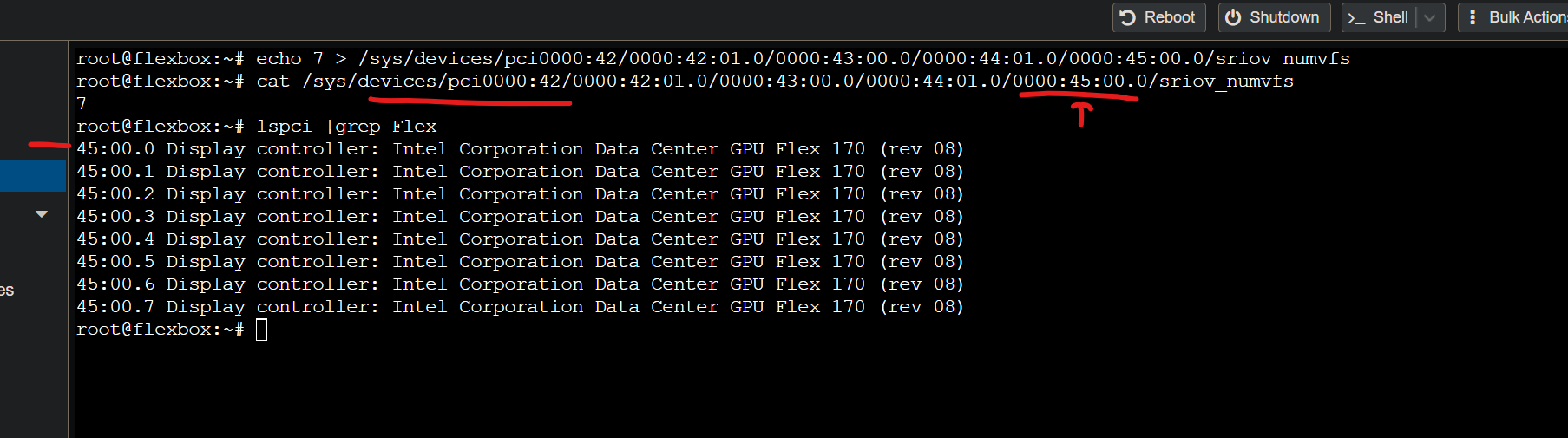
After that lspci should be a little more filled out:
45:00.0 Display controller: Intel Corporation Data Center GPU Flex 170 (rev 08)
45:00.1 Display controller: Intel Corporation Data Center GPU Flex 170 (rev 08)
45:00.2 Display controller: Intel Corporation Data Center GPU Flex 170 (rev 08)
45:00.3 Display controller: Intel Corporation Data Center GPU Flex 170 (rev 08)
45:00.4 Display controller: Intel Corporation Data Center GPU Flex 170 (rev 08)
45:00.5 Display controller: Intel Corporation Data Center GPU Flex 170 (rev 08)
45:00.6 Display controller: Intel Corporation Data Center GPU Flex 170 (rev 08)
45:00.7 Display controller: Intel Corporation Data Center GPU Flex 170 (rev 08)
also note that if you lspci and then note your device is 0000:45 as mine is, and look for that in /sys/devices… you might not see it. that’s normal, you hvae to get there via the bridge. check out the red highlights in the above screenshot. That’s where sriov_numvfs is located.
Flex 170 supports up to 31 virtual functions, but for practical VDI usage I’d really only recommend about 7 high-res dual monitor seats per card, or up to 15ish 2x1080p clients at most. The fact that a 1-socket 32 core Intel Emerald Rapids Xeon Gold 6538N + a single Flex 170 can easily support a dozen information-worker VDI roles is pretty significant.
I could play crysis at 1080p reasonably okay in a 7-slice config. That’s 14 good-size VDI seats per Supermicro Pizzabox
Proxmox VE 8.1 - Configure Resources in Datacenter
The right way to handle this, so that VM migration works in a cluster, is to map these PCIe devices to resources. That way Proxmox knows that when moving a VM between hosts that the PCIe resource in one host to the next is transportable.
Assign the resource, never the raw device, via the Datacenter area of Proxmox:
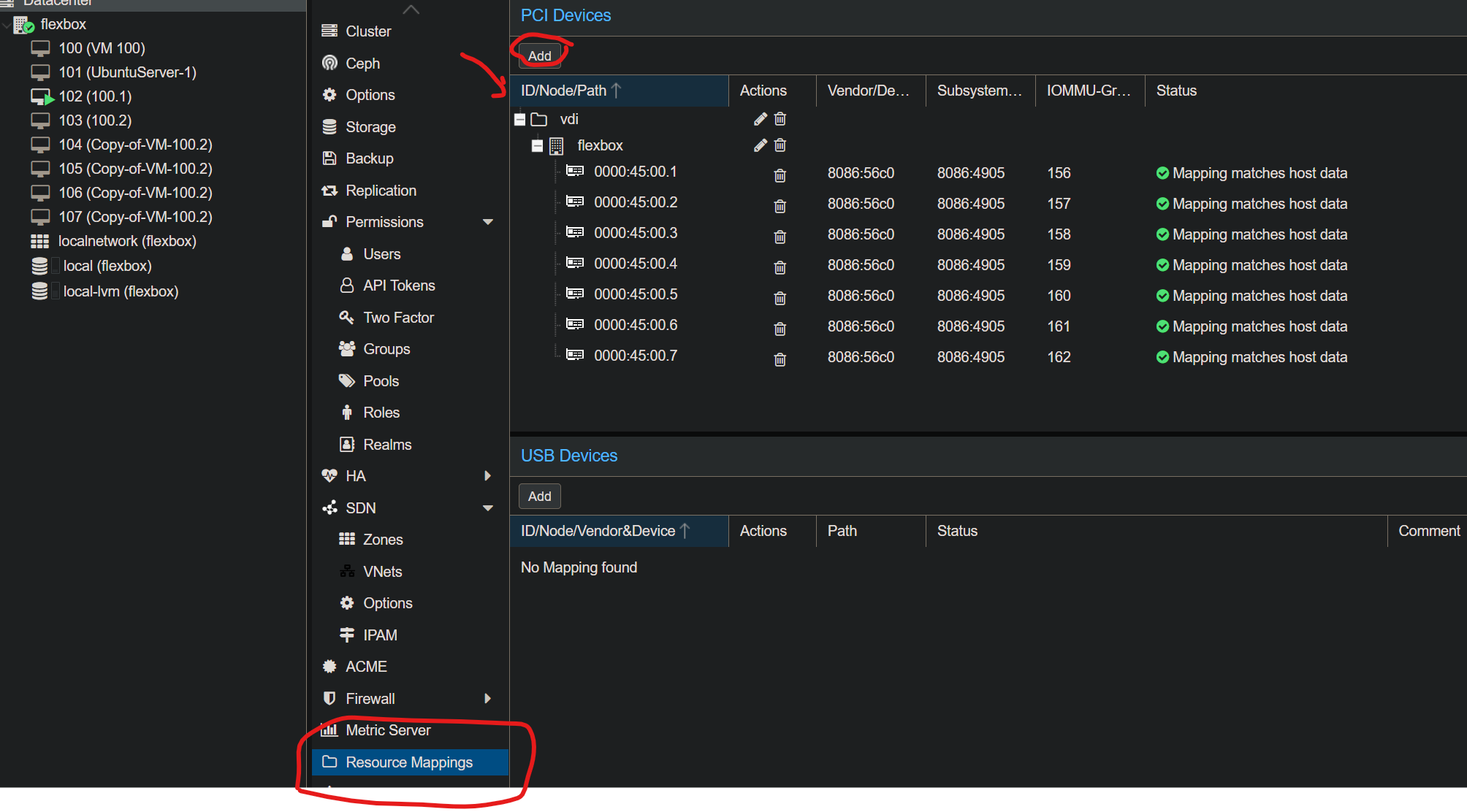
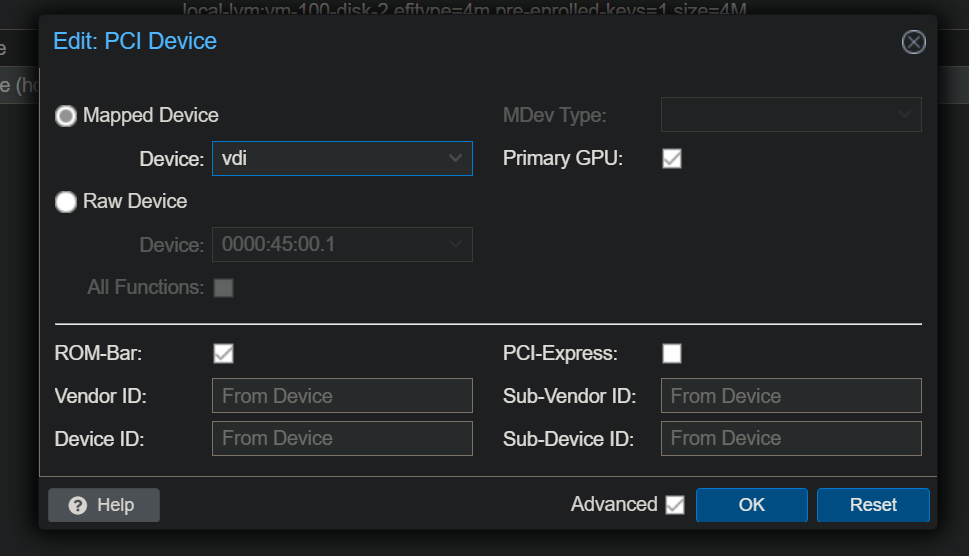
…for every host that you assign resources in this pool, Proxmox will assign the resources appropriately depending on the physical host the VM is running on.
Configure the first virtual function (00.1) in one of the Proxmox VMs you’ve already created (it is easier to install and setup windows THEN add the Flex GPU fwiw). I also recommend enabling remote desktop and making sure all that works before adding the PCIe device.
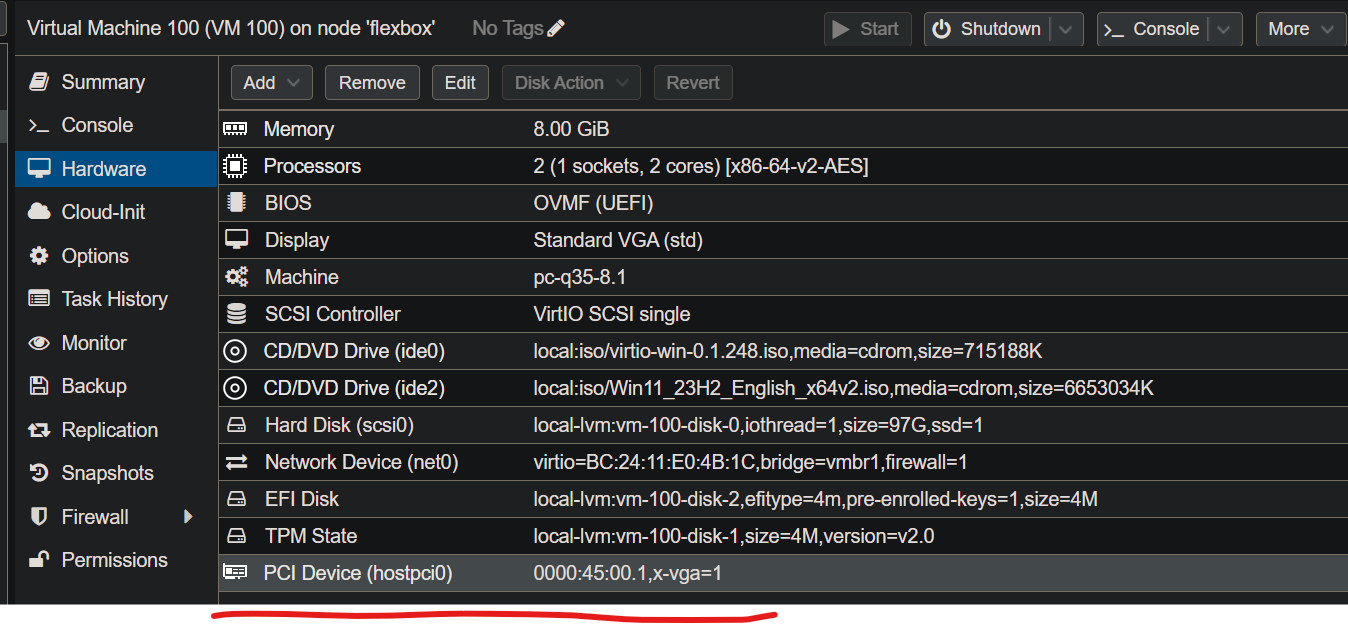
Once that’s done, boot up the VM and install the windows drivers for the GPU.
The Windows client driver you’ll need:
https://www.intel.com/content/www/us/en/download/780185/intel-data-center-gpu-flex-series-windows.html
The Future
I am not sure about SR-IOV’s future, in general. I really thought intel was on to somehting with GVT-g, but that has been deprecated. This exact same functionality + the awesome LookingGlass project on “consumer” GPUs like the A770 or even AMD or Nvidia GPUs cannot get here fast enough. With this functionality it becomes more possible to easily share gpu compute between hosts and guests.
AMD doesn’t realize it, but this also easily solves their AI problem because Windows and Linux can co-exist on the same hardware, seamlessly, with this type of functionality. Had SR-IOV been in client as easily as Intel Xe Graphics, I think AMD adoption of GPUs for AI would be much farther along than it is today.
Minisforum MS-01 SR-IOV
This guide basically applies to the MS-01 HOWEVER please ensure that you are able to ssh into your host prior to starting this guide AND that you are able to reboot & the network comes up automatically. There is a good chance that when you start this guide, the local console stops working.
[ 3.567985] i915 0000:00:02.0: vgaarb: deactivate vga console
00:02.0 VGA compatible controller: Intel Corporation Raptor Lake-P [Iris Xe Graphics] (rev 04)
I also strongly recommend setting:
intel_iommu=on iommu=pt i915.enable_guc=3 i915.max_vfs=7 i915.modeset=1
in /etc/default/grub so that the console never gets initialized. Seems to cause null pointer problems when trying to use the VFs. Sometimes.
FWIW The SR-IOV functions on the igpu seem much closer to “beta” quality than not; this should stablize around kernel 6.8.
that’s what the iGPU looks like on the MS-01; once the backports i915 dkms driver is loaded, try to add some virtual functions:
Success!
echo 4 > /sys/devices/pci0000:00/0000:00:02.0/sriov_numvfs
and output from dmesg
[  273.854452] pci 0000:00:02.1: [8086:a7a0] type 00 class 0x030000
[  273.854486] pci 0000:00:02.1: DMAR: Skip IOMMU disabling for graphics
[  273.854554] pci 0000:00:02.1: Adding to iommu group 22
[  273.854560] pci 0000:00:02.1: vgaarb: bridge control possible
[  273.854561] pci 0000:00:02.1: vgaarb: VGA device added: decodes=io+mem,owns=none,locks=none
[  273.854634] i915 0000:00:02.1: enabling device (0000 -> 0002)
[  273.854664] i915 0000:00:02.1: Running in SR-IOV VF mode
[  273.855425] i915 0000:00:02.1: GuC interface version 0.1.9.0
[  273.856592] i915 0000:00:02.1: [drm] GT count: 1, enabled: 1
[  273.856623] i915 0000:00:02.1: [drm] VT-d active for gfx access
[  273.856642] i915 0000:00:02.1: [drm] Using Transparent Hugepages
[  273.857782] i915 0000:00:02.1: GuC interface version 0.1.9.0
[  273.859519] i915 0000:00:02.1: GuC firmware PRELOADED version 0.0 submission:SR-IOV VF
[  273.859545] i915 0000:00:02.1: HuC firmware PRELOADED
[  273.869944] i915 0000:00:02.1: [drm] Protected Xe Path (PXP) protected content support initialized
[  273.870312] [drm] Initialized i915 1.6.0 20201103 for 0000:00:02.1 on minor 1
[  273.871590] pci 0000:00:02.2: [8086:a7a0] type 00 class 0x030000
[  273.871607] pci 0000:00:02.2: DMAR: Skip IOMMU disabling for graphics
[  273.871652] pci 0000:00:02.2: Adding to iommu group 23
[  273.871657] pci 0000:00:02.2: vgaarb: bridge control possible
[  273.871659] pci 0000:00:02.2: vgaarb: VGA device added: decodes=io+mem,owns=none,locks=none
[  273.871698] i915 0000:00:02.2: enabling device (0000 -> 0002)
[  273.871712] i915 0000:00:02.2: Running in SR-IOV VF mode
[  273.872471] i915 0000:00:02.2: GuC interface version 0.1.9.0
[  273.873587] i915 0000:00:02.2: [drm] GT count: 1, enabled: 1
[  273.873615] i915 0000:00:02.2: [drm] VT-d active for gfx access
[  273.873630] i915 0000:00:02.2: [drm] Using Transparent Hugepages
[  273.874834] i915 0000:00:02.2: GuC interface version 0.1.9.0
[  273.876399] i915 0000:00:02.2: GuC firmware PRELOADED version 0.0 submission:SR-IOV VF
[  273.876401] i915 0000:00:02.2: HuC firmware PRELOADED
[  273.886244] i915 0000:00:02.2: [drm] Protected Xe Path (PXP) protected content support initialized
[  273.886549] [drm] Initialized i915 1.6.0 20201103 for 0000:00:02.2 on minor 2
[  273.887242] pci 0000:00:02.3: [8086:a7a0] type 00 class 0x030000
[  273.887258] pci 0000:00:02.3: DMAR: Skip IOMMU disabling for graphics
[  273.887293] pci 0000:00:02.3: Adding to iommu group 24
[  273.887297] pci 0000:00:02.3: vgaarb: bridge control possible
[  273.887298] pci 0000:00:02.3: vgaarb: VGA device added: decodes=io+mem,owns=none,locks=none
[  273.887321] i915 0000:00:02.3: enabling device (0000 -> 0002)
[  273.887331] i915 0000:00:02.3: Running in SR-IOV VF mode
[  273.888310] i915 0000:00:02.3: GuC interface version 0.1.9.0
[  273.889780] i915 0000:00:02.3: [drm] GT count: 1, enabled: 1
[  273.889792] i915 0000:00:02.3: [drm] VT-d active for gfx access
[  273.889803] i915 0000:00:02.3: [drm] Using Transparent Hugepages
[  273.890680] i915 0000:00:02.3: GuC interface version 0.1.9.0
[  273.892330] i915 0000:00:02.3: GuC firmware PRELOADED version 0.0 submission:SR-IOV VF
[  273.892332] i915 0000:00:02.3: HuC firmware PRELOADED
[  273.902980] i915 0000:00:02.3: [drm] Protected Xe Path (PXP) protected content support initialized
[  273.903357] [drm] Initialized i915 1.6.0 20201103 for 0000:00:02.3 on minor 3
[  273.904165] pci 0000:00:02.4: [8086:a7a0] type 00 class 0x030000
[  273.904177] pci 0000:00:02.4: DMAR: Skip IOMMU disabling for graphics
[  273.904210] pci 0000:00:02.4: Adding to iommu group 25
[  273.904213] pci 0000:00:02.4: vgaarb: bridge control possible
[  273.904214] pci 0000:00:02.4: vgaarb: VGA device added: decodes=io+mem,owns=none,locks=none
[  273.904237] i915 0000:00:02.4: enabling device (0000 -> 0002)
[  273.904246] i915 0000:00:02.4: Running in SR-IOV VF mode
[  273.904647] i915 0000:00:02.4: GuC interface version 0.1.9.0
[  273.906426] i915 0000:00:02.4: [drm] GT count: 1, enabled: 1
[  273.906452] i915 0000:00:02.4: [drm] VT-d active for gfx access
[  273.906461] i915 0000:00:02.4: [drm] Using Transparent Hugepages
[  273.907348] i915 0000:00:02.4: GuC interface version 0.1.9.0
[  273.909055] i915 0000:00:02.4: GuC firmware PRELOADED version 0.0 submission:SR-IOV VF
[  273.909079] i915 0000:00:02.4: HuC firmware PRELOADED
[  273.919835] i915 0000:00:02.4: [drm] Protected Xe Path (PXP) protected content support initialized
[  273.920261] [drm] Initialized i915 1.6.0 20201103 for 0000:00:02.4 on minor 4
[  273.921120] i915 0000:00:02.0: Enabled 4 VFs
Errors?
if you see something like IOV0: Initialization failed (-EIO) GT wedged it just means you need firmware. The logs even tell you where to get it, farther up. https://git.kernel.org/pub/scm/linux/kernel/git/firmware/linux-firmware.git/tree/i915 and put in /lib/firmware
If you don’t see the firmware you need there, chances are it’s here:
git://anongit.freedesktop.org/drm/drm-firmware
… this is where the diff/“pull requests” to the linux kernel general come from for the intel driver team. You can git clone this in usr src and copy what you need to /usr/lib/firmware/i915 (this is also a good troubleshooting step – bleeding edge firmware newer than what’s on the linux kernel website).
At the time I’m writing this, that’s not the case and you can inspect individual firmware files to confirm. Our guc firmware is from just a couple weeks ago, 20204-02-24
https://git.kernel.org/pub/scm/linux/kernel/git/firmware/linux-firmware.git/log/i915/adlp_guc_70.bin
I don’t know that it was necessary but in /usr/lib/firmware/i915/ I did
ln -s adlp_guc_70.bin adlp_guc_70.13.1.bin
because it seemed to be looking for that specific filename. I could see that in the commit history though, so the 70.bin was just the “latest version” – probably a bug in the backports driver looking for a specific firmware version.
Null Pointer Dereference
Over the course of working on the video for the linux channel, the i915 backports repo changed enough that the iGPU sr-iov stuff stopped working, kinda. Officially, the i915 backports does not really support sriov on igpus.
This repo is the best resource for using sriov on igpus in general. There is a good chance this repo will work if i915 backports doesn’t work. You will need to remove the other i915 dkms repo if you use this repo, however. I think, at least before kernel 6.8, I recommend this repo.
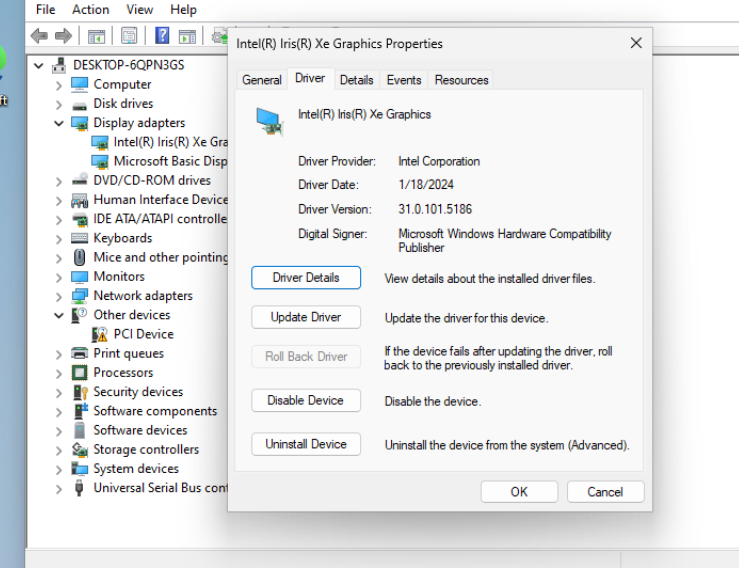
Code 43
I was getting code43 at first, but it went away after setting vendor_id (using args: in the vm conf) AND updating the driver to this version:
Alarming Things That Remain
It can be annoying enabling more than 7 virtual functions via i915 backports; this seems to be a vestige of the fact we’re on Proxmox.
This isn’t Flex 170 related, as far as I can tell, but is likely PVE kernel related with bleeding edge Xeons:
[ 4342.301217] x86/split lock detection: #AC: CPU 1/KVM/13757 took a split_lock trap at address: 0x7ef3d050
[ 4475.445905] x86/split lock detection: #AC: CPU 0/KVM/13756 took a split_lock trap at address: 0xfffff80756e769af
… have’t had a chance to really dig into that yet. It only happens during pcie or driver init, if it’s going to happen. So things are stable once they’re running but rebooting a VM on a heavily loaded machine has maybe a 1 in 10 chance of being weird. I haven’t seen this before on my other boxes. Maybe EMR Xeon related. Rebooting the VM a second time seems to resolve it.
Update 2025-10-19
Background
Proxmox 9 has a much newer kernels available and things have changed quite a bit since the OG guide.
First, the “Strongtz” repo is out. The team over there doesn’t seem to have any interest in flex. (I might be able to supply access to systems with flex140 for devs actually interested in making this go BUT the intel team has nicely closed the loop on this in the last year or so). This repo now has more to do with iGPU sr-iov than VDI type sr-iov. Imho the sr-iov you can do with the intel igpus is… not great. Good for plex and homelab type scenarios, but not great for what we want to do here. And limited support now from that repo/community it seems 
Check out this issue on the strongtz github
One problem folks still run into with Intel’s official DKMS source is Error: Error in sysfs when trying to set the sriov_numvfs functions. This seems to be down to missing firmware or even wrong low-level firmware on the GPUs themselves. The GPUs themselves can be updated with the xpu-smi utility.
I think this is not as big of an issue as I was first thinking, though, and intel’s official DKMS source has come a long way. Some good people doing good work over there.
Imho the following guide is not a clean walkthrough, either, because one must understand and cherry pick some different parts of what you’re trying to accomplish from Intel’s own documentation (for Ubuntu 24.04 LTS), Firmware (if applicable to your particular hardware), Proxmox Bugs, and interactions with vfio.
You also need to create a custom systemd service to restore the state of the system as that’s probably the best way to surive updates and have forward-compatibility.
I got this working on:
[Intel Datacenter Flex GPU AMC Firmware Version 6.8.0.0. | Driver Details | Dell Cook Islands](https://www.dell.com/support/home/en-ck/drivers/driversdetails?driverid=5831g)
Intel’s Roadmap
Understand also as part of this background there is Intel’s Xe driver. I think? the plan is to eventually support Flex in-tree. This is an incredibly useful table at Intel that is hard to find in search that tells you what kernel, minimum, or if you’re going to be doing the out-of-tree thing:
https://dgpu-docs.intel.com/devices/hardware-table.html
I am being verbose here because this guide will be quickly outdated when/if intel closes the loop on sr-iov functionality being merged under Xe.
B50/60 Warning
Therefor, because of the above, Xe-based GPUs such as B50/B60 do not at all remotely apply to this guide. The only thing useful here in that context is the systemd service to restore the state of your sr-iov config on boot, if you didn’t know how to do that .
Getting started with Proxmox 9
My assumption is that you’re starting from a fresh Proxmox 9 install. Install build-essential dkms and everything from the dev/build steps above. You’ll need the packages.
I am using grub for the bootloader. The kernel command line I used was:
GRUB_CMDLINE_LINUX_DEFAULT="intel_iommu=on iommu=pt i915.enable_guc=3"
the contents of /etc/modprobe.d/i915.conf is
options i915 force_probe=56c1,56c0
Those are the IDs of Flex170 and Flex140 as I have both in this system.
also add
blacklist xe
to /etc/modprobe.d/pve-blacklist.conf just in case the xe driver is tempted to load for Flex 140/170. Someday that’ll be a thing though! So if you’re well past 2025-10-10… this guide might need an update!
Last prep step is to apt install proxmox-headers-6.14.8-2-pve and proxmox-kernel-6.14.8-2-pve
reboot and ensure uname -a returns the proper kernel version.
The Intel Backports Driver Adventure
Intel engineers working on this are killing it. There had been lots of unobvious landmines trying to use the backports driver on prettymuch anything other than RHEL, SLES and Ubuntu 22.04 unless some rando like me walked you through step-by-step of microsurgery to get there.
Intel has improved their documentation. Read this, but don’t do the steps:
https://dgpu-docs.intel.com/driver/installation-lts2.html#ubuntu
The steps there want to use ubuntu codename noble or jammy. We’re trixie because this is debian, not ubuntu. We really just need the xpu-smi utility and a few other things,
wget -qO - https://repositories.intel.com/gpu/intel-graphics.key |
    sudo gpg --yes --dearmor --output /usr/share/keyrings/intel-graphics.gpg

# you probably already have these
sudo apt install -y gnupg wget
create /etc/apt/sources.list.d/intel-gpu-noble.list with this contents:
deb [arch=amd64 signed-by=/usr/share/keyrings/intel-graphics.gpg] https://repositories.intel.com/gpu/ubuntu noble/lts/2523 unified
then
apt install intel-fw-gpu xpu-smi
You may someday be able to install intel-i915-dkms but it did not build for me in this scenario.
On to the git way of installing backports
Since that did not work, I cloned the git repo for the backports and switched to the branch thats applicable for Ubuntu 24.04:
git clone https://github.com/intel-gpu/intel-gpu-i915-backports.git
cd intel-gpu-i915-backports
git checkout backport/main
If you aren’t familiar with the backports project, here is some more background reading.
make -j$(nproc) i915dkmsdeb-pkg
This will build a .deb one directory level up:

If that doesn’t work for some reason, Intel has some generic build documentation for ubuntu that mostly applies in the proxmox context. Useful background reading.
from there you can copy the .deb to /tmp and apt install /tmp/intel-i915-dkms_1.25.2.25.25.0224.whatever.deb
Hopefully you see successful output building for the 6.14.8-2 kernel version:
Module intel-i915-dkms/1.25.2.25.250224.31 for kernel 6.14.8-2-pve (x86_64):
AUXILIARY_BUS is enabled for 6.14.8-2-pve.
Before uninstall, this module version was ACTIVE on this kernel.
Deleting /lib/modules/6.14.8-2-pve/updates/dkms/i915-compat.ko
Deleting /lib/modules/6.14.8-2-pve/updates/dkms/i915.ko
Restoring archived original module /lib/modules/6.14.8-2-pve/kernel/drivers/gpu/drm/i915/i915.ko
Deleting /lib/modules/6.14.8-2-pve/updates/dkms/i915_spi.ko
Deleting /lib/modules/6.14.8-2-pve/updates/dkms/iaf.ko
Deleting /lib/modules/6.14.8-2-pve/updates/dkms/mei.ko
Restoring archived original module /lib/modules/6.14.8-2-pve/kernel/drivers/misc/mei/mei.ko
Deleting /lib/modules/6.14.8-2-pve/updates/dkms/mei-me.ko
Restoring archived original module /lib/modules/6.14.8-2-pve/kernel/drivers/misc/mei/mei-me.ko
Deleting /lib/modules/6.14.8-2-pve/updates/dkms/mei-gsc.ko
Restoring archived original module /lib/modules/6.14.8-2-pve/kernel/drivers/misc/mei/mei-gsc.ko
Deleting /lib/modules/6.14.8-2-pve/updates/dkms/mei_wdt.ko
Restoring archived original module /lib/modules/6.14.8-2-pve/kernel/drivers/watchdog/mei_wdt.ko
Deleting /lib/modules/6.14.8-2-pve/updates/dkms/mei_hdcp.ko
Restoring archived original module /lib/modules/6.14.8-2-pve/kernel/drivers/misc/mei/hdcp/mei_hdcp.ko
Deleting /lib/modules/6.14.8-2-pve/updates/dkms/mei_pxp.ko
Restoring archived original module /lib/modules/6.14.8-2-pve/kernel/drivers/misc/mei/pxp/mei_pxp.ko
Deleting /lib/modules/6.14.8-2-pve/updates/dkms/mei_iaf.ko
Deleting /lib/modules/6.14.8-2-pve/updates/dkms/intel_vsec.ko
Deleting /lib/modules/6.14.8-2-pve/updates/dkms/pmt_class.ko
Restoring archived original module /lib/modules/6.14.8-2-pve/kernel/drivers/platform/x86/intel/pmt/pmt_class.ko
Deleting /lib/modules/6.14.8-2-pve/updates/dkms/pmt_telemetry.ko
Restoring archived original module /lib/modules/6.14.8-2-pve/kernel/drivers/platform/x86/intel/pmt/pmt_telemetry.ko
Deleting /lib/modules/6.14.8-2-pve/updates/dkms/pmt_crashlog.ko
Restoring archived original module /lib/modules/6.14.8-2-pve/kernel/drivers/platform/x86/intel/pmt/pmt_crashlog.ko
Deleting /lib/modules/6.14.8-2-pve/updates/dkms/i915-vfio-pci.ko
Running depmod.... done.
Sidenote: I did try 6.8.12-15-pve but its broken, but fortunately, its something I could probably fix and submit a PR for, later. This is similar to the regression on newer 6.14 kernels, I think, and maybe fixed by the time you’re reading this if I get trigger-happy on a pull request:
/var/lib/dkms/intel-i915-dkms/1.25.2.25.250224.31/build/drivers/gpu/drm/i915/intel_runtime_pm.c: In function ‘__intel_runtime_pm_get_if_active’:
/var/lib/dkms/intel-i915-dkms/1.25.2.25.250224.31/build/drivers/gpu/drm/i915/intel_runtime_pm.c:260:13: error: too many arguments to function ‘pm_runtime_get_if_active’
  260 |         if (pm_runtime_get_if_active(to_kdev(rpm), ignore_usecount) <= 0)
      |             ^~~~~~~~~~~~~~~~~~~~~~~~
In file included from /var/lib/dkms/intel-i915-dkms/1.25.2.25.250224.31/build/backport-include/linux/pm_runtime.h:3,
                 from /var/lib/dkms/intel-i915-dkms/1.25.2.25.250224.31/build/drivers/gpu/drm/i915/intel_runtime_pm.c:29:
./include/linux/pm_runtime.h:75:12: note: declared here
   75 | extern int pm_runtime_get_if_active(struct device *dev);
      |            ^~~~~~~~~~~~~~~~~~~~~~~~
  CC [M]  /var/lib/dkms/intel-i915-dkms/1.25.2.25.250224.31/build/drivers/gpu/drm/i915/gt/intel_gt_mcr.o
make[6]: *** [scripts/Makefile.build:243: /var/lib/dkms/intel-i915-dkms/1.25.2.25.250224.31/build/drivers/gpu/drm/i915/intel_runtime_pm.o] Error 1
make[6]: *** Waiting for unfinished jobs....
  LD [M]  /var/lib/dkms/intel-i915-dkms/1.25.2.25.250224.31/build/compat/i915-compat.o
  LD [M]  /var/lib/dkms/intel-i915-dkms/1.25.2.25.250224.31/build/drivers/misc/mei/mei-me.o
  LD [M]  /var/lib/dkms/intel-i915-dkms/1.25.2.25.250224.31/build/drivers/misc/mei/mei.o
make[5]: *** [scripts/Makefile.build:481: /var/lib/dkms/intel-i915-dkms/1.25.2.25.250224.31/build/drivers/gpu/drm/i915] Error 2
make[4]: *** [Makefile:1927: /var/lib/dkms/intel-i915-dkms/1.25.2.25.250224.31/build] Error 2
make[3]: *** [Makefile.build:13: modules] Error 2
make[2]: *** [Makefile.real:95: modules] Error 2
make[1]: *** [Makefile:90: modules] Error 2
make: *** [Makefile:75: default] Error 2
Reboot
Once your system is back from reboot you can try to modprobe i915 then check the output of dmesg and xpu-smi to see if it looks reasonable.
my dmesg output:
7.150095] [drm] I915 BACKPORTED INIT
[    7.438481] i915 0000:1d:00.0: Running in SR-IOV PF mode
[    7.467589] i915 0000:1d:00.0: Using 64 cores (0-63) for kthreads
[    7.468073] i915 0000:1d:00.0: VT-d active for gfx access
[    7.468087] i915 0000:1d:00.0: Attaching to 261843MiB of system memory on node 0
[    7.468115] i915 0000:1d:00.0: Using Transparent Hugepages
[    7.468152] i915 0000:1d:00.0: GT0: Local memory { size: 0x0000000140000000, available: 0x000000013cc00000 }
[    7.545502] i915 0000:1d:00.0: GT0: GuC firmware i915/dg2_guc_70.44.1.bin version 70.44.1
[    7.547639] i915 0000:1d:00.0: GT0: local0 bcs'0.0 clear bandwidth:106663 MB/s
[    7.550860] i915 0000:1d:00.0: GT0: local0 bcs'0.0 swap bandwidth:10292 MB/s
[    7.550995] i915 0000:1d:00.0: 28 VFs could be associated with this PF
[    7.551706] [drm] Initialized i915 1.6.0 for 0000:1d:00.0 on minor 1
[    7.560387] BACKPORTED INTEL VSEC REGISTER
[    7.560775] i915 0000:20:00.0: Running in SR-IOV PF mode
[    7.560787] i915 0000:20:00.0: Using 64 cores (0-63) for kthreads
[    7.561301] i915 0000:20:00.0: VT-d active for gfx access
[    7.561321] i915 0000:20:00.0: Attaching to 261843MiB of system memory on node 0
[    7.561351] i915 0000:20:00.0: Using Transparent Hugepages
[    7.561397] i915 0000:20:00.0: GT0: Local memory { size: 0x0000000140000000, available: 0x000000013cc00000 }
[    7.567349] ipmi_ssif: IPMI SSIF Interface driver
[    7.646248] i915 0000:20:00.0: GT0: GuC firmware i915/dg2_guc_70.44.1.bin version 70.44.1
[    7.648346] i915 0000:20:00.0: GT0: local0 bcs'0.0 clear bandwidth:106628 MB/s
[    7.651559] i915 0000:20:00.0: GT0: local0 bcs'0.0 swap bandwidth:10292 MB/s
[    7.651642] i915 0000:20:00.0: 28 VFs could be associated with this PF
[    7.652328] [drm] Initialized i915 1.6.0 for 0000:20:00.0 on minor 2
[    7.669281] power_meter ACPI000D:00: Found ACPI power meter.
[    7.669316] power_meter ACPI000D:00: Ignoring unsafe software power cap!
[    7.669328] power_meter ACPI000D:00: hwmon_device_register() is deprecated. Please convert the driver to use hwmon_device_register_with_info().
[    7.676353] BACKPORTED INTEL VSEC REGISTER
[    7.676713] i915 0000:45:00.0: Running in SR-IOV PF mode
[    7.676723] i915 0000:45:00.0: Using 64 cores (0-63) for kthreads
[    7.677357] i915 0000:45:00.0: VT-d active for gfx access
[    7.677372] i915 0000:45:00.0: Attaching to 261843MiB of system memory on node 0
[    7.677396] i915 0000:45:00.0: Using Transparent Hugepages
[    7.677434] i915 0000:45:00.0: GT0: Local memory { size: 0x0000000380000000, available: 0x000000037a800000 }
and xpu-smi discovery
# xpu-smi  discovery
+-----------+--------------------------------------------------------------------------------------+
| Device ID | Device Information                                                                   |
+-----------+--------------------------------------------------------------------------------------+
| 0         | Device Name: Intel(R) Data Center GPU Flex 140                                       |
|           | Vendor Name: Intel(R) Corporation                                                    |
|           | SOC UUID: 00000000-0000-0000-d44a-|
|           | PCI BDF Address: 0000:1d:00.0                                                        |
|           | DRM Device: /dev/dri/card1                                                           |
|           | Function Type: physical                                                              |
+-----------+--------------------------------------------------------------------------------------+
| 1         | Device Name: Intel(R) Data Center GPU Flex 140                                       |
|           | Vendor Name: Intel(R) Corporation                                                    |
|           | SOC UUID: 00000000-0000-0000-fbea-                                       |
|           | PCI BDF Address: 0000:20:00.0                                                        |
|           | DRM Device: /dev/dri/card2                                                           |
|           | Function Type: physical                                                              |
+-----------+--------------------------------------------------------------------------------------+
| 2         | Device Name: Intel(R) Data Center GPU Flex 170                                       |
|           | Vendor Name: Intel(R) Corporation                                                    |
|           | SOC UUID: 00000000-0000-0000-c561-|
|           | PCI BDF Address: 0000:45:00.0                                                        |
|           | DRM Device: /dev/dri/card3                                                           |
|           | Function Type: physical                                                              |
+-----------+--------------------------------------------------------------------------------------+


## Setting up Flex 140 / Flex 170 sr-iov virtual functions
root@flexbox:/home/w# xpu-smi vgpu -l -d 0
±-------------------------------------------------------------------------------------------------+
| Device Information |
±-------------------------------------------------------------------------------------------------+
| PCI BDF Address: 0000:1d:00.0 |
| Function Type: physical |
| Memory Physical Size: 384.63 MiB |
±-------------------------------------------------------------------------------------------------+
| PCI BDF Address: 0000:1d:00.1 |
| Function Type: virtual |
| Memory Physical Size: 2328.00 MiB |
±-------------------------------------------------------------------------------------------------+
| PCI BDF Address: 0000:1d:00.2 |
| Function Type: virtual |
| Memory Physical Size: 2328.00 MiB |
±-------------------------------------------------------------------------------------------------+
and  xpu-smi vgpu -c -n 7 -d 1
+--------------------------------------------------------------------------------------------------+
| Device Information                                                                               |
+--------------------------------------------------------------------------------------------------+
| PCI BDF Address: 0000:20:00.0                                                                    |
| Function Type: physical                                                                          |
| Memory Physical Size: 377.27 MiB                                                                 |
+--------------------------------------------------------------------------------------------------+
| PCI BDF Address: 0000:20:00.1                                                                    |
| Function Type: virtual                                                                           |
| Memory Physical Size: 666.00 MiB                                                                 |
+--------------------------------------------------------------------------------------------------+
| PCI BDF Address: 0000:20:00.2                                                                    |
| Function Type: virtual                                                                           |
| Memory Physical Size: 666.00 MiB                                                                 |
+--------------------------------------------------------------------------------------------------+
| PCI BDF Address: 0000:20:00.3                                                                    |
| Function Type: virtual                                                                           |
| Memory Physical Size: 666.00 MiB                                                                 |
+--------------------------------------------------------------------------------------------------+
| PCI BDF Address: 0000:20:00.4                                                                    |
| Function Type: virtual                                                                           |
| Memory Physical Size: 666.00 MiB                                                                 |
+--------------------------------------------------------------------------------------------------+
| PCI BDF Address: 0000:20:00.5                                                                    |
| Function Type: virtual                                                                           |
| Memory Physical Size: 666.00 MiB                                                                 |
+--------------------------------------------------------------------------------------------------+
| PCI BDF Address: 0000:20:00.6                                                                    |
| Function Type: virtual                                                                           |
| Memory Physical Size: 666.00 MiB                                                                 |
+--------------------------------------------------------------------------------------------------+
| PCI BDF Address: 0000:20:00.7                                                                    |
| Function Type: virtual                                                                           |
| Memory Physical Size: 666.00 MiB                                                                 |
+--------------------------------------------------------------------------------------------------+
and finally
 xpu-smi vgpu -c -n 7 -d 1
+--------------------------------------------------------------------------------------------------+
| Device Information                                                                               |
+--------------------------------------------------------------------------------------------------+
| PCI BDF Address: 0000:20:00.0                                                                    |
| Function Type: physical                                                                          |
| Memory Physical Size: 377.27 MiB                                                                 |
+--------------------------------------------------------------------------------------------------+
| PCI BDF Address: 0000:20:00.1                                                                    |
| Function Type: virtual                                                                           |
| Memory Physical Size: 666.00 MiB                                                                 |
+--------------------------------------------------------------------------------------------------+
| PCI BDF Address: 0000:20:00.2                                                                    |
| Function Type: virtual                                                                           |
| Memory Physical Size: 666.00 MiB                                                                 |
+--------------------------------------------------------------------------------------------------+
| PCI BDF Address: 0000:20:00.3                                                                    |
| Function Type: virtual                                                                           |
| Memory Physical Size: 666.00 MiB                                                                 |
+--------------------------------------------------------------------------------------------------+
| PCI BDF Address: 0000:20:00.4                                                                    |
| Function Type: virtual                                                                           |
| Memory Physical Size: 666.00 MiB                                                                 |
+--------------------------------------------------------------------------------------------------+
| PCI BDF Address: 0000:20:00.5                                                                    |
| Function Type: virtual                                                                           |
| Memory Physical Size: 666.00 MiB                                                                 |
+--------------------------------------------------------------------------------------------------+
| PCI BDF Address: 0000:20:00.6                                                                    |
| Function Type: virtual                                                                           |
| Memory Physical Size: 666.00 MiB                                                                 |
+--------------------------------------------------------------------------------------------------+
| PCI BDF Address: 0000:20:00.7                                                                    |
| Function Type: virtual                                                                           |
| Memory Physical Size: 666.00 MiB                                                                 |
+--------------------------------------------------------------------------------------------------+
if you want 7 new virtual functions on device 1 from your device table.
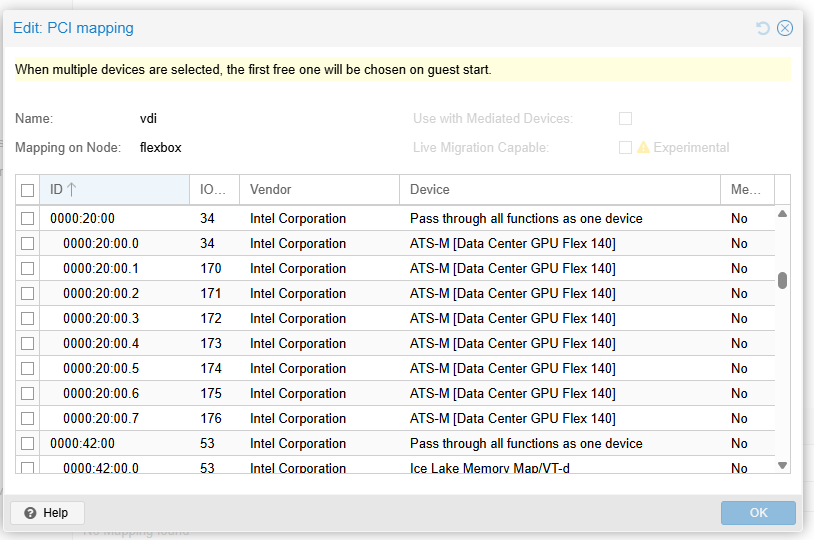
From here, the steps from the proxmox gui setup above apply.
The systemd service
The steps done with xpu-smi need to be automated to one-shot happen every boot. This is where the custom systemd service comes in.
First, a configuration file to assist with devices, especially if you have more than one. /etc/xpu-sriov.conf
# One or more “create” commands. Examples:
# Create 7 VFs on device 0:
/usr/bin/xpu-smi vgpu -c -n 7 -d 2

# If you have more devices, add more lines, e.g.:
# /usr/bin/xpu-smi vgpu -c -n 7 -d 2
And create a helper script: /usr/local/sbin/xpu-sriov-bind-vfio.sh
#!/usr/bin/env bash
# wendell at level1techs
set -euo pipefail

CFG="/etc/xpu-sriov.conf"
LOG="/var/log/xpu-sriov-vfio.log"
TMP="$(mktemp)"
trap 'rm -f "$TMP" "$TMP.clean" "$TMP.vfs"' EXIT

log(){ echo "$(date -Is) $*" | tee -a "$LOG" >&2; }

# 1) Sanity checks
command -v /usr/bin/xpu-smi >/dev/null || { echo "xpu-smi not found in PATH"; exit 1; }
[ -r "$CFG" ] || { echo "Config $CFG not found or unreadable"; exit 1; }

# 2) Load vfio modules early
/sbin/modprobe vfio-pci || true
/sbin/modprobe vfio || true
/sbin/modprobe vfio_iommu_type1 || true

log "=== Starting SR-IOV create + vfio bind ==="
: > "$LOG"

# 3) Run each xpu-smi command and capture output
while IFS= read -r line; do
  [[ -z "${line// }" || "${line#\#}" != "$line" ]] && continue  # skip blanks/comments
  log "Running: $line"
  if eval "$line" 2>&1 | tee -a "$TMP" >>"$LOG"; then
    log "OK: $line"
  else
    log "ERROR running: $line"
  fi
done < "$CFG"

# 4) Parse xpu-smi output to collect only virtual functions (skip PF .0)
# Strip color codes / CRs just in case
sed -r 's/\x1B\[[0-9;]*[mK]//g; s/\r//g' "$TMP" > "$TMP.clean"
grep "BDF Address" "$TMP.clean" | awk '{print $5}' | grep -Ev '\.0$' | sort -u > "$TMP.vfs"

if [[ ! -s "$TMP.vfs" ]]; then
  log "No virtual functions detected in xpu-smi output."
  exit 0
fi

log "Virtual functions to bind to vfio-pci:"
cat "$TMP.vfs" | tee -a "$LOG"

# 5) Give udev a moment to create sysfs nodes
udevadm settle || true
sleep 1

bind_one() {
  local bdf="$1"
  local dev="/sys/bus/pci/devices/$bdf"

  for i in {1..50}; do
    [[ -e "$dev" ]] && break
    sleep 0.1
  done
  if [[ ! -e "$dev" ]]; then
    log "WARN: $bdf not present under $dev"
    return 1
  fi

  # Unbind from any current driver
  if [[ -L "$dev/driver" ]]; then
    echo "$bdf" > "$dev/driver/unbind" || true
  fi

  # Force-bind to vfio-pci
  echo vfio-pci > "$dev/driver_override"
  echo "$bdf" > /sys/bus/pci/drivers_probe

  if [[ "$(readlink -f "$dev/driver" 2>/dev/null || true)" == *"/vfio-pci" ]]; then
    log "Bound $bdf to vfio-pci"
  else
    log "ERROR: Failed to bind $bdf to vfio-pci"
  fi
}

rc=0
while read -r bdf; do
  bind_one "$bdf" || rc=1
done < "$TMP.vfs"

log "=== Done (rc=$rc) ==="
exit "$rc"
!! Don’t forget to
sudo chmod 0755 /usr/local/sbin/xpu-sriov-bind-vfio.sh
Its possible to run the script manually depending on how you have it setup (which device(s) to run against, how many VF to setup, etc.). Output should look like:
 /usr/local/sbin/xpu-sriov-bind-vfio.sh
2025-10-19T12:28:38-04:00 === Starting SR-IOV create + vfio bind ===
2025-10-19T12:28:38-04:00 Running: /usr/bin/xpu-smi vgpu -c -n 7 -d 2
2025-10-19T12:28:39-04:00 OK: /usr/bin/xpu-smi vgpu -c -n 7 -d 2
2025-10-19T12:28:39-04:00 Virtual functions to bind to vfio-pci:
0000:45:00.1
0000:45:00.2
0000:45:00.3
0000:45:00.4
0000:45:00.5
0000:45:00.6
0000:45:00.7
2025-10-19T12:28:40-04:00 Bound 0000:45:00.1 to vfio-pci
2025-10-19T12:28:40-04:00 Bound 0000:45:00.2 to vfio-pci
2025-10-19T12:28:40-04:00 Bound 0000:45:00.3 to vfio-pci
2025-10-19T12:28:40-04:00 Bound 0000:45:00.4 to vfio-pci
2025-10-19T12:28:40-04:00 Bound 0000:45:00.5 to vfio-pci
2025-10-19T12:28:40-04:00 Bound 0000:45:00.6 to vfio-pci
2025-10-19T12:28:40-04:00 Bound 0000:45:00.7 to vfio-pci
2025-10-19T12:28:40-04:00 === Done (rc=0) ===
This is what prevents the Proxmox error about not being able to bind vfio-pci via the gui. And it is good practice to run this at boot-time anyway.
If that works, we can set it up to run one-shot at boot time.
Note
You can use sysfs for this kind of thing instead of a custom script. That’s actually the usual thing to do. So when the root device is loaded it auto-creates the functions based on your /etc/sysfs.conf . In the case of proxmox here, for some reason, I always end up doing a custom script anyway for one reason or another. In this case I just wanted to show you how it might be done, and I’ve done it in such a way to work around the gui bug in proxmox.
Create /etc/systemd/system/xpu-sriov-vfio.service
[Unit]
Description=Create Intel XPU SR-IOV VFs and bind them to vfio-pci
DefaultDependencies=no
After=local-fs.target systemd-udevd.service
Wants=systemd-udevd.service
ConditionPathExists=/usr/local/sbin/xpu-sriov-bind-vfio.sh

[Service]
Type=oneshot
ExecStart=/usr/local/sbin/xpu-sriov-bind-vfio.sh
RemainAfterExit=yes
# Give slow platforms time to enumerate
TimeoutStartSec=120

[Install]
WantedBy=multi-user.target
then enable:
sudo systemctl daemon-reload
sudo systemctl enable --now xpu-sriov-vfio.service
… Reboot and see if everything recovers!
Congratulations on your new Stable subscription-free VDI solution!
Proxmox 9 Bugs
So As of 2025-10-19 the Proxmox UI seems to have a bug where it doesn’t understand PCIe devices behind a PCIe bridge. Each Flex 140 gpu shows up as two devices such as:
/sys/devices/pci0000:16/0000:16:01.0/0000:17:00.0/0000:18:00.0/0000:19:00.0/0000:1a:08.0/0000:1b:00.0/0000:1c:01.0/0000:1d:00.0
/sys/devices/pci0000:16/0000:16:01.0/0000:17:00.0/0000:18:00.0/0000:19:00.0/0000:1a:18.0/0000:1e:00.0/0000:1f:01.0/0000:20:00.0
When you have successfully created the .1 .2 .3 .4 etc devices and try to bind it in the Proxmox UI there will be an error:
error writing '0000:1d:00.1' to '/sys/bus/pci/drivers/vfio-pci/bind': No such device
TASK ERROR: Cannot bind 0000:1d:00.1 to vfio
This is a dumb gui bug. We will prevent this issue from happening, hopefully, by baking this bind-vfio-driver step into our systemd script that creates the number of virtual funcitons we want at boot time. This is why the custom systemd script is important.
I found it useful to lspci -vvvnnn |less and search for Flex to see the state of the system, sr-iov enablement and what, if any, driver is bound.
The Split Lock Mitigation Slowdown
[ 1554.952489] x86/split lock detection: #AC: CPU 2/KVM/6864 took a split_lock trap at address: 0x236af911df7
This kernel also has this “feature” – you’ll want to disable it for best performance of windows virtual machines. Fortunately the Proxmox Wiki covers this. . Pay attention to the perhaps undesirable security implications of disabling the split lock mitigation.
Firmware Troubleshooting
If you see any messages about bad or out of date firmware, first try this:
This is run-time firmware. There is a great sin intel is committing here and that is the actual low-level card firmware isn’t here. I think. I had this problem on a batch of Flex 140 gpus where they were buggy and terrible.
The xpu-smi utility can update the firmware. In the case of Flex140 I am using this DG02_2.2280 firmware binary. If anyone from intel is reading this can you please drop generic card firmware into the firmware repo? You don’t have to do anything with it! Just having access to the .bin files so the user can elect to flash it with xpu-smi would be super handy. Otherwise folks have to just google the filename and hope they can find it.
# xpu-smi updatefw -d 0 -t GFX -f /home/w/XPUM_Flex_140_128_ES_034_gfx_fwupdate_DG02_2.2280_\ \(1\).bin
This GPU card has multiple cores. This operation will update all firmwares. Do you want to continue? (y/n) y
Device 0 FW version: DG02_2.2268
Device 1 FW version: DG02_2.2268
Image FW version: DG02_2.2280
Do you want to continue? (y/n) y
Start to update firmware
Firmware Name: GFX
Image path: /home/w/XPUM_Flex_140_128_ES_034_gfx_fwupdate_DG02_2.2280_ (1).bin
[============================================================] 100 %
Update firmware successfully.
out of tree i915 dueling insanity
With dkms the i915 driver from that should override the in-tree i915 but that doesn’t seem to always be the case. You may have to troubleshoot why your system is not loading the dkms version ot the kernel module, and the clues for that will be things like
[  453.417499] i915: disagrees about version of symbol intel_vsec_register
[  453.417743] i915: Unknown symbol intel_vsec_register (err -22)
and
[    7.947452] i915 0000:1d:00.0: Your graphics device 56c1 is not properly supported by i915 in this
               kernel version. To force driver probe anyway, use i915.force_probe=56c1
               module parameter or CONFIG_DRM_I915_FORCE_PROBE=56c1 configuration option,
               or (recommended) check for kernel updates.
[    7.948154] i915 0000:20:00.0: Your graphics device 56c1 is not properly supported by i915 in this
               kernel version. To force driver probe anyway, use i915.force_probe=56c1
               module parameter or CONFIG_DRM_I915_FORCE_PROBE=56c1 configuration option,
               or (recommended) check for kernel updates.
[    7.948837] i915 0000:45:00.0: Your graphics device 56c0 is not properly supported by i915 in this
               kernel version. To force driver probe anyway, use i915.force_probe=56c0
               module parameter or CONFIG_DRM_I915_FORCE_PROBE=56c0 configuration option,
               or (recommended) check for kernel updates.
You can kind-of weaponize this force-probe problem to prevent the in-tree i915 driver from binding to the Flex devices so that you can rmmod it later.
This hackery goes away – the finish line is in sight for “official” (unofficial) dkms backport intel sources. Even for applications like Proxmox. Which is very nice for us, the users.

Superposition and heaven! running at once!
 .
.