That’s promising! I still am none the wiser why no SR-IOV though 
I’ve even tried 6.18-rc1 with no joy.
No SR-IOV here either on proxmox (opted into 6.17). Other devices report support just not the B50 Pro.
Attempting to update the firmware via igsc + the publicly posted firmware matrix failed as my card shipped with a newer fw than posted and thus far my attempts to boot Windows2Go to force any available update have also failed.
1 Like
Had to bring my Windows2Go disk internally to finally get Windows to behave but I can confirm that Windows (at least currently) is required to update the firmware.
03:00.0 VGA compatible controller: Intel Corporation Battlemage G21 [Intel Graphics] (prog-if 00 [VGA controller])
        Subsystem: Intel Corporation Device 1114
        Flags: bus master, fast devsel, latency 0, IRQ 289, IOMMU group 18
        Memory at 2810000000 (64-bit, prefetchable) [size=16M]
        Memory at 2800000000 (64-bit, prefetchable) [size=256M]
        Expansion ROM at 52000000 [disabled] [size=2M]
        Capabilities: [40] Vendor Specific Information: Len=0c <?>
        Capabilities: [70] Express Endpoint, IntMsgNum 0
        Capabilities: [ac] MSI: Enable+ Count=1/1 Maskable+ 64bit+
        Capabilities: [d0] Power Management version 3
        Capabilities: [100] Alternative Routing-ID Interpretation (ARI)
        Capabilities: [110] Null
        Capabilities: [200] Address Translation Service (ATS)
        Capabilities: [420] Physical Resizable BAR
        Capabilities: [220] Virtual Resizable BAR
        Capabilities: [320] Single Root I/O Virtualization (SR-IOV)
        Capabilities: [400] Latency Tolerance Reporting
        Kernel driver in use: xe
        Kernel modules: xe
Working firmware version:
root@meltdown:/tmp/firmware/igsc/builddir/src# ./igsc fw version --device /dev/mei0
Device: FW Version: BMG__21.1162
Edit: Dump of the “bmg” firmware folder from the WIndows installer that should contain the working firmware (contents unverified for use with igsc)
https://drive.google.com/drive/folders/13-qowdpDwYpeAeyZC71dT12L6i2ZVGff?usp=sharing
Huzzah!
The windows firmware update seems to be a 100% requirement. Pulled out a 4090 from a workstation, installed the Arc B50 firmware, reboot twice to be sure - put it back into the ASUS server and walla!
23:00.0 VGA compatible controller: Intel Corporation Device e212 (prog-if 00 [VGA controller])
	Subsystem: Intel Corporation Device 1114
	Flags: bus master, fast devsel, latency 0, IRQ 494, NUMA node 0, IOMMU group 46
	Memory at 3ee0c000000 (64-bit, prefetchable) [size=16M]
	Memory at 3e400000000 (64-bit, prefetchable) [size=16G]
	Expansion ROM at f2000000 [disabled] [size=2M]
	Capabilities: [40] Vendor Specific Information: Len=0c <?>
	Capabilities: [70] Express Endpoint, MSI 00
	Capabilities: [ac] MSI: Enable+ Count=1/1 Maskable+ 64bit+
	Capabilities: [d0] Power Management version 3
	Capabilities: [100] Alternative Routing-ID Interpretation (ARI)
	Capabilities: [110] Null
	Capabilities: [200] Address Translation Service (ATS)
	Capabilities: [420] Physical Resizable BAR
	Capabilities: [220] Virtual Resizable BAR
	Capabilities: [320] Single Root I/O Virtualization (SR-IOV)
	Capabilities: [400] Latency Tolerance Reporting
	Kernel driver in use: xe
	Kernel modules: xe
lspci shows
22:02.0 PCI bridge: Intel Corporation Device e2f1
23:00.0 VGA compatible controller: Intel Corporation Device e212
23:00.1 VGA compatible controller: Intel Corporation Device e212
23:00.2 VGA compatible controller: Intel Corporation Device e212
23:00.3 VGA compatible controller: Intel Corporation Device e212
23:00.4 VGA compatible controller: Intel Corporation Device e212
23:00.5 VGA compatible controller: Intel Corporation Device e212
23:00.6 VGA compatible controller: Intel Corporation Device e212
23:00.7 VGA compatible controller: Intel Corporation Device e212
23:01.0 VGA compatible controller: Intel Corporation Device e212
4 Likes
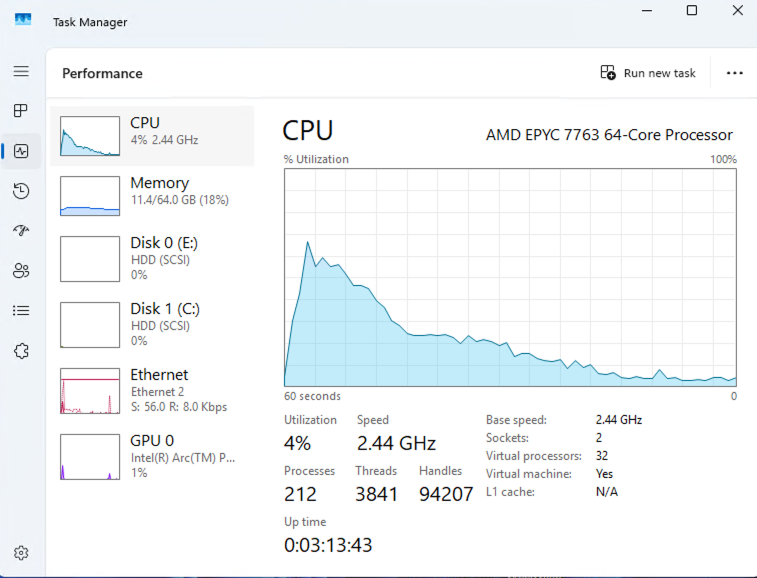
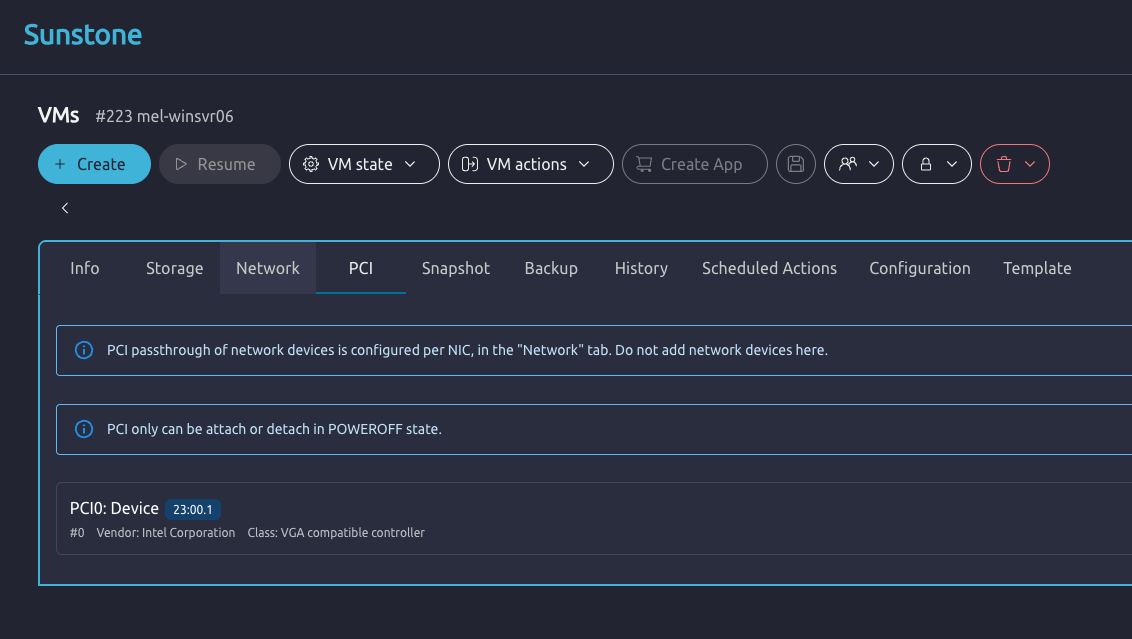
Well - got it all working accross 3 hosts on my EPYC x86 cluster. I don’t know how a VM migration would go, but otherwise didn’t really need to do anything fancy in OpenNebula to get this to work natively.
- Followed the instructions to add a udev rule to give the “one” user access to /dev/vfio*
- Added the vfio cgroups into qemu.conf
- Unbound the virtual function cards from the xe driver, and bound them to vfio-pci

3 Likes
How are the display adapters divided among vfs?
I like to have physical displays in my VMs sometimes.
And im considering getting myself one of these cards.
Virtual functions don’t use the card’s display outputs at all. It wouldn’t really make sense for it to work that way. 
1 Like
Damn. Thats a deal breaker. No point in changing my current setup if i have to get dedicated display adapters. right now im using whole gpus for each VM, not utilizing sr-iov. i like this approach because passing entire cards allows the VM to use the display outputs attached to the cards. it’d be nice if i could consolidate into a single card. but i dont think im willing to give up the convenience of VMs having physical outputs in order to consolidate gpu hardware.
Have you tried looking glass? I used to switch my displays so that my gaming vm could have a display out that was nice but looking glass makes it so I don’t have to.
2 Likes
looking glass is an option, but i’d like a solution to see physical output of it that doesnt rely on the guest OS functioning. yes, i know SPICE is a thing. its just, physical outputs are so convenient as opposed to having to find a device to act as a spice client.
for linux guests, i just do X11 forwarding over the network (yes, i use an ssh wrapper, im not THAT crazy), but this still relies on the guest OS to be functional to a certain level.
i know there are many ways to do framebuffer copying to the host and redirect it to another device for output, but:
i sometimes like to do very lightweight VR things in my VMs. as far as i know, SteamVR requires the HMD to be on a display adapter directly on the VM. im not aware of any way to finangle rerouting that through the host to another display adpater without causing SteamVR to just not work.
normal 2D applications i believe i would be fine with ivshmem and X11 redirection.
i can get a thin client with display outs and fast enough networking to rdma the frambuffer from the VM host to show them. at 1080p, 40gb/s should be enough. then it’d just be a bunch of X11 and USB/ip shenanigans, just needs a way to make SteamVR happy with a non-local HMD.
1 Like
@gregnetau Just make sure I am following here.
You were able to share (utilize) the 1 card out to multiple vm’s for non graphics workloads like lets say trans-coding or IPEX-LLM workloads?
If that is true that is really exciting and going to get one on order if I can.
What kernel version did you need to use?
When you speaking to the to
any links to steps or configs to share? Looks like in your screenshot you just passed one of the now many vfio-pci. Is that really it?
- Followed the instructions to add a udev rule to give the “one” user access to /dev/vfio*
- Added the vfio cgroups into qemu.conf
- Unbound the virtual function cards from the xe driver, and bound them to vfio-pci
1 Like
I am using OpenNebula 7.0 as the GUI for my KVM cluster(s). I have 4 ARM hosts in a cluster and 3 AMD hosts in an x86 cluster.
I downloaded the kernel 6.17.0-6 files from Ubuntu’s Archive:
# ls -L /home/admin/linux617/
linux-cloud-tools-6.17.0-6_6.17.0-6.6_amd64.deb          linux-headers-6.17.0-6_6.17.0-6.6_all.deb                   linux-modules-6.17.0-6-generic_6.17.0-6.6_amd64.deb
linux-cloud-tools-6.17.0-6-generic_6.17.0-6.6_amd64.deb  linux-headers-6.17.0-6-generic_6.17.0-6.6_amd64.deb         linux-tools-6.17.0-6_6.17.0-6.6_amd64.deb
linux-cloud-tools-common_6.17.0-6.6_all.deb              linux-image-unsigned-6.17.0-6-generic_6.17.0-6.6_amd64.deb  linux-tools-6.17.0-6-generic_6.17.0-6.6_amd64.deb
PCI passthrough docs here - PCI Passthrough
That doc covers the udev rule, but for clarity this is what worked for me:
cat /etc/udev/rules.d/99-vfio-permissions.rules
KERNEL=="vfio", MODE="0660", GROUP="kvm", OWNER="oneadmin"

# Set ownership for all VFIO group devices (/dev/vfio/<group>)
KERNEL=="vfio/*", MODE="0660", GROUP="kvm", OWNER="oneadmin"

SUBSYSTEM=="vfio", GROUP="kvm", OWNER="oneadmin"
These need to be applied via udevadm (or a reboot)
udevadm control --reload-rule
udevadm trigger
Then i needed to setup the # of virtual functions on the Arc B50. I haven’t yet scripted this or added it to a systemd/unit file,but it looks something like this:
echo 8 > /sys/bus/pci/devices/0000\:23\:00.0/sriov_numvfs
modprobe vfio-pci
echo 0000:23:00.1 > /sys/bus/pci/drivers/xe/unbind
echo 0000:23:00.2 > /sys/bus/pci/drivers/xe/unbind
echo 0000:23:00.3 > /sys/bus/pci/drivers/xe/unbind
echo 0000:23:00.4 > /sys/bus/pci/drivers/xe/unbind
echo 0000:23:00.5 > /sys/bus/pci/drivers/xe/unbind
echo 0000:23:00.6 > /sys/bus/pci/drivers/xe/unbind
echo 0000:23:00.7 > /sys/bus/pci/drivers/xe/unbind
echo 0000:23:01.0 > /sys/bus/pci/drivers/xe/unbind
echo 0x8086 0xe212 > /sys/bus/pci/drivers/vfio-pci/new_id
This should fill dmesg with somethiing like
[  238.307340] VFIO - User Level meta-driver version: 0.3
[  261.295225] vfio-pci 0000:23:00.1: vgaarb: VGA decodes changed: olddecodes=io+mem,decodes=io+mem:owns=none
[  261.295809] vfio-pci 0000:23:00.2: vgaarb: VGA decodes changed: olddecodes=io+mem,decodes=io+mem:owns=none
[  261.296185] vfio-pci 0000:23:00.3: vgaarb: VGA decodes changed: olddecodes=io+mem,decodes=io+mem:owns=none
[  261.296610] vfio-pci 0000:23:00.4: vgaarb: VGA decodes changed: olddecodes=io+mem,decodes=io+mem:owns=none
[  261.297012] vfio-pci 0000:23:00.5: vgaarb: VGA decodes changed: olddecodes=io+mem,decodes=io+mem:owns=none
[  261.297396] vfio-pci 0000:23:00.6: vgaarb: VGA decodes changed: olddecodes=io+mem,decodes=io+mem:owns=none
[  261.297742] vfio-pci 0000:23:00.7: vgaarb: VGA decodes changed: olddecodes=io+mem,decodes=io+mem:owns=none
[  308.982082] vfio-pci 0000:23:01.0: vgaarb: VGA decodes changed: olddecodes=io+mem,decodes=io+mem:owns=none
Then I added the following to /etc/libvirt/qemu.conf
cgroup_device_acl = [
    "/dev/null", "/dev/full", "/dev/zero",
    "/dev/random", "/dev/urandom",
    "/dev/ptmx", "/dev/kvm", "/dev/kqemu",
    "/dev/rtc","/dev/hpet", "/dev/vfio/vfio",
    "/dev/vfio/134", "/dev/vfio/135", "/dev/vfio/136", "/dev/vfio/137", "/dev/vfio/138", "/dev/vfio/139", "/dev/vfio/140", "/dev/vfio/141"
]
Restarted libvirtd
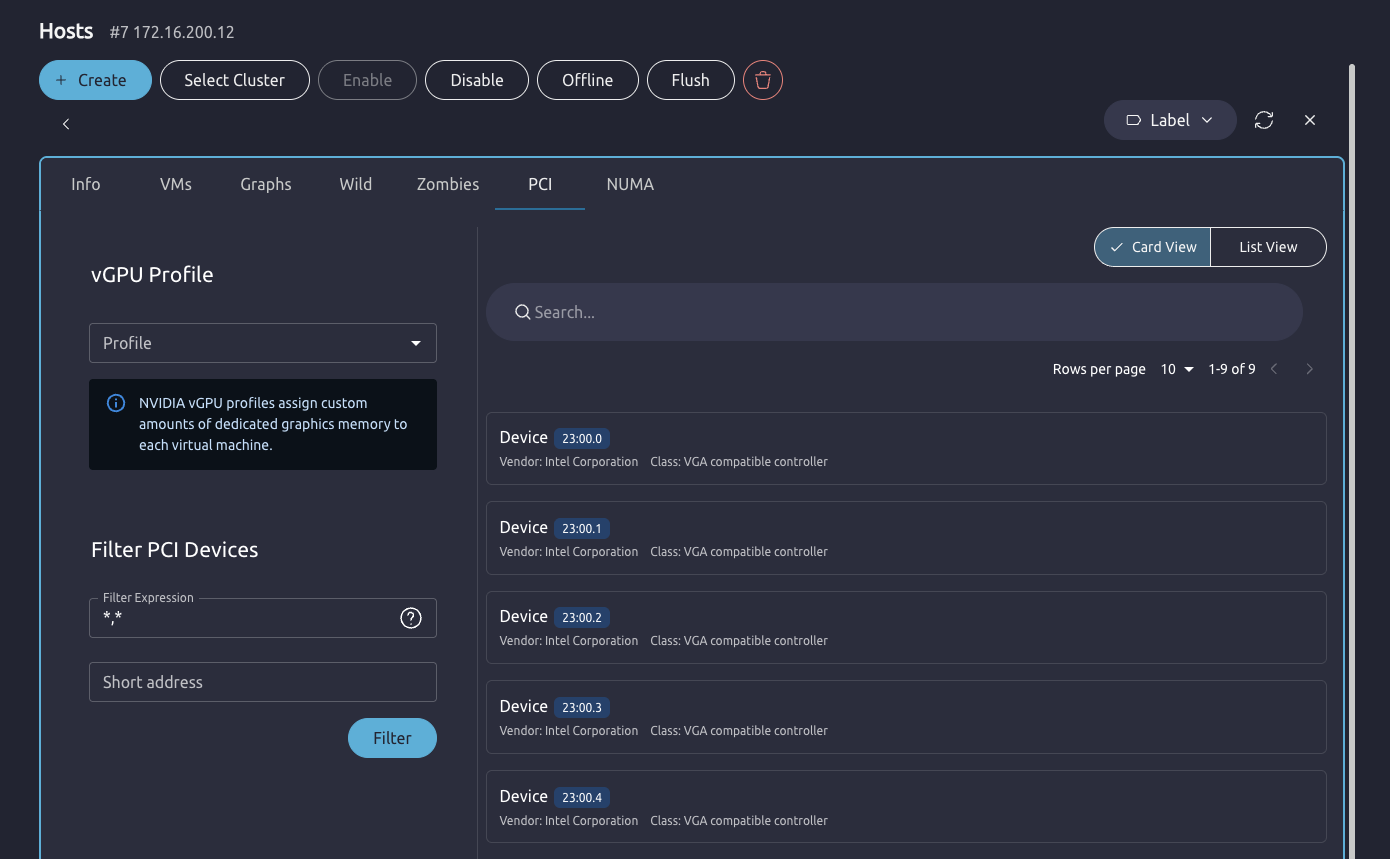
The Open Nebula GUI then shows the PCI cards/virtual functions, and you can bind them to a VM. Note - you need to also make sure that your filter for the host is set at :
5 Likes
@gregnetau many thanks for your detailed post! And congrats on your success.
I was trying to give this a go and unable to get this to go on my ASUS W680. Not able to sriov_numvfs under the pci device
Kernel running
6.17.4-200.fc42.x86_64
Firmware updated on card
./igsc fw version --device /dev/mei1
Device: FW Version: BMG__21.1162
BIOS enabled with SRV-IO , VT-D and required PCI Express native power management options set.
Tried a few Kernel options permutations.
intel_iommu=on
intel_iommu=on xe.vfs_max=7
What I did noticed is the card is missing the srv-io capability. Much like reported. I looked around I am at a loss why it will not show up.
lspci -nvs 03:00.0
03:00.0 0300: 8086:e212 (prog-if 00 [VGA controller])
        Subsystem: 8086:1114
        Flags: bus master, fast devsel, latency 0, IRQ 222, IOMMU group 21
        Memory at 8c000000 (64-bit, non-prefetchable) [size=16M]
        Memory at 6000000000 (64-bit, prefetchable) [size=16G]
        Expansion ROM at 8d000000 [disabled] [size=2M]
        Capabilities: [40] Vendor Specific Information: Intel Capabilities v1
                CapA: Peg60Dis- Peg12Dis- Peg11Dis- Peg10Dis- PeLWUDis- DmiWidth=x4
                      EccDis- ForceEccEn- VTdDis- DmiG2Dis- PegG2Dis- DDRMaxSize=Unlimited
                      1NDis- CDDis- DDPCDis- X2APICEn- PDCDis- IGDis- CDID=0 CRID=0
                      DDROCCAP- OCEn- DDRWrtVrefEn+ DDR3LEn+
                CapB: ImguDis- OCbySSKUCap- OCbySSKUEn- SMTCap- CacheSzCap 0x0
                      SoftBinCap- DDR3MaxFreqWithRef100=Disabled PegG3Dis-
                      PkgTyp- AddGfxEn- AddGfxCap- PegX16Dis- DmiG3Dis- GmmDis-
                      DDR3MaxFreq=2932MHz LPDDR3En-
        Capabilities: [70] Express Endpoint, IntMsgNum 0
        Capabilities: [ac] MSI: Enable+ Count=1/1 Maskable+ 64bit+
        Capabilities: [d0] Power Management version 3
        Capabilities: [100] Alternative Routing-ID Interpretation (ARI)
        Capabilities: [110] Null
        Capabilities: [200] Address Translation Service (ATS)
        Capabilities: [420] Physical Resizable BAR
        Capabilities: [400] Latency Tolerance Reporting
        Kernel driver in use: xe
        Kernel modules: xe
Wish I had another card that had SRV-IO but I do not to test.
How did you go about updating the firmware only thing I am unsure of. I used ARC Firmware tool on another windows system I had here seemed to just flash fine. When installing the just the intel update I was just left with BMG__21.1156.
I’ll keep digging into this. Thanks again for your posts.
EDIT: Looked at my noob flash job. Missed the op codes. Things are working now! Wuuuuu!
3 Likes
can you update the card’s firmware on linux or do you have to load the card to a windows machine to do the upgrade?
1 Like
I did this in a Windows VM with the card in passthrough. Better to do it bare metal to be safe. Just took the gamble it should work.
3 Likes
You should be able to do this with igsc + the firmware files I posted following this guide. The op codes are the important pieces for SR-IOV it seems.
I personally used windows because I didn’t think to extract the driver/firmware files until I was already booted into Windows.
1 Like
what are the hardware requirements for sr iov to work. im kinda new to the entire thing just watched the video but id love to use it as a secondary gpu especially if you can divide it into 4 x 4gb cards. do i need to have a full x16 slot available or will it work with a x4 slot aswell?
1 Like
I can confirm, it works fine in an x4 slot. I have not tested x1 yet though. The GPU only has 8 lanes so if you put it in an x16, half of them are wasted.
1 Like
Any idea if this will work with
2x CPU E5-2698 v4
Supermicro X10DRi
or AMD 2990wx? got some old workstations I’m using as home lab now ;c
1 Like
Hello everyone,
this all is just confusing me! I watched the video and thought that it might be the coolest thing in PC tech this decade. So I got an Intel Arc Pro B50, made sure I’m running Kernel 6.17 but I can’t get it to work. May I ask you to summarize what is needed for this project? I’m sure others will benefit from this as well.
Here are some informations about my System:
root@castor:~# uname -a
Linux castor 6.17.2-1-pve #1 SMP PREEMPT_DYNAMIC PMX 6.17.2-1 (2025-10-21T11:55Z) x86_64 GNU/Linux
root@castor:~# lspci -s 03:00.0 -v
03:00.0 VGA compatible controller: Intel Corporation Battlemage G21 [Intel Graphics] (prog-if 00 [VGA controller])
	Subsystem: Intel Corporation Device 1114
	Flags: bus master, fast devsel, latency 0, IRQ 138, IOMMU group 16
	Memory at f4000000 (64-bit, non-prefetchable) [size=16M]
	Memory at f800000000 (64-bit, prefetchable) [size=16G]
	Expansion ROM at f5000000 [disabled] [size=2M]
	Capabilities: [40] Vendor Specific Information: Len=0c <?>
	Capabilities: [70] Express Endpoint, IntMsgNum 0
	Capabilities: [ac] MSI: Enable+ Count=1/1 Maskable+ 64bit+
	Capabilities: [d0] Power Management version 3
	Capabilities: [100] Alternative Routing-ID Interpretation (ARI)
	Capabilities: [110] Null
	Capabilities: [200] Address Translation Service (ATS)
	Capabilities: [420] Physical Resizable BAR
	Capabilities: [400] Latency Tolerance Reporting
	Kernel driver in use: xe
	Kernel modules: xe

root@castor:~# pveversion
pve-manager/9.0.11/3bf5476b8a4699e2 (running kernel: 6.17.2-1-pve)
3 Likes