You need to update the card firmware. Pass the card once using standard VFIO (of the entire device) to a windows VM and install the intel driver. This will update the firmware. After that, you can reboot, delete the VM and never use windows. The SR-IOV capability will show up in lspci.
People in the other thread also figured out a way to update the firmware from linux, but I haven’t tried it.
2 Likes
This did the trick for me!
2 Likes
I guess fwupd isnt a thing for intel cards?
Is there any possible to use SR-IOV in hyper-v like those NVIDIA GPU card which supported vGPU?
My host use hyper-v on winserver, if not possible, I need to migrate all data and VMs to linux platform.
1 Like
Mine just arrived today. Everything roughly works on Fedora 42 (kernel 6.17.4/5 is current in the repos). I do also get some fan weirdness, which seems to be worked around by running LACT in the background.
Setup was easy:
- Passthrough full device to a Windows VM and update firmware (of course it’s recommended to do natively if possible).
- Reboot and echo (e.g.) 4 into num_vfs.
- success!
- Have not setup RDP but also on spice alongside a virtio GPU things seem working in a Windows VM.
- Have not yet tested LookingGlass and/or moonlight to get lower latency.
- Have not yet tested a Linux VM, but I guess kernel 6.17 (or at least a recent one with battlemage support) is required?
I am still waiting for my mDP to HDMI adapter, which should arrive tomorrow, to test display output. My plan is to use the B50 for display output and lighter VMs, alongside an nvidia GPU for offloading on Linux and more graphically demanding VMs.
What’s not entirely clear to me yet, is how display output and acceleration on the host is going to work. If I make 4 VFs, almost all of the memory on the root device gets allocated and 4 VFs with 4GB each pop up. It seems to mean the root device has (almost) no memory left. So, should I use DRI_PRIME to run graphical tasks on a VF and offload? Or are there ways to reserve some memory for the host (sriov stride?). Things to try over the weekend… It would be nice to reserve some memory for the host (e.g. 8GB and then still have 4 2GB VFs left).
3 Likes
Once you get your display port adapters can you test using the gpu as part of the host machine and to pass through part to a vm? I don’t know if/how that works with the actual display ports on the back or if its possible at all?
Will do! So far I’ve already encountered issues running stuff on the root device when there’s VFs allocated. Perhaps running out of ram. Running e.g. heaven on one of the VFs and prime offloading does seem to work though!
But I hope I can make that work since that’s how I’m planning to use it. Assigning VFs to ports doesn’t seem to be possible though, so it will need to go over moonlight or looking glass ideally.
1 Like
Interesting I’m wondering how lg will work without an adapter on windows since it apparently disables the gpu if no display is connected. From the lg docs
If you are using a vGPU the virtual device should already have a virtual monitor attached to it negating this requirement.
I wonder what virtual monitor windows would accept?
1 Like
In my testing the default display proxmox provides counts. But definitely this is worth digging into.
I can not seem to edit sriov_numvfs. I get permission denied error code 3 in winscp or file not found when i putty in. Can someone please help?
THanks!
1 Like
Have you updated the firmware (by installing the drivers on windows on bare metal)?
I used the command:
“echo 4 > /sys/devices/pci0000:00/0000:00:03.1/0000:0d:00.0/0000:0e:01.0/0000:0f:00.0/sriov_numvfs”
I did install on bare windows and got it working as a single passthrough card to a VM. Please see the readout i get…
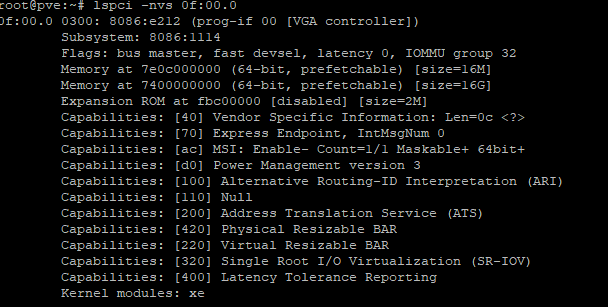
what is the output of dmesg | grep xe?
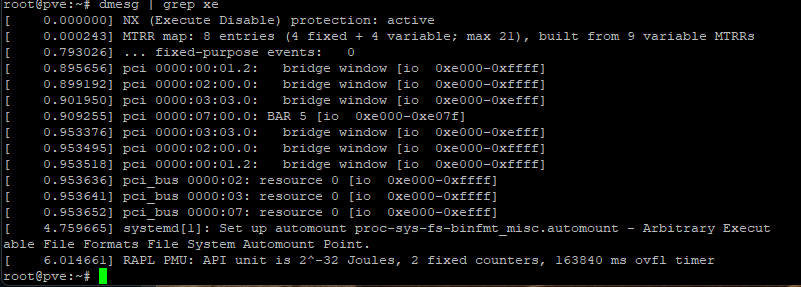
Strange… There are no messages from the xe driver at all… This is how mine looks:
[    3.649885] xe 0000:05:00.0: [drm] Running in SR-IOV PF mode
[    3.649954] xe 0000:05:00.0: [drm] Found battlemage (device ID e212) discrete display version 14.01 stepping B0
[    3.651363] xe 0000:05:00.0: [drm] VISIBLE VRAM: 0x000000ec00000000, 0x0000000400000000
[    3.651385] xe 0000:05:00.0: [drm] VRAM[0]: Actual physical size 0x0000000400000000, usable size exclude stolen 0x00000003fb000000, CPU accessible size 0x00000003fb000000
[    3.651387] xe 0000:05:00.0: [drm] VRAM[0]: DPA range: [0x0000000000000000-400000000], io range: [0x000000ec00000000-effb000000]
[    3.651389] xe 0000:05:00.0: [drm] VRAM[0]: Actual physical size 0x0000000400000000, usable size exclude stolen 0x00000003fb000000, CPU accessible size 0x00000003fb000000
[    3.651390] xe 0000:05:00.0: [drm] VRAM[0]: DPA range: [0x0000000000000000-400000000], io range: [0x000000ec00000000-effb000000]
[    3.664075] xe 0000:05:00.0: vgaarb: VGA decodes changed: olddecodes=io+mem,decodes=none:owns=none
[    3.675882] xe 0000:05:00.0: [drm] Finished loading DMC firmware i915/bmg_dmc.bin (v2.6)
[    3.714299] xe 0000:05:00.0: [drm] GT0: Using GuC firmware from xe/bmg_guc_70.bin version 70.49.4
[    3.858941] xe 0000:05:00.0: [drm] GT0: ccs1 fused off
[    3.858944] xe 0000:05:00.0: [drm] GT0: ccs2 fused off
[    3.858945] xe 0000:05:00.0: [drm] GT0: ccs3 fused off
[    3.884290] xe 0000:05:00.0: [drm] GT1: Using GuC firmware from xe/bmg_guc_70.bin version 70.49.4
[    3.891549] xe 0000:05:00.0: [drm] GT1: Using HuC firmware from xe/bmg_huc.bin version 8.2.10
[    3.902518] xe 0000:05:00.0: [drm] GT1: vcs1 fused off
[    3.902520] xe 0000:05:00.0: [drm] GT1: vcs3 fused off
[    3.902521] xe 0000:05:00.0: [drm] GT1: vcs4 fused off
[    3.902522] xe 0000:05:00.0: [drm] GT1: vcs5 fused off
[    3.902523] xe 0000:05:00.0: [drm] GT1: vcs6 fused off
[    3.902524] xe 0000:05:00.0: [drm] GT1: vcs7 fused off
[    3.902525] xe 0000:05:00.0: [drm] GT1: vecs2 fused off
[    3.902526] xe 0000:05:00.0: [drm] GT1: vecs3 fused off
[    3.935267] xe 0000:05:00.0: [drm] Registered 4 planes with drm panic
[    3.935269] [drm] Initialized xe 1.1.0 for 0000:05:00.0 on minor 1
[    4.000357] xe 0000:05:00.0: [drm] fb1: xedrmfb frame buffer device
[    4.000932] xe 0000:05:00.0: [drm] Using mailbox commands for power limits
[    4.001293] xe 0000:05:00.0: [drm] PL2 is supported on channel 0
This is on fedora 42 with kernel 6.17.4…
Which OS/kernel are you running? And components? Resizable bar enabled, and other bios settings (iommu, sr-iov, etc.)?
I just updated proxmox to 6.17 last night.

From what I can tell i’ve enabled all the bios functions. I just eneabled it back on a passthrough VM so you could see what i get using lspci -vvvv command.
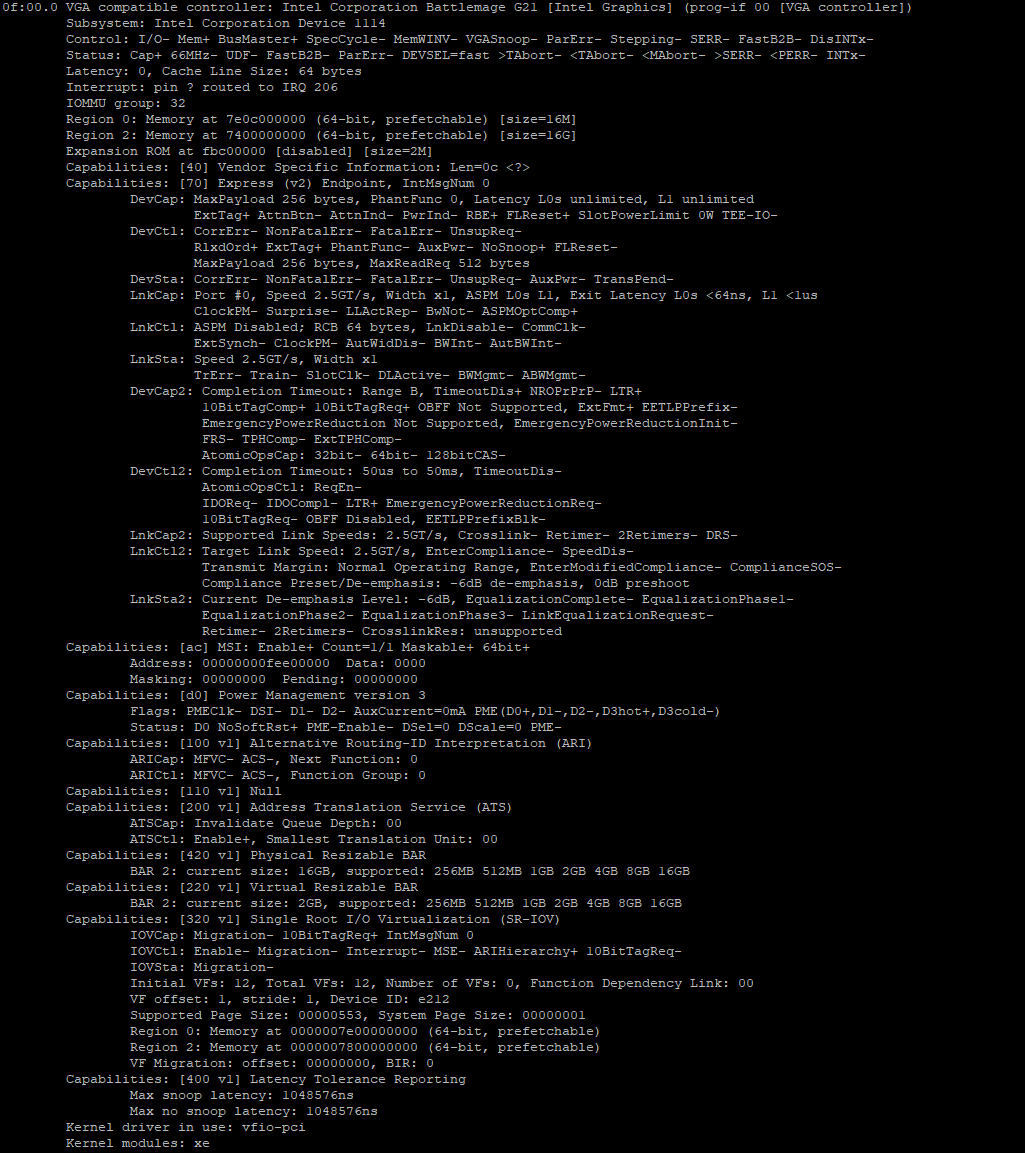
Oh, I see the issue. You need to let the xe driver load on the card, then vfio on the virtual functions. So you’d need to remove vfio pci id of the B50 from the kernel parameters. The VFs created can be easily bound/unbound on my machine, so no need to worry for now about blacklisting or kernel parameters.
After the VFs are created you can pass them through, they should (un)bind automatically (at least they do here). Or you can echo 0 > sriov_drivers_autoprobe so that the xe driver doesn’t bind them.
If you’re not sure which kernel parameters are used: cat /proc/cmdline
1 Like
I don’t think the i915 driver even binds battlemage devices, so no need to blacklist. And you should let the xe driver bind, since this is the one that allows the VFs to be created.
As a hobbyist here, can you tell me how I do that? Still learning the lingo and commands.