How to ZFS on Dual-Actuator Mach2 drives from Seagate without Worry

Hey, thanks for the reply, I finally found time to tinker around with this some more. Have a couple follow up questions:

Can I format the drives as btrfs, or is it safer to use ext4?
Can I symlink them to an existing volume, or do I have to create a new one?
Do I need to append the fstab file?

Noob here

I am running Raspbian 64-bit (Bookworm, Kernel version: 6.6) on a Raspberry Pi 400. I have a Seagate 14TB Exos Mach.2 ST14000NM0121 (SATA) inside a Seagate Expansion Desktop connected to the Pi 400. It’s just the one HDD that is connected to the Pi 400’s USB 3.0 port. Nothing else on any other ports.

I looked at this video (https://youtu.be/6I92nkcIO6U?t=375) and will be creating an ext4 RAID volume striped across two halved partitions just like the video shows.

My code would be

sudo parted /dev/sda mklabel gpt
sudo parted --align min /dev/sda mkpart primary 0% 50%
sudo parted --align min /dev/sda mkpart primary 50% 100%
sudo pvcreate /dev/sda1 /dev/sda2
sudo mdadm --create --verbose /dev/md0 --level=0 --raid-devices=2 /dev/sda1 /dev/sda2
sudo mkfs.ext4 /dev/md0

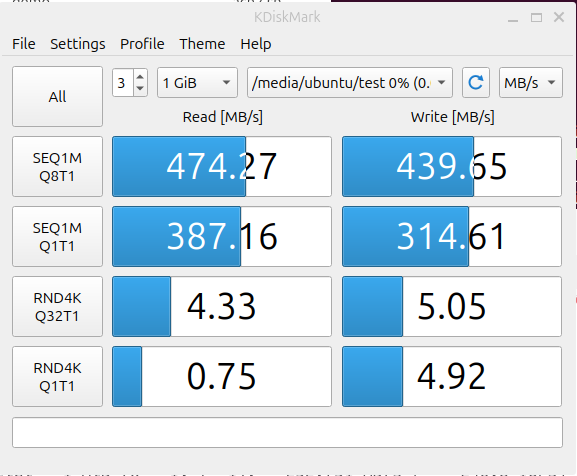
However, I see later on in the same video (https://youtu.be/6I92nkcIO6U?t=764) that the real-world performance of file transfers using this code would not provide the 300-400MB/s speeds that CrystalDiskMark gives.

I also see that with Linux Kernel 6.3, BFQ I/O scheduler is tuned for multi-actuator drives, but I read on some comments that you have to actually tell Linux that the drive is dual actuator. I am wondering if the lack of real-world performance of file transfers in the video is due to this.

My questions are

  • Do I have to do anything in the command line or settings to force Linux to recognize my USB-connected SATA drive is dual-actuator to give me the boosted performance? How do I do so? What code should I run?
  • Has anyone been able to get 300+MB/s real-world file transfer performance on striped RAID for file transfers on a single Mach.2 SATA drive on USB 3?

Small comment:

This doesn’t do anything, but maybe confuse some software. The command initializes physical volumes for use by LVM, which is not used.
Instead the next command creates a raid0 arrary of both partitions using the mdraid software stack…

Nope.
But the real question is what you try to achieve with this setup. It is waiting for issues because while stacking all these technologies is technically possible, but it is rarely done because it creates an often unnecessary complexity.

How do you define a real-world workload? If you plan on storing your Raspbian OS on the HDD, don’t expect anything close to 300MB/s. HDDs just don’t do very well on this type of real-world workload. That’s why everyone is using SSDs nowadays.
HDDs have a niece use case - mostly for storing libraries of large files. Now, getting 300+MB/s for this is going to be challenging when connected to a CPU as intended - going through USB will drop some extra points.

3 Likes

Oh yes. Thanks for catching that. My code is now corrected below with that line removed

sudo parted /dev/sda mklabel gpt
sudo parted --align min /dev/sda mkpart primary 0% 50%
sudo parted --align min /dev/sda mkpart primary 50% 100%
sudo mdadm --create --verbose /dev/md0 --level=0 --raid-devices=2 /dev/sda1 /dev/sda2
sudo mkfs.ext4 /dev/md0

Perfect. That’s exactly what I was hoping.

I am mainly after speed improvements, especially since HDD speeds will slowly taper off as you begin to fill more of the drive. (https://images.anandtech.com/doci/13340/seq_rd_wr.png).

Right. My OS is on microSD and in the future I’ll be putting the OS on an SSD. This Seagate HDD will mainly be used as a single drive NAS for storing large files. Eventually when I upgrade my network to 2.5GbE and upgrade to a Raspberry Pi 5, I think setting this drive up this way will have been worth it. I wanted to set it up correctly now so that I wouldn’t have to worry when I do upgrade the rest of the network.

Thank you for the quick reply! This resolved my main concerns.

1 Like

I’m running into some problems getting these drives to work with TrueNAS Scale, and could use some help. Here’s where I’m at:

  • I’ve been using TrueNAS CORE (and freenas before that) for about 10 years, but only just migrated my system to SCALE about a month ago, so I’m still pretty fresh there.
  • Currently running TrueNAS SCALE Dragonfish-24.04.2.3
  • I have 5x of the 14TB SAS 2x 7TB Exos drives. They have a July 2024 manufacture date.
  • Inserting the drives, then looking at the TrueNAS SCALE webgui, the drives aren’t displayed correctly. It shows only half of each drive, and doesn’t show the other half at all.

Here are my steps:

  1. Modified the script in the original post. My drives have prefixes that include 0x6000c500d, 0x6000c500c, and 0x6000c500a. The script assumes they’re all 0x6000c500d. I just removed d from the prefix on the FOR loop. After making this change, the script worked fine.

  2. I ran the command it gave me for creating a raidz1 pool. It returned an error: cannot mount '/mach_pool': failed to create mountpoint: Read-only file system

  3. Running zpool list shows the pool was created, but there is no value in the ALTROOT column.

  4. I tried running zfs set mountpoint but zpool list still didn’t show the mountpoint.

  5. I ran zpool export <pool_name> then zpool import zpool import -R /mnt <pool_name>. zpool list now shows the pool correctly, with ALTROOT populated.

Moving to the TrueNAS SCALE webgui now…

  • On the Storage tab, the disks show up under the ā€œUnassigned Disksā€ section, and the pool I created and imported is not listed here. They still show only half of each drive, like before
  • On the Datasets tab, it shows the pool, but when I try to add a dataset to it using the UI, I get this error:
  File "/usr/lib/python3/dist-packages/middlewared/main.py", line 198, in call_method
    result = await self.middleware.call_with_audit(message['method'], serviceobj, methodobj, params, self)
             ^^^^^^^^^^^^^^^^^^^^^^^^^^^^^^^^^^^^^^^^^^^^^^^^^^^^^^^^^^^^^^^^^^^^^^^^^^^^^^^^^^^^^^^^^^^^^
  File "/usr/lib/python3/dist-packages/middlewared/main.py", line 1466, in call_with_audit
    result = await self._call(method, serviceobj, methodobj, params, app=app,
             ^^^^^^^^^^^^^^^^^^^^^^^^^^^^^^^^^^^^^^^^^^^^^^^^^^^^^^^^^^^^^^^^
  File "/usr/lib/python3/dist-packages/middlewared/main.py", line 1417, in _call
    return await methodobj(*prepared_call.args)
           ^^^^^^^^^^^^^^^^^^^^^^^^^^^^^^^^^^^^
  File "/usr/lib/python3/dist-packages/middlewared/service/crud_service.py", line 179, in create
    return await self.middleware._call(
           ^^^^^^^^^^^^^^^^^^^^^^^^^^^^
  File "/usr/lib/python3/dist-packages/middlewared/main.py", line 1417, in _call
    return await methodobj(*prepared_call.args)
           ^^^^^^^^^^^^^^^^^^^^^^^^^^^^^^^^^^^^
  File "/usr/lib/python3/dist-packages/middlewared/service/crud_service.py", line 210, in nf
    rv = await func(*args, **kwargs)
         ^^^^^^^^^^^^^^^^^^^^^^^^^^^
  File "/usr/lib/python3/dist-packages/middlewared/schema/processor.py", line 47, in nf
    res = await f(*args, **kwargs)
          ^^^^^^^^^^^^^^^^^^^^^^^^
  File "/usr/lib/python3/dist-packages/middlewared/schema/processor.py", line 187, in nf
    return await func(*args, **kwargs)
           ^^^^^^^^^^^^^^^^^^^^^^^^^^^
  File "/usr/lib/python3/dist-packages/middlewared/plugins/pool_/dataset.py", line 562, in do_create
    verrors.check()
  File "/usr/lib/python3/dist-packages/middlewared/service_exception.py", line 70, in check
    raise self
middlewared.service_exception.ValidationErrors: [EINVAL] pool_dataset_create.aclmode: DISCARD aclmode may not be set for NFSv4 acl type```


I'm not really sure what to do at this point.  It looks like the pool is created correctly in the command line, but not in the UI.  Can't interact with the pool at all in the UI.

Any help would be appreciated.

update (can’t figure out how to edit my last post)

I don’t know if I did something different last time, or if I just didn’t wait long enough for the webUI to update, but I got it working. This is what I did:

  • zpool export <pool_name>
  • navigate to Storage in the webUI, and click ā€œImport Poolā€ (when I tried this previously, nothing was populated in the dropdown. This time, I clicked the button, then got distracted, and when I came back, the dropdown had my pool in there, so maybe I wasn’t patient enough last time)

Anywho, it’s working now. I was able to create a dataset in that pool in the webUI. I don’t know what it’s doing, but the TrueNAS SCALE webUI is clearly doing more than just the zpool import command.

So, to summarize, here are the steps you need to take if you’re using TrueNAS SCALE and run into the problems I did:

  1. Run the script in the original post of this thread. Pay attention to the names of your disks to make sure the script sees them all.
  2. Choose the zpool create command you want, and delete all of the extra spaces and newlines. (bash threw a fit, for some reason it didn’t like new newline escapes, I didn’t bother trying to figure out why)
  3. Run the zpool create command
  4. Run zpool export on your newly created pool
  5. Navigate to Storage in the webUI, and click Import Pool Then wait a bit for the dropdown to populate
  6. Select the pool, and click Import

So I also have 5x of these 2x14 SATA drives

lsblk -t /dev/disk/by-id/ata-ST14000NM0121_[A-Z0-9][A-Z0-9][A-Z0-9][A-Z0-9][A-Z0-9][A-Z0-9][A-Z0-9][A-Z0-9]
NAME   ALIGNMENT MIN-IO OPT-IO PHY-SEC LOG-SEC ROTA SCHED       RQ-SIZE  RA WSAME
sde            0   4096      0    4096     512    1 mq-deadline     256 128    0B
ā”œā”€sde1         0   4096      0    4096     512    1 mq-deadline     256 128    0B
└─sde2         0   4096      0    4096     512    1 mq-deadline     256 128    0B
sdf            0   4096      0    4096     512    1 mq-deadline     256 128    0B
ā”œā”€sdf1         0   4096      0    4096     512    1 mq-deadline     256 128    0B
└─sdf2         0   4096      0    4096     512    1 mq-deadline     256 128    0B
sdg            0   4096      0    4096     512    1 mq-deadline     256 128    0B
ā”œā”€sdg1         0   4096      0    4096     512    1 mq-deadline     256 128    0B
└─sdg2         0   4096      0    4096     512    1 mq-deadline     256 128    0B
sdh            0   4096      0    4096     512    1 mq-deadline     256 128    0B
ā”œā”€sdh1         0   4096      0    4096     512    1 mq-deadline     256 128    0B
└─sdh2         0   4096      0    4096     512    1 mq-deadline     256 128    0B
sdi            0   4096      0    4096     512    1 mq-deadline      64 128    0B
ā”œā”€sdi1         0   4096      0    4096     512    1 mq-deadline      64 128    0B
└─sdi2         0   4096      0    4096     512    1 mq-deadline      64 128    0B

But I’m only getting like 20-30mb/s per head in RAIDZ2 I’ve tried formatting in the recommended way from the Seagate whitepaper and the script example, but both perform like crap.

I’m not really sure where to go from here.

is that random or sequential i/o? as measured by fio or?
have you tried, just for giggles, a striped mirror plus hotspare? i.e.

drive one: A B
drive two: A B
drive three: C D
Drive four: C D
drive five: spare spare

just for speed test/fio purposes?

raidz2 in this case is IRL raidz1 because when you have a fault you’re going to have a double fault.

Hi Wendell thanks for taking the time to respond,

So for some context I was planning on using these 14TB external MACH.2 drives to act as an acceleration pool for an existing 5x14TB RaidZ2 pool, I figured adding dual actuators would get me to be able to saturate 25GbE with reasonable IOPS.

I had tested all of these drives as 50/50 split using badblocks and was able to get 140-160MB/s sustained after 30+ hrs per read / write cycle, reads were faster by about 10%.

For testing I’m using the following command: fio --filename=test --direct=1 --rw=write --bs=1M --numjobs=4 --iodepth=32 --group_reporting --name=test --filesize=32G --ioengine=libaio --runtime=300

With striped mirrors of the first 4 disks I’m able to get the following results:

test: (g=0): rw=write, bs=(R) 1024KiB-1024KiB, (W) 1024KiB-1024KiB, (T) 1024KiB-1024KiB, ioengine=libaio, iodepth=32
...
fio-3.33
Starting 4 processes
test: Laying out IO file (1 file / 32768MiB)
Jobs: 4 (f=4): [W(4)][100.0%][w=797MiB/s][w=797 IOPS][eta 00m:00s]
test: (groupid=0, jobs=4): err= 0: pid=1175433: Sun Dec  8 13:24:05 2024
  write: IOPS=855, BW=855MiB/s (897MB/s)(128GiB/153264msec); 0 zone resets
    slat (usec): min=73, max=12151, avg=4675.60, stdev=1592.14
    clat (nsec): min=1147, max=257183k, avg=144988285.25, stdev=49241311.53
     lat (usec): min=1427, max=265258, avg=149663.88, stdev=50826.90
    clat percentiles (msec):
     |  1.00th=[    6],  5.00th=[    6], 10.00th=[   44], 20.00th=[  150],
     | 30.00th=[  153], 40.00th=[  155], 50.00th=[  157], 60.00th=[  161],
     | 70.00th=[  165], 80.00th=[  169], 90.00th=[  178], 95.00th=[  188],
     | 99.00th=[  222], 99.50th=[  230], 99.90th=[  251], 99.95th=[  255],
     | 99.99th=[  257]
   bw (  KiB/s): min=522240, max=21290194, per=99.96%, avg=875350.02, stdev=301537.82, samples=1224
   iops        : min=  510, max=20790, avg=854.83, stdev=294.45, samples=1224
  lat (usec)   : 2=0.01%
  lat (msec)   : 2=0.01%, 4=0.17%, 10=7.85%, 20=0.94%, 50=1.30%
  lat (msec)   : 100=1.67%, 250=87.96%, 500=0.11%
  cpu          : usr=0.54%, sys=2.38%, ctx=186478, majf=0, minf=47
  IO depths    : 1=0.1%, 2=0.1%, 4=0.1%, 8=0.1%, 16=0.1%, 32=99.9%, >=64=0.0%
     submit    : 0=0.0%, 4=100.0%, 8=0.0%, 16=0.0%, 32=0.0%, 64=0.0%, >=64=0.0%
     complete  : 0=0.0%, 4=100.0%, 8=0.0%, 16=0.0%, 32=0.1%, 64=0.0%, >=64=0.0%
     issued rwts: total=0,131072,0,0 short=0,0,0,0 dropped=0,0,0,0
     latency   : target=0, window=0, percentile=100.00%, depth=32

Run status group 0 (all jobs):
  WRITE: bw=855MiB/s (897MB/s), 855MiB/s-855MiB/s (897MB/s-897MB/s), io=128GiB (137GB), run=153264-153264msec

The topology is as follows:

So now I’ll try again with the raid-z2 topology:

test: (g=0): rw=write, bs=(R) 1024KiB-1024KiB, (W) 1024KiB-1024KiB, (T) 1024KiB-1024KiB, ioengine=libaio, iodepth=32
...
fio-3.33
Starting 4 processes
test: Laying out IO file (1 file / 32768MiB)
Jobs: 4 (f=4): [W(4)][100.0%][w=568MiB/s][w=567 IOPS][eta 00m:00s]
test: (groupid=0, jobs=4): err= 0: pid=1177076: Sun Dec  8 13:30:31 2024
  write: IOPS=648, BW=649MiB/s (680MB/s)(128GiB/202066msec); 0 zone resets
    slat (usec): min=73, max=11680, avg=6164.73, stdev=2098.94
    clat (nsec): min=1246, max=284738k, avg=191155342.06, stdev=64924401.41
     lat (usec): min=1928, max=293574, avg=197320.07, stdev=67014.79
    clat percentiles (msec):
     |  1.00th=[    6],  5.00th=[    6], 10.00th=[   48], 20.00th=[  197],
     | 30.00th=[  201], 40.00th=[  205], 50.00th=[  209], 60.00th=[  213],
     | 70.00th=[  220], 80.00th=[  228], 90.00th=[  236], 95.00th=[  243],
     | 99.00th=[  253], 99.50th=[  259], 99.90th=[  275], 99.95th=[  284],
     | 99.99th=[  284]
   bw (  KiB/s): min=460800, max=21111436, per=99.96%, avg=663934.43, stdev=263195.49, samples=1614
   iops        : min=  450, max=20616, avg=648.37, stdev=257.02, samples=1614
  lat (usec)   : 2=0.01%, 4=0.01%
  lat (msec)   : 2=0.01%, 4=0.17%, 10=7.79%, 20=0.94%, 50=1.16%
  lat (msec)   : 100=1.21%, 250=87.19%, 500=1.54%
  cpu          : usr=0.40%, sys=1.93%, ctx=204834, majf=0, minf=44
  IO depths    : 1=0.1%, 2=0.1%, 4=0.1%, 8=0.1%, 16=0.1%, 32=99.9%, >=64=0.0%
     submit    : 0=0.0%, 4=100.0%, 8=0.0%, 16=0.0%, 32=0.0%, 64=0.0%, >=64=0.0%
     complete  : 0=0.0%, 4=100.0%, 8=0.0%, 16=0.0%, 32=0.1%, 64=0.0%, >=64=0.0%
     issued rwts: total=0,131072,0,0 short=0,0,0,0 dropped=0,0,0,0
     latency   : target=0, window=0, percentile=100.00%, depth=32

Run status group 0 (all jobs):
  WRITE: bw=649MiB/s (680MB/s), 649MiB/s-649MiB/s (680MB/s-680MB/s), io=128GiB (137GB), run=202066-202066msec

And the topology:


This pool has the first RAIDZ2 being the A platters and the 2nd being the B platters (sorry didn’t feel like censoring serials).

Odd… The results are much more normal now…

So now I add 5x18TB single spindle disks (to represent the original disks that are in the pool)

test: (g=0): rw=write, bs=(R) 1024KiB-1024KiB, (W) 1024KiB-1024KiB, (T) 1024KiB-1024KiB, ioengine=libaio, iodepth=32
...
fio-3.33
Starting 4 processes
Jobs: 4 (f=4): [W(4)][100.0%][w=1088MiB/s][w=1088 IOPS][eta 00m:00s]
test: (groupid=0, jobs=4): err= 0: pid=1180111: Sun Dec  8 13:40:35 2024
  write: IOPS=1208, BW=1208MiB/s (1267MB/s)(128GiB/108471msec); 0 zone resets
    slat (usec): min=76, max=6119, avg=3308.72, stdev=1081.70
    clat (usec): min=2, max=141948, avg=102610.17, stdev=33392.99
     lat (msec): min=2, max=146, avg=105.92, stdev=34.47
    clat percentiles (msec):
     |  1.00th=[    5],  5.00th=[    6], 10.00th=[   36], 20.00th=[  107],
     | 30.00th=[  110], 40.00th=[  111], 50.00th=[  113], 60.00th=[  114],
     | 70.00th=[  116], 80.00th=[  118], 90.00th=[  124], 95.00th=[  129],
     | 99.00th=[  136], 99.50th=[  138], 99.90th=[  142], 99.95th=[  142],
     | 99.99th=[  142]
   bw (  MiB/s): min=  898, max=22152, per=100.00%, avg=1208.82, stdev=364.14, samples=864
   iops        : min=  898, max=22152, avg=1208.82, stdev=364.14, samples=864
  lat (usec)   : 4=0.01%
  lat (msec)   : 4=0.77%, 10=7.46%, 20=0.99%, 50=1.42%, 100=2.55%
  lat (msec)   : 250=86.81%
  cpu          : usr=0.73%, sys=3.45%, ctx=294117, majf=0, minf=45
  IO depths    : 1=0.1%, 2=0.1%, 4=0.1%, 8=0.1%, 16=0.1%, 32=99.9%, >=64=0.0%
     submit    : 0=0.0%, 4=100.0%, 8=0.0%, 16=0.0%, 32=0.0%, 64=0.0%, >=64=0.0%
     complete  : 0=0.0%, 4=100.0%, 8=0.0%, 16=0.0%, 32=0.1%, 64=0.0%, >=64=0.0%
     issued rwts: total=0,131072,0,0 short=0,0,0,0 dropped=0,0,0,0
     latency   : target=0, window=0, percentile=100.00%, depth=32

Run status group 0 (all jobs):
  WRITE: bw=1208MiB/s (1267MB/s), 1208MiB/s-1208MiB/s (1267MB/s-1267MB/s), io=128GiB (137GB), run=108471-108471msec

So pretty good and in the ball park for what I’m expecting, but there are some configuration that I can make some really strange results.

If I decrease the number of threads or iodepth or block size I think it starts caching to ARC in RAM or something.

So sequential async performance looks good.

4k random writes are the real killer:

fio --filename=test --direct=1 --rw=randwrite --bs=4k --numjobs=4  --iodepth=32 --group_reporting --name=test --filesize=4G --ioengine=libaio
test: (g=0): rw=randwrite, bs=(R) 4096B-4096B, (W) 4096B-4096B, (T) 4096B-4096B, ioengine=libaio, iodepth=32
...
fio-3.33
Starting 4 processes
Jobs: 4 (f=4): [w(4)][99.7%][w=43.5MiB/s][w=11.1k IOPS][eta 00m:03s]
test: (groupid=0, jobs=4): err= 0: pid=1203579: Sun Dec  8 14:42:38 2024
  write: IOPS=4104, BW=16.0MiB/s (16.8MB/s)(16.0GiB/1021793msec); 0 zone resets
    slat (usec): min=2, max=22150, avg=973.45, stdev=306.65
    clat (nsec): min=822, max=65892k, avg=30206855.11, stdev=9460331.30
     lat (usec): min=92, max=67966, avg=31180.30, stdev=9765.12
    clat percentiles (usec):
     |  1.00th=[ 5669],  5.00th=[14222], 10.00th=[19268], 20.00th=[21890],
     | 30.00th=[24511], 40.00th=[27395], 50.00th=[30540], 60.00th=[33424],
     | 70.00th=[36439], 80.00th=[39584], 90.00th=[42206], 95.00th=[43779],
     | 99.00th=[46924], 99.50th=[48497], 99.90th=[57410], 99.95th=[60031],
     | 99.99th=[63177]
   bw (  KiB/s): min= 8144, max=245752, per=99.98%, avg=16416.60, stdev=1992.75, samples=8172
   iops        : min= 2036, max=61438, avg=4104.12, stdev=498.19, samples=8172
  lat (nsec)   : 1000=0.01%
  lat (usec)   : 100=0.01%, 250=0.01%, 500=0.17%, 750=0.23%, 1000=0.15%
  lat (msec)   : 2=0.05%, 4=0.03%, 10=2.12%, 20=9.37%, 50=87.56%
  lat (msec)   : 100=0.33%
  cpu          : usr=0.12%, sys=1.35%, ctx=4182164, majf=0, minf=44
  IO depths    : 1=0.1%, 2=0.1%, 4=0.1%, 8=0.1%, 16=0.1%, 32=100.0%, >=64=0.0%
     submit    : 0=0.0%, 4=100.0%, 8=0.0%, 16=0.0%, 32=0.0%, 64=0.0%, >=64=0.0%
     complete  : 0=0.0%, 4=100.0%, 8=0.0%, 16=0.0%, 32=0.1%, 64=0.0%, >=64=0.0%
     issued rwts: total=0,4194304,0,0 short=0,0,0,0 dropped=0,0,0,0
     latency   : target=0, window=0, percentile=100.00%, depth=32

Run status group 0 (all jobs):
  WRITE: bw=16.0MiB/s (16.8MB/s), 16.0MiB/s-16.0MiB/s (16.8MB/s-16.8MB/s), io=16.0GiB (17.2GB), run=1021793-1021793msec

Here is the performance of just 4 of the disks on their own in a striped mirror:

fio --filename=test --direct=1 --rw=randwrite --bs=4k --numjobs=4  --iodepth=32 --group_reporting --name=test --filesize=4G --ioengine=libaio
test: (g=0): rw=randwrite, bs=(R) 4096B-4096B, (W) 4096B-4096B, (T) 4096B-4096B, ioengine=libaio, iodepth=32
...
fio-3.33
Starting 4 processes
Jobs: 4 (f=4): [w(4)][99.7%][w=43.5MiB/s][w=11.1k IOPS][eta 00m:03s]
test: (groupid=0, jobs=4): err= 0: pid=1203579: Sun Dec  8 14:42:38 2024
  write: IOPS=4104, BW=16.0MiB/s (16.8MB/s)(16.0GiB/1021793msec); 0 zone resets
    slat (usec): min=2, max=22150, avg=973.45, stdev=306.65
    clat (nsec): min=822, max=65892k, avg=30206855.11, stdev=9460331.30
     lat (usec): min=92, max=67966, avg=31180.30, stdev=9765.12
    clat percentiles (usec):
     |  1.00th=[ 5669],  5.00th=[14222], 10.00th=[19268], 20.00th=[21890],
     | 30.00th=[24511], 40.00th=[27395], 50.00th=[30540], 60.00th=[33424],
     | 70.00th=[36439], 80.00th=[39584], 90.00th=[42206], 95.00th=[43779],
     | 99.00th=[46924], 99.50th=[48497], 99.90th=[57410], 99.95th=[60031],
     | 99.99th=[63177]
   bw (  KiB/s): min= 8144, max=245752, per=99.98%, avg=16416.60, stdev=1992.75, samples=8172
   iops        : min= 2036, max=61438, avg=4104.12, stdev=498.19, samples=8172
  lat (nsec)   : 1000=0.01%
  lat (usec)   : 100=0.01%, 250=0.01%, 500=0.17%, 750=0.23%, 1000=0.15%
  lat (msec)   : 2=0.05%, 4=0.03%, 10=2.12%, 20=9.37%, 50=87.56%
  lat (msec)   : 100=0.33%
  cpu          : usr=0.12%, sys=1.35%, ctx=4182164, majf=0, minf=44
  IO depths    : 1=0.1%, 2=0.1%, 4=0.1%, 8=0.1%, 16=0.1%, 32=100.0%, >=64=0.0%
     submit    : 0=0.0%, 4=100.0%, 8=0.0%, 16=0.0%, 32=0.0%, 64=0.0%, >=64=0.0%
     complete  : 0=0.0%, 4=100.0%, 8=0.0%, 16=0.0%, 32=0.1%, 64=0.0%, >=64=0.0%
     issued rwts: total=0,4194304,0,0 short=0,0,0,0 dropped=0,0,0,0
     latency   : target=0, window=0, percentile=100.00%, depth=32

Run status group 0 (all jobs):
  WRITE: bw=16.0MiB/s (16.8MB/s), 16.0MiB/s-16.0MiB/s (16.8MB/s-16.8MB/s), io=16.0GiB (17.2GB), run=1021793-1021793msec

Does this 4k performance seem reasonable?

yeah 4k random io is real real hard on mechanical disks. seek time is several milliseconds

ssd spoil us the raw head can only be in one place at once so you can absolute best case scenario only expect 500iops per drive max per second.

3 Likes

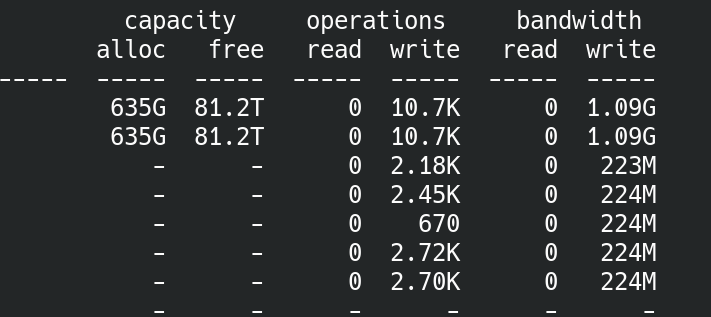
Performance isn’t great but it’s plenty serviceable for a 10gbps link, I think in this specific zfs snapshot transfer we are at the bandwidth limit of my 5x18TB RAID-Z2 pool that is the target. 5 real disks are putting out 254MB/s while the other 10 actuators in the 5 mach.2 drives are doing 366MB/s. Ideally in more controlled environment I would compare 10x normal disks to 5x and 5x mach.2 but that’s too expensive.

On the downstream side it’s really neat to see the write amplification from RAID-Z2:

image

I think for my use case of tossing around snapshots this should help add storage and a bit of bandwidth. Honestly for the way I plan on using these device to device links it’s probably for the best that the HDDs can’t saturate the 10/25gbps bonds because I plan on using the remaining bandwidth to make a Ceph pool with the idle NVMe disks I have around my network.

I’ve noticed with these Seagates (both mach.2 and normal actuators) on extended badblocks writes and reads they start off strong at like 200-230MB/s per head but by the end of the write/read segment they are down to like 150-160MB/s per head, I wouldn’t think this is thermal throttling as the disks never really get over 55C as reported by smart.

I’ve had my first failure with these drives now.

The occasional ā€œsqueakā€ mentioned months ago now happens constantly when trying to read or write data to the disk. Tested in three machines with five different SATA cables and backplanes, both Windows and Linux. And with only 5 months of power on hours.

Luckily it was just a backup of the second still functional 2X18! I will be reverting to non-helium disks for the time being.

1 Like

might be useful to compare the output of smartctl -a

the drives are aware of helium pressure and you may have a small helium leak

1 Like

Has someone been able to verify this and maybe even fix the provided script to compensate? I mean I guess in the end this shouldn’t really effect anything real world but hey why not fix it to actually partition at exactly the mid-LBA…

Hello :slightly_smiling_face:

I have one of the mach.2 2x14 TB drives from a shucked Seagate Expansion. (And 3 more still in the boxes)
I’m fairly new to this stuff so bare with me. Trying to setup my first NAS via TrueNAS Scale.
I couldn’t get the script(s) to work for some reason. Most likely my own error but I’m not knowledgable enough to know how to fix it.
Using a Ubuntu (live USB) I followed the intructions from the Mach.2 FAQ page to prepare the drive for TrueNAS. (LVM striped)
All goes to plan until I get to the last command:

sudo lvcreate -n lv_demo --stripes 2 demo_test -L ā€˜vgdisplay --units S
demo_test| grep ā€œVG Sizeā€ | awk ā€˜{print $3}’ ā€˜S

I’m presented with this error:

Size requires number argument.
Invalid argument for --size: 'vgdisplay
Error during parsing of command line.
awk: 1: unexpected character 0xe2
awk: line 2: missing } near end of file
grep: Size": No such file or directory
demo_test: command not found

Anyone know what I’m doing wrong? Hopefully something obvious.

For reference, here are the first 5 commands I used (with serial number redacted). Please let me know If anything looks off:

sudo parted /dev/disk/by-id/ata-ST14000NM0121_[SN] mklabel gpt

sudo parted --align min /dev/disk/by-id/ata-ST14000NM0121_[SN] mkpart primary 0% 50%

sudo parted --align min /dev/disk/by-id/ata-ST14000NM0121_[SN] mkpart primary 50% 100%

sudo pvcreate /dev/disk/by-id/ata-ST14000NM0121_[SN]-part1 /dev/disk/by-id/ata-ST14000NM0121_[SN]-part2

sudo vgcreate demo_test /dev/disk/by-id/ata-ST14000NM0121_[SN]-part1 /dev/disk/by-id/ata-ST14000NM0121_[SN]-part2

Hardware:
CPU: i7 3770k
Mobo: Gigabyte Z77x-UD5H
RAM: Corsair Vengeance LP DDR3 16GB 1600Mhz
OS Disk: Samsung 256GB SSD
Storage Disk: 1 x Seagate Mach.2 2x14 TB (Will add 3 more if I can get this successfully configured)
SATA: Just using internal SATA ports for now. (Intel)

Any advice would be much appreciated. Sorry for the long first post. :v:

There are multiple issues with the command as written in the original example, and then you seem to introduce additional issues. There’s a difference between backtick (`) and apostrophe (').

The original command as written:

lvcreate -n lv_demo --stripes 2 demo_test -L ā€˜vgdisplay --units S 
demo_test| grep ā€œVG Sizeā€ | awk ā€˜{print $3}’ ā€˜S

Note that this command has both a line break and some character translations that shouldn’t be there.

My guess as to what the command should be:

lvcreate -n lv_demo --stripes 2 demo_test -L `vgdisplay --units S | demo_test | grep "VG Size" | awk '{print $3}' `S

You should probably try to run the enclosed command separately first:

vgdisplay --units S | demo_test | grep "VG Size" | awk '{print $3}'

and then if that returns something that looks reasonable use the returned value with lvcreate:

lvcreate -n lv_demo --stripes 2 demo_test -L [returned_string]S

I’ve never used lvcreate myself so I don’t know what the deal is with the S at the end. I’m just trying to decode the command without knowing anything about lvcreate or vgdisplay. So keep that in mind before doing as I say. :slight_smile:

2 Likes

Thanks for taking the time to reply, I really appreciate it!
And thanks for catching those typos I made.

To clarify, initially I was copy/pasting the original command from the FAQ page, and was still getting the errors. And then I guess I made it worse by adding additional typos when I wrote it out later on. The error messages look basically the same regardless of the typos I added, aside from a reference to the miss-use of quotes etc. which I see now.

Anyways, I tried using your revised commands and they didn’t work either. :frowning_face:

The response I got from this was:

demo_test: command not found

I also tried this:

This was the response:

demo_test: command not found
Size requires number argument.
Invalid argument for --size: S
Error during parsing of command line.

Any other suggestions?
Are there any other commands/tools I can use to achieve the intended results of the last 2 commands in the FAQ? (vgcreate and lvcreate)
I saw someone reference the ā€œzpool createā€ command, but I wasn’t sure if it’s related to this step.
Thanks again for your help.

Looks like I added a typo of my own in the form of an additional pipe! Try this:

vgdisplay --units S demo_test | grep "VG Size" | awk '{print $3}'
3 Likes

That did the trick… Thank you!
Now we’re getting somewhere…

1GB-striped

2 Likes

I am planning on getting some Mach.2 SAS drives here shorlty… is there a simple solution to running smart tests on ā€œbothā€ drives in truenas? I am aware the WebUIwon’t exactly understand how to do that, but how would I go about running via a cron job?

Would it just be

smartctl short wwn-0x6000c500d8e7532b0000000000000000

Or would you just do

smartctl short sdx

I am trying to make sure I understand this setup before I invest in drives…

1 Like