I have tested 2-3 different pool configurations using Seagate´s Q&A. But I do experience poor perfomance to my understanding. About 600-700 MB7s read and 400 MB/s write with 6 x Exos 2x18 in RaidZ2 and mirror layouts.
So, before try again, I should ask someone grown ups for advise. I will be very happy for an advise for good zpool layout in Truenas Scale. My resources:
Server 2 x Xeon Silver 4116 - 128GB
6 x sata Exos 2x18
4 x MP510 1 TB nvme
1 x 1 GB nvme (different type to above)
2 x 0.5 TB nvme
2 x 10 Gb nic
Use case: This will be the second server with a copy of the video library on server1, pluss some backups from server1. Read and write speeds are priority, 2 failed drive parity.
So I have purchased some 14Tb drives to play with TrueNAS. I’d recommend setting up the zfs before TrueNAS install, it seems to work better. It is all quite quirky…
A question - creating a full disk encrypted pool for TrueNAS. Are there any gotchas? I want to be able to do ZFS replication between 2 pools, and can’t find a way to go from encrypted to unencrypted pools on different machines. I don’t want to spend hours playing at this point, so any hints and tips welcomed!
Thanks for the pointer - I did actually watch that this morning to remind myself of the options. What I’m looking for is advice on creating an encrypted pool first - such as:
Thank you for the script.
I am totally new to Linux environment, currently I have deployed Dell R730XD server, running Proxmox on bare metal and TrueNAS as VM. HBA is set to pass through, all drives are visible, everything is all good. Except for, I have 16 Seagate Exos Mach 2 14 TB drives. They are SATA drives, so they show as 1 drive. I want to use this script to partition them as 2 and use them in RAID Z1 config as discussed.
How do I go about that? Do I run this script in TrueNAS, or should I create an Ubuntu VM and run it on terminal?
Should I plug all drives at once?
Does the script needs to be run one by one or I can run the whole script at once by changing a few things as directed in the script?
For someone who has successfully run this script, please assist.
I want to utilize these Mach 2 drives to their fullest.
Thanks
I just got one of the SAS 14TB mach.2 drives to test and I can confirm that the people saying these drives are super quiet when seeking is true, I suppose it makes sense with only half the head assembly swinging around.
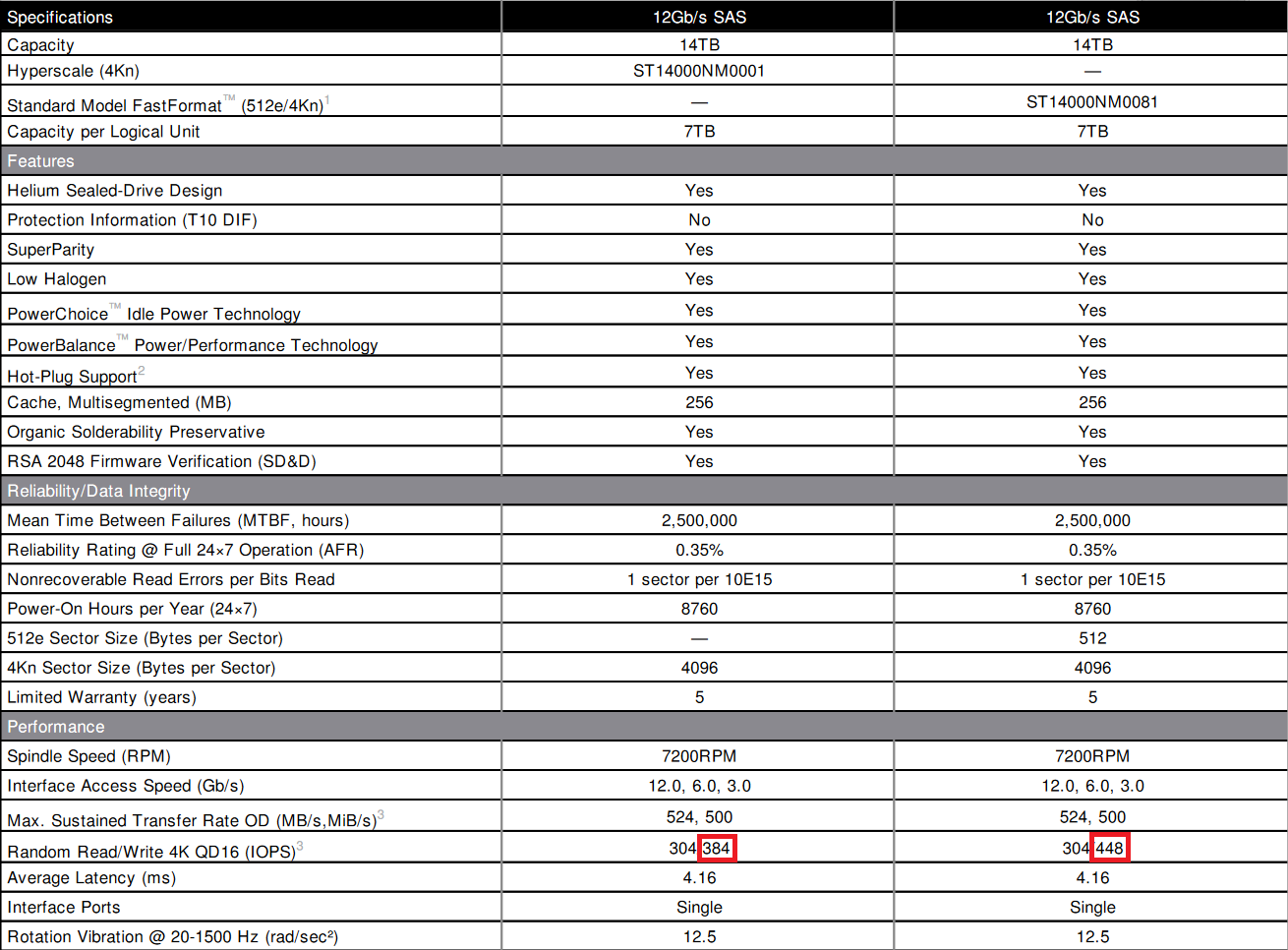
Also another interesting thing I noticed is that the 4kn drives have worse write IOPs than the 512e drives:
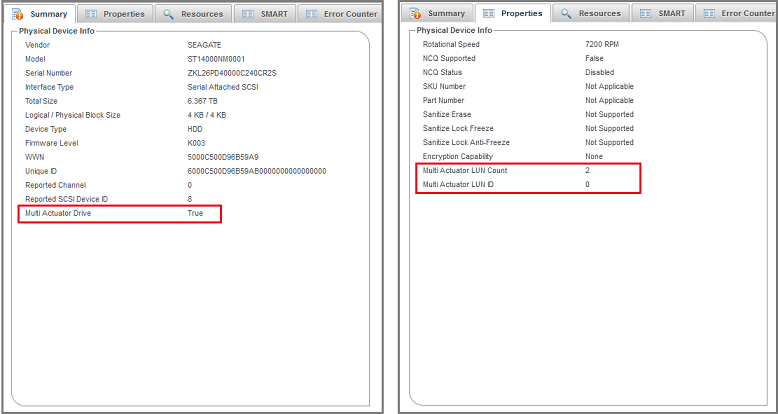
Also another interesting thing I’ve noticed is that Microchip changed their nomenclature from “Dual Actuator Drive” (back in post #2) to “Multi Actuator Drive”, hinting at future developments.
Any progress on using these with Synology devices? I’m trying to get a couple SATA drives working on my Synology DS923+.
Synology seems to identify disks as sata1, sata2… instead of using the sd naming scheme.
Using /dev/sata3 as an example, after creating the partitions for each actuator, my drive shows up as:
Device Start End Sectors Size Type
/dev/sata3p1 2048 17578328063 17578326016 8.2T Linux filesystem
/dev/sata3p2 17578328064 35156654079 17578326016 8.2T Linux filesystem
But when trying to initialize:
pvcreate /dev/sata3p1 /dev/sata3p2
Device /dev/sata3p1 not found (or ignored by filtering).
Device /dev/sata3p2 not found (or ignored by filtering).
Was able to do so using mdadm instead, but not clear on how to proceed from here, as it still shows up as a single bare drive in the gui.
they work fine as is, BUT if you want to get the perf benefit then you have to use mdadm manually, create the partition, format it, then symlink it from the synology volume. Lot of manual steps.
I’m really impressed with the mach.2 drives so far, SAS variants. +1 to the noise comments - basically silent compared to the ultrastar drives I have.
I originally tried seeing if truenas was up to the job but the interface and tools just don’t work with the logical addressing. Ended up using this script on ubuntu server - so just dropping in to say thank you!
zfs send to another zfs pool on unraid 7.0.0 beta 2 (standard sata drives in this one) also worked without hiccups so I am pretty happy with that.
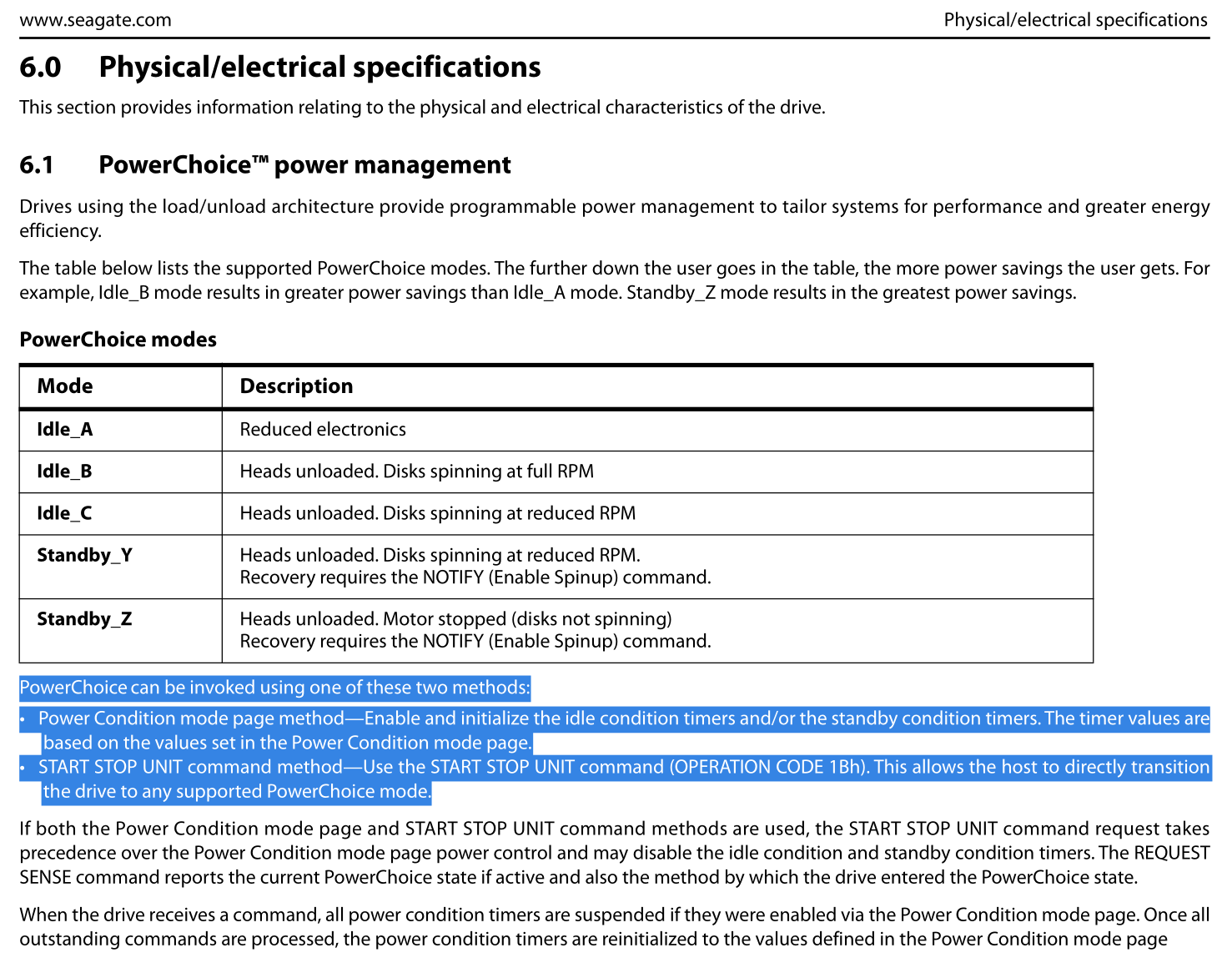
I am trying to adjust values idle_b and idle_c to my needs. Both sdparm and SeaChestPowerControl say the parameters are adjustable, but I cannot see that the commands take.
Modification attempt with SeaChest_PowerControl utility
root@bites:~/SeaChest# ./SeaChest_PowerControl_x86_64-alpine-linux-musl_static -d /dev/sdb --showEPCSettings
==========================================================================================
 SeaChest_PowerControl - Seagate drive utilities - NVMe Enabled
 Copyright (c) 2014-2023 Seagate Technology LLC and/or its Affiliates, All Rights Reserved
 SeaChest_PowerControl Version: 3.3.1-4_1_1 X86_64
 Build Date: Mar 27 2023
 Today: Sat Sep 14 19:46:48 2024	User: root
==========================================================================================

/dev/sg1 - ST14000NM0001 - ZKL02BNS - K004 - SCSI

===EPC Settings===
	* = timer is enabled
	C column = Changeable
	S column = Savable
	All times are in 100 milliseconds

Name       Current Timer Default Timer Saved Timer   Recovery Time C S
Idle A     *10           *10           *10           50            Y N
Idle B     *6000         *6000         *6000         430           Y N
Idle C     *18000         18000        *18000        2035          Y N
Standby Y   18000         18000         18000        2035          N N
Standby Z   36000         36000         36000        9265          N N

root@bites:~/SeaChest# ./SeaChest_PowerControl_x86_64-alpine-linux-musl_static -d /dev/sdb --idle_b 1500
==========================================================================================
 SeaChest_PowerControl - Seagate drive utilities - NVMe Enabled
 Copyright (c) 2014-2023 Seagate Technology LLC and/or its Affiliates, All Rights Reserved
 SeaChest_PowerControl Version: 3.3.1-4_1_1 X86_64
 Build Date: Mar 27 2023
 Today: Sat Sep 14 19:46:56 2024	User: root
==========================================================================================

/dev/sg1 - ST14000NM0001 - ZKL02BNS - K004 - SCSI
Successfully configured the requested EPC settings.
NOTE: This command may have affected more than 1 logical unit

root@bites:~/SeaChest# ./SeaChest_PowerControl_x86_64-alpine-linux-musl_static -d /dev/sdb --showEPCSettings
==========================================================================================
 SeaChest_PowerControl - Seagate drive utilities - NVMe Enabled
 Copyright (c) 2014-2023 Seagate Technology LLC and/or its Affiliates, All Rights Reserved
 SeaChest_PowerControl Version: 3.3.1-4_1_1 X86_64
 Build Date: Mar 27 2023
 Today: Sat Sep 14 19:47:07 2024	User: root
==========================================================================================

/dev/sg1 - ST14000NM0001 - ZKL02BNS - K004 - SCSI

===EPC Settings===
	* = timer is enabled
	C column = Changeable
	S column = Savable
	All times are in 100 milliseconds

Name       Current Timer Default Timer Saved Timer   Recovery Time C S
Idle A     *10           *10           *10           50            Y N
Idle B     *6000         *6000         *6000         430           Y N
Idle C     *18000         18000        *18000        2035          Y N
Standby Y   18000         18000         18000        2035          N N
Standby Z   36000         36000         36000        9265          N N
So, running what I think is the command to modify the PM behavior doesn’t throw an error, but I cannot see any effect - both not when reviewing the drive settings as well as observing behavior in real world.
Btw. I tried the equivalent commands using sdparm but observed the same lack of change in behavior.
To recap: Manual says the behavior can be modified, tool says behavior can be modified, command to modify seems to complete successfully, but no change to system is observed.
€249 per piece for ST18000NM0092 (2x18, SATA), “recertified 0 power on hours” here. Delivery to Germany only unfortunately.
3,987 sold?! (I seem to remember it said almost 7,000 yesterday, but maybe I’m misremembering). What is this, Seagate selling off unused drives returned from some major customer in a way that they won’t have to honor any warranty?
I got 6 drives with 0 hours, for $160 I think, they are pretty nice, definitely an overkill for my homelab because they do use more power, but i like everything about them, e.g. long smart test is 2x faster, etc.
I just double checked and I actually ended up paying 129 each after all the taxes and shipping are accounted for, so not quiet as good a deal. I got them from the nps ebay store, but I bought all the ones they had.